

Manufacturer's Serial Number
A manufacturer's serial number is a unique code assigned by the maker of a product to one specific physical unit. No two units share the same serial number. It lets you track that exact item from the factory floor to your customer's door. This article was last reviewed in July 2025.
Published 1 August 2026. Reviewed and updated 15 September 2026.
Book a callWhat Is a Manufacturer's Serial Number and How Does It Differ from a Model Number or SKU?
A manufacturer's serial number identifies one single unit. A model number identifies a product type.
Think of a cordless drill: every drill of the same model shares one model number, but each drill off the line gets its own serial number. Two units sitting side by side look identical. Their serial numbers are not.
Reviewed September 2026. Each figure comes from the assumptions stated beside it, so you can substitute your own and the arithmetic still holds.
A SKU is different again. Your warehouse or distributor creates a SKU internally for ordering and pricing. The manufacturer never sees it.
The serial number comes from the factory. Both can live in a barcode inventory management system at the same time, and knowing both keeps inventory records clean. Mixing them up is one of the most common causes of stock discrepancies in small operations.
Would you rather have it built around your operation?
The first look is free. If you would rather not compare products, describe how your operation already works and we build the system around it.
No build cost. You see it running on your own process first, and the monthly subscription starts only once it is live.
Book a callWhy Does the IRS Make Serial Number Identification a Financial Obligation?
The IRS makes the stakes plain. IRS Publication 538 states: "To figure taxable income, you must value your inventory at the beginning and end of each tax year." You cannot value what you cannot identify. Serial numbers are how you identify it.
Where Does a Manufacturer's Serial Number Live on a Product?
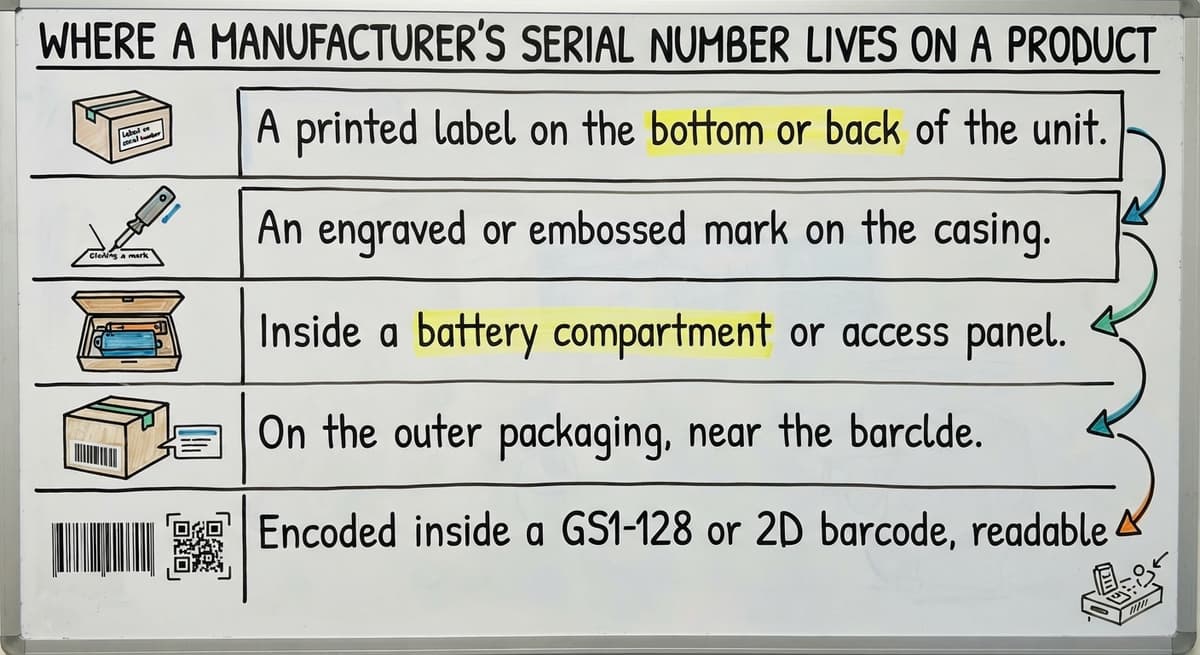
Serial number location varies by product type, but the most common spots are:
- A printed label on the bottom or back of the unit
- An engraved or embossed mark on the casing
- Inside a battery compartment or access panel
- On the outer packaging, near the barcode
- Encoded inside a GS1-128 or 2D barcode, readable by a scanner
For equipment shipped through a supply chain, the serial number may also arrive digitally via EDI (Electronic Data Interchange, a system that sends structured data between trading partners).
When it does, it can be matched to the physical unit at the receiving dock before anyone touches a keyboard.
Not finding a serial number on arrival is itself useful information. Flag those units at once for manual review rather than letting them enter stock unidentified.
How Does a GS1 Serial Number Appear Inside a Barcode?
Serial numbers are encoded inside barcodes using GS1 standards, which are the global rules that govern how product data is structured in supply chains.
The Application Identifier 21 in the GS1 system specifically marks a field as the serial number. When a warehouse scanner reads the barcode, it pulls the serial number directly into the inventory management system.
This matters because manual entry is where errors begin. A staff member typing a 12-character serial number under time pressure will make mistakes. A scanner does not.
Linking the GS1 serial number field to your system at the point of scan removes that risk entirely and creates a clean record from the first moment the item enters your operation.
Is the comparison easier when one option is built for you?
Yes. Off-the-shelf means fitting your process to the software, and custom is the other way round. The first look costs nothing.
Book a call
What Else a GS1-128 Barcode Carries in a Single Scan
For operations that receive goods from multiple suppliers, GS1-128 barcodes also carry the GTIN (a product identifier), lot number, and expiry date in the same scan. One pass of the scanner captures everything.
FAQ: How does a serial number appear inside a barcode?
GS1 Application Identifier 21 designates the serial number field inside a GS1-128 or 2D barcode. Scanning it writes the serial number to your system automatically, with no manual entry needed.
Why Serial Number Tracking Matters in a Warehouse
Serial-level tracking tells you which exact unit is in which exact location. That precision pays off in several ways.
For warranty claims, you can confirm whether the unit a customer is calling about is still under cover.
For product recalls, you know which customers received affected units and can reach them directly rather than contacting everyone who bought that product type. For high-value goods, electronics, medical devices, and regulated products, serial tracking is a legal or contractual requirement.

How Serial Tracking Cleans Up Returns and Differs from Lot Tracking
Returns are cleaner too. When a return arrives, scan the serial number and confirm it matches the original shipment. This stops a customer from returning a different or damaged unit and receiving credit for a good one.
The scan also updates inventory so the returned item does not re-enter stock as new.
For operations that handle both serialised goods and batch-produced items, the distinction between serial number tracking and lot number tracking matters.
A lot number covers a batch of items made together, used most often in food, chemicals, and pharmaceuticals for expiry and recall. A serial number covers one item. Some warehouses need both. A good inventory management system handles both without requiring separate processes.
FAQ: What is the difference between a serial number and a lot number?
A lot number identifies a batch of items produced together. A serial number identifies one specific unit. Food and pharmaceutical operations lean on lot numbers; electronics and equipment operations lean on serial numbers. Some products carry both.
How Warehouses Capture and Track Serial Numbers from Dock to Delivery
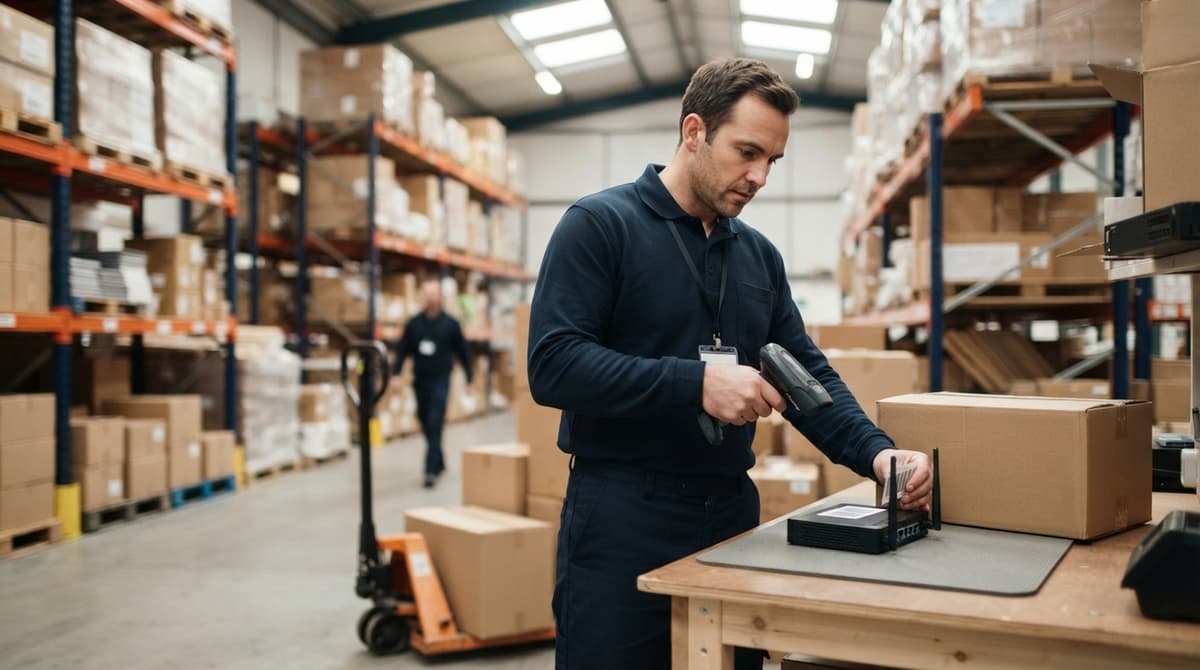
Capturing the serial number at the receiving dock is the most important step in the chain. If it is missed here, every record downstream is incomplete.
The process should follow this sequence:
- Scan the barcode on arrival to record the serial number against the buy order.
- Link the serial number to a bin location, pallet, or storage area at once.
- Flag any item that arrives without a readable serial number for manual review before it enters stock.
- Log every move, pick, pack, and ship event against that serial number going forward.
That last step builds an audit trail. An operations manager can look up a serial number and see exactly where that unit is, where it has been, and which staff member last touched it. Finding a misplaced high-value item takes seconds rather than a shift.

Closing the Loop on Outbound Shipments with Serial Numbers
On outbound shipments, print the serial number on the packing slip and the shipping label.
Record which serial number left with which sales order. That record closes the loop between your inventory and your customer's records, and it is the first thing you need when a warranty claim or service call comes in.
FAQ: How should a warehouse capture serial numbers at receiving?
Scan the barcode on arrival and link the serial number to the buy order and bin location in the same step. Do not allow unidentified units into stock. Capturing at the dock is the only point where the record is guaranteed to be correct.
What does it look like running on your own process?
The first thing you see is it running on your own process, at no build cost. The subscription starts once it is live and doing the job, not before.
Book a callCommon Problems When Serial Numbers Live in Spreadsheets
Spreadsheets are where serial number tracking starts, and where it breaks down. The problems are predictable.
Manual entry creates ghost records. A single transposed character in a 12-digit serial number produces a record that does not match anything in the real world. Finding and fixing it takes time no one has.
Multiple people updating the same file means the version you open may not reflect what happened in the last hour. There is no real-time view. A staff member on a customer call cannot look up a serial number and give a confident answer.
The Hidden Cost of Spreadsheet-Based Serial Tracking
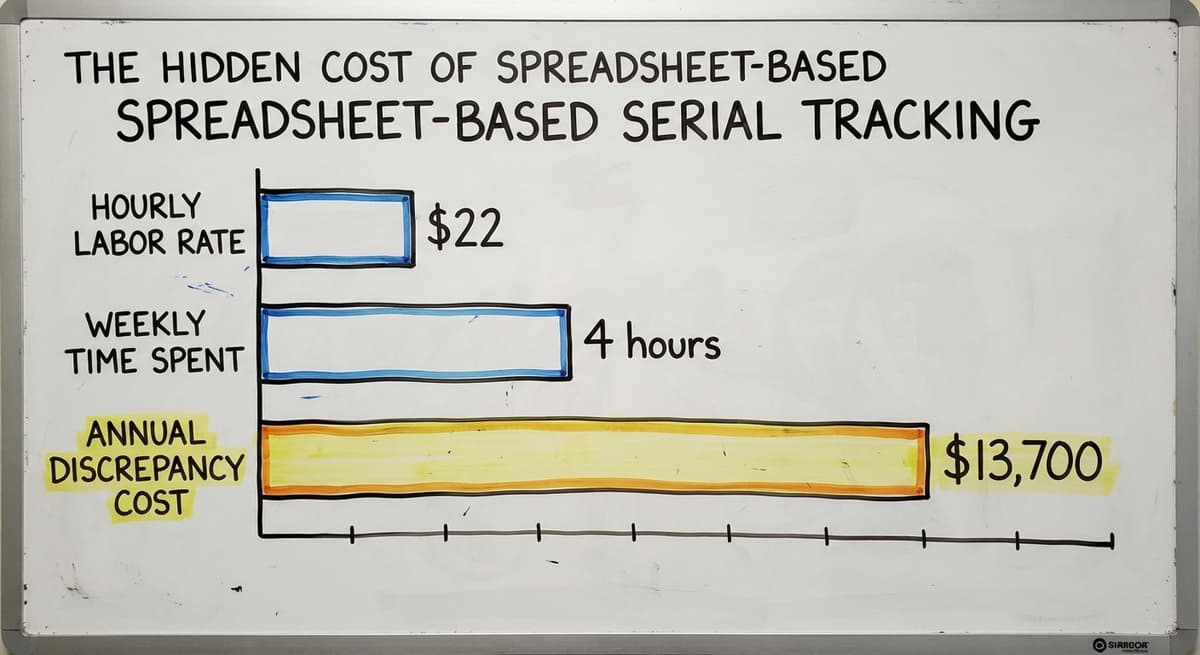
Consider the cost. The Bureau of Labor Statistics reports median pay for stock and inventory clerks.
At $22 an hour, 3 people spending just 4 hours a week resolving serial number discrepancies costs over $13,700 a year. That is before counting the cost of a missed recall or a fraudulent return.
Version control across a team of 5 or more is nearly impossible in a shared spreadsheet. The file that matters is rarely the one everyone is looking at.
Does the accounting software Support Manufacturer's Serial Number Tracking?
The accounting software has some serial number tracking, but only in the Enterprise version, and it is limited. It does not connect serial numbers to bin locations. It does not log movements through the warehouse. It cannot tell you where a specific unit is right now.
Most small and mid-size distributors end up bridging the accounting software with a paper log or a separate spreadsheet to fill the gap. That bridge breaks constantly.
A accounting integration for warehouse operations works best when a dedicated barcode inventory management system handles the physical tracking and pushes the financial data back to the accounting software, rather than asking the accounting software to do both jobs.
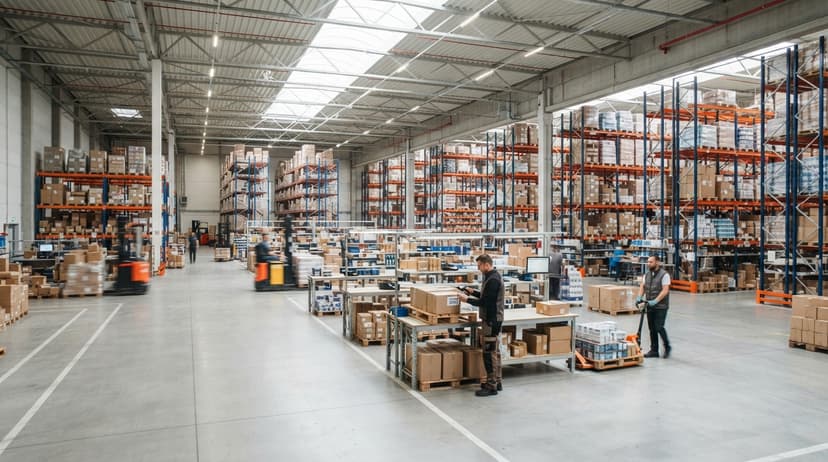
Why the accounting software Was Not Built for Warehouse Serial Tracking
The question is not whether the accounting software is good accounting software. It is. The question is whether it was built to track a serialised unit from the receiving dock to the customer's door. It was not.
FAQ: Does the accounting software handle manufacturer's serial number tracking for warehouse operations?
The accounting software includes basic serial number fields, but it does not track bin locations, warehouse movements, or real-time unit status.
Most distributors need a separate barcode inventory system that syncs financial data back to the accounting software rather than relying on the accounting software alone.
Not sure this is the right shape for your operation?
The call is free. Describe how the work runs today. We map it on a call and show you what it would look like built around that, before you spend anything.
Book a callWhat a Barcode Inventory System Does That the accounting software Cannot: And What to Look for Before You Choose One
A dedicated barcode inventory management system scans and stores serial numbers at every stage without manual entry. It links each serial number to a location, an order, a customer, and a shipment in one place.
Any staff member can look up a unit in under 2 seconds. Financial records sync back to the accounting software so accounting stays intact.
Before choosing a system, answer these questions for your own operation:
- Which product categories need serial-level tracking and which do not?
- Where are serial numbers currently captured, and who is responsible?
- How are returns and recalls handled today, and where does the process break down?
- Does the current setup connect serial numbers to customer orders automatically?
Custom vs. Off-the-Shelf: Choosing the Right Fit for Mixed Tracking Needs
Off-the-shelf systems need the warehouse to change its process to fit the software. Custom warehouse management software for small operations is built around the workflows already in place.
For distributors with mixed tracking needs, serial numbers on some lines and lot numbers on others, a custom build is faster to get running than a large enterprise WMS that carries features the team will never use.
The right system must capture serial numbers by scan at receiving, link each number to a location and customer record, and sit alongside the accounting software rather than replacing it. Those three requirements rule out most spreadsheet approaches and most entry-level software.
Getting Started with Serial Number Tracking
Start by identifying the product lines where serial tracking has the highest value. High-value goods, regulated items, and anything with a warranty are the right place to begin.
Map the current process from receiving to shipment. Mark every point where a serial number is recorded, skipped, or lost. That map shows you where the system needs to change and how much the current gaps are costing.
Choosing a System and Finding Implementation Support
Choose a system that fits the current team size and can grow with the operation. A local rollout partner can build around existing workflows rather than requiring a full retraining.
The goal is a system the team uses on day one, not one they work around.
The NIST Manufacturing Extension Partnership offers vendor-neutral guidance on supply chain process improvement for smaller operations. It is a useful reference before committing to any software decision.
Serial number tracking is not a large-company problem. It is a problem for any operation that ships a product it cannot afford to lose track of.
Frequently asked questions
What is a manufacturer's serial number?
A manufacturer's serial number is a unique code assigned by the maker of a product to one specific unit. No two units of the same product share a serial number. It is used to identify, track, and verify that exact item throughout its life.
How does a serial number appear inside a barcode?
GS1 Application Identifier 21 designates the serial number field inside a GS1-128 or 2D barcode. Scanning it writes the serial number to your inventory system automatically, with no manual entry needed.
What is the difference between a serial number and a lot number?
A lot number identifies a batch of items produced together, used most often in food, chemicals, and pharmaceuticals. A serial number identifies one specific unit. Electronics and equipment operations lean on serial numbers. Some products carry both.
How should a warehouse capture serial numbers at receiving?
Scan the barcode on arrival and link the serial number to the buy order and bin location in the same step. Do not allow unidentified units into stock. Capturing at the dock is the only point where the record is guaranteed to be correct.
Does the accounting software support manufacturer's serial number tracking?
The accounting software includes basic serial number fields, but it does not track bin locations, warehouse movements, or real-time unit status.
Most distributors need a separate barcode inventory system that syncs financial data back to the accounting software rather than relying on the accounting software alone.
How is a serial number different from a model number or SKU?
A model number identifies a product type. A serial number identifies one unit of that type. A SKU is created internally by the distributor for ordering and pricing.
The serial number comes from the manufacturer. All three can exist in the same system at the same time.
How do serial numbers help during a product recall?
Serial number records show exactly which customers received affected units. Without serial tracking, a recall means contacting everyone who bought that product type. With serial tracking, outreach is targeted, response time is faster, and liability is reduced.
What should a small distributor look for in a serial number tracking system?
The system must capture serial numbers by scan at receiving, link each number to a bin location and customer order, return search results in under 2 seconds, and integrate with the accounting software rather than replacing it. Manual entry at any stage defeats the purpose.
Where can I find the serial number on my product?
Check the label on the back, base, or inside a battery door, beside a barcode and marked S/N. Appliances put it inside the door frame; vehicles put it on the dashboard plate; software and devices show it under Settings or About.
How do I check a product warranty using its serial number?
Enter the serial on the manufacturer's support site, where it returns the model, the ship date, and the warranty end date. A warehouse that records serials at receiving can answer the same question from its own system without the lookup.
Can a serial number reveal the manufacture date?
Often. Many makers encode the year and week of manufacture in the serial, for example the fourth and fifth characters. The format is not universal, so the manufacturer's site is the reliable decoder.
What is in a free first look?
A 30 minute call, your operation mapped, and a clear picture of what we would build. No obligation and nothing to install.
Book a callRelated guides
More on the same work.
Guides
- Serial Numbering
- Serial Numbers on Products
- Manufacturing Serial Number
- Tracking Number Barcode
- Barcode Abbreviation
- Barcode Scan Machine
- Barcode Reader Machine
- Barcode Scanner App Ios
- 2d Barcode Readers
- Barcode Producer
- Barcode Systems for Warehouse
- Barcode Reader Description
- Barcodes and Labels
- Warehouse Scanning System
Common questions
- What Are Serial Numbers
- What is a Serial Number on a Product
- What Are Serial Numbers Used For
- Where Are Serial Numbers
- How to Read a Barcode Number
- What Are the Numbers on a Barcode
- What is Bin Number in Inventory Management
- What Does a Barcode Look Like
- How to Create a Barcode System for Inventory
- How to Use a Barcode Scanner