

What Is A Warehouse Management System Used For
A warehouse management system is used for 5 things: tracking stock, running receiving, guiding picks, confirming shipments, and reporting. Running a warehouse on spreadsheets and paper logs works until it stops working: orders go out late, counts are wrong, and someone updates a file nobody else sees. This guide, reviewed in September 2026, takes the 5 uses one at a time.
Published 18 August 2026. Reviewed and updated 15 September 2026.
Book a callWhat Is a Warehouse Management System Used For?
A warehouse management system is software that tracks everything moving through your warehouse: inventory on the shelves, orders coming in, and shipments going out.
Think of it as replacing a pile of spreadsheets with one live system that every person on your team works from at the same time.
The public record on this is worth reading directly: GS1 covers why a barcode printed by one company scans at another.
The public record on this is worth reading directly: Auburn University RFID Lab covers independent research on RFID in retail and supply chain.
The public record on this is worth reading directly: Warehousing Education and Research Council covers the standard benchmark set for distribution centre performance.
Reviewed August 2026. Each figure comes from the assumptions stated beside it, so you can substitute your own and the arithmetic still holds.
Walking is the hidden cost. A picker covering 40 feet to a fast mover 60 times a shift walks 2,400 feet a day, and across 250 days that is 600,000 feet a year per picker.
Moving 20 fast movers nearer the pack bench removes most of it.
The obligation behind all of this is not optional. OSHA states: “The warehousing and storage industry includes establishments operating facilities for general merchandise, refrigerated goods, and other products.” A figure nobody trusts is no better than a guess.
It is not accounting software. It is not a shopping cart. It sits in the middle of your operation and connects the physical work your staff does to the data your business runs on.
This article focuses on small and mid-size operations, not large enterprise distribution centers. If you have a team of five to a hundred people and you are running on basic accounting software and spreadsheets, this addresses you.
Would you rather have it built around your operation?
The first look is free. If you would rather not compare products, describe how your operation already works and we build the system around it.
No build cost. You see it running on your own process first, and the monthly subscription starts only once it is live.
Book a callTracking Inventory in Real Time with a WMS
Real-time inventory means you know exactly what is on hand right now, not as of the last time someone updated a spreadsheet. When a picker pulls a case from the shelf, the system records it. When a shipment arrives, the count goes up immediately.
Contrast that with the manual version: printed count sheets, spreadsheet files that are already stale by Tuesday afternoon, and a manager calling the floor to ask if a product is actually in stock. That gap between what the spreadsheet says and what the shelf holds is where overselling and stockouts happen.
Here is a simple example. A warehouse manager gets an order for 40 units of a product. The spreadsheet says 50 are available.
But 15 were picked an hour ago and nobody updated the file. The order goes out short. The customer calls. Someone spends an afternoon fixing it.
A WMS closes that gap. The system shows the live count, so the manager sees 35 units available before the order is confirmed.
According to OSHA, proper warehouse organization and inventory control directly affect worker safety and operational efficiency, which is one reason accurate, real-time data matters beyond just avoiding stockouts.

How Does a WMS Handle Receiving and Put-Away?
Receiving is the first use: when new stock arrives, a WMS guides your staff through every step of recording it correctly. The system records what came in, which supplier sent it, how many units arrived, and exactly where each item was stored.
That replaces paper receiving logs and the manual bookkeeping entries someone has to type in later. Instead of a clipboard and a stack of packing slips, your receiving staff works from a screen or a handheld scanner.
The system confirms the receipt, flags any discrepancies between what was ordered and what actually arrived, and assigns a storage location.
Put-away becomes guided rather than guesswork. New staff can follow the system's instructions without needing to memorize where everything lives. That matters when you are onboarding someone quickly or covering for an absent employee.
Picking, Packing, and Shipping Orders
Order fulfillment is where a WMS pays for itself most visibly. Rather than handing a picker a paper list and hoping for the best, the system directs them to the right location in the right sequence. It can group picks by zone, minimize walking distance, and confirm each item before the picker moves on.
Pick errors drop when the system verifies each scan against the order. If the wrong item gets scanned, the system flags it before the box gets sealed.
Packing confirmation and shipping label generation are standard features in most systems, so the handoff from picking to shipping is clean and documented.
Fewer errors mean fewer customer complaints. Faster pick sequences mean more orders out the door in the same shift. For a small fulfillment operation, that is a meaningful difference without adding headcount.

Keeping Your Accounting Software in the Loop
One of the biggest fears small operators have is that a WMS will force them to abandon their accounting software and migrate to a full ERP system. That is not how a well-built WMS works.
Accounting software integration means the two systems talk to each other. Inventory adjustments flow from the WMS into your bookkeeping platform automatically.
Receipts, invoices, and cost-of-goods entries can sync without anyone re-entering data. The WMS handles the warehouse side. Your accounting software handles the books. Neither one replaces the other.
This is especially relevant for small distributors who have years of financial history in their bookkeeping software and no interest in rebuilding it somewhere else.
A WMS built with accounting integration for distributors in mind fits around what you already have rather than forcing a rip-and-replace project.
Is the comparison easier when one option is built for you?
Yes. Off-the-shelf means fitting your process to the software, and custom is the other way round. The first look costs nothing.
Book a callReducing Errors and Manual Work
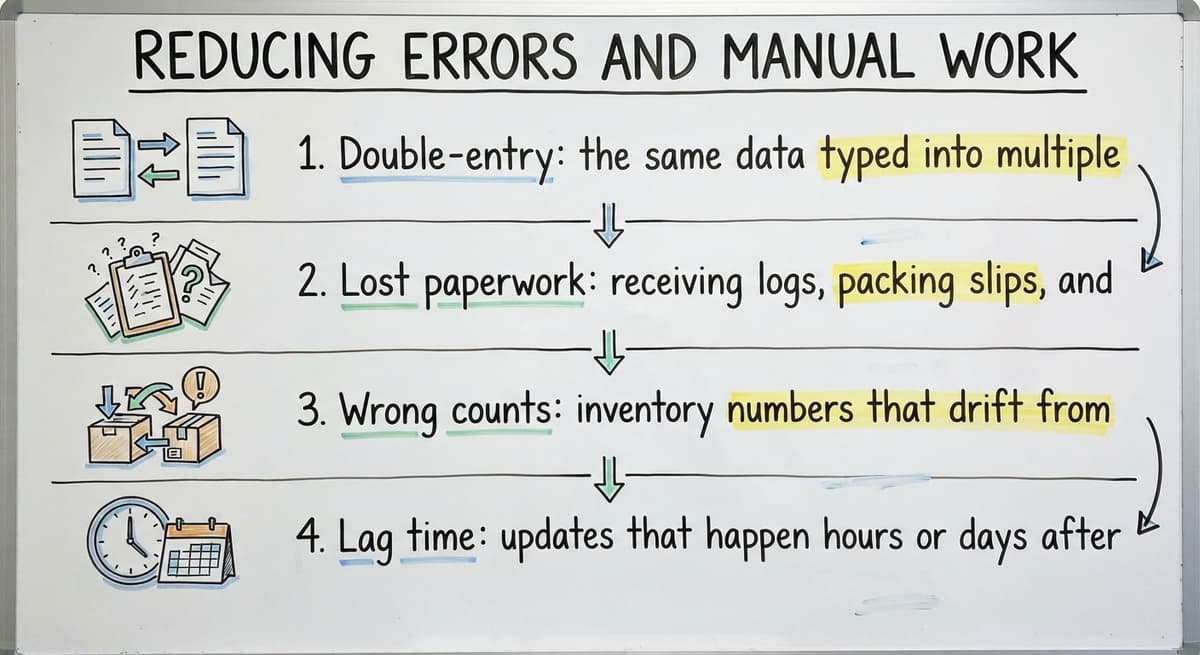
Manual warehouse operations share the same 5 pain points:
- Double-entry: the same data typed into multiple places
- Lost paperwork: receiving logs, packing slips, and pick tickets that disappear
- Wrong counts: inventory numbers that drift from reality between physical counts
- Lag time: updates that happen hours or days after the physical work
A WMS creates one source of truth that everyone works from at the same time. When the picker scans an item, the inventory updates.
When the receiver logs a shipment, the purchase order closes. There is no second system to update and no paper trail to reconstruct later.
For a five-to-one-hundred-person operation, that means less time fixing mistakes and less product written off because nobody could find it or account for it accurately. Replacing spreadsheets with operational software built around your actual workflow is the clearest path to reclaiming that time.

Reporting and Visibility for Managers
Reporting is the manager's use: a WMS gives a view of the operation with no walk of the floor and no call to staff. Standard reports cover:
| Report Type | What It Shows |
|---|---|
| Inventory turnover | Which products move fast and which sit |
| Order status | Where each order is in the fulfillment process |
| Low-stock alerts | Items approaching reorder thresholds |
| Receiving history | What came in, when, and from which supplier |
| Pick accuracy | Error rates by picker or by product |
For a small distributor, these reports support purchasing decisions that used to rely on gut feel. If a product turns over every eight days, you can set a reorder point with confidence.
If one picker's error rate is higher than others, you can address it with data rather than assumptions.
Visibility at that level does not require a large IT department. It requires a system that captures the right data as your staff does their normal work.
When Is a Business Ready for a WMS?
There are 5 signals that a warehouse or distribution operation has outgrown its current setup:
- Inventory errors are frequent enough that staff spends real time correcting them
- Spreadsheet files are out of date before the week is over
- Orders are shipping late or incomplete on a regular basis
- Receiving is logged on paper and entered into the accounting system hours later
- A new employee cannot function without shadowing someone for days
A WMS does not require a large team or a large budget to be worthwhile. Order fulfillment software for small warehouses is built specifically for operations at this scale, not just adapted-down versions of enterprise tools.
Implementation does not have to be a months-long project either. Custom-built tools can match your existing workflow rather than forcing your team to adapt to a system designed for someone else's operation. That distinction matters when your concern is disruption, not just cost.
What Should You Look for in a Warehouse Management System?
The right WMS for a small operation is the one that fits the way your team already works, not the other way around. Start with these criteria:
- Accounting software compatibility: Confirm the integration is real, not a manual export
- Ease of use for warehouse staff: If pickers and receivers cannot learn it in a day, adoption will fail
- Fit with your current workflow: Receiving, put-away, pick and pack, and shipping should all map to how you actually operate
- Scalability: The system should grow as order volume grows without requiring a full replacement
- Support from someone who understands your operation: Generic software vendors sell licenses; a good implementation partner learns your process first
Oversized systems built for enterprise distribution centers carry features, costs, and complexity that a twenty-person warehouse does not need and will not use. Custom software for wholesale and distribution built around your specific operation avoids that mismatch.
Working with a builder who understands your workflow before writing any code is the difference between a system your team uses every day and one that collects dust after the first month.
A warehouse management system is not a scary technology project. It is a practical replacement for manual work that was costing you time and accuracy you cannot afford to lose.
If your operation is ready to move past spreadsheets and paper logs, the next step is a conversation about what your workflow actually looks like, not a demo of someone else's generic platform.
Frequently asked questions
Frequently asked questions
What are the four types of WMS?
The four common types are standalone WMS (software focused only on warehouse operations), ERP-integrated WMS (a warehouse module built into a larger enterprise resource planning system), cloud-based WMS (hosted software accessed through a browser with no local installation), and supply chain platform WMS (systems that extend into transportation and supplier management).
For small and mid-size operations, standalone or cloud-based systems are the most practical starting point because they are easier to implement and do not require a full ERP migration.
Is WMS difficult to learn?
The answer depends on the system. Enterprise WMS platforms built for large distribution centers can take weeks to learn and often require formal training programs.
Systems designed for leaner warehouse operations should be learnable by a picker or receiver within a day or two of hands-on use.
The key factor is whether the system was built around how your team already works or whether your team has to adapt to the software's logic.
A well-implemented WMS reduces the learning curve because the workflow inside the system mirrors the physical workflow on the floor.
Can a WMS Work Alongside Your Accounting Software Without Replacing It?
Yes. A WMS handles the warehouse side: inventory tracking, receiving, pick and pack, and shipping. Your accounting software handles the financial side: invoices, payments, and accounting records.
A well-built WMS syncs with that software so that inventory adjustments, purchase receipts, and order data flow between the two systems automatically. You do not need to abandon your bookkeeping tool or migrate to an ERP to get the benefits of a WMS.
Is the Software a WMS or ERP?
Large enterprise resource planning suites are primarily ERPs, covering finance, HR, procurement, and many other business functions. Many of these suites include a warehouse management module, but the full platform is far larger and more complex than a standalone WMS.
For a smaller warehouse operation, that kind of suite is almost always more system than needed, and the implementation cost and timeline reflect that scale.
What is the most common WMS?
There is no single most common WMS across all business sizes. Among enterprise operations, a handful of large established platforms are widely used. For mid-market businesses, several well-known inventory and warehouse tools appear frequently.
For small warehouses already using basic accounting software, options like an off-the-shelf inventory tool or a custom-built system integrated with that software are common choices.
The right answer depends on your order volume, team size, existing software, and how closely the system needs to match your current workflow.
What daily warehouse tasks does a WMS handle?
A WMS handles receiving new stock and recording where it is stored, directing pickers to the right shelf location for each order, confirming items during packing, generating shipping labels, updating inventory counts in real time, and sending data to your accounting system or other connected systems. These are tasks that manual operations handle through paper logs, spreadsheets, and phone calls.
A WMS consolidates them into one system that everyone works from simultaneously.
Is a warehouse management system only for large companies?
No. A WMS is useful for any operation where manual tracking is causing errors, delays, or wasted time. Operations as small as five to ten warehouse staff can benefit from a WMS if inventory mistakes are frequent or order fulfillment is inconsistent.
The key is choosing a system scaled for your operation rather than an enterprise platform with features and costs designed for a thousand-person distribution center.
How does a WMS reduce errors and manual data entry?
A WMS creates one record that updates automatically as physical work happens. When a picker scans an item, inventory adjusts. When a receiver logs a shipment, the purchase order closes.
There is no second system to update manually, no paper form to re-enter later, and no lag between the physical action and the data record. That removes the most common sources of error: double-entry, outdated counts, and lost paperwork.
What are the main features of a warehouse management system?
A warehouse management system tracks real-time inventory, guides receiving and put-away, directs picking, packing, and shipping, and syncs data with accounting software. It also produces reports on inventory turnover, order status, low-stock alerts, receiving history, and pick accuracy.
Together these features replace spreadsheets and paper logs with one live system every team member can rely on together.
What is the difference between a WMS and an ERP system?
A warehouse management system focuses specifically on physical warehouse operations, such as tracking inventory, receiving, and order fulfillment, while an ERP system manages broader business functions including finance and accounting.
A well-built warehouse management system does not replace accounting software; instead it integrates with existing tools so inventory data flows automatically without forcing a business to migrate its financial records elsewhere.
How much does a warehouse management system cost?
The page does not state a specific cost, since pricing depends on the assumptions and setup for each operation.
Some approaches avoid upfront build costs and only begin a monthly subscription once the system is live and running on your actual process, rather than charging you to adapt to a fixed off-the-shelf product.
How does a warehouse management system improve inventory accuracy?
It improves accuracy by updating counts the moment activity happens, so a picked item or received shipment is reflected immediately rather than hours or days later on a spreadsheet. This closes the gap between what records show and what is actually on the shelf, preventing overselling, stockouts, and orders going out short due to outdated information.
What is in a free first look?
A 30 minute call, your operation mapped, and a clear picture of what we would build. No obligation and nothing to install.
Book a callRelated guides
The rest of this guide, for the parts of the job this page does not cover.
Guides
- Warehouse Inventory Management Systems
- Warehouse Management System Top 10
- Software for Warehouse Management System
- Small Business Warehouse Management System
- Warehouse Management System Types
- Warehouse Inventory Management System
- Warehouse Management System Examples
- Warehouse Management System Implementation
Common questions
- What Are the Benefits of Warehouse Management System
- What is the Point of Warehouse Management System
- What is Asn in Warehouse Management System
- What is a Warehouse Management System
- What is the Purpose of a Warehouse Management System
- What is a Warehouse Management System Pdf
- What is a Warehouse Management System Example
- What Warehouse Management System Does Amazon Use
- What Are the Top 5 Warehouse Management Systems?
- What is the Best Warehouse Inventory Management System?
- What is the Difference Between Warehousing and Inventory Management
- What is the Most Popular Warehouse Management System?
- What is B Type of Inventory in Warehouse Management
- What is a Simple Warehouse Management System?
- What is Warehousing and Inventory Management
- How to Choose a Warehouse Management System