


Definition Of Warehouse Management System
The definition of a warehouse management system is software that tracks stock, locations, and orders from the dock to the truck. Running a warehouse without it feels like directing traffic blindfolded: things are moving, but nobody is quite sure where anything is. This guide, reviewed in September 2026, gives the definition, the 6 functions behind it, and what the term leaves out.
Published 11 August 2026. Reviewed and updated 15 September 2026.
Book a callWhat Is a Warehouse Management System?
The definition of a warehouse management system is straightforward: it is software that tracks inventory, orders, and the physical movement of goods inside a warehouse.
Think of it as a digital traffic controller for your stock. It knows where every item is, where it needs to go, and who is handling it at any given moment.
The public record on this is worth reading directly: GS1 covers why a barcode printed by one company scans at another.
Reviewed August 2026. Each figure comes from the assumptions stated beside it, so you can substitute your own and the arithmetic still holds.
The arithmetic is worth doing before the software conversation. 3 people spending 6 hours a week between them chasing the same questions, at 22 dollars an hour, is 936 hours a year of paid time spent confirming what a system would already know. Over 3 years that is 2,808 hours.
The obligation behind all of this is not optional. OSHA states: “The warehousing and storage industry includes establishments operating facilities for general merchandise, refrigerated goods, and other products.” A figure nobody trusts makes that number a guess.
A WMS is not complicated technology reserved for giant operations. It is a practical tool that replaces the guesswork that comes with clipboards, printed sheets, and memory.
If you have ever had a team member walk the floor to count stock before confirming an order, a warehouse management system is what removes that step.
Would you rather have it built around your operation?
The first look is free. If you would rather not compare products, describe how your operation already works and we build the system around it.
No build cost. You see it running on your own process first, and the monthly subscription starts only once it is live.
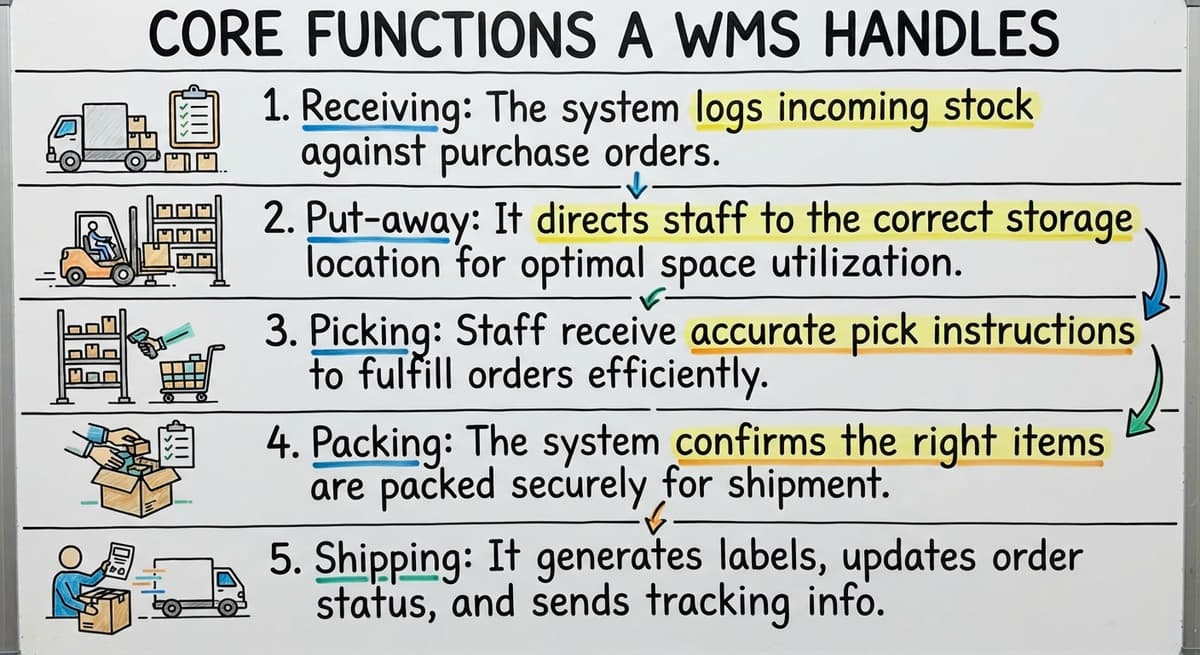
Book a callCore Functions a WMS Handles
A warehouse management system is the record of the full journey of goods from the moment they arrive to the moment they leave.
- Receiving: The system logs incoming stock against purchase orders as goods arrive, catching discrepancies before they become problems.
- Put-away: It directs staff to the correct storage location rather than leaving placement to habit or guesswork.
- Picking: Staff receive accurate pick instructions tied to live inventory counts, not yesterday's printed sheet.
- Packing: The system confirms the right items are packed for each order before the box is sealed.
- Shipping: It generates labels, updates order status, and records the departure of goods in real time.
Real-time inventory replaces manual stock checks entirely. As OSHA notes on its warehousing guidance page, proper organization and clear processes inside a warehouse directly reduce errors and injury risk, which is exactly the kind of structured environment a WMS is designed to create.

How Is a WMS Different from Your Accounting Software or a Spreadsheet?
Accounting software tracks money; it does not track where a pallet of product is sitting in your warehouse. That is the clearest way to separate the two tools.
Your bookkeeping platform records invoices, payments, and financial transactions. A warehouse management system records physical movement: what came in, where it went, who picked it, and when it shipped.
Spreadsheets present a different limitation. A spreadsheet is a snapshot taken at the moment someone updated it. A WMS is a live record that updates as activity happens. By the time your team has corrected a spreadsheet, the information is already stale.
The good news is that a WMS and your accounting software work side by side. Adopting warehouse inventory management software does not mean replacing your accounting tools. Your bookkeeping system handles the financials; the WMS handles the warehouse floor.
Many small operations run both without any conflict. If you want to understand how that connection works in practice, the guide on linking accounting software with warehouse software explains the typical setup.
Who Uses a Warehouse Management System
WMS tools are not reserved for large enterprises with hundreds of staff. The operations that benefit most are small and mid-sized: wholesale distributors, fulfilment centres, and warehouses running between five and one hundred people.
Consider a wholesale distributor managing orders through email chains and a shared spreadsheet.
When order volume grows, emails get missed, stock levels go stale, and customers start calling about missing shipments. That is not a staffing problem. It is a systems problem, and a WMS is the direct fix.
Small operations gain as much as large ones, sometimes more, because every error costs a higher percentage of their capacity. The Warehouse inventory management software overview covers the range of tools available across different business sizes.

Signs Your Operation Needs a WMS
Some warning signs are easy to recognise once you know what to look for.
- Stock counts are consistently off when you go to fulfil an order
- Orders get lost between email, voicemail, and handwritten notes
- Staff rely on printed pick sheets that are out of date before the shift ends
- Inventory data has migrated into a spreadsheet, a desktop database, or a patchwork of shared files
- Order volume is growing but the process for handling it has not changed
Growing order volume is where manual warehouse processes become genuinely dangerous. One missed shipment is a bad day. A pattern of missed shipments is a reason customers leave. If any of these signs sound familiar, the operation has already outgrown its current approach.
Is the comparison easier when one option is built for you?
Yes. Off-the-shelf means fitting your process to the software, and custom is the other way round. The first look costs nothing.
Book a callTypes of Warehouse Management Systems
Not every WMS is the same size or the same commitment, and there are 4 types.
| Type | What It Is | Best For |
|---|---|---|
| Standalone WMS | A dedicated warehouse tool that connects to existing software | Operations that want to add capability without replacing anything |
| ERP-embedded module | A WMS function built into a larger business platform | Companies already running an ERP system |
| Custom-built WMS | Software built specifically around one operation's workflows | Businesses with processes that off-the-shelf tools do not fit |
Standalone tools slot in without disrupting what already works. Custom warehouse software is built around the way your operation already runs, rather than asking your team to adapt to someone else's assumptions.
The guide on how to replace spreadsheet-based operations with purpose-built software walks through what that transition looks like.

What a WMS Does Not Do
Clearing up a few common fears is worth a moment.
A WMS does not replace your accounting software or any other financial tool. It handles warehouse activity, not financial records. The two systems complement each other rather than competing.
A WMS also isn't a full ERP system, and adopting one does not require a long, expensive rollout.
The fear that implementing warehouse inventory management software means months of disruption stops a lot of small operators from making a change that would take them a week to feel the benefit of. Most small-to-mid-market implementations are far lighter than the enterprise horror stories suggest.
How a Custom WMS Fits a Small Distributor
A custom WMS is built around existing workflows rather than forcing a team to abandon what they know. The manual, error-prone parts get replaced. The parts that work stay in place.
For a Columbus-area wholesale distributor or any similar small-to-mid-market operator, this means the existing accounting software remains the financial system of record.
The WMS takes over receiving, inventory tracking, order management, and shipping confirmation. Staff learn one new layer, not an entirely new business system.
The result is that the operation runs the same way it always has, just without the errors that come from tracking everything by hand. Custom software for wholesale distributors is designed with exactly this kind of fit in mind.
What Should You Do First When Considering a WMS?
The first step is a map of where your current process breaks down, before you look at any software. Write down the three moments in a typical week where something goes wrong or where someone has to stop and manually check something. That list tells you exactly what a WMS needs to solve.
Once you know the problem, talk to a specialist or local builder rather than defaulting to an enterprise product designed for operations ten times your size. The right conversation starts with your workflow, not with a vendor's feature list.
If you want to talk through what your operation actually needs, reach out for a straightforward conversation. No pitch, no pressure. Just a look at where things are breaking down and whether a purpose-built system would help.
Frequently asked questions
Frequently asked questions
What are the four types of WMS?
The four types most commonly referenced are: standalone WMS (a dedicated warehouse tool), ERP-embedded WMS (a warehouse module inside a larger business platform), cloud-based WMS (hosted software accessed via browser with no on-premise installation), and custom-built WMS (software developed specifically for one operation's workflows).
The right type depends on your existing software, team size, and how standard or unusual your processes are.
What are the five S's of warehouse management?
The five S's come from a Japanese lean methodology: Sort (remove what is not needed), Set in order (organize what remains for easy reach), Shine (keep the space clean and maintained), Standardize (establish consistent processes across the team), and Sustain (build habits that keep the first four in place).
A WMS supports several of these by enforcing consistent put-away locations and standardizing pick and pack processes.
What's the difference between WMS and ERP?
A WMS focuses specifically on physical warehouse activity: receiving, put-away, picking, packing, and shipping. An ERP (Enterprise Resource Planning) system is a broader platform that covers finance, HR, procurement, manufacturing, and sometimes warehouse functions as one of many modules.
A WMS does one thing well. An ERP does many things at once, which makes it more complex and typically more expensive to implement. Some businesses run both; others find a standalone WMS covers everything they need without the overhead of a full ERP.
What is the definition of warehouse management?
Warehouse management refers to the processes and systems used to control the movement and storage of goods inside a warehouse. It covers everything from receiving stock and assigning storage locations to picking orders, packing shipments, and recording what leaves the building.
A warehouse management system is the software that handles these tasks digitally, replacing manual tracking methods like spreadsheets and printed pick sheets.
Does a warehouse management system replace your accounting software?
No. A WMS handles physical warehouse activity: inventory tracking, order management, and the movement of goods. Accounting software handles financial records: invoices, payments, and accounting.
The two tools serve different purposes and work alongside each other. You do not need to change your accounting setup to adopt a WMS.
Can a small warehouse with fewer than 20 staff benefit from a WMS?
Yes. Small operations benefit more than large ones because every picking error or lost order represents a larger share of total capacity.
A WMS built for a small team does not need to be complex. It needs to eliminate the manual steps that cause mistakes, which is achievable even for a team of five to ten people.
How long does it take to implement a warehouse management system?
Implementation time varies by type. An off-the-shelf standalone WMS can be configured and running within a few weeks.
A custom-built WMS takes longer because it is built around specific workflows, but the result fits the operation from day one rather than requiring staff to adapt to a generic system.
The fear of a long, disruptive rollout is more common with large ERP projects and does not apply to most small-to-mid-market WMS implementations.
What are the main functions of a warehouse management system?
A warehouse management system covers the full journey of goods from arrival to departure. It handles receiving by logging stock against purchase orders, put-away by directing staff to correct storage locations, picking with accurate instructions tied to live inventory, packing by confirming correct items before sealing, and shipping by generating labels and updating order status in real time.
How does a WMS improve inventory accuracy?
A warehouse management system replaces manual stock checks with real-time inventory tracking. Instead of relying on memory, printed sheets, or outdated spreadsheets, it maintains a live record that updates as activity happens.
Staff receive pick instructions based on current counts rather than yesterday's information, and receiving discrepancies are caught immediately, which keeps stock data accurate rather than stale.
How much does a warehouse management system cost?
Cost varies depending on the type chosen, whether standalone, embedded within a broader business system, or custom built around a specific operation's workflows.
Implementations for small and mid-sized operations tend to be far lighter than large enterprise rollouts, felt within a week rather than requiring months of disruption, so the investment scales with the complexity of the business.
What are the benefits of using a WMS?
Benefits include eliminating guesswork from clipboards, printed sheets, and memory by giving staff real-time visibility into stock location and movement. It reduces errors in receiving, picking, and shipping, prevents lost orders and missed shipments, and creates the kind of organized, structured environment that reduces mistakes.
Small operations gain as much or more than large ones since errors cost them a higher share of capacity.
How do you choose the right WMS for a business?
Choosing the right system starts with recognizing the type of operation you run.
A standalone system suits businesses wanting added capability without replacing existing tools, an embedded module fits companies already running a larger business platform, and a custom built option suits businesses whose processes do not fit off-the-shelf software.
Matching the tool to existing workflows matters more than picking the biggest or most popular option.
What is in a free first look?
A 30 minute call, your operation mapped, and a clear picture of what we would build. No obligation and nothing to install.
Book a callRelated guides
The rest of this guide, for the parts of the job this page does not cover.
Guides
- Warehouse Inventory Management Systems
- Warehouse Management System Top 10
- Software for Warehouse Management System
- Small Business Warehouse Management System
- Warehouse Management System Types
- Warehouse Inventory Management System
- Warehouse Management System Examples
- Warehouse Management System Implementation
- Cloud Warehouse Management System
- Warehouse Stock Management System
Common questions
- What Are the Benefits of Warehouse Management System
- What is the Point of Warehouse Management System
- How to Choose a Warehouse Management System
- What is Asn in Warehouse Management System
- How to Create a Warehouse Management System
- What is a Warehouse Management System
- Which Warehouse Management System Would a Jeweler Most Likely Use
- How to Build a Warehouse Management System
- What is a Warehouse Management System Used For
- Warehouse Management System vs Warehouse Control System
- Meaning of Warehouse Management System
- Warehouse Management System Comparison
- What is the Purpose of a Warehouse Management System
- What is a Warehouse Management System Pdf