

How To Build A Warehouse Management System
Building a warehouse management system is 3 steps in order. Map the floor, list the features, and build in phases. Running a warehouse on spreadsheets and memory works until it does not: orders get mixed up, stock goes missing, and a new hire takes weeks to learn where anything lives. This guide, reviewed in September 2026, is the build path for a warehouse of 5 to 100 people.
Published 13 August 2026. Reviewed and updated 15 September 2026.
Reviewed August 2026. Each figure comes from the assumptions stated beside it, so you can substitute your own and the arithmetic still holds.
Book a callWhat Does a Warehouse Management System Actually Do?
A warehouse management system is software that tracks where every item is, where it came from, and where it is going, in real time. That is the whole job.
A WMS connects receiving, storage, picking, packing, and shipping in one place. When a pallet arrives, the system logs it. When a picker pulls an item, the system updates the count. When a box ships, the system closes the loop.
Contrast that with the current state in most small warehouses: a printed pick list, a text message to the receiving team, and a spreadsheet updated at the end of the day. Those tools are not wrong. They just cannot scale.
A WMS replaces the gaps between them, not the people who fill those gaps.
Would you rather have it built around your operation?
The first look is free. If you would rather not compare products, describe how your operation already works and we build the system around it.
No build cost. You see it running on your own process first, and the monthly subscription starts only once it is live.
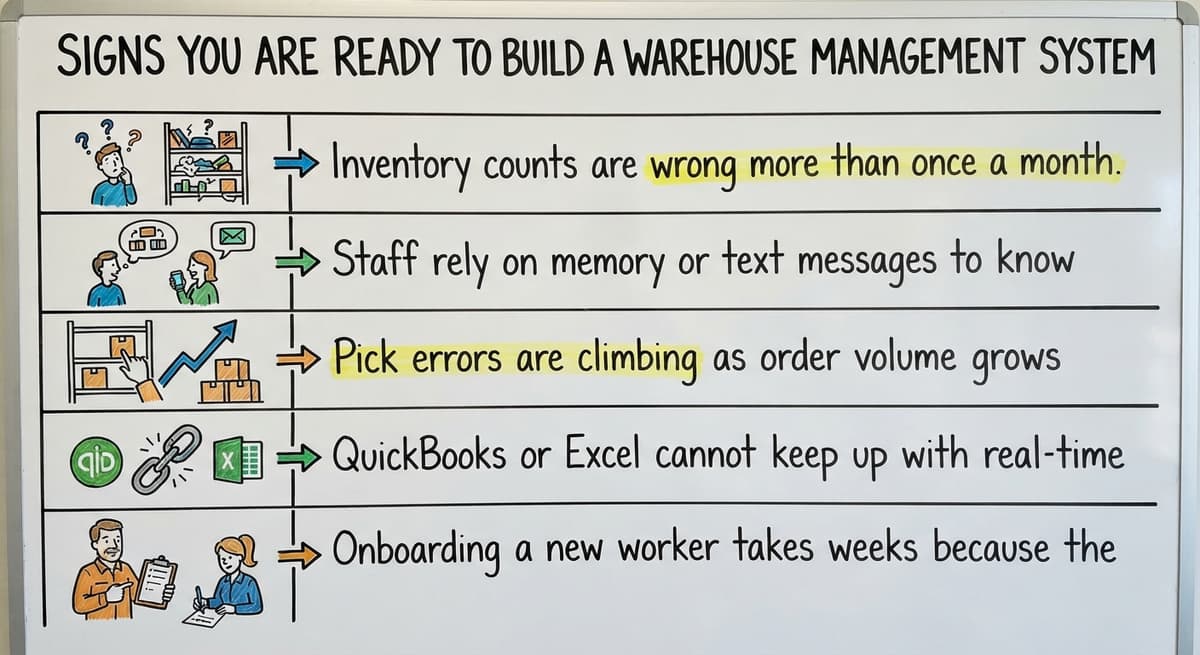
Book a callSigns You Are Ready to Build a Warehouse Management System
Not every warehouse needs custom software today. These signals tell you the time has come:
- Inventory counts are wrong more than once a month
- Staff rely on memory or text messages to know where stock lives
- Pick errors are climbing as order volume grows
- Your accounting software or spreadsheet cannot keep up with real-time location tracking
- Onboarding a new worker takes weeks because the process lives in people's heads
There is also a safety dimension. According to OSHA, "poor housekeeping, improper stacking, and inadequate training" are among the leading contributors to warehouse injuries, and you can review their full warehousing guidelines at https://www.osha.gov/warehousing.
A system that gives every worker clear, current information reduces the guesswork that leads to those conditions.
What Should You Map Before You Write a Line of Code?
Map your current workflow first. That single step separates warehouse software projects that succeed from the ones that stall.
Walk the floor and document every step from the receiving dock to the outbound shipment. Note every paper form, every spreadsheet, every verbal handoff. You are looking for the three or four pain points that cost the most time or cause the most errors.
This map becomes your blueprint. Build the system around it, not around a vendor's template. Replacing spreadsheets and desktop databases with custom software works best when the replacement mirrors real operations rather than forcing new habits onto an experienced team.

Core Features Every Warehouse Management System Needs
Inventory tracking is the foundation. Everything else depends on knowing where each SKU lives at any given moment. Beyond that, a solid WMS for a small or mid-size operation needs:
- Receiving and purchase order matching so nothing enters the warehouse unrecorded
- Bin and location tracking so every item has a known address on the shelf
- Pick, pack, and ship workflow with confirmation steps at each stage
- Real-time inventory counts and low-stock alerts
- Basic reporting: fill rate, cycle count accuracy, and order throughput
That list is shorter than most vendors will show you. That is intentional. A focused system your team actually uses beats a bloated one they work around.
Features to Add Later, Not on Day One
Scope creep kills warehouse software projects faster than any technical problem. These are real improvements worth building, just not first:
- Barcode or RFID scanning belongs in phase two, after the workflow logic is solid
- Advanced analytics and demand forecasting require clean data, which takes time to accumulate
- Carrier rate shopping and automated label printing are phase-two improvements once the basics are stable
Building everything at once splits your team's attention and delays the moment anyone gets value from the system. Ship something useful, use it, then add the next layer.
Is the comparison easier when one option is built for you?
Yes. Off-the-shelf means fitting your process to the software, and custom is the other way round. The first look costs nothing.
Book a callHow Do You Handle Your Accounting Software Integration?
Most small warehouses already run accounting in dedicated bookkeeping software. Keep it there. The WMS handles the operational layer; the bookkeeping software handles the financial layer. Those are two different jobs, and a good WMS extends that software rather than replacing it.
A proper accounting integration for distributors syncs purchase orders, receipts, and invoices without double entry. Your receiving team confirms a shipment in the WMS. That confirmation flows into the accounting system automatically. No one re-enters data.
This is the key difference between a custom WMS and a big ERP system. An ERP demands a full migration. A well-built WMS works alongside the tools you already trust.
If a vendor tells you that you must abandon your accounting software to use their system, that is a red flag, not a feature.

Choose Between Custom Build, Off-the-Shelf, and Hybrid
The right choice depends on how unique your workflow is and how much re-training your team can absorb.
| Option | Speed to Deploy | Fits Your Workflow | Total Cost Over Three Years |
|---|---|---|---|
| Off-the-shelf WMS | Fast | Forces compromise | Lower upfront, higher adaptation cost |
| Custom build | Moderate | Built around your team | Higher upfront, lower adoption cost |
| Hybrid | Moderate | Partial fit | Middle ground on both |
For operations under 100 staff with distinct processes, custom warehouse software or a hybrid approach wins on total cost and adoption speed. Custom operational software for wholesale and distribution is built around how your team already works, which means less re-training and fewer workarounds.
Build It in Phases, Not All at Once
Phased delivery is not a compromise. It is the strategy that actually gets systems used.
- Phase one: receiving and inventory location tracking. Get every item a known address.
- Phase two: pick and pack workflow with digital confirmation at each step.
- Phase three: reporting, integrations, and scanning hardware.
Each phase should go live and be used before the next one starts. Staff adoption is easier when changes arrive in small steps they can absorb between shifts, not in a single cutover that rewrites every habit at once.
How Do You Get Your Team to Adopt a New Warehouse System?
The people who pick orders every day know exactly where the current system breaks down.
Involve floor staff in the workflow mapping stage, not just managers. Their input surfaces problems before they get coded into the new system, which is far cheaper than fixing them after launch.
Early involvement also creates buy-in. A picker who helped design the confirmation step is not going to skip it. Plan a short training period for each phase before it goes live.
Keep training sessions short and hands-on. Show the team how the new step makes their shift easier, not just how it helps management track numbers.
What does it look like running on your own process?
The first thing you see is it running on your own process, at no build cost. The subscription starts once it is live and doing the job, not before.
Book a call
Common Mistakes That Derail Warehouse Management System Projects
Warehouse management system projects stall or fail because of recognizable, repeatable patterns:
- Building for a future warehouse size instead of the current one
- Skipping the workflow map and jumping straight to features
- Choosing a system that requires replacing your accounting software unnecessarily
- Underestimating data cleanup: dirty product data causes problems from day one, before a single order ships
- Picking a vendor who has never worked at warehouse scale below 500 employees
The last point matters more than most buyers realize. A team that only knows enterprise implementations will design for enterprise problems. Your operation needs someone who understands small warehouse software, not someone retrofitting a large-enterprise playbook.
How Long Does It Take to Build a Warehouse Management System?
A focused phase-one build for a small warehouse takes six to twelve weeks. That range assumes the workflow is documented clearly at the start. Vague requirements stretch timelines more than technical complexity does.
Off-the-shelf tools can go live faster, but they require workflow compromises that generate their own delays. Custom builds take slightly longer upfront and eliminate the re-training cost of forcing new habits onto an experienced team.
Fulfillment center software solutions built around your existing process tend to reach full adoption faster than generic platforms, even when the build itself takes a few extra weeks.
What Should You Look for in a Development Partner?
The right partner asks about your workflow before talking about technology. That question tells you they understand the job. A team that leads with a feature list is selling a product. A partner who leads with questions is solving a problem.
Other things worth confirming before you sign anything:
- Experience with operations at your scale matters more than large-enterprise case studies
- Look for a partner who will stay involved after launch, not hand off and disappear
- Local partners who can walk your floor add real value during the design phase
- Confirm they understand accounting software integration and will not push you to abandon it
Warehouse inventory management software built by a team that has never stood on a warehouse floor tends to miss the details that matter most. Ask to see examples at your scale. Ask how they handled a workflow that did not fit a standard template.
Start With the Workflow, Build From There
Building a warehouse management system is not a software project. It is an operations project that happens to involve software. Start with the workflow map.
Identify the real pain points. Build only what solves today's problems. Keep your existing accounting software where it works. Add complexity in phases your team can absorb.
If you are ready to replace fragmented manual work with a system aligned to your real operations, the next step is a conversation about your floor, not a demo of someone else's features.
Custom workflow implementation built around how your team already works is the sensible path between doing nothing and buying a bloated ERP you will spend years fighting.
Talk to a partner who will walk your floor before writing a line of code.
Frequently asked questions
What the manual process costs, in numbers
Put numbers on the errors and it gets clearer. 200 orders a day at a 2 percent mispick rate is 4 wrong shipments a day and roughly 1,000 orders a year going out wrong.
Cutting that to 0.5 percent leaves 250 orders a year, which is 750 fewer apologies.
The sources behind this guide
The primary sources are worth a look here: GS1 covers why a barcode printed by one company scans at another.
Independent research confirms this point: Auburn University RFID Lab covers independent findings on RFID in retail and supply chain.
External documentation exists here: Warehousing Education and Research Council covers the standard benchmark set for distribution centre performance.
This rests on official guidance: IRS Publication 538 covers why inventory has to be counted and valued at all, as a legal obligation rather than a preference.
Government data backs this up: US Bureau of Labor Statistics covers what the staff doing this work are actually paid, for any cost-of-manual-process argument.
National statistics confirm this pattern: US Census Bureau, Monthly Wholesale Trade covers national inventories, sales and the inventories-to-sales ratio for wholesale firms.
One more example is documented here: NIST Manufacturing Extension Partnership covers vendor-neutral guidance on supply chain and inventory process.
Frequently asked questions
What are the four types of WMS?
The four common types are standalone WMS (dedicated warehouse software with no broader ERP connection), integrated ERP modules (WMS built into a large enterprise resource planning suite), cloud-based WMS (hosted software accessed by subscription, such as a small-business inventory platform), and custom-built WMS (software designed around a specific operation's workflow).
Standalone and cloud-based systems suit small to mid-size warehouses. ERP modules fit large enterprises. Custom builds work best when an operation's workflow does not match any standard template.
What are the components of a warehouse management system?
A WMS includes receiving and purchase order matching, bin and location tracking, pick and pack workflow management, shipping confirmation, real-time inventory counts, cycle count tools, and basic reporting.
More advanced systems add barcode or RFID scanning, carrier integrations, demand forecasting, and connections to your accounting software. Not every component is needed on day one. A phased build starting with receiving and location tracking covers most of the immediate pain for small warehouses.
What are the five S's of warehouse management?
The five S's come from the lean manufacturing framework: Sort (remove items that do not belong in a space), Set in Order (assign a specific place to every item), Shine (keep the space clean and maintained), Standardize (document the process so everyone follows the same method), and Sustain (build habits and accountability to maintain the first four).
A WMS supports all five by making locations, processes, and counts visible to everyone on the floor rather than stored in one person's memory.
What are the 5 KPIs for a warehouse?
The five most commonly tracked warehouse KPIs are order fill rate (the percentage of orders shipped complete and on time), inventory accuracy (how closely physical counts match system records), picking accuracy (the percentage of picks completed without error), order cycle time (the time from order receipt to shipment), and receiving efficiency (the time and cost to process inbound shipments).
A WMS generates the data needed to measure all five consistently, which is difficult to do reliably with spreadsheets alone.
Do I Need to Replace Your Accounting Software to Build a WMS?
No. A well-built WMS works alongside your accounting software rather than replacing it. The WMS handles the operational layer: receiving, location tracking, picking, and shipping. The accounting platform handles the financial layer: invoicing, accounts payable, and general ledger.
A proper integration syncs purchase orders, receipts, and invoices between the two systems without double entry. Any vendor who tells you that you must abandon your bookkeeping system is selling a migration, not a solution.
What is the difference between a custom WMS and an off-the-shelf solution?
An off-the-shelf WMS is faster to deploy but requires your team to adapt its workflow to the software's structure. Custom software is built around how your team already works, which reduces re-training and eliminates workarounds.
Off-the-shelf tools carry lower upfront costs but generate hidden costs in adaptation and lost productivity. For operations under 100 staff with distinct processes, custom or hybrid builds win on total cost over a three-year period.
How do I avoid common mistakes when building warehouse management software?
The most common mistakes are building for a future warehouse size instead of today's operation, skipping the workflow map and jumping straight to features, choosing a system that forces you to abandon your accounting software, and underestimating how much data cleanup is needed before launch.
Dirty product data causes errors from the first day of use. Working with a development partner who has experience at your scale and who asks about your workflow before discussing technology reduces the risk of all of these.
What database schema should a warehouse management system use?
A warehouse management system works best on a relational schema built around core entities: items or SKUs, bin and location records, purchase orders, sales orders, and transaction logs that record every movement.
Each item table links to a location table so the system always knows where stock sits, while transaction records tie receiving, picking, and shipping events back to inventory counts for accurate real-time reporting.
How much does it cost to develop a warehouse management system?
Cost depends heavily on scope: an off-the-shelf system has lower upfront cost but higher long-term adaptation cost as your team works around its limits, while a custom or hybrid build costs more initially but fits your workflow better and reduces retraining.
Building in phases, starting with core inventory and pick-pack-ship features, keeps early costs lower and lets you add advanced features once the basics prove valuable.
How much does it cost to develop a custom WMS?
Custom-built software has a higher upfront cost than off-the-shelf software but a lower total cost over time, since it follows your actual workflow rather than forcing compromises.
For operations under 100 staff with distinct processes, this wins on both total cost and adoption speed. Phasing the build, core features first, then advanced ones, helps control spending as the system proves its value.
How should a WMS integrate with an ERP and shipping carriers?
A WMS should handle the operational layer while accounting software or an ERP continues handling the financial layer, syncing purchase orders, receipts, and invoices automatically so no one re-enters data.
Unlike a full ERP, which demands complete migration, a well-built WMS works alongside existing tools. Carrier connections, such as rate shopping and automated label printing, are best added later as phase-two improvements once core workflows are stable.
What is in a free first look?
A 30 minute call, your operation mapped, and a clear picture of what we would build. No obligation and nothing to install.
Book a callRelated guides
The rest of this guide, for the parts of the job this page does not cover.
Guides
- Warehouse Inventory Management Systems
- Warehouse Management System Top 10
- Software for Warehouse Management System
- Small Business Warehouse Management System
- Warehouse Management System Types
- Warehouse Inventory Management System
- Warehouse Management System Examples
- Warehouse Management System Implementation
- Cloud Warehouse Management System
Common questions
- How to Choose a Warehouse Management System
- How to Create a Warehouse Management System
- How to Design a Warehouse Management System
- How to Set up a Warehouse Management System
- How Warehouse Management System Works
- How to Manage Inventory in a Warehouse
- What Are the Benefits of Warehouse Management System
- What is the Point of Warehouse Management System
- What is Asn in Warehouse Management System
- What is a Warehouse Management System
- Which Warehouse Management System Would a Jeweler Most Likely Use
- What is a Warehouse Management System Used For
- Warehouse Management System vs Warehouse Control System
- Meaning of Warehouse Management System
- Definition of Warehouse Management System