


Warehouse Management System Vs Warehouse Control System
Warehouse management system vs warehouse control system is a planning-against-machines distinction. A warehouse management system (WMS) is the software for inventory, orders, and picking tasks; a warehouse control system (WCS) is the software that drives conveyors, sorters, and robotic arms. Most warehouses of 5 to 100 people need the first and not the second, and this guide, reviewed in September 2026, explains where each one fits, when both are worth running, and the vendor confusion between them.
Reviewed August 2026. Each figure comes from the assumptions stated beside it, so you can substitute your own and the arithmetic still holds.
Published 12 August 2026. Reviewed and updated 15 September 2026.
Book a callWhat Is a Warehouse Management System?
A warehouse management system is software that tracks what you have, where it lives, and what needs to happen next.
Think of it as the brain of your warehouse. It tells your team what to pick, where to put incoming stock, and when an order is ready to ship.
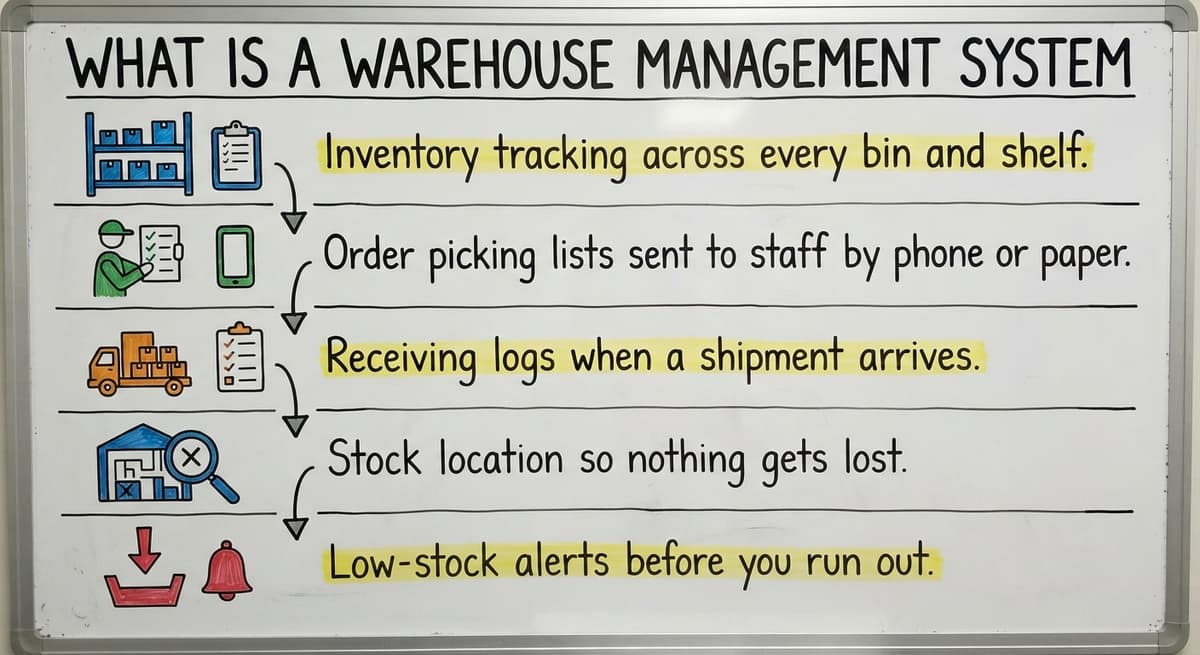
Here is what a WMS handles:
- Inventory tracking across every bin and shelf
- Order picking lists sent to staff by phone or paper
- Receiving logs when a shipment arrives
- Stock location so nothing gets lost
- Low-stock alerts before you run out
As the IRS notes in Publication 538, "To figure taxable income, you must value your inventory at the beginning and end of each tax year." A WMS makes that count accurate without a manual stocktake scramble.
Would you rather have it built around your operation?
The first look is free. If you would rather not compare products, describe how your operation already works and we build the system around it.
No build cost. You see it running on your own process first, and the monthly subscription starts only once it is live.
Book a callWhat a WMS Does Not Do
A WMS is not an ERP. It does not run payroll or manage your accounts. It focuses on warehouse operations and does that job well without forcing you to change every other system in the business.
A WMS connects to the tools you already use. QuickBooks integration for warehouse operations is one of the most common links. So is a connection to your order platform or your wholesale customer portal.
Who Uses a WMS
Wholesale distributors, fulfilment centres, and growing product businesses use a WMS most often. These are teams that have outgrown spreadsheets but do not want the cost or weight of a full ERP.
A warehouse inventory management software overview will show you that most WMS products sit between a basic spreadsheet and a full business suite.
If your team is still logging stock on paper or chasing orders through email, a WMS is the right next step.
What Is a Warehouse Control System?
A warehouse control system is software that talks directly to physical machines. Conveyors, robotic sorters, barcode scanners on a moving belt, and pick-and-place arms all need real-time instructions.
A WCS gives those instructions. It fires commands to a conveyor to speed up, tells a sorter which chute to use, and reads scanner data as a box moves through the line. It works in milliseconds; the machines cannot wait.
When a WCS Is and Is Not Relevant
A WCS is hardware-dependent. Without conveyors, sorters, or robotic arms, there is nothing for it to control. If your warehouse runs on people, not machines, a WCS adds no value and costs real money.
OSHA notes that "The warehousing and storage industry includes establishments operating facilities for general merchandise, refrigerated goods, and other products." Many of those large facilities run automated lines where a WCS is essential for keeping equipment safe and in sync. Smaller operations rarely need one.
Does Your Operation Need a WCS?
Ask yourself one question: do you have automated conveyor systems or robotic equipment on your floor right now? If the answer is no, you do not need a WCS.
Most warehouses with 5 to 100 staff pick and pack by hand. A WCS is built for a different kind of operation entirely.

What Is the Difference Between a Warehouse Management System and a Warehouse Control System?
The WMS makes decisions. The WCS carries them out with machines. That is the whole difference in warehouse management system vs warehouse control system, and it matters: the two solve different problems.
Here is a simple way to think about it. The WMS is the manager. It looks at the orders, checks the stock, and tells the team what to do.
The WCS is the machine operator. It takes those instructions and turns them into physical actions on automated equipment.
| System | What It Manages | Who It Talks To |
|---|---|---|
| WMS | Inventory, orders, picking tasks | Staff, ERP, order platforms |
| WCS | Conveyors, sorters, robotic arms | Automated hardware in real time |
| ERP | Whole business: finance, HR, supply chain | Every department |
Most small and mid-size warehouses only need a WMS. The WCS layer only becomes relevant when you add automated equipment to the floor. Custom warehouse software for small distributors almost never includes a WCS component; the operations do not need one.
Is the comparison easier when one option is built for you?
Yes. Off-the-shelf means fitting your process to the software, and custom is the other way round. The first look costs nothing.
Book a callWhich Operations Actually Need a WCS?
A WCS earns its place only in facilities running automated warehouse equipment. That means conveyors that sort and route packages automatically, robotic pick-and-place arms on a fulfilment line, automated sorters that direct parcels to the right chute, and high-speed scanning systems built into moving lines. These setups are common in large e-commerce distribution centres and national logistics hubs. They are not common in wholesale distributors, regional fulfilment centres, or product businesses with lean teams.
If your team picks and packs by hand, a WCS adds no value. The equipment it controls does not exist on your floor. Buying one would be like buying a remote control for a car you do not own.
The Warehousing Education and Research Council tracks performance benchmarks across distribution centres. The operations that run WCS tools are almost always at the high end of volume and automation.
If your operation is not there yet, skip the WCS conversation entirely and focus on getting your inventory data clean.
Why the Confusion Exists
Vendors sometimes use warehouse management system vs warehouse control system loosely. A product marketed as a WCS might include basic inventory features.
A WMS might advertise equipment integrations. Read the feature list, not just the label. What matters is if the software matches the work your team actually does.

Which Operations Actually Need a WCS?
A WCS earns its place only in facilities running automated warehouse equipment. That means:
- Conveyor belts that sort and route packages automatically
- Robotic pick-and-place arms on a fulfilment line
- Automated sorters that direct parcels to the right chute
- High-speed scanning systems built into moving lines
These setups are common in large e-commerce distribution centres and national logistics hubs. They are not common in wholesale distributors, regional fulfilment centres, or product businesses with lean teams.
If your team picks and packs by hand, a WCS adds no value. The equipment it controls does not exist on your floor. Buying one would be like buying a remote control for a car you do not own.
The Warehousing Education and Research Council tracks performance benchmarks across distribution centres. The operations that run WCS tools are almost always at the high end of volume and automation.
If your operation is not there yet, skip the WCS conversation entirely and focus on getting your inventory data clean.
Where a WMS Fits a Small or Mid-Size Warehouse
A WMS is the right tool for teams that are still running on QuickBooks, spreadsheets, and printed pick lists. It replaces the manual parts without forcing a full system change.
Here is what that looks like in practice:
- Inventory tracking replaces the spreadsheet you update twice a week
- Order picking lists replace the printed emails your team carries around the floor
- Receiving logs replace the clipboard at the dock door
- Stock location replaces the mental map that only one person holds
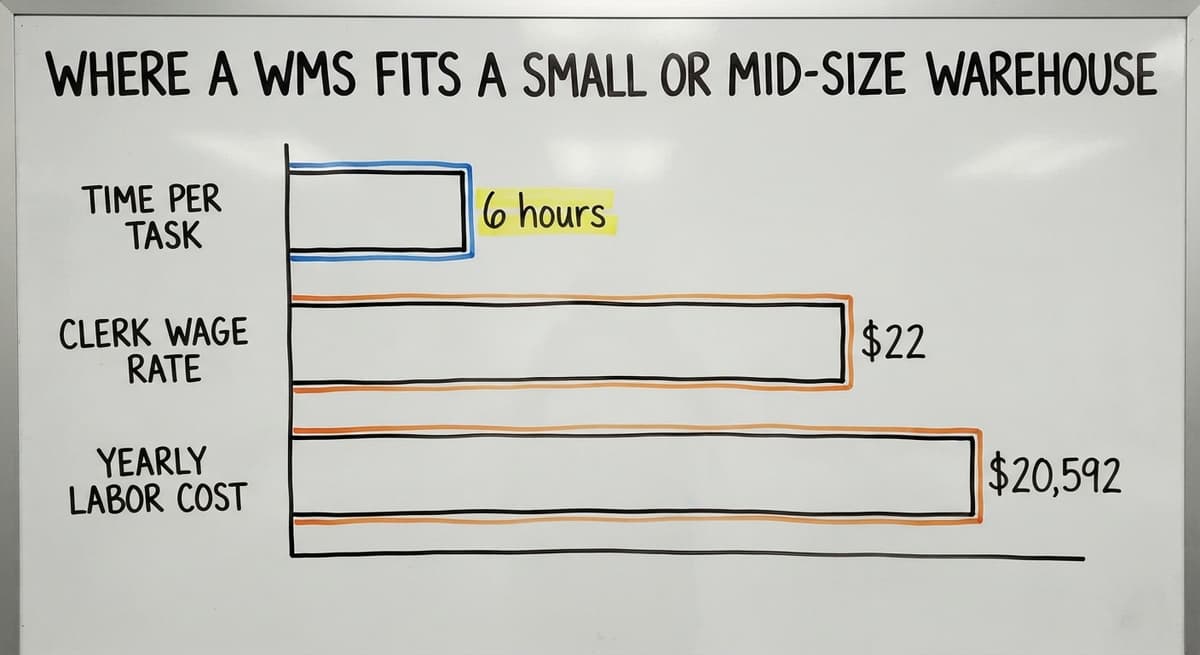
Consider a small distributor with 3 people spending 6 hours each week updating stock counts manually. At the average warehouse clerk wage of around $22 an hour, that is $20,592 a year spent on a task software handles in seconds.
The US Bureau of Labor Statistics confirms that wage range for stock and order clerks in current data.
What does it look like running on your own process?
The first thing you see is it running on your own process, at no build cost. The subscription starts once it is live and doing the job, not before.
Book a call
How a WMS Sits Between a Spreadsheet and an ERP
Inventory tracking software for wholesale distributors targets exactly this gap. It sits between a spreadsheet and a full ERP. It keeps QuickBooks doing what it does well and adds real-time stock control on top. It does not require you to replace your accounting system, retrain your finance team, or pay for modules you will never use.
The scope is narrow by design, and that is what makes it practical for a lean operation.
Replacing Paper Without Replacing Everything
The biggest fear for most operations managers is disruption. A WMS built for small teams does not demand a full migration. It connects to the systems already in use and replaces only the manual work.
Fulfilment centre software solutions built this way let your team keep their routine while the software handles the tracking.
Can a WMS and WCS Work Together?
Yes. In large automated facilities, the WMS sends the instructions and the WCS executes them with machines. The WMS decides which order to pick and from which location.
The WCS then fires commands to the conveyor to bring that item to the right station. The WMS holds the inventory logic. The WCS holds the equipment commands. Neither system tries to do the other's job.

When That Integration Is Not Worth the Cost
For smaller operations, this level of setup is not needed and not worth the cost.
The integration between a WMS and WCS is a project in itself. It requires middleware, hardware compatibility checks, and ongoing technical support. That investment only makes sense when the volume of automated transactions justifies it.
If you run a warehouse with fewer than 100 staff and no conveyor systems, the WMS and WCS question is simple: start with the WMS and revisit the WCS question only if you add automation later.
Common Confusion Between WMS, WCS, and ERP
Three terms come up together in the warehouse management system vs warehouse control system debate, and vendors blur them constantly. Here is a plain breakdown:
- ERP covers the whole business: finance, HR, purchasing, and warehouse together
- WMS covers warehouse operations: stock, orders, picking, and receiving
- WCS covers warehouse equipment: conveyors, sorters, and automated hardware
An ERP can include a WMS module. A WMS can connect to a WCS. But they are not the same thing, and buying the wrong one wastes money and time. Vendors sometimes use warehouse management system vs warehouse control system loosely.
A product marketed as a WCS might include basic inventory features. A WMS might advertise equipment integrations. Read the feature list, not just the label. What matters is if the software matches the work your team actually does.

Why Buying More System Than You Need Is a Real Risk
The NIST Manufacturing Extension Partnership offers vendor-neutral guidance on supply chain and inventory processes. Their core advice is to match the tool to the actual process, not to the most advanced option available.
A full ERP costs more to buy, more to set up, and more to run. If your problem is that stock counts are wrong and orders get missed, a WMS fixes that. You do not need an ERP to solve a warehouse problem.
The Vendor Marketing Problem
Some WMS vendors call their product a WCS to sound more technical. Some ERP vendors bundle a basic WMS and call it a complete warehouse solution.
Read what the software actually does. Ask whether it connects to QuickBooks or replaces it. Ask whether it requires new hardware. The answers will tell you which category it really belongs to.
What is in a free first look?
A 30 minute call, your operation mapped, and a clear picture of what we would build. No obligation and nothing to install.
Book a callHow to Choose the Right System for Your Warehouse
Start with two questions:
- Do you have automated conveyor systems or robotic equipment on your floor?
- Are you still tracking inventory in spreadsheets, paper, or email?
If the answer to question one is no, a WMS is the right starting point. If the answer to question two is yes, a WMS will solve your most pressing problems.
Fit matters more than features. The right warehouse software matches how your operation already works. A system with 200 features you will never use is harder to run than a focused tool that handles your 10 daily tasks well.
Why Barcode Standards and Custom Fit Matter
GS1 sets the global barcode standards that let a label printed in one warehouse scan correctly in another. GS1's barcode standards are built into most WMS products, which means your stock data is compatible with suppliers and customers from day one.
Custom warehouse software for small distributors is worth considering if off-the-shelf products do not fit your workflow.
A custom-built WMS can keep QuickBooks in place, connect to your order platform, and replace only the manual work. It does not force you into a new way of running the business.
Questions to Ask Before You Buy
- Does it connect to QuickBooks, or does it replace it?
- Can your team use it on a phone or tablet on the floor?
- Does setup require a long IT project, or can you be live in days?
- Is the pricing based on users, orders, or a flat monthly fee?
- What happens to your data if you stop using it?
What Should I Do Next If My Warehouse Has Outgrown Spreadsheets?
Start by writing down your three biggest manual pain points before you look at any software. That list will tell you more about what you need than any product demo.
For most small warehouses, the decision is clear: a WMS is the right tool. A WCS is not relevant unless automated equipment is already on the floor. An ERP is not needed unless the warehouse problem is part of a wider business system failure.
The US Census Bureau's Monthly Wholesale Trade data shows that wholesale inventories represent a significant share of business assets across the country. Getting that inventory under control is not just an operations improvement. It directly affects cash flow and tax reporting.
How to Map Your Operation Before Choosing Software
Map your manual work first. Note where stock counts go wrong, where orders get delayed, and where your team spends time on tasks that software could handle. That map is the brief for the right system.
A connected, custom-built WMS can replace the manual parts of your operation without forcing you off QuickBooks or into a costly ERP.
The Software Society builds systems like this for growing distributors and fulfilment teams. The starting point is a conversation about your operation, not a product demo.
If you want to talk through what your warehouse actually needs, reach out and describe the problem. That is where the right answer starts.
Frequently asked questions
Frequently asked questions
What is a warehouse management system?
A warehouse management system is software that tracks your inventory, manages order picking, and organises stock locations across your warehouse. It tells your team what to pick, where to put incoming goods, and when an order is ready to ship.
Most WMS products connect to QuickBooks or your order platform so you do not have to change every system you already use.
Do I need a WMS or a WCS for my warehouse?
If your team picks and packs by hand, you need a WMS. A WCS only applies if you run automated conveyor systems, robotic sorters, or pick-and-place machines.
Most warehouses with 5 to 100 staff have no automated equipment, which means a WCS is not relevant. Start with a WMS and revisit the WCS question only if you add automation later.
Can a WMS and WCS be used together?
Yes. In large automated distribution centres, the WMS handles inventory logic and sends instructions, while the WCS executes those instructions by controlling the physical equipment.
The two systems hand off tasks to each other. For smaller operations without automated equipment, this integration is not needed and not worth the cost.
What are the four types of WMS?
The four common types are: standalone WMS (a focused product built only for warehouse operations), ERP-integrated WMS (a warehouse module inside a full business suite like SAP or Oracle), cloud-based WMS (hosted software accessed by subscription, with no on-site servers), and custom-built WMS (software designed around a specific operation's workflow).
The right type depends on your team size, your existing systems, and how much flexibility you need.
Is SAP a WMS or ERP?
SAP is an ERP. It covers the whole business: finance, HR, procurement, and operations. SAP does include a warehouse management module, but the full platform is far broader and more expensive than a standalone WMS.
For small and mid-size warehouses that only need to fix inventory tracking and order picking, SAP is more system than the problem requires.
What's the difference between WMS and ERP?
A WMS focuses on warehouse operations: stock, orders, picking, and receiving. An ERP covers the whole business, including finance, HR, purchasing, and warehouse together.
An ERP can include a WMS module, but the two are not the same thing. If your problem is warehouse-specific, a WMS solves it at a fraction of the cost and complexity of a full ERP.
Is a WCS necessary for a small or mid-size warehouse?
No. A WCS is only necessary when automated warehouse equipment is already in use. If your team works by hand, a WCS controls nothing on your floor.
Small and mid-size warehouses with 5 to 100 staff almost never need a WCS. A WMS is the right starting point for operations that have outgrown spreadsheets and paper.
What is the right warehouse software for a team still using spreadsheets and QuickBooks?
A WMS that connects to QuickBooks rather than replacing it. Look for a product that handles inventory tracking, order picking lists, and receiving logs without forcing a full system migration.
Custom-built options exist for teams that want software shaped around their workflow rather than an off-the-shelf product that changes how they work.
What is the difference between WMS, WCS, and WES?
A WMS handles inventory, orders, and picking decisions, acting as the brain of the warehouse. A WCS controls physical equipment such as conveyors, sorters, and robotic arms, carrying out those decisions in real time.
A WES sits between the two, blending order orchestration with equipment control. Most small and mid-size warehouses only need a WMS, since WCS and WES layers only matter once automated equipment is involved.
How does a WCS integrate with a WMS?
A WCS integrates with a WMS by taking the decisions the WMS makes, such as which order to pick or where stock should move, and turning them into real-time commands for conveyors, sorters, and robotic arms.
The WMS acts as the manager, checking orders and stock, while the WCS acts as the machine operator, executing those instructions on automated hardware within milliseconds so the physical line matches the software's plan.
Which warehouse management system is best for an automated warehouse?
The best fit is a WMS built to work alongside a WCS layer, since automated warehouses need the WMS's inventory and order decisions paired with real-time control of conveyors, sorters, and robotic arms.
Rather than trusting a label, check the feature list, because some products marketed as a WCS or WMS blend both sets of capabilities. A system built around your existing automated process, rather than forcing your process into an off-the-shelf tool, tends to fit best.
What are the costs of implementing a WMS and WCS?
Costs depend on whether your operation actually needs each system. A WMS suited to a small or mid-size warehouse can come with no build cost, with a monthly subscription starting only once it is running on your process.
A WCS only makes sense, and only costs money wisely, when you already run conveyors, sorters, or robotic arms; without that equipment, buying a WCS adds expense with no value.
Not sure this is the right shape for your operation?
The call is free. Describe how the work runs today. We map it on a call and show you what it would look like built around that, before you spend anything.
Book a callRelated guides
The rest of this guide, for the parts of the job this page does not cover.
Guides
- Warehouse Inventory Management Systems
- Warehouse Management System Top 10
- Software for Warehouse Management System
- Small Business Warehouse Management System
- Warehouse Management System Types
- Warehouse Inventory Management System
- Warehouse Management System Examples
- Warehouse Management System Implementation
- Cloud Warehouse Management System
- Warehouse Stock Management System
Common questions
- What Are the Benefits of Warehouse Management System
- What is the Point of Warehouse Management System
- How to Choose a Warehouse Management System
- What is Asn in Warehouse Management System
- How to Create a Warehouse Management System
- What is a Warehouse Management System
- Which Warehouse Management System Would a Jeweler Most Likely Use
- How to Build a Warehouse Management System
- What is a Warehouse Management System Used For
- Meaning of Warehouse Management System
- Definition of Warehouse Management System
- Warehouse Management System Comparison
- What is the Purpose of a Warehouse Management System
- What is a Warehouse Management System Pdf