


What Is A Warehouse Management System
A warehouse management system is the software that runs the floor. It knows what a warehouse holds, where each item sits, and what ships today. Without a warehouse management system, stock counts are wrong, orders go out late, and Friday afternoon goes to reconciling the spreadsheet against the shelf. This guide, reviewed in September 2026, answers what is a warehouse management system, explains what it does, how it connects to the business, and the signs a warehouse of 5 to 100 people needs one.
Published 21 July 2026. Reviewed and updated 15 September 2026.
Book a callWhat Is a Warehouse Management System, in Plain Terms?
A warehouse management system, or WMS, is software that tracks inventory inside a warehouse or distribution center. It tells your team what is in stock, where each item lives, and what needs to be picked, packed, or shipped.
Think of it as the brain of your warehouse floor. Instead of clipboards, printed sheets, and memory, the WMS holds the information and sends it to the right person at the right time.
A WMS is not an accounting system. It does not replace the accounting software. It handles the warehouse side: the physical movement of goods from the receiving dock to the shipping door.
Would you rather have it built around your operation?
The first look is free. If you would rather not compare products, describe how your operation already works and we build the system around it.
No build cost. You see it running on your own process first, and the monthly subscription starts only once it is live.
Book a callWhat Does a Warehouse Management System Actually Do?
A warehouse management system does 4 jobs: it records what arrives, tracks where it goes, guides the pick, and confirms the shipment.
Receiving and Putting Stock Away
When a delivery arrives, a WMS records what came in, checks it against the purchase order, and tells your team where to put it. No handwritten receiving logs. No sticky notes on pallets.
For a wholesale distributor currently tracking receipts in a spreadsheet, this step alone saves hours each week. The system creates a record the moment the goods arrive. Everyone can see it. Nothing gets lost between the dock and the shelf.
OSHA notes that "workers in warehousing face serious hazards", and a structured receiving process reduces the chaos that leads to those hazards. A WMS builds that structure in.
Picking, Packing, and Shipping Orders
Once an order comes in, the WMS generates a pick list automatically. It tells your picker exactly where to go and what to grab. No more printing sheets every morning and hoping the stock count is still accurate.
After picking, the system guides packing and creates the shipping record. Inventory updates in real time. You know what you have without walking the floor or calling someone to check.
This is real-time inventory visibility. It is the single biggest reason small warehouses move from spreadsheets to warehouse software.

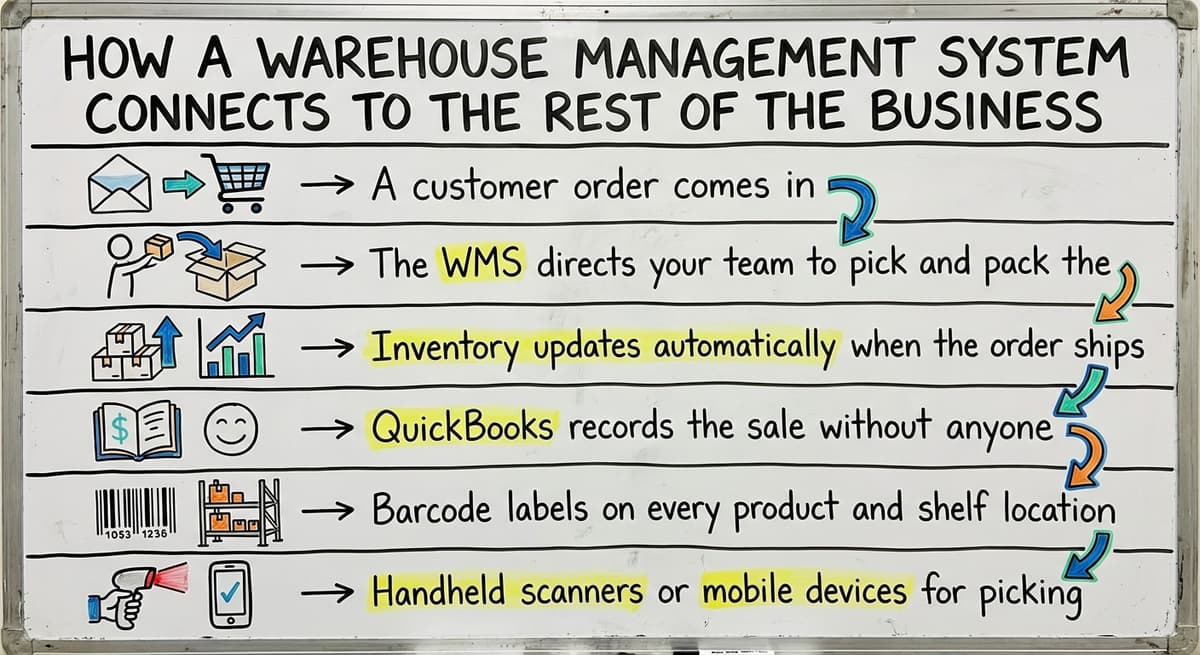
How Does a Warehouse Management System Connect to the Rest of the Business?
A warehouse management system is one node in the business: orders come in from sales, and confirmed movements go out to accounting.
The Data Flow from Order to Record
A WMS is not a standalone tool. It connects to the tools you already use, including the accounting software.
Here is how the data flows:
- A customer order comes in.
- The WMS directs your team to pick and pack it.
- Inventory levels update automatically.
- The completed order syncs to the accounting software, and the sale is on the books.
You keep the accounting software exactly as it is. The WMS handles warehouse inventory management on the floor.
The accounting software handles the books. Both systems do what they are good at. For more on connecting these tools, see our guide to accounting integration for distributors.
Scanners, Barcodes, and Mobile Devices
Most WMS setups are simple hardware alongside the software: 2 or 3 scanners and a label printer. Your team scans barcodes with a handheld device or a mobile phone. The scan updates the system instantly.
This is not complicated technology. Your team can learn it in a day. The hardware is inexpensive. And the accuracy improvement over manual entry is significant.
You do not need a server room or an IT department. A good warehouse software setup runs on devices your team already knows how to use.
Not sure this is the right shape for your operation?
The call is free. Describe how you receive, pick and count today. We map it on a call and show you what the system would look like built around that, before you spend anything.
Book a callSigns Your Operation Needs a Warehouse Management System
The signs are the same in most operations, and 3 of them show up together.
When Manual Processes Start Costing You
Most warehouse operators know something is wrong before they can name the problem. Here are the clearest signs:
- You track stock in a spreadsheet or on printed sheets and errors keep appearing.
- Orders get mispicked or shipped late when nobody has a clear picture of what is available.
- Receiving takes too long when each person does it differently.
- Your team is growing and verbal handoffs no longer work reliably.
These are not signs of a bad team. They are signs that the tools have not kept up with the operation. Warehouse inventory management software exists to solve exactly these problems.
The Reconciliation Problem
One of the most common pain points for operations running on an accounting package and spreadsheets is the weekly reconciliation. You spend hours comparing what the accounting software says you have versus what is actually on the shelf. The numbers never quite match.
The reason is simple: the accounting software tracks transactions, not physical locations. It does not know that six units of Item A are in aisle 3 and four more are on the receiving dock waiting to be put away.
A WMS tracks the physical reality. When the 2 systems connect, the reconciliation problem largely disappears. For teams exploring this shift, replacing spreadsheets with custom operational software is a practical starting point.

Enterprise WMS vs. Custom Warehouse Software for Smaller Operations
What Enterprise Systems Are Built For
Large WMS platforms exist and they are impressive. They handle complex operations with hundreds of staff, multiple facilities, and sophisticated routing logic.
But they target that scale. Implementing an enterprise WMS means:
- Long implementation timelines, six to eighteen months.
- Expensive licensing fees that do not fit a lean budget.
- Changing your processes to match the software, not the other way around.
For a warehouse with 5 to 100 staff, that trade-off rarely makes sense. The software ends up being more than the operation needs, and the team spends months adapting to it instead of using it.
Is the comparison easier when one option is built for you?
Yes. Off-the-shelf means fitting your process to the software, and custom is the other way round. The first look costs nothing.
Book a callWhy Custom Warehouse Software Fits Better
The alternative is custom warehouse software built around how your operation already works. This approach replaces only the manual, broken parts. It does not rip out what is working.
Your accounting setup stays. Your team's workflow stays. The system slots in around the gaps: receiving logs, pick lists, location tracking, real-time inventory.
For distribution center software at this scale, a purpose-built custom solution is faster to implement and easier for the team to adopt.
There is no six-month training program. There is no forced migration. For more on this approach, see custom software for wholesale distributors and warehouse inventory management software overview.
If you run a fulfilment operation, fulfilment centre software solutions built to your process follow the same logic.
What Should You Look for When Choosing a Warehouse Management System?
Before you talk to any vendor, there are 6 questions to ask:
- Does it fit your actual workflow? You should not have to rebuild your operation to use the software. Ask the vendor to show you how it handles your specific receiving and picking process.
- Does it integrate with the accounting software? If you use the accounting software, the WMS should connect to it cleanly. Ask for a live demonstration of that connection.
- Is it built for your scale? Small warehouse software built for a five-to-one-hundred-person operation is different from an enterprise platform. Ask who their typical customer is.
- How long does implementation take? A realistic timeline for a small operation is weeks, not months. Ask for a specific project plan before you sign anything.
- Who supports it after go-live? Ask if support comes from the team that built the system or from a distant help desk with no context on your setup.
The right system fits your operation as it exists today. It grows with you. And it does not require a massive project to get started.

The Short Version
A warehouse management system is software that tracks inventory and directs your team through receiving, picking, packing, and shipping. It replaces spreadsheets, printed sheets, and memory with a single source of truth that updates in real time.
Reviewed August 2026. Figures below are worked from the assumptions stated beside them, so you can substitute your own volumes and the arithmetic still holds.
A worked example makes the difference concrete. At 200 orders a day with a 2% mispick rate, that is 4 wrong shipments daily, about 1,000 a year.
If each one costs $18 in return freight and repick labour, the error rate alone is $18,000 a year.
Cutting mispicks to 0.5% with scan confirmation leaves 250 a year and $4,500. The system is not paying for software, it is paying for the other $13,500.
For small and mid-sized warehouses, the best WMS is not the biggest one. It is the one that fits your workflow, connects to your existing tools, and gets your team up and running quickly.
If your operation is outgrowing spreadsheets and you want to understand what a practical, custom-built solution looks like for your specific setup, The Software Society builds warehouse and operational software around how your business already works.
No rip-and-replace. No enterprise price tag. Reach out to start a straightforward conversation about what your operation actually needs.
Frequently asked questions
Frequently asked questions
What is a warehouse management system in simple terms?
A warehouse management system is software that tracks inventory inside a warehouse. It tells your team what is in stock, where it is located, and what needs to be picked, packed, or shipped.
Think of it as the brain of your warehouse floor, replacing clipboards, spreadsheets, and memory.
How does a WMS connect to accounting software?
A WMS handles the physical side of your operation: receiving, picking, packing, and shipping. When an order is completed, the WMS syncs that information to the accounting software, which records the sale.
You keep the accounting software exactly as it is. The 2 systems work alongside each other without replacing one another.
Do small warehouses need a warehouse management system?
Yes, if manual processes are causing errors. If you are tracking stock in a spreadsheet, printing pick lists each morning, or spending hours reconciling inventory counts, a WMS built for small operations can solve those problems without a large budget or a long implementation.
What is the difference between a WMS and an ERP?
A WMS focuses on warehouse operations: receiving, location tracking, picking, packing, and shipping. An ERP is a broader business system that covers finance, HR, purchasing, and more.
A WMS is a focused tool. An ERP is a company-wide platform. Many small operations use a WMS alongside the accounting software instead of replacing everything with an ERP.
Can I get a warehouse management system without a long, expensive implementation?
Yes. Enterprise WMS platforms require months of implementation and expensive licenses. Custom warehouse software built for smaller operations can be implemented in weeks.
The key is finding a system built to fit your existing workflow rather than one that forces you to change your processes to match the software.
What does a warehouse management system do day to day?
On a typical day, a WMS records incoming deliveries, directs your team to put stock in the right locations, generates pick lists when orders come in, guides packing, creates shipping records, and updates inventory in real time. It replaces the manual steps that slow teams down and introduce errors.
What should I look for when choosing warehouse management software?
Look for software that fits your actual workflow without forcing you to change everything, integrates with the accounting software or your existing accounting tool, is built for your scale rather than a 500-person operation, has a realistic implementation timeline, and comes with ongoing support from the team that built it.
What are the main features of a warehouse management system?
Receiving against purchase orders, bin and location tracking, barcode scanning at pick and pack, real-time stock levels by location, routed pick lists, cycle counting, returns handling, and a sync to the accounting software so nothing is keyed twice.
Reporting on accuracy and throughput turns those records into decisions. For a small warehouse, the feature that matters most is whichever one removes its biggest manual step.
What are the benefits of using a WMS?
Fewer mis-picks and short shipments, because every pick is confirmed by a scan; stock counts that match the shelf, because every movement is recorded when it happens; faster receiving and put-away; less time spent searching and re-keying; and an end to the weekly reconciliation between the floor and the books.
The benefit most owners notice first is that new staff become productive in days, because the process lives in the system rather than in one person's head.
How much does a warehouse management system cost?
The answer depends on the model. Subscription products charge by user, by order or by location, with setup, hardware and support tiers underneath the monthly fee. Enterprise platforms run far higher and take months to roll out.
A custom system for a small warehouse is a one-time build, comparable to a year of subscription fees for a large platform, with a smaller ongoing charge. Compare total cost over three years against the manual hours and stock errors removed.
How do you choose the right WMS for a business?
Start from the process, not the product. Map how goods are received, stored, picked, packed and shipped today and mark where the errors happen.
Shortlist systems that handle those steps without forcing the team to change how it works, check the accounting integration on real orders, pilot one product line, and compare total cost over three years.
The right warehouse management system is the one the team will actually use every day.
How does a warehouse management system integrate with existing business software?
Through connectors or an API, with a clear split of duties: the accounting or ERP system stays the financial and commercial record, the WMS becomes the physical record.
Orders and purchase orders flow into the WMS; receipts, picks, shipments and stock adjustments flow back with cost of goods. Confirm exactly which fields sync before you sign, because a partial sync recreates the double entry the system was meant to remove.
What does it look like running on your own process?
The first thing you see is it running on your own process, at no build cost. The subscription starts once it is live and doing the job, not before.
Book a callRelated guides
The rest of this guide, for the parts of the job this page does not cover.
Guides
- Warehouse Inventory Management Systems
- Warehouse Management System Top 10
- Software for Warehouse Management System
- Small Business Warehouse Management System
- Warehouse Management System Types
- Warehouse Inventory Management System
- Warehouse Management System Examples
- Warehouse Management System Implementation
Common questions
- What Are the Benefits of Warehouse Management System
- What is the Point of Warehouse Management System
- What is Asn in Warehouse Management System
- What is a Warehouse Management System Used For
- What is the Purpose of a Warehouse Management System
- What is a Warehouse Management System Pdf
- What is a Warehouse Management System Example
- What Warehouse Management System Does Amazon Use
- What Are the Top 5 Warehouse Management Systems?
- What is the Best Warehouse Inventory Management System?
- What is the Difference Between Warehousing and Inventory Management
- What is the Most Popular Warehouse Management System?
- What is B Type of Inventory in Warehouse Management
- What is a Simple Warehouse Management System?
- What is Warehousing and Inventory Management
- How to Choose a Warehouse Management System