

Cloud Warehouse Management System
A cloud warehouse management system is the fix for a pain every small warehouse knows: spreadsheets stale by noon and pick sheets that do not match the shelf.
Published 22 July 2026. Reviewed and updated 15 September 2026.
Book a callWhat Does a Cloud Warehouse Management System Actually Do?
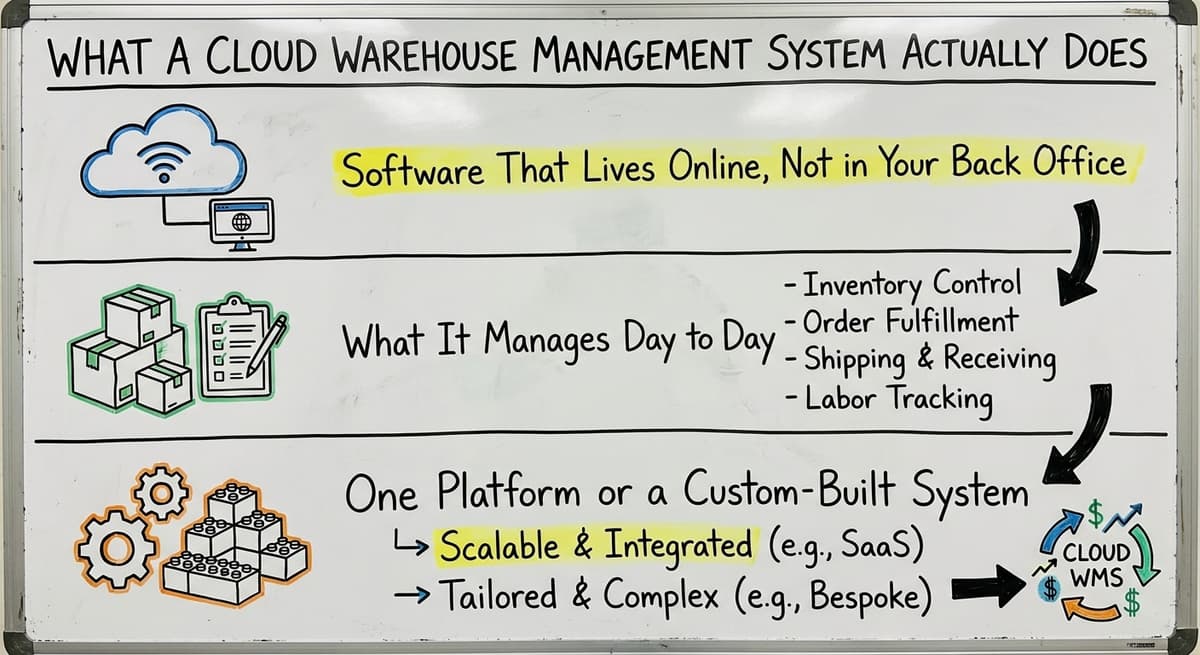
Software That Lives Online, Not in Your Back Office
A cloud warehouse management system is software that runs on the internet. There is no server to buy, no IT person needed to keep it running. You log in from any device with a browser, and your data is there.
Your information lives in a secure data center managed by the software provider. That means it is backed up, protected, and accessible whether you are on the warehouse floor or working from home.
What It Manages Day to Day
A cloud warehouse management system handles the physical side of your operation. That includes:
- Receiving inbound shipments and logging what arrived
- Assigning items to bin or shelf locations during putaway
- Generating pick lists for outbound orders
- Confirming picks, creating packing slips, and updating order status
- Tracking inventory levels and locations in real time
- Flagging discrepancies between what the system shows and what is on the shelf
One Platform or a Custom-Built System
A cloud warehouse management system can be an off-the-shelf product you subscribe to, or it can be a custom-built system designed around how your specific operation already works. Either way, the goal is the same: give your team one place to see what is in stock, where it is, and what needs to happen next.
Would you rather have it built around your operation?
The first look is free. If you would rather not compare products, describe how your operation already works and we build the system around it.
No build cost. You see it running on your own process first, and the monthly subscription starts only once it is live.
Book a callHow Is a Cloud WMS Different from What Most Small Warehouses Use Today?
The Typical Small Warehouse Setup
At 40 orders a day, most small warehouses run on a combination of tools that were never meant to work together. The accounting package handles the financials. A spreadsheet tracks inventory counts.
Pick sheets get printed each morning. Order updates go out by email. Someone built a small desktop database 5 years ago and now only one person knows how it works.
This setup made sense when the operation was smaller. It does not scale well.
The Real Cost of Manual Processes
The cost of that setup is not just time. It is errors. Duplicate data entry. Hours spent reconciling spreadsheets at the end of the week.
New hires who take months to learn the system because the system is really just a collection of informal habits.
OSHA notes directly that "good housekeeping is one of the most important elements of accident prevention" in warehouse environments, and disorganized information systems contribute to disorganized physical operations. You can read more at https://www.osha.gov/warehousing.
Filling the Gap Without Replacing What Works
Accounting software is excellent at accounting. It was not built to manage a warehouse floor. A cloud WMS fills the gap between your accounting software and your physical operation without requiring you to rip out everything you already use.
The goal is not to replace the accounting software. The goal is to stop doing manually what software should handle. Warehouse Inventory Management Software sits in the middle of that problem and solves it.
Core Features to Expect in a Cloud Warehouse Management System
Inventory and Order Visibility
Real-time inventory is the foundation of any cloud warehouse management system.
You should be able to see exactly what is on hand, where each item is located, and what is already committed to open orders. That alone eliminates most of the questions that slow down a warehouse team.
Order management connects incoming orders to available stock and triggers the right fulfillment steps automatically. No more manually checking whether you have enough to ship before printing a pick list.
Pick, Pack, and Ship
Pick and pack is where a cloud warehouse management system either earns its keep or does not. A cloud WMS generates pick lists based on actual stock locations, confirms picks as they happen, and updates order status without anyone having to enter data twice.
Mobile and barcode scanning support lets your team work on the floor rather than running back to a desk to check a screen. That is a practical detail that matters in a real warehouse environment.
Reporting and Accounting Integration
Useful reporting means you can see inventory turnover, order fill rates, and receiving accuracy without building a spreadsheet to find out. Dashboards should answer your questions, not create new ones.
Integration with the accounting software keeps financial records accurate without double entry. A well-built accounting integration for distributors means your warehouse team does their job and the accounting side updates automatically.
Not sure this is the right shape for your operation?
The call is free. Describe how you receive, pick and count today. We map it on a call and show you what the system would look like built around that, before you spend anything.
Book a call
What Makes a Cloud WMS Work for Small and Mid-Size Operations?
Built at the Right Scale
Most warehouse management software on the market was designed for large enterprises with dedicated IT teams and six-figure implementation budgets. That is not what a 10-person distribution operation needs.
A cloud WMS built or configured for smaller operations works at the scale of 5 to 100 staff. It does not require a full implementation project team. It does not assume you have a warehouse manager, an IT director, and a software consultant all working together.
Matching the Software to How You Already Work
The most important thing a cloud warehouse management system can do for a small operation is fit how your team already works.
If the software forces everyone to learn a completely new process, adoption fails. People go back to the spreadsheet because it is familiar.
Custom warehouse software for small operations solves this by using the terminology and steps your team already knows. The system should feel like an improvement on what you do, not a replacement for how you think.
Low Barrier to Entry and Room to Grow
Cloud warehouse management systems have a lower upfront cost than on-premise installs because there is no hardware to buy. Setup is faster.
And because the software lives in the cloud, it can be updated and improved as your business grows without a major reinstallation project.
Reviewed August 2026. Figures below are worked from the assumptions stated beside them, so you can substitute your own numbers and the arithmetic still holds.
The arithmetic that decides it: a 3-person team spending 6 hours a week between them on stock checks, at $22 an hour, is $20,592 a year of labour spent confirming numbers the system would already know.
A cloud setup removes the server and the maintenance window from that total as well, which for most operations of this size is another few thousand a year in avoided IT time.
That matters for a growing operation. The system you start with should be able to scale with you, not force you to switch platforms every few years.
Cloud WMS vs ERP: Understanding the Difference
What an ERP Is and Why Many Small Operations Avoid It
An ERP is a large system, the opposite of a cloud warehouse management system, that tries to manage every part of a business in one platform: finance, HR, purchasing, operations, and more.
The appeal is having everything in one place. The reality for most small distributors is a long implementation timeline, high cost, and a requirement to change how almost everything works.
Many small warehouse operations have looked at ERP and walked away. That is a reasonable decision.
A Cloud WMS Is a Focused Tool
A cloud warehouse management system does not try to run your entire business. It solves one specific problem: managing what happens inside your warehouse and keeping inventory accurate. That focus is its advantage.
Wholesale distribution software built around WMS functions handles what your operation actually needs without the overhead of a full ERP. You are not buying a system that manages payroll when all you need is real-time inventory and pick-and-pack workflows.
Sitting Alongside Your Accounting Software, Not Replacing It
Choosing a cloud warehouse management system does not mean committing to a massive overhaul. For most small operations, the right answer is a WMS that sits alongside the accounting software.
The books keep doing what they do well. The WMS handles what accounting software cannot.
That is a much smaller change than an ERP migration, and it delivers results faster.
Is the comparison easier when one option is built for you?
Yes. Off-the-shelf means fitting your process to the software, and custom is the other way round. The first look costs nothing.
Book a callHow Does a Cloud Warehouse Management System Connect to Your Accounting Software?
The Accounting Software Stays the Financial Source of Truth
For most small operations, the accounting package is the financial system and it should stay that way.
A cloud WMS is not trying to take over that role. It is filling in the parts accounting software was not designed to handle: bin locations, pick lists, receiving workflows, and real-time stock counts.
The 2 systems work together. The accounting software owns the financial records. The WMS owns the warehouse floor.
How the Integration Works in Practice
Here is a simple example. An order comes in. The WMS checks available stock, generates a pick list, and guides your team through pick, pack, and ship.
When the order ships, the completed transaction syncs back to the accounting software as an invoice or sales receipt.
Your accounting records are accurate without anyone entering the same data twice. That is what a real accounting integration looks like. Not a one-time data dump, but a live connection that keeps both systems current.
Custom Integration Around Your Existing Setup
If your accounting setup has been customized over the years, a generic WMS integration may not fit cleanly. A custom-built cloud WMS can be designed specifically around your existing accounting configuration rather than requiring you to change how the books are set up.
That is a meaningful difference for operations that have spent years building an accounting setup that actually works for them.

Signs Your Warehouse Is Ready for a Cloud WMS
Your Team Is Spending Too Much Time on Manual Work
If your staff spend significant time each week updating spreadsheets or reconciling inventory counts, that time is not going toward moving product. It is going toward maintaining a system that should not require that much maintenance.
The same applies if your accountant or bookkeeper is regularly fixing inventory-related errors in the accounting system. That is a sign the two sides of your operation are not talking to each other reliably.
Orders Are Going Wrong
Incorrect picks and late shipments are a data problem, not a people problem. When the information your team is working from is not current, mistakes happen.
A cloud WMS gives everyone the same real-time picture of what is in stock and where it is.
If you cannot answer the question "how many units of SKU X do we have and where are they" without checking multiple places, that is a clear signal.
Growth Is Breaking the Manual Approach
The manual approach that worked at lower volume breaks down as orders increase, and that is the point where a cloud warehouse management system pays for itself.
New hires take too long to learn the system because the system is really just informal habits passed from person to person.
If you are growing and the cracks are showing, a cloud WMS is not a luxury. It is the infrastructure that lets you keep growing without adding headcount just to manage information.
What Should You Look for When Choosing a Cloud Warehouse Management System?
Fit, Integration, and Support
The most important factor is fit. The system should match how your team already operates. A cloud WMS that forces a generic process onto a unique operation will face resistance and low adoption.
Confirm that accounting compatibility is real and maintained. Ask specifically how the integration works, how often it syncs, and what happens when something does not match.
Ask who handles implementation, who trains your team, and who fixes problems after go-live. Support is not a bonus feature. It is part of what you are buying.
Scalability Without Overwhelming Your Team
The system should grow with you. But it should not overwhelm a small team on day one with features they will not use for 2 years. Look for a solution that starts with what you need and can expand as your operation grows.
Fulfillment center management software built at the right scale does exactly that. It is not trying to impress you with a feature list. It is trying to solve your actual problem.
What does it look like running on your own process?
The first thing you see is it running on your own process, at no build cost. The subscription starts once it is live and doing the job, not before.
Book a callFull Cost Transparency
Understand the full cost of a cloud warehouse management system before you commit: $300 to $2,000 a month for a small team is the usual band. That includes:
- Monthly or annual subscription fees
- Setup and implementation costs
- Training time and resources
- Ongoing support costs
- Any fees for integrations or additional users
The cheapest option is rarely the right option. A system that does not get adopted costs more in the long run than one that was set up correctly from the start.
Custom-Built Cloud WMS vs Off-the-Shelf Software
When Off-the-Shelf Makes Sense
Off-the-shelf cloud warehouse management system products offer faster setup and lower upfront cost. If your operation has standard workflows and your team is willing to adapt to how the software works, an off-the-shelf product can be a good fit.
Simple operations with limited customization needs and tight budgets start here. The tradeoff is that you are fitting your operation to the software rather than the other way around.
When Custom Makes Sense
A custom-built cloud warehouse management system follows how your specific operation already works. It uses the terminology your team knows. It handles the edge cases that generic software ignores. It integrates with your accounting setup as it actually exists, not as the software assumes it should be configured.
Custom does not have to mean expensive or slow. A team that specializes in small to mid-size warehouse operations can build a focused system faster than a large enterprise implementation.
The Honest Tradeoff
| Factor | Off-the-Shelf | Custom-Built |
|---|---|---|
| Setup speed | Faster initially | Faster long-term adoption |
| Process fit | You adapt to the software | Software adapts to you |
| Accounting integration | Generic connection | Built around your setup |
| Cost | Lower upfront | Higher upfront, lower friction cost |
| Scalability | Depends on the product | Built to your growth path |
Neither option is universally better. The right choice depends on how standard your workflows are and how much your team can absorb process change during implementation.

Making the Decision
A cloud warehouse management system is not a big scary software project. For the right operation, it is a practical tool that replaces a pile of spreadsheets and printed pick sheets with one system that actually reflects what is happening in your warehouse.
If your team is spending hours each week keeping information accurate across multiple tools, that time has a cost.
A cloud WMS does not eliminate all of that work, but it eliminates the work that software should never have left to people in the first place.
The Software Society builds and implements custom warehouse and operations software for growing businesses that have outgrown manual processes. If you want to talk through whether a cloud WMS makes sense for your operation, start with a conversation.
No pitch, no pressure, just a clear look at what your current setup costs you and what a better one could look like.
Frequently asked questions
Frequently asked questions
Do I need an IT team to run a cloud warehouse management system?
No. Because a cloud WMS runs on the internet, there is no server to buy or maintain. The provider handles updates, security, and backups. Your team logs in from a browser or mobile device and uses the system. No technical staff required on your end.
Can a cloud WMS work alongside my accounting software instead of replacing it?
Yes, and that is exactly how most small operations should use it. Your accounting software stays as your financial system. The cloud WMS handles what accounting software cannot: bin locations, pick lists, receiving workflows, and real-time inventory tracking.
When an order ships, the transaction syncs back to the accounting software automatically so your books stay accurate without double entry.
How long does it take to implement a cloud warehouse management system?
The figure varies. An off-the-shelf product can be set up in days or weeks, but it may require your team to change how they work to match the software.
A custom-built system designed around your existing workflow takes longer to build but gets adopted faster because it fits how your team already operates.
The honest answer is: ask any vendor specifically about their implementation timeline and what is required from your team during that period.
What does a cloud warehouse management system cost?
Cost depends on the number of users, features, level of customization, and what support is included. Off-the-shelf products start with a monthly subscription. Custom-built systems have higher upfront costs but lower long-term friction.
Avoid choosing based on the lowest subscription price alone. A system that does not get adopted or that requires constant workarounds costs more in the long run than one that was implemented correctly.
What happens to my data if my internet goes down?
This is a valid concern and worth asking any vendor directly. Some cloud WMS products offer offline modes that allow limited functionality without an internet connection, syncing data when the connection is restored.
Others require a live connection at all times. Ask specifically about offline capability and what your team should do during an outage before you commit to a system.
Can a cloud WMS handle multiple warehouse locations?
Yes. Most modern cloud warehouse management systems support multi-location inventory tracking. You can see stock levels, locations, and order activity across all your locations from one dashboard.
If multi-location is a requirement for your operation, confirm that the specific system you are evaluating handles it before signing anything.
Is my data safe in the cloud?
Cloud data centers use security practices that most small businesses cannot replicate on their own: encrypted data storage, regular backups, access controls, and physical security at the data center level.
Ask any vendor about their backup frequency, who can access your data, and what happens to your data if you cancel the service. These are reasonable questions and any reputable vendor should answer them clearly.
What is the difference between a cloud WMS and an ERP system?
An ERP tries to manage every part of your business in one platform: finance, HR, purchasing, operations, and more. It is broad by design. A cloud WMS is focused specifically on warehouse and inventory management.
For most small distributors, a cloud WMS paired with their accounting software covers what they actually need without the cost, timeline, and disruption of a full ERP implementation.
What are the best cloud warehouse management systems?
There is no single best cloud warehouse management system. For a small or mid-size warehouse the right one matches how orders already move through the building, connects to the accounting software without replacing it, runs on the scanners or phones the team carries, and is live in weeks.
Where no packaged system fits without changing the process, a custom cloud system built around the operation is the better answer.
What is the difference between cloud WMS and on-premise WMS?
A cloud warehouse management system runs on the vendor's servers and is reached through a browser or an app, so there is no server to buy, patch or back up, updates arrive on their own, and staff log in from the floor, the office or home.
An on-premise WMS is installed on hardware you own and maintain. For most small warehouses the cloud version is faster to start, cheaper up front and easier to keep running.
How do I choose the right WMS for a 3PL warehouse?
A third-party logistics warehouse needs what a single-company warehouse does not: separate inventory and reporting per client, client-level billing for storage and handling, and portals or feeds so each client sees their own stock and orders.
Put those first, then apply the usual checks on receiving, picking accuracy, carrier integration and total cost. A system built for one company's stock rarely stretches to several.
Which integrations should a cloud WMS support?
Four at minimum: the accounting software, so receipts, cost of goods and invoices sync without re-keying; the online store or order channels, so orders flow in and confirmations flow back; the shipping carriers, for labels and rates; and the scanners and label printers on the floor.
Ask any vendor to show each connection working on your own data before you sign, and to say exactly which fields move.
What is in a free first look?
A 30 minute call, your operation mapped, and a clear picture of what we would build. No obligation and nothing to install.
Book a callRelated guides
The rest of this guide, for the parts of the job this page does not cover.
Guides
- Cloud Based Warehouse Management
- Warehouse Management Cloud
- Warehouse Inventory Management Systems
- Warehouse Management System Top 10
- Software for Warehouse Management System
- Small Business Warehouse Management System
- Warehouse Management System Types
- Warehouse Inventory Management System
- Warehouse Management System Examples
- Warehouse Management System Implementation
- Warehouse Stock Management System
Common questions
- What Are the Benefits of Warehouse Management System
- What is the Point of Warehouse Management System
- How to Choose a Warehouse Management System
- What is Asn in Warehouse Management System
- How to Create a Warehouse Management System
- What is a Warehouse Management System
- Which Warehouse Management System Would a Jeweler Most Likely Use
- How to Build a Warehouse Management System
- What is a Warehouse Management System Used For
- Warehouse Management System vs Warehouse Control System
- Meaning of Warehouse Management System
- Definition of Warehouse Management System
- Warehouse Management System Comparison