


Warehouse Management System Comparison
Most warehouse management system comparison guides are for enterprise buyers with dedicated IT teams and six-figure budgets. Ours is for the operation with 5 to 100 staff. If you run a small or mid-size warehouse, already use QuickBooks, and want to fix the broken manual parts without blowing up your whole operation, this guide is for you.
Published 11 August 2026. Reviewed and updated 15 September 2026.
Reviewed August 2026. Each figure comes from the assumptions stated beside it, so you can substitute your own and the arithmetic still holds.
You know your warehouse better than any vendor does. The goal here is to help you ask better questions, spot red flags early, and find a system that fits the way you already work.
Book a callWhat Is a Warehouse Management System?
A warehouse management system, or WMS, is software that tracks inventory, orders, and physical movement inside a warehouse. It tells you what you have, where it is, and what needs to happen next.
Think of it as the operational layer between your physical shelves and your accounting records.
The key difference between a WMS and a full ERP is scope. An ERP covers your entire business: finance, HR, purchasing, sales, and operations in one system. A WMS focuses only on warehouse operations.
Many small distributors do not need an ERP. They need better inventory tracking and cleaner order fulfillment, and they need those things to stay connected to QuickBooks rather than replace it.
That distinction matters before you buy anything. Vendors who sell full ERP suites will frame your warehouse problem as a company-wide problem. Sometimes that is true. It is not.
Would you rather have it built around your operation?
The first look is free. If you would rather not compare products, describe how your operation already works and we build the system around it.
No build cost. You see it running on your own process first, and the monthly subscription starts only once it is live.
Book a callThe Main Types of Warehouse Management Systems
Not every WMS is built the same way. Understanding the categories makes the warehouse management system comparison much easier.
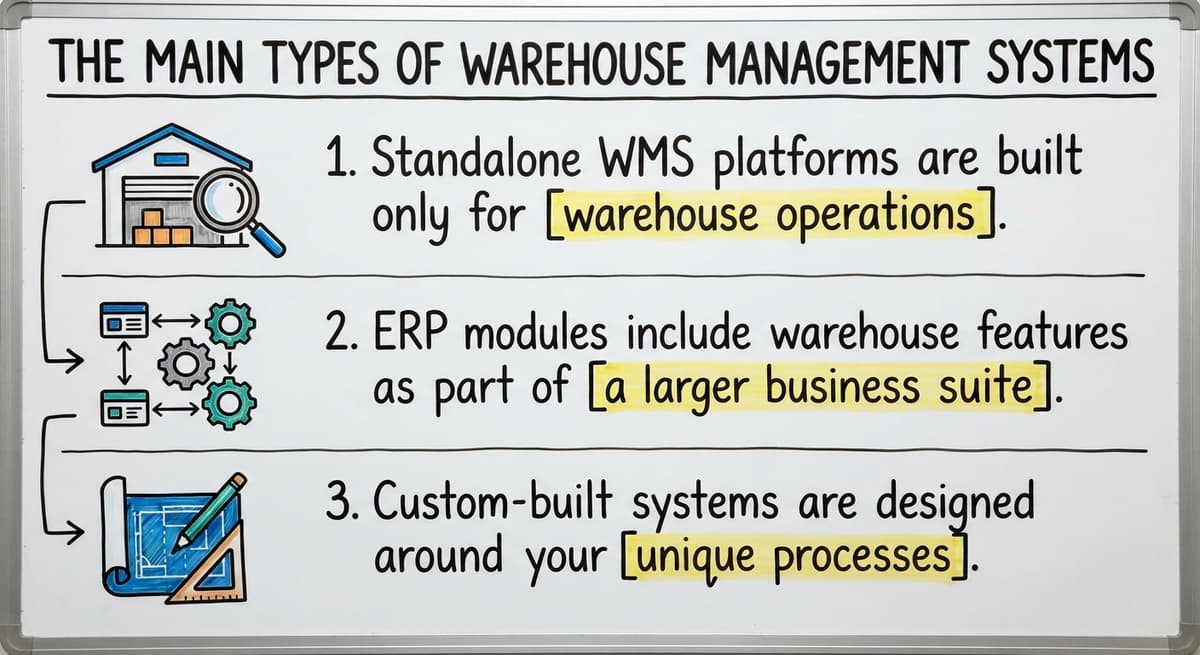
- Standalone WMS platforms are built only for warehouse operations. They handle receiving, put-away, picking, and shipping without touching your accounting setup.
- ERP modules include warehouse features as part of a larger suite. You get warehouse tools, but you may also be paying for HR, payroll, and CRM features you do not need.
- Custom-built systems start from your existing operation. Rather than forcing your team to change how they work, a custom system mirrors the workflows already running.
Cloud Versus On-Premise: A Separate Decision
Cloud tools have lower upfront costs and faster deployment. On-premise systems give you more control but require internal IT support. Whatever type you consider, safety compliance is part of warehouse operations.
OSHA states directly, "Warehousing operations can expose workers to a variety of hazards," which is a reminder that any system you implement should support, not complicate, your safety procedures.

What Features Matter Most When Comparing Warehouse Management Systems?
The right features depend on where your operation is losing time or making errors. Start with the problems you have today, not a vendor's full feature list.
Core features worth comparing across any WMS:
- Real-time inventory tracking so your stock counts match what is actually on the shelf
- Receiving, put-away, picking, and shipping workflows that match how your team moves product
- Reporting tools that show order accuracy, fulfillment rates, and stock discrepancies
- Mobile or barcode scanning support so your floor team is not hand-keying data
- Integration with QuickBooks or your existing accounting software
A warehouse inventory management software overview will list dozens of features. Ignore the ones that solve problems you do not have. A feature you will not use is not a benefit. It is complexity.
How Do Implementation Time and Cost Differ?
The license cost surprises most WMS buyers by being a fraction of the whole cost.
Enterprise WMS platforms require months of setup, a dedicated IT project manager, and significant staff retraining. That timeline is realistic for large operations. For a team of 20 or 30 people, it is overkill and carries real risk of disruption.
Mid-market SaaS tools deploy faster and frequently expect your processes to bend to the software. That trade-off is worth understanding before you sign anything.
Custom-built systems take longer to scope, and in return they keep what already works. You are not migrating to someone else's workflow. You are building a system on top of your own.
Is the comparison easier when one option is built for you?
Yes. Off-the-shelf means fitting your process to the software, and custom is the other way round. The first look costs nothing.
Book a callHidden WMS Costs to Ask About Before You Commit
Hidden costs to ask about before any commitment:
- Per-user or per-location pricing that scales steeply as you grow
- Data migration fees if you are moving from spreadsheets or a legacy system
- Training time and productivity loss during rollout
- Ongoing licensing, support, and upgrade fees after go-live

Comparing WMS Options for Small and Mid-Size Operations
Small operations have different needs than enterprise warehouses. A system built for 500-person distribution centers will not automatically work well for a 30-person team.
| System Type | Best For | Risk for Small Ops |
|---|---|---|
| SAP Extended Warehouse Management | Large enterprise, complex logistics | High cost, long implementation, feature overload |
| Fishbowl | Small manufacturers and distributors | Workflow changes required, QuickBooks dependency varies |
| Cin7 | Growing product businesses | Can replace QuickBooks rather than complement it |
| Custom-built WMS | Operations with established workflows | Requires a capable implementation partner |
Why Is Buying More System Than You Need the Biggest Risk?
For teams under 100 staff, the biggest risk is buying more system than you need. Enterprise platforms like SAP target scale that most small distributors will never reach.
Mid-market tools like Fishbowl or Cin7 offer real structure but require meaningful process changes before your team sees any benefit.
Custom operational software for wholesale businesses scopes down to match exactly what you need today, with room to expand later. That approach works best when you have a clear picture of your current pain points.
QuickBooks Integration: What to Look For
Many small warehouse teams already rely on QuickBooks for accounting, invoicing, and payroll. The last thing they need is a WMS vendor who treats QuickBooks as the problem.
Some platforms will push you to replace QuickBooks entirely. That creates retraining costs, data migration risk, and disruption to financial workflows that are already running fine.
The best outcome for most small distributors is a WMS that keeps QuickBooks in place and fills the operational gaps around it.
QuickBooks integration for distributors works best when data flows automatically between systems. Orders fulfilled in the WMS should update inventory and trigger invoices in QuickBooks without manual entry. Ask vendors specifically:
- Does data sync in real time or in batches?
- Which QuickBooks version does this support?
- Who maintains the integration when QuickBooks updates?
If a vendor cannot answer those questions clearly, that is a signal worth taking seriously.
What does it look like running on your own process?
The first thing you see is it running on your own process, at no build cost. The subscription starts once it is live and doing the job, not before.
Book a call
Red Flags to Watch in Any WMS Comparison
Not every vendor is a good fit. Some red flags are easy to miss during a polished demo.
- Vague implementation timelines with no fixed scope or go-live date
- Pricing that jumps significantly with each additional user or warehouse location
- Vendors who push full ERP replacement when you described a warehouse-only problem
- No named support contact after go-live, only a general helpdesk ticket system
- Demos that show features you did not ask about instead of solving the problems you described
Replacing Excel and Access with purpose-built warehouse tools is a reasonable goal for many small operations. The right vendor will help you do that without dismantling what is working.
Questions to Ask Before You Choose a System
Bring these into every vendor conversation:
- Will this work alongside our current QuickBooks setup without replacing it?
- How long does implementation take for an operation our size, and what does that timeline look like week by week?
- Can we start with the features we need most and expand later without re-implementing?
- Who handles support after go-live, and how do we reach them?
- Does your system adapt to how we already work, or do we need to change our processes to fit your system?
The answers will tell you more than any feature comparison chart.
How Do I Make the Right Choice for My Warehouse?
Start with your own operation, not a vendor's pitch. List the manual steps that cost the most time or cause the most errors each week. Those are your real requirements.
Match those pain points to features, not brand names. A system that solves your three biggest problems is worth more than a platform with 40 features you will never use.
When Does a Custom-Built Approach Deserve a Serious Look?
If off-the-shelf tools keep asking you to change how you work, a custom-built approach deserves a serious look. Custom warehouse software is not always more expensive when you factor in the hidden costs of forcing your team through a workflow migration that does not fit.
Local or specialized implementation partners move faster and carry less risk than large software vendors. They understand small-scale wholesale distribution software needs and are not trying to sell you a platform built for a company ten times your size.
Describe your current setup, the parts that work and the parts that do not, and a good partner can tell you quickly whether you need a standalone WMS, a lighter integration, or something built around your existing workflows. That conversation costs nothing and usually saves months of trial and error.
Frequently asked questions
The sources behind this guide
The public record on this is worth reading directly: GS1 covers why a barcode printed by one company scans at another.
The public record on this is worth reading directly: Auburn University RFID Lab covers independent research on RFID in retail and supply chain.
Independent documentation exists here too: Warehousing Education and Research Council sets out the standard benchmarks for distribution centre performance.
IRS Publication 538 documents this plainly: counting and valuing inventory is a legal obligation, not a preference.
For a straightforward source on the topic, US Bureau of Labor Statistics shows what the staff doing this work are actually paid, useful for any cost-of-manual-process argument.
See the primary source directly: US Census Bureau, Monthly Wholesale Trade tracks national inventories, sales and the inventories-to-sales ratio for wholesale firms.
A vendor-neutral reference sits alongside these sources: NIST Manufacturing Extension Partnership offers practical guidance on supply chain and inventory process.
Frequently asked questions
What are the top 5 warehouse management systems?
There is no single answer that fits every operation. The most commonly evaluated platforms are SAP Extended Warehouse Management, Oracle WMS Cloud, Manhattan Associates WMS, Fishbowl, and Cin7. Enterprise platforms like SAP and Oracle serve large-scale logistics and carry significant cost and implementation complexity.
Fishbowl and Cin7 serve smaller operations but may require process changes. For teams with established workflows, a custom-built system outperforms any off-the-shelf product because it follows what you already do instead of asking you to adapt.
What are the top 20 WMS systems?
Frequently evaluated WMS platforms include SAP EWM, Oracle WMS Cloud, Manhattan Associates, Blue Yonder, HighJump, Infor WMS, 3PL Central, Fishbowl, Cin7, Deposco, Logiwa, Extensiv, Acumatica, NetSuite WMS, Dynamics 365 Supply Chain, Peoplevox, Mintsoft, Korber, Softeon, and Radley.
Most of these target mid-market to enterprise buyers. Small operations under 50 staff will find that many of these platforms include far more complexity than they need. Matching the system to your actual scale matters more than picking a recognizable name.
What are the four types of WMS?
The four types are standalone WMS platforms built only for warehouse operations, ERP-integrated modules that include warehouse features within a larger business suite, cloud-based SaaS systems delivered over the internet with subscription pricing, and custom-built systems designed around a specific operation.
Each type carries different implementation timelines, costs, and flexibility. Standalone and custom systems tend to work best for small distributors who need warehouse functionality without replacing their existing accounting or ERP setup.
What is the best software for warehouse management?
The best warehouse management software is the one that solves your specific problems without creating new ones. For large enterprises, SAP EWM or Manhattan Associates are common choices.
For small and mid-size operations already running QuickBooks, the better question is which system works alongside QuickBooks rather than replacing it.
Fishbowl and Cin7 deserve a look, with the caveat that both expect the workflow to bend toward them. A custom-built system is worth considering if your processes are already working well and you only need to replace the manual parts.
Can a WMS work alongside QuickBooks instead of replacing it?
Yes, and for most small distributors that is the right approach. Several standalone systems and custom-built platforms work alongside QuickBooks instead of replacing it.
The key is confirming that the integration runs in real time, covers your QuickBooks version, and that the vendor maintains it when QuickBooks updates. Ask vendors specifically how order data, inventory counts, and invoices flow between the two systems before you commit.
How long does it take to implement a warehouse management system?
Implementation time varies widely by system type and operation size. Large-scale systems such as SAP EWM require three to twelve months and a dedicated IT project team.
Mid-market SaaS tools deploy in four to twelve weeks but may require process changes that extend the real timeline.
Custom-built systems depend on scope and ship in 8 to 16 weeks for small operations. The hidden time cost in any implementation is staff training and the productivity dip that follows go-live.
How do I compare warehouse management systems without getting overwhelmed?
Start by writing down the three to five manual steps that cost your team the most time or cause the most errors. Use those as your filter.
Any system that does not clearly solve those problems moves to the bottom of your list regardless of how many other features it includes.
Then ask each vendor the same five questions: QuickBooks compatibility, implementation timeline, phased rollout options, post-go-live support, and whether the system adapts to your workflows or requires you to change them. Comparing answers to the same questions is far more useful than comparing feature lists.
How do I know if I need a custom system or an off-the-shelf product?
If every off-the-shelf tool you evaluate requires significant changes to how your team works, a custom-built system is worth serious consideration. Off-the-shelf products make sense when your workflows are fairly standard and the tool fits without major adaptation.
Custom systems make sense when your operation has specific processes that drive your competitive advantage and you cannot afford to disrupt them during a migration. The total cost comparison should include not just licensing but also training, process change management, and productivity loss during rollout.
What is the best WMS for a small business?
There is no single best option; it depends on your operation. Standalone or custom-built systems suit small teams better than large systems such as SAP Extended Warehouse Management, which carry high cost and implementation risk.
Mid-market tools such as Fishbowl or Cin7 can work but require process changes. A custom-built system scoped to your existing workflow avoids buying more system than you need.
How much does a warehouse management system cost?
Cost varies by system type, and the license fee is rarely the whole cost. Enterprise WMS platforms require months of setup, dedicated IT staff, and retraining.
Cloud-based mid-tier systems deploy faster but may force process changes. Watch for hidden costs like per-user or per-location pricing, data migration fees, training time, and ongoing licensing and support fees after go-live.
What is the difference between WMS, ERP, OMS, and TMS?
A WMS focuses only on warehouse operations, tracking inventory, orders, and physical movement inside a warehouse. An ERP covers the entire business, including finance, HR, purchasing, sales, and operations in one system.
The page does not define OMS or TMS specifically, but an OMS manages order processing across channels while a TMS manages transportation and shipping logistics.
What is in a free first look?
A 30 minute call, your operation mapped, and a clear picture of what we would build. No obligation and nothing to install.
Book a callRelated guides
The rest of this guide, for the parts of the job this page does not cover.
Guides
- Warehouse Inventory Management Systems
- Warehouse Management System Top 10
- Software for Warehouse Management System
- Small Business Warehouse Management System
- Warehouse Management System Types
- Warehouse Inventory Management System
- Warehouse Management System Examples
- Warehouse Management System Implementation
- Cloud Warehouse Management System
- Warehouse Stock Management System
Common questions
- What Are the Benefits of Warehouse Management System
- What is the Point of Warehouse Management System
- How to Choose a Warehouse Management System
- What is Asn in Warehouse Management System
- How to Create a Warehouse Management System
- What is a Warehouse Management System
- Which Warehouse Management System Would a Jeweler Most Likely Use
- How to Build a Warehouse Management System
- What is a Warehouse Management System Used For
- Warehouse Management System vs Warehouse Control System
- Meaning of Warehouse Management System
- Definition of Warehouse Management System
- What is the Purpose of a Warehouse Management System
- What is a Warehouse Management System Pdf