


How To Create A Warehouse Management System
Creating a warehouse management system is a 6-step job. Map the workflow, decide what the system must do on day one, choose build or buy, keep the accounting package and replace only the manual parts, plan the data structure, and train the team before go-live. This guide, reviewed in September 2026, is that plan for a warehouse of 5 to 100 people.
Published 21 August 2026. Reviewed and updated 15 September 2026.
Reviewed August 2026. Each figure comes from the assumptions stated beside it, so you can substitute your own and the arithmetic still holds.
Book a callWhat Is a Warehouse Management System?
A warehouse management system is software that tracks inventory, orders, and movement inside a warehouse. It knows what stock you have, where it lives, and what needs to happen next. That is the core of it.
A WMS is not the same as a full ERP. An ERP tries to run the entire business, from payroll to purchasing to production. A WMS focuses on the warehouse floor. For most small and mid-sized operations, that narrower focus is exactly what is needed.
Small warehouses do not need a system built for a distribution centre with 300 staff. A focused WMS can be simple, affordable, and built around how you already work.
The goal is to answer the question: what is a warehouse management system and what does it do? It does one thing well: it tells you and your team what is where and what needs to move.
Would you rather have it built around your operation?
The first look is free. If you would rather not compare products, describe how your operation already works and we build the system around it.
No build cost. You see it running on your own process first, and the monthly subscription starts only once it is live.
Book a callWho Should Think About Creating a Warehouse Management System
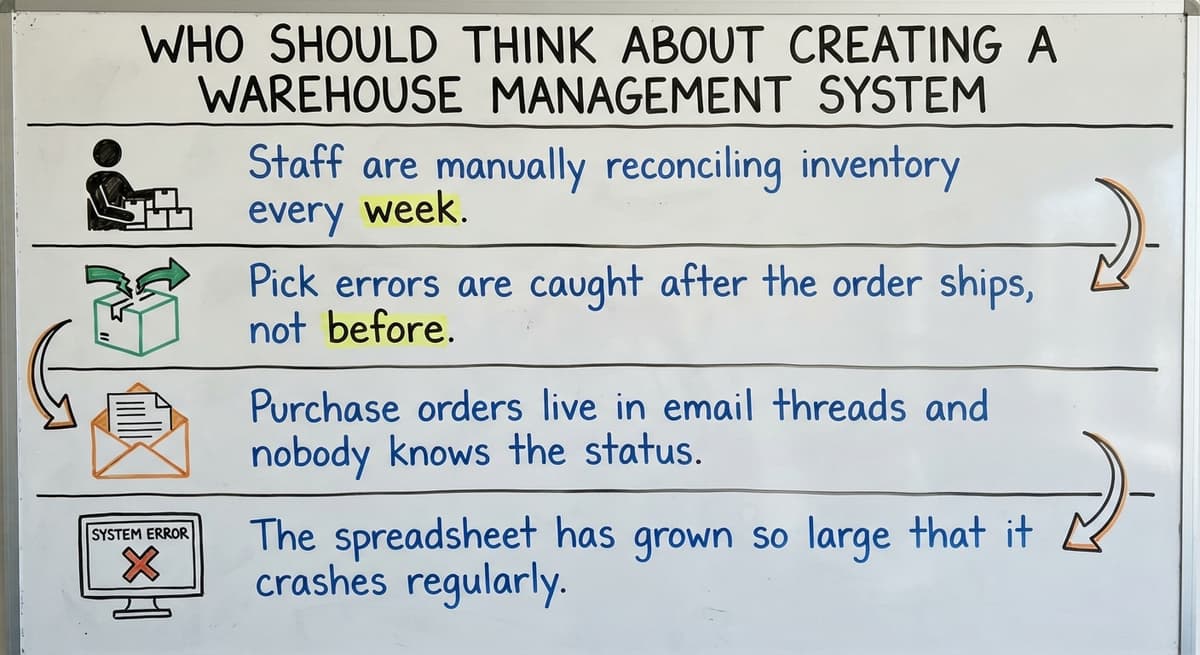
A warehouse management system (WMS) is worth building for wholesale distributors, fulfilment centres, and warehouses running between 5 and 100 staff. If any of these sound like your operation, a WMS is worth building:
- Staff are manually reconciling inventory every morning
- Pick errors are caught after the order ships, not before
- Purchase orders live in email threads and nobody is sure what arrived
- The spreadsheet has grown so large that it crashes on older machines
Your accounting software handles the books well. It was not built to run a warehouse floor, and asking it to do both is where the cracks appear.
Why Does Warehouse Safety Make a WMS Worth Considering?
Workplace safety is also a factor. According to OSHA, warehousing operations involve some of the most hazardous conditions in industry, and disorganised workflows contribute directly to those risks.
A system that tells staff exactly where to go and what to handle reduces both errors and exposure.
For more on this, see the Signs your operation has outgrown spreadsheets resource, which covers the specific triggers that signal it is time to move.
How Do You Map Your Current Warehouse Workflow Before Building Anything?
The map is your blueprint, not a vendor's template, so map every step first. Walk the floor from the moment a purchase order arrives to the moment an outbound order leaves the building.
At each step, write down:
- Who touches it
- What tool they use (paper, spreadsheet, email, phone)
- How often it goes wrong
Most operations find three or four steps that cause the majority of errors. Those are the steps your WMS needs to fix first. Everything else can wait.
This exercise also reveals what is already working. There is no point rebuilding a step that runs smoothly. The warehouse workflow map is the most valuable hour you will spend before writing a single line of code or signing a software contract.

Decide What Your System Must Do on Day One
Before choosing any software, write two lists. The first is must-haves. The second is nice-to-haves. Keep them separate.
Must-have functions for most operations:
- Inventory tracking with real-time quantity updates by location or bin
- Inbound receiving: log purchase orders, flag discrepancies, update stock automatically
- Outbound picking and packing: generate pick lists, confirm items, print shipping labels
- Shipping confirmation that closes the order and updates the record
Nice-to-haves include things like demand forecasting, supplier scorecards, and automated reorder triggers. Those are worth adding later. Trying to include them on day one slows everything down and makes training harder.
A focused system used well beats a complex one used poorly. Every time.
What Is the Difference Between Off-the-Shelf WMS Software and a Custom Build?
Off-the-shelf software gets you started faster, but it forces your operation to match the software's logic. If your workflow does not fit the template, you either change how you work or you pay for customisation that costs as much as a custom build anyway.
A custom build follows how you already work. Staff do not need to relearn their jobs. The system learns the job instead.
Is the comparison easier when one option is built for you?
Yes. Off-the-shelf means fitting your process to the software, and custom is the other way round. The first look costs nothing.
Book a callHow Do Off-the-Shelf and Custom WMS Costs Compare at Mid-Market Scale?
Here is a comparison to help decide:
| Factor | Off-the-Shelf | Custom Build |
|---|---|---|
| Time to start | Faster | Depends on scope |
| Fits your workflow | Not exactly | Yes, by design |
| Cost at small scale | Lower upfront | Comparable if scope is tight |
| Flexibility | Limited | High |
| Integration with your accounting software | Varies | Built to spec |
Mid-market operations find off-the-shelf tools either too simple or too enterprise-heavy. Custom warehouse software does not have to mean expensive or slow, provided the scope stays tight and phased.
For more on this topic, the Custom operational software for wholesale businesses page covers how a scoped build compares to packaged solutions in practice.
Keep Your Accounting Software and Replace Only the Manual Parts
Accounting software integration is one of the most common concerns for operations managers considering a WMS. The short answer: keep your accounting software. There is no reason to replace it.
A well-built WMS connects to your accounting software rather than replacing it. The accounting layer stays intact. What gets replaced are the spreadsheets, desktop databases, and printed pick lists that sit between the accounting system and the warehouse floor.
This approach reduces risk significantly. Staff do not have to learn a new accounting system. Finance does not have to change how they work. The WMS handles receiving, picking, packing, and shipping confirmation, then passes the relevant data to the accounting software automatically.
Implementation time drops when the scope is limited to replacing manual processes rather than migrating an entire accounting setup. For a deeper look at how this works in practice, the accounting integration for distributors resource walks through the connection points.

Core Features to Include in Your Warehouse Management System
Based on the workflow map and the must-have list, most small warehouse software builds include these 6 core features:
- Inventory tracking with real-time quantity updates by location or bin, so the system always reflects what is physically on the shelf
- Inbound receiving that logs purchase orders, flags discrepancies against what was ordered, and updates stock automatically on confirmation
- Pick and pack workflows that generate pick lists by location, confirm each item scanned or selected, and print shipping labels without a separate step
- Reporting that shows stock levels, order status, and fulfilment speed in one view without exporting to a spreadsheet
These four functions cover the majority of daily warehouse activity. Everything beyond them is an enhancement, not a foundation.
For a broader overview of what to look for, the Warehouse inventory management software overview page covers feature sets across different operation sizes.
Plan Your Data Structure First
Before any software is built or configured, the data needs to be clean. This step is underestimated almost every time.
Every item needs three things:
- A unique SKU
- A location (aisle, shelf, bin, or zone)
- A unit of measure
Decide how locations are named before importing anything. Inconsistent naming, such as mixing "Aisle A" with "A-Row" and "Row A", causes errors that are hard to trace later. Pick one convention and apply it everywhere.
Existing product data can be imported from your accounting software or spreadsheets, which avoids re-entering thousands of SKUs by hand.
Clean data at the start prevents compounding errors throughout the system's life. Budget time for this. Most teams need at least a week to audit and standardise their product records before go-live.
What does it look like running on your own process?
The first thing you see is it running on your own process, at no build cost. The subscription starts once it is live and doing the job, not before.
Book a callHow Should You Build a Warehouse Management System Without Overwhelming Your Team?
Building in phases lets staff adopt the system without being overwhelmed. Start with the single biggest pain point. For most operations, that is either inventory accuracy or pick errors.
Get that one module working and trusted before adding the next. Each phase should deliver a measurable improvement before the next begins. That improvement builds confidence in the system and makes the next phase easier to sell internally.
What Order Should Warehouse Management System Phases Follow?
A practical phased sequence for most small warehouses is 4 phases:
- Inventory tracking and location management
- Inbound receiving and purchase order reconciliation
- Outbound pick and pack with label printing
- Reporting and accounting software sync
This sequence mirrors the physical flow of goods through the warehouse. Staff learn one layer at a time, which means fewer mistakes during the transition and less resistance to the change.
For practical guidance on automating the outbound side, the How to automate warehouse picking and packing resource covers the tools and logic involved.

Train Your Team on the New System
Training is not a formal course. Walk staff through real daily tasks using the actual system on the actual floor.
Run the old process and the new system side by side for one to two weeks. This gives staff a safety net while they build confidence. It also surfaces any gaps in the build before the old process is retired.
Identify one internal champion per shift who can answer questions on the floor without escalating every issue. Simple written cheat sheets posted at workstations reduce the volume of support calls in the first month more than any other single action.
Staff who were consulted during the workflow mapping phase are more willing to adopt the new system. They recognise their own input in how it works.
Common Mistakes When Creating a Warehouse Management System
Most WMS projects that fail do so for the same 5 reasons:
- Automating a broken process instead of fixing it first. Software makes a bad process faster and harder to unwind.
- Choosing software that requires months of implementation before delivering any value. If nothing improves in the first four weeks, motivation drops fast.
- Building without staff input, which produces a system that people work around rather than with.
- Underestimating data cleanup time before go-live. This is the most common cause of delayed launches.
The fix for most of these is the same: start smaller, involve the people doing the work, and deliver something useful before moving to the next phase.
When Should You Work With a Local Software Partner?
A local partner is one who can visit the floor, see the workflow, and build around what they observe rather than what you describe in a requirements document. That difference matters more than most buyers expect.
Remote vendors who have never seen a real picking and packing operation tend to build systems that look correct on paper but create friction on the floor. Shorter feedback loops mean faster fixes when something does not work as expected.
For Columbus-area distributors and warehouses, working with a nearby team removes the guesswork from implementation. The Software Society works directly with operations teams to map workflows, scope builds, and deliver systems that connect to existing tools rather than replacing them.
If your operation is running on basic accounting software and spreadsheets and you are ready to replace only what is broken, that is exactly the kind of project worth having a conversation about.
Frequently asked questions
What the manual process costs, in numbers
The arithmetic is worth doing before the software conversation. 3 people spending 6 hours a week between them chasing the same questions, at 22 dollars an hour, is 936 hours a year of paid time spent confirming what a system would already know. Over 3 years that is 2,808 hours.
Walking is the hidden cost. A picker covering 40 feet to a fast mover 60 times a shift walks 2,400 feet a day, and across 250 days that is 600,000 feet a year per picker.
The sources behind this guide
The public record on this is worth reading directly: GS1 covers why a barcode printed by one company scans at another.
The public record on this is worth reading directly: Auburn University RFID Lab covers independent research on RFID in retail and supply chain.
A source worth checking directly is Warehousing Education and Research Council, which covers the standard benchmark set for distribution centre performance.
The primary source is worth checking directly: IRS Publication 538 covers why inventory has to be counted and valued at all, as a legal obligation rather than a preference.
This source lays it out directly: US Bureau of Labor Statistics covers what the staff doing this work are actually paid, for any cost-of-manual-process argument.
Read the original source: US Census Bureau, Monthly Wholesale Trade covers national inventories, sales and the inventories-to-sales ratio for wholesale firms.
The original data is here: NIST Manufacturing Extension Partnership covers vendor-neutral guidance on supply chain and inventory process.
The obligation behind all of this is not optional. OSHA states: “The warehousing and storage industry includes establishments operating facilities for general merchandise, refrigerated goods, and other products.” A figure nobody trusts makes that number a guess.
Frequently asked questions
What are the four types of WMS?
The four types are standalone WMS (software focused only on warehouse operations), ERP-integrated WMS (a warehouse module built into a broader enterprise system), cloud-based WMS (hosted software accessed via browser with subscription pricing), and supply chain platform WMS (part of a larger logistics network tool).
For smaller and mid-sized warehouses, a standalone or cloud-based WMS is the most practical starting point.
What is the best free warehouse management software?
There is no single best answer. Several free inventory tools offer basic tracking at no cost, but they come with limitations on users, integrations, or support.
The right choice depends on your order volume, the number of warehouse locations you manage, and whether you need integration with your accounting software.
Free tools work for very small operations. Once picking and packing workflows and multi-location tracking become critical, a paid or custom solution delivers better value.
How do I design a warehouse management system (WMS)?
Start by mapping your current workflow from receiving to shipping and identifying the steps that cause the most errors. Define the must-have functions for day one, clean your product data, and build in phases starting with the single biggest pain point.
Get each phase working before adding the next. Involving the staff who do the work during design produces a system they will use rather than work around.
What are the five S's of warehouse management?
The five S's come from lean manufacturing: Sort (remove what is not needed), Set in order (organise what remains for efficient the software), Shine (keep the workspace clean and inspected), Standardise (apply consistent processes across all shifts), and Sustain (maintain the standards over time). They are a useful framework for preparing a warehouse floor before implementing any software, because a disorganised physical space produces disorganised data regardless of the system used.
Can I keep using your accounting software if I add a WMS?
Yes. A well-built WMS connects to your accounting software rather than replacing it. The accounting layer stays in place.
The WMS handles receiving, picking, packing, and shipping confirmation, then passes the relevant data to the accounting software automatically. This reduces implementation risk, and your finance team keeps working the same way.
How long does it take to create a warehouse management system?
A phased build focused on the highest-priority function, inventory tracking or pick accuracy, can be operational in four to eight weeks for a small warehouse.
Full implementation covering receiving, pick and pack, shipping, and reporting takes three to six months when built in stages. The biggest variable is data cleanup before go-live. Operations with clean, consistent product records move significantly faster than those starting with inconsistent spreadsheets.
Do I need a full ERP or can I build something smaller?
Most small and mid-sized warehouses have no need for a full ERP. An ERP is designed to run an entire business across departments. A WMS focuses on the warehouse floor.
If your accounting is handled by dedicated accounting software and your main problems are inventory accuracy, pick errors, and manual reconciliation, a focused WMS solves those problems without the cost or complexity of an ERP migration.
What mistakes should I avoid when building a WMS?
The four most common mistakes when you create a warehouse management system are automating a broken process before fixing it, choosing software with a months-long implementation before delivering any value, building without input from the staff who do the work, and underestimating the time needed to clean product data before go-live.
Starting with a narrow scope and delivering measurable improvement in the first phase avoids most of these problems.
How much does it cost to build a custom warehouse management system?
The cost to create a warehouse management system depends mainly on scope rather than a fixed price.
A tailored build can be comparable to off-the-shelf software at small scale if the feature list stays tight and phased, focusing first on inventory tracking, receiving, picking, and shipping.
Adding forecasting, scorecards, or automation too early raises cost and slows delivery, so a narrow first phase keeps the build affordable and realistic for smaller operations.
What are the essential modules of a warehouse management system?
The essential modules of a warehouse management system are inventory tracking with real time quantity updates by location or bin, inbound receiving that logs purchase orders and flags discrepancies, outbound picking and packing that generates pick lists and confirms items, and shipping confirmation that closes the order and updates records. These four cover the core workflow from purchase order arrival to outbound shipment and should be built before any optional features.
Should a small business buy or build a WMS?
The answer depends on how closely a packaged tool fits existing workflow. Off-the-shelf software starts faster but forces the operation to match its logic, and customizing it can cost as much as building custom software anyway.
A tailored system follows how the business already works, so staff don't have to relearn their jobs. Small operations with simple, well-defined workflows may do fine off the shelf, while those with unusual processes benefit more from a fully custom system.
What database schema is best for warehouse inventory tracking?
A workable warehouse schema centers on separate tables for items, locations or bins, and stock quantities, linked so each item's quantity is tracked per location rather than as one total.
Additional tables record inbound receipts, outbound orders, and stock movements as transactions, so every change in quantity is tied to a specific event. This structure supports real time updates, discrepancy flags, and accurate reporting without relying on a single flat inventory count.
What is in a free first look?
A 30 minute call, your operation mapped, and a clear picture of what we would build. No obligation and nothing to install.
Book a callRelated guides
The rest of this guide, for the parts of the job this page does not cover.
Guides
- Warehouse Inventory Management Systems
- Warehouse Management System Top 10
- Software for Warehouse Management System
- Small Business Warehouse Management System
- Warehouse Management System Types
- Warehouse Inventory Management System
- Warehouse Management System Examples
- Warehouse Management System Implementation
- Cloud Warehouse Management System
Common questions
- How to Choose a Warehouse Management System
- How to Build a Warehouse Management System
- How to Design a Warehouse Management System
- How to Set up a Warehouse Management System
- How Warehouse Management System Works
- How to Manage Inventory in a Warehouse
- What Are the Benefits of Warehouse Management System
- What is the Point of Warehouse Management System
- What is Asn in Warehouse Management System
- What is a Warehouse Management System
- Which Warehouse Management System Would a Jeweler Most Likely Use
- What is a Warehouse Management System Used For
- Warehouse Management System vs Warehouse Control System
- Meaning of Warehouse Management System
- Definition of Warehouse Management System