

Warehouse Management Functions
Warehouse management functions are the tasks that keep a warehouse running. There are 8 of them: receiving goods, putting them away, tracking stock, picking orders, packing shipments, shipping, handling returns, and counting inventory. Every warehouse handles all 8 with or without software, and this guide, reviewed in September 2026, takes each one in turn with the failure it produces when nobody owns it.
Published 28 July 2026. Reviewed and updated 15 September 2026.
Book a callWhat Are Warehouse Management Functions?
Functions Exist With or Without Software
A warehouse management function is just a job that has to get done. Receiving a truck. Putting goods away. Picking an order. Counting stock. These tasks happen in every warehouse, from a 2-person operation with clipboards to a 200-person facility with scanners.
Most small warehouses run these functions through spreadsheets, printed sheets, and memory. That works up to a point. The problems start when the operation grows and the gaps between those tools get wider.
What This Article Covers
Warehouse management breaks down into a set of distinct functions, each named here in plain terms. For each one, it explains what a person actually does, what goes wrong when it is manual, and how it connects to the next function in the chain.
The goal is simple. Before you can fix a problem, you have to name it. Read through each section and note the ones that feel familiar.
Would you rather have it built around your operation?
The first look is free. If you would rather not compare products, describe how your operation already works and we build the system around it.
No build cost. You see it running on your own process first, and the monthly subscription starts only once it is live.
Book a callReceiving and Inbound Shipment Processing
What Receiving Looks Like on the Floor
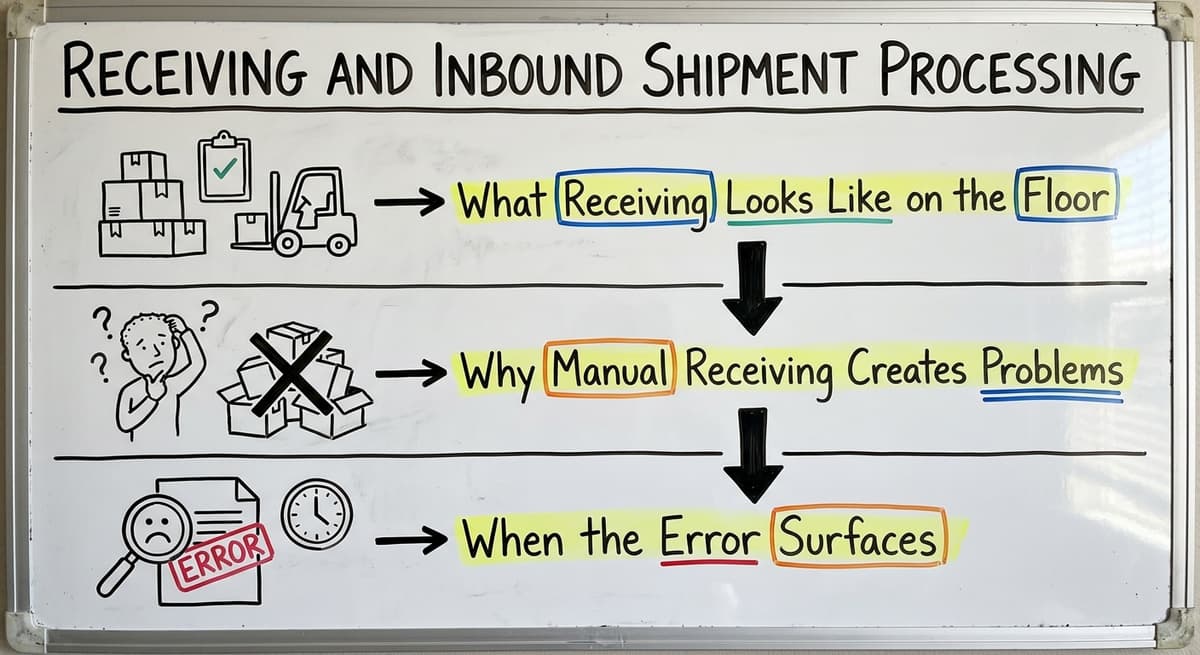
Receiving is the first warehouse management function. When a truck pulls up, someone checks what came in against the purchase order. They count the items. They log the quantities. If something is short or damaged, they flag it.
As OSHA notes, "The warehousing and storage industry includes establishments operating facilities for general merchandise, refrigerated goods, and other products," and the receiving dock is where that industry begins, physically and logistically. See OSHA's warehousing guidance for more on safe dock operations.
Why Manual Receiving Creates Problems
Manual receiving is error-prone. A worker counts 48 boxes but logs 50. A shipment arrives with no PO number on the paperwork. No one records the time the truck arrived. These are small mistakes. They do not feel urgent in the moment.
The problem is that these errors go straight into your inventory data. A wrong count at receiving means your stock numbers are wrong before the goods even reach the shelf.
When the Error Surfaces
Receiving errors do not show up until a customer order goes wrong weeks later. By then, the truck is gone, the vendor has been paid, and no one can say exactly what happened at the dock.
Reviewed August 2026. Each figure comes from the assumptions stated beside it, so you can substitute your own and the arithmetic still holds.
Good receiving practice means counting carefully, matching every shipment to a purchase order, and logging a timestamp. That is the whole function. It sounds simple. It breaks constantly in manual operations.
Inventory Tracking and Stock Visibility
Knowing What You Have and Where It Is
Inventory tracking means knowing exactly what you have, where it is, and how much of it is available to promise to a customer. Those are 3 different things, and all 3 matter.
Total quantity is not enough. If you have 200 units of a product spread across 4 locations in the warehouse and no one knows the location of any of it, your pickers will waste time searching.
Stock visibility means location-level knowledge, not just a number on a screen.
The QuickBooks Reality
QuickBooks tracks inventory value and quantity. It does not track bin location or real-time movement. That is not a criticism. QuickBooks is accounting software. It does what it is built to do.
The gap shows up when a picker needs to know if the stock is in aisle 3 or the overflow room. QuickBooks cannot answer that. Warehouse Inventory Management Software is built to answer exactly that question.
What Breaks Without Good Tracking
Poor inventory tracking leads to 3 recurring problems:
- Overselling: You sell stock you do not actually have in a pickable location
- Phantom stock: Items show as available in the system but cannot be found on the floor
- Wasted count time: Staff spend hours each week searching for items that should be easy to locate
Inventory accuracy is the foundation every other warehouse function depends on. Get this wrong and everything downstream gets harder.
Is the comparison easier when one option is built for you?
Yes. Off-the-shelf means fitting your process to the software, and custom is the other way round. The first look costs nothing.
Book a callOrder Picking and Fulfillment
What the Picking Function Is
Picking is selecting the right items in the right quantities from the right locations to fill a customer order. It sounds straightforward. In a busy warehouse, it is one of the most time-consuming and error-prone tasks on the floor.
There are 3 common picking methods:
- Single order picking: One picker works one order at a time
- Batch picking: One picker collects items for several orders in one trip
- Zone picking: Each picker works a fixed area and hands off to the next zone
What Slows Picking Down in Manual Operations
Paper pick lists are the main problem. They give no location guidance beyond what someone typed when they created the list. They have no priority system.
If 2 pickers get the same list by mistake, you ship a duplicate. If the list is wrong, the picker has no way to know until they get to the shelf.
Order management for fulfillment centers that use location-based pick lists and scan confirmation can cut pick errors significantly. The picker knows exactly where to go and confirms each item before moving on.
Why Picking Accuracy Matters
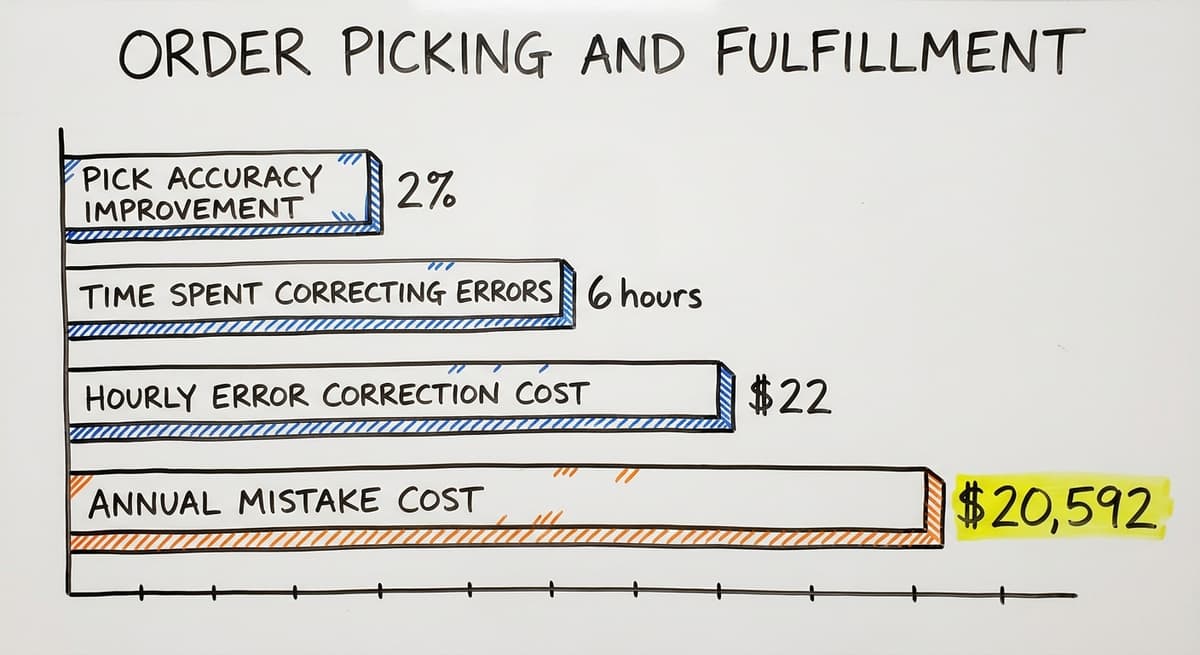
A wrong pick means a wrong shipment. A wrong shipment means a return, a credit, and an unhappy customer. For warehouses with 5 to 50 staff, even a 2% improvement in pick accuracy reduces return costs and customer complaints in a measurable way.
If 3 pickers each spend 6 hours a week correcting pick errors at $22 an hour, that is $20,592 a year spent fixing mistakes that a location-based system would prevent most of.

Packing and Shipping Coordination
Packing Is Its Own Function
Packing is not the same as picking. Picking gets the items. Packing turns those items into a shipment. That means checking the items against the order, choosing the right box, adding protection, printing the label, and attaching the right documentation.
Each of those steps can go wrong. A packer who skips the check ships whatever the picker brought, right or wrong. A label printed for the wrong carrier causes a delay or a lost package.
Shipping Coordination
Shipping coordination covers carrier choice, label generation, tracking number capture, and customer notification. Many small distributors handle this through a mix of carrier portals, printed manifests, and manual data entry into QuickBooks. That works until volume grows or a carrier changes its process.
Errors at packing trace back to upstream problems. A wrong pick leads to a wrong pack.
A receiving error leads to wrong stock, then a wrong pick, then a wrong shipment. The packing station is where those upstream errors become visible to the customer.
What does it look like running on your own process?
The first thing you see is it running on your own process, at no build cost. The subscription starts once the system is live and doing the job, not before.
Book a callConnecting Outward and Inward
Packing and shipping is the function that faces both directions. It connects outward to the customer through the shipment and inward to inventory through the deduction of stock. Both sides have to update correctly. In manual operations, one of them does not.
Returns and Reverse Logistics
What the Returns Function Covers
Reverse logistics means receiving goods back from customers, inspecting them, deciding what to do with them, and updating inventory. A returned item might go back to stock, go to a damage shelf, go back to the vendor, or get written off.
Each of those outcomes requires a different action. In a manual operation, those decisions happen case by case, over email and phone, with no formal process.
Why Returns Are Disproportionately Painful
Returns interrupt normal warehouse flow. A return arrives without warning. Someone has to stop what they are doing, inspect the item, and figure out what to do with it.
If there is no process, that decision takes longer than it should and often gets done wrong.
The downstream effects are real. Inventory does not get updated. The customer waits for a credit. The item sits on a returns shelf for weeks.
Many small warehouses treat returns as the last function to fix. That is understandable. It is also expensive: the hidden cost of unprocessed returns adds up fast.

Putaway and Location Management
What Putaway Actually Means
Putaway is moving received goods to their assigned storage location. It sounds like a simple physical task. It is also a data task. When an item is put away, the system needs to know exactly where it went.
Without a formal putaway process, items go wherever there is space. That seems efficient in the moment. Over time, it means no one knows where anything is.
Why Location Management Enables Everything Else
Location management is assigning and maintaining a logical system of bins, slots, zones, or racks. It is what makes picking fast. You cannot pick efficiently from a warehouse with no address system.
Small warehouses resist location management when space is tight and layouts change. That is fair.
Even a simple system, aisle letters and shelf numbers on printed labels, is better than none. Inventory tracking software for small distributors can manage locations without requiring a full warehouse redesign.
Cycle Counting and Physical Inventory
What Cycle Counting Is
Cycle counting is counting a portion of your inventory on a rolling basis rather than shutting down once a year for a full count.
You might count a different section each week. Over a quarter, you have counted everything. Errors get caught early, before they cause a fulfillment failure.
The IRS is clear about why inventory has to be counted at all.
As IRS Publication 538 states: "To figure taxable income, you must value your inventory at the beginning and end of each tax year." Counting is not optional. The question is how you do it.
Why Manual Counts Fall Short
In QuickBooks-based operations, inventory counts are done by hand and then reconciled manually. That process takes days. It still leaves errors. Staff count what they see, not what the system expects, and the differences have to be investigated one by one.
Regular cycle counting, even in a small warehouse, keeps inventory data accurate enough to make real decisions from. That is the point. You need to trust your numbers before you can act on them.
What is in a free first look?
A 30 minute call, your operation mapped, and a clear picture of what we would build. No obligation and nothing to install.
Book a call
Reporting and Operational Visibility
Reporting Is a Warehouse Function
Reporting is not just a nice output from a system. It is a warehouse management function in its own right. Without good reporting, you cannot see problems until they become crises.
Useful warehouse reporting covers:
- Inventory turnover by product or category
- Order fill rates and backorder frequency
- Receiving accuracy over time
- Pick error rates by picker or shift
- Labor productivity by function
Why Small Warehouses Lack Good Reporting
Most small warehouses lack useful warehouse reporting because data lives in too many places. QuickBooks holds financial data. Excel holds pick logs. Email holds return decisions. No single tool sees all of it.
QuickBooks financial reports tell you what inventory is worth. They do not tell you how long it takes to pick an order or how often receiving errors cause downstream problems. Those are operational questions. They need operational data.
Warehouse reporting built from connected functions answers them. The Warehousing Education and Research Council publishes standard benchmarks for distribution center performance that give small operations a useful comparison point.
How Do These Warehouse Management Functions Connect?
The Chain of Errors
Warehouse management functions are not independent. They form a chain. An error in one step compounds in the next.
Here is a simple example. A receiving worker logs 50 units when 48 arrived. Inventory now shows 50. A picker pulls from that count and ships an order.
A week later, a second order cannot be filled because the last 2 units do not exist. The customer calls. The problem traces back to a count error at the dock 3 weeks ago.
Why Disconnected Tools Break the Chain
Managing warehouse functions in separate tools, QuickBooks, Excel, email, and paper, breaks the chain at every handoff. Data has to be re-entered at each step. Re-entry creates errors. Errors compound.
The goal of any warehouse management system is to connect these functions so data flows between them without manual re-entry. QuickBooks integration for warehouse operations can bridge some of those gaps without replacing the accounting system your team already knows.
Managing Warehouse Functions Without a Big ERP
The Reality for Small Distributors
Most small distributors cannot justify the cost or disruption of a full ERP. A large ERP project can take 12 to 18 months and cost more than the problem it solves. That is not a realistic option for a 10 to 80 person operation.
The good news is that you do not need to replace everything. You need to fix the functions that are causing the most pain.
A Different Approach
Custom warehouse software for wholesale distributors can handle specific warehouse management functions without touching the rest of your operation. That means identifying your biggest problem, whether it is receiving accuracy, pick errors, or inventory counts, and building a solution around your existing process.
This is different from buying a packaged WMS that requires your operation to conform to the software's logic. A packaged system assumes a standard warehouse.
Your warehouse is not standard. It has its own layout, its own workflows, and its own quirks built up over years.
What Implementation Actually Looks Like
A targeted warehouse management build can go live in weeks, not months. It works alongside QuickBooks rather than replacing it. Staff learn one new tool, not an entirely new system.
The NIST Manufacturing Extension Partnership offers vendor-neutral guidance on supply chain process improvement that is worth reviewing before committing to any software path.
The right starting point is a clear picture of which function is failing most and what a fix would actually cost to build versus the cost of leaving it manual.
If your operation is outgrowing spreadsheets and paper, a Custom Workflow Implementation built around your real processes is worth a direct conversation.
Frequently asked questions
Frequently asked questions
What are the functions of a warehouse manager?
A warehouse manager oversees all the core functions: receiving inbound shipments, putting goods away in assigned locations, tracking inventory, directing order picking, coordinating packing and shipping, handling returns, running cycle counts, and reviewing operational reports.
In a small operation, one person may handle several of these directly. In a larger one, each function has a team. The manager's job is to make sure every function runs accurately and connects correctly to the next.
What are the five functions of warehousing?
The five functions most commonly cited are: receiving, storage, order picking, packing and shipping, and returns handling. Some frameworks add inventory management and reporting as separate functions, which is more accurate for practical purposes.
All five core functions have to work together. A breakdown in any one of them creates problems in the others.
What are the basic concepts of warehouse management?
The basic concepts are: know what you have, know where it is, move it accurately, and track every step. Inventory accuracy is the foundation. Location management makes picking possible. Receiving and putaway feed inventory.
Picking and packing serve the customer. Cycle counting keeps the data honest. Reporting shows where the system is working and where it is not. Every concept connects to the others.
What are the typical functions of a warehouse management system (WMS)?
A WMS handles receiving, putaway, location management, inventory tracking, order picking, packing, shipping, returns, cycle counting, and reporting. The key difference between a WMS and a manual process is that a WMS connects all these functions so data flows between them without re-entry.
A receiving scan updates inventory instantly. A pick confirmation updates stock in real time. That connection is what prevents the chain of errors that manual operations suffer.
Can QuickBooks handle warehouse management functions on its own?
QuickBooks handles inventory quantity and value well. It does not handle bin locations, real-time stock movement, pick list generation, or receiving verification. For a small distributor with simple inventory, QuickBooks may be enough.
As soon as location tracking, pick accuracy, or receiving verification become problems, QuickBooks needs to be paired with warehouse-specific tools rather than replaced entirely.
What goes wrong when warehouse functions run on spreadsheets and paper?
The main problems are errors that compound across functions, no real-time visibility, and no audit trail. A count error on a spreadsheet does not trigger any alert. A paper pick list gives no location guidance.
A manual return log does not update inventory automatically. Each gap is manageable alone. Together, they create a system where small errors grow into customer complaints and inventory write-offs before anyone notices.
Which warehouse management function causes the most problems when it breaks down?
Inventory tracking causes the most downstream damage when it fails, because every other function depends on accurate stock data. A receiving error feeds bad data into inventory.
Bad inventory data causes pick errors. Pick errors cause wrong shipments. Wrong shipments cause returns. The chain starts with inventory accuracy. That is the right place to start fixing things.
How long does it take to implement software for specific warehouse functions?
A targeted build focused on one or two specific functions, such as receiving and inventory tracking, can go live in a few weeks when built around your existing process.
A full packaged WMS implementation takes 6 to 18 months and requires significant process change. The right timeline depends on scope. Fixing one broken function is faster and less disruptive than replacing an entire system.
What is the difference between warehouse management and inventory management?
Inventory management decides what to hold, how much and when to reorder, and it lives in purchasing and the books. Warehouse management runs the physical side inside the building: receiving, put-away, locations, picking, packing, shipping and counting.
The two meet at the stock record: inventory management sets the target, and the warehouse management functions are what make the record match the shelf.
What are the five main processes in a warehouse?
Receiving, put-away, storage, picking and shipping. Receiving checks a delivery against the purchase order; put-away moves it to an assigned location; storage keeps it findable and counted; picking pulls it for an order; shipping packs, labels and confirms it.
Every other warehouse management function, from cycle counting to returns to reporting, exists to keep those five accurate.
What are the key warehouse performance metrics?
Inventory accuracy (system count against physical count), order accuracy (orders shipped complete and correct), dock-to-stock time for receiving, picks per hour, on-time shipment rate and the number of manual corrections staff make each week.
The last one is the early warning: if corrections do not fall, the process and the record still do not match.
How can warehouse management improve efficiency?
Record every movement at the moment it happens rather than at the end of the day, scan instead of writing, keep fast movers nearest the packing area, batch picks by route through the building, cycle count in small slices instead of one annual count, and connect the warehouse record to the accounting software so nothing is keyed twice.
Most gains come from removing re-keying and searching, not from working faster.
Not sure this is the right shape for your operation?
The call is free. Describe how the work runs today. We map it on a call and show you what it would look like built around that, before you spend anything.
Book a callRelated guides
The rest of this guide, for the parts of the job this page does not cover.
Guides
- Warehouse Inventory Management Software
- Warehouse Inventory Management Systems
- Warehouse Stock Management Software
- Warehouse Management System Top 10
- Software for Warehouse Management System
- Inventory and Warehouse Management Software
- Small Business Warehouse Management System
- Cloud Based Warehouse Management
- Warehouse Management System Types
- Warehouse Inventory Management System
- List of Warehouse Management Software
- Warehouse Management Costs
- Warehouse Management Cloud
- Warehouse Management System Examples
- Warehouse Management System Implementation
- Online Warehouse Management Software
Common questions
- What Are the Benefits of Warehouse Management System
- What is the Point of Warehouse Management System
- How to Choose a Warehouse Management System
- What Are the Top 5 Warehouse Management Systems?
- What is Asn in Warehouse Management System
- How to Create a Warehouse Management System
- What is a Warehouse Management System
- Which Warehouse Management System Would a Jeweler Most Likely Use