


What Are The Top 5 Warehouse Management Systems?
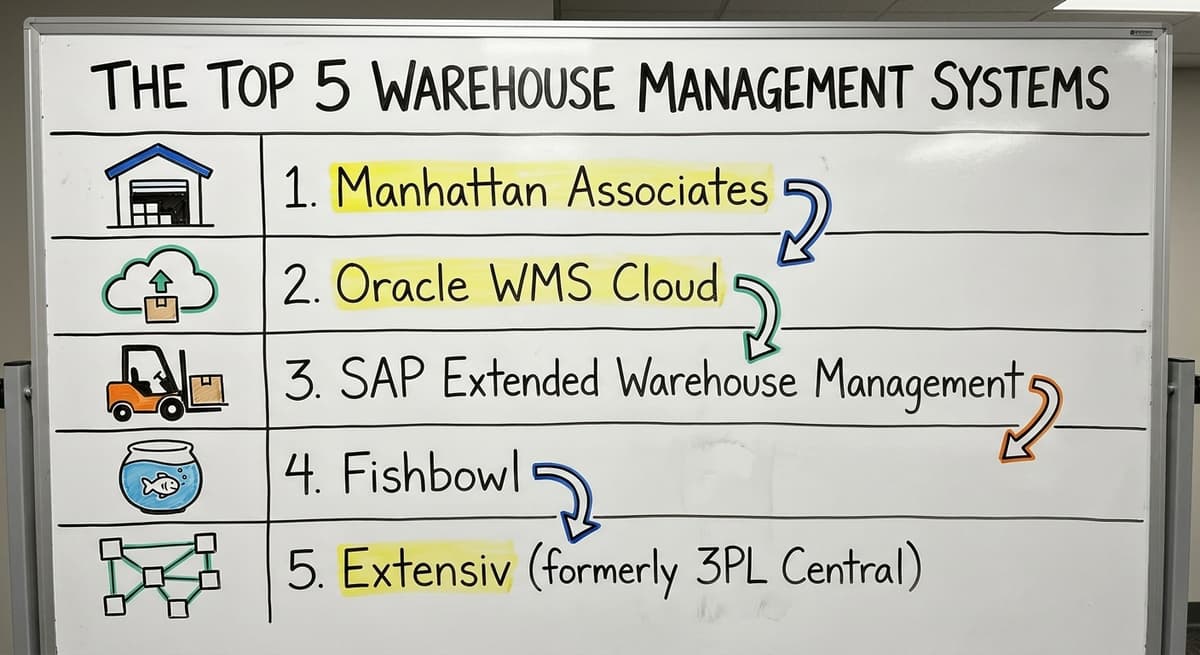
The top 5 warehouse management systems most often cited by buyers are Manhattan Associates, Oracle WMS Cloud, SAP Extended Warehouse Management, Fishbowl, and Extensiv (formerly 3PL Central). Each serves a different size of operation. Manhattan, Oracle, and SAP target large enterprise use. Fishbowl and Extensiv work better for small and mid-size warehouses. The right choice depends on your team size, order volume, and existing software.
Published 10 August 2026. Reviewed and updated 15 September 2026.
Reviewed August 2026. Each figure comes from the assumptions stated beside it, so you can substitute your own and the arithmetic still holds.
Reviewed and updated 15 September 2026
Book a callWhat Is a Warehouse Management System?
A warehouse management system, or WMS, is software that tracks what happens inside your warehouse. It records stock as it arrives, guides staff through picking and packing, and confirms when orders ship.
Think of it as a live log of every item and every move.
A WMS is not the same as an ERP. An ERP, or enterprise resource planning system, covers the whole business: finance, HR, purchasing, and more.
A WMS focuses only on warehouse operations. Some ERPs include a WMS module, but many do not go deep enough for busy fulfillment work.
Not every warehouse needs the same system. A 5-person team shipping 50 orders a day has different needs than a 200-person fulfillment center.
Size, order mix, and workflow all shape the right fit. This article covers the 5 systems that appear most often in buyer research, and what each one actually does well.
Would you rather have it built around your operation?
The first look is free. If you would rather not compare products, describe how your operation already works and we build the system around it.
No build cost. You see it running on your own process first, and the monthly subscription starts only once it is live.
Book a callHow Did We Choose These Five Systems?
The 5 warehouse management systems reviewed here earned their place on 4 factors: market presence, the range of business sizes each serves, depth of features, and how often they appear in real buyer research and industry comparisons.
No single system is right for every operation. A small distributor running 3 staff and QuickBooks has very different needs than a regional 3PL with 80 warehouse workers.
The Warehousing Education and Research Council publishes standard benchmarks for distribution center performance, and the gap between small and large operations is wide on almost every measure.
As OSHA notes, "The warehousing and storage industry includes establishments operating facilities for general merchandise, refrigerated goods, and other products." That range is broad.
A system built for refrigerated goods at scale will not help a small general merchandise distributor who needs something simple and fast to set up.
The list is a starting point, not a ranking. Read each entry with your own operation in mind.
The Top 5 Warehouse Management Systems
The 5 warehouse systems below cover a wide range. Some target large enterprise use. Others work well for smaller teams. Each has a different sweet spot. Use this section to narrow your options before you talk to any vendor.
1. Manhattan Associates
Manhattan Associates is one of the most widely used enterprise WMS platforms in the world. It handles complex warehouse operations: multi-site inventory, labor management, slotting, and advanced order routing. It connects well with large ERP systems and supports high-volume fulfillment centers.
The trade-off is scale and cost. Manhattan is built for large operations. A warehouse running fewer than 50 staff will likely find it far more than they need.
Setup takes months and requires dedicated IT support. If you run a lean team, this is probably not your system.
2. Oracle WMS Cloud
Oracle WMS Cloud is a strong fit for mid-to-large warehouses already using Oracle's broader software suite. It offers real-time inventory tracking, barcode scanning support, and deep reporting tools. It runs in the cloud, which removes some of the hardware burden.
Like Manhattan, Oracle is built with large operations in mind. The learning curve is steep. Implementation can run 6 to 12 months for a complex site. Smaller warehouses find the feature set overwhelming and the cost hard to justify.
3. SAP Extended Warehouse Management
SAP EWM is the warehouse module inside the SAP ecosystem. If your business already runs SAP for finance or procurement, adding EWM can make sense. It handles complex workflows: wave picking, cross-docking, and yard management.
For warehouses not already on SAP, starting here is a big commitment. SAP projects are known for long timelines and high consulting costs. This system earns its place at large, complex operations. It is rarely the right first WMS for a growing small business.
The comparison is easier when one option is built for you
Choosing a warehouse management system is easier when one option is built for your operation. We do it the other way round, and the first look costs nothing.
Book a call4. Fishbowl
Fishbowl is one of the most common warehouse inventory management software choices for small and mid-size businesses. It integrates directly with QuickBooks, which makes it popular with distributors who already run their books there. It handles purchase orders, receiving, picking, and basic barcode scanning.
Fishbowl is not built for high-volume fulfillment centers. But for a team of 5 to 30 people managing a few thousand SKUs, it covers the core needs without a long or expensive setup. QuickBooks integration for wholesale distributors is one of its clearest strengths.
5. Extensiv (formerly 3PL Central)
Extensiv is built for third-party logistics providers and small fulfillment centers. It handles multi-client inventory, billing, and order management in one place. It connects with major e-commerce platforms and shipping carriers.
Extensiv works best for 3PLs and fulfillment operations. If you run your own single-brand warehouse, some of its features will not apply. But for a growing fulfillment center managing orders for multiple clients, it is one of the cleaner options at this price point.
How to Choose the Right Warehouse Management System for Your Operation
The right warehouse management system is the one that fits the operation, and the 4 checks below sort that out faster than any demo.
Ask These Questions Before You Buy
The best WMS is the one that fits how you already work. Before you talk to any vendor, answer these questions honestly:
- How many SKUs do you manage today?
- Do you use QuickBooks, and do you need your WMS to connect with it?
- How many staff will use the system daily?
- What are your biggest manual pain points right now?
- Do you ship from 1 location or several?
These answers will cut the list fast. A 10-person team managing 2,000 SKUs out of QuickBooks does not need Manhattan Associates. A 3PL handling 20 clients and 500 daily orders probably outgrew a basic spreadsheet months ago.
The IRS requires that businesses "value your inventory at the beginning and end of each tax year." That alone is a reason to track stock properly. But the system you use to do it should match your size, not a vendor's sales pitch.
Watch Out for These Common Mistakes
Many small and mid-size warehouses pay for features they never use. A system with 200 configuration options sounds powerful. In practice, it means a longer setup, more training, and more ways for things to go wrong.
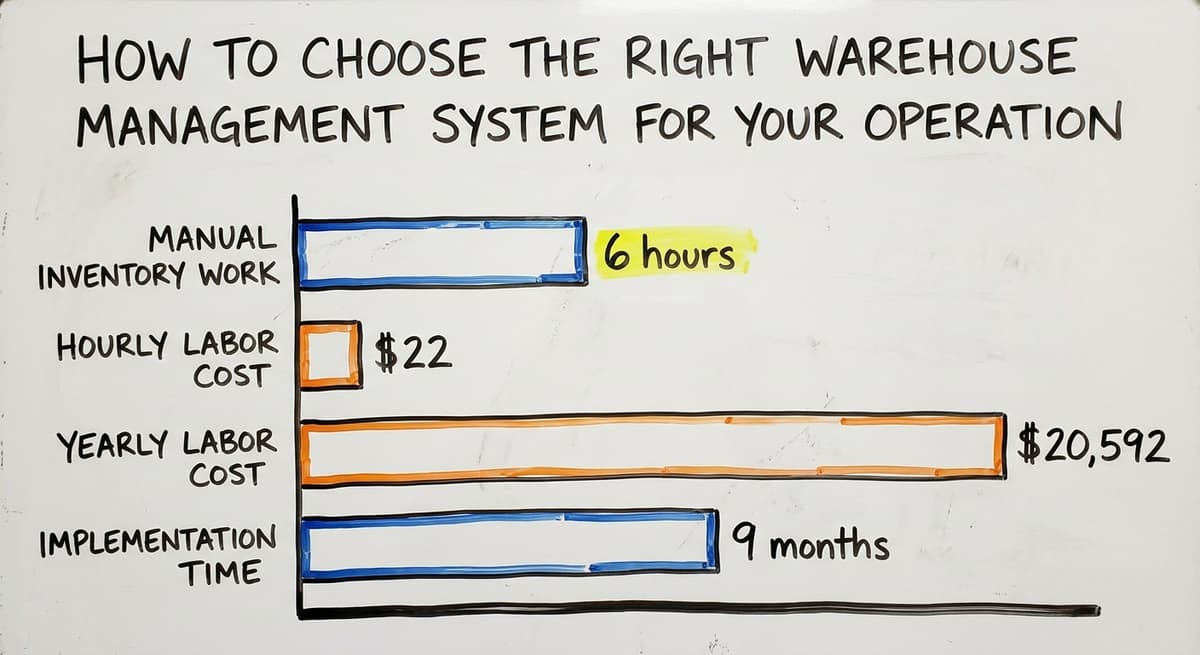
Consider the real cost of a slow rollout. If 3 people spend 6 hours a week on manual inventory work at $22 an hour, that is $20,592 a year in labor.
A WMS that takes 9 months to implement and costs $40,000 to set up does not pay back quickly for a small team.
Long implementations also disrupt daily operations. Training pulls staff off the floor. Old processes break before new ones are ready. For a lean team, that disruption can cost more than the software saves in year one.
If your workflow is straightforward, start simple. You can always add features later. Signs your warehouse operation has outgrown manual processes are worth watching for, but outgrowing manual work does not automatically mean you need an enterprise platform.
What does it look like running on your own process?
The first thing you see is it running on your own process, at no build cost. The subscription starts once the system is live and doing the job, not before.
Book a call
When Might a Custom System Work Better Than a Standard WMS?
A custom system is the better answer when the warehouse workflow is the asset and the software has to bend to it.
The Common Scenario: QuickBooks Plus a Pile of Workarounds
Off-the-shelf WMS platforms are a good fit for many operations. But some warehouses and distributors have workflows that do not fit neatly into packaged software.
The most common version of this looks like: QuickBooks for the books, Excel for inventory tracking, a printed pick sheet taped to the wall, and email threads to confirm what shipped. It works until it does not.
Orders get missed. Stock counts drift. Staff spend hours reconciling what the system says versus what is actually on the shelf.
How to replace spreadsheets in your warehouse operation is a real question for many teams at this stage. The answer is not always a full WMS. Sometimes it is a targeted fix for the specific manual steps causing the most pain.
Custom Software as a Targeted Fix
A custom-built system can replace only the manual parts without touching QuickBooks. That matters because most small distributors do not want to move their accounting. They want to stop losing track of stock and orders.
Custom does not have to mean slow or expensive. A small local team building at modest scale can deliver a working system faster than a large ERP vendor can finish the discovery phase.
The NIST Manufacturing Extension Partnership offers vendor-neutral guidance on supply chain process improvement, and one consistent theme is that the right tool is the one that fits the actual process, not the other way around.
Custom warehouse software built around your existing QuickBooks setup can handle receiving, picking, stock alerts, and order tracking without forcing you to change how you run your books.
For operations where standard WMS platforms either do too much or too little, custom software vs off-the-shelf is a comparison worth making honestly.
A warehouse inventory management software overview can help you map what you actually need before committing to any platform.

Frequently Asked Questions: Part One
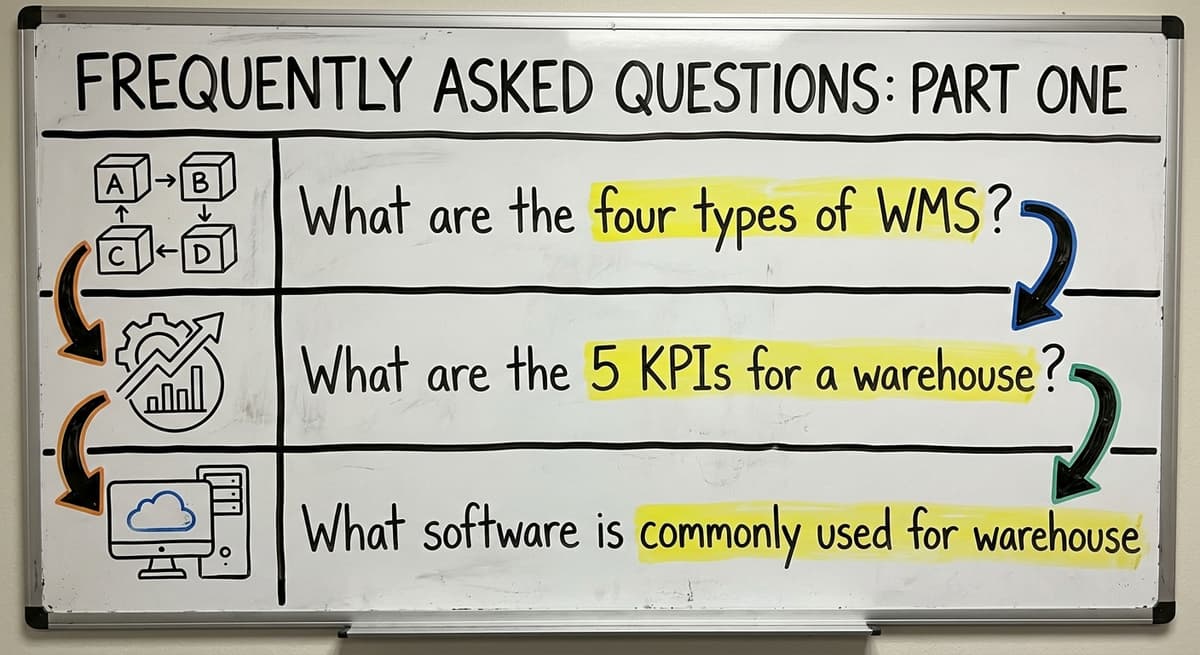
What are the four types of WMS?
The 4 main types are: standalone WMS (software focused only on warehouse functions), ERP-integrated WMS (a warehouse module built into a broader business system), cloud-based WMS (hosted online, no local servers needed), and supply chain module WMS (part of a larger supply chain platform).
Most small warehouses start with a standalone or cloud-based option. ERP-integrated systems make sense only if you are already deep in that ERP ecosystem.
What are the 5 KPIs for a warehouse?
The 5 most tracked warehouse KPIs are: order accuracy rate, inventory accuracy, on-time shipment rate, receiving efficiency, and cost per order.
The Warehousing Education and Research Council publishes standard benchmarks for each of these. Tracking even 2 or 3 of them consistently will show you where your operation is losing time or money.
Start with a free first look
A free first look starts with a 30 minute call, your operation mapped, and a clear picture of what we would build. No obligation and nothing to install.
Book a callWhat software is commonly used for warehouse management?
The most common warehouse management platforms across all business sizes are Manhattan Associates, Oracle WMS Cloud, SAP EWM, Fishbowl, and Extensiv.
Among smaller operations, Fishbowl shows up most because it connects directly with QuickBooks. For 3PLs and fulfillment centers, Extensiv appears often. Enterprise operations tend to use Manhattan, Oracle, or SAP.

Frequently Asked Questions: Part Two

Conclusion: Start With Your Own Operation, Not a Vendor's Demo
The top 5 warehouse management systems cover a wide range of needs. Manhattan, Oracle, and SAP are powerful tools built for large, complex operations. Fishbowl and Extensiv serve smaller teams and 3PLs more directly. None of them is the right answer for every warehouse.
Before you book a demo, answer the practical questions: how many SKUs, how many staff, and what is breaking right now.
The US Bureau of Labor Statistics tracks wages for warehouse and inventory staff, and the cost of manual work adds up fast. But the wrong software can cost more than the problem it was meant to fix.
If your workflows are unusual, or if QuickBooks is already central to how you run the business, a custom-built system may fit better than any packaged WMS.
Custom software built to your actual process arrives faster and at lower total cost than a full enterprise rollout.
If you are not sure where to start, map your biggest manual pain points first. That list will tell you more about the right system than any vendor comparison chart.
Frequently asked questions
The sources behind this guide
The obligation behind all of this is not optional. IRS Publication 538 states: “To figure taxable income, you must value your inventory at the beginning and end of each tax year.” A figure nobody trusts makes that number a guess.
Frequently asked questions
What are the four types of WMS?
The 4 main types are: standalone WMS (focused only on warehouse functions), ERP-integrated WMS (a warehouse module inside a broader business system), cloud-based WMS (hosted online with no local servers), and supply chain module WMS (part of a larger supply chain platform).
Most small warehouses start with a standalone or cloud-based option. ERP-integrated systems only pay off for a business already committed to that ERP.
What are the 5 KPIs for a warehouse?
The 5 most tracked warehouse KPIs are order accuracy rate, inventory accuracy, on-time shipment rate, receiving efficiency, and cost per order.
The Warehousing Education and Research Council publishes standard benchmarks for each. Tracking even 2 or 3 consistently will show you where your operation is losing time or money.
What software is commonly used for warehouse management?
The same five names come up: the three enterprise suites, plus Fishbowl and Extensiv for smaller teams. Fishbowl is the usual pick at that size, again because of the direct QuickBooks connection.
For 3PLs and fulfillment centers, Extensiv appears often. Enterprise operations tend to use Manhattan, Oracle, or SAP.
What are the top 5 inventory management software?
The top 5 inventory management tools that appear most often in small business research are Fishbowl, inFlow Inventory, Cin7, Zoho Inventory, and QuickBooks Commerce. These are not full WMS platforms. They focus on stock tracking, purchase orders, and basic order management.
For a small team without complex warehouse workflows, one of these may be enough before stepping up to a full WMS.
Do I need a WMS if I already use QuickBooks?
Not always. QuickBooks handles basic inventory tracking but does not manage warehouse workflows like receiving, picking, or bin locations. Lost stock, missed orders, or hours spent reconciling counts all point to needing something more.
The question is whether a full WMS or a targeted add-on fits better. Some QuickBooks integrations for wholesale distributors can close the gap without a full platform switch.
How much does a warehouse management system cost?
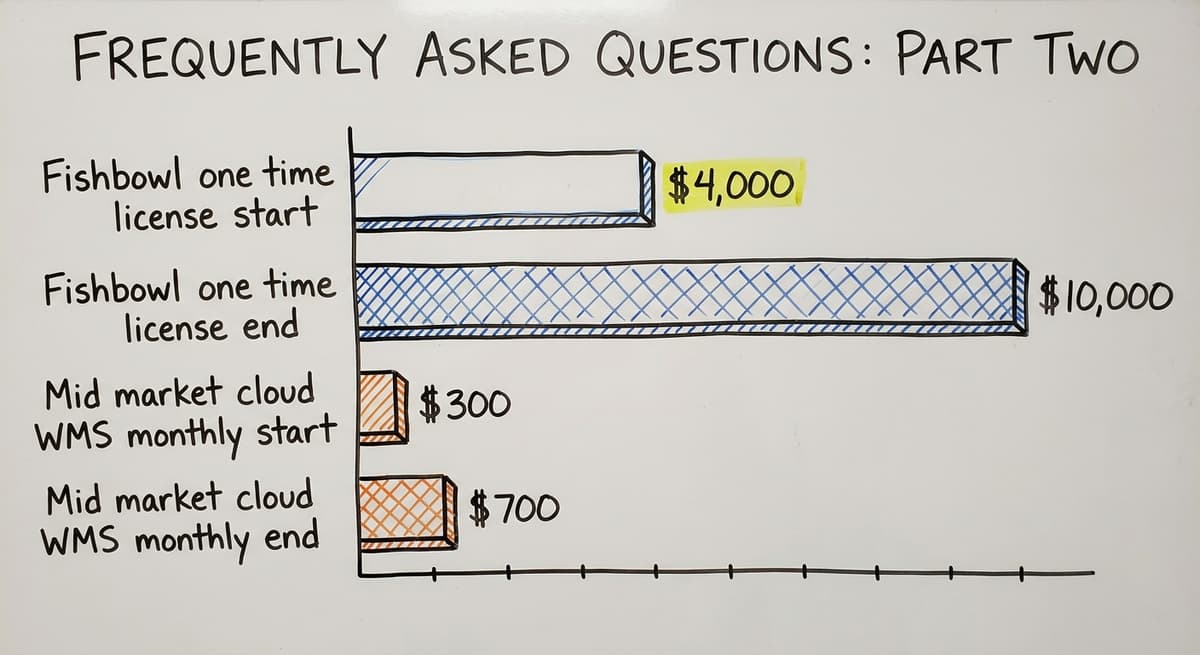
Costs vary widely. Cloud-based small business options like Fishbowl start around $4,000 to $10,000 for a one-time license. Mid-market cloud WMS platforms run $300 to $700 per month.
Enterprise systems like Manhattan or SAP EWM can cost $100,000 or more when you include setup, consulting, and training. Always ask vendors for total cost of ownership, not just the license fee.
How long does WMS implementation take?
The system and the size of your operation decide it. A small cloud-based WMS like Fishbowl can be running in a few weeks. Mid-market platforms take 2 to 4 months.
Enterprise systems like SAP EWM or Manhattan Associates take 6 to 12 months or longer. The more complex your workflows and the more data you need to migrate, the longer the process takes.
Can a small warehouse with fewer than 20 staff use a WMS effectively?
Yes. Fishbowl, Extensiv, and several cloud-based options are built with small teams in mind. The key is matching the system to the actual workload.
A 10-person team does not need wave picking or labor management tools. They need accurate stock counts, simple order tracking, and a system staff can learn quickly. Start with the basics and add features only when the operation demands them.
Which warehouse management system is best for a small business?
For a small business the best warehouse management system is rarely the biggest name on a top 5 list. The enterprise platforms assume hundreds of staff and months of setup.
A 5 to 30 person warehouse does better with a mid-market system that connects to its accounting software, runs on the scanners the team carries and is live in weeks, or with a custom build when its process does not fit a standard template.
What is the difference between WMS and ERP software?
An ERP covers the whole business: finance, purchasing, HR, sales and often a warehouse module. A WMS covers only the physical side of the warehouse: receiving, put-away, locations, picking, packing and shipping, in more depth than an ERP module offers.
Large operations sometimes run the ERP's own module; small and mid-size warehouses keep their accounting software and add a focused WMS beside it.
How long does it take to implement a warehouse management system?
The answer scales with the system. The enterprise platforms on this list take six to twelve months for a complex site, with consultants and dedicated IT. Mid-market systems for a small warehouse run a few weeks to a few months.
A custom system scoped to one part of the operation, such as receiving or picking, can be live in weeks because the team only learns what it will actually use.
What features should a warehouse management system include?
Whichever of the top 5 warehouse management systems you look at, the core set is the same: receiving against purchase orders, bin and location tracking, barcode scanning at pick and pack, real-time stock levels, order routing through the building, cycle counting, and a sync to the accounting or ERP system so nothing is keyed twice.
Reporting on accuracy and throughput is what turns those records into decisions.
Not sure this is the right shape for your operation?
The call is free. Describe how the work runs today. We map it on a call and show you what it would look like built around that, before you spend anything.
Book a callRelated guides
The rest of this guide, for the parts of the job this page does not cover.
Guides
- Warehouse Inventory Management Software
- Warehouse Inventory Management Systems
- Warehouse Stock Management Software
- Warehouse Management System Top 10
Common questions
- What Are the 5 Main Activities in a Warehouse?
- What Are the Benefits of Warehouse Management System
- What is the Point of Warehouse Management System
- What is Asn in Warehouse Management System
- What is a Warehouse Management System
- What is the Best Warehouse Inventory Management System?
- What is a Warehouse Management System Used For
- What is the Difference Between Warehousing and Inventory Management
- What is the Most Popular Warehouse Management System?
- What is the Purpose of a Warehouse Management System
- What is a Warehouse Management System Pdf
- What is B Type of Inventory in Warehouse Management
- What is a Simple Warehouse Management System?
- What is Warehousing and Inventory Management
- What is a Warehouse Management System Example
- What Warehouse Management System Does Amazon Use
- What is the Most Important Part of Warehouse Organization
- What is Warehousing Operations
- What is Warehouse Operation
- What Does Lpn Stand for in Warehousing