


What Does Lpn Stand For In Warehousing
LPN stands for License Plate Number in warehousing. An LPN is a unique ID label attached to a pallet, tote, or carton. It lets a warehouse track that whole container with one scan instead of scanning every item inside. This is not the nursing abbreviation. In distribution and inventory management, LPN always means License Plate Number.
Published 29 July 2026. Reviewed and updated 15 September 2026.
Book a callLPN in Warehousing: What the Term Actually Means
Think of a car's license plate. One plate identifies one vehicle. An LPN does the same job for a pallet or tote in a warehouse.
The label might say LP-00042817. That number links to a record in the warehouse system. That record holds every detail: which products are inside, how many units, lot numbers, and expiry dates.
Some systems call it a license plate label, an LP number, or a container ID. The name changes by software vendor. The idea is always the same.
One Label, One Container
A pallet of 48 boxes gets 1 LPN. A worker scans that 1 label. The system knows what is on the pallet and where it should go. No one counts 48 boxes by hand.
This is the core value. One scan replaces many steps.
What LPN Is Not
LPN in nursing stands for Licensed Practical Nurse. That is a different field entirely. In warehousing and inventory management, LPN always means License Plate Number.
If you found this page from a warehouse job listing or a WMS demo, you are in the right place.
Would you rather have it built around your operation?
The first look is free. If you would rather not compare products, describe how your operation already works and we build the system around it.
No build cost. You see it running on your own process first, and the monthly subscription starts only once it is live.
Book a callHow Does an LPN Work in a Warehouse?
An LPN is printed as a barcode or QR code on a label. That label goes on a pallet or container when goods arrive or when a pallet is built. From that moment, the system tracks every move.
Walking is the hidden cost. A picker covering 40 feet to a fast mover 60 times a shift walks 2,400 feet a day, and across 250 days that is 600,000 feet a year per picker.
Moving 20 fast movers nearer the pack bench removes most of it.
Walking is the hidden cost. A picker covering 40 feet to a fast mover 60 times a shift walks 2,400 feet a day, and across 250 days that is 600,000 feet a year per picker.
Moving 20 fast movers nearer the pack bench removes most of it.
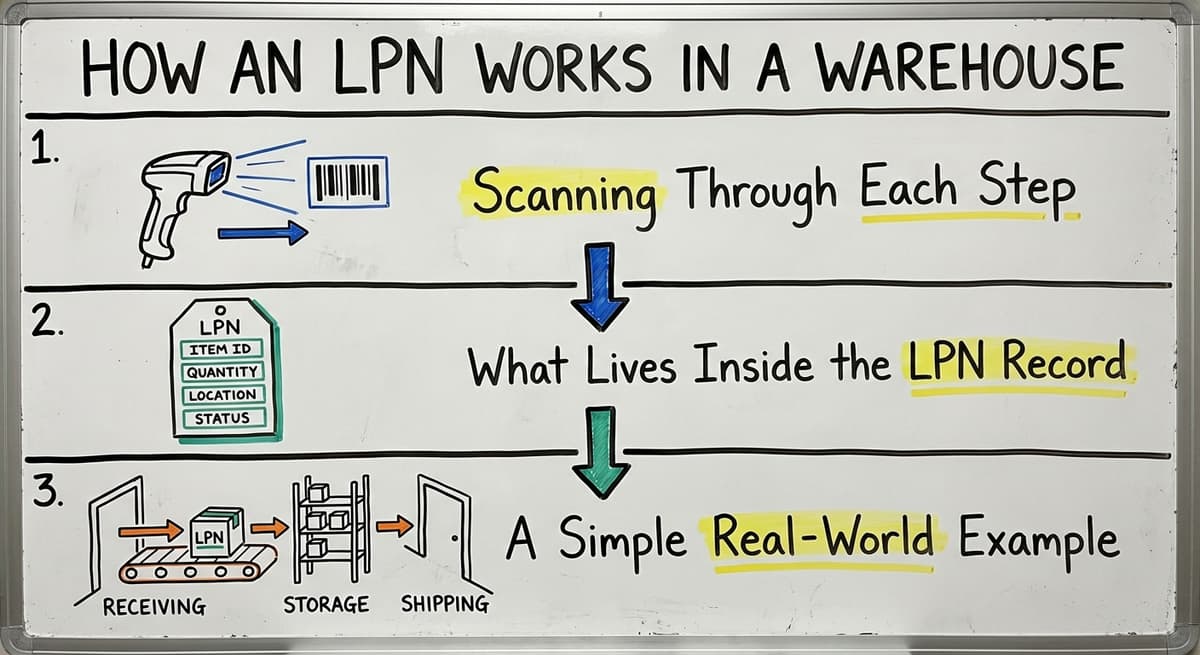
Scanning Through Each Step
The LPN is scanned at each stage of the warehouse process:
- Receiving: The system reads the LPN and records what came in against the purchase order.
- Putaway: The worker scans the LPN, then scans the bin location. The system now knows exactly where that pallet sits.
- Picking: The system sends the worker to the right LPN location. A scan confirms the pick.
- Packing and shipping: The LPN is checked against the outbound order. The warehouse has a full audit trail.
Workers only scan 1 label to move or locate an entire pallet. This is faster than scanning dozens of individual items.
What Lives Inside the LPN Record
All the detail about the container lives in the warehouse system, linked to the LPN. That includes:
Reviewed August 2026. Each figure comes from the assumptions stated beside it, so you can substitute your own and the arithmetic still holds.
- SKUs and quantities
- Lot numbers and batch codes
- Expiry dates
- Supplier and purchase order reference
The IRS is direct about why this matters at a business level.
As IRS Publication 538 states: "To figure taxable income, you must value your inventory at the beginning and end of each tax year." You cannot value what you cannot find or count. LPN tracking makes that count possible without a full manual recount.
A Simple Real-World Example
Your supplier ships 48 boxes of the same product on 1 pallet. Your team prints 1 LPN label and sticks it on the pallet.
When the pallet moves to bin B-12, a worker scans the LPN and scans the bin. Later, when a picker needs that product, the system says: go to B-12, scan LPN LP-00042817. Done. No guessing, no searching, no recount.

Why Do LPNs Matter for Inventory Accuracy?
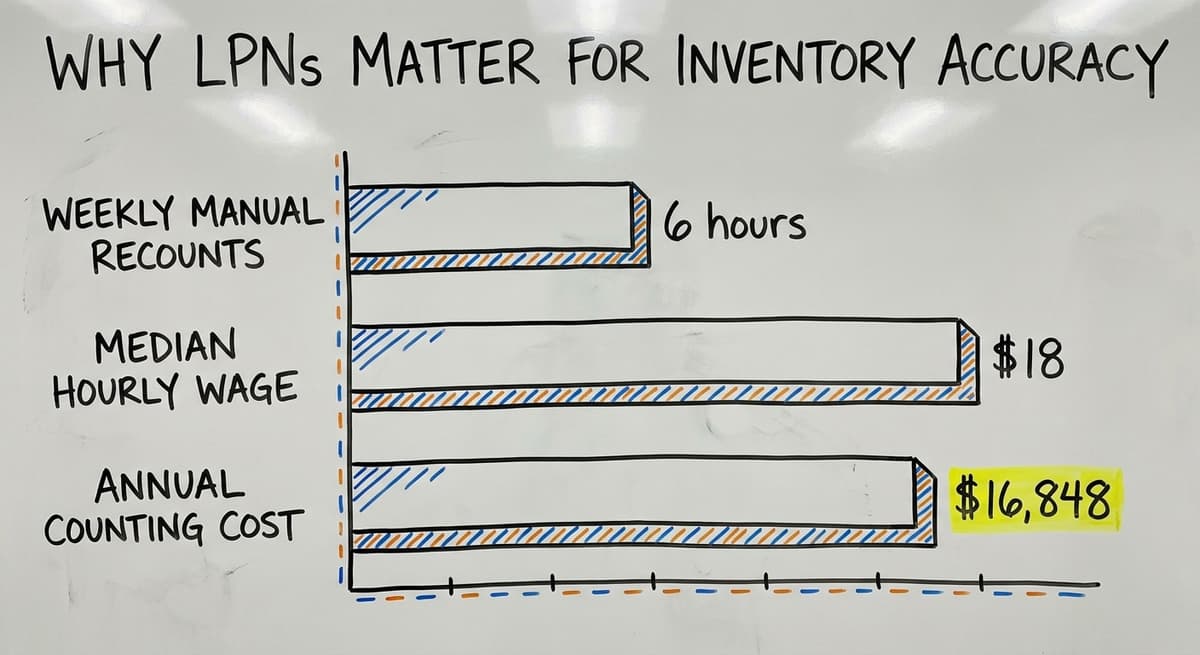
Inventory errors cost real money. Consider 3 warehouse workers spending 6 hours a week each on manual recounts, at the median wage for stock clerks of around $18 an hour per the US Bureau of Labor Statistics. That is roughly $16,848 a year spent just on counting. LPN scanning cuts that time sharply.
Fewer Errors, Faster Counts
LPNs replace handwritten notes and manual tallies with a single scan. The system always knows which LPN is in which location. Workers do not re-count contents every time a pallet moves.
This matters most for:
- Products with expiry dates that need lot tracking
- Items subject to recall requirements
- Mixed-SKU containers that are easy to miscount
Is the comparison easier when one option is built for you?
Yes. Off-the-shelf means fitting your process to the software, and custom is the other way round. The first look costs nothing.
Book a callThe Spreadsheet Problem
Many small warehouses track inventory in a spreadsheet or on printed sheets. That works until a pallet gets partially picked. Now the sheet says 48 units but the pallet holds 31. No one updated the count. The next pick is wrong.
LPN tracking solves this. When a worker pulls 17 boxes from a pallet, they scan the LPN. The system adjusts the quantity. The record stays accurate without anyone updating a spreadsheet.
Cycle counting and inventory accuracy improve because the system always reflects what actually happened, not what someone remembered to write down.
Lot Tracking and Compliance
For food, pharma, or any product with a batch code, LPNs make lot tracking simple. The lot number is tied to the LPN at receiving.
If a recall happens, the system shows every LPN that holds that lot and exactly where each one sits. Without LPNs, that search is manual and slow.

LPNs vs Barcodes vs SKUs
LPNs, barcodes, and SKUs are 3 terms that get mixed up often. They are not the same thing.
What Each Term Means
| Term | What It Identifies | Example |
|---|---|---|
| SKU | A product type | Blue widget, size M |
| Barcode | The printed symbol used to scan | The striped label |
| LPN | A specific physical container right now | Pallet LP-00042817 |
A SKU is what something is. A barcode is how you scan it. An LPN is where it is and what is in that box or pallet right now.
Why the Difference Matters
One SKU can appear on hundreds of different LPNs across a warehouse at the same time. You might have 12 pallets of the same blue widget, each with its own LPN, each in a different bin.
The barcode is just the format. A barcode can encode a SKU or an LPN. The barcode itself does not tell you which one it is.
Your system does. How barcode scanning works in a warehouse depends on what data sits behind each label, not just the label itself.

Do Small Warehouses Need LPNs?
Whether small warehouses need LPNs is the question most LPN articles skip. The short answer: if you move pallets or totes through more than 2 steps, LPNs will help you.
Size Does Not Disqualify You
LPN tracking is not only for large operations with expensive enterprise software. The concept is simple. A label, a scanner, and a system that links the two. That takes shape at any scale.
Small warehouses that use spreadsheet or The accounting software hit the exact problems LPNs solve:
- Lost partial pallets
- Wrong counts at receiving
- Slow picking because workers search instead of scan
Warehouse inventory management software overview for small and mid-sized operations now includes LPN features without requiring a full enterprise WMS. The technology has come down in cost and complexity.
What does it look like running on your own process?
The first thing you see is it running on your own process, at no build cost. The subscription starts once it is live and doing the job, not before.
Book a callYou Do Not Have to Change Everything at Once
A good system fits how your operation already works. You do not need to rebuild every process overnight. A warehouse inventory management software built for smaller teams can layer LPN tracking on top of your current workflow.
For teams running on a standard accounting package, an accounting integration for warehouse operations can pull purchase order and order data from it and add LPN tracking on top. Your accounting stays in the accounting software. Your inventory gets accurate. Neither system fights the other.
How Does Warehouse Software Use LPNs?
LPN data flows through a warehouse management system, or WMS, at every stage. Here is how that looks in practice.
From Receiving to Putaway
At receiving, the system generates an LPN or reads one from a supplier label. It records what came in against the purchase order. The receiving and putaway process in a warehouse becomes a scan-and-confirm step rather than a count-and-write step.
During putaway, the worker scans the LPN and scans the bin. The system records the location. No one has to remember where they put it.
From Picking to Shipping
During picking, the system directs the worker to the LPN location. A scan confirms the pick and adjusts the quantity on the LPN record. If the pallet is fully consumed, the LPN closes. If units remain, the LPN stays open with the updated count.
At shipping, the LPN is confirmed against the outbound order. The warehouse has a complete audit trail from receipt to dispatch. This is especially useful for fulfillment centers and wholesale distribution operations that need traceability but are not ready for a full ERP.
The NIST Manufacturing Extension Partnership notes that clear tracking through each supply chain step reduces errors and supports faster response when problems arise. LPN scanning is one of the most direct ways to build that clarity into daily operations.
Common Questions About LPNs in Warehousing
Can one LPN hold multiple SKUs? Yes. A mixed pallet or tote can have a single LPN with multiple product types recorded inside it. The system tracks each SKU and quantity separately, all linked to that one LPN.
What happens when an LPN is broken down? The original LPN is closed. New child LPNs or individual item records are created for the pieces that move separately. The system keeps the history of what came from where.
Do LPNs expire or get reused? Most systems retire an LPN once it is shipped or consumed. A new LPN is generated for the next container. This keeps records clean and avoids confusion between old and new shipments.
Is an LPN the same as an SSCC? Not exactly. An SSCC, or Serial Shipping Container Code, is a standardized GS1 format used in EDI and retail compliance.
All SSCCs are a type of LPN, but not all LPNs are SSCCs. If your retail customers require EDI compliance, your LPNs may need to follow the SSCC format. If not, your system can use its own numbering.
If your team is still tracking pallets on paper or in a spreadsheet, LPN tracking is the clearest upgrade you can make. It does not require a massive system overhaul. It requires a label, a scanner, and software that connects the two to your existing orders and locations.
The Software Society builds custom workflow systems for operations exactly like yours. We connect inventory tracking, purchasing, and order management into one place, without forcing you to abandon what already works.
If you want to see what that looks like for your warehouse, start a conversation with our team.
Frequently asked questions
Frequently asked questions
What does LPN stand for in warehousing?
LPN stands for License Plate Number. It is a unique ID label attached to a pallet, tote, or carton in a warehouse. The label lets the system track that container with one scan instead of counting every item inside individually.
What is the difference between an LPN, a SKU, and a barcode in a warehouse?
A SKU identifies a product type. A barcode is the printed symbol used to scan a SKU or an LPN. An LPN identifies a specific physical container at a specific moment in time.
The SKU is what something is. The LPN is where it is and what is inside that box or pallet right now.
Can an LPN hold multiple SKUs?
Yes. A mixed pallet or tote can carry a single LPN with multiple product types recorded inside it. The warehouse system tracks each SKU and quantity separately, all linked to that one LPN label.
Do small warehouses need LPN tracking?
LPN tracking is useful at any size if the warehouse handles pallets, totes, or mixed-SKU containers that move through more than one step.
Small warehouses tracking inventory in a spreadsheet or the accounting software face the exact problems LPNs solve: lost partial pallets, wrong counts at receiving, and slow picking.
What happens to an LPN when a pallet is broken down?
The original LPN is closed. New child LPNs or individual item records are created for the parts that move separately. The system keeps a history of what came from the original container.
Is an LPN the same as an SSCC?
Not exactly. An SSCC, or Serial Shipping Container Code, is a standardized GS1 format used in EDI and retail compliance.
All SSCCs are a type of LPN, but not all LPNs are SSCCs. If your retail customers require EDI compliance, your LPNs may need to follow the SSCC format.
Can I use LPN tracking if I run my business on a standard accounting package?
Yes. A custom warehouse system can pull purchase order and order data from the accounting software and layer LPN tracking on top without replacing your accounting workflow. Your books stay in the accounting software and your inventory becomes accurate in the warehouse system.
What is an LPN label?
An LPN label is the printed barcode that carries a license plate number: a unique identifier for one physical container, a pallet, tote or carton, rather than for a product type.
Scanning the label tells the system everything held in that container and where it currently sits. It is applied at receiving and travels with the container through put-away, storage and picking until the container is broken down.
How does an LPN work in a WMS?
At receiving the system generates a license plate number, prints the label and records what went onto that container: the SKUs, quantities, lot or expiry where relevant, and the purchase order it came from.
From then on staff scan the LPN rather than the individual items. A put-away scan records its location, a move scan updates it, a pick scan draws stock down from it, and the container's history stays attached to the number.
Where is an LPN used in the warehouse?
Wherever goods move as a group: on pallets coming off the truck, on totes moving through put-away, on cases in bulk storage, on staged shipments waiting at the dock and on returns waiting for inspection.
Small warehouses that pick single items from shelves use LPNs mainly at receiving and in bulk storage; distribution centers use them at every step.
What information is stored against an LPN?
The contents: each SKU and its quantity, with lot numbers, serials or expiry dates where the product needs them; the source, the purchase order and supplier; the current location; the container's status, such as received, put away, staged or shipped; and a movement history with users and timestamps. That record is what lets a warehouse answer where a specific pallet is, and what is on it, without walking to look.
Can one LPN contain multiple products?
Yes. A mixed pallet or tote carries several SKUs under one license plate number, and the system holds each line separately underneath it. That is the main advantage over tracking by SKU alone: staff scan the container once, and the system knows all of its contents.
When the container is broken down, the stock is re-assigned to new LPNs or to shelf locations and the original number is closed.
What is in a free first look?
A 30 minute call, your operation mapped, and a clear picture of what we would build. No obligation and nothing to install.
Book a callRelated guides
The rest of this guide, for the parts of the job this page does not cover.
Guides
Common questions
- What Warehouse Management System Does Amazon Use
- What Does Receiving Mean in a Warehouse?
- What is the Most Important Part of Warehouse Organization
- What Are the Benefits of Warehouse Management System
- What is the Point of Warehouse Management System
- What Are the Top 5 Warehouse Management Systems?
- What is Asn in Warehouse Management System
- What is a Warehouse Management System
- What is the Best Warehouse Inventory Management System?
- What is a Warehouse Management System Used For
- What is the Difference Between Warehousing and Inventory Management
- What is the Most Popular Warehouse Management System?
- What is Warehousing Operations
- What is the Purpose of a Warehouse Management System
- What is a Warehouse Management System Pdf
- What is Warehouse Operation
- What is B Type of Inventory in Warehouse Management
- What is a Simple Warehouse Management System?
- What is Warehousing and Inventory Management
- What is a Warehouse Management System Example
- What Does a Barcode Look Like
- What Are the 7s Rules in a Warehouse?
- What is Picking and Packing in a Warehouse?