


What Is The Purpose Of A Warehouse Management System
The purpose of a warehouse management system is to control the movement and storage of goods inside a warehouse. It replaces manual tracking with information that updates on every scan, so the team knows what is on the shelf, where it sits, and what ships next. This guide, reviewed in September 2026, sets out the 5 core purposes and what changes on the floor when a warehouse of 5 to 100 people gets one.
Reviewed August 2026. Each figure comes from the assumptions stated beside it, so you can substitute your own and the arithmetic still holds.
Published 14 August 2026. Reviewed and updated 15 September 2026.
Book a callWhat Does a Warehouse Management System Actually Track?
A WMS tracks every item from the moment it arrives at your dock to the moment it leaves on a truck. That covers inventory location, quantity on hand, and every step in between.
The system logs receiving, putaway, picking, packing, and shipping as separate events. Each event records who did the work and when. That full activity log is something no spreadsheet can match.
OSHA notes that "the warehousing and storage industry includes establishments operating facilities for general merchandise, refrigerated goods, and other products." Every one of those product types moves through the same basic steps, and a WMS tracks all of them in real time.
Why Do Spreadsheets Go Stale?
A printed pick sheet is accurate right when it prints. The second someone moves a pallet, that sheet is wrong.
Spreadsheets have the same problem. A cell updated on one computer does not update on the forklift driver's clipboard. Real-time inventory tracking is only possible when a single system records every move the instant it happens.
In a wholesale distribution setting, a pallet of 200 units might be split across 3 locations. A spreadsheet shows one number. A WMS shows all 3 locations, the quantity in each, and the location to pull from first.
The Full Activity Log
Every scan creates a record. The record shows the item, the quantity, the worker, the time, and the location.
When a mis-ship happens, you trace it back in seconds. No one has to guess the shift that made the error or the bin that was short.
Would you rather have it built around your operation?
The first look is free. If you would rather not compare products, describe how your operation already works and we build the system around it.
No build cost. You see it running on your own process first, and the monthly subscription starts only once it is live.
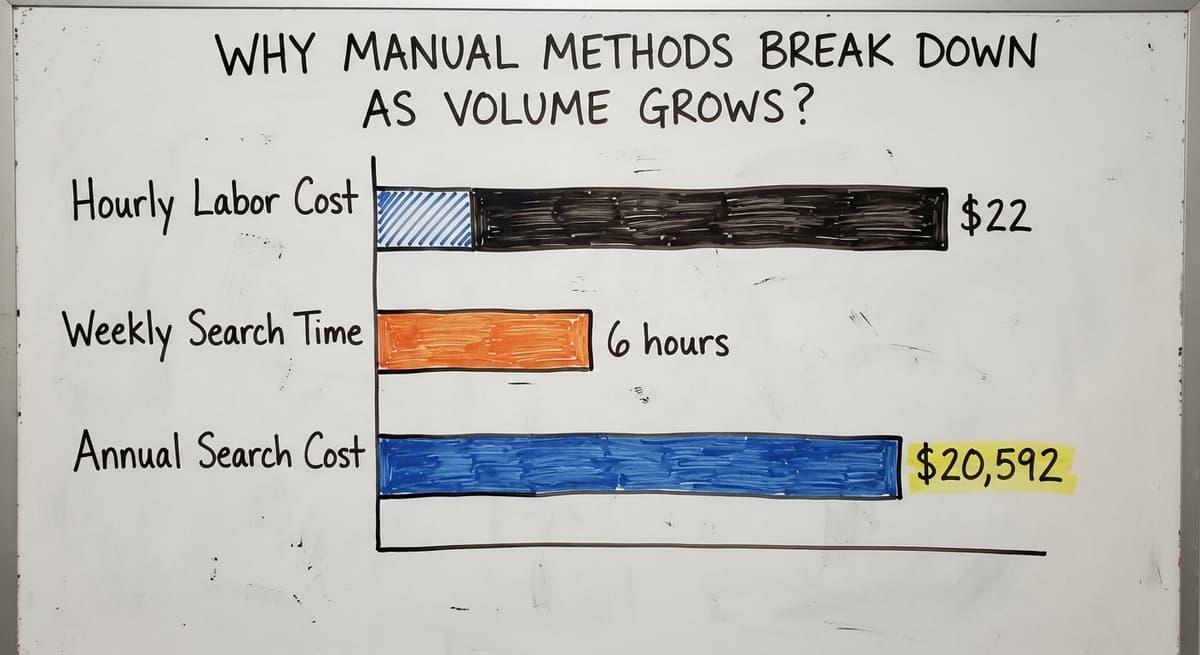
Book a callWhy Manual Methods Break Down as Volume Grows?
Manual methods break down when they cannot update fast enough to keep pace with a growing order volume. When your team ships 20 orders a day, a spreadsheet is manageable. At 200 orders a day, it becomes a liability.
Errors compound quickly. One wrong count in a receiving log creates a mismatch in your pick list. That mismatch causes a mis-ship. The mis-ship triggers a return. The return costs time, freight, and a frustrated customer.
Staff start spending their day hunting for stock rather than moving it. The US Bureau of Labor Statistics shows that warehouse order fillers earn around $22 per hour.
Three workers spending 6 hours a week searching for misplaced stock costs $20,592 a year in labor alone, and that number does not include the orders that ship late.
The Accounting Software and Spreadsheet Wall
Many small distributors run their business on accounting software plus a set of spreadsheets. That setup works well up to a point. It is not a failure of planning. The tools did the job until the job got bigger.
Your accounting software handles your financials well. A spreadsheet tool handles simple lists. Neither tool was built to track a bin location, confirm a pick, or flag a short ship before the truck pulls away.
Growth exposes the gap. The process that worked at 50 orders a week starts to crack at 500.
Is the comparison easier when one option is built for you?
Yes. Off-the-shelf means fitting your process to the software, and custom is the other way round. The first look costs nothing.
Book a call
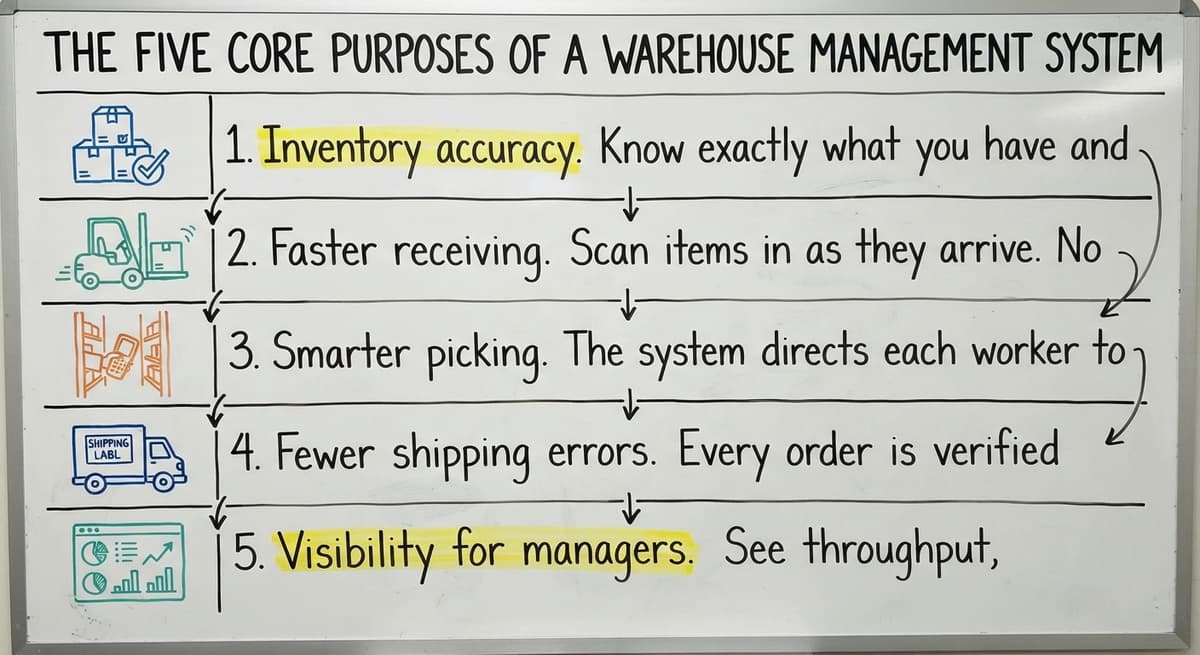
The Five Core Purposes of a Warehouse Management System
Warehouse management systems serve 5 distinct purposes, each solving a different part of the daily operations puzzle.
- Inventory accuracy. Know exactly what you have and where it sits. The system updates counts in real time as items move.
- Faster receiving. Scan items in as they arrive. No paper logs, no hand-written counts, no reconciling at the end of the day.
- Smarter picking. The system directs each worker to the right bin in the right order. Pick paths are optimized so workers cover less ground.
- Fewer shipping errors. Every order is verified before it leaves the dock. The system confirms each item scanned matches the order.
- Visibility for managers. See throughput, bottlenecks, and open orders on a screen. No walking the floor to get an update.
The Warehousing Education and Research Council publishes standard benchmarks for distribution center performance. Accuracy, cycle time, and on-time ship rate are the metrics that matter most. A WMS gives you the data to measure all three.

Does a Warehouse Management System Replace Your Accounting Software or Work Alongside It?
A well-built WMS works alongside your accounting tool. It does not replace it.
Your accounting system handles your chart of accounts, invoices, and tax records. The IRS is clear on why that matters.
IRS Publication 538 states: "To figure taxable income, you must value your inventory at the beginning and end of each tax year." That software is the right tool for that job.
Accounting sync keeps both systems current without double entry. A sale in the accounting software updates the quantity in the WMS. A receipt in the WMS updates the inventory value in that system.
What Data Syncs Between the Two Systems?
The sync does not have to be complex. The key data points are:
- Item numbers and descriptions
- Quantity on hand by location
- Purchase orders received
- Sales orders shipped
- Adjustments and returns
Those 5 data points cover the vast majority of what a small distributor needs to keep both systems aligned. No six-figure ERP rollout required.

What Changes on the Warehouse Floor?
The day-to-day experience for your team changes in practical ways.
Receiving staff scan items in as they come off the truck. The system assigns a putaway location and prints or displays a label. No one writes a count by hand.
Pick errors drop once the system confirms each item before it goes in the box. A worker scans the item, the system says yes or no, and the packing step only closes when every line is confirmed.
Managers stop fielding calls about order status. The answer is on screen. A 10-person operation can see every open order, every item picked, and every shipment staged without leaving the office.
Onboarding New Workers Gets Faster
When the process lives in someone's head, every new hire needs that person to train them. That creates a bottleneck and a single point of failure.
A WMS puts the process in the system. New workers follow the screen. They learn the job in hours instead of days, with the instructions built into each step.
What does it look like running on your own process?
The first thing you see is it running on your own process, at no build cost. The subscription starts once it is live and doing the job, not before.
Book a call
Signs Your Operation Is Ready for a WMS
Some symptoms show up before an operation is ready to act on them. Others make the decision obvious.
- Mis-ships or inventory discrepancies happen weekly. If you are reconciling counts more than you are filling orders, the manual process has already broken down.
- Staff spend significant time reconciling counts. Time spent fixing numbers is time not spent moving product.
- Growth is slowing because the process cannot scale. New customers require more capacity. The current setup has no more room to stretch.
- Onboarding takes too long. If a new hire needs 2 weeks of shadowing before they can work alone, the process is not documented. It is memorized.
The US Census Bureau's Monthly Wholesale Trade data tracks inventory-to-sales ratios across wholesale firms. When that ratio climbs, it means stock is sitting longer than it should. A WMS helps you move the right stock first.
Custom vs. Off-the-Shelf Warehouse Management Systems
Off-the-shelf systems target an average warehouse. Your warehouse is not average.
A packaged WMS comes with features for cold storage, hazmat handling, multi-site management, and dozens of other use cases you may never need. You pay for all of them. You use a fraction of them.
| Factor | Off-the-Shelf WMS | Custom WMS |
|---|---|---|
| Built for your workflow | No | Yes |
| Features you actually use | Partial | Targeted |
| Implementation time | Weeks to months | Shaped to your timeline |
| Cost structure | License plus setup fees | Built to scope |
| Fits existing team habits | Rarely | By design |
Custom warehouse software is shaped around the way your team already works. The screens match your process. The language matches your product categories. Workers adopt it faster because it feels familiar.
A local, custom-built option also avoids the long enterprise rollout that comes with large packaged systems. For a 10- to 50-person distributor, a phased build that starts with receiving and picking is far less disruptive than a full platform switch.
NIST's Manufacturing Extension Partnership offers vendor-neutral guidance on supply chain process improvement. Their guidance consistently points toward fitting the tool to the operation, not the other way around.
GS1 barcode standards make it possible for a label printed at your supplier to scan correctly at your dock. A custom WMS built on those standards works with the barcodes already on your products.
How Should You Think About Implementation?
Implementation does not have to mean disruption. A phased approach starts with the highest-pain area, receiving or picking, and adds layers once the team is comfortable.
The goal is a system your team uses every day, not one that sits unused because it was too hard to learn. The way custom warehouse software follows your workflow makes a real difference in whether adoption sticks.
So, What Is the Bottom Line on Warehouse Management System Purpose?
A WMS exists to give every person in the warehouse accurate information at the right moment. That is the whole purpose, stated plainly.
The result is fewer errors, faster fulfillment, and a manager who can see what is happening without walking the floor. Warehouse inventory management stops being a guessing game and starts being a system.
The right WMS fits your operation. It works with the tools you already use, including your accounting software. It does not demand that you change everything at once.
If mis-ships, inventory discrepancies, or slow onboarding are already costing you time and customers, the gap between what you have and what you need is worth a conversation.
A short assessment of your current warehouse operations can show exactly where a system would have the most impact and what a practical build would look like for your team.
Frequently asked questions
Frequently asked questions
What are the four types of WMS?
The 4 common types are: standalone WMS (a dedicated system focused only on warehouse operations), ERP-integrated WMS (a warehouse module built into a larger business system such as a major enterprise resource planning suite), cloud-based WMS (hosted software accessed via browser with no on-site servers), and supply chain module WMS (a warehouse component within a broader supply chain platform).
Standalone and cloud-based options are the most practical starting point for small distributors who are not running a full ERP.
What's the difference between WMS and ERP?
A WMS handles warehouse operations: location, movement, picking, packing, and shipping. An ERP (enterprise resource planning system) handles the whole business: finance, HR, purchasing, sales, and sometimes warehouse operations as one of many modules.
For a small distributor already using accounting software, a standalone WMS is the right fit. It fills the warehouse gap without replacing the financial tools that already work.
What are the five S's of warehouse management?
The 5 S's come from a Japanese workplace method: Sort (remove items that do not belong in the space), Set in order (give every item a defined location), Shine (keep the space clean and inspected), Standardize (document the process so everyone follows the same steps), and Sustain (keep the habits in place over time).
A WMS supports all 5 by enforcing location rules and recording every move, but the 5 S's are a physical practice that runs alongside the software.
Is WMS difficult to learn?
A well-built WMS should not be difficult to learn. Workers follow on-screen instructions for each task: scan this item, place it here, confirm the count. Most warehouse staff are productive within a day or two on a system designed for their workflow.
The systems that feel difficult are ones built for a different type of operation or configured without input from the people doing the work. A custom build shaped around your team's habits cuts the learning curve significantly.
What does a warehouse management system actually do day to day?
Day to day, a WMS guides workers through each task in sequence. It tells a receiving team member where to put incoming stock. It directs a picker to the right bin in the right order. It confirms each item before packing closes. It logs every action so managers can see order status, stock levels, and worker activity without asking anyone for an update.
When does a small warehouse actually need a WMS?
The clearest signs are weekly mis-ships, inventory counts that never match, staff spending more time reconciling than fulfilling, and new workers taking weeks to get up to speed.
If any of those are happening regularly, the manual process has already reached its limit. A WMS is not a future investment at that point. It is the fix for a current problem.
Is a custom WMS better than an off-the-shelf system for a small distributor?
For most small distributors, yes. Off-the-shelf systems carry features built for warehouses much larger or more complex than yours. You pay for those features whether you use them or not.
A custom WMS is scoped to your actual workflow, your product types, and your team size. It costs less to run, takes less time to learn, and does not force your team to adapt to a process designed for someone else's operation.
What are the main features of a warehouse management system?
A warehouse management system centers on five core functions: inventory accuracy through real-time count updates, faster receiving via scanning instead of paper logs, smarter picking through optimized paths, fewer shipping errors through order verification before dispatch, and visibility for managers who can see throughput, bottlenecks, and open orders without checking the floor in person.
How does a WMS improve inventory accuracy?
A WMS improves accuracy by updating stock counts the instant an item moves, rather than relying on a spreadsheet or printed sheet that goes stale immediately.
Every scan creates a record showing the item, quantity, worker, time, and location, so discrepancies can be traced back in seconds instead of guessed at.
How much does a warehouse management system cost?
Cost varies by business size and setup, but a warehouse management system does not require a large upfront investment or a complex enterprise rollout.
Smaller distributors can sync only the essential data points, such as item details, quantities, and orders, without needing an expensive system overhaul, keeping the overall approach practical and scaled to actual operational needs.
How do you choose the right WMS for a business?
Choosing the right system starts with recognizing whether your operation is actually ready for one. Look for signs such as frequent mis-ships, staff spending excessive time reconciling counts, stalled growth, or slow onboarding because processes live only in someone's memory.
From there, weigh whether a custom system built around your existing workflow or an off-the-shelf option that requires adapting your process fits better.
What types of businesses need a WMS?
Businesses that need a warehouse management system are wholesale distributors and growing operations whose order volume has outpaced manual tracking, such as spreadsheets or paper logs.
Once daily orders climb into the hundreds, errors compound, staff spend time hunting for stock, and tools like basic accounting software and spreadsheets can no longer keep pace with warehouse floor demands.
What is in a free first look?
A 30 minute call, your operation mapped, and a clear picture of what we would build. No obligation and nothing to install.
Book a callRelated guides
The rest of this guide, for the parts of the job this page does not cover.
Guides
- Warehouse Inventory Management Systems
- Warehouse Management System Top 10
- Software for Warehouse Management System
- Small Business Warehouse Management System
- Warehouse Management System Types
- Warehouse Inventory Management System
- Warehouse Management System Examples
- Warehouse Management System Implementation
Common questions
- What Are the Benefits of Warehouse Management System
- What is the Point of Warehouse Management System
- What is Asn in Warehouse Management System
- What is a Warehouse Management System
- What is a Warehouse Management System Used For
- What is a Warehouse Management System Pdf
- What is a Warehouse Management System Example
- What Warehouse Management System Does Amazon Use
- What Are the Top 5 Warehouse Management Systems?
- What is the Best Warehouse Inventory Management System?
- What is the Difference Between Warehousing and Inventory Management
- What is the Most Popular Warehouse Management System?
- What is B Type of Inventory in Warehouse Management
- What is a Simple Warehouse Management System?
- What is Warehousing and Inventory Management
- How to Choose a Warehouse Management System