


What Is A Simple Warehouse Management System?
A simple warehouse management system is stock tracking without the bloat. It records stock, locations, and orders and skips the modules an enterprise needs. Most explanations of a simple warehouse management system address buyers with IT departments and six-figure budgets; this one, reviewed in September 2026, is for a warehouse of 5 to 100 people that wants a simple warehouse management system live in weeks.
Published 13 August 2026. Reviewed and updated 15 September 2026.
Book a callWhat Is a Simple Warehouse Management System?
A simple warehouse management system is software that tracks inventory, orders, and stock movement inside a warehouse. It tells you what you have, where it lives, and what needs to happen next. That is the whole job.
For an independent explanation, see what a global standards body publishes on this: GS1 covers why a barcode printed by one company scans at another.
A closer look comes from independent research published here: Auburn University RFID Lab covers independent research on RFID in retail and supply chain.
The benchmark data itself is published directly by the organization that maintains it: Warehousing Education and Research Council covers the standard benchmark set for distribution centre performance.
Reviewed August 2026. Each figure comes from the assumptions stated beside it, so you can substitute your own and the arithmetic still holds.
The arithmetic is worth doing before the software conversation. 3 people spending 6 hours a week between them chasing the same questions, at 22 dollars an hour, is 936 hours a year of paid time spent confirming what a system would already know. Over 3 years that is 2,808 hours.
The word "simple" does not mean stripped-down or low quality. It means right-sized. A simple WMS is built for operations that do not need payroll processing, HR modules, or manufacturing scheduling baked in. It handles warehouse operations and does that one thing well.
Large ERP systems do much more, and that is exactly the problem for most small warehouses. You pay for features you will never touch, and you spend months getting the thing running. A simple WMS skips all of that.
Would you rather have it built around your operation?
The first look is free. If you would rather not compare products, describe how your operation already works and we build the system around it.
No build cost. You see it running on your own process first, and the monthly subscription starts only once it is live.
Book a callWhat does a simple warehouse management system actually track?
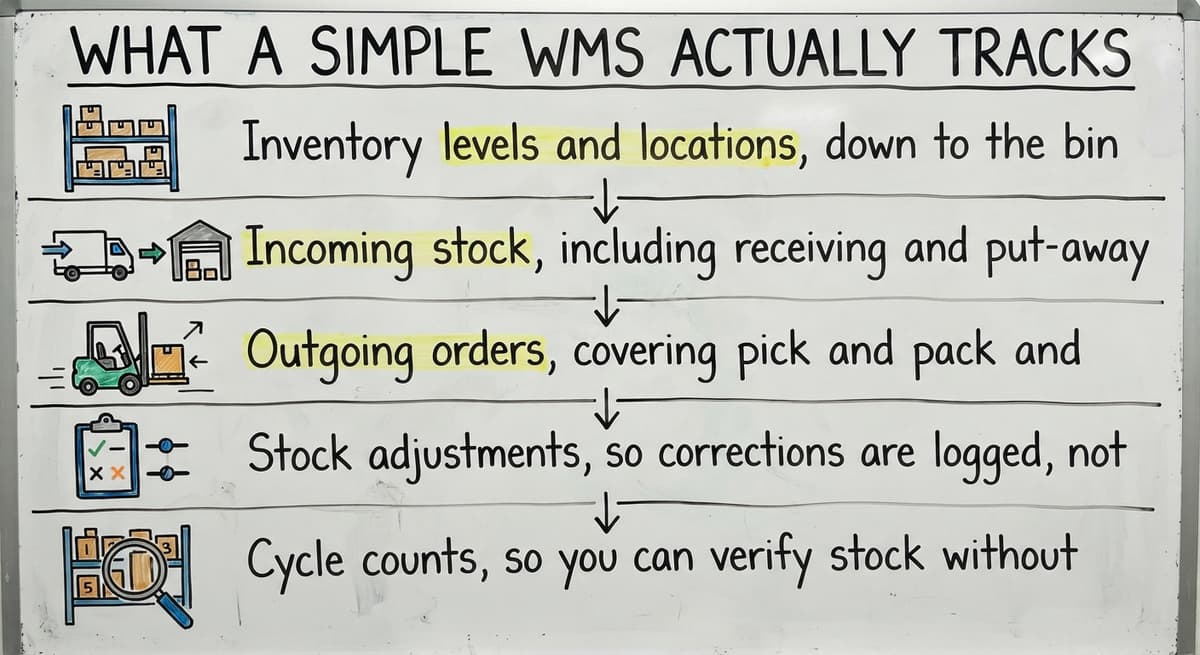
Good warehouse inventory management starts with knowing what the system is responsible for. A simple WMS covers:
- Inventory levels and locations, down to the bin, shelf, or zone
- Incoming stock, including receiving and put-away workflows
- Outgoing orders, covering pick and pack and shipping confirmation
- Stock adjustments, so corrections are logged, not guessed
- Cycle counts, so you can verify stock without shutting down the floor
Proper warehouse operations also carry real safety obligations. As OSHA states directly on its warehousing guidance page, "Warehousing operations present a variety of safety and health hazards", which is one reason accurate location and movement tracking matters beyond just order accuracy.

How Does a Simple WMS Fit Into a Small Operation?
A simple WMS fits between the tools you already use, not on top of a full replacement project.
Most small warehouses are running some version of the same setup: basic accounting software for the books, a spreadsheet for stock counts, printed pick lists handed to staff, and email threads for order updates. It works until it does not.
A simple WMS does not ask you to abandon your accounting software or retrain your team on an entirely new platform. Instead, it sits in the middle. Inventory data lives in the WMS.
Order status lives in the WMS. Your accounting software still handles the books. The two systems share data through an integration, so you are not manually copying numbers from one place to another.
This is exactly where understanding warehouse inventory management software becomes relevant: knowing what the software owns versus what your existing tools own is the first step toward a clean setup.
Simple WMS vs. Full ERP: What Is the Difference
The distinction matters: vendors blur the two in conversation.
| Feature Area | Simple WMS | Full ERP |
|---|---|---|
| Inventory tracking | Yes | Yes |
| Warehouse operations | Yes | Yes |
| Finance and accounting | No | Yes |
| HR and payroll | No | Yes |
| Manufacturing scheduling | No | Yes |
| CRM and sales pipeline | No | Yes |
| Setup time | Days to weeks | Months to years |
| Cost | Lower | Significantly higher |
A simple WMS focuses only on warehouse and inventory operations. That narrow focus is a feature, not a limitation.
For a small distributor shipping fifty to five hundred orders a day, an ERP is overkill. It creates disruption, cost, and a long implementation that pulls your team away from actual work.

Signs Your Operation Is Ready for One
You do not need a consultant to tell you when the current system is breaking. These moments are familiar:
- Your team counts stock on paper and transfers the numbers to a spreadsheet every week
- Pick errors are climbing, and you are reshipping orders you already packed once
- Someone spends hours each week reconciling the accounting software with a separate inventory sheet
- The warehouse has grown, but the process is still the same one you used when you were half the size
- A customer calls asking where their order is, and no one can answer without digging through emails
None of these are abstract metrics. They are real moments that cost real time and real money.
Is the comparison easier when one option is built for you?
Yes. Off-the-shelf means fitting your process to the software, and custom is the other way round. The first look costs nothing.
Book a callCore Features to Look For
Not every system marketed as a "simple WMS" actually earns that label. When you evaluate options, these are the 6 features that matter:
- Real-time inventory visibility: Stock levels update the moment a transaction happens, not at the end of the day
- Receiving and put-away workflow: Staff follow a guided process when stock arrives, so nothing gets misplaced
- Pick list generation: Whether paper-based or barcode-driven, pick lists should be accurate and easy to follow
- Accounting software integration: Data should sync without manual export and import steps. Integration between the warehouse system and your accounting software is a non-negotiable requirement for most small operations
- Reporting: You need to see stock levels, order status, and movement history without building a custom report every time

What makes a warehouse management system truly simple to use?
Software is only simple if your team can actually use it. A few things separate systems that stick from systems that get abandoned:
Staff should be comfortable within days, not weeks. If the training timeline stretches past a week for core tasks, the system is not built for small operations. It is built for enterprise teams with dedicated trainers.
The best systems are built around the way your team already works. They use your terminology, match your physical layout, and follow the sequence your staff already knows. A generic workflow that your team must adapt to is a friction point every single day.
No IT department should be required to keep it running. Updates, user changes, and basic troubleshooting should be manageable by whoever runs the warehouse.
Custom-Built vs. Off-the-Shelf Simple WMS
Off-the-shelf software works well for operations with generic workflows. If your receiving process, your bin structure, and your order types are standard, a packaged system will probably cover you.
But many small warehouses have specific quirks. A product that ships in custom kit configurations. A put-away process tied to expiration dates.
A picking sequence that follows the physical layout of the building rather than alphabetical order. Off-the-shelf systems handle these with workarounds, and workarounds become habits, and habits slow people down.
Custom warehouse software for small distributors matches the exact process, terminology, and physical layout of your operation from day one.
Custom does not automatically mean expensive or slow. Builders who specialize in small and mid-size operations move quickly; they are not starting from an enterprise template.
This is also where replacing spreadsheet-based inventory tracking becomes a real conversation. A custom build can map directly to the columns your team already uses, which makes the transition far less disruptive than switching to a system designed for a different kind of business entirely.
Where Do You Start?
Start on paper, before you talk to any vendor. The first step is mapping your current process in order to describe it clearly. Write down what happens when a shipment arrives, how a pick list gets created, and how an order gets confirmed as shipped.
From there:
- List the three biggest daily pain points in the warehouse. Be specific.
- Note the tools you currently use and the ones you want to keep.
- Ask any vendor if their system integrates with your accounting software and what implementation actually looks like in weeks, not marketing language.
- Find out whether the system can be configured to your workflow or whether you will be adapting to theirs.
If you would rather talk through your current setup before committing to anything, that is a reasonable place to start.
The Software Society works with small and growing operations to map what they have, identify where the process is breaking, and build or recommend a system that fits the actual operation rather than a hypothetical one.
No pressure, no pitch deck. Just a conversation about what is happening now and what would make it better.
Frequently asked questions
Frequently asked questions
What is a simple warehouse management system in plain language?
A simple warehouse management system is software that tracks what inventory you have, where it is located, and what needs to move in or out of your warehouse. It handles receiving, put-away, picking, packing, and shipping without requiring the complexity of a full ERP platform.
Can a simple warehouse management system work alongside your accounting software instead of replacing it?
Yes. A simple WMS is designed to handle warehouse and inventory operations while your accounting software continues to handle the books. The two systems share data through an integration, which eliminates the manual reconciliation step most small warehouses deal with every week.
How is a simple WMS different from a full ERP system?
A full ERP covers finance, HR, manufacturing, CRM, and more. A simple WMS focuses only on warehouse and inventory operations. That narrower scope means shorter setup time, lower cost, and far less disruption to your daily work.
What signs mean a small warehouse needs a WMS?
Common signs include stock counts still done on paper or in spreadsheets, rising pick errors, orders shipping late, hours spent reconciling accounting software with a separate inventory sheet, and a warehouse that has grown but is still running on the same manual process it used when it was smaller.
What features should a simple WMS include?
Look for real-time inventory visibility, a guided process for receiving and shelving stock, pick list generation, integration with accounting software or reliable data sync, and reporting on stock levels, order status, and movement history. These five areas cover the core of most small warehouse operations.
Is a custom-built WMS better than an off-the-shelf product for a small operation?
The answer depends on how standard your workflow is. Off-the-shelf systems work well for generic operations. If your process has specific quirks around kitting, put-away logic, or picking sequences, a custom-built system will match those exactly rather than requiring constant workarounds.
How long does it take to get a simple WMS up and running?
A simple WMS built for small operations should have staff comfortable with core tasks within days. Full implementation, including integration with accounting software and configuration of your specific workflow, takes weeks rather than the months associated with enterprise ERP rollouts.
How much does a simple warehouse management system cost?
A simple warehouse management system costs far less than an all-in-one ERP because it only covers inventory and warehouse functions, not finance, HR, or manufacturing modules.
Pricing works as an ongoing subscription rather than a large upfront purchase, and setup takes days to weeks instead of months. Because you are not paying for unused features, the overall cost stays proportional to a small operation's actual needs.
What features should a simple warehouse management system have?
It should offer real-time inventory visibility so stock updates the moment a transaction happens, clear steps for receiving and shelving new stock, accurate pick list generation, and integration with accounting software so data syncs without manual entry.
Reporting is also essential, letting you see stock levels, order status, and movement history without building custom reports. Together these features cover receiving, storage, picking, shipping, and stock adjustments without unnecessary complexity.
What is the difference between a WMS and inventory management software?
A warehouse management system tracks the full flow of goods through a facility, including receiving, put-away, picking, packing, shipping, and location-level stock accuracy.
Inventory management software focuses more narrowly on stock counts and quantities on hand, without necessarily managing warehouse workflows or physical movement. A WMS builds on inventory tracking by adding operational processes tied to where and how items move inside the building.
What is the best WMS for a small business?
The best option is one that is right-sized rather than stripped-down, covering inventory, receiving, picking, and order tracking without extra modules like payroll or manufacturing scheduling that small operations do not need. It should integrate with existing accounting tools, let staff become comfortable within days, and not require dedicated IT support.
A system built around how the team already works tends to stick better than a generic one requiring workarounds.
What is the best warehouse management system for a small business?
The best system matches the size and complexity of the operation rather than trying to replace every business tool at once. It should track inventory by location, manage receiving and outgoing orders, log stock adjustments, and support cycle counts, all while syncing cleanly with existing accounting software.
Ease of use matters most: staff should be trained within days, and the warehouse team should be able to run it without needing IT support.
What is in a free first look?
A 30 minute call, your operation mapped, and a clear picture of what we would build. No obligation and nothing to install.
Book a callRelated guides
The rest of this guide, for the parts of the job this page does not cover.
Guides
- Simple Warehouse Management System
- Warehouse Inventory Management Software
- Warehouse Inventory Management Systems
- Warehouse Stock Management Software
- Warehouse Management System Top 10
Common questions
- What is the Best Warehouse Inventory Management System?
- What is the Most Popular Warehouse Management System?
- What Are the Benefits of Warehouse Management System
- What is the Point of Warehouse Management System
- What Are the Top 5 Warehouse Management Systems?
- What is Asn in Warehouse Management System
- What is a Warehouse Management System
- What is a Warehouse Management System Used For
- What is the Difference Between Warehousing and Inventory Management
- What is the Purpose of a Warehouse Management System
- What is a Warehouse Management System Pdf
- What is B Type of Inventory in Warehouse Management
- What is Warehousing and Inventory Management
- What is a Warehouse Management System Example
- What Warehouse Management System Does Amazon Use
- What is the Most Important Part of Warehouse Organization
- What is Warehousing Operations
- What is Warehouse Operation
- What Does Lpn Stand for in Warehousing