


What Is The Most Popular Warehouse Management System?
The most popular warehouse management system is an enterprise platform, and that is exactly why it is the wrong starting point for most operations. Knowing which system gets the most installs does not tell you which one will work in your building. This guide, reviewed in September 2026, names the most widely used platforms, explains why enterprise popularity is a poor guide for a team of 5 to 100 people, and lays out the options that fit smaller warehouses. It also covers how the accounting package fits in, what to compare when demos start, and when a custom-built system makes more sense than any of the popular names.
Published 11 August 2026. Reviewed and updated 15 September 2026.
Book a callWhat Does a Warehouse Management System Actually Do?
The definition
A warehouse management system (WMS) is software that tracks inventory, orders, and movement inside a warehouse from the moment goods arrive to the moment they ship. Think of it as a live record of everything in your building and everything moving through it.
The public record on this is worth reading directly: GS1 covers why a barcode printed by one company scans at another.
Independent confirmation comes from Auburn University RFID Lab, which studies RFID applications in retail and supply chain independently.
Official benchmarking data comes from Warehousing Education and Research Council, the standard benchmark set for distribution centre performance.
IRS Publication 538 covers why inventory has to be counted and valued at all: it is a legal obligation, not a preference.
The public record on this is worth reading directly: US Bureau of Labor Statistics covers what the staff doing this work are actually paid, for any cost-of-manual-process argument.
Reviewed August 2026. Each figure comes from the assumptions stated beside it, so you can substitute your own and the arithmetic still holds.
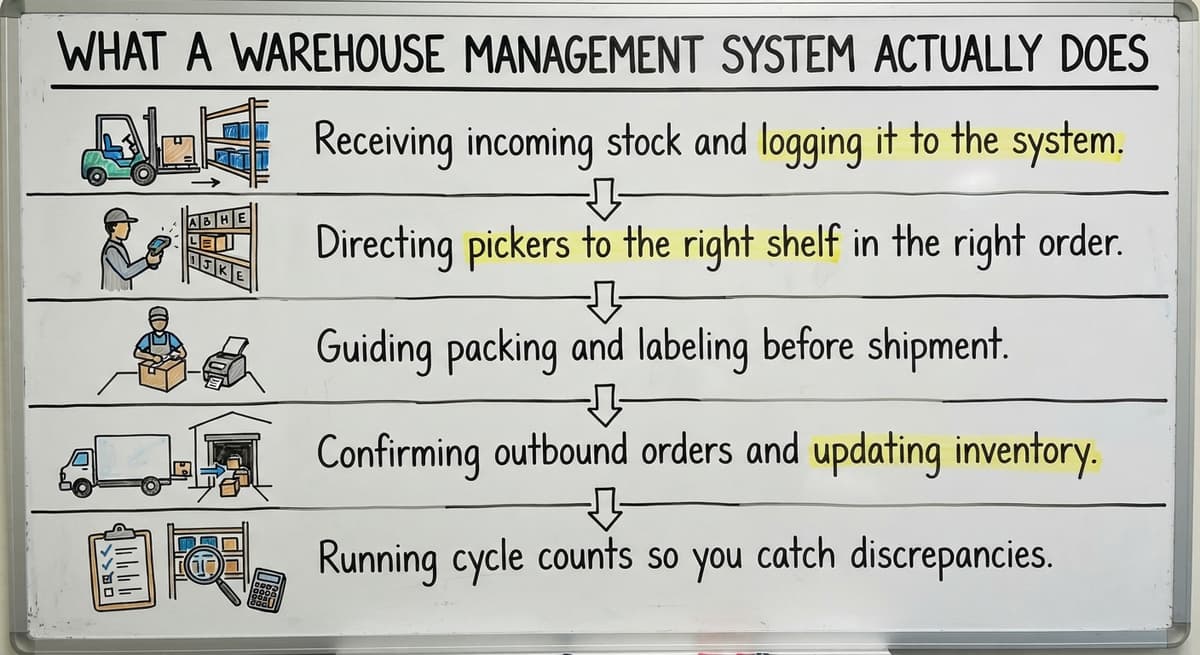
The core jobs a WMS handles include:
- Receiving incoming stock and logging it to the right location
- Directing pickers to the right shelf in the right order
- Guiding packing and labeling before shipment
- Confirming outbound orders and updating inventory counts automatically
- Running cycle counts so you catch discrepancies before they become problems
Replacing paper logs and spreadsheets in warehouse operations is one of the clearest wins a WMS delivers. Printed pick lists get lost. Manual tallies drift. A WMS keeps every count current and every person on the same page.
Would you rather have it built around your operation?
The first look is free. If you would rather not compare products, describe how your operation already works and we build the system around it.
No build cost. You see it running on your own process first, and the monthly subscription starts only once it is live.
Book a callThe Most Widely Used Warehouse Management Systems
The two largest enterprise-grade warehouse platforms are the most installed, and they hold the biggest share of large-company deployments worldwide. A major enterprise supply chain software suite sits alongside them in the upper tier, serving retailers and large distributors with complex, high-volume operations.
For smaller operations, a small-business inventory tool and a mid-market accounting-linked platform appear most often in market research covering the small-to-mid segment.
| Platform | Best Fit | Notable Strength |
|---|---|---|
| the software Extended WMS | Large enterprise | Deep ERP integration |
| the software | Large enterprise | Multi-site complexity |
| the software | Enterprise retail | Omnichannel fulfillment |
| your accounting software | Mid-market | Built-in ERP and financials |
| the software | Small to mid | your accounting software integration |
How Does Market Size Change the Popularity Rankings?
Popularity rankings shift depending on which slice of the market you measure. Among operations with fewer than 100 staff, smaller inventory management tools appear far more often than the large enterprise suites.
OSHA reminds employers that warehouse safety and operational compliance go hand in hand: as stated on their official warehousing resource, "Warehousing is one of the most hazardous industries in the United States", which is one reason accurate inventory tracking and organized movement matter beyond just efficiency.

Why Enterprise Systems Are Not Always the Right Answer?
Enterprise WMS platforms are not built for lean teams, and choosing one without the IT staff to support it is one of the most common and costly mistakes smaller distributors make. Enterprise-grade implementations routinely run 12 to 24 months and carry six-figure price tags before you count internal labor.
For a 10- to 50-person operation, that timeline means:
- Months of parallel systems and staff confusion
- Significant consulting fees on top of license costs
- Process changes that fit the software rather than your actual workflow
Popularity at the enterprise level does not signal best fit for a small warehouse. The warehouse inventory management software that dominates large enterprise procurement lists was designed for warehouses with dedicated IT departments, change management budgets, and years to absorb disruption.
Popular WMS Options for Small and Mid-Size Warehouses
Smaller operations have real choices, and none of them is an enterprise budget or an enterprise timeline. The platforms most commonly used by small and mid-size warehouses each have a distinct strength worth knowing before you compare.
- Warehouse add-on tool: Known primarily for its integration with a popular small business accounting platform, this warehouse management add-on layers on top of that accounting software rather than replacing it, which matters if your accounting team is not ready for a full migration.
- A straightforward inventory tracker: A simple option for operations that need basic order management and stock control without complex configuration.
- A multichannel inventory platform: Connects inventory, sales channels, and fulfillment in one place, useful for operations selling across multiple channels.
- A fulfillment center platform: Built specifically for third-party logistics providers managing multiple client accounts.
- A direct-to-consumer fulfillment tool: Targets high-order-volume, smaller-SKU operations.
Is the comparison easier when one option is built for you?
Yes. Off-the-shelf means fitting your process to the software, and custom is the other way round. The first look costs nothing.
Book a callWhat Should You Expect When You Switch to a Small-Business WMS?
Many of these connect to the accounting software you already use, which is a practical advantage for operations already running their books there. Even so, any of these tools will require some process adjustment. The software does not bend entirely to your current habits.

How Does Your Accounting Software Fit Into the WMS Picture?
The key distinction is whether a WMS layers on top of your accounting software or requires you to leave it entirely. Many small distributors and warehouse operators have years of financial history in that system and a bookkeeper who knows it well.
Replacing it creates risk and training costs that are easy to underestimate.
Accounting software integration for wholesale distributors works in two different ways depending on the platform:
- Sync-based integration: The WMS handles warehouse operations and pushes data to your accounting software. One popular small-business option works this way. Your accounting stays where it is.
- Full migration: Some platforms replace your accounting software entirely, consolidating financials and warehouse operations in one system. This is more powerful but more disruptive.
Neither approach is wrong. The right choice depends on how central your current accounting software is to your team's daily work and whether you have the capacity to manage a full migration.
What Should You Look for When Comparing WMS Platforms?
Map your current workflow before you open a single demo. Knowing exactly how your receiving, picking, and shipping steps work today makes it far easier to spot where a platform will fit cleanly and where it will force a change you are not ready for.
Practical criteria to evaluate during a warehouse management software comparison:
- Ease of use: Can a new warehouse employee learn the basics in a day?
- Implementation time: What is the realistic go-live timeline for an operation your size?
- Accounting compatibility: Does it sync, replace, or ignore your current accounting setup?
- Mobile access: Do pickers and receivers work from handheld devices or fixed terminals?
- Support quality: Is support included, or does it cost extra per incident?
- Total cost: Add license fees, implementation fees, and training time before comparing numbers
Why Does a Pilot Period Matter More Than a Vendor Presentation?
Brand name is not a reliable guide. A short pilot or demo period with real data from your operation reveals far more than a vendor presentation.
What does it look like running on your own process?
The first thing you see is it running on your own process, at no build cost. The subscription starts once it is live and doing the job, not before.
Book a call
When Does a Custom-Built System Make More Sense?
Some warehouses have workflows that no off-the-shelf WMS is shaped for. Custom workflow software for small warehouses solves a specific problem: the operation has to change to fit the software, rather than the software fitting the operation.
Custom does not automatically mean slow or expensive. A builder working at small scale can scope and deliver a focused system in weeks rather than months.
The result is software that matches your actual process, uses your terminology, and does not include features you will never touch.
This approach makes the most sense when:
- Your picking or fulfillment logic is genuinely unusual
- You have tried two or three off-the-shelf tools and hit the same wall each time
- The gap between what the software does and what you need is costing real time or money
Questions to Ask Before You Choose a WMS
There are 6 questions on this checklist, and each is worth asking before committing to any platform:
- Will this system work with accounting software or require replacing it?
- How long does WMS implementation take for an operation our size, and who manages it?
- Does the vendor have documented experience with operations under 100 people?
- What happens when we need a change or a new feature after go-live?
- What does support cost, and how fast does it respond?
- Can we run a real pilot with our own data before we sign a contract?
What Is the Right WMS for Your Operation?
The most popular warehouse management system is not automatically the right one for your business. Popularity reflects enterprise adoption, and enterprise needs are different from the needs of a 15-person distributor running everyday accounting software and trying to get off spreadsheets.
The right system fits three things: your team's size, your existing tools, and your actual workflow.
Start by writing down how an order moves through your building today, from receiving dock to outbound truck. That map will tell you more about which software fits than any feature comparison chart.
When Is an Off-the-Shelf WMS Not the Answer?
If you have mapped your process and still cannot find a platform that fits without major compromise, a custom-built approach may be worth a conversation.
The Software Society builds connected workflow systems for operations that have outgrown manual processes and need something aligned to how they actually work, not how a software vendor assumes they work.
Ready to figure out what your operation actually needs? Start with a conversation about your current workflow and we will tell you honestly whether an off-the-shelf WMS, an accounting-software integration, or a custom build makes the most sense.
Frequently asked questions
Frequently asked questions
What are the top 5 warehouse management systems?
The five platforms most cited in market research include two enterprise resource planning modules, a large supply chain suite, a mid-market business platform, and a small-business inventory tool. These enterprise options dominate large-scale use.
The mid-market platform serves mid-size operations. The small-business tool is widely used by companies running everyday accounting software. Which of these fits you depends on your team size, budget, and existing tools.
What is the best software for warehouse management?
There is no single best warehouse management software. The right answer depends on the size of your operation, your existing accounting setup, your implementation budget, and how complex your fulfillment process is.
Small operations with everyday accounting software do well with a lightweight inventory tool. Mid-market distributors may find a broader business suite a better fit. Large enterprises with IT teams use an enterprise resource planning module.
What are the top 20 WMS systems?
Beyond the five most cited platforms, the broader warehouse management market includes dozens of other tools: simple inventory trackers, multichannel retail platforms, third-party logistics fulfillment systems, direct-to-consumer fulfillment tools, mid-market ERP-integrated warehouse modules, and specialized supply chain software built for particular industries.
The right choice from this list still comes back to company size, industry, and workflow complexity.
What are the four types of WMS?
The four common types are: standalone WMS (dedicated warehouse software that connects to other systems via integration), ERP-integrated WMS (warehouse functionality built into a broader enterprise resource planning system), cloud-based WMS (hosted software accessed via browser with lower upfront cost), and supply chain module WMS (warehouse features embedded in a larger supply chain platform).
Standalone and cloud-based options are most common for small and mid-size operations.
Can a WMS Work Alongside Your Accounting Software Instead of Replacing It?
Yes. Some inventory platforms are specifically designed to sync with your existing accounting software rather than replace it.
The WMS handles inventory and warehouse operations, then pushes financial data to your accounting software. This approach works well for operations where the accounting team is comfortable with their current system and a complete changeover would create more disruption than value.
How long does it take to implement a warehouse management system?
Implementation time varies widely by platform and operation size. Large enterprise systems take 12 to 24 months. Mid-market platforms run 3 to 6 months.
Simpler small-business tools can go live in weeks for a small operation. A custom-built system scoped for a small warehouse can also move quickly when built by a team working at that scale.
When should a warehouse consider a custom-built system instead of an off-the-shelf WMS?
A custom build makes sense when your workflow does not map cleanly onto available platforms, when you have already tried off-the-shelf tools and hit the same limitations, or when the process changes required by packaged software would cost more than building something aligned to how you already work.
Custom does not always mean expensive. A focused build from a team experienced with small operations can be faster and more cost-effective than a lengthy enterprise implementation.
What should I look for when comparing warehouse management systems?
Evaluate ease of use, realistic implementation time for your size, compatibility with your accounting software, mobile device support, cost including implementation and training, and the quality of ongoing support. Map your current workflow before comparing platforms.
Run a real pilot with your own data before signing. Avoid choosing on brand recognition alone; the most widely known platforms target large enterprises with IT teams.
What is the best warehouse management system for a small business?
There is no single best option; the right system is one built for lean teams without heavy IT support.
Small businesses should look for straightforward setup, quick staff learning curves, and flexible accounting integration rather than enterprise-grade platforms designed for large corporations with dedicated IT departments and long implementation budgets. Fit to your actual workflow matters more than market popularity.
How much does a warehouse management system cost?
Cost varies widely depending on the size and complexity of the system. Enterprise-grade platforms carry six-figure price tags plus significant consulting fees and implementation timelines stretching over a year or more.
Smaller, mid-market solutions are far less expensive and quicker to launch. The real cost also includes staff training time and any disruption caused by changing existing workflows.
What is the difference between WMS and ERP?
A warehouse management system focuses specifically on tracking inventory, orders, and movement within a warehouse, from receiving through shipping. An enterprise resource planning system is broader, covering financials, accounting, and other business functions across an organization.
Some platforms combine both. Others keep warehouse operations separate and sync data to whatever accounting or financial software a business already uses.
How do I choose the right warehouse management system?
Start by mapping your current receiving, picking, and shipping workflow before evaluating any platform. Then compare options based on ease of use, realistic implementation timelines, and whether the system fits your existing accounting setup rather than forcing a full migration.
Avoid choosing a system purely on its popularity among large enterprises; what works for a big operation rarely suits a smaller team.
What is in a free first look?
A 30 minute call, your operation mapped, and a clear picture of what we would build. No obligation and nothing to install.
Book a callRelated guides
The rest of this guide, for the parts of the job this page does not cover.
Guides
- Warehouse Inventory Management Software
- Warehouse Inventory Management Systems
- Warehouse Stock Management Software
- Warehouse Management System Top 10
Common questions
- What is the Best Warehouse Inventory Management System?
- What is a Simple Warehouse Management System?
- What is the Most Important Part of Warehouse Organization
- Which Warehouse Management System Would a Jeweler Most Likely Use
- What Are the Benefits of Warehouse Management System
- What is the Point of Warehouse Management System
- What Are the Top 5 Warehouse Management Systems?
- What is Asn in Warehouse Management System
- What is a Warehouse Management System
- What is a Warehouse Management System Used For
- What is the Difference Between Warehousing and Inventory Management
- What is the Purpose of a Warehouse Management System
- What is a Warehouse Management System Pdf
- What is B Type of Inventory in Warehouse Management
- What is Warehousing and Inventory Management
- What is a Warehouse Management System Example
- What Warehouse Management System Does Amazon Use
- What is Warehousing Operations
- What is Warehouse Operation
- What Does Lpn Stand for in Warehousing