


What Is A Warehouse Management System Pdf
A warehouse management system PDF is the printable version of a WMS explained. A warehouse management system is software that tracks inventory, orders, and stock movement inside a warehouse: a digital clipboard that never loses a page. This guide, reviewed in September 2026, is that overview in 8 sections, for a warehouse of 5 to 100 people.
Published 18 August 2026. Reviewed and updated 15 September 2026.
Book a callWhat Is a Warehouse Management System, Actually?
A WMS tells you what you have, where it is, and what needs to happen next. That is the whole job. Every feature in any WMS software traces back to one of those three things.
The public record on this is worth reading directly: GS1 covers why a barcode printed by one company scans at another.
Put numbers on the errors and it gets clearer. 200 orders a day at a 2 percent mispick rate is 4 wrong shipments a day and roughly 1,000 orders a year going out wrong.
Cutting that to 0.5 percent leaves 250 orders a year, which is 750 fewer apologies.
Reviewed August 2026. Each figure comes from the assumptions stated beside it, so you can substitute your own and the arithmetic still holds.
The obligation behind all of this is not optional. OSHA states: “The warehousing and storage industry includes establishments operating facilities for general merchandise, refrigerated goods, and other products.” A figure nobody trusts is nothing but a guess.
Without a system, that information lives in someone's head, on a printed sheet, or across three spreadsheets that never quite match. A WMS pulls it into one place so your team stops guessing and starts moving.
The software is not just for giant operations. Small and mid-size warehouses use WMS tools to cut pick errors, speed up receiving, and keep stock counts accurate without a full physical count every quarter.
Would you rather have it built around your operation?
The first look is free. If you would rather not compare products, describe how your operation already works and we build the system around it.
No build cost. You see it running on your own process first, and the monthly subscription starts only once it is live.
Book a callWhy Do People Search for a Warehouse Management System PDF?
Most people searching for a PDF want something they can share with a colleague or read offline before making a decision. A PDF is a starting point for research, not a substitute for understanding the software itself.
This article covers the same ground. You can read it now, share the link, and skip the file.
Warehouse operations carry real safety and compliance weight. OSHA notes that warehousing is among the industries with the highest rates of workplace injury, and a well-run WMS supports safer floor operations by reducing the time workers spend hunting for stock. OSHA publishes warehousing guidance directly at osha.gov/warehousing.

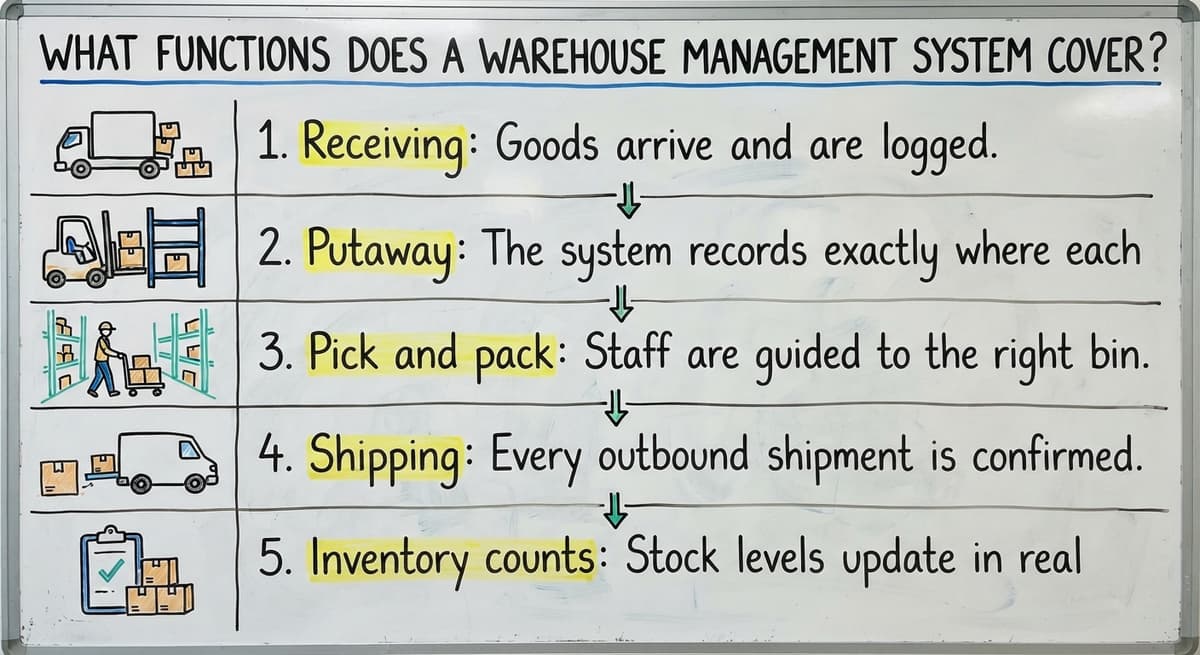
What Functions Does a Warehouse Management System Cover?
Every WMS overview, whether PDF or article, covers the same core workflows. Here is what each one means in practice:
- Receiving: Goods arrive and are logged immediately. Quantity, location, and condition are recorded before anything moves.
- Putaway: The system records exactly where each item is stored so no one has to remember or guess later.
- Pick and pack: Staff are guided to the right bin for each order. Picking errors drop because the system directs the work.
- Shipping: Every outbound shipment is confirmed with a timestamp and carrier detail. Nothing leaves without a record.
- Inventory counts: Stock levels update in real time. You see current stock without stopping the floor for a manual count.
This is the foundation of warehouse inventory management. Any software worth evaluating will handle all five.
How Does a WMS Connect to the Rest of Your Operation?
Most small warehouses already use accounting software for invoicing and bookkeeping. A good WMS works alongside that accounting software rather than replacing it. Orders, stock levels, and shipments sync between the two systems so nothing has to be entered twice.
Replacing spreadsheets with warehouse software is where the real efficiency gain shows up. Printed pick sheets get misread, spreadsheets get overwritten, and manual entry creates errors that cost time to trace. A connected WMS removes those failure points.
For a closer look at how this connection works in practice, the topic of accounting software integration for distributors covers the sync logic and what to check before choosing a system.

WMS for Small and Mid-Size Warehouses vs Enterprise Systems
Enterprise WMS platforms target hundreds of staff, complex multi-site operations, and budgets to match. That is not most warehouses.
| Factor | Enterprise WMS | Small Warehouse Software |
|---|---|---|
| Team size | 200+ staff | 5 to 100 people |
| Implementation time | Months to years | Weeks |
| Cost | High six figures and up | Scales with the operation |
| Flexibility | Rigid process templates | Adapts to how you work |
| Support | Ticket queues | Direct contact |
The right system matches how your operation already works instead of forcing your team to change every process to match the software.
Fulfilment centre software built for small distributors should feel like it belongs in the building, not like it was designed for a logistics corporation.
Is the comparison easier when one option is built for you?
Yes. Off-the-shelf means fitting your process to the software, and custom is the other way round. The first look costs nothing.
Book a callSigns Your Operation Is Ready for a WMS
You do not need a consultant to tell you whether you need warehouse management software. The signs are obvious once you know what to look for:
- Stock counts live in multiple spreadsheets that rarely agree with each other
- Pick errors or shipping mistakes are climbing as order volume grows
- Staff spend time hunting for inventory instead of moving it
- Your accounting software is accurate for money but has no visibility into what is happening on the floor
If two or more of those describe your week, a WMS is not a luxury. It is the next operational step.

What Should You Look for When Evaluating WMS Software?
Integration with your current accounting tool is the first thing to confirm, especially if your bookkeeping runs through dedicated accounting software. Beyond that, here is what separates a useful system from one that creates new problems:
- Barcode or mobile scanning support for picking and receiving
- Ability to customize workflows without a long, expensive implementation
- Reporting that shows real inventory levels, not just what was manually entered
- A support team you can actually reach when something breaks
A warehouse inventory management software overview can help you map these criteria to the platforms you are considering before you book a demo.
Custom WMS vs Off-the-Shelf Software
Off-the-shelf platforms cover common workflows well. If your operation runs a standard pick, pack, and ship process, one of the major platforms will likely work.
Custom WMS software is built around how your team already operates. That matters when your process has a step, a product type, or a workflow that standard platforms do not handle cleanly.
Custom does not have to mean slow or expensive. A builder who works at small scale can visit the floor, understand the operation in a few sessions, and deliver a working system in weeks.
Custom operational software for wholesale businesses fits this model because the workflows are specific enough that off-the-shelf tools require too many workarounds.
The comparison is not always custom versus off-the-shelf. Sometimes the answer is a lightly configured platform. The goal is a system that fits the work, not one that forces the work to fit the system.
What Are the Next Steps After Reading a WMS Overview?
The next step is to map your current process before talking to any vendor. Start with what you already know:
- List the manual steps that cause the most errors or delays in your current workflow
- Identify which tools you want to keep, such as your accounting software, and which ones to replace
- Talk to a builder who works with operations your size before committing to any platform
- Ask specifically about implementation time and what the first 30 days look like
A short discovery call costs nothing and shows quickly whether a WMS is the right fit for your operation. You do not need to understand every feature before having that conversation. You just need to describe what is breaking and what you want to fix.
Replacing spreadsheets with warehouse software is a practical, achievable step for most small operations. The technology is not the barrier. Knowing where to start is.
Frequently asked questions
Frequently asked questions
What is a warehouse management system?
A warehouse management system is software that tracks inventory, orders, and stock movement inside a warehouse. It tells your team what you have, where it is stored, and what needs to happen next. It replaces manual spreadsheets, printed pick sheets, and verbal handoffs with a single connected record that updates in real time.
What are the four types of WMS?
The four commonly referenced types are standalone WMS (dedicated warehouse software with no built-in ERP), ERP-integrated WMS (a module inside a larger enterprise resource planning system), cloud-based WMS (hosted software accessed via browser or app), and custom WMS (built specifically for one operation's workflows).
Most small warehouses choose between cloud-based standalone platforms and custom-built options depending on how standard their processes are.
What are the five S's of warehouse management?
The five S's come from a Japanese lean methodology: Sort (remove what does not belong), Set in order (organize what remains), Shine (keep the space clean), Standardize (document the right way to do each task), and Sustain (maintain the standard over time).
A WMS supports several of these, particularly Set in order and Standardize, by recording locations and guiding staff through consistent workflows.
What are the 5 KPIs for a warehouse?
The five most commonly tracked warehouse KPIs are order accuracy rate (how often the right items ship), inventory accuracy (how closely system records match physical stock), order cycle time (how long from order receipt to shipment), receiving efficiency (how quickly inbound goods are logged and put away), and carrying cost of inventory (the cost of holding stock over time).
A WMS makes all five measurable without manual counting or spreadsheet work.
How Does a WMS Work with Your Accounting Software?
A WMS syncs with your accounting software so that orders, stock levels, and shipments flow between the two systems automatically. That accounting software handles invoicing and bookkeeping.
The WMS handles what is physically happening on the floor. When the two are connected, your team stops re-entering data by hand, which removes a common source of errors for small distributors.
Is a warehouse management system only for large companies?
No. Enterprise platforms target large operations, but there are WMS tools designed specifically for teams of 5 to 100 people.
Small and mid-size warehouses benefit from WMS software as soon as manual tracking starts causing pick errors, stock discrepancies, or time lost hunting for inventory. The system should fit the operation, not the other way around.
How long does it take to implement a WMS for a small operation?
A well-scoped WMS implementation for a small warehouse takes a few weeks, not months. The timeline depends on how complex your workflows are, how many integrations are needed, and whether you are using an off-the-shelf platform or a custom build.
Builders who specialize in small operations can deliver a working system faster because they are not configuring for enterprise-scale requirements.
What is the difference between a custom WMS and off-the-shelf software?
Off-the-shelf WMS platforms cover standard workflows and are ready to configure out of the box. They work well when your process matches what the software was designed for.
A custom WMS follows your specific workflows, product types, and team size. It costs more upfront in some cases but avoids the workarounds that accumulate when standard software does not fit the operation cleanly.
What are the main functions of a warehouse management system?
A warehouse management system covers five core workflows: receiving, where goods are logged with quantity, location, and condition; putaway, recording exact storage locations; pick and pack, guiding staff to the right bin to reduce errors; shipping, confirming outbound orders with timestamps and carrier details; and inventory counts, which update stock levels continuously without halting floor operations.
What are the benefits of using a warehouse management system?
A warehouse management system reduces pick and shipping errors, speeds up receiving, and keeps stock counts accurate without frequent manual counts. It centralizes information that would otherwise live in someone's head, on paper, or across mismatched spreadsheets, helping teams stop guessing and start moving. It also supports safer floor operations by cutting the time workers spend searching for stock, and it can sync with existing accounting tools so data is not entered twice.
What are the best warehouse management system software options?
The best option depends on how closely a platform matches your existing process. Off-the-shelf software works well for standard pick, pack, and ship operations, while custom systems suit warehouses with unique steps or product types that standard tools cannot handle cleanly.
Sometimes a lightly configured platform is the right middle ground. The strongest choice is whichever system fits the work, rather than one that forces the work to fit the software.
What are the main features of a warehouse management system?
Key features include barcode or mobile scanning support for picking and receiving, the ability to customize workflows without a lengthy implementation, reporting that reflects real inventory levels rather than manually entered guesses, and reachable support when issues arise.
Integration with existing accounting tools is also essential, so order details, stock counts, and shipment records update automatically instead of requiring duplicate data entry.
What is in a free first look?
A 30 minute call, your operation mapped, and a clear picture of what we would build. No obligation and nothing to install.
Book a callRelated guides
The rest of this guide, for the parts of the job this page does not cover.
Guides
- Warehousing Management Pdf
- Warehouse Inventory Management Systems
- Warehouse Management System Top 10
- Software for Warehouse Management System
- Small Business Warehouse Management System
- Warehouse Management System Types
- Warehouse Inventory Management System
- Warehouse Management System Examples
- Warehouse Management System Implementation
Common questions
- What Are the Benefits of Warehouse Management System
- What is the Point of Warehouse Management System
- What is Asn in Warehouse Management System
- What is a Warehouse Management System
- What is a Warehouse Management System Used For
- What is the Purpose of a Warehouse Management System
- What is a Warehouse Management System Example
- What Warehouse Management System Does Amazon Use
- What Are the Top 5 Warehouse Management Systems?
- What is the Best Warehouse Inventory Management System?
- What is the Difference Between Warehousing and Inventory Management
- What is the Most Popular Warehouse Management System?
- What is B Type of Inventory in Warehouse Management
- What is a Simple Warehouse Management System?
- What is Warehousing and Inventory Management