


7 Types Of Inventory
Reviewed and updated: October 2026
The 7 types of inventory are raw materials, work-in-progress (WIP), finished goods, transit inventory, buffer inventory, anticipation inventory, and decoupling inventory. Every wholesale distributor and warehouse operation touches most of these daily. Knowing which type you are dealing with at any moment is the first step to controlling your stock.
Book a callWhy Knowing Your Inventory Types Matters
Most warehouse problems trace back to one root cause: treating all stock the same. A pallet of raw materials is not the same as a pallet of finished goods, even if they sit side by side. When your system cannot tell them apart, you end up overbuying in one area while running short in another. Cash gets tied up in the wrong places. Orders go out late. Classifying inventory by type is not advanced theory. It is the foundation every accurate count is built on. The sections below walk through each of the 7 types of inventory in plain terms, with a focus on what breaks down for small distributors running on QuickBooks and spreadsheets.
We build it for your operation, and the first look is free
If you would rather not compare products, describe how your operation already works and we build the system around it.
No build cost. You see it running on your own process first, and the monthly subscription starts only once it is live.
Book a callRaw Materials: The Starting Point of Your Inventory
Raw materials are inputs your operation has not yet processed or assembled. For a wholesale distributor doing light kitting, that might be individual components waiting to be bundled into a finished kit.
Tracking raw materials is harder than it looks. Quantities drop as production runs consume them, and those drops happen fast. QuickBooks records a buy when the bill is entered, but it does not subtract units in real time as your team pulls them for assembly. That gap grows wider with every shift.
Why Barcode Standards Matter for Raw Material Counts
Accurate raw material counts depend on reliable scan data at the point of use. GS1, the global standards body, publishes the barcode specifications that make scan-based counting possible. As GS1 states, their barcode standards are "the most widely used supply chain standards system in the world." Building your raw material tracking on those standards gives every scan a consistent, verifiable identity.
Without that scan layer, raw material counts are always a guess.
What Is Work-in-Progress Inventory and Who Uses It?
Work-in-progress (WIP) inventory is stock that has left raw material status but is not yet a finished product. If your team is mid-kit, mid-bundle, or mid-assembly, those goods are WIP.
WIP is the hardest inventory type to count because it lives between 2 states at once. A unit is no longer a raw input, but it is not ready to ship. That in-between status breaks flat tools fast. An Excel tab named "WIP" gets updated when someone remembers to update it. A printed pick sheet tells you what was pulled, not what stage it is in right now.
Fulfillment centers doing kitting or light assembly feel this pain most. The fix is a system that assigns a status to every unit and updates that status as work moves forward. Without that, your WIP count is always stale.
Finished Goods: The Most Visible Inventory Type
Finished goods are products ready to ship to a customer. For most wholesale distributors, this is the inventory type that gets the most attention, and rightly so. Accuracy here drives order fill rates and customer satisfaction directly.
The IRS is clear on why finished goods must be counted carefully. IRS Publication 538 states: "To figure taxable income, you must value your inventory at the beginning and end of each tax year." That obligation starts with knowing exactly what finished goods you hold.
Finished goods counts are also where QuickBooks most often overflows into spreadsheets. A second tab appears for overflow SKUs, then a third for a second location. Each tab is one more place where a count can fall out of sync.
Transit Inventory: The Stock Your System Forgets
Transit inventory is stock that has left a supplier but has not yet arrived at your facility. It is also called pipeline inventory or goods in transit. Many distributors do not account for it at all.
That gap causes real problems. Your buyer sees a low on-hand count and places a duplicate order. Or your team calls a supplier to chase a shipment that is already on a truck. Both cost time and money.
How In-Transit Visibility Changes Your Inventory Picture
A system tied to your buy order data can show in-transit stock alongside on-hand stock in one view. When a PO is marked as shipped, those units appear as "in transit" rather than disappearing until they hit the receiving dock. That single change removes most phantom shortage calls. The US Census Bureau's Monthly Wholesale Trade data tracks national inventory-to-sales ratios for wholesale firms, and those ratios only make sense if transit stock is counted as part of total inventory. Most small distributors are not doing that yet.
The comparison is easier when one option is built for you
Off-the-shelf means fitting your process to the software. We do it the other way round, and the first look costs nothing.
Book a callBuffer Inventory: How Much Safety Stock Is Enough?
Buffer inventory is extra stock held to guard against unexpected demand spikes or supply delays. You may also hear it called safety stock. The 2 terms mean the same thing.
Too little buffer and you stock out when a supplier runs late. Too much and you tie up cash and floor space on stock that sits idle. Getting the level right needs knowing your lead times and your demand variability.
Where to Find Guidance on Setting Safety Stock Levels
For most small distributors, that data lives scattered across email threads, supplier spreadsheets, and memory. Nobody has pulled it into one place. Setting a buffer level without that data is a guess, and a guess that is wrong in either direction costs money. The NIST Manufacturing Extension Partnership offers vendor-neutral guidance on supply chain process, including how to use lead time data to set rational safety stock levels. That is a useful starting point before you buy any software.
Anticipation Inventory: Stocking Up for What You Already Know Is Coming
Anticipation inventory is stock built up ahead of a known demand event. A seasonal peak, a large incoming order, or a supplier price increase you have been warned about: all of these are predictable triggers.

This is different from buffer stock. Buffer stock guards against random surprises. Anticipation inventory responds to events you can see on the calendar.
Examples include stocking up before a busy season or pre-buying a product line before a supplier raises prices. Both are smart moves when done with good data. The problem is that doing this well needs historical sales data by SKU and by period. Ad-hoc spreadsheets rarely hold that data in a form you can query quickly. A distributor who cannot pull last year's Q4 sales by SKU in 5 minutes is guessing at how much to pre-buy, and that guess usually results in either a shortage or dead stock.
Decoupling Inventory: Keeping Every Station Running
Decoupling inventory is stock held between 2 process steps so a slowdown in one step does not stop the next. It is most relevant to operations with multi-stage fulfillment or light manufacturing.
A practical example: keeping a buffer of picked-but-not-yet-packed orders at the packing station. If the pick team slows down, the pack team still has work. Without that buffer, one bottleneck shuts down the whole shift.
Decoupling points are often invisible until a bottleneck shuts down a shift. Nobody planned to hold 40 picked orders at the pack station. It just happened because the pick team runs faster than the pack team on busy days. Recognizing that as a decoupling point, and managing it deliberately, is the difference between a reactive operation and a planned one.
How Do All 7 Inventory Types Show Up in One Real Workflow?
A single workflow at a wholesale distributor can touch 5 or 6 inventory types in one day. Here is a simple example.
Your team receives a shipment of components (raw materials). Some of those components are mid-kit at the end of the shift (WIP). Completed kits move to the finished goods shelf. A buy order for more components is on a truck (transit inventory). You hold an extra 2 weeks of components because your supplier has long lead times (buffer inventory). And you pre-bought extra finished kits last month before a price increase (anticipation inventory).
The same SKU can move through 3 or 4 of those categories in a single day. A flat ledger in QuickBooks or a single spreadsheet tab cannot follow that movement. It records the buy and the sale, but everything in between is invisible. That invisibility is where errors compound.

The Hidden Cost of Misclassifying Inventory
Misclassification sets off a chain of errors. Wrong reorder points, inaccurate financials, and poor customer service all follow from putting a unit in the wrong category.
A concrete example: your team counts WIP kits as finished goods. Your system shows 200 units available. A sales rep commits to a customer order for 150 units. When the order is picked, only 80 kits are actually complete. The other 120 are still on the assembly table. That false availability reading turns into a late shipment and a customer service call.
The FTC's Mail, Internet, or Telephone Order Merchandise Rule needs sellers to ship when they said they would or notify the customer and offer a refund. Misclassified inventory makes that obligation harder to meet. At scale, manual processes make misclassification almost inevitable.
See it running on your own process first
No build cost. The subscription starts once it is live and doing the job, not before.
Book a callWhy Can't QuickBooks Track All 7 Types of Inventory on Its Own?
QuickBooks is an accounting tool. It was built to record what was purchased and what was sold. It does that well. What it does not do is track location, stage, or status in real time.
When a unit moves from raw material to WIP to finished goods, QuickBooks does not see those transitions. It sees a buy and, eventually, a sale. Everything in the middle is a blank.
The Hidden Cost of Spreadsheet Workarounds
Many distributors compensate by building Excel tabs named by inventory type: one tab for WIP, one for transit, one for safety stock. That works at low volume. At higher volume, the tabs fall out of sync with each other and with QuickBooks. Someone updates one tab and forgets the other. The gap between the spreadsheet and the actual count grows with every shift.
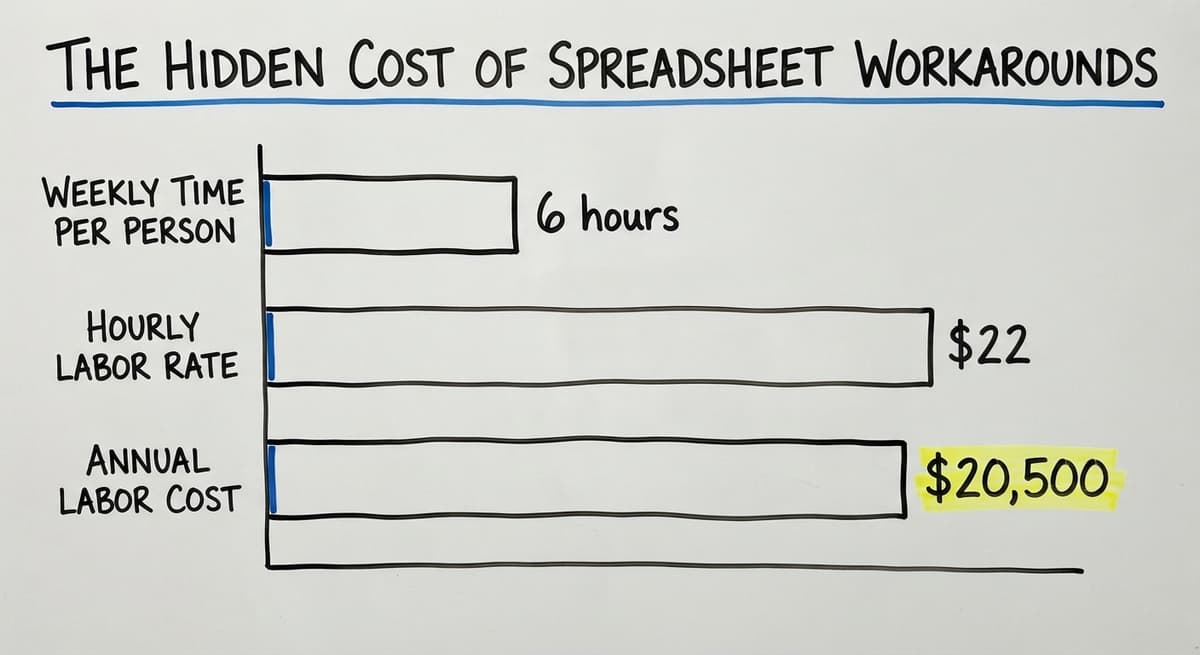
This is not a criticism of QuickBooks. It is an acknowledgment of what it was designed to do. The BLS Occupational Employment data shows that stock clerks and order fillers earn a median wage that makes manual matching an expensive workaround. Three people spending 6 hours a week each reconciling spreadsheets at $22 an hour adds up to more than $20,500 a year in labor alone, before counting the errors those matchings miss.

What Good Inventory Tracking Software Does for Each Type
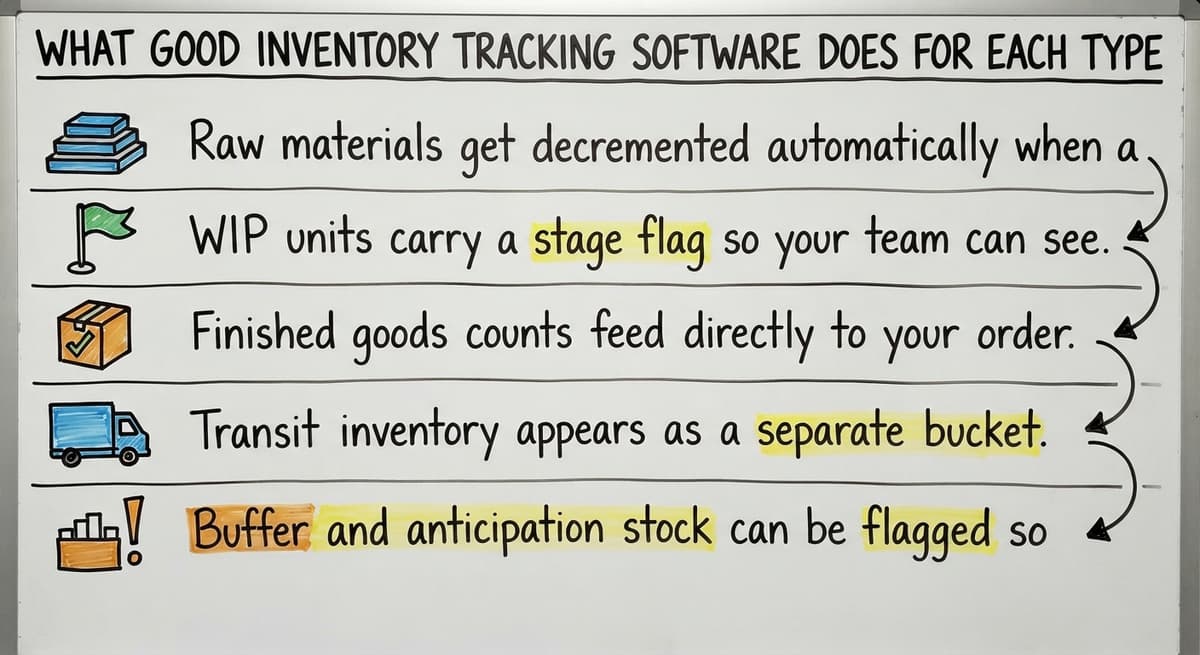
Good inventory management software assigns a status to every unit: raw, WIP, finished, in transit, safety stock, or anticipation stock. That status updates in real time as goods move through your operation.
Here is what that looks like in practice for each inventory type:
- Raw materials get decremented automatically when a pick or assembly transaction is recorded, so your count reflects actual consumption rather than last week's buy.
- WIP units carry a stage flag so your team can see how many kits are at step 1, step 2, or complete.
- Finished goods counts feed directly to your order management so sales reps see real availability.
- Transit inventory appears as a separate bucket tied to open POs, visible alongside on-hand stock.
- Buffer and anticipation stock can be flagged so reorder logic does not treat them as available-to-sell.
How the System Closes the Loop With QuickBooks
The system feeds summary data back to QuickBooks so your accounting stays accurate without anyone re-entering numbers. That closed loop between operations and accounting is what removes the spreadsheet layer entirely.
Custom Software vs. a Generic Inventory Module
Generic inventory modules are built around a standard workflow. If your operation matches that standard, they work well. Many small distributors do not match the standard, and the gaps show up fast.
A custom-built system maps to the way your team already works. Same terminology, same process steps, same handoff points. Your team does not have to learn a new way of working to use the tool.

Why the Custom Route Is Faster to Value for Small Distributors
For operations running custom workflow rollout, the approach is straightforward: QuickBooks stays where it is useful, handling accounting and financials. The custom layer sits on top and handles what QuickBooks cannot: real-time status tracking, location management, and inventory type classification.
This matters most for operations with 5 to 100 staff that do not need a full enterprise ERP. A big ERP needs a long rollout, a big budget, and often a forced change to your process. A custom layer built on your existing workflow does not. Custom working software vs. off-the-shelf ERP is a real choice, and for most small distributors, the custom route is faster to value and easier to keep.
Not sure this is the right shape for your operation
Describe how the work runs today. We map it on a call and show you what it would look like built around that, before you spend anything.
Book a callSigns Your Current System Is Losing Track of Inventory Types
Your system may already be showing you the warning signs. Watch for these:
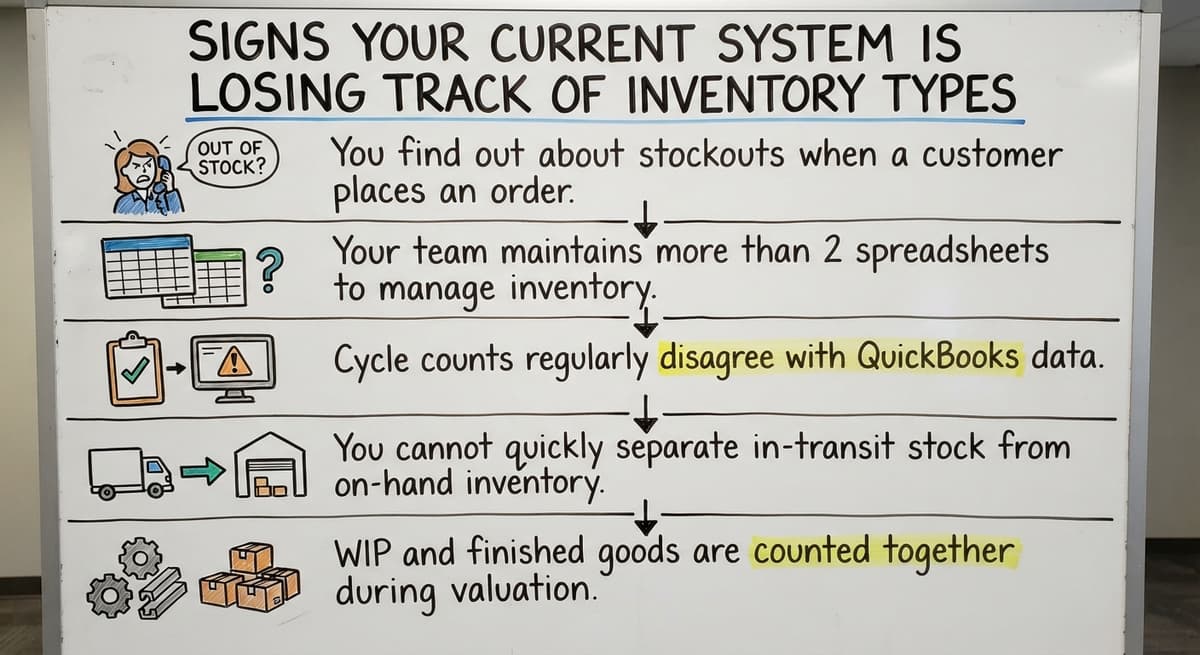
- You find out about stockouts when a customer calls, not before the pick fails.
- Your team keeps more than 2 spreadsheets to track stock status across types or locations.
- Cycle counts regularly disagree with QuickBooks balances, and no one is sure which number to trust.
- You cannot quickly separate in-transit stock from on-hand stock without pulling a PO report and doing manual math.
- WIP and finished goods are counted together because your system has no way to distinguish them.
Any one of these is a signal. More than one means the gap between your system and your actual inventory is already costing you.
How Do You Start Classifying Your Inventory Today?
Start with what you already have. You do not need new software to begin. Here are 4 steps that move you forward at once.
- List every SKU and assign it a primary type from the 7 categories. Some SKUs will fit more than one type at different points in your workflow. That is expected.
- Identify which types your current system cannot track correctly. WIP and transit are the most common blind spots for distributors on QuickBooks.
- Map the handoff points where stock moves from one type to another. Raw material becomes WIP at the assembly table. WIP becomes finished goods at the quality check. Each handoff is a point where your count can drift.

Your Workarounds Are Already Your Software Specification
- Document the manual workarounds your team already uses. Every workaround is a software requirement in disguise. A spreadsheet tab named "in transit" tells you exactly what your system needs to track.
Those documented workarounds become the specification for whatever system you build or buy next.
Questions to Ask Before Choosing Inventory Management Software
Before you commit to any tool, these questions will tell you whether it fits your operation.
- Does it track all 7 inventory types, or only finished goods on hand?
- Will it integrate with QuickBooks without replacing it, so your accounting stays intact?
- Can it be configured to match your existing process, or do you have to change your process to match it?
- What does the setup look like, and how long does it realistically take before your team is using it daily?
Why Post-Go-Live Support Should Drive Your Vendor Decision
Is the team that builds it the same team that supports it after go-live?
That last question matters more than most buyers realize. A vendor who hands off to a support desk after rollout leaves you explaining your own workflow to someone who was not in the room when it was built. Inventory management software for wholesale distributors works best when the people who built it understand your operation.
Inventory Types and Reorder Points: A Quick Connection
Each inventory type has a different trigger for reordering, and mixing them up produces wrong reorder points.

Finished goods reorder based on quantity on hand relative to a minimum level. Raw materials reorder based on your production schedule and how fast you consume them. Buffer stock reorder points depend on lead time variability, not just quantity. If your supplier sometimes takes 5 days and sometimes takes 14, your buffer needs to cover that 9-day swing.
Connecting inventory type to reorder logic is where manual systems consistently break down. A single reorder point set in QuickBooks treats all 3 situations the same way. It cannot account for stage, lead time variability, or the difference between stock that is available to sell and stock that is reserved as safety buffer. Getting reorder points right by type is one of the clearest returns a better system delivers.
Putting It All Together for Your Operation
The 7 types of inventory are raw materials, WIP, finished goods, transit, buffer, anticipation, and decoupling stock. Each one behaves differently, moves at a different pace, and needs a different trigger to reorder.
Most small distributors already understand this intuitively. Your team knows the difference between a component and a finished kit. The gap is not knowledge. The gap is having a system that tracks each type automatically, in real time, without a spreadsheet in the middle.
Replacing manual processes in fulfillment centers does not need an enterprise ERP or a long rollout. It needs a system that maps to your actual workflow and feeds clean data back to QuickBooks. If your current setup is leaving any of the 7 types untracked, that is the place to start. Reach out to discuss what a custom layer built on your existing process could look like for your operation.
Frequently asked questions
What are four types of inventory?
The 4 types most commonly cited in accounting and operations texts are raw materials, work-in-progress, finished goods, and MRO (maintenance, repair, and operations) supplies. Some frameworks use transit inventory as a fourth instead of MRO. The full working picture for most distributors covers 7 types.
What are the different types of inventory?
There is no single fixed list, but the most widely used framework covers 7 types: raw materials, WIP, finished goods, transit inventory, buffer (safety) stock, anticipation inventory, and decoupling inventory. Some frameworks add MRO supplies as an eighth. The right list for your operation is the one that matches every stage your stock moves through.
What are the 7 types of supply chain management?
Supply chain management is usually broken into 7 functions: plan, source, make, deliver, return, enable, and sometimes demand management. These are process functions, not inventory categories. Inventory classification sits inside the make and deliver functions and supports planning across all of them.
What is an inventory list?
An inventory list is a record of every SKU your operation holds, including quantity, location, and status. A basic list shows what you have. A useful list also shows what type each unit is: raw, WIP, finished, in transit, or reserved as buffer. Without the type field, the list cannot drive accurate reorder decisions.
What is the most common type of inventory for wholesale distributors?
Finished goods is the most visible type, but transit inventory and buffer stock are close behind in terms of daily impact. Most distributors hold all 3 at the same time, which is exactly why a single count in QuickBooks is not enough.
Is safety stock the same as buffer inventory?
Yes. The terms are interchangeable. Safety stock is the accounting term. Buffer inventory is the operations term. Both refer to extra stock held to absorb unexpected demand or supply delays.
Can QuickBooks track work-in-progress inventory?
Not in real time. QuickBooks records the cost of materials that go into production, but it does not track stage or location. It cannot tell you how many kits are at step 1 versus step 2 versus complete. For that level of detail, you need a layer built on top of QuickBooks that tracks status at the unit or batch level.
Do I need software to track all 7 inventory types?
Not necessarily at very low volume. A small operation with a handful of SKUs and one location can manage with careful spreadsheets. The manual approach breaks down as volume grows, SKU count rises, or you add a second location. At that point, the labor cost of manual matching and the cost of errors from misclassification both exceed the cost of a purpose-built system.
Start with a free first look
A 30 minute call, your operation mapped, and a clear picture of what we would build. No obligation and nothing to install.
Book a callRelated guides
The rest of this guide, for the parts of the job this page does not cover.
Guides
- Types of Inventory Control
- Types of Stock Control Systems
- Warehouse Management System Types
- Classification of Inventory
- Excess Inventory
- Closed for Inventory
- Multi Location Inventory Management Software
- Ms Excel Inventory Template
- Inventory Management for Multiple Locations
- Costing Inventory
- Is Inventory a Long-term Asset
- Inventory Management System for Manufacturing
- Inventory Fixed Assets
- Inventory Management Pics
- Inventory Monitoring
- Excel Inventory Template
- Push and Pull Inventory
- Consumable Inventory
- B2b Inventory Management
- Jewelry Inventory Management
- Dental Inventory Management