


Inventory Monitoring
Inventory monitoring is the ongoing process of tracking stock levels, locations, and movement in real time. It is different from a physical count because it never stops. This guide explains what a dedicated inventory monitoring system does, who needs one, and how to add it without replacing the accounting tools your team already uses. Reviewed and updated October 2026.
Book a callWhat Inventory Monitoring Means
Inventory monitoring means watching your stock continuously, not just once a quarter. Every receipt, pick, and transfer updates the count as it happens. A warehouse manager can see what is on hand, where it sits, and what has moved, without waiting for a count.
A physical count is a snapshot. You stop work, count everything, and record the result. That number is already aging the moment the count ends. Inventory monitoring replaces that snapshot with a live feed. Think of it as the difference between a photograph and a security camera.
The goal is simple: know what you have, where it is, and when you need to order more, at any moment of the day.
We build it for your operation, and the first look is free
If you would rather not compare products, describe how your operation already works and we build the system around it.
No build cost. You see it running on your own process first, and the monthly subscription starts only once it is live.
Book a callWhy Monitoring Matters More Than a Monthly Count
A monthly count only shows you what was true on count day. Problems that develop between counts stay hidden until they become expensive. Stock-outs stop shipments. Over-orders tie up cash. Shrinkage, meaning product that disappears without a recorded reason, eats margin quietly.
Here is a common example. A distributor sells a case of product to one customer. The spreadsheet does not get updated before a second order comes in. The warehouse ships the same case to the second customer. Now someone gets a back-order apology, and the first customer is short. That mistake costs time, freight, and trust.
GS1, the global standards body behind barcode systems, notes that "barcodes are the most widely used automatic spotting technology in the world" for tracking goods, as explained at gs1.org/standards/barcodes. Real-time tracking built on those standards is what prevents the double-ship scenario above.
What the IRS Requires from Your Inventory Records
The IRS is direct on the legal side. IRS Publication 538 states: "To figure taxable income, you must value your inventory at the beginning and end of each tax year." Accurate monitoring makes that valuation faster and more defensible.
Does Your Accounting Software Handle Inventory Monitoring on Its Own?
No. Your accounting software tracks financial transactions, not physical stock movement in real time. That is not a criticism; it is just what the tool is built to do.
The gap between your accounting package and the warehouse floor gets filled with printed pick lists, shared spreadsheets, and email threads. Those tools drift out of sync fast, especially when more than 1 person is touching the same data. An inventory monitoring system bridges that gap without replacing your accounting software. It handles the physical side, what is on the shelf and where, while your accounting software keeps doing the financial side.
The two tools work together better than either works alone.
Signs Your Current Approach Is Breaking Down
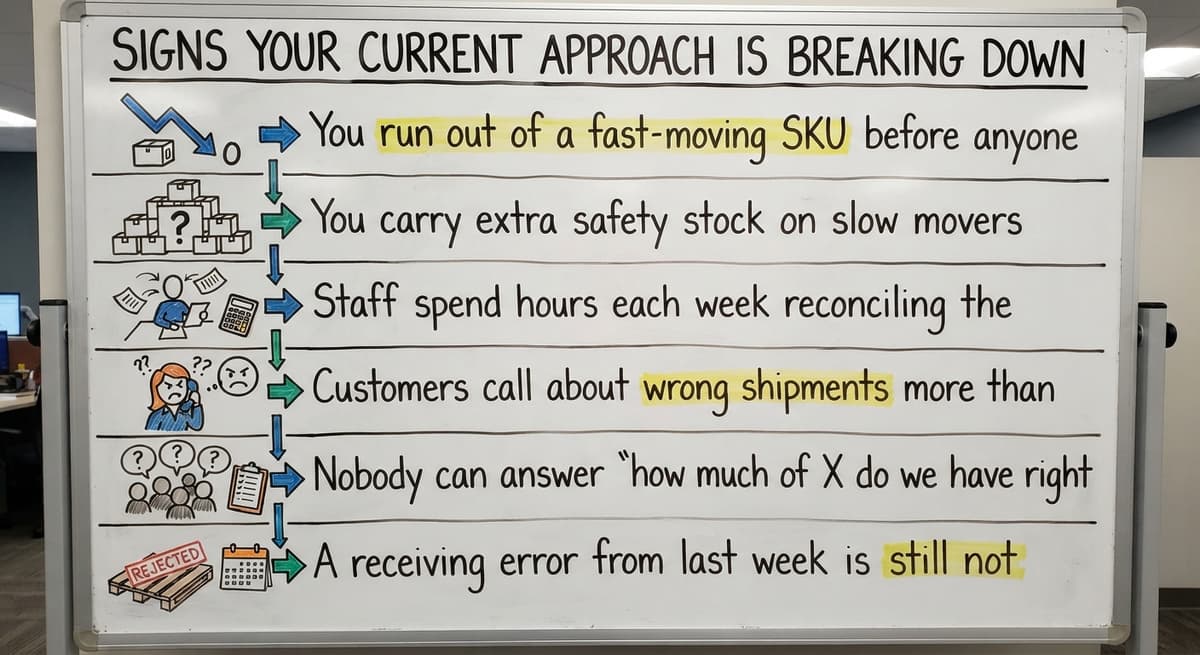
Small distributors between 5 and 100 people run into the same growing pains, and those pains are not failures. They are signals that the process has outgrown the tools.
Watch for these symptoms:
- You run out of a fast-moving SKU before anyone noticed the level was low.
- You carry extra safety stock on slow movers because you do not trust the count.
- Staff spend hours each week reconciling the spreadsheet against what is actually on the shelf.
- Customers call about wrong shipments more than once a month.
- Nobody can answer "how much of X do we have right now?" without walking the floor.
- A receiving error from last week is still not resolved because no one logged who touched the product.
If 3 or more of those sound familiar, a dedicated inventory monitoring system will pay for itself quickly.
The comparison is easier when one option is built for you
Off-the-shelf means fitting your process to the software. We do it the other way round, and the first look costs nothing.
Book a callCore Functions of an Inventory Monitoring System
A solid inventory monitoring system does 4 things well. Each one replaces a manual step that currently costs time or causes errors.
- Real-time stock level visibility across every location, so anyone with access sees the same number at the same moment.
- Movement tracking for every receipt, pick, transfer, and adjustment, logged as it happens.
- Reorder point alerts that notify the right person when a SKU drops below the level you set.
- Audit trail showing who changed what and when, so disputes get resolved with data instead of guesswork.
Those 4 functions cover the gap that spreadsheets and accounting packages leave open. The NIST Manufacturing Extension Partnership offers vendor-neutral guidance on building supply chain processes around exactly these capabilities.
Reorder Point Alerts
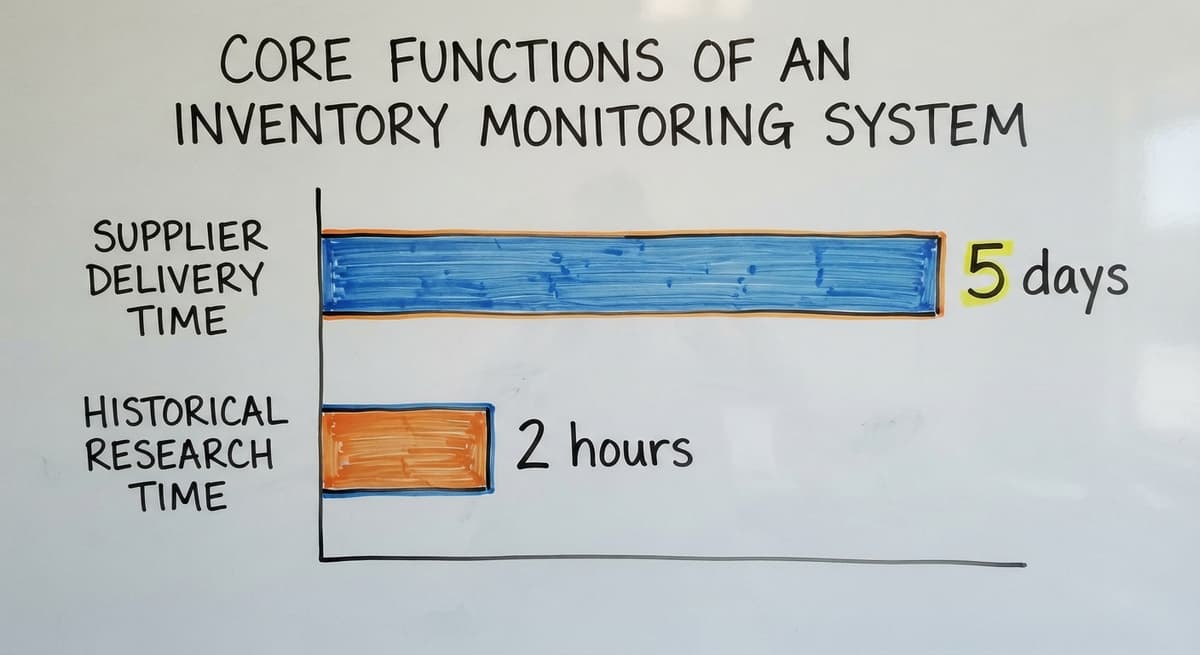
A reorder point is the quantity at which you need to order more stock to avoid running out before the next shipment arrives. For example, if a SKU sells 10 units a day and your supplier takes 5 days to deliver, your reorder point is 50 units.
Setting that number manually is easy. Checking it every day for every SKU is not. Automated alerts remove that daily mental load entirely. The system watches the levels and sends a alert when action is needed.
Thresholds can be set per SKU, per storage location, or per customer account if your operation serves customers with dedicated stock. You set the rules once, and the system does the watching.
Movement History and Audit Trails
Every receipt, pick, transfer, and adjustment gets a timestamp and a user name attached to it. That log is your audit trail.
An audit trail resolves disputes fast. A customer says they received the wrong quantity. You pull the pick record, see who picked it and when, and find the answer in under 2 minutes instead of 2 hours.
Audit trails also surface shrinkage patterns. If product is disappearing from one bin but not others, the log shows it. This replaces the paper log that gets lost and the shared spreadsheet that nobody fully trusts.
Multi-Location and Multi-Bin Tracking
Most distributors and warehouses have more than 1 storage area. You might have a main floor, a back room, a second building, or a third-party overflow facility. Good inventory monitoring tracks stock by bin, shelf, zone, or building, not just a single total quantity.

Why does bin-level detail matter? Because a picker sent to the wrong bin wastes time and creates errors. If the system says you have 40 units but does not say where they are, the picker has to search. Multi-location inventory tracking turns a vague total into a precise address.
For operations with more than 1 facility, the same logic applies at the building level. The US Census Bureau's Monthly Wholesale Trade data shows that wholesale inventories are large relative to sales across the economy, which means small errors in location tracking compound quickly across a large SKU count.
How Does Inventory Monitoring Connect to Order Fulfillment Accuracy?
When inventory data is live, every pick list reflects what is actually on the shelf right now. That is the direct connection between warehouse inventory tracking and order fulfillment accuracy.
The chain works like this:
- A sales order comes in.
- The system checks current stock levels in real time.
- A pick list goes to the warehouse with the correct bin location.
- The picker pulls the product and confirms the pick.
- Stock levels update at once.
- The shipment goes out with the right product in the right quantity.
Manual steps in that chain are where errors and delays enter. A paper pick list printed at 8 a.m. does not reflect a pick made at 7:45 a.m. by another team member. Live data closes that window of error entirely.

Your Legal Obligation to Ship on Time
The US Federal Trade Commission's Mail, Internet, or Telephone Order Merchandise Rule needs sellers to ship within the time they promise or notify customers of a delay. Accurate stock data is the foundation of meeting that obligation.
See it running on your own process first
No build cost. The subscription starts once it is live and doing the job, not before.
Book a callBarcode Scanning vs. Manual Entry
Barcode scanning reduces keying errors and speeds up both receiving and picking. A scan takes less than 1 second and records the exact SKU without the risk of a typo. Manual entry is slower and introduces errors at every keystroke.
Small operations often start with manual entry, and that can work if the process is disciplined. The risk grows as volume grows. A good inventory monitoring system supports both methods. You should not have to roll out scanners on day one to get value from the software.
Start with manual entry if that is where you are. Add barcode scanning inventory when the volume justifies it. The system should grow with your operation, not set the pace for it.

Keeping Your Accounting Software in the Picture
Many small distributors are not ready to leave their accounting package behind, and they should not have to. Your accounting software handles invoices, payments, and financials well. The inventory monitoring layer handles stock levels, bin locations, and pick records.
Think of it as a division of labor. Your accounting software owns the money side. The monitoring system owns the physical side. The two sync automatically so neither team has to do double entry.
What stays in your accounting software: invoices, vendor payments, cost of goods sold, and financial reporting. What moves to the monitoring system: on-hand quantities by location, inbound receipts, outbound picks, and stock adjustments.
What Manual Reconciliation Between Systems Actually Costs
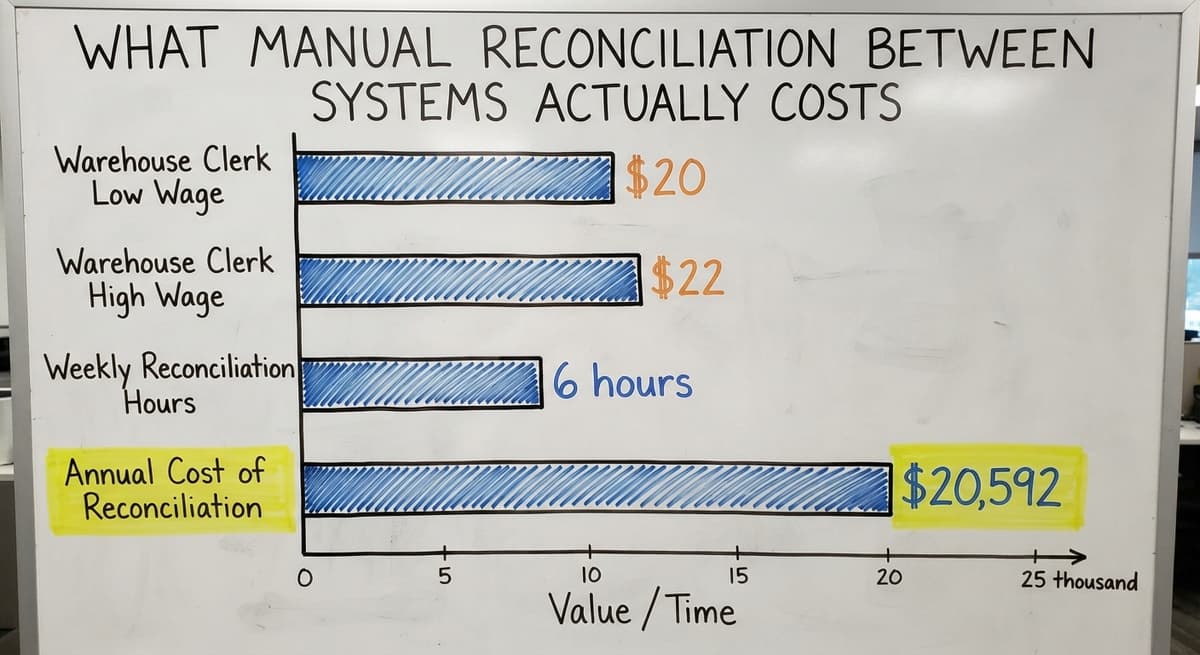
The BLS Occupational Employment data shows that warehouse and inventory clerks earn around $20 to $22 an hour. Three clerks spending 6 hours a week on manual matching between systems costs about $20,592 a year. A sync that removes that work pays back fast.
What Good Integration with Your Accounting Software Looks Like
Good accounting software integration for wholesale operations means data flows in both directions without anyone copying it by hand.
- Inventory adjustments post to your accounting software automatically so the books reflect the current count.
- Buy orders and receipts sync so landed inventory appears in the financials the moment it is confirmed.
- The accounting team sees invoices and costs. The warehouse team sees bins and quantities. Same underlying data, each team seeing the view they need.
No integration that needs manual export and import qualifies as real integration. If someone has to touch a file to move data between systems, the gap is still open.

Reporting That Operations Managers Actually Use
Generic ERP reports need a consultant to configure and often answer questions nobody asked. Useful reporting in an inventory monitoring system surfaces the numbers an ops manager checks every morning without digging through menus.
The reports that matter most in a warehouse or distribution setting:
- Current stock by location: what is on hand, where, right now.
- Slow-moving SKUs: product that has not moved in 30, 60, or 90 days and is tying up shelf space.
- Shrinkage over a period: the gap between expected and actual counts, by SKU or by zone.
- Fill rate by order: the percentage of orders shipped complete and on time.
Those 4 reports answer the questions that drive daily decisions. A system that makes them easy to pull is one your team will actually use.
Inventory Accuracy Rate: The Number to Watch
Inventory accuracy rate is the percentage of SKUs where the system count matches the physical count. If you have 200 SKUs and 180 of them match, your accuracy rate is 90 percent.
Operations running below 95 percent accuracy usually see measurable order errors and customer complaints. The math is straightforward: at 90 percent accuracy, 1 in 10 SKUs carries a wrong count, and those wrong counts show up in mis-ships and stock-outs.
Continuous monitoring improves this number because discrepancies get caught the day they happen, not at the next cycle count weeks later. A small error caught early is a quick fix. The same error found at cycle count is a mystery to solve.
Should You Buy Off-the-Shelf or Build Custom Inventory Monitoring Software?
Off-the-shelf tools are built for an average operation. Custom inventory monitoring software is built for your operation. That difference matters more than it sounds.
Small distributors often spend months forcing their workflow into a packaged tool, then build workarounds for the parts that do not fit. Those workarounds become the new spreadsheets, and the problem returns. Custom warehouse software for small distributors maps to the process already in place rather than asking staff to change how they work.
The honest trade-off: off-the-shelf costs less up front and takes less time to deploy. Custom costs more to build but stops costing time to fight. For an operation with a specific workflow, the custom path often reaches a lower total cost within 18 months. The deciding factor is how far your process sits from what the packaged tool assumes.
Not sure this is the right shape for your operation
Describe how the work runs today. We map it on a call and show you what it would look like built around that, before you spend anything.
Book a call
Implementation Without the Big-ERP Headache
The fear of a long, expensive rollout is real and reasonable. Big ERP projects do go wrong. A targeted inventory monitoring build is not that.
A phased approach keeps the risk small. Start with stock visibility: get every SKU into the system with a current count and a location. That alone is a major improvement over a shared spreadsheet. Add reorder point alerts in the second phase. Add barcode scanning inventory in the third, if volume justifies it.
Each phase delivers value before the next one starts. You do not have to complete the whole build to see results. Warehouse management for small and mid-size operations works best when the rollout matches the pace the team can absorb.
What to Look for When Evaluating a System
Not every inventory monitoring system is built for a 10-to-80-person distributor. Evaluate any option against these criteria before you commit.
- Location tracking: does the system track by bin or shelf, not just total quantity across the whole warehouse?
- Accounting software sync: does data flow automatically, with no manual export step?
- Per-SKU reorder points: can you set different thresholds for different products?
- Process fit: does the software match how your team already works, or does it need a process change to get started?
- Support continuity: is the team that builds the system the same team that supports it after go-live?
A system that scores well on all 5 is rare. Rank location tracking and accounting software sync first; those two gaps cause the most daily pain in a small distribution operation.
Questions to Ask Before You Commit
Before signing anything, get clear answers to these questions from any vendor or rollout team:
- Who sets up the reorder points and alerts: your team, or a consultant you pay by the hour?
- How long does a typical rollout take for an operation your size, in weeks, not months?
- What is the process for making a change after go-live, and what does it cost?
- Is the software shaped around your workflow, or do you adapt to the software's assumptions?
The answers reveal whether the vendor sells software or solves problems. A team that cannot answer the third question clearly has not thought about what happens after the sale.

Getting Started with Inventory Monitoring
The practical first step is a process map. Write down how a product moves from receiving dock to outbound shipment today. Mark every point where someone records something manually. Those marks are your pain points.
Pick the biggest one and solve it first. For most small distributors, that is stock visibility: knowing what is on hand without walking the floor. Even basic real-time inventory tracking is a large improvement over a shared spreadsheet that three people update at different times.
Choosing the Right Partner Before You Build Anything
Decide what your accounting software keeps doing before you build anything else. That decision shapes the whole system design. Order fulfillment software and inventory monitoring work best when the boundaries between systems are clear from the start.
If you want to talk through what that looks like for your specific operation, reach out to a local team that builds around how you already work, not around a packaged tool they need to sell. The right partner asks about your process before they mention their software.
Frequently asked questions
What is inventory monitoring and how is it different from a physical count?
Inventory monitoring is the continuous tracking of stock levels, locations, and movement in real time. A physical count is a one-time snapshot that ages the moment it ends. Monitoring replaces that snapshot with a live feed, so you always know what is on hand without stopping work to count.
Why is a spreadsheet or accounting software alone not enough for inventory monitoring?
Your accounting software tracks financial transactions, not physical stock movement. Spreadsheets drift out of sync the moment more than one person touches them. Neither tool updates when a pick happens or a receipt arrives. A dedicated inventory monitoring system fills that gap by tracking the physical side in real time while your accounting software handles the financial side.
What are the signs that a warehouse needs a dedicated inventory monitoring system?
Common signs include frequent stock-outs, excess safety stock on slow movers, hours spent reconciling counts each week, customer complaints about wrong shipments, and no quick answer to 'how much do we have right now?' If 3 or more of those apply, the current process has outgrown its tools.
How does inventory monitoring connect to order fulfillment accuracy?
Live inventory data means every pick list reflects what is actually on the shelf at that moment. The chain runs from sales order to stock check to pick list to shipment to stock update, with no manual steps in between. Removing those manual steps is where order errors and delays stop happening.
What is inventory accuracy rate and why does it matter?
Inventory accuracy rate is the percentage of SKUs where the system count matches the physical count. Operations below 95 percent accuracy usually see measurable order errors and customer complaints. Continuous monitoring improves this number because discrepancies are caught the day they happen rather than at the next scheduled cycle count.
What core features should an inventory monitoring system include?
A solid system needs real-time stock level visibility across all locations, movement tracking for every receipt and pick, reorder point alerts per SKU, and a full audit trail showing who changed what and when. Those 4 functions cover the gap that spreadsheets and accounting packages leave open.
How long does it take to implement an inventory monitoring system for a small distributor?
A phased build keeps the timeline short. Getting stock visibility live, meaning every SKU in the system with a current count and location, usually takes a few weeks for a small operation. Reorder alerts come next. Barcode scanning is added later if volume justifies it. Each phase delivers value before the next one starts.
What is the difference between off-the-shelf and custom inventory monitoring software?
Off-the-shelf tools are built for an average operation and cost less up front. Custom software is built for your specific workflow and stops costing time to fight. For operations with a process that differs from what packaged tools assume, custom monitoring often reaches a lower total cost within 18 months because it removes the workarounds that become the new spreadsheets.
Start with a free first look
A 30 minute call, your operation mapped, and a clear picture of what we would build. No obligation and nothing to install.
Book a callRelated guides
The rest of this guide, for the parts of the job this page does not cover.
Guides
- Classification of Inventory
- Excess Inventory
- Closed for Inventory
- Multi Location Inventory Management Software
- Ms Excel Inventory Template
- Inventory Management for Multiple Locations
- Costing Inventory
- Is Inventory a Long-term Asset
- Inventory Management System for Manufacturing
- Inventory Fixed Assets
- Inventory Management Pics
- Excel Inventory Template
- Push and Pull Inventory
- Types of Inventory Control
- Consumable Inventory
- B2b Inventory Management
- Jewelry Inventory Management
- Dental Inventory Management
- The Objective of Inventory Management is To
- Qr Code for Inventory Management
- Inventory Metrics