

Calculate Beginning Inventory
To calculate beginning inventory, use this formula: Beginning Inventory = Ending Inventory + COGS, Buys. Ending inventory is what you had left at the close of the prior period. COGS is the cost of goods sold during that period. Buys is all new stock received. The result tells you what was on hand when the current period opened.
Reviewed September 2026. Figures are worked from the assumptions stated beside them, so you can substitute your own and the arithmetic still holds.
Reviewed and updated: July 2025
Book a callWhat Is Beginning Inventory and Why Does It Matter?
Beginning inventory is the dollar value or unit count of stock on hand at the start of an accounting period. For a warehouse or wholesale distributor, that means every pallet, case, and loose unit sitting in the building when the clock resets on a new month, quarter, or fiscal year.
The number is not new. It is the same figure as ending inventory from the prior period, carried forward. One period ends, the next one opens, and the closing count becomes the opening count.
This figure ties directly to cost of goods sold (COGS), gross profit, and the accuracy of your financial statements. The IRS is direct about it: IRS Publication 538 states, "To figure taxable income, you must value your inventory at the beginning and end of each tax year." That makes accurate beginning inventory a legal obligation, not just a best practice.
An off number here ripples into purchasing decisions, reorder points, and tax filings. Operations managers who track it closely also catch shrinkage and counting errors before they compound. The US Census Bureau's Monthly Wholesale Trade data shows that wholesale inventories-to-sales ratios shift month to month, which means even a small counting error can distort how a business reads its own position.
Accurate barcode scanning is one of the most reliable ways to keep counts clean. As GS1 notes at its barcode standards page, standardized barcodes are the foundation of scan-based inventory tracking across global supply chains.
We build it for your operation, and the first look is free
If you would rather not compare products, describe how your operation already works and we build the system around it.
No build cost. You see it running on your own process first, and the monthly subscription starts only once it is live.
Book a callWhat Is the Formula to Calculate Beginning Inventory?
Beginning Inventory = Ending Inventory + COGS, Buys is the formula you need, and you can apply it in dollars or units as long as you stay consistent.
Here is what each piece means in plain language:
- Ending inventory is the value of stock left at the close of the previous period. Find it on your balance sheet or the inventory valuation summary in QuickBooks.
- COGS (cost of goods sold) is the total cost of products sold during that same period. It appears on the profit and loss statement.
- Buys is every new item received and paid for during the period. Pull this from buy orders, bills, or the QuickBooks buys-by-vendor report.
All 3 numbers must cover the same time window. A COGS figure from Q1 paired with a buys figure from Q2 produces a meaningless result.
Breaking Down Each Variable
Ending inventory can come from a physical count or a system-generated valuation report. A physical inventory count is the most reliable source when system records are in question.
COGS covers only product costs, not shipping to customers or service labor. If your income statement bundles those together, separate them before you use the number.
Buys must include every receipt for the period, not just paid invoices. Under accrual accounting, received goods are a cost even before the bill is settled. Freight and landed costs belong here too, if your system tracks them as part of inventory value. Vendor credits and returns reduce the total, so subtract them before applying the formula.
Match the period across all 3 variables. That single discipline prevents most of the errors that send beginning inventory calculations off track.

Step-by-Step Example for a Wholesale Distributor
Here is a realistic scenario. A small wholesale distributor closes out Q1 and needs to confirm its beginning inventory for Q2.
The team pulls 3 numbers from QuickBooks:
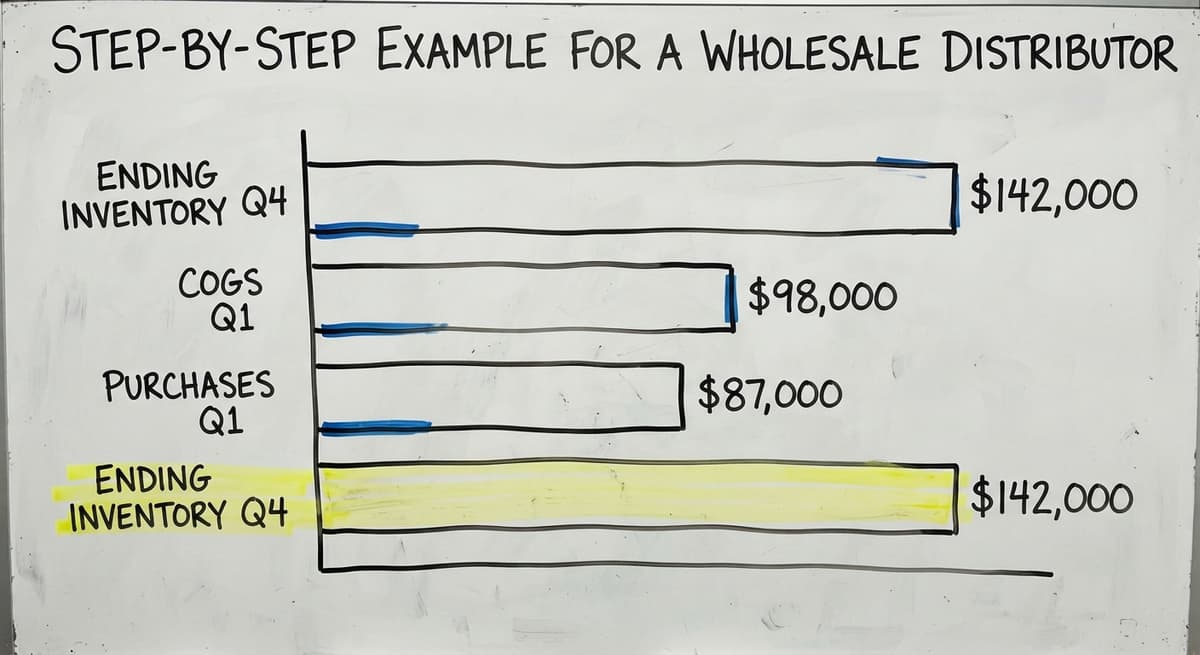
- Ending inventory (close of Q4, prior year): $142,000
- COGS for Q1: $98,000
- Buys received during Q1: $87,000
Apply the formula:
Beginning Inventory = $142,000 + $98,000, $87,000 = $153,000
That $153,000 is what should have been on hand at the start of Q1. If a physical count at the Q1 open showed $149,000, the $4,000 gap is worth investigating. It could be unrecorded shrinkage, a receiving error, or a timing issue with a vendor credit.
Operationally, the number also tells the purchasing manager whether the business entered the quarter lean or heavy. A higher-than-expected figure might mean slower sales in Q4 and a reason to hold off on new orders. A lower figure might signal a reorder is overdue.
The comparison is easier when one option is built for you
Off-the-shelf means fitting your process to the software. We do it the other way round, and the first look costs nothing.
Book a call
How to Find Ending Inventory and Pull Your COGS
Finding Ending Inventory from the Prior Period
The fastest path is the balance sheet or the inventory valuation summary report inside QuickBooks. Run the report as of the last day of the prior period. The total inventory value on that date is your ending inventory figure.
If records are missing or unreliable, a physical inventory count is the fallback. Count every unit, assign a cost to each, and total the result. That count becomes your baseline.
When the physical count does not match the system number, do not average them or pick the one that looks right. A discrepancy is a red flag. It usually points to unrecorded receipts, missing adjustments, or theft. Investigate the gap before moving forward, because carrying a wrong number into the formula produces a wrong beginning inventory, and that error flows into COGS and gross profit for the entire period.
Pulling Your COGS Number
COGS appears on the profit and loss statement in QuickBooks. Filter the report to the exact period you are calculating, then read the cost of goods sold line.
One common mistake: mixing service revenue costs with product costs. If your business sells both goods and services, make sure the COGS line reflects only product costs. Service labor and overhead belong elsewhere.
If COGS is not tracked as a separate line, estimate it using your sales total and your known average margin. Multiply total sales by the cost percentage (1 minus your gross margin percentage) to get a working figure. This is a workaround, not a substitute for proper tracking, and it is worth fixing in QuickBooks if you rely on it regularly.

What Are the Most Common Mistakes When You Calculate Beginning Inventory?
The most common mistake is using different time periods for each variable, and it produces a number that looks plausible but is completely wrong. Here are the other errors that show up most often:
- Forgetting in-transit or consignment stock that belongs to your business but has not physically arrived yet
- Mixing units and dollars in the same calculation, which produces a result with no meaning
- Skipping the annual matching between the calculated figure and a physical count, so errors accumulate quietly over time
- Treating the formula result as final without checking it against the prior period's closing balance sheet
Inventory matching is not a one-time task. The NIST Manufacturing Extension Partnership recommends regular process reviews as part of sound supply chain management. For most wholesale distributors, quarterly matching is the minimum. Monthly works better for fast-moving stock.

Beginning Inventory vs Ending Inventory, and How Both Connect to COGS
Beginning inventory and ending inventory are the same number seen from different points in time. Beginning inventory opens the period. Ending inventory closes it. The moment a period ends, its closing figure becomes the opening figure for the next one. This chain is how inventory flows through the books continuously.
The connection to COGS runs in both directions. The COGS formula is:
Beginning Inventory + Buys, Ending Inventory = COGS
That is the same formula rearranged. An error in beginning inventory changes COGS, which changes gross profit, which changes taxable income. The FTC's guidance on order fulfillment underscores why accurate stock counts matter operationally too: you cannot promise to ship what you do not actually have.
A wrong beginning inventory does not stay isolated. It corrupts every downstream number that depends on it.

Inventory Valuation Methods That Affect Your Calculation
The dollar value of beginning inventory depends on which valuation method your business uses. There are 3 common approaches:
- FIFO (first in, first out): Assumes the oldest stock sells first. In a rising-cost environment, this produces a higher ending inventory and lower COGS.
- LIFO (last in, first out): Assumes the newest stock sells first. This is less common and not permitted under international accounting standards.
- Weighted average cost: Divides total inventory cost by total units to get one average cost per unit. Simpler to keep and common among wholesale distributors.
The method you choose changes the dollar value assigned to beginning inventory. Stay consistent with whichever method is already set up in QuickBooks. Switching methods mid-stream distorts comparisons across periods and needs an accountant's guidance to do correctly. The IRS has specific rules about method changes, detailed in IRS Publication 538.
See it running on your own process first
No build cost. The subscription starts once it is live and doing the job, not before.
Book a callWhen to Calculate Beginning Inventory, and How Tools Affect the Process
How Often Should You Run the Calculation?
The right frequency depends on how fast your stock moves:
- Monthly for businesses with high-velocity SKUs or tight cash flow
- Quarterly for slower-moving wholesale operations where stock turns are measured in weeks
- At fiscal year-end, always, for tax and financial reporting
- Any time a physical count is completed, since a fresh count resets the baseline
Doing This in QuickBooks vs a Spreadsheet
QuickBooks can produce all 3 numbers needed for the formula if inventory items and transactions are entered correctly. The inventory valuation summary gives ending inventory. The profit and loss statement gives COGS. The buys-by-vendor report gives the buys total.
Many small distributors pull those figures into Excel to run the actual math. That hybrid workflow works well at low volume. It breaks down when transaction counts grow, when multiple staff pull the same report and get different numbers, or when the QuickBooks data itself needs manual correction before it is usable.
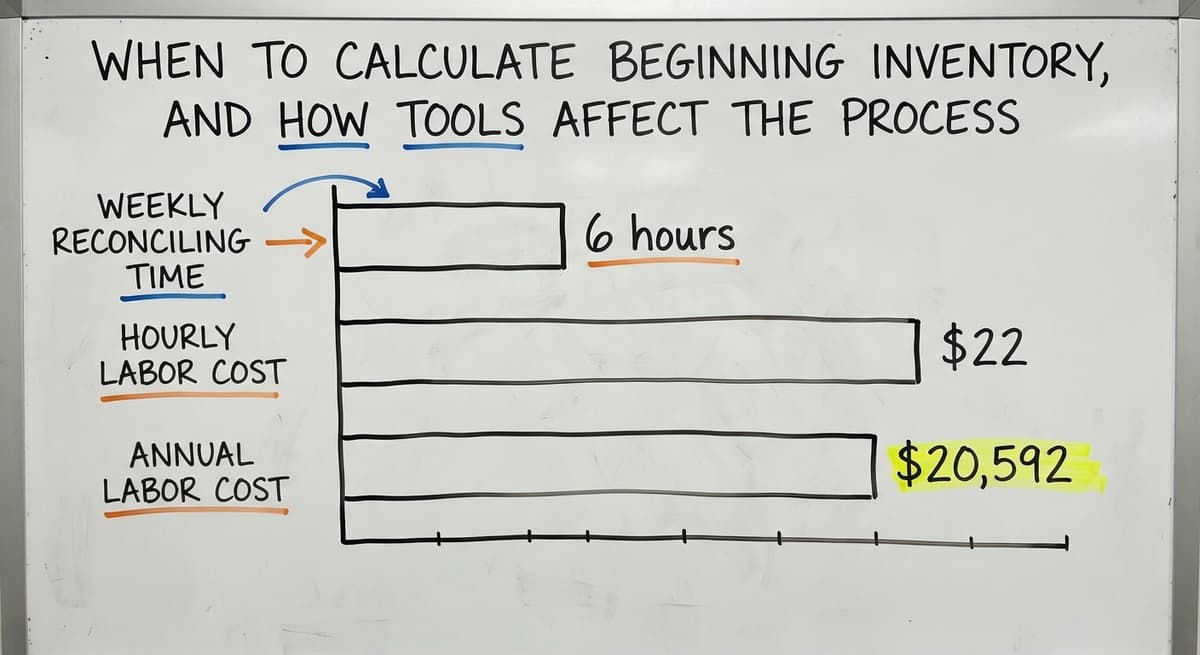
Three people spending 6 hours a week reconciling inventory at $22 an hour costs $20,592 a year in labor alone, based on BLS wage data for stock clerks and order fillers. That figure does not include the cost of decisions made on wrong numbers.
Is Your Inventory Tracking Ready for an Upgrade?
Your current process is holding you back if you recognize more than 2 of these signs:
- Matching takes hours and the counts still do not match the system
- Beginning inventory changes depending on who pulls the report and when
- Multiple printed sheets or spreadsheets are needed to produce one clean number
- Staff are correcting QuickBooks entries manually after transactions close
These are not QuickBooks problems. They are process problems that a purpose-built layer can fix without replacing the accounting system you already rely on.
Inventory management software for small distributors built for warehouse operations records every receipt and shipment in real time. Beginning inventory for any period is calculated automatically from live data. No manual formula, no spreadsheet, no matching session at month-end. The number is current because the system updates it as work happens.
Warehouse receiving and tracking automating can sit alongside QuickBooks rather than replacing it. The two systems sync, so beginning inventory in QuickBooks stays accurate without manual entry. Custom working software for wholesale businesses handles receiving, picking, and counting while QuickBooks handles the accounting. This approach works for operations with 5 to 100 staff. It does not need an enterprise ERP budget or a year-long rollout.
Replacing Excel spreadsheets with purpose-built software removes the version-control problem entirely. One system, one number, one source of truth. If you want to explore how to integrate custom software with QuickBooks in a way that fits your current workflow, that conversation starts with understanding where your manual process actually breaks.
Quick Reference: Beginning Inventory Formula and Steps
Here is the full process in one place:
Formula: Beginning Inventory = Ending Inventory + COGS, Buys
- Find ending inventory from the prior period's balance sheet or QuickBooks inventory valuation summary. Tip: confirm it matches your last physical count before using it.
- Find COGS from the profit and loss statement filtered to the exact period. Tip: strip out service costs if they share a line with product costs.
- Total buys from the buys-by-vendor report or your bills list. Tip: subtract vendor credits and returns, and include freight if it is tracked in inventory value.
- Apply the formula and compare the result to any available physical count. Tip: a gap of more than 2% is worth a short investigation before you close the period.
The formula takes 10 minutes when the data is clean. Most of the work is making the data clean.
Frequently asked questions
How do I calculate opening inventory?
Opening inventory is the same as beginning inventory. Use this formula: Beginning Inventory = Ending Inventory + COGS, Buys. Pull ending inventory from your prior period's balance sheet, COGS from your profit and loss statement, and buys from your buy orders or bills. Apply the formula and you have your opening figure.
How do you calculate beginning and ending inventory?
Beginning inventory is calculated using: Beginning Inventory = Ending Inventory + COGS, Buys. Ending inventory is calculated by taking beginning inventory, adding buys made during the period, and subtracting COGS: Ending Inventory = Beginning Inventory + Buys, COGS. The two formulas are the same equation rearranged. The ending figure from one period becomes the beginning figure for the next.
How to calculate beginning value?
Beginning value refers to the dollar value of inventory at the start of a period. Find it by taking the ending inventory value from the prior period's balance sheet or QuickBooks inventory valuation report. If that figure is unavailable, use the formula: Beginning Inventory = Ending Inventory + COGS, Buys, with all three numbers drawn from the same time window.
How do I calculate my beginning work in progress inventory?
Work in progress (WIP) inventory covers goods that have been started but not finished. To find the beginning WIP value, take the ending WIP balance from the prior period's balance sheet. If you need to derive it, use: Beginning WIP = Ending WIP + Cost of Goods Manufactured, Manufacturing Costs Added During the Period. This applies to businesses that assemble or manufacture products rather than resell finished goods.
What if I have no records from the prior period?
Start with a physical inventory count. Count every unit on hand, assign a cost to each one using your best available pricing records, and total the result. That figure becomes your baseline beginning inventory. Document the count date and method so future periods have a clean starting point.
Can QuickBooks calculate beginning inventory automatically?
QuickBooks can produce the numbers you need for the formula, but it does not run the calculation for you. The inventory valuation summary gives ending inventory. The profit and loss statement gives COGS. The buys-by-vendor report gives buys. All three numbers are only reliable if inventory items and transactions have been entered correctly and consistently throughout the period.
How often should I reconcile my beginning inventory?
At minimum, reconcile quarterly. Monthly is better for businesses with fast-moving stock or tight cash flow. Always reconcile at fiscal year-end for tax and financial reporting. Any time a physical count is completed, use it as an opportunity to confirm the system number matches the actual count.
Start with a free first look
A 30 minute call, your operation mapped, and a clear picture of what we would build. No obligation and nothing to install.
Book a callRelated guides
More on the same work.
Guides
Common questions
- How to Calculate Cycle Stock
- What is E Inventory Management
- What is Roq in Inventory Management
- What is Barcoding in Inventory Management
- What is Online Inventory Management System
- What is Effective Inventory Management
- What is the Definition of Inventory Management
- What is Inventory Management Mary Kay
- What is Inventory Management Practices
- What is Fluctuation Stock in Inventory Management
- What is Abc Classification in Inventory Management
- What is the Purpose of Inventory in Operations Management
- How to Manage Food Inventory
- What is Sales and Inventory Management System
- What is the Importance of Quality Inventory Management
- What is Inventory Management System Project
- How to Create an Inventory Tracking System?
- How to Manage Consignment Inventory
- What is Inventory Management Meaning in Hindi
- What is Fifo in Inventory Management
- What is Telecom Inventory Management
- How to Manage Fba Inventory
Added since this page was reviewed
The newer guides in this cluster are here.
- How to Manage Inventory in Rocket League Answered on its own page.
Added since this page was reviewed
The newer guides in this cluster are here.
- How to Manage Inventory in Stardew Valley Answered on its own page.
Added since this page was reviewed
The newer guides in this cluster are here.
- How to Manage Inventory Fallout 76 Answered on its own page.
Added since this page was reviewed
The newer guides in this cluster are here.
- Best Inventory Software Answered on its own page.
- Classification of Inventory Answered on its own page.
- How to Keep Track of Inventory Answered on its own page.
- Excess Inventory Answered on its own page.
- Closed for Inventory Answered on its own page.
- Multi Location Inventory Management Software Answered on its own page.
- Ms Excel Inventory Template Answered on its own page.
- What is the Difference Between Aggregate and Item Inventory Management Answered on its own page.
- Inventory Management for Multiple Locations Answered on its own page.
- Costing Inventory Answered on its own page.
- What is Jit Inventory Management Answered on its own page.
- What is Kanban System of Inventory Management Answered on its own page.
- Is Inventory a Long-term Asset Answered on its own page.
- Mro Inventory Meaning Answered on its own page.
- Inventory Management System for Manufacturing Answered on its own page.
- Inventory Fixed Assets Answered on its own page.
- Inventory Management Pics Answered on its own page.
- Inventory Monitoring Answered on its own page.
- Excel Inventory Template Answered on its own page.
- What is an Important Factor in Inventory Management Answered on its own page.
- Push and Pull Inventory Answered on its own page.