

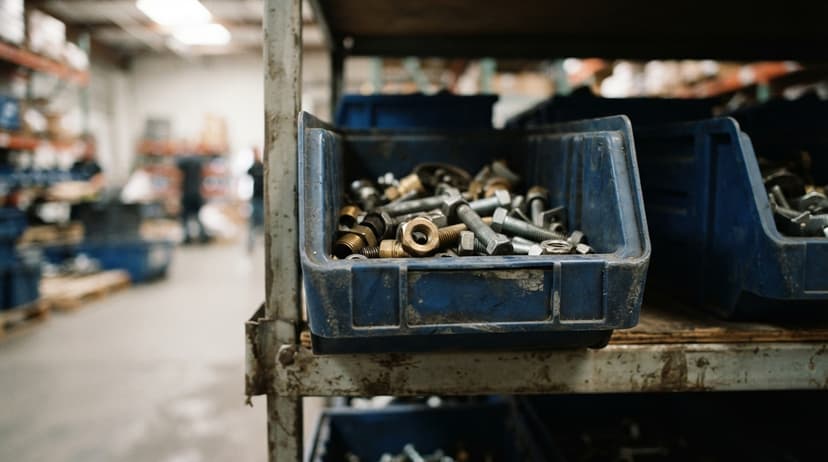
Inventory Bin System
An inventory bin system gives every item in your warehouse a named home. Workers look up the bin address, walk straight to it, and pick the right item. That is the whole idea. This guide covers how bin systems work, how to set one up, and how to connect bin-level tracking to QuickBooks without replacing it. Reviewed June 2025.
Book a callWhat Is an Inventory Bin System and How Does It Work?
A bin is any named storage spot in a warehouse or stockroom. It can be a shelf section, a plastic tote, a floor slot, or a rack bay. The inventory bin system is the combination of physical labels on those spots plus the software or records that track what quantity sits in each one.
Every SKU (stock-keeping unit, meaning one unique product) gets assigned to at least one bin. When a worker needs to pick an order, the system tells them the bin address. They walk to that exact spot, scan or confirm the item, and move on.
Receiving, picking, replenishment, and cycle counting all run through bin addresses. The bin is the anchor that keeps every step honest.
How Bin Locations Matter Day to Day
Without bin locations, pickers search by memory or ask a coworker. Both slow things down and cause errors. A bin system shrinks pick time, cuts mis-ships, and makes training new staff faster because the location is written down, not stored in someone's head.
This matters most for operations with 5 to 100 staff, where 1 wrong shipment can cost a customer relationship. QuickBooks tells you how many units you own. It does not tell you where those units live on the shelf. That gap is what a bin system closes.
GS1, the global standards body behind product barcodes, notes that consistent location labeling is the foundation of scan-based tracking. You can read their barcode standards at gs1.org. A bin system built on those standards works with any scanner or software that reads standard barcodes.
The IRS is direct about why accurate counts matter: "To figure taxable income, you must value your inventory at the beginning and end of each tax year," per IRS Publication 538. A bin system makes that count faster and more accurate.
We build it for your operation, and the first look is free
If you would rather not compare products, describe how your operation already works and we build the system around it.
No build cost. You see it running on your own process first, and the monthly subscription starts only once it is live.
Book a callBin Naming Conventions and Physical Setup
A clear naming format is the first decision you make. The most common is aisle-bay-level-position, for example A-03-02-L means Aisle A, Bay 3, Level 2, Left side. Zone prefixes work well for special areas: COLD-A-01 for a refrigerated section, HV-B-04 for a high-value cage.
Keep names short enough to fit on a small label and easy to say aloud. A picker calling out a bin address over the radio should not have to spell it.
Consistency matters more than any single format. Pick one system and use it everywhere from day one.
Physical Labels and Bin Hardware
Barcode or QR labels on each bin let a scanner confirm the right spot before the worker pulls anything. Aisle signs at eye level help new pickers navigate without asking for directions.
Bin hardware options include:
- Wire shelving with label holders for small-parts operations
- Plastic totes clipped to rack rails for loose items
- Pallet rack with dividers for mid-size cartons
- Floor tape marking bulk zones for large or heavy goods
Use durable label stock or laminate your labels. A smudged bin label causes a mis-pick just as surely as a missing one.
Fixed Bins vs. Dynamic Bin Assignment
The difference between fixed and dynamic bins is simple. With fixed bins, each SKU always lives in the same location. Workers memorize it over time. This works well for stable product catalogs and is the right starting point for most small distributors.
With dynamic bins, items are placed wherever space exists and the software tracks the current location. This handles high-volume or seasonal operations where SKU counts shift constantly, but it needs software that updates in real time.
Most small operations start with fixed bins and add dynamic logic only when they outgrow their fixed slots. If you are not sure which to choose, start fixed. You can layer in dynamic assignment later without rebuilding the whole system.
Single-Bin vs. Multi-Bin Inventory
Single-bin means one location per SKU. It is straightforward and easy to manage, but it creates bottlenecks when demand spikes. If your 1 forward pick slot runs empty mid-shift, pickers stall.
Multi-bin lets a SKU live in a primary pick bin and 1 or more reserve bins. You buy in bulk, store the overflow on a back rack, and keep a forward slot stocked for fast picking. When the pick bin runs low, the software flags a replenishment move from the reserve bin.
Software manages the primary-versus-reserve relationship automatically. Workers just pick from the primary bin. The system handles the rest.
Multi-bin is worth the added setup for any SKU that sells frequently enough to run out between replenishment cycles.
The comparison is easier when one option is built for you
Off-the-shelf means fitting your process to the software. We do it the other way round, and the first look costs nothing.
Book a call
How Many Bins Do You Actually Need?
A rough starting rule: 1 primary bin per active SKU, plus overflow bins for your top 20 percent of volume items. Count your active SKUs first, then map them to your available shelving.
Leave 10 to 15 percent of bin slots empty. New products arrive, and a full bin map forces a complete reslot every time one does.
For operations under 500 SKUs, a spreadsheet map is enough to start. List each SKU, assign a bin address, and print labels. Software can come next once the physical layout is proven. Trying to configure software before the layout is settled wastes time on both sides.
How Bin Data Connects to QuickBooks
QuickBooks tracks item quantities well. It has no native bin-location field, which means it cannot tell a picker where to go. That is the gap a custom software layer fills.
A custom system sits between QuickBooks and the warehouse floor. It stores bin addresses and current quantities at the bin level. Workers interact with the custom system on a handheld or phone. When a pick is confirmed, the quantity updates. That updated quantity syncs back to QuickBooks so the bookkeeper's numbers stay current.
The books stay in QuickBooks. The warehouse runs on the custom layer. No one has to learn a new accounting tool.
Can I Add Bin Tracking Without Replacing QuickBooks?
Yes, and for most small distributors that is exactly the right move. Replacing QuickBooks means migrating years of financial history, retraining your bookkeeper, and paying for features you do not need. Adding a warehouse layer avoids all of that.
The custom layer handles bin locations, pick lists, replenishment alerts, and cycle counts. QuickBooks handles invoicing, payables, and financials. The 2 systems stay in sync through an automated connection.
This is the approach The Software Society takes for wholesale and distribution clients. The goal is to fit the software to the operation, not force the operation to change for the software. If your team already runs on QuickBooks integration for warehouses, a custom layer is the least-disruptive path to bin-level inventory control.

Barcode Scanning and Cycle Counting by Bin
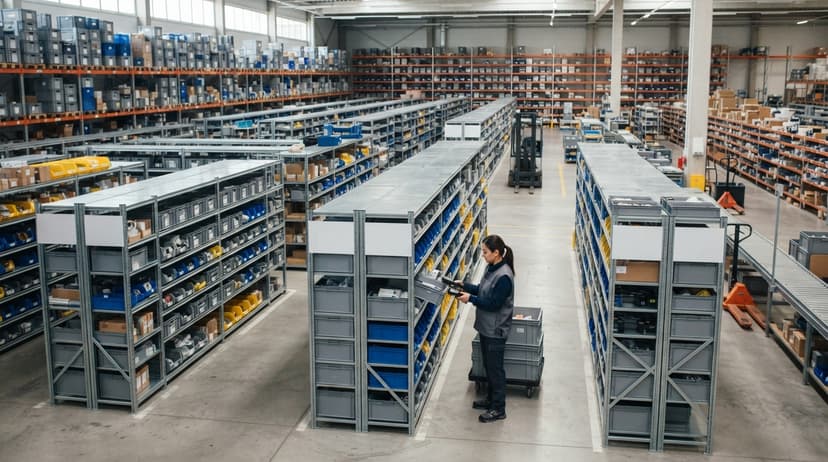
Handheld barcode scanners or mobile phones with a scanning app let workers confirm both the bin and the item before pulling anything. The process is 3 steps: scan the bin label, scan the item barcode, confirm the quantity. That replaces a paper pick sheet and removes the most common source of mis-picks, which is reading the wrong row on a printed list.
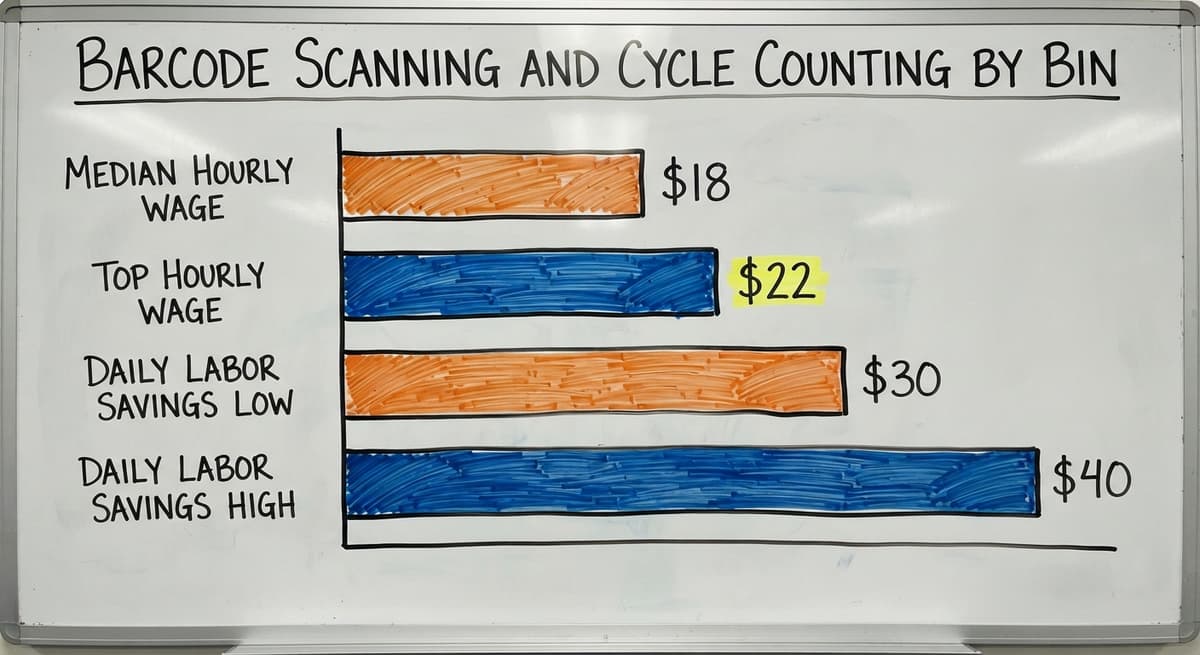
Modern custom software runs on any Android or iOS device. No expensive proprietary hardware is required. According to the US Bureau of Labor Statistics, warehouse order fillers earn a median wage around $18 to $22 per hour. 3 pickers spending 30 minutes less per shift searching for items saves roughly $30 to $40 per day in labor, or around $10,000 per year for a 5-day operation. The scanner pays for itself quickly.
Cycle counting means counting a small section of inventory on a regular schedule instead of shutting the whole warehouse down once a year. A bin system makes this practical. Assign 1 worker to count bins A-01 through A-05 on Monday morning. The software compares the count to the system quantity and flags any gap right away. Accurate records stay current all year, and the annual shutdown count becomes unnecessary. Cycle counting best practices are worth reviewing before you set your count schedule.
Organizing Bins for Faster Picking
Bin placement affects pick speed as much as bin naming does. These 4 rules cut travel time without changing your shelving:
- Put fast-moving SKUs in bins closest to the shipping area so pickers walk less
- Group items that are often ordered together in nearby bins to reduce back-and-forth travel
- Keep heavy items at waist height to reduce strain and speed handling
- Review pick frequency data every quarter and move bins when patterns shift
Slotting (placing SKUs in the bins that match their demand pattern) is the highest-return layout decision you can make. Even a rough sort of your top 20 percent of SKUs into the closest bins will cut average pick time noticeably.
See it running on your own process first
No build cost. The subscription starts once it is live and doing the job, not before.
Book a callSetting Up Zones for Different Product Types
Zones are groups of bins that share a characteristic: refrigerated, hazmat, high-value, oversize, or returns. Zone codes in the bin name let software route picks to the right area automatically.
Even a small warehouse benefits from a 2-zone layout: bulk storage in the back and active pick slots near the shipping door. Fulfillment centers handling multiple clients use zone codes to keep each client's inventory separate while running 1 unified bin map. The pick and pack process runs faster when zone routing is built into the pick list rather than left to the picker's judgment.

Common Mistakes and How to Avoid Them
Most bin system problems come from the setup phase, not the daily operation. Watch for these:
- Starting with too many bins before the team is trained. Begin simple. Add bins as the team gets comfortable.
- Using bin names that are too long. If the name does not fit on a 1-inch label, shorten it.
- Not updating the system when items are moved. Stale bin data is worse than no bin data because it sends pickers to the wrong spot with confidence.
- Skipping physical labels and relying on memory. The system only works if every bin is marked. No exceptions.
The NIST Manufacturing Extension Partnership recommends documenting location logic before labeling begins, so the naming scheme is consistent across the whole floor from day one.
Bin System Software: What to Look For and Whether to Buy or Build
The right software for bin tracking needs these features:
- Bin-level quantity tracking, not just item totals across the whole warehouse
- Pick list generation sorted by bin address to minimize travel distance
- Replenishment alerts when a primary bin falls below a set threshold
- Integration with your existing accounting or order management tool
- A mobile or scanner-friendly interface workers can use after a short training session
Off-the-shelf warehouse management systems (WMS) are built for large operations. They often take months to set up and come loaded with features a small distributor will never touch. The US Census Bureau's Monthly Wholesale Trade data shows that inventory-to-sales ratios for wholesale firms shift significantly by sector, which means a generic WMS built for one industry rarely fits another cleanly.
Custom inventory software is built around your bin layout, your SKU structure, and your existing workflow. The Software Society builds custom bin tracking that slots into the way an operation already runs. No forced migration, no months-long ERP rollout. Most operations are running with bin-level tracking within 30 days of starting.
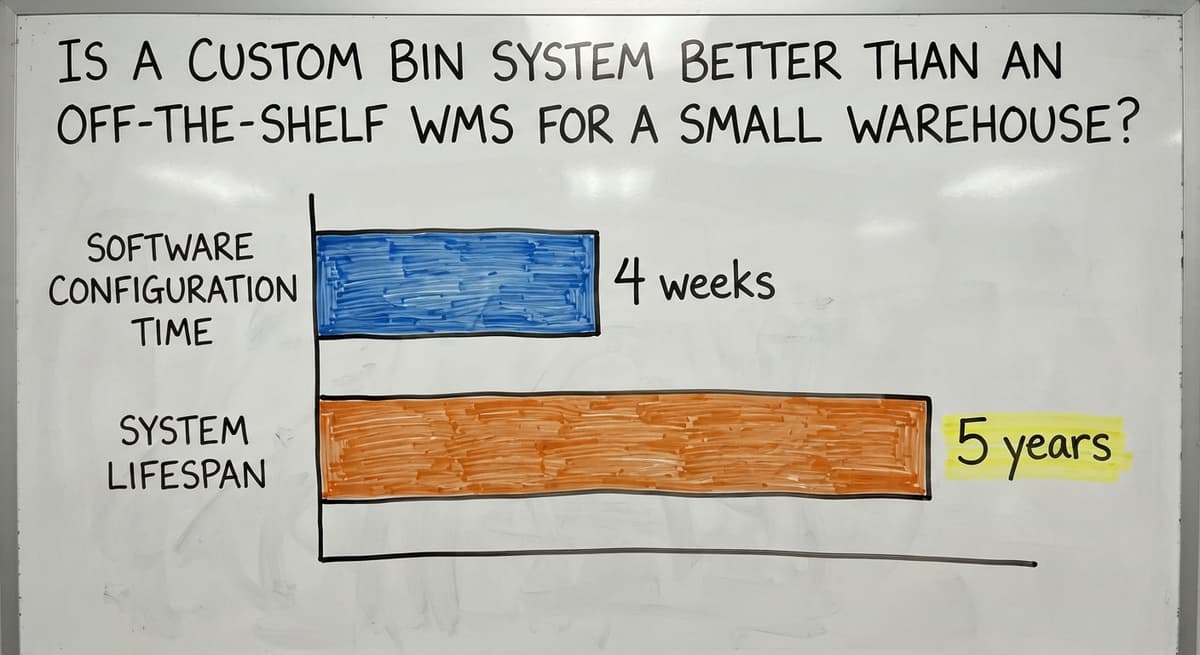
Is a Custom Bin System Better Than an Off-the-Shelf WMS for a Small Warehouse?
For most small distributors, yes. A WMS built for a 500-person distribution center carries pricing, training requirements, and setup complexity that does not fit a 10-person operation. You pay for what you do not use, and the setup cost alone can exceed the first year of value.
Custom warehouse software for small distributors is scoped to the actual operation. The bin layout, the SKU naming, the QuickBooks connection, and the mobile interface are all built to match what the team already does. The learning curve is shorter because the software matches the workflow rather than demanding the workflow match the software.
The trade-off is real: off-the-shelf tools are available at once, while custom software takes 1 to 4 weeks to configure. For an operation planning to run the same system for 3 to 5 years, that lead time is a small cost for a much better fit.
Getting Started with a Bin System
Starting simple beats waiting for the perfect setup. Here are the steps in order:
- Map your space and sketch a bin layout on paper or a spreadsheet
- Choose a naming format and apply it consistently to every location
- Print and install labels, starting with 1 zone or product category
- Load existing inventory into the new bin locations before going live
- Run a 30-minute training session with staff on the new pick process
- Add software once the physical layout is proven and the team is comfortable
The FTC's Mail and Internet Order Merchandise Rule needs sellers to ship within the time they promise. Accurate bin-level inventory is what makes that promise keepable. A bin system is not just an efficiency tool. It is part of operating a reliable business.
The Software Society builds custom bin tracking layers that work alongside QuickBooks and fit the operation as it already runs. If you run a wholesale or distribution business near Columbus, Ohio, or anywhere in the US, reach out for a no-pressure conversation about your specific setup. Custom warehouse management for small distributors does not have to mean a big-system price tag.
Frequently asked questions
What is an inventory bin?
An inventory bin is any named storage location inside a warehouse or stockroom. It can be a shelf section, a plastic tote, a floor slot, or a rack bay. The bin gets a label with a unique address, and software tracks what quantity of each item sits in that spot. The bin is the physical anchor that tells a picker exactly where to go.
What is the difference between fixed bins and dynamic bin assignment?
Fixed bins assign each SKU a permanent home. Workers memorize the location over time, and the setup is simple to manage. Dynamic bin assignment places items wherever space is available and lets software track the current location. Fixed bins are the right starting point for most small operations. Dynamic assignment adds value when SKU counts shift frequently or volume is high enough that fixed slots run out regularly.
What is the 2 bin system used for in inventory management?
The 2-bin system uses 2 physical containers for the same SKU. Workers pull from the first bin until it is empty, then switch to the second and trigger a reorder for the first. It is a simple, low-tech way to prevent stockouts without software. It works well for low-cost, high-use items like fasteners or packaging supplies where demand is steady and predictable.
How do I name my warehouse bins?
The most common format is aisle-bay-level-position, for example A-03-02-L for Aisle A, Bay 3, Level 2, Left. Add a zone prefix for special areas like COLD or HV for high-value. Keep names short enough to fit on a small label and easy to say aloud. Consistency matters more than the specific format you choose. Pick one system and apply it everywhere from the start.
What are the top 3 inventory management systems?
There is no single answer because the right system depends on business size, industry, and existing tools. QuickBooks with a custom bin tracking layer suits small distributors already using QuickBooks for accounting. Fishbowl is a common mid-market option that integrates with QuickBooks and adds warehouse features. NetSuite fits larger operations that need a unified ERP. The best choice is the one that matches your current workflow rather than the one with the most features.
What are the four main types of inventory systems?
The 4 main types are periodic, perpetual, just-in-time, and consignment. Periodic systems count inventory at set intervals. Perpetual systems update counts in real time with every transaction. Just-in-time systems order stock only when needed to minimize holding costs. Consignment means a supplier owns the inventory until you sell it. Most small warehouses run a perpetual system once they add barcode scanning, because real-time counts are what make a bin system accurate.
How long does it take to set up a bin system?
Physical labeling of a small warehouse with under 1,000 bins takes 1 to 2 days. Loading existing inventory into bin locations takes a few hours if your data is already in a spreadsheet. Custom software setup usually takes 1 to 4 weeks depending on complexity and integration needs. Most operations are running with bin-level tracking within 30 days of starting, with no months-long ERP rollout required.
How do I measure whether my bin system is working?
Track pick accuracy rate before and after launch. A well-run bin system should push accuracy above 99 percent. Measure average pick time per order line to see travel-time savings. Count how many times per week staff report a lost or missing item. Monitor inventory discrepancies through cycle count results over time. Shrinkage should drop as bin-level records become more accurate.
Start with a free first look
A 30 minute call, your operation mapped, and a clear picture of what we would build. No obligation and nothing to install.
Book a callRelated guides
The rest of this guide, for the parts of the job this page does not cover.
Guides
- Inventory Management System for Manufacturing
- Manual Inventory System
- Warehouse Inventory Management Systems
- Warehouse Inventory Systems
- Warehouse Inventory Management System
- Retail Inventory Management Systems
- Warehouse Inventory Tracking System
- Inventory Tracking Systems for Small Businesses
- Simple Inventory System for Small Business
- Small Business Inventory Management System
- Barcode Scanner Inventory System
- Barcode System for Inventory Free
- Inventory System for Small Business
- Retail Inventory System
- Hospital Stock Management System
- Top 10 Wms Systems
- Excess Inventory
- Multi Location Inventory Management Software
- Inventory Management for Multiple Locations
- Costing Inventory
- Excel Inventory Template
- Jewelry Inventory Management