


Example Of Inventory
Inventory is not a spreadsheet column. It is a live picture of what you have, where it sits, and where it is headed next. This article walks through concrete examples of inventory across wholesale distribution, warehouse, and fulfillment settings so you can see exactly what good tracking looks like and where common setups start to break down.
Book a callWhat Inventory Means in a Business
Inventory is any goods a business holds to sell, ship, or consume in its operations. In a wholesale or distribution setting, that breaks into three layers: raw materials that have not been processed yet, work-in-progress items being assembled or kitted, and finished goods ready to ship. A warehouse might also carry MRO supplies, meaning maintenance, repair, and operations items used internally, such as packing tape or forklift batteries. Each layer behaves differently and needs its own tracking logic to stay accurate.
We build it for your operation, and the first look is free
If you would rather not compare products, describe how your operation already works and we build the system around it.
Reviewed October 2026.
No build cost. You see it running on your own process first, and the monthly subscription starts only once it is live.
Book a callA Real-World Example of Inventory in a Wholesale Business
Picture a wholesale distributor that stocks cleaning supplies across four product lines. On any given morning, the inventory record might show 240 units of a 32-oz degreaser in bin A-14, with a reorder point of 80 units and a 6-day supplier lead time. Shelf-stable wipes sit in bin C-02 at 415 cases, and a bulk floor cleaner is down to 60 gallons, already below its reorder threshold.
Every item carries a barcode because, as GS1 states, "barcodes are the most widely used automatic spotting technology in the world", and scanning them at receiving removes the manual entry step that causes most count errors. The result is a snapshot your operations team can act on at once rather than a number they have to verify first.
What an Inventory Record Actually Contains
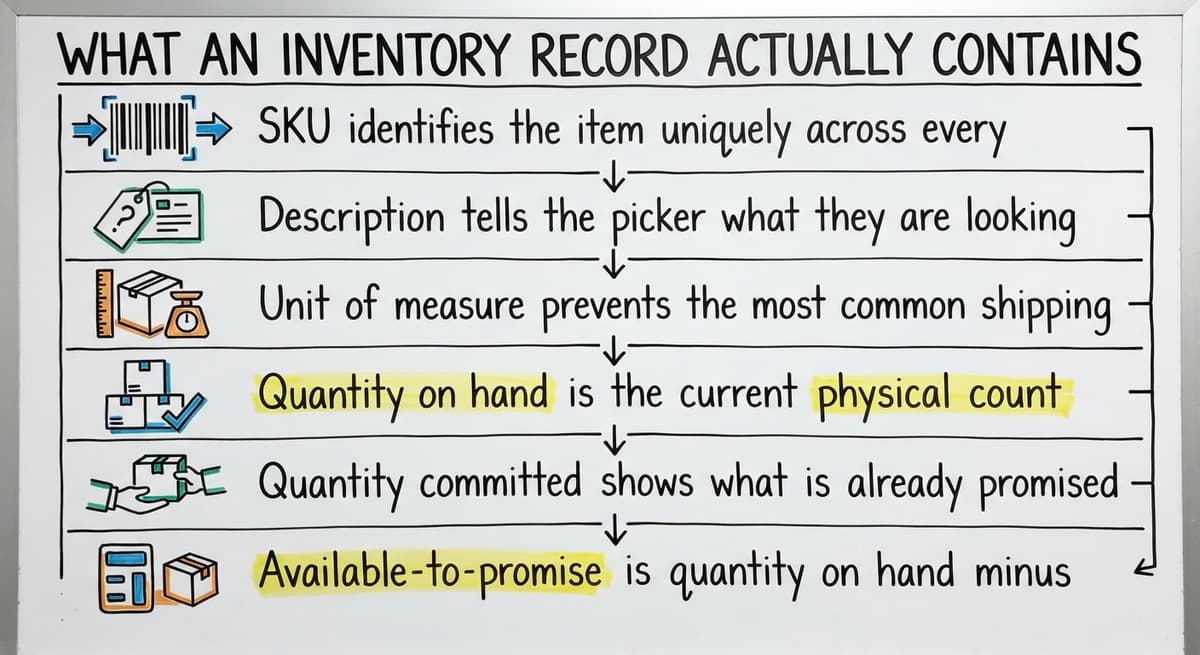
A real inventory record is more than a name and a quantity. Each field does a specific job, and a missing field creates a specific failure.
- SKU identifies the item uniquely across every system that touches it
- Description tells the picker what they are looking for without opening another screen
- Unit of measure prevents the most common shipping error: sending 1 case when the customer ordered 1 each
- Quantity on hand is the current physical count
- Quantity committed shows what is already promised to open orders
- Available-to-promise is quantity on hand minus quantity committed, the number that actually decides whether you can take a new order
- Reorder point triggers a buy order before stock runs out
- Lead time tells the system how many days to look ahead
- Bin or location code sends the picker to the right spot without guessing
Strip out the unit of measure and you will eventually ship a pallet when the order called for a case. That one gap turns into a wrong invoice, a return, and a frustrated customer.
What Does Inventory Look Like in a Fulfillment Center?
Fulfillment center inventory is tied directly to customer orders rather than to static shelf positions. A single SKU might carry four statuses at once: available, reserved for an open order, in-pick as a picker works the order, and shipped once it leaves the dock. Client SKUs arrive with lot numbers that trace back to a production batch, and pick locations shift as volume changes.
The inventory count alone tells you almost nothing here. What matters is the relationship between the count, the open order queue, and the outbound shipping schedule. A unit that is available at 9 a.m. can be reserved by 9:05, in-pick by 9:20, and off the dock by noon. Fulfillment center software built around your workflow keeps those status changes visible in real time so no two orders claim the same unit.
How Inventory Moves Through a Warehouse in a Single Day
Warehouse inventory is defined by movement. A shipment arrives at the receiving dock and sits in a staging zone while a team member scans each pallet. That scan creates a receiving event and adds the units to a receiving queue, not yet to available stock. Putaway moves each pallet to its assigned location, and a second scan at the bin confirms the transfer. Only then does the count update.
Mid-morning, a pick order pulls 30 cases from bin D-07. The system deducts 30 from on-hand and adds them to committed. A cycle count at 2 p.m. catches a discrepancy in bin B-11 and triggers a manual adjustment. Each event changes the number, and a count that is even a few hours stale can cause an oversell or a missed reorder trigger.
| Inventory Event | Effect on Count |
|---|---|
| Receiving scan at dock | Adds to receiving queue, not yet available |
| Putaway scan at bin | Moves quantity to available on-hand |
| Pick confirmation | Reduces on-hand, increases committed |
| Cycle count adjustment | Corrects on-hand to match physical reality |
| Shipment confirmation | Removes committed quantity from record |
The comparison is easier when one option is built for you
Off-the-shelf means fitting your process to the software. We do it the other way round, and the first look costs nothing.
Book a callThe Four Main Types of Inventory
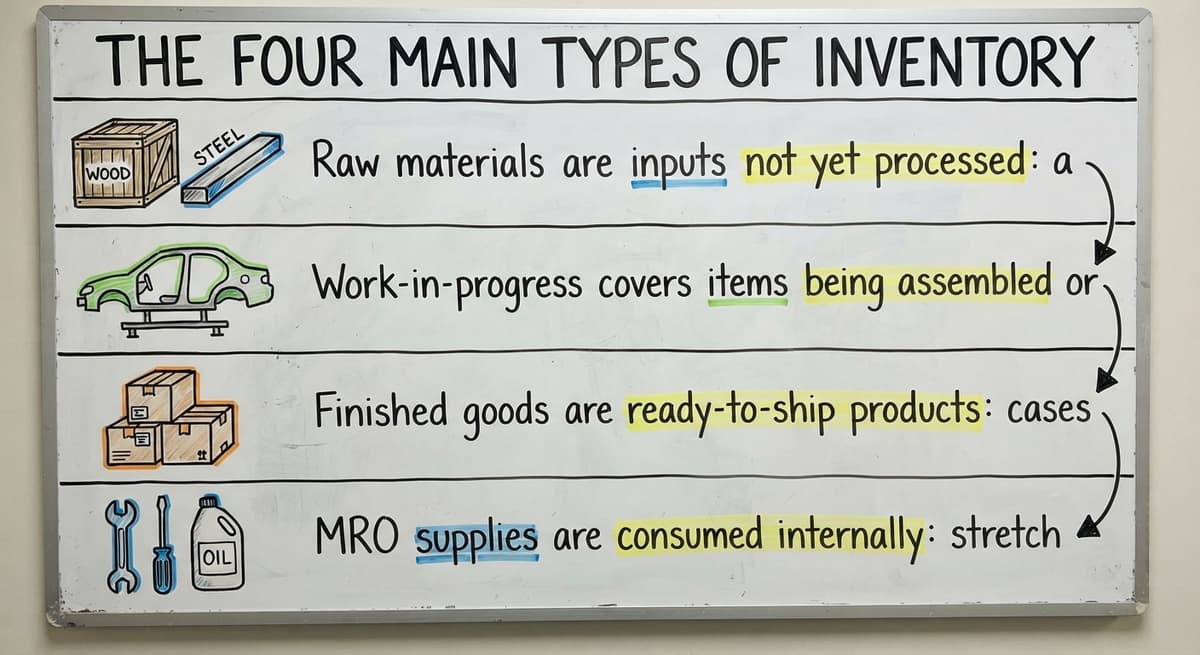
Every distribution or warehouse operation carries some mix of these four categories.
- Raw materials are inputs not yet processed: a distributor might hold bulk resin pellets waiting to be packaged into finished units
- Work-in-progress covers items being assembled or kitted: a team building gift sets from individual components is working with WIP inventory
- Finished goods are ready-to-ship products: cases of labeled product sitting in a pick location waiting for an order
- MRO supplies are consumed internally: stretch wrap, packing foam, and replacement conveyor belts that never appear on a customer invoice
Tracking all four under the same system prevents the common problem of MRO supplies disappearing from the floor without any record.

How Most Small Distributors Track Inventory Today
The typical setup at a 10-to-50-person distributor uses an accounting package for purchasing and invoicing, a spreadsheet for stock counts, printed pick lists, and email for urgent requests. This works when order volume is low and the product catalog is small. As volume grows, the gaps become working problems.
Double-entry errors accumulate because the same receipt gets typed into two places. Counts go stale between updates, so the spreadsheet shows 50 units while the shelf holds 42. No one has real-time visibility, so a sales rep promises stock that is already committed to another order. These are not mistakes; they are the natural result of a manual system hitting a volume it was not designed for.
Where Does Your Accounting Software Fit in an Inventory Management Setup?
Your accounting software handles purchasing and invoicing well, and most small distributors should keep it doing exactly that. What it does not handle well is real-time bin locations, multi-warehouse splits, or pick-and-pack workflows. Integrating your accounting package with warehouse operations works best when it stays as the financial layer and a dedicated working system handles receipts, picks, and adjustments on the floor. The two systems sync on transactions without either one trying to do the other's job. Forcing your accounting software to manage bin-level inventory tracking stretches it past its design, and the result is the same stale-count problem that spreadsheets create.
What Inventory Management Software Does with These Examples
Inventory management software for wholesale distributors captures every event from the day-in-the-life example automatically. A receiving scan updates the count without a second entry. A pick confirmation deducts the committed quantity the moment the picker confirms. An adjustment from a cycle count posts at once.
The system surfaces three numbers at any moment: current on-hand, committed to open orders, and available-to-promise. That third number is the one that lets your sales team quote correctly and your operations team plan picks without a phone call to the floor. Automating does not change the inventory logic; it just removes the delay between the physical event and the recorded count.

What Causes Inventory Accuracy Problems?
Inventory accuracy problems almost always trace to a process gap, not a careless employee. A count shows 50 units but only 42 are on the shelf because a return was restocked without being scanned back in. An item arrives at the dock and gets moved to a bin before anyone records the receipt, so the system never sees it. A transfer between warehouse zones happens informally and the count never moves.
The downstream effects stack up fast:
- Wrong available-to-promise figures lead to orders that cannot ship on time
- Unrecorded receipts create phantom shortages that trigger unnecessary buy orders
- Unrecorded returns inflate on-hand counts until a physical inventory exposes the gap
Fixing accuracy means closing the gaps in the process, specifically adding a scan or confirmation step at every point where goods physically move.
See it running on your own process first
No build cost. The subscription starts once it is live and doing the job, not before.
Book a callCycle Counts vs. Full Physical Inventory: An Example of Each
A cycle count counts a portion of inventory on a rolling schedule without stopping operations. A warehouse running cycle counts might count bins A-01 through A-20 on Monday, B-01 through B-20 on Tuesday, and so on. Discrepancies get corrected the same day. High-velocity items get counted more often than slow movers.
A full physical count counts everything at once, usually requiring a receiving freeze and sometimes a full shutdown. It produces a clean baseline but disrupts operations for hours or days.
For most small and mid-size distributors, cycle counts are the better ongoing tool because they catch errors before they compound. A full physical count still makes sense once a year to reset the baseline, but relying on it as the primary accuracy check means living with stale numbers for months at a time.
Reorder Points and Inventory Valuation: Two Numbers That Drive Decisions
A reorder point is the quantity level that triggers a buy order. The calculation is straightforward: average daily usage multiplied by supplier lead time in days. If your team ships 20 units per day and your supplier takes 5 days to deliver, your reorder point is 100 units. When on-hand stock hits 100, the system flags a replenishment need. Software can trigger this alert automatically so no one has to monitor counts manually.
Inventory valuation decides how those units flow into your financial records. Three methods cover most operations:
- FIFO (first in, first out) assumes the oldest stock ships first, which matches physical reality for most perishable or dated goods
- LIFO (last in, first out) assumes the newest stock ships first, which can affect taxable income in periods of rising costs
- Weighted average cost blends all unit costs into a single average, which smooths out price swings across a large catalog
The method you choose changes the numbers that flow into your accounting package, so align it with your accountant before switching.

Have You Outgrown Your Current Inventory System?
You have outgrown your current setup when the daily workarounds take longer than the actual work. Specific signs your operations team will recognize:
- Inventory counts in the spreadsheet no longer match what is on the shelf, and no one is sure which number to trust
- Staff spend several hours reconciling counts before each physical inventory rather than just confirming them
- Orders sit on hold because the real available quantity is unknown and someone has to walk the floor to check
- A new product line or a second location has made the spreadsheet structure unmanageable
Each of these is a signal that the volume has exceeded the system, not that the team is doing something wrong. How to replace Excel inventory tracking with custom software does not have to mean a year-long ERP project.
What to Look for in an Inventory Management Solution
The right solution fits your operation rather than asking your operation to fit it. Four questions cut through most vendor conversations:
- Does it work at your scale, with your SKU count and your team size, rather than being sized for a warehouse ten times larger?
- Can it connect to your existing accounting package without replacing it, so your financial history stays intact?
- Does it reflect how your team actually picks, receives, and counts, using the terminology and sequence your staff already knows?
- Is the team that implements it the same team that builds and supports it, so problems get fixed by people who understand the system?
Custom warehouse management software for small operations maps to the workflow already in place. Rollout does not need a data migration that takes months; it needs mapping your current process and replacing the manual steps one at a time. That approach keeps the disruption small and the results visible quickly.
Key Takeaways
Inventory is not just a count. It is a live record of where goods are, what is committed, and what is available to promise. Small and mid-size distributors carry real working complexity, and that complexity deserves a system built around it. The goal is accurate, real-time data without a massive software project, and that is achievable when the solution is sized and implemented to match the operation rather than the other way around.
If your current setup is showing the signs described above, the next step is a straightforward review of where your process gaps actually are.
Frequently asked questions
What are four types of inventory?
The four main types are raw materials (inputs not yet processed), work-in-progress (items being assembled or kitted), finished goods (products ready to ship), and MRO supplies (maintenance, repair, and operations items used internally, such as packing materials or equipment parts). Most distribution and warehouse operations carry all four, though finished goods and MRO supplies tend to be the largest categories by transaction volume.
How do I create an inventory list?
Start with the fields that drive daily decisions: SKU, description, unit of measure, quantity on hand, bin or location code, and reorder point. A spreadsheet works for a small catalog, but it needs manual updates after every receipt, pick, and adjustment. A dedicated inventory tracking tool or custom software captures those updates automatically, so the list reflects the current state of your floor rather than the last time someone remembered to type a number in.
How do you write an inventory?
An inventory record documents every item your operation holds, with enough detail to find it, count it, and replenish it. For each item, record a unique identifier (SKU or item number), a plain-language description, the unit of measure, the physical location, the quantity on hand, and the reorder point. Update the record every time goods move: at receiving, putaway, picking, and adjustment. The record is only useful if it reflects what is physically there, so the process that keeps it current matters as much as the format.
How do you do an inventory?
Doing an inventory means counting what you have and reconciling that count against your records. A full physical count freezes receiving, counts everything at once, and resets the baseline. A cycle count covers a portion of locations on a rolling schedule without stopping operations. For most small and mid-size distributors, cycle counts run continuously while a full physical count happens once a year. Either way, the process needs a count sheet or scanning device, a way to record discrepancies, and a step to post adjustments to the system before the count is considered complete.
What is a simple example of inventory in a warehouse or distribution business?
A wholesale distributor stocks 240 units of a cleaning product in bin A-14, with a reorder point set at 80 units and a 6-day lead time from the supplier. That single record, item name, quantity, location, and reorder threshold, is a working example of inventory. Multiply that record across hundreds of SKUs and you have a warehouse inventory system. The count changes every time a shipment arrives, a pick goes out, or a cycle count finds a discrepancy.
When should a distributor move from spreadsheets to inventory management software?
Three clear trigger points: your spreadsheet count no longer matches the physical shelf count and you cannot explain the gap; orders are being held because no one knows the real available quantity without walking the floor; or a new product line or second location has made the spreadsheet structure too complex to keep correctly. Any one of these signals that the manual system has hit its volume limit. The move does not need a large ERP project. A solution sized to your operation can replace the manual tracking steps without touching your existing accounting setup.
How do small businesses track inventory without a big ERP?
The most practical approach keeps an accounting package for purchasing and invoicing and adds a dedicated inventory tracking layer for the working work: receiving, putaway, picking, and cycle counts. The two systems sync on transactions so financial records stay accurate without manual re-entry. This avoids the cost and disruption of a full ERP migration while closing the gaps that spreadsheets cannot handle, specifically real-time bin locations, committed quantities, and available-to-promise figures.
Start with a free first look
A 30 minute call, your operation mapped, and a clear picture of what we would build. No obligation and nothing to install.
Book a callRelated guides
The rest of this guide, for the parts of the job this page does not cover.
Guides
- Make to Stock Examples
- Warehouse Management System Examples
- Examples of Warehouse Management System
- Best Inventory Software
- Classification of Inventory
- Excess Inventory
- Closed for Inventory
- Multi Location Inventory Management Software
- Ms Excel Inventory Template
- Inventory Management for Multiple Locations
- Costing Inventory
- Is Inventory a Long-term Asset
- Inventory Management System for Manufacturing
- Inventory Fixed Assets
- Inventory Management Pics
- Inventory Monitoring
- Excel Inventory Template
- Push and Pull Inventory
- Types of Inventory Control
- Consumable Inventory
- B2b Inventory Management