


How to Keep Track of Fba Inventory
Learn how to keep track of FBA inventory with one master count, shipment logs, and a set check schedule. A plain 3-step routine for small teams.
Book a callHow Do You Keep Track of FBA Inventory?
To keep track of FBA inventory, keep one master record of what you own. Compare it to the marketplace's reports on a set schedule. Fix any gap fast.
Stock sits in 3 places: your warehouse, in transit to the fulfillment centers, and inside those centers. Your record must cover all 3. The goal is one number you trust for each product. It gives you a routine you can run each week with the tools you have now.
We build it for your operation, and the first look is free
If you would rather not compare products, describe how your operation already works and we build the system around it.
No build cost. You see it running on your own process first, and the monthly subscription starts only once it is live.
Book a callWhy Is FBA Inventory Hard to Track?
FBA inventory is hard to track because your stock lives in 2 worlds. Part of it sits on your shelves. Part of it sits in Amazon's centers, where you can only see it through reports.
A unit can be inbound, available, reserved, unfulfillable, or lost. One shipment can also split across several centers. Each center then receives its part on its own day.
Sheets and email updates drift out of date fast. Someone forgets a row, and the count is wrong. Clean product IDs help. GS1 calls its barcode standards "the global language of business", and a shared language is what your SKUs need too.
What Inventory Statuses Should You Watch?
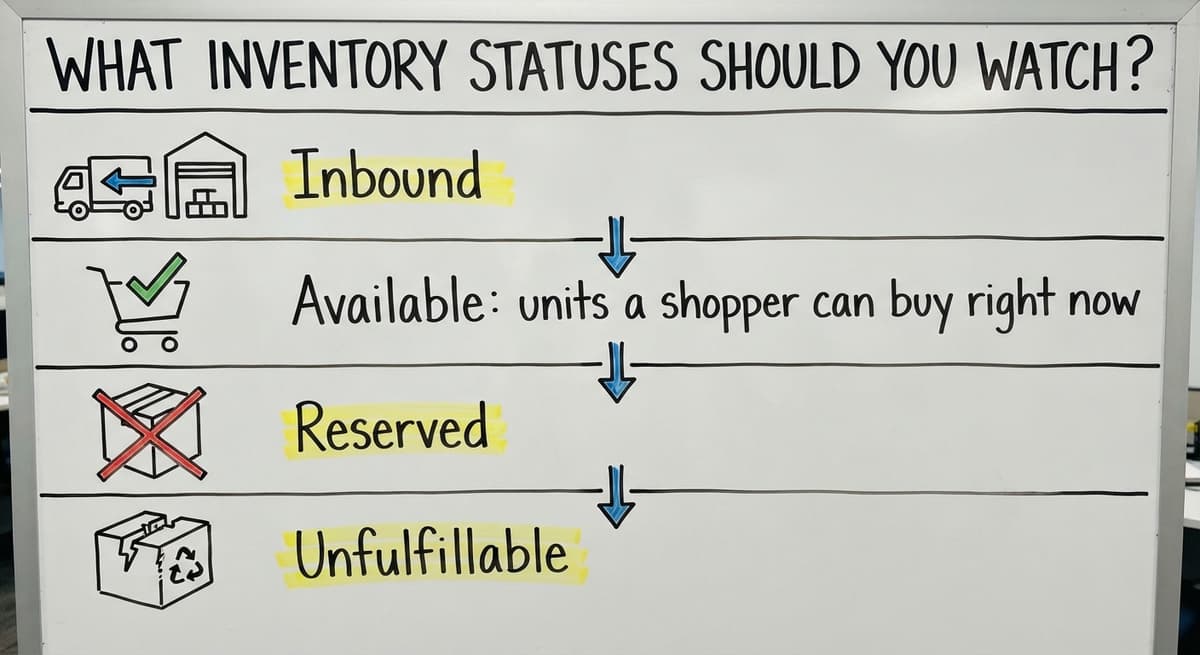
Four statuses matter most: inbound, available, reserved, and unfulfillable. Each one tells you something different about what you can sell today.
- Inbound: units on their way to the center, or at the center but not yet checked in.
- Available: units a shopper can buy right now.
- Reserved: units set aside for open orders or being moved between centers.
- Unfulfillable: units that are damaged, expired, or otherwise cannot be sold.
Give each status its own column in your records. Total units is not the same as units you can sell. A product with 100 units and 30 unfulfillable has only 70 to sell.
Step 1: Keep One Master Count of Your Stock
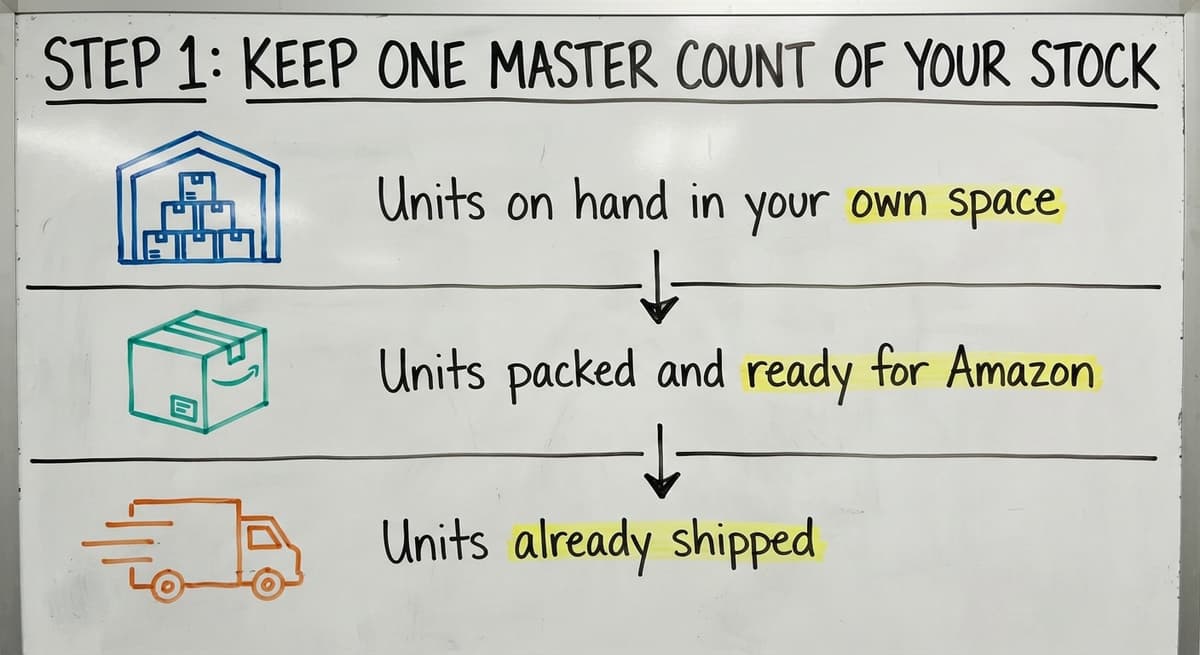
Your master count is one list, with one row per SKU. A SKU is the short code you give each product. Use the same code in your warehouse, in the marketplace, and in your accounting package.
For each SKU, record 3 numbers:
- Units on hand in your own space.
- Units packed and ready for Amazon.
- Units already shipped.
Name one person who owns the count. That person makes the final edit and answers questions. When everyone can change the number, no one can trust it. If you also run a wider stockroom, the same rules apply to how to keep track of inventory in warehouse settings.

Step 2: Track Every Shipment to Amazon
FBA inbound shipments need their own log. A shipment is stock in motion, and it belongs in neither the warehouse count nor the center count until it lands.
Log these items for each shipment:
- Shipment ID.
- SKU and units sent.
- Ship date.
- Carrier.
Mark the units as in transit until the marketplace shows them received. Then set a limit, such as 14 days. Flag any shipment that sits unreceived past it. A flagged shipment is the first place to look when a count goes wrong.
Not sure this is the right shape for your operation
Describe how the work runs today. We map it on a call and show you what it would look like built around that, before you spend anything.
Book a callStep 3: Compare Amazon's Reports to Your Records
Comparing Amazon's reports to your records is a matching job. Run it as a plain routine, the same way each time.
Pull the reports
Download the marketplace's inventory reports on a set day. Choose the same day each cycle so every comparison covers the same span of time. Save each one with the date in the file name, and keep the older files in one folder. Dated copies let you look back and see when a count first went wrong.
Match by SKU
Line up the report against your master count, one SKU at a time. Compare each status column to its twin in your records, such as available, inbound, and unsellable units. Work down the list in the same order every cycle. When a SKU does not agree, mark it and note the gap, so you can trace the cause after the match.
Mark every gap
Write down each difference and its cause. A cause can be a late receipt, a return, a damaged unit, or a typo. A gap with no cause is the one that comes back next week.
A match that you log every time is the proof that your count is true.

How Often Should You Check FBA Inventory?
Check fast sellers daily, or at least several times a week. A product that sells 20 units a day can run dry in a few days. Slow sellers need a weekly check.
Once a month, run a deeper full comparison of every SKU. That pass catches the small drift that quick checks miss.
Pick a schedule you can keep. A weekly check you finish beats a daily check you skip. Put the dates on a calendar and give them to the count owner. Many small teams also use the same rhythm for how to keep track of inventory small business owners run across all their channels.
How Do You Find Lost or Missing FBA Units?
Start with the gap between units sent and units received. If you sent 200 and the report shows 188, 12 units need an answer.
Next, check the lost, damaged, and unfulfillable lines. Unfulfillable inventory is stock the marketplace holds but cannot sell. It counts as units you own, so track it apart from available stock.
Keep shipment records close. Your shipment ID, units sent, and carrier details are what you attach when you open a case with Amazon. Cases have no promised result. Good records give you the best chance of a fair review.

How Do You Know When to Restock?
Restock when your units on hand plus units in transit fall to your reorder point. The reorder point is the stock level that tells you to place the next order.
The formula is simple. Multiply daily sales by lead time plus a few safety days. Lead time is the days from order to arrival.
Here is an example. A product sells 10 units a day. Lead time is 14 days. Add 5 safety days. The reorder point is 10 x 19 = 190 units. You have 120 available and 80 in transit, which is 200. You are above 190, so you wait.
The comparison is easier when one option is built for you
Off-the-shelf means fitting your process to the software. We do it the other way round, and the first look costs nothing.
Book a callCan a Spreadsheet or Your Accounting Package Handle FBA Tracking?
Spreadsheets work at first. With 5 or 10 SKUs and one person, a sheet does the job well.
Problems grow with more SKUs, more shipments, and more people editing. Each manual step is a place for a typo. Say 2 people spend 5 hours a week at $22 an hour moving numbers between files. That is $11,440 a year. The Bureau of Labor Statistics publishes pay data for the clerks who do this work, so you can check your own wage.

Where Does an Accounting Package Fall Short for FBA Stock?
Accounting matters too. IRS Publication 538 says, "To figure taxable income, you must value your inventory at the beginning and end of each tax year." An accounting package like your accounting software handles that money side well. It is weaker at live stock by location. Keep it for the books. Replace only the manual copy work around it.
When Does a Custom System Make Sense?
A custom system makes sense when the manual work costs more than it saves. Three signs show it.
Signs you have outgrown sheets
- Someone copies and pastes data every day.
- Counts never match, even after a check.
- Errors cost you sales, such as a stock-out you did not see.
An accurate count also protects you when you promise a ship date. The FTC's mail, internet, or telephone order rule covers that duty.
What a custom tool does
A custom tool fits how your team already works. It needs no big ERP and no long move. It works at small scale. The Software Society is local to Columbus, Ohio. We build the software, the website, and the search presence. Our work links to an online marketplace and your accounting software, so your count and your books stay in step. For process basics, the NIST Manufacturing Extension Partnership offers vendor-neutral guidance.

What Mistakes Make FBA Counts Go Wrong?
Five mistakes cause most bad counts. Each one is easy to fix once you see it.
- Mismatched SKU names. Two names for one product split its count in half.
- Unlogged shipments and returns. A unit you forgot to log looks lost.
- Many editors in one sheet. Edits collide, and no one knows which is right.
- Unsellable units counted as available. You promise stock you cannot ship.
- Checking only when something breaks. By then the gap is large.
How Do You Keep FBA Counts Right After You Fix Them?
The same habits apply to how to keep track of product inventory in any channel. A set routine beats a rescue after the fact. The Census Bureau tracks wholesale inventories nationwide, and the lesson holds at any size: know your stock before you sell it.
Start this week. Build the master count, log your next shipment, and run your first match. If your sheets already fight back, talk to The Software Society about a tool built around your team.
Frequently asked questions
How do you keep track of FBA inventory?
Keep one master count by SKU. Log every shipment. Compare the marketplace's reports to your count on a set schedule, and write down the cause of every gap.
What do the FBA inventory statuses mean?
Inbound units are on the way. Available units can be sold now. Reserved units are held for orders or moves. Unfulfillable units are damaged or expired and cannot be sold.
How often should I check FBA inventory?
Check fast sellers daily or several times a week. Check slow sellers weekly. Do a full comparison of every SKU once a month.
When should I reorder FBA stock?
Reorder when units on hand plus units in transit reach your reorder point. Set it as daily sales times lead time plus safety days.
Why does my FBA inventory not match my records?
The usual causes are mismatched SKU names, unlogged shipments or returns, split shipments, and unfulfillable units counted as available. Match by SKU and log the cause of each gap.
How do I find lost or missing FBA units?
Compare units sent to units received. Then check the lost, damaged, and unfulfillable lines. Keep shipment records so you can open a case.
When do I need something more than a spreadsheet?
You need more when you copy and paste daily, counts never match, or errors cost sales. A custom tool can replace the manual steps without a big ERP.
Start with a free first look
A 30 minute call, your operation mapped, and a clear picture of what we would build. No obligation and nothing to install.
Book a callRelated guides
More on the same work.
- How to Keep Track of Inventory
- How to Keep Track of Inventory on Clover
- How to Keep Track of Computer Inventory
- How to Keep Track of Consignment Inventory
- How to Keep Track of Alcohol Inventory
- How to Keep Track of Product Inventory
- How to Keep Track of Ebay Inventory
- How to Keep Track of Poshmark Inventory
- How to Keep Track of Dental Inventory
- How to Keep Track of Boutique Inventory
- How to Keep Track of Vaccine Inventory
- How to Keep Track of Liquor Inventory
- How to Keep Track of Grocery Inventory
- How to Keep Track of Lularoe Inventory
- How to Keep Track of Freezer Inventory
- How to Keep Track of Cigarette Inventory
- How to Keep Track of Inventory Electronically
- How to Keep Track of Paparazzi Inventory
- How to Manage Fba Inventory
- How to Create an Inventory Tracking System?
- How to Track Inventory for Home Staging
- How to Track Non Inventory Items
- How to Track Inventory with Qr Code
- How to Track Inventory in Real-time