


How To Make Your Own Barcode
Reviewed and updated 15 September 2026. You can make your own barcode today, for free, using online tools that take about 10 minutes to learn. For internal warehouse or inventory tracking, you do not need to buy anything or register with anyone. Pick a number, choose a format, generate the image, print the label, and scan it into your system. That is the whole process.
Published 19 July 2026. Reviewed and updated 15 September 2026.
Book a callWhat Does Making Your Own Barcode Actually Mean?
There are 2 very different things people mean when they say "make a barcode." The first is generating a barcode image, which is free and takes minutes.
The second is registering a globally unique barcode number with GS1, which costs money and is required only for retail sales.
Reviewed September 2026. Each figure comes from the assumptions stated beside it, so you can substitute your own and the arithmetic still holds.
The guide covers the first path. If you track products, bins, pallets, or locations inside your own operation, you do not need a registered number.
You just need a consistent system and a label printer. Everything here applies to internal inventory barcode tracking, not retail shelf scanning.
Would you rather have it built around your operation?
The first look is free. If you would rather not compare products, describe how your operation already works and we build the system around it.
No build cost. You see it running on your own process first, and the monthly subscription starts only once it is live.
Book a callStep 1: Decide What You Are Tracking to Make Your Own Barcode
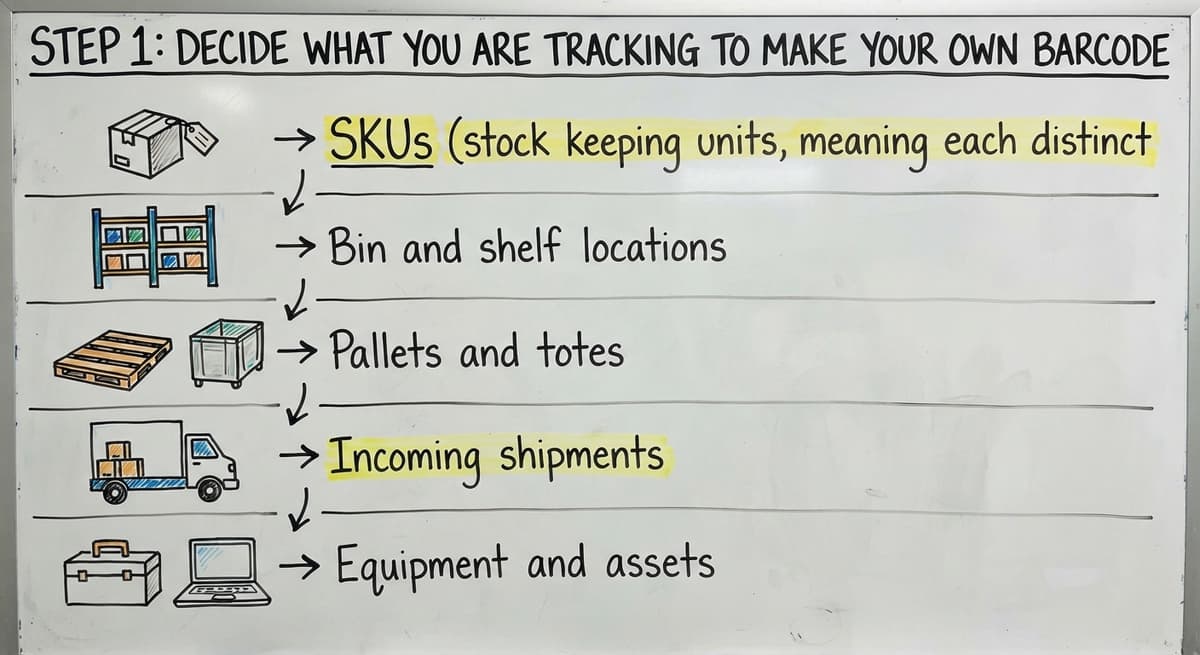
Before you generate anything, write down what you need to track. Common items in a warehouse or distribution center include:
- SKUs (stock keeping units, meaning each distinct product)
- Bin and shelf locations
- Pallets and totes
- Incoming shipments
- Equipment and assets
What you track work out what number or code goes inside the barcode. As GS1 explains in its barcode standards overview, a barcode is simply "a visual representation of data," and that data must mean something to your system.
Keep it simple: 1 barcode per unique item type or location. Mixing categories into the same number series causes confusion fast.
What Barcode Format Should I Use for Warehouse Inventory?
Code 128 is the right default for most warehouse and distribution work. It handles letters and numbers, fits on a small label, and reads reliably with almost any scanner.
Here are the 3 formats you will encounter:
- Code 128 handles letters, numbers, and symbols. It is compact and works with every modern barcode scanner. Use it for SKUs, locations, and pallets.
- Code 39 is older and simpler. It works for basic alphanumeric labels but takes more space on the label for the same data.
- QR codes store more data and can encode a full URL. Use them when staff will scan with phones or when you need to link to a web page or document.
For a standard inventory barcode setup, start with Code 128 and switch to QR only if you have a specific reason.
Step 3: Create Your Numbering System
A barcode is only as useful as the number inside it. Build a simple scheme before you generate a single label.
A workable structure uses 3 parts: a category prefix, a sequential number, and an optional check digit. For example:
- WH-LOC-0042 means warehouse location number 42
- SKU-00187 means product number 187
- PLT-2025-0003 means the 3rd pallet received in 2025
Avoid using vendor part numbers as your only identifier. Vendors change part numbers, and 2 different vendors can use the same number for different products. Your internal system needs numbers you control.
Consistency matters more than complexity. A simple scheme you follow every day beats an elaborate one that staff ignore. Write the scheme down and keep a master list so no number is ever reused.

Step 4: Generate the Barcode Image
Free online barcode generators handle this step in under 5 minutes. Reliable options include:
- Barcode.tec-it.com supports Code 128, QR, Code 39, and dozens of other formats
- Free-Barcode-Generator.net offers quick PNG downloads with no account needed
- Cognex barcode generator is clean and straightforward for basic label work
The process is the same on all of them: type your number, pick your format, download the image as a PNG or SVG file. SVG scales without losing quality, which matters if you resize labels later.
For bulk label creation, spreadsheet add-ins exist for both spreadsheet and a shared spreadsheet that generate barcode images in a column automatically. Word plugins work the same way.
Download the image files and paste them into your label template rather than copying from the browser, since browser copies sometimes lose resolution.
Is the comparison easier when one option is built for you?
Yes. Off-the-shelf means fitting your process to the software, and custom is the other way round. The first look costs nothing.
Book a callStep 5: Design and Print Your Barcode Label
Label size directly affects whether your scanner can read the barcode. A Code 128 barcode needs at least 1 inch of width and 0.5 inches of height to scan reliably at arm's length.
Smaller is possible with a high-quality printer and a close-range scanner, but it adds risk.
Always print the human-readable number below the barcode. Staff can read the location or SKU without a scanner, which saves time during receiving and cycle counts.
Choosing a Label Printer
Common options for printing barcode labels include:
- A major scanner maker thermal printers are the warehouse standard. They are fast, durable, and do not use ink.
- DYMO label printers work well for lower volumes and desktop use.
- Standard laser printers with Avery label sheets are fine for shelves and low-traffic areas.
For label material, use paper labels on shelves and storage locations. Use polyester or vinyl on bins, equipment, and anything that gets handled often. Paper peels and smears; vinyl does not.
What Size Should My Barcode Label Be?
Start at 2 inches wide by 1 inch tall for general warehouse use. That size fits a Code 128 barcode, the human-readable number, and a location name. Go smaller only after you have tested with your actual scanner at your actual scanning distance.

Step 6: Test Before You Print in Bulk
Print 1 test sheet before you commit to labeling an entire warehouse. Scan every label on the sheet with the scanner your staff will actually use, not just your phone.
Check that your inventory software or spreadsheet receives the exact value you encoded. Look for:
- Smearing or faded bars from a low ink or worn print head
- Low contrast between the bars and the label background
- Labels that are too small to scan from your normal working distance
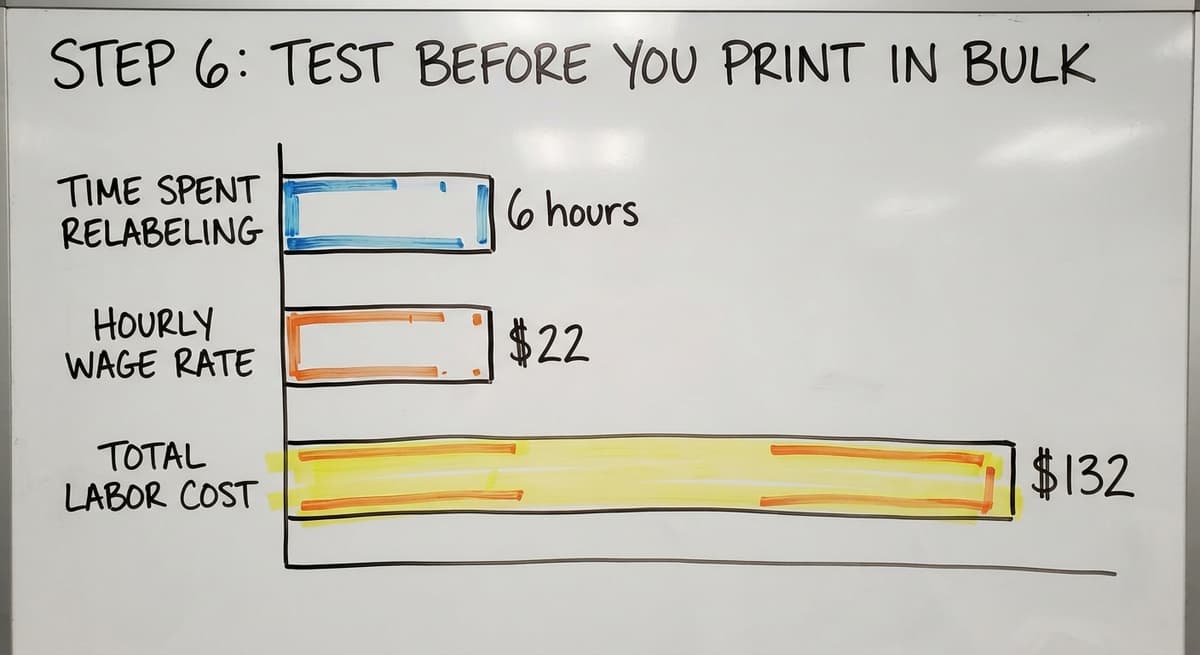
Fix problems now. Relabeling 500 bins after the fact costs far more time than a 20-minute test run.
One person spending 6 hours relabeling at $22 an hour, based on Bureau of Labor Statistics wage data for stock clerks, runs about $132 in labor alone, before counting the disruption to operations.
Do You Need to Register Your Barcode?
Registration with GS1 is required only if your product will be scanned at a retail checkout or listed on a major online marketplace. Those systems check that every barcode number is globally unique and tied to a verified company.
For tracking inside your own facility, registration is not needed. Your barcodes only have to mean something to your own system. No external database checks them.
A clear rule: if the barcode never leaves your four walls, skip registration entirely. If a retail buyer or online marketplace will ever scan it, register before you print.
What does it look like running on your own process?
The first thing you see is it running on your own process, at no build cost. The subscription starts once it is live and doing the job, not before.
Book a call
How Do I Connect My Barcodes to the accounting software or My Inventory System?
A barcode is a label. The value it encodes must match a record in your system, or the scan does nothing useful.
When a staff member scans a barcode, the scanner sends the number to whatever software is open, exactly as if they had typed it. That means:
- A USB barcode scanner plugged into a laptop feeds numbers directly into an open spreadsheet cell or the accounting software item field
- A mobile scanner app sends the number to a web-based inventory system
- A dedicated handheld scanner stores scans and syncs them in batch
Many small operations start with spreadsheet and a $50 USB scanner. That works until the spreadsheet grows large enough that manual re-entry errors become a daily problem.
The IRS needs that you "value your inventory at the beginning and end of each tax year", so accuracy is not optional.
When Should I Move Beyond the accounting software to Dedicated Inventory Software?
A purpose-built barcode inventory tracking system removes the manual re-entry step entirely, which is where most errors enter.
The accounting software handles basic item counts but has real limits once you need location tracking, receiving workflows, or pick lists. That is the point where operations move to dedicated software.
Common Mistakes to Avoid
Barcode rollouts fail in predictable ways, and the errors below create the most rework:
- Using duplicate numbers across item types causes scans to pull up the wrong record every time
- Printing labels too small means scanners fail at normal working distances and staff waste time repositioning
- Skipping human-readable text below the barcode forces staff to rely entirely on the scanner, which breaks down when batteries die or a label smears
- Not backing up your numbering master list means a lost file forces you to audit every label in the building
- Changing a barcode number after it is in the system creates orphaned records and breaks historical data
None of these mistakes are hard to avoid. They are all easier to prevent than to fix.
When Is a Simple Barcode Setup Not Enough?
A basic setup works well at the start. It starts to break down when you see these signs:
- Staff are typing scanned numbers into a spreadsheet by hand instead of the scan going straight to the record
- Counts in your spreadsheet do not match what the accounting software shows
- Receiving takes longer because someone has to cross-reference a paper list
- You cannot tell where a specific pallet or bin is without walking the floor
Barcodes work best when connected to a system that handles receiving, picking, and stock levels without manual steps in between. Spreadsheet-based barcode tracking is a starting point, not a destination.
When those signs appear, the right move is a system built around your actual workflow, not a generic tool you adapt around. Custom inventory software for small distributors connects scanning directly to receiving, fulfillment, and reporting so the data flows without anyone touching it twice.
Quick Reference: How to Make Your Own Barcode in Six Steps
The full process takes under an hour for a small operation. Here is the summary:
- Decide what you are tracking so you know what data goes inside each barcode.
- Choose Code 128 as your format for standard warehouse and inventory use.
- Build a numbering scheme with a category prefix and a sequential number you control.
- Generate the barcode image using a free tool like Barcode.tec-it.com and download it as a PNG or SVG.
- Design and print your label at least 2 inches wide, with human-readable text below the bars. For general warehouse use, 2 inches wide by 1 inch tall fits a Code 128 barcode, the human-readable number, and a location name. Go smaller only after you have tested with your actual scanner at your actual scanning distance.
- Test every label with your actual scanner before printing in bulk.
If your barcodes stay inside your own facility, you do not need to register them or spend a dollar. Start with free tools, test one label, and scale from there.
If your operation has grown past what a spreadsheet and a USB scanner can handle, a connected system built around your workflow removes the manual steps that cause errors. Reach out to discuss what that looks like for your specific setup.
Frequently asked questions
Can I get a barcode for free?
Yes. For internal inventory tracking, you can create a barcode for free using tools like Barcode.tec-it.com or Free-Barcode-Generator.net. You only pay if you need a globally registered barcode number from GS1, which is required for retail sales but not for tracking inside your own warehouse.
How much does it cost to create a barcode?
Generating a barcode image costs nothing. Free online generators handle it in minutes.
If you need a GS1-registered UPC for retail or marketplace sales, GS1 charges an initial fee plus an annual license based on your company size. For internal warehouse use, the cost is zero.
Is there a free app to generate barcodes?
Yes. Barcode.tec-it.com, Free-Barcode-Generator.net, and the Cognex barcode generator are all free and work in any browser. For mobile, apps like QR Code Generator and Barcode Scanner and Generator let you create and scan barcodes directly from your phone without a subscription.
Can I create barcodes on my phone?
Yes. Several free apps on both iOS and Android let you type a number, pick a format like Code 128 or QR, and generate a barcode image you can print or share.
For small runs or quick label tests, a phone works fine. For bulk label printing, a desktop generator connected to a label printer is faster.
Do I need to register my barcode with GS1?
Only if your product will be scanned at a retail checkout or listed on a major online marketplace. For tracking inside your own warehouse, distribution center, or fulfillment operation, no registration is needed. Your barcodes only need to make sense to your own system.
What barcode format should I use for warehouse inventory?
Code 128 is the best default for warehouse and distribution use. It handles letters and numbers, prints compactly, and reads with almost any scanner.
Use QR codes only when you need to encode a URL or a longer string of data, or when staff will scan with phones.
How do I create a numbering system for my barcodes?
Use a prefix for the category, a sequential number, and optionally a check digit. For example, WH-LOC-0042 for warehouse location 42 or SKU-00187 for product 187.
Avoid vendor part numbers as your only identifier since they can overlap or change. Write the scheme down and keep a master list.
What size should my barcode label be?
Start at 2 inches wide by 1 inch tall for general warehouse use. That fits a Code 128 barcode and human-readable text.
Go smaller only after testing with your actual scanner at your normal scanning distance. Labels that are too small cause scan failures and slow down your team.
What barcode type should I use for my products?
UPC or EAN for products sold through retail, with the number from GS1. Code 128 for anything you track yourself, because it holds letters and numbers and every scanner reads it.
How do I print barcode labels at home?
A desktop thermal label printer at $150 to $500 prints from label software or the inventory app, no ink needed. A laser printer on sheet labels works for a first batch; print at 100 percent scale and test one label with a scanner.
Can I create a barcode from an SKU?
Yes. The SKU is the value, Code 128 is the format, and the generator or the inventory system draws the bars. Keep the SKU under 20 characters and print it in text under the bars.
How do I scan and test a barcode?
Open a text editor, point a scanner at the printed label, and check that the exact SKU appears.
Test at the distance staff will use, on the label stock you will print, and under the light on the floor. A phone camera app does for a first check.
What is in a free first look?
A 30 minute call, your operation mapped, and a clear picture of what we would build. No obligation and nothing to install.
Book a callRelated guides
More on the same work.
Guides
- Make Barcode
- Barcode Abbreviation
- Barcode Scan Machine
- Tracking Number Barcode
- Barcode Reader Machine
- Barcode Scanner App Ios
- 2d Barcode Readers
- Barcode Producer
- Barcode Systems for Warehouse
- Barcode Reader Description
- Barcodes and Labels
- Alphanumeric Barcode
- Barcode Scanner Inventory System
Common questions
- How Do I Create My Own Barcodes
- How to Create a Barcode System for Inventory
- How to Use a Barcode Scanner
- How to Read a Barcode Number
- How to Barcode Scanners Work
- How Barcode Scanning Works
- How Are Barcodes Read
- How to Create a Barcode
- How Do Barcodes Work
- What Does a Barcode Look Like
- When Was Barcode Scanner Invented