

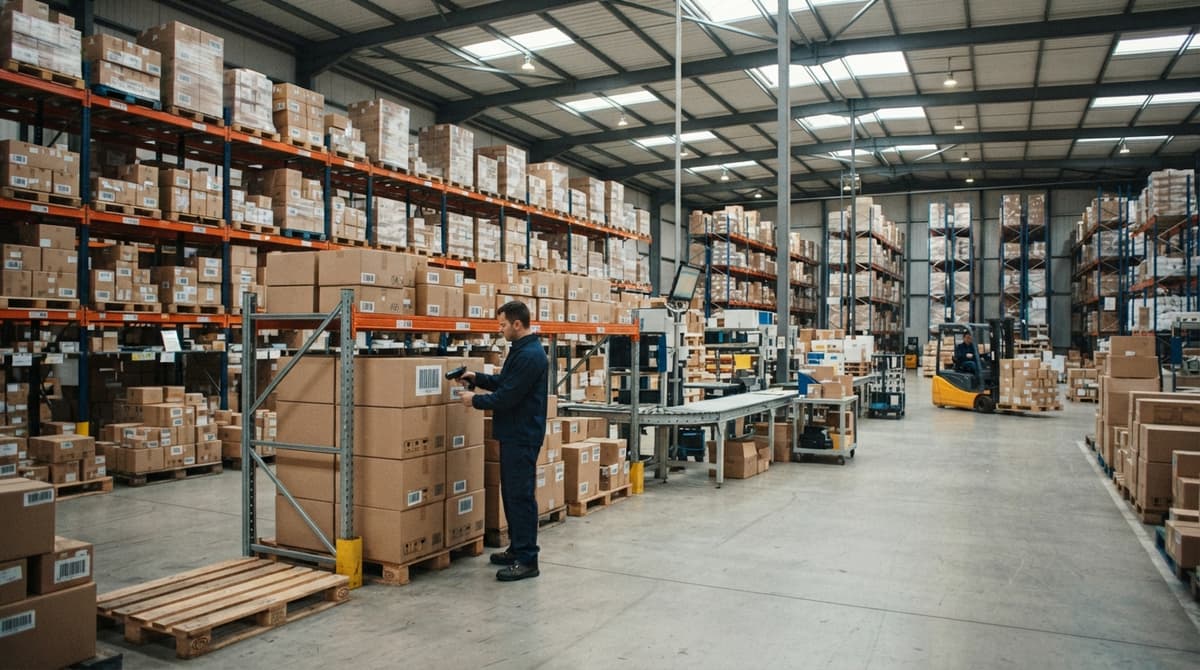
How Do Barcodes Work
A barcode stores a number as a pattern of bars and spaces. A scanner reads that pattern and sends the number to your software. The software matches the number to a record and returns the product data. The barcode itself holds almost nothing. The value lives in the system behind it.
Published 4 August 2026. Reviewed and updated 15 September 2026.
Reviewed September 2026. Each figure comes from the assumptions stated beside it, so you can substitute your own and the arithmetic still holds.
Book a callHow Do Barcodes Work, in Short?
A barcode is a machine-readable pattern that stores a number. A scanner reads the pattern and sends that number to a computer in milliseconds.
The computer looks up the number and returns the matching record, which might be a product name, a stock count, a bin location, or a price. The barcode is the key. The database is the door.
Would you rather have it built around your operation?
The first look is free. If you would rather not compare products, describe how your operation already works and we build the system around it.
No build cost. You see it running on your own process first, and the monthly subscription starts only once it is live.
Book a callWhat Is a Barcode, Actually?
A barcode is a visual way to store a short number using bars and spaces. The bars and spaces do not contain product details. They encode a numeric key, and that key points to a record in your system.
Think of it like a locker number. The number on the locker door tells you nothing about what is inside. But give that number to the right system, and it opens the right locker every time.
As GS1, the global standards body for barcodes, explains, the barcode is a carrier for an identifier, not a container for data.
The identifier is meaningless without the system that interprets it. That is why two businesses can scan the same UPC barcode and get completely different results depending on what their software holds.
The barcode is the input. Your software is where the work happens.
What Are the Two Main Types of Barcodes?
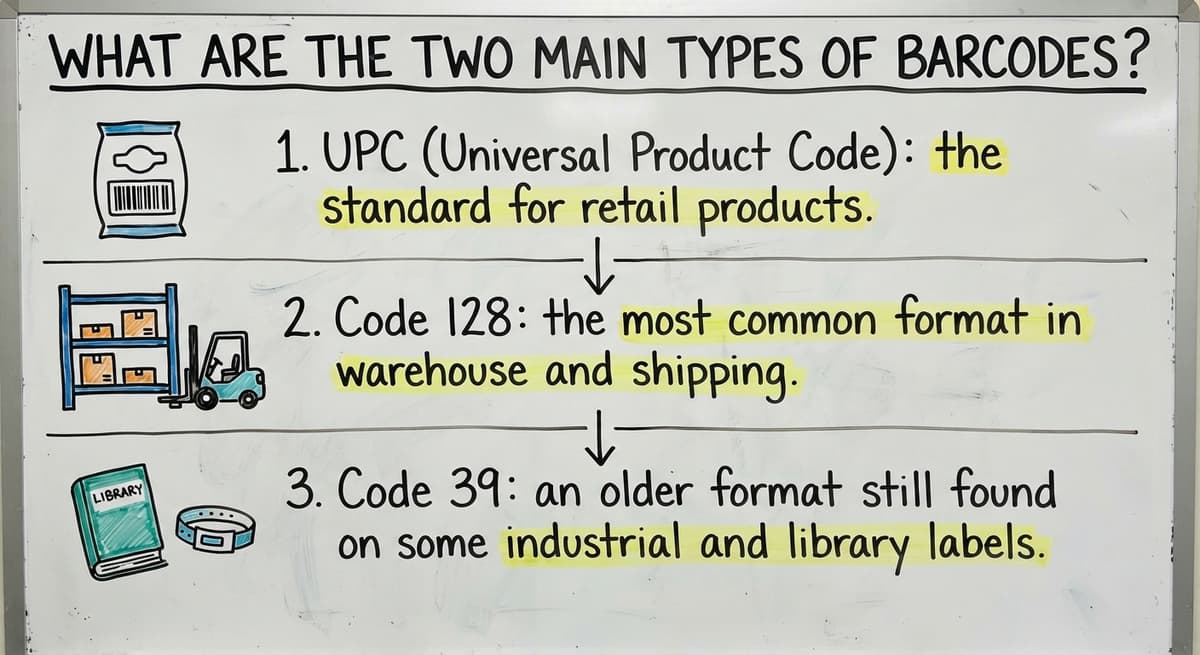
There are 2 main types of barcodes, and choosing the wrong one for your operation causes real problems. The first type is the 1D barcode, which stores data as a row of vertical lines. Common 1D formats include Code 128, Code 39, and UPC-A. These carry 8 to 25 characters and are the standard for product and shipment scanning in most warehouse environments.
The second type is the 2D barcode, which stores data in a square grid pattern. QR codes and Data Matrix codes are the most common 2D formats. They hold hundreds of characters and can encode URLs, location addresses, or multi-field records without a database lookup. Most modern scanners read both types.
1D Barcodes
1D barcodes are the classic stripes you see on retail packaging. Common formats include:
- UPC (Universal Product Code): the standard for retail items sold in North America
- Code 128: the most common format in warehouse and distribution settings, used on shipping labels and cartons
- Code 39: an older format still found on some industrial and government labels
Code 128 is the format most wholesale distributors and warehouses rely on. It handles letters and numbers, fits on a standard label, and reads cleanly on most handheld scanners.
2D Barcodes
2D barcodes, including QR codes and Data Matrix codes, pack far more data into a small space. A QR code can store hundreds of characters.
A 1D barcode stores 8 to 25. Warehouses are starting to use 2D codes for bin labels and pallet tracking, where extra detail is useful.
For most day-to-day receiving, picking, and shipping, Code 128 is still the format that runs operations.
How Does a Barcode Scanner Read the Lines?
A barcode scanner shines a light across the barcode. That light is either a laser or an LED beam, depending on the scanner model. Dark bars absorb the light. White spaces reflect it back toward a sensor inside the scanner.
The sensor measures the pattern of light and dark as the beam crosses the label. Wide bars create a longer dark signal. Narrow bars create a shorter one. The same logic applies to the spaces between them.
Is the comparison easier when one option is built for you?
Yes. Off-the-shelf means fitting your process to the software, and custom is the other way round. The first look costs nothing.
Book a callHow Does the Scanner Convert Light Into a Number?
A small decoder chip inside the scanner converts that signal pattern into a number. The whole process takes less than a tenth of a second. The scanner then sends that number to your connected software, over a USB cable, Bluetooth, or a Wi-Fi network.
Nothing about this process needs the scanner to "know" what the product is. The scanner only reads the pattern and passes the number along. What happens next depends entirely on the software waiting on the other end.
What Happens After the Scan?
The scanned number arrives at your inventory system or point-of-sale platform. The system searches its database for a record that matches that number. When it finds one, it returns the linked data: product name, unit of measure, stock count, bin location, price, or supplier.

How Does the System Act on the Scan?
From there, the system acts. It might subtract 1 unit from stock when a picker pulls an item. It might log a received shipment against an open buy order. It might flag a reorder when stock drops below a set level.
For wholesale distributors, this chain matters. The US Census Bureau tracks the national inventory-to-sales ratio for wholesale firms, and tight ratios mean there is little room for count errors.
A scan that triggers the wrong record, or no record at all, creates a discrepancy that compounds across a shift.
The scan is the input. The software is where the working value sits.
What Do the Numbers Under a Barcode Mean?
The digits printed below a UPC barcode mirror exactly what the scanner reads. They exist so a cashier or warehouse worker can type the number manually if the label will not scan.
In a standard 12-digit UPC barcode, the digits carry specific roles:
- The first 6 digits identify the manufacturer
- The next 5 digits identify the specific product
- The final digit is the check digit, a built-in error catcher
The check digit is calculated from the other 11 digits using a fixed formula. When the scanner reads the barcode, it runs the same calculation and compares the result to the check digit.
If the numbers match, the scan is valid. If they do not match, the scanner rejects the read and tries again.
The check digit means a smudged or partial scan fails loudly rather than silently passing bad data into your system.
What does it look like running on your own process?
The first thing you see is it running on your own process, at no build cost. The subscription starts once it is live and doing the job, not before.
Book a call
Why Are Barcodes More Accurate Than Manual Data Entry?
Barcode scanning is faster and more accurate than typing. A warehouse worker typing item numbers by hand will make errors. That is not a criticism. It is a physical fact about how humans process repetitive input.
The check digit catches misreads before bad data enters the system. Standardized formats mean any compliant scanner reads any compliant barcode, without setup for each new label.
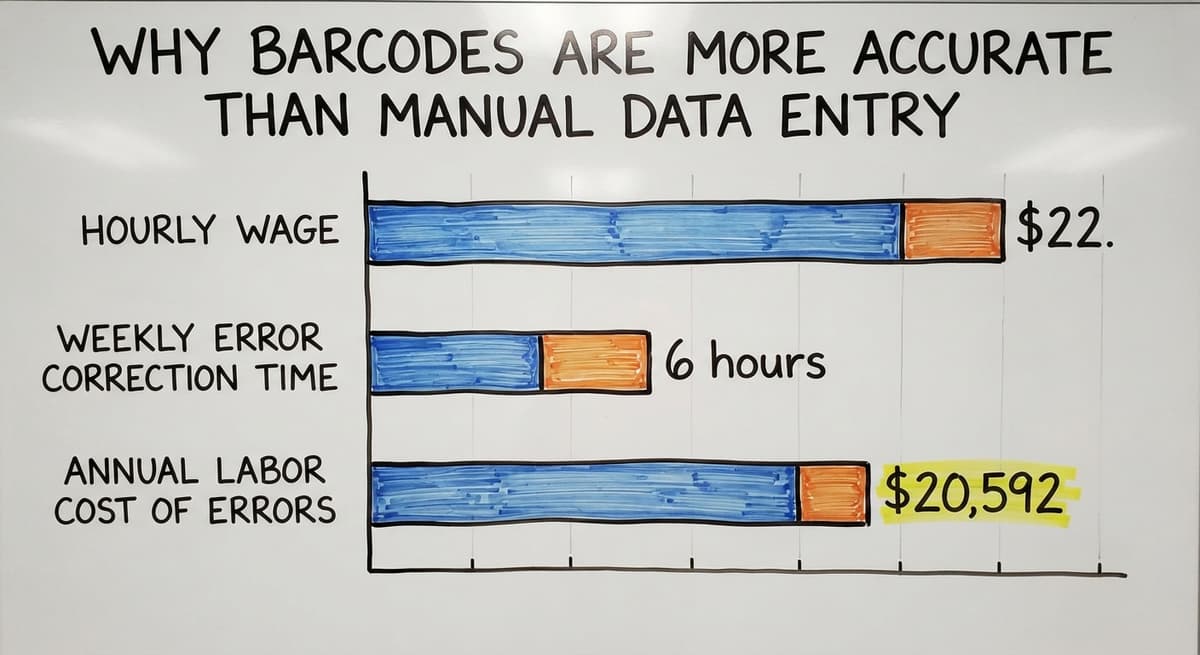
Consider the cost side. The US Bureau of Labor Statistics reports median hourly wages for stock and inventory clerks around $22.
Three workers spending 6 hours a week correcting manual entry errors costs roughly $20,592 a year in labor alone, before you count the downstream cost of wrong counts and missed orders.
Scanning does not just save time. It removes the category of error that spreadsheet-based operations cannot catch until the damage is done.
Barcodes vs QR Codes: What Is the Practical Difference?
Traditional 1D barcodes store 8 to 25 characters. QR codes store hundreds. That sounds like QR codes are always better, but the comparison is more nuanced in a warehouse setting.
A QR code can encode a full URL, a product description, or a location address without any database lookup. That is useful for consumer marketing, where a phone camera needs to open a webpage with no backend system involved.

When Do QR Codes Make Sense in a Warehouse?
In a warehouse, the database does the heavy lifting anyway. The barcode only needs to carry a short item number. The system attached to the scanner holds everything else. So the extra capacity of a QR code goes unused.
Where QR codes are gaining ground is internal labeling: bin locations, pallet tags, and transfer documents where more detail on the label itself reduces lookup steps.
Many operations run both formats, using Code 128 for product scanning and QR or Data Matrix codes for location and routing labels.
The right format is the one your scanner reads cleanly and your software acts on correctly.
How Do Barcodes Fit Into Inventory Management?
Every scan is a data event. Receive a shipment: scan. Pull an item for an order: scan. Ship a pallet: scan. Move stock between locations: scan. Each event writes a record with a timestamp, a quantity, and a user ID.
This replaces hand-written receiving logs and end-of-day spreadsheet updates. The IRS needs businesses to value inventory at the beginning and end of each tax year, and accurate scan records make that count far easier to defend.
Real-time data means you know what you have now, not what you had yesterday morning.
Not sure this is the right shape for your operation?
The call is free. Describe how the work runs today. We map it on a call and show you what it would look like built around that, before you spend anything.
Book a call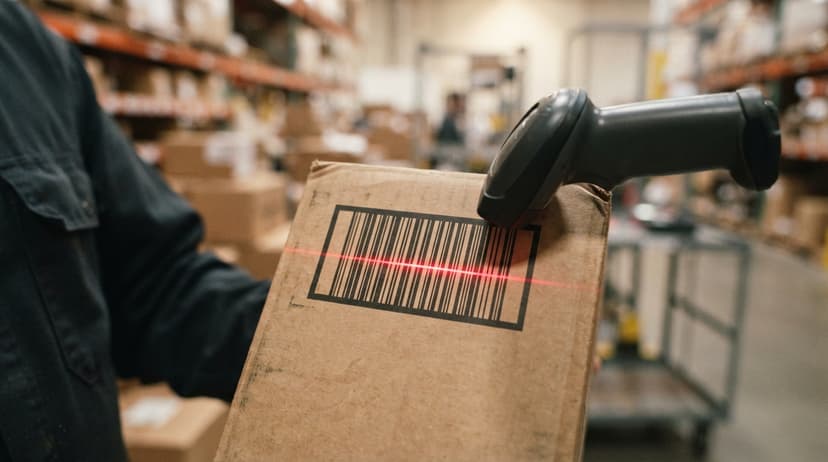
Why Does Real-Time Scan Data Matter for Distributors?
For wholesale distributors, the working case is direct. Barcode inventory management cuts the gap between physical stock and system stock. That gap is where lost revenue hides: items that show as available but are not, or items that sit unrecorded because a receiving log was never entered.
NIST's Manufacturing Extension Partnership identifies real-time inventory visibility as a core supply chain ability for distributors competing on order accuracy and fulfillment speed.
Barcode scanning does not just speed up counting. It makes the count trustworthy enough to run the business from.
What Do You Need to Start Using Barcodes in a Warehouse?
Getting started with warehouse barcode scanning needs 3 things: hardware, labels, and software.
Hardware covers the scanners themselves. Options include:
- Handheld corded scanners for fixed receiving stations
- Wireless handheld scanners for picking and put-away
- Wearable ring scanners for high-volume pick operations
- Fixed-mount scanners for conveyor lines
Labels are either pre-printed by your supplier or printed on demand using a thermal label printer at your dock. Thermal printers produce durable, smear-resistant labels that hold up in warehouse conditions.

Why Is Software the Real Investment in a Barcode Setup?
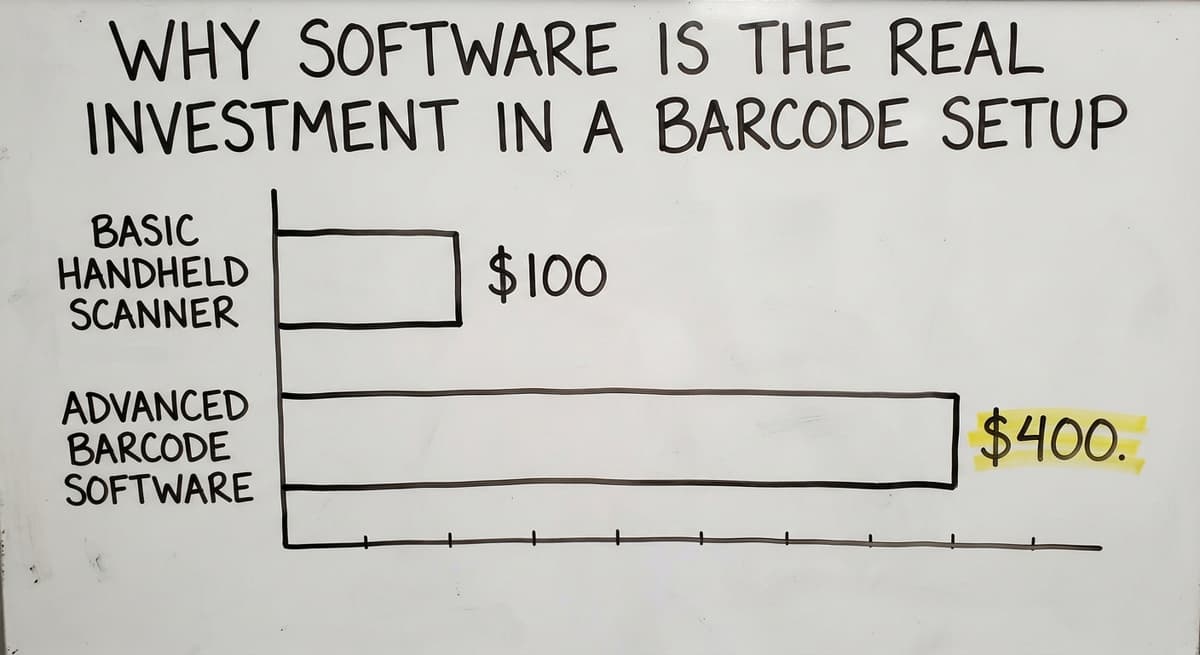
Software is where the real investment sits. The scanner is the cheapest part of the setup. A basic handheld scanner runs $100 to $400.
The inventory system that receives scan data, stores item records, and acts on each event is the layer that work out what scanning actually does for your operation.
Many operations already run a standard accounting package for accounting but find it does not handle scan data or real-time stock movement well.
A barcode inventory management system that connects scan input to the accounting software fills that gap without replacing the accounting workflow your team already knows.
Start with the software decision. The scanner choice follows from what the software supports.
Common Barcode Problems and How to Avoid Them
Most barcode failures trace back to 4 predictable causes. Knowing them in advance saves a lot of troubleshooting.
- Damaged or smudged labels are the most common cause of scan failures. Use durable label stock rated for your environment. In cold storage or outdoor docks, standard paper labels fail quickly.
- Wrong barcode format causes misreads when a scanner expects Code 128 but the label carries Code 39 or a 2D format. Confirm your scanner supports every format your operation uses before you print labels at scale.
- Duplicate item numbers in the database cause the system to return the wrong record on a valid scan. Audit your item master before you go live, not after you find the problem in a physical count.
- Scanning into a disconnected system wastes the speed advantage entirely. If scan data queues locally and syncs hours later, or never, the real-time benefit disappears.
The fix for most of these is not better hardware. It is a clean item database and a software layer designed for scan-driven operations.

Frequently Asked Questions About How Barcodes Work
Can one barcode work across multiple software systems? Yes, if both systems share the same item number for that product. The barcode carries a number.
Any system that holds a matching record for that number will return the right data. The problem comes when two systems use different item numbers for the same product.
Do barcodes store prices? No. Prices live in the software, not the barcode. The barcode carries an identifier. The system attached to the scanner holds the price and updates it without touching the label.
Can a smartphone scan warehouse barcodes? Yes, with the right app. A phone camera can read most 1D and 2D barcodes.
For occasional lookups it works fine. For high-volume picking and receiving, a dedicated barcode scanner is faster, more durable, and less prone to misreads in poor lighting.
What is the difference between a barcode and an RFID tag? A barcode needs line of sight. The scanner beam must hit the label directly.
An RFID tag broadcasts a signal that a reader picks up through packaging, from a distance, and in bulk. RFID is faster for full pallet reads but costs more per tag and needs different hardware.
What is a check digit and why does it matter? A check digit is the final digit in a barcode number. It is calculated from the other digits using a fixed formula.
The scanner runs the same calculation when it reads the label. If the result does not match the check digit, the scan is rejected. This catches partial reads and smudged labels before bad data reaches your system.
Can barcodes work with the accounting software? the accounting software does not natively accept scan input or manage real-time stock movement at the scan level.
A barcode inventory management system that sits between your scanners and the accounting software handles the scan data and passes clean records to the accounting software for accounting. That layer is where most growing distributors find the gap in their current setup.
Barcodes are simple by design. A pattern becomes a number. A number becomes a lookup. A lookup becomes a decision. The technology is decades old and works because it is standardized, fast, and reliable.
What changes the outcome for your operation is not the barcode itself. It is the software that acts on every scan.
If your team is still reconciling stock counts at the end of the day or chasing receiving errors in a spreadsheet, the barcode is not your problem.
The system behind it is. A connected barcode inventory management system built around how your warehouse actually operates is the upgrade that makes scanning worth doing.
The sources behind this guide
The obligation behind all of this is not optional. IRS Publication 538 states: “To figure taxable income, you must value your inventory at the beginning and end of each tax year.” A figure nobody trusts makes that number a guess.
Frequently asked questions
Do barcodes store product information or just a number?
Barcodes store only a number, encoded as a pattern of bars and spaces.
The product information, such as the name, price, and stock count, lives in the software system connected to your scanner. The barcode is the key. The database is where the data actually sits.
How does a barcode scanner read a barcode?
A barcode scanner shines a laser or LED beam across the label. Dark bars absorb the light and white spaces reflect it back.
A sensor inside the scanner measures that pattern of light and dark, and a decoder chip converts it into a number. The whole process takes less than a tenth of a second.
What is a check digit and why does it matter?
A check digit is the final digit in a barcode number. It is calculated from the other digits using a fixed formula.
When the scanner reads the label, it runs the same calculation and compares the result. If the numbers do not match, the scan is rejected before any bad data reaches your system.
What equipment do you need to use barcodes in a warehouse?
You need 3 things: a barcode scanner, barcode labels, and inventory software that accepts scan input. The scanner is the cheapest part.
A handheld unit runs $100 to $400. The software layer that receives scan data and acts on it is where the real investment and the real value sit.
Can one barcode work across multiple software systems?
Yes, if both systems use the same item number for that product. The barcode carries a number. Any system with a matching record will return the right data.
Problems arise when two systems assign different item numbers to the same product, which breaks the lookup on one side.
What is the difference between a 1D barcode and a QR code?
A 1D barcode stores 8 to 25 characters as a row of vertical lines. A QR code stores hundreds of characters in a square grid.
In a warehouse, the extra capacity of a QR code goes unused because the database holds all the detail anyway. Code 128, a 1D format, remains the most common choice for shipping and receiving labels.
Can barcodes work with the accounting software?
The accounting software does not natively accept scan input or manage real-time stock movement at the scan level.
A barcode inventory management system that sits between your scanners and the accounting software handles the scan data and passes clean records to the accounting software for accounting. That middle layer is where most growing distributors find the gap in their current setup.
Why do some barcodes have numbers underneath them?
So a person can type the code when the scanner cannot read it. The digits are the same value the bars encode, and on a retail UPC the last one is a check digit that catches a mistyped entry.
How do QR codes work?
A QR code stores data in a grid of squares read in both directions, with 3 large corner squares that tell the scanner the orientation and error-correction blocks that let it read with up to 30 percent of the code damaged. It holds up to 4,296 characters.
Can a barcode be scanned if it is damaged?
A 1D barcode reads as long as one clean path across the full width survives, which is why scanners sweep at several angles. A QR code reads with up to 30 percent missing. A torn or smeared label past that gets reprinted from the record.
Can barcodes store prices or other product information?
A retail UPC stores only a number; the price comes from the register's database, which is why one label survives a price change. A 2D code can carry the price, lot, and expiry itself, which some coupons and shipping labels do.
What is in a free first look?
A 30 minute call, your operation mapped, and a clear picture of what we would build. No obligation and nothing to install.
Book a callRelated guides
More on the same work.
Guides
- Barcode Abbreviation
- Barcode Scan Machine
- Tracking Number Barcode
- Barcode Reader Machine
- Barcode Scanner App Ios
- 2d Barcode Readers
- Barcode Producer
- Barcode Systems for Warehouse
- Barcode Reader Description
- Barcodes and Labels
- Alphanumeric Barcode
- Barcode Scanner Inventory System
Common questions
- How Do I Create My Own Barcodes
- How to Barcode Scanners Work
- How Barcode Scanning Works
- What Do Barcode Scanners Scan
- How to Create a Barcode System for Inventory
- How to Use a Barcode Scanner
- How to Read a Barcode Number
- How Are Barcodes Read
- How to Create a Barcode
- How to Make Your Own Barcode
- What Does a Barcode Look Like
- When Was Barcode Scanner Invented