


How Are Barcodes Read
A barcode scanner shines light onto the barcode. A sensor measures how much light bounces back. A decoder turns that pattern of light and dark into a number or text string. That string then travels to your software. The whole process takes less than a second. This article was last reviewed in July 2025.
Published 25 July 2026. Reviewed and updated 15 September 2026.
Book a callHow Are Barcodes Read, in Short?
A barcode scanner shines light onto the label. Dark bars absorb the light. White spaces reflect it back. A sensor inside the scanner reads that pattern of highs and lows.
A decoder maps the pattern to a known standard and outputs a number or text string. That string moves to your software. From beam to record, the process takes a fraction of a second and needs no manual typing.
Would you rather have it built around your operation?
The first look is free. If you would rather not compare products, describe how your operation already works and we build the system around it.
Reviewed September 2026. Each figure comes from the assumptions stated beside it, so you can substitute your own and the arithmetic still holds.
No build cost. You see it running on your own process first, and the monthly subscription starts only once it is live.
Book a callWhat Is a Barcode, Actually?
A barcode is a printed pattern that stores data as bars and spaces of different widths. Dark bars absorb light; white spaces reflect it. That contrast is the whole mechanism.
There are two main types. A 1D barcode is a row of vertical lines, like the stripes on a cereal box or a warehouse shipping label.
A 2D barcode, such as a QR code, stores data in a grid of squares and can hold far more information in a smaller space.
As GS1, the global standards body for barcodes, explains on its barcode standards page: barcodes are "the most widely used automatic spotting and data capture technology in the world." That reach matters for warehouse operators because every trading partner, carrier, and retailer reads from the same shared rules.
What Are the Four Steps of Reading a Barcode?
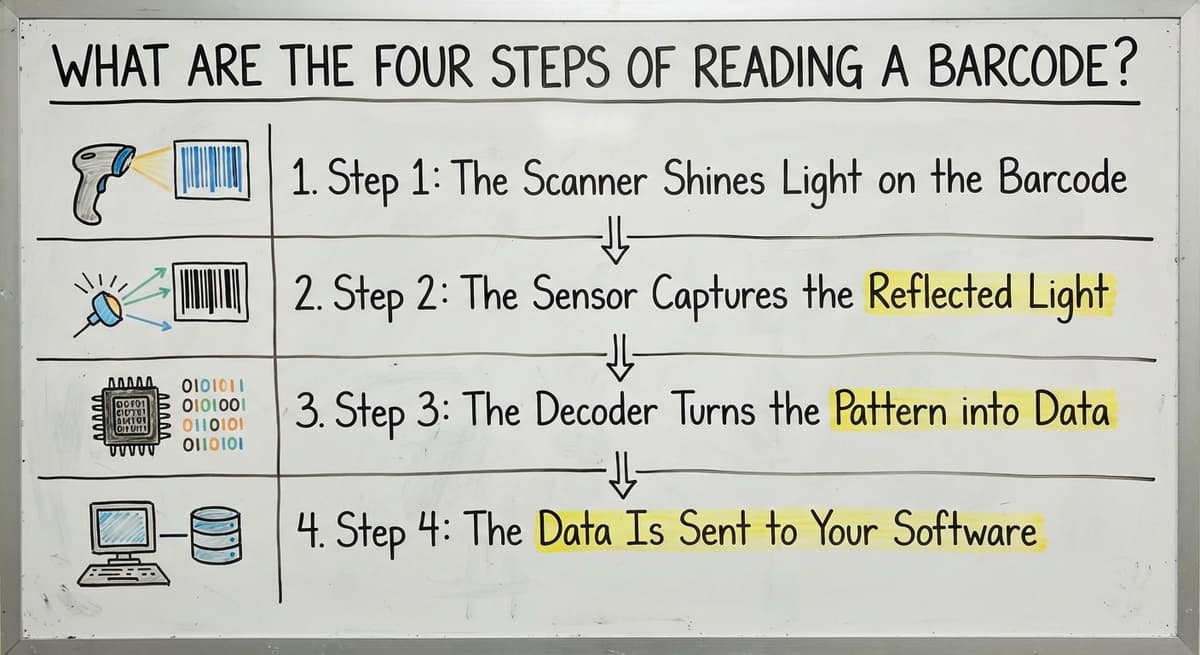
Reading a barcode follows 4 distinct steps, and understanding each one helps you spot where things go wrong. Here is the sequence:
- Light hits the barcode
- A sensor captures the reflected light
- A decoder converts the pattern into data
- The data travels to your software
Each step depends on the one before it. A dirty label breaks step 1. A cheap sensor misses step 2. Wrong decoder settings fail step 3. A disconnected system wastes step 4.
Step 1: The Scanner Shines Light on the Barcode
Not all scanners use the same light source, and the difference matters in a working warehouse.
Laser scanners sweep a single beam across the barcode in a rapid side-to-side motion. They read quickly at distance but struggle with curved surfaces or tilted labels.
LED and imager scanners flood the entire barcode with light and capture a photo of it. They read from any angle and handle damaged or wrinkled labels far better.
For a busy receiving dock where labels arrive bent, wet, or skewed, an imager scanner cuts misreads significantly.
The light source also sets the read range. Laser scanners reach further. Imager scanners trade some range for flexibility. Matching the scanner to the job is the first decision a warehouse operator should make.
Step 2: The Sensor Captures the Reflected Light
Inside the scanner sits a light-sensitive sensor that measures how much light returns from the label. Dark bars send back almost nothing.
White spaces send back a strong signal. The sensor reads this as a wave of highs and lows, moving left to right across the barcode.
Think of it like reading Morse code with a flashlight. Short dark, long light, short dark: each combination carries meaning. The sensor does not read letters or numbers directly. It reads contrast, and the decoder handles the translation in the next step.
Low contrast printing, faded ink, or a shiny label surface can all confuse the sensor at this stage.
Is the comparison easier when one option is built for you?
Yes. Off-the-shelf means fitting your process to the software, and custom is the other way round. The first look costs nothing.
Book a callStep 3: The Decoder Turns the Pattern into Data
The wave of light and dark signals becomes a binary stream: on or off, bar or space. The barcode decoder, a small chip or piece of software built into the scanner, then maps that binary stream against a known barcode standard.
Common standards include Code 128, used widely in shipping and distribution, and UPC-A, found on retail products. The decoder identifies which standard applies and outputs a clean number or text string. That output might be a SKU, a serial number, or a lot code.
This is the step where a physical mark on a label becomes usable inventory data. A scanner set to the wrong barcode standard will fail here even if steps 1 and 2 worked perfectly.
Step 4: The Data Is Sent to Your Software
The decoded string leaves the scanner and travels to whatever system is connected. That connection might be a USB cable, a Bluetooth link, or a Wi-Fi network, depending on the scanner model and the warehouse setup.
This step is where most small distributors lose value. The scan works. The data arrives. But it lands in a spreadsheet, or triggers a manual entry into the accounting software, rather than updating an inventory record directly.
A barcode inventory management system closes that gap. When the software is built around how the warehouse already moves, the decoded string updates the right record instantly: a received buy order, a picked line, a shipped carton.
No second step, no re-keying, no lag. The scan becomes the transaction.
For operations exploring how that connection works end to end, a barcode inventory management system overview covers the full picture.
Common Barcode Types Used in Warehouses
Warehouses deal with several barcode formats, and each one suits a different job. Here are the 4 most common:
| Barcode Type | Format | Primary Use |
|---|---|---|
| Code 128 | 1D | Shipping labels, distribution, internal SKU tracking |
| UPC-A | 1D | Retail product packaging, consumer goods |
| QR Code | 2D | High-data labels, growing use in warehouse receiving |
| GS1-128 | 1D | Shipping containers and pallets, includes lot and expiry data |
GS1-128 is worth calling out separately. It follows the GS1 standard for encoding structured data fields such as batch numbers, expiry dates, and serial numbers into a single label.
For wholesale and distribution operations that track lot numbers for compliance or recall purposes, GS1-128 is the right format.
QR codes are growing in warehouse use because they hold more data, read from any angle, and survive partial damage better than 1D barcodes.
What does it look like running on your own process?
The first thing you see is it running on your own process, at no build cost. The subscription starts once it is live and doing the job, not before.
Book a call
Why Do Barcodes Sometimes Fail to Scan?
A failed scan means the wrong SKU gets recorded, or nothing gets recorded at all, and either outcome costs time and accuracy. The most common causes are straightforward:
- Damaged labels tear or smear the bars, breaking the contrast the sensor needs
- Low contrast printing from a worn label printer produces grey bars instead of black ones
- Wrong scanner for the barcode type means a 1D laser scanner cannot read a QR code
- Poor lighting in a dim warehouse corner reduces the sensor's ability to distinguish highs from lows
- Label placement on a curved or reflective surface scatters the reflected light
In a wholesale or distribution operation, 1 misread can cascade fast. A wrong SKU on a pick creates a short shipment. A short shipment creates a customer complaint.
A customer complaint creates a credit and a recount. The cost of that chain is far higher than the cost of a better label printer or scanner.
A connected inventory system that flags scan errors at the point of scan stops bad data before it travels downstream. A system that silently accepts whatever string arrives passes the problem along.
How Does Barcode Scanning Connect to Inventory Management?
Every successful scan is a data event. It can trigger a stock count update, confirm a pick, log a receipt, or mark a carton as shipped. The scan is only as valuable as the system that receives it.
Many small distributors scan into spreadsheets or type scan results manually into the accounting software. That breaks the chain between the physical warehouse and the financial record.
The IRS is direct on why that record matters: IRS Publication 538 states, "To figure taxable income, you must value your inventory at the beginning and end of each tax year." A broken scan-to-record chain makes that valuation slower and less accurate.
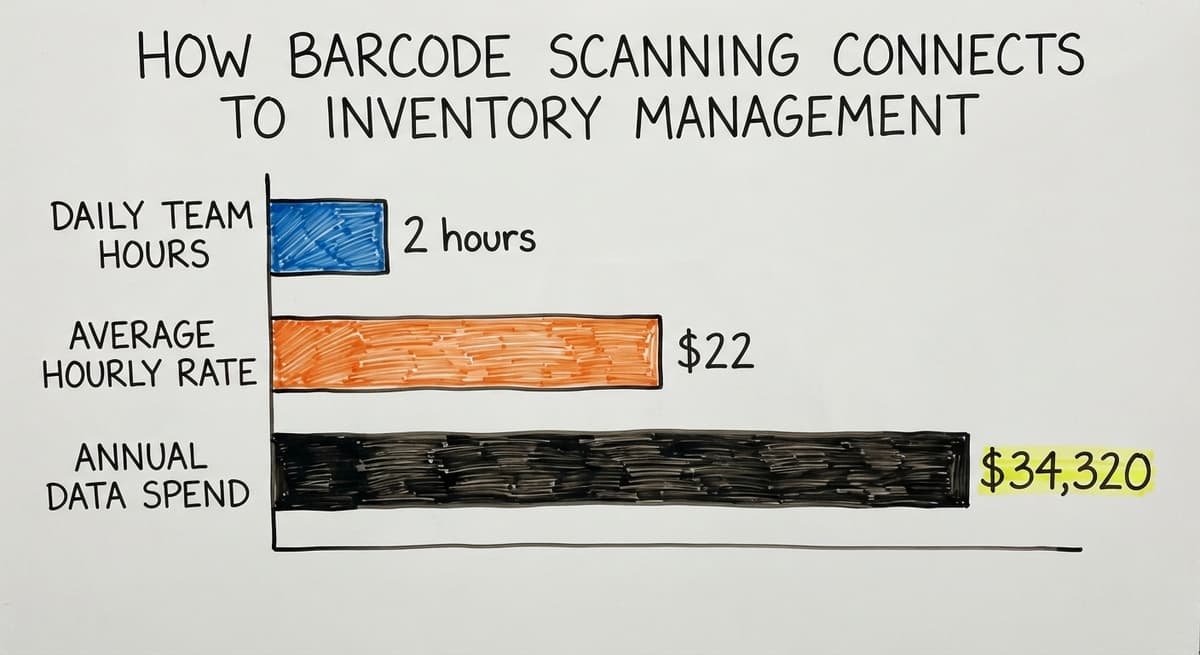
Consider a 3-person receiving team spending 2 hours each per day on manual data entry at a $22 average hourly rate. That is $34,320 a year spent moving data that a connected system would move automatically.
A barcode inventory management system closes the loop so the scan at once updates the right record. No second step.
Teams exploring this path find that QuickBooks inventory management limitations and alternatives become clear quickly once they map where manual entry still lives in their process.

Handheld Scanners vs Fixed Scanners vs Mobile Computers
The right scanner depends on where in the warehouse the work happens. Three main categories cover most operations:
- Handheld scanners are portable and low cost. Staff carry them during receiving and picking. They connect by USB or Bluetooth and suit operations where people move constantly through the floor.
- Fixed scanners mount at a conveyor point or dock door and scan automatically as items pass. No one needs to hold them. They suit high-volume sortation lines where speed matters more than flexibility.
- Mobile computers combine a scanner, a screen, and software in one device. Staff can scan a label and at once see the inventory record, the pick instruction, or the receiving order on the same screen.
For a 5 to 100-person warehouse operation, handheld scanners paired with a connected software platform cover most needs without the cost of enterprise fixed infrastructure.
The screen on a mobile computer adds value when staff need to verify data at the point of scan rather than walking back to a terminal.
How to set up a warehouse barcode system covers the hardware and software pairing in more detail for teams building from scratch.

What to Look for When Barcodes Are Part of a Bigger System
The scanner is the input device. The system around it work out the outcome.
When evaluating how barcode scanning fits into a wider operation, look for 3 things:
- Real-time sync so a scan updates the inventory record at once rather than batching overnight
- Compatibility with existing tools such as the accounting software, so the scan data reaches the financial record without a separate import step
- Minimal manual re-entry at every handoff point, from receiving through picking to shipping
A system forced onto an existing warehouse workflow creates friction. Staff find workarounds. Data gaps appear. A system built around how the team already moves removes that friction from day one.
Custom warehouse software for small distributors can be designed to match real picking routes, real label formats, and real approval steps rather than a generic template.
Receiving and picking workflow automating takes that further by removing the decision points that slow a team down at peak volume.
The scan is fast. The gap is always in what happens next. Closing that gap is where the work is, and where the return on a connected system shows up in the numbers.
If your warehouse scanning is working but the data still needs manual handling before it reaches your inventory or financial records, that is the gap worth fixing. The Software Society builds connected systems around how your operation already works, so the scan becomes the record rather than the start of another task. Start with a conversation about where the manual steps still live in your process.
Frequently asked questions
Is there a way to read barcodes?
Yes. Any barcode scanner, including the camera on a modern smartphone, can read a barcode. Dedicated handheld scanners are faster and more reliable in a warehouse setting.
Smartphone apps work for low-volume or occasional scanning but slow down in high-throughput environments. For inventory management, a scanner connected directly to your software system is the most practical option.
How do I decode a barcode number?
A barcode decoder inside the scanner does this automatically. It converts the pattern of bars and spaces into a binary signal, then maps that signal against a known standard such as Code 128 or UPC-A.
The output is a number or text string. If you want to decode a barcode manually, free online tools let you enter a barcode image and see the encoded data, but in practice the scanner handles this in under a second.
Are barcodes readable in black or white?
Barcodes work on contrast, not color. Black bars on a white background is the standard because it gives the highest contrast. Other color combinations can work if the contrast is strong enough for the scanner's sensor to distinguish bars from spaces.
Light bars on a dark background can also work on some scanners. In practice, black on white is the safest choice for warehouse labels because it reads reliably across all scanner types.
What do the first numbers of a barcode mean?
In a UPC-A barcode, the first digit is a number system character that identifies the product category. In a GS1-128 barcode, the opening digits are an Application Identifier that tells the decoder what type of data follows, such as a batch number or expiry date.
The meaning of the leading digits depends on the barcode standard in use. GS1 publishes the full list of Application Identifiers at gs1.org/standards/barcodes.
What barcode types are most common in warehouses and distribution?
Code 128 and GS1-128 are the most common in shipping and distribution. Code 128 handles alphanumeric SKUs and serial numbers. GS1-128 adds structured data fields like lot numbers and expiry dates on a single label.
UPC-A appears on retail products. QR codes are growing in warehouse use because they hold more data and read from any angle, which matters when labels arrive on curved or damaged packaging.
How does barcode scanning connect to inventory management software?
After the decoder produces a string of data, that string travels to whatever software is connected, by USB, Bluetooth, or Wi-Fi. In a connected barcode inventory management system, the string updates the relevant record at once: a received order, a picked line, or a shipped carton.
In a disconnected setup, the string lands in a spreadsheet or gets typed manually into another system. The scanner works the same way in both cases. The difference is whether the software closes the loop or leaves a manual step in the middle.
What kind of scanner is right for a small warehouse operation?
For most 5 to 100-person warehouse operations, a handheld scanner connected to a barcode inventory management system covers receiving, picking, and shipping without enterprise-level cost. Imager scanners handle damaged or tilted labels better than laser scanners, which matters on a busy dock.
Mobile computers add value when staff need to see inventory data at the point of scan rather than walking back to a terminal. Start with handheld imager scanners and scale from there.
How does a barcode scan update inventory records in real time?
When the scanner decodes a barcode, the resulting string travels over USB, Bluetooth, or Wi-Fi to the connected software. A real-time inventory system receives that string and at once writes the update to the relevant record, without waiting for a batch process or a manual import.
The key requirement is a direct connection between the scanner and the inventory system. If the data passes through a spreadsheet or a manual entry step first, the update is no longer real time.
What is the difference between 1D and 2D barcodes?
A 1D barcode stores a short number in one row of bars; a 2D barcode stores data in a grid and holds thousands of characters. A 1D code points to a record; a 2D code can carry the record itself.
Can a barcode be read without a scanner?
Yes. The digits are printed under the bars on every retail code, and a phone camera with a scanning app reads the bars directly. A dedicated scanner is only faster and more reliable at volume.
How does a QR code store information?
In a grid of squares read in both directions, with error-correction blocks that let it read even when a third of the code is damaged. It holds up to 4,296 characters.
What information is stored in a product barcode?
Only a number: a company prefix, an item number, and a check digit. The description, price, and stock level come from the database that number points to.
What is in a free first look?
A 30 minute call, your operation mapped, and a clear picture of what we would build. No obligation and nothing to install.
Book a callRelated guides
More on the same work.
Guides
- Barcode Abbreviation
- Barcode Scan Machine
- Tracking Number Barcode
- Barcode Reader Machine
- Barcode Scanner App Ios
- 2d Barcode Readers
- Barcode Producer
- Barcode Systems for Warehouse
- Barcode Reader Description
- Barcodes and Labels
- Alphanumeric Barcode
- Barcode Scanner Inventory System
- Lpn Barcodes
Common questions
- How to Read a Barcode Number
- How to Create a Barcode System for Inventory
- How to Use a Barcode Scanner
- How to Barcode Scanners Work
- How Barcode Scanning Works
- How to Create a Barcode
- How Do I Create My Own Barcodes
- How to Make Your Own Barcode
- How Do Barcodes Work
- What Does a Barcode Look Like
- When Was Barcode Scanner Invented