


Perpetual Inventory Vs Physical Inventory
Reviewed June 2025. Perpetual inventory updates your stock count automatically every time a product moves. Physical inventory means staff count every item by hand on a schedule. Perpetual tracking is more accurate day-to-day. Physical counts are simpler to start. Most growing operations end up using both.
Book a callWhat Perpetual Inventory vs Physical Inventory Actually Means
Strip away the accounting language and you have 2 simple ideas. Perpetual inventory means your system knows the count right now, because every move updates it. Physical inventory means someone walks the floor and counts what is there. Neither method is complicated. The real question is which one fits where your operation is today, and where it is going.
We build it for your operation, and the first look is free
If you would rather not compare products, describe how your operation already works and we build the system around it.
No build cost. You see it running on your own process first, and the monthly subscription starts only once it is live.
Book a callHow Perpetual Inventory Works
Every time a product arrives, ships, gets returned, or moves between locations, the count updates. No one has to remember to log it later. The scan or the entry does it in real time.
This works because every item carries a barcode or a label that a scanner reads. As GS1, the global body that sets barcode standards, explains, "barcodes are the foundation of automatic spotting and data capture" (GS1). That scan feeds the count instantly.
Managers can check stock levels from a screen at any moment. Real-time inventory removes the guesswork from reorder decisions. Distribution centers and warehouses that move high daily volumes rely on this method because manual tracking simply cannot keep pace.
How Physical Inventory Works?
Physical inventory means staff walk every aisle and count every SKU by hand, usually once a year or once a quarter. Counts go onto paper sheets, spreadsheets, or a mobile device. Operations often slow or stop during the count. The results then get compared to existing records to find gaps.
Smaller operations with slow-moving stock and few product lines still use this method because it needs no software. You get a verified, ground-truth number at the moment of the count. The problem is that number starts going stale the minute the count ends. Errors and shrinkage build up silently until the next count, and the hidden cost of pausing your floor for a full stock count adds up fast.
Key Differences at a Glance
Here is a plain side-by-side look at how the 2 methods compare across the things that matter most to a warehouse or wholesale operation.
| Factor | Perpetual Inventory | Physical Inventory |
|---|---|---|
| Update frequency | Continuous, real time | Periodic, set schedule |
| Labor required | Lower ongoing effort | High labor burst at count time |
| Inventory accuracy | High, if entries are correct | Accurate right after count only |
| Disruption to operations | None | Operations may slow or stop |
| Upfront setup | Needs software or system | No special software needed |
Perpetual tracking wins on accuracy over time. Physical counts win on simplicity at the start. The right choice depends on how many orders you move and how much a stock error costs you.
The comparison is easier when one option is built for you
Off-the-shelf means fitting your process to the software. We do it the other way round, and the first look costs nothing.
Book a call
Pros and Cons of Perpetual Inventory
Where Perpetual Tracking Earns Its Keep
Perpetual inventory gives you always-current stock data. That means faster decisions on reorders, fewer missed shipments, and earlier detection of shrinkage. It also scales well. Adding 500 more SKUs does not change how the system works.
The trade-offs are real. You need reliable software and a team that scans or enters every move. Data is only as good as what gets entered. If a staff member skips a scan or types the wrong quantity, that error compounds. The next transaction builds on a wrong number, and the gap between the system and reality grows quietly.
Best fit: operations moving dozens to hundreds of orders per day, where a manual count would never keep pace.
Where Perpetual Tracking Struggles
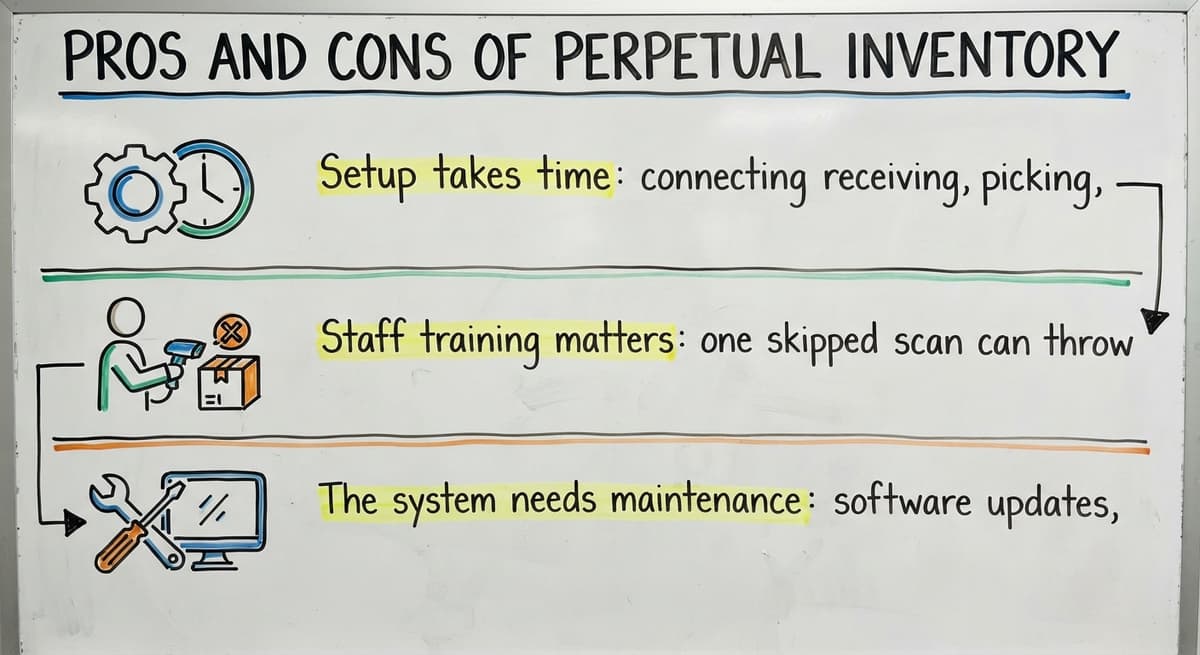
Perpetual tracking delivers real-time accuracy, but it introduces working demands that physical counting does not. Before committing to the switch, every distributor should understand where the system can break down.
- Setup takes time: connecting receiving, picking, and shipping into one system is not instant.
- Staff training matters: one skipped scan can throw off a whole product line.
- The system needs maintenance: software updates, hardware reliability, and data audits are ongoing tasks.
Pros and Cons of Physical Inventory
What Physical Counts Do Well
Physical inventory needs no software. Any operation can do it. The count gives you a verified number you can trust at that moment. For a small distributor with 50 slow-moving SKUs, a quarterly count may be all the inventory tracking needed.
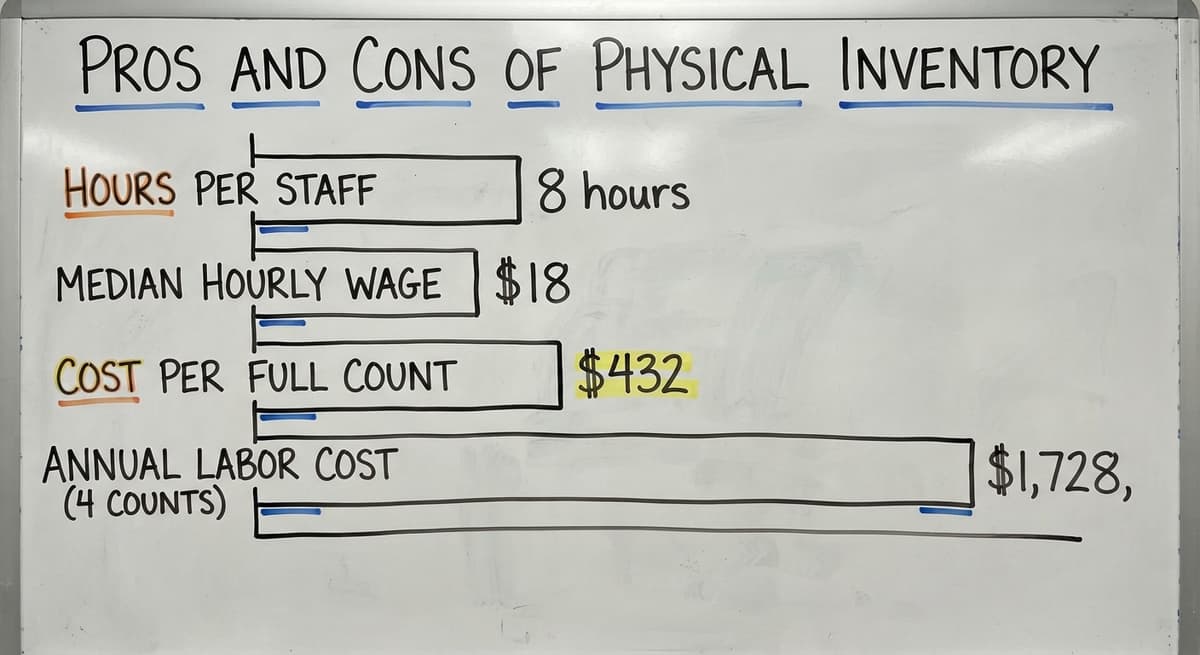
The cons stack up as volume grows. Physical counts are labor-intensive. Consider 3 staff spending 8 hours each on a full count at the Bureau of Labor Statistics median wage for stock clerks of around $18 an hour. That is $432 per count, before you factor in slowed shipments or overtime. Run 4 counts a year and the direct labor cost alone reaches $1,728, not counting errors found after the fact.
The Hidden Cost of Stopping the Floor
The IRS needs inventory valuation regardless of method. As IRS Publication 538 states, "To figure taxable income, you must value your inventory at the beginning and end of each tax year" (IRS). Physical counts satisfy that requirement, but they do not protect inventory accuracy between counts. Errors accumulate, and shrinkage goes undetected until the next scheduled stop.
Best fit: very small operations with slow-moving stock and a handful of SKUs.

Can You Use Both Methods Together?
Yes, and many distributors do. Running perpetual tracking day-to-day and doing periodic physical counts to verify the numbers is standard practice in well-run warehouses.
When you count in sections rather than all at once, that is called a cycle count. You might count one product category per week instead of shutting down for a full floor count. The physical count acts as an audit on the perpetual system. It catches the scans that got skipped and the entries that were wrong.
Combining both methods gives you the best warehouse inventory accuracy without a full working shutdown. The perpetual system handles the day-to-day. The cycle count keeps it honest. Neither method alone does both jobs as well.
See it running on your own process first
No build cost. The subscription starts once it is live and doing the job, not before.
Book a callWhich Inventory Method Fits a Wholesale or Distribution Operation?
If your operation runs on QuickBooks plus spreadsheets and printed pick lists, you are already doing a rough form of physical inventory. Someone checks a sheet, someone walks the floor, and the numbers get reconciled later. That works at low volume. As order volume grows, manual counts fall behind. A missed reorder or a wrong shipment is not just an inconvenience. The FTC's Mail and Internet Order Rule needs merchants to ship within the time promised or notify the customer (FTC). Bad stock data makes that promise hard to keep.

How Perpetual Inventory Becomes Practical for Small Distributors
Perpetual inventory becomes practical when software connects receiving, picking, and shipping in one place. You do not need a massive ERP system to get there. QuickBooks inventory features handle basic tracking, and a custom-built layer can add real-time counts while keeping QuickBooks for accounting. The NIST Manufacturing Extension Partnership notes that aligning inventory processes to actual operations, rather than forcing a generic system, produces better outcomes for small and mid-size manufacturers and distributors (NIST MEP). The upgrade path is shorter than most owners expect. The right software fits around what you already do.
When Should You Switch to Inventory Management Software?
The answer is simpler than most vendors make it: switch when the cost of not switching shows up in your numbers. These 4 signals say that moment has arrived.
- Stock discrepancies are causing missed shipments or customer complaints, which means your count and your reality are no longer the same thing.
- Physical counts take more than a day and still produce errors, which means the labor cost of manual tracking has outgrown its value.
- Staff manage inventory across multiple spreadsheets or paper logs, which means no single source of truth exists and reconciling them burns hours.
- Your team cannot answer "how many units do we have right now" without walking the floor, which means every reorder decision is a guess.

How to Choose Between Custom Warehouse Software and Off-the-Shelf ERP
The right inventory management software for small distributors fits your existing operation rather than forcing a full overhaul. A connected system can add perpetual tracking on top of your current QuickBooks setup. QuickBooks integration for warehouses is a common starting point because it keeps your accounting intact while adding real-time stock visibility where you need it most. If you are weighing a packaged solution against something built for your workflow, the comparison between custom warehouse software vs off-the-shelf ERP comes down to one question: does the software bend to your process, or do you bend to it? Either way, the goal is the same. You want a count you can trust without stopping the floor to get it. Once real-time tracking is in place, the next lever is how to reduce picking errors in a fulfillment center, because accurate stock data only helps if the right item leaves the right shelf.
The Software Society builds connected systems for growing wholesale and distribution operations. If your stock counts are costing you more than they should, talk to us about adding perpetual tracking alongside the tools you already use.
Frequently asked questions
What are the disadvantages of perpetual inventory?
Perpetual inventory depends entirely on accurate data entry. If a staff member skips a scan or logs the wrong quantity, that error carries forward into every transaction that follows. Setup takes time and needs software your team will actually use consistently. The system also needs ongoing maintenance: hardware, software updates, and periodic audits to catch drift between the recorded count and what is physically on the shelf.
What is a good example of perpetual inventory?
A wholesale distributor that scans every inbound pallet at receiving, records each pick against an order, and updates the count at shipment is running perpetual inventory. The stock level in the system reflects what is on the shelf at any moment. A grocery chain that updates its system every time a cashier scans a product at checkout is another common example. Both rely on the scan doing the count work rather than a person walking the floor.
What is the 80/20 rule in inventory?
The 80/20 rule in inventory, sometimes called the Pareto principle, holds that roughly 80% of your sales volume comes from about 20% of your SKUs. In practice this means a small number of products drive most of your revenue and most of your fulfillment activity. Operations use this to rank where to focus accuracy efforts: the top 20% of SKUs deserve tighter controls, more frequent cycle counts, and closer reorder monitoring than the slow-moving tail.
What are the four main types of inventory?
The 4 main types are raw materials (inputs waiting to be used in production), work-in-progress (items partially through a process), finished goods (products ready to sell or ship), and maintenance, repair, and operations supplies (items that support the operation but do not become part of the product). Wholesale distributors usually deal mainly in finished goods, which is where perpetual tracking and physical counts both apply most directly.
Which inventory method is more accurate?
Perpetual inventory is more accurate on a day-to-day basis because it updates with every transaction. Physical inventory is only accurate at the moment the count ends. The gap between physical counts is where errors, shrinkage, and misplaced stock accumulate undetected. Running both together, using cycle counts to audit the perpetual system, gives the highest overall accuracy.
Do you still need physical counts if you use perpetual inventory software?
Yes. Perpetual software tracks what the system was told happened. Physical counts verify what actually happened. Skipped scans, receiving errors, and theft all create gaps between the two. Most operations do cycle counts on a rolling basis, counting one section or product category at a time, to keep the perpetual system honest without shutting down the floor.
What is a cycle count and how does it relate to physical inventory?
A cycle count is a partial physical count done on a rotating schedule rather than all at once. Instead of stopping the entire operation to count every SKU, staff count one zone or product group per week. Over time every item gets counted without a full shutdown. Cycle counts serve as a regular audit on the perpetual system, catching discrepancies before they grow into bigger problems.
Can perpetual inventory work alongside QuickBooks?
Yes. QuickBooks carries basic inventory tracking built in, and third-party tools or custom-built systems can connect to it to add real-time scan-based counts. The accounting stays in QuickBooks while the warehouse side gains perpetual visibility. This approach lets a small distributor upgrade to real-time inventory without replacing the financial system the team already knows.
Start with a free first look
A 30 minute call, your operation mapped, and a clear picture of what we would build. No obligation and nothing to install.
Book a callRelated guides
The rest of this guide, for the parts of the job this page does not cover.
Guides
- Classification of Inventory
- Excess Inventory
- Closed for Inventory
- Multi Location Inventory Management Software
- Inventory Management for Multiple Locations
- Costing Inventory
- Is Inventory a Long-term Asset
- Inventory Management System for Manufacturing
- Inventory Fixed Assets
- Inventory Management Pics
- Excel Inventory Template
- Push and Pull Inventory
- Consumable Inventory
- B2b Inventory Management
- Jewelry Inventory Management
- Dental Inventory Management
- The Objective of Inventory Management is To
- Qr Code for Inventory Management
- Inventory Metrics
- Inventory Formulas
- Hvac Inventory Management Software
- Calculate Beginning Inventory