


What Software Is Used For Inventory Management
Small warehouses and distributors most often use one of four types of software for inventory management: a standalone inventory tracking tool, a warehouse management system (WMS), an order management platform, or a custom-built system designed around their specific workflow. The right choice depends on how many locations you run, how many SKUs you carry, and whether the software needs to work alongside your existing accounting software or replace it entirely.
Reviewed October 2026.
Book a callWhat Inventory Management Software Actually Does
Inventory management software tracks what stock you have, where it sits, and when to reorder. That is the whole job. The IRS makes the underlying obligation clear: "To figure taxable income, you must value your inventory at the beginning and end of each tax year," which means a count is not optional regardless of how you do it.
Spreadsheets and printed pick sheets can satisfy that requirement at low volume. They break down when order counts climb, staff grow, or a second location opens. The goal of any inventory system is fewer stockouts, less overstock, and less time spent counting by hand. Software does not change the goal; it removes the manual steps that make the goal hard to reach.
We build it for your operation, and the first look is free
If you would rather not compare products, describe how your operation already works and we build the system around it.
No build cost. You see it running on your own process first, and the monthly subscription starts only once it is live.
Book a callThe Main Categories of Inventory Management Software
Four categories cover most of what small and mid-size operations actually use.
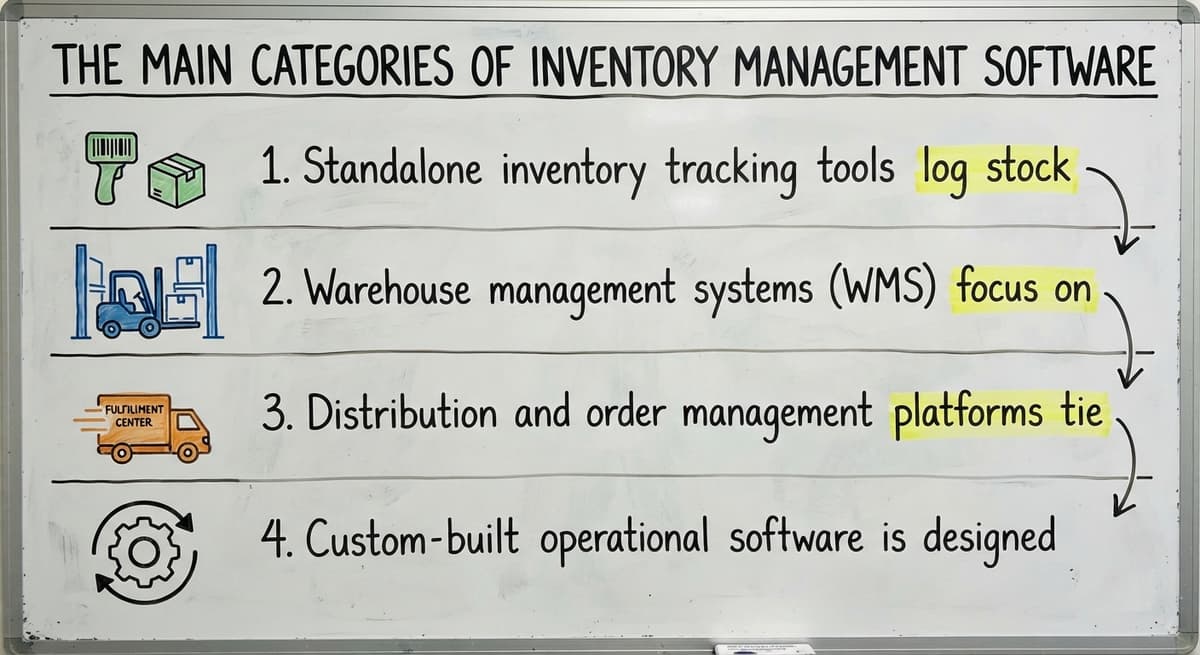
- Standalone inventory tracking tools log stock levels and send reorder alerts. Setup is fast and cost is low, but integration with other systems is limited.
- Warehouse management systems (WMS) focus on physical movement: bin locations, pick and pack workflows, and receiving. A WMS is the right tool when the warehouse itself is the complexity.
- Distribution and order management platforms tie purchasing, sales orders, and stock levels together in one place. These suit operations where buying and selling drive inventory decisions.
- Custom-built working software is designed around how a specific warehouse or distributor already works, replacing only the manual steps while leaving proven tools in place.
Large ERP suites exist, but they are sized and priced for enterprise accounts. Most operations with 5 to 100 staff do not need one. GS1, the global standards body behind barcodes, notes that barcode standards underpin every scan-based count, so whatever category you choose, the system should support GS1-compliant scanning from day one.
What Features Should a Small Distributor Look For in Inventory Management Software?
The features that matter most are the ones that remove manual steps your staff currently handle by hand. Start with this list and cross off anything your current volume does not yet demand.
- Real-time stock levels across every location, updated the moment a transaction posts
- Reorder point alerts so your purchasing team acts before a stockout, not after
- Receiving and buy order tracking tied to what actually arrives, not what was ordered
- Pick, pack, and ship workflow support so the warehouse floor runs from the system, not a printed sheet
- Reporting on inventory turns, aging stock, and shrinkage so slow movers surface before they become a write-off
- Integration with the accounting package already in use, so transactions post without staff rekeying them
The US Federal Trade Commission's Mail, Internet, or Telephone Order Merchandise Rule needs merchants to ship when promised. An accurate, real-time count is what makes that promise keepable.
Can Inventory Software Work Alongside Your Accounting Software Without Replacing It?
Yes, and for most small distributors that is exactly the right approach. Many operations run dedicated accounting software and have no reason to replace it. The goal is to stop double entry, not to rip out a working system.
Good inventory software posts transactions to your accounting package automatically. A sale closes, stock drops, and the journal entry appears in your accounting software without anyone touching a keyboard twice. Accounting software integration for wholesale and distribution operations is one of the most common requests from operations that have outgrown spreadsheets but are not ready for a full platform change. The test is simple: if staff are rekeying data from one system into another, the integration is not working.
The comparison is easier when one option is built for you
Off-the-shelf means fitting your process to the software. We do it the other way round, and the first look costs nothing.
Book a callStandalone Tools vs. Custom Operational Software
Off-the-shelf standalone tools are quick to start. The tradeoff is that your operation adapts to the software's workflow rather than the other way around. That works fine when your process is simple. It creates friction when your warehouse runs in a way the generic tool did not expect.

Custom working software for fulfillment centers and distributors starts from the opposite direction. A builder maps how your team currently works, then replaces only the manual, error-prone steps. The processes your staff already trust stay in place. Your accounting software stays in place. What changes is the part that used to involve a clipboard or a spreadsheet.
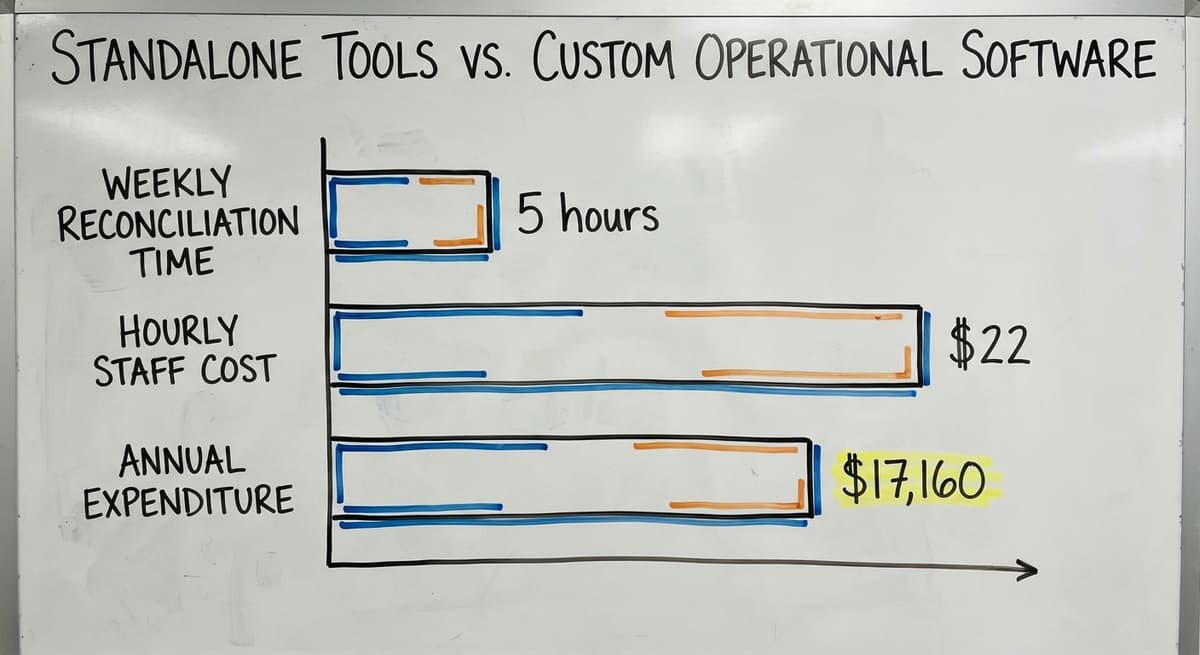
Consider the cost of staying manual. 3 staff spending 5 hours a week reconciling spreadsheets at $22 an hour adds up to $17,160 a year before you count the errors those hours still produce. Custom software is not only for large companies. It is a practical option for any operation that has outgrown generic tools but is not ready for an enterprise ERP.
How Do I Know When My Current System Is No Longer Enough?
The signs are working, not technical. You do not need a software audit to spot them.
- Staff spend hours each week matching spreadsheet counts to physical stock
- Stockouts and overstock situations happen regularly despite manual tracking
- Picking staff work from printed sheets that are out of date before the shift ends
- Managers cannot check current stock without asking someone to walk the floor
- Order data, buy data, and stock data live in separate files that never fully agree
Signs your distribution operation has outgrown manual processes tend to appear gradually, then all at once when a busy period hits. If more than 2 of these describe your operation today, the manual system is already costing more than a software fix would.
What Small Distributors and Warehouses Typically Use
Operations with 5 to 100 staff usually start with accounting software plus spreadsheets. That combination works until order volume grows, a second location opens, or staff turnover means the person who built the spreadsheet is no longer there to keep it.

The next step is usually one of two things: a purpose-built inventory or WMS tool that handles the warehouse workflow, or a custom system built around the specific way the operation runs. How to replace spreadsheet-based inventory tracking is a question of fit, not just features. The right answer depends on how many SKUs you carry, how many locations you manage, and how tightly stock levels must connect to purchasing and sales orders. The US Census Bureau's Monthly Wholesale Trade data tracks national inventory-to-sales ratios for wholesale firms, a useful benchmark when deciding how lean your stock levels should run once a real system is in place.
Barcode Scanning, Mobile Access, and Multi-Location Tracking
Modern inventory management software supports barcode or QR scanning to speed up receiving, picking, and cycle counts. GS1 barcode standards are the foundation every scanner relies on, so confirm any system you evaluate is GS1-compliant before you commit. Mobile access lets warehouse staff update stock on the floor without returning to a desk, which cuts the lag between a physical movement and a system update.
See it running on your own process first
No build cost. The subscription starts once it is live and doing the job, not before.
Book a callHow Does Inventory Software Handle Multiple Warehouse Locations?
Distributors with more than 1 storage location need software that tracks inventory by location, not just by item. Bin-level tracking tells a picker exactly where an item sits, which cuts pick time on a busy day. Transfers between locations should update both sides of the ledger automatically, with no manual journal entry required. A system that cannot do this forces staff to reconcile 2 records every time stock moves, which is the same problem spreadsheets create.
The NIST Manufacturing Extension Partnership offers vendor-neutral guidance on supply chain process, including how location-level tracking fits into a broader inventory control strategy.

Questions to Ask Before Choosing Inventory Software
Before you evaluate any platform or builder, answer these questions about your own operation. The answers narrow the field fast.
- Does it connect to the accounting package already in use, or will it need a replacement?
- Can it handle your daily SKU count and transaction volume without slowing down?
- How long does setup take, and who does the work when something needs to change later?
- Will staff need to learn a new workflow, or does the software fit the process they already follow?
- What support is available after go-live, and is it the same team that built the system?
The last question is the one most buyers skip, and it is the one that matters most six months after launch when a workflow needs to change.
How Custom Inventory Software Is Built for Your Operation
A custom build starts with a map of how your operation currently works. The builder documents your receiving process, your pick and pack workflow, your reorder triggers, and how stock ties to your sales and buy orders. Then the build replaces only the steps that are manual and error-prone.
Your accounting software stays. Trusted processes stay. What changes is the clipboard, the spreadsheet, and the email chain. Staff recognize the new system as their own process in a digital form, which means faster adoption and fewer workarounds after launch.
This approach is available to small and mid-size operations, not just enterprise accounts. The Software Society is based in Columbus, Ohio, and the same team that builds the software supports it after go-live. There is no handoff to a separate support desk. When the operation changes, the team that knows the code changes the software to match.
Next Steps for Finding the Right Fit
Start by mapping the pain before you evaluate any tool. List the manual steps that cost the most time or produce the most errors. That list is your requirements document.
Then decide whether an off-the-shelf tool fits your complexity or whether a custom build makes more sense. Talk to a builder who has worked with distributors and warehouses at a scale similar to yours. Ask what they have built before, how long it took, and what happens when something breaks.
If you are ready to describe your current workflow and where it breaks down, that conversation is the right place to start. Reach out and walk us through your operation. We will tell you honestly whether a custom build fits, and what that would look like for your team.
Frequently asked questions
What are the top 5 inventory management software?
There is no single list that fits every operation. The right tools depend on your size, your workflow, and what accounting package you already use. The main categories are: standalone inventory tracking apps, warehouse management systems (WMS), order management platforms, custom-built working software, and large ERP suites. Most small distributors with 5 to 100 staff find the answer in the first 3 categories or in a custom build, not in an enterprise ERP.
What is the best software for inventory management?
The best fit depends on your operation, not on a ranking. An operation running 1 location with a small SKU count needs something very different from a distributor managing 3 warehouses and hundreds of daily orders. Decide first whether you need bin-level tracking, multi-location support, and tight accounting integration. Those answers point to the right category of tool before you evaluate any specific option.
Can I use Excel for inventory management?
Yes, at low volume. A spreadsheet can track stock levels, log receipts, and flag reorder points when order counts are small and one person keeps the file. The problems start when volume grows, staff turn over, or a second location opens. At that point, a spreadsheet cannot update in real time, cannot support barcode scanning, and cannot post transactions to accounting automatically. Most operations outgrow it faster than they expect.
Is a large enterprise ERP an inventory management software?
Large enterprise resource planning (ERP) suites include inventory management as part of a much broader platform. They are designed for large organizations with complex, multi-country operations and dedicated IT teams. For a small or mid-size distributor, the cost, setup time, and ongoing management overhead of a full ERP are rarely justified. A purpose-built inventory tool or a custom system built around your specific workflow is almost always the better fit at that scale.
How long does it take to implement inventory management software?
A standalone off-the-shelf tool can go live in days or weeks. A warehouse management system with full integration usually takes 4 to 12 weeks depending on complexity. A custom build takes longer to scope but can be phased so the most painful manual steps are replaced first. The key variable is not the software itself but whether the rollout team understands your workflow before they start building.
Does inventory software support barcode scanning and mobile devices?
Most modern inventory and warehouse management systems support barcode and QR scanning on mobile devices. GS1-compliant scanning is the standard to look for. Mobile access lets staff update stock on the warehouse floor in real time, which removes the lag between a physical movement and a system record. Confirm that any system you evaluate supports the scanner hardware you plan to use before you commit.
What does custom inventory software mean, and is it only for large companies?
Custom inventory software is built around how your specific operation works rather than asking your team to adapt to a generic workflow. It replaces only the manual, error-prone steps while leaving tools like your existing accounting software in place. It is not only for large companies. Small and mid-size distributors and warehouses use custom builds when off-the-shelf tools do not fit their workflow and a full ERP is more than they need.
Start with a free first look
A 30 minute call, your operation mapped, and a clear picture of what we would build. No obligation and nothing to install.
Book a callRelated guides
The rest of this guide, for the parts of the job this page does not cover.
Guides
- Multi Location Inventory Management Software
- Hvac Inventory Management Software
- Inventory Management Software for Schools
- Inventory Management Software Costs
Common questions
- What is a Warehouse Management System Used For
- What is the Difference Between Aggregate and Item Inventory Management
- What is Jit Inventory Management
- What is Kanban System of Inventory Management
- What is the Definition of Inventory Management
- What is an Important Factor in Inventory Management
- What is Abc Classification in Inventory Management
- What is Inventory Management in Working Capital
- What is Inventory Management and Its Types
- What is the Main Purpose of Inventory Management
- What is Effective Inventory Management
- What is Information Technology Inventory Management
- What is Risk Pooling in Inventory Management
- What is Inventory Management Mary Kay
- What is Stock Taking in Inventory Management
- What is Bin Number in Inventory Management
- What is the Goal of Inventory Management Quizlet
- What is the Implication of Proper Inventory Management
- What is Omni-channel Inventory Management
- What is Inventory Management and Its Importance