


Top 10 Wms Systems
The top 10 WMS systems reviewed here are Fishbowl, inFlow, Deposco, Extensiv, Logiwa, Infor, Manhattan Associates, Blue Yonder, Acumatica, and a custom-built option. This list was last reviewed in July 2025. It focuses on warehouse management software that fits teams of 5 to 200 staff, not just Fortune 500 buyers.
Book a callWhat Is a WMS System
A warehouse management system, or WMS, is software that runs your warehouse floor. It tracks every item from the moment it arrives to the moment it ships. A WMS handles receiving, putaway, picking, packing, shipping, and real-time inventory tracking.
Reviewed September 2026. Figures are worked from the assumptions stated beside them, so you can substitute your own and the arithmetic still holds.
A WMS is not the same as an ERP. An ERP covers your whole business: accounting, HR, purchasing, and more. A WMS focuses only on what happens inside four walls. Many small distributors run QuickBooks for accounting and add a WMS just for the warehouse, which keeps costs down and avoids a full ERP rollout.
Picking the right WMS matters because the wrong one costs more than it saves.
We build it for your operation, and the first look is free
If you would rather not compare products, describe how your operation already works and we build the system around it.
No build cost. You see it running on your own process first, and the monthly subscription starts only once it is live.
Book a callHow We Ranked These WMS Systems
Rankings here weigh ease of use, time to go live, cost, scalability, QuickBooks integration, and fit for lean teams. Enterprise platforms like Manhattan Associates and Blue Yonder are included for completeness, but they sit near the bottom because they are rarely the right call for operations under 100 staff.
The IRS makes inventory counting a legal requirement, not a preference. As IRS Publication 538 states: "To figure taxable income, you must value your inventory at the beginning and end of each tax year." A WMS makes that count accurate and fast. The list covers both cloud WMS and on-premise options so you can choose what fits your IT setup.
Top 10 WMS Systems, Ranked
Is Fishbowl the Best WMS for QuickBooks Users?
Fishbowl is the most widely used mid-market WMS built to sit alongside QuickBooks, making it the natural first choice for distributors who want warehouse power without replacing their accounting software. It handles lot tracking, barcode scanning, and multi-location inventory without a full ERP price tag.
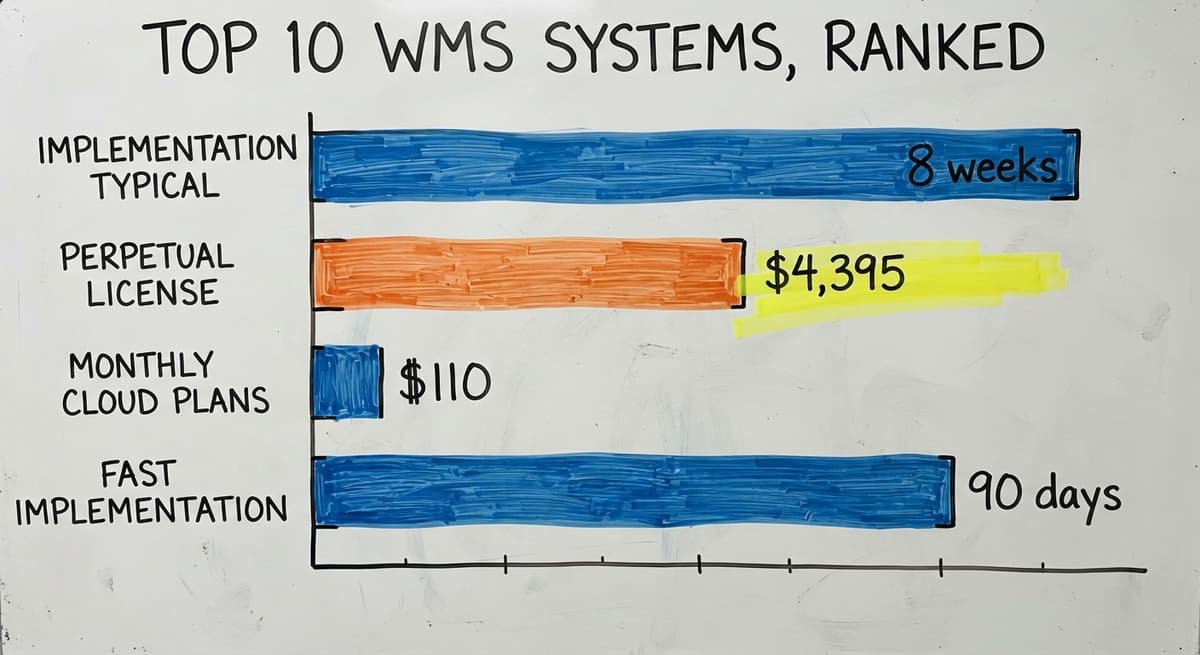
Fishbowl fits manufacturers and distributors with 10 to 100 staff. It works best for companies moving physical goods across a few locations. Rollout usually runs 4 to 8 weeks. Pricing starts around $4,395 for a perpetual license, with cloud plans also available. If your team already knows QuickBooks, Fishbowl shortens the learning curve on the warehouse side.
2. inFlow Inventory
inFlow is a straightforward WMS built for small distributors who need order management, barcode scanning, and solid reporting without a steep setup cost. The cloud-based platform includes a mobile app, so your floor staff can scan and update stock from anywhere in the building.
inFlow works best for teams under 20 staff managing a single warehouse. Plans start around $110 per month. It does not have the depth of larger platforms, but for a small operation drowning in spreadsheets, it solves the core problem fast. The reporting tools give an operations manager a clear picture of stock levels and order status without needing an IT team to run queries.
3. Deposco
Deposco is a cloud-native WMS built for omnichannel fulfillment. It handles wave picking, labor tracking, and real-time inventory visibility across sales channels. Retailers selling through their own site, Amazon, and wholesale accounts at the same time will find it handles that complexity well.
Deposco scales from mid-market up to larger operations, so you do not have to switch systems as you grow. It connects to common e-commerce platforms and ERPs through standard integrations. For a distributor managing multiple channels with a growing order volume, Deposco brings order to what can otherwise become a chaotic fulfillment floor.
4. Extensiv (formerly 3PL Central)
Extensiv targets third-party logistics operators and fulfillment centers. Its billing automating, client portal, and multi-client inventory tools are built specifically for 3PL businesses that manage inventory for multiple customers under one roof.
Cloud delivery means no server to keep. The typical Extensiv customer runs a fulfillment house with 5 to 50 clients. If you are a 3PL operator billing clients for storage and pick-and-pack work, the billing automating alone can save hours each week. Extensiv is a poor fit for a single-brand warehouse, but it is close to purpose-built for the 3PL model.
5. Logiwa WMS
Logiwa is built for high-volume direct-to-consumer and B2B shippers. AI-driven slotting decides where products should live in your warehouse to cut travel time. Automated workflows reduce the manual steps between an order arriving and a label printing.
Carrier integrations cover the major shipping providers, so rate shopping and label generation happen inside one system. Logiwa claims fast rollout, often under 90 days. It works best for operations shipping hundreds or thousands of orders per day. If your daily volume is under 100 orders, Logiwa's feature set is more than you need.
Is Manhattan Associates WMS Right for Your Warehouse?
Manhattan Associates is an enterprise WMS for large, high-complexity operations, and it is almost never the right fit for teams under 100 staff. It leads the industry in advanced demand forecasting, yard management, and robotics integration, but those features come with enterprise pricing and rollout timelines measured in months, sometimes over a year.
Manhattan is included here because it belongs on any complete list of top 10 WMS systems. If you run a regional distribution center with 200-plus staff and a dedicated IT team, it is worth a look. For everyone else, the cost and complexity will outweigh the benefits.
The comparison is easier when one option is built for you
Off-the-shelf means fitting your process to the software. We do it the other way round, and the first look costs nothing.
Book a call7. Infor WMS
Infor WMS is an enterprise-grade platform with deep tools for labor management, slotting tuning, and task interleaving (assigning workers multiple jobs in one trip across the floor). It handles complex, multi-site operations that mid-market systems cannot manage.
Rollout runs longer and costs more than anything else on this list below Manhattan. The right buyer is a larger distributor with complex workflows across several locations. If you are running a single warehouse with under 50 staff, Infor is overbuilt for your needs and will cost more to configure than the efficiency gains justify.
8. Blue Yonder (formerly JDA)
Blue Yonder combines supply chain planning with warehouse execution. Its AI-driven forecasting and labor planning modules are strong, but they need real IT resources to run and keep.
Blue Yonder fits large distribution networks with dedicated IT teams and budgets to match. It is not a plug-and-play system. For a mid-size distributor without an internal IT department, the support overhead alone makes it a poor choice. It earns its place on this list for large-scale complexity, not for ease of adoption.
9. Acumatica Cloud ERP with WMS Module
Acumatica is a cloud ERP that includes a capable WMS module, which makes it a different kind of option. Instead of adding a WMS alongside QuickBooks, Acumatica can replace QuickBooks entirely while adding warehouse features in the same system.
Mid-market pricing and a flexible licensing model (based on resources used, not per-user seats) make it accessible for growing distributors. Some operations choose Acumatica when they have outgrown QuickBooks and want one platform for accounting and warehouse management. If you are ready to move beyond QuickBooks, Acumatica is worth including in your demo list alongside standalone WMS options.
10. Custom-Built WMS
A custom warehouse management system is a legitimate option, not a last resort. Off-the-shelf WMS platforms are built around generic workflows. Your operation may have unique receiving rules, custom labeling, or non-standard picking logic that no packaged software handles cleanly without expensive workarounds.
A custom WMS is built around how you already work. It can keep QuickBooks in place and replace only the manual parts: the spreadsheets, the paper pick tickets, the email threads used to track orders. For distributors with processes that do not fit a standard template, a custom build often costs less over 3 years than forcing a packaged system to bend to your workflow. The learning curve is also shorter because the software matches what your team already does.
WMS Systems Compared at a Glance
No single WMS is right for every warehouse. Use this table to narrow your list before you start demos.
| System | Best For | QuickBooks Compatible | Deployment | Cost Tier |
|---|---|---|---|---|
| Fishbowl | Mid-market distributors | Yes, natively | Cloud or on-premise | Mid |
| inFlow | Small teams, 1 warehouse | Yes | Cloud | Low |
| Deposco | Omnichannel fulfillment | Via integration | Cloud | Mid |
| Extensiv | 3PL operators | Via integration | Cloud | Mid |
| Logiwa | High-volume DTC/B2B | Via integration | Cloud | Mid-High |
| Infor WMS | Large multi-site ops | Via integration | Cloud or on-premise | High |
| Manhattan | Enterprise, 200+ staff | Via integration | Cloud or on-premise | Enterprise |
| Blue Yonder | Large supply chains | Via integration | Cloud or on-premise | Enterprise |
| Acumatica | Growing mid-market | Replaces it | Cloud | Mid |
| Custom WMS | Unique workflows | Yes, kept in place | Either | Varies |
The 3 systems that integrate natively with QuickBooks without replacing it are Fishbowl, inFlow, and a custom-built solution designed to connect to your existing accounting setup.
See it running on your own process first
No build cost. The subscription starts once it is live and doing the job, not before.
Book a call
Key Features to Look for in Any WMS
Real-time inventory tracking is the foundation every other feature depends on. Without it, every count, every order, and every report is working from stale data. Beyond that, here are the features that separate useful WMS software from a glorified spreadsheet:
- Real-time inventory tracking updates stock the moment a scan happens, not at the end of a shift
- Barcode scanning removes the manual entry step that causes most receiving errors
- Receiving and putaway workflows tell staff exactly where each item belongs, cutting search time
- Pick and pack support guides pickers through orders in the most efficient sequence
- Shipping integration connects your WMS to carriers so labels print without rekeying data
- Reporting tools give managers a live view of what is in stock, what is moving, and what is sitting
- Mobile access lets floor staff work from a handheld device rather than walking back to a terminal
The best feature set is worthless if your team avoids the system because it is too hard to use. Ease of use is not a nice-to-have; it work out whether you see a return on what you spend.
Does a WMS Need to Replace QuickBooks?
No, a WMS does not need to replace QuickBooks, and for most small and mid-size distributors, it should not. Many WMS platforms integrate directly with QuickBooks, passing sales orders, buy orders, and inventory values between systems without manual entry.
Fishbowl is the clearest example: it was built specifically to extend QuickBooks into the warehouse. inFlow also connects cleanly. A custom WMS can be built to sync with QuickBooks so your accounting team never has to change how they work.
Some operations do eventually outgrow QuickBooks and move to an ERP like Acumatica. But that is a separate decision from choosing a WMS. You can add warehouse management software today and decide on the accounting platform later. Do not let fear of losing QuickBooks stop you from fixing warehouse problems that are costing you money right now.

Cloud WMS vs. On-Premise WMS
A cloud WMS runs on the vendor's servers. You access it through a browser or app and pay a monthly subscription. An on-premise WMS runs on servers you own and manage inside your building.
Cloud WMS pros: lower upfront cost, automatic updates, remote access from any device, no server hardware to keep. Most of the systems on this list are cloud-based for this reason.
On-premise pros: full data control, no ongoing subscription fee, works without an internet connection. On-premise makes sense if your warehouse has unreliable internet or if your industry has strict data rules.
For most small and mid-size operations with a lean IT setup, cloud WMS wins on simplicity and cost. On-premise is worth considering only when data control or connectivity is a genuine constraint.
How Long Does Implementation Take, and What Does a WMS Cost?
Implementation Timelines
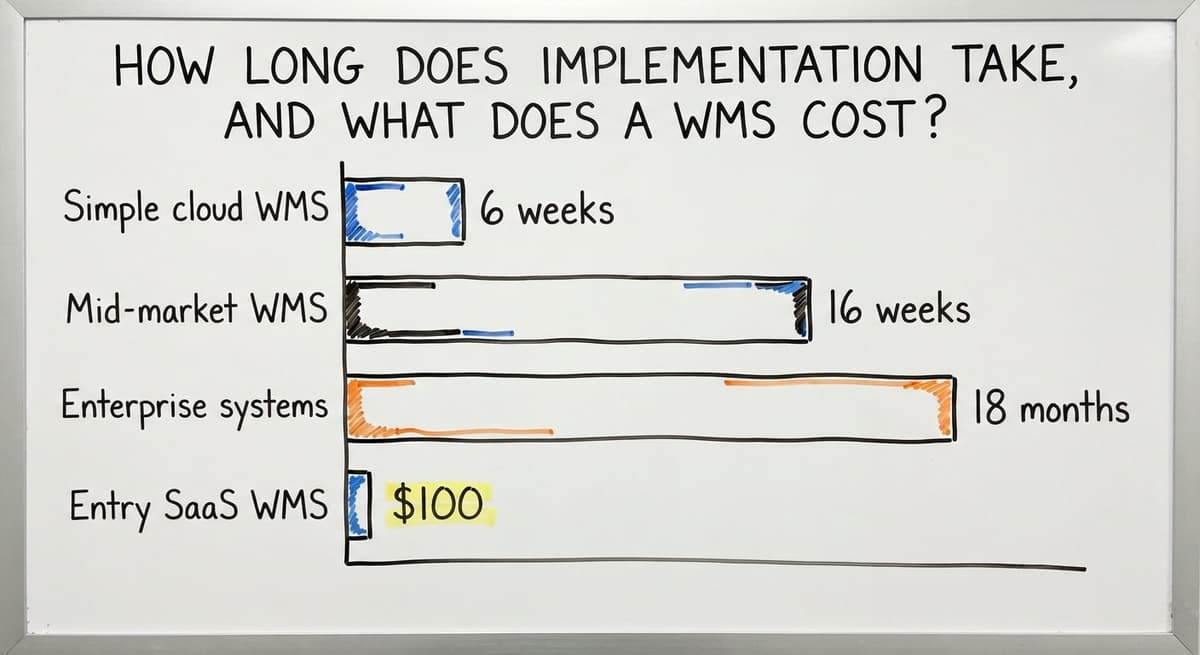
Simple cloud WMS platforms can be live in 2 to 6 weeks. Mid-market systems usually take 6 to 16 weeks when you factor in data migration, staff training, and connecting to your other software. Enterprise systems like Manhattan and Infor can run 6 to 18 months.
What drives the timeline is not the software itself. It is how clean your existing data is, how many integrations you need, and how much your workflows differ from the system's defaults. A custom WMS built around your current process shortens the learning curve because your team is not learning new habits, just using better tools.
Be cautious of any vendor who promises a go-live in days for a complex, multi-location operation. Fast promises often mean shortcuts that show up as problems after launch.
Not sure this is the right shape for your operation
Describe how the work runs today. We map it on a call and show you what it would look like built around that, before you spend anything.
Book a callWMS Cost Ranges
Entry-level SaaS WMS software runs $100 to $500 per month. Mid-market platforms range from $500 to several thousand per month depending on users and features. Enterprise systems are quoted individually and often run six figures per year when you include rollout fees.
Hidden costs are where budgets slip. Training, custom integrations, and ongoing support often add 30 to 50 percent to the first-year total. Consider a real example: 3 staff spending 10 hours a week on manual data entry at $22 an hour (near the BLS median for stock clerks) costs about $34,320 a year. Even a $1,000-per-month WMS pays for itself if it cuts that time by half.
Weigh total cost of ownership over 3 years, not just the monthly subscription line.

When You Have Outgrown Spreadsheets, and When a Packaged WMS Is Not the Answer
Signs Your Operation Needs a WMS
Most wholesale distributors and warehouse operators know something is broken before they admit it. These are the signs that a WMS has stopped being optional:
- Inventory counts never match what the system shows, so you are either over-ordering or running out
- Orders ship wrong often enough that customers notice and call
- Staff spend hours each week on manual data entry that adds no value
- You have no real-time view of what is in stock, so decisions are made on guesswork
- Receiving a new shipment means a paper trail, a spreadsheet update, and a prayer that nothing gets missed
The US Census Bureau's Monthly Wholesale Trade data shows that inventory-to-sales ratios at wholesale distributors are closely watched at the national level because excess inventory is a direct drag on cash flow. A WMS gives you the data to manage that ratio rather than guess at it.
When an Off-the-Shelf WMS Is Not the Right Fit
Packaged WMS platforms are built around the most common warehouse workflows. That works for most operations. It does not work for everyone.
If your receiving process has rules specific to your suppliers, your labeling has to match customer requirements that no template covers, or your picking logic is tied to a sequence that no standard system supports, you will spend more time configuring a packaged system than it saves. The NIST Manufacturing Extension Partnership notes that supply chain process alignment matters as much as the tools themselves.
For distributors with genuinely unique workflows, a custom WMS built around existing operations is not a luxury. It is the practical choice.
How Do You Choose the Right WMS for Your Warehouse?
Start by mapping your own workflow before you open a vendor's demo. The right WMS is the one your team will actually use every day, and that depends on specifics, not feature lists.
Work through these 6 questions before you talk to a single vendor:
- Team size: How many people will use the system daily?
- Order volume: How many orders do you ship per day, and is that growing?
- QuickBooks dependency: Do you need to keep QuickBooks, or are you open to replacing it?
- Budget: What is your monthly ceiling, and what is your 3-year total cost tolerance?
- IT resources: Do you have someone who can manage a system, or does it need to run itself?
- Timeline: How fast do you need to be live, and what is driving that deadline?
Demo at least 2 or 3 systems with your floor staff in the room, not just management. The person scanning boxes every day will spot problems in a demo that a manager sitting in a conference room will miss. The best WMS is not the one with the longest feature list; it is the one your team adopts and uses without being pushed.

Next Steps
The top 10 WMS systems on this list cover a wide range of sizes, budgets, and use cases. Fishbowl and inFlow are strong starting points for small and mid-size teams on QuickBooks. Deposco and Logiwa fit growing fulfillment operations. Enterprise buyers have Infor, Manhattan, and Blue Yonder. Acumatica works when you are ready to replace QuickBooks entirely. And a custom WMS is a real option when no packaged system fits how you work.
Map your workflow first. Then demo 2 or 3 systems. If you want a second opinion on which direction fits your operation, or if you are curious whether a custom-built system might serve you better than anything on this list, reach out. No pressure, just a straight conversation about what you actually need.
Frequently asked questions
What is the most popular WMS?
There is no single most popular WMS across all warehouse types. Fishbowl is widely used among small and mid-size distributors running QuickBooks. Manhattan Associates leads in large enterprise and retail distribution. The right system depends on your team size, order volume, and budget, not industry popularity.
What are the four types of WMS?
The 4 common types are standalone WMS (warehouse-only software), ERP-integrated WMS (a module inside a larger business system like Acumatica), cloud-based WMS (hosted by the vendor, accessed by browser or app), and on-premise WMS (installed on servers you own). A custom-built WMS can fit any of these categories depending on how it is built and deployed.
Which WMS does Amazon use?
Amazon uses a proprietary warehouse management system built in-house. It is not available to outside buyers. Amazon's scale and complexity made off-the-shelf options impractical, which is the same logic that leads some mid-size distributors with unique workflows to consider a custom WMS rather than forcing their process into a packaged system.
What are the top 10 best logistics software solutions?
The top 10 WMS and logistics software options for most warehouse and distribution operations are Fishbowl, inFlow Inventory, Deposco, Extensiv, Logiwa, Infor WMS, Manhattan Associates, Blue Yonder, Acumatica with WMS module, and a custom-built WMS. The best fit depends on your team size, order volume, and whether you need to keep QuickBooks in place.
What is the difference between a WMS and an ERP?
A WMS focuses on what happens inside your warehouse: receiving, picking, packing, shipping, and inventory tracking. An ERP covers the whole business, including accounting, HR, and purchasing. Many small distributors run QuickBooks for accounting and add a standalone WMS for the warehouse, which costs less than a full ERP rollout.
Does a WMS work with QuickBooks?
Many WMS platforms work directly with QuickBooks rather than replacing it. Fishbowl was built specifically to extend QuickBooks into warehouse operations. inFlow also connects cleanly. A custom WMS can be built to sync with QuickBooks so your accounting team never has to change how they work.
How do I know if I need a WMS?
If inventory counts never match reality, orders ship wrong regularly, or your staff spend hours each week on manual data entry, a WMS is worth evaluating. These problems compound as order volume grows. The cost of a WMS is usually lower than the cost of the errors and labor hours it replaces.
Start with a free first look
A 30 minute call, your operation mapped, and a clear picture of what we would build. No obligation and nothing to install.
Book a callRelated guides
More on the same work.
Guides
- Warehouse Management System Top 10
- Best 3PL WMS Software
- WMS for Small Business
- Hospital Stock Management System
- Inventory Management System for Manufacturing
- Inventory Bin System
- Manual Inventory System
- Types of Stock Control Systems
- Automated Inventory Management System
- Web Based Inventory Management System
- Best Inventory Management System
- Cloud Based Inventory Management Systems
- Automotive Inventory Management Systems
- System Inventory
- Perpetual Stock System
- Perpetual Inventory System
- Periodic Inventory Systems
- Best Inventory Tracking Systems