


How Warehouse Management System Works
A warehouse management system is a chain of 4 handoffs. Receiving, putaway, picking, and packing each end in a scan that updates the same record. A warehouse running on printed pick sheets and gut instinct works until it does not: stock goes missing, orders ship wrong, and Friday afternoon goes to counting instead of shipping. This guide, reviewed in September 2026, walks the chain step by step for a warehouse of 5 to 100 people.
Published 11 August 2026. Reviewed and updated 15 September 2026.
Book a callWhat Is a Warehouse Management System?
A warehouse management system (WMS) is software that tracks every item in your warehouse: where it is, how many you have, and what needs to happen next. That is the whole job.
The public record on this is worth reading directly: GS1 covers why a barcode printed by one company scans at another.
Reviewed August 2026. Each figure comes from the assumptions stated beside it, so you can substitute your own and the arithmetic still holds.
Walking is the hidden cost. A picker covering 40 feet to a fast mover 60 times a shift walks 2,400 feet a day, and across 250 days that is 600,000 feet a year per picker.
Moving 20 fast movers nearer the pack bench removes most of it.
The obligation behind all of this is not optional. OSHA states: “The warehousing and storage industry includes establishments operating facilities for general merchandise, refrigerated goods, and other products.” A figure nobody trusts makes that number a guess.
It is not a replacement for the accounting software. It does not touch your chart of accounts or your vendor invoices.
Think of it as the physical side of the operation: the WMS knows where the boxes are, and the accounting software knows what they cost.
A spreadsheet can hold a list of items. A paper log can record a delivery.
Neither one tells you in real time that item 1042 is in Row B, Shelf 3, Bin 7, or that a picker just pulled the last unit. That gap is exactly what a WMS closes.
Would you rather have it built around your operation?
The first look is free. If you would rather not compare products, describe how your operation already works and we build the system around it.
No build cost. You see it running on your own process first, and the monthly subscription starts only once it is live.
Book a callHow Does a Warehouse Management System Work at Its Core?
The single job of a WMS is to know where every item is and what needs to happen next. Everything else, reports, pick lists, cycle counts, flows from that one capability.
If your team has ever spent an hour looking for a pallet that was supposed to be in aisle four, or shipped the wrong product because two SKUs look identical on a shelf, you already understand the daily cost of not having this.
As OSHA notes, warehousing operations involve constant movement of materials and workers, and disorganized inventory is a direct contributor to both errors and safety incidents.
A simple way to frame it: a WMS is the GPS for your inventory. Without it, you are navigating from memory.
Step 1: How Does Receiving Work Inside a WMS?
Receiving is step 1: when goods arrive, the WMS records them immediately, either by scanning barcodes on the inbound shipment or by matching items to an open purchase order already in the system. That first scan creates the first accurate count and assigns each item a location before it ever touches a shelf.
This replaces the paper receiving log or the spreadsheet file someone updates at the end of the day, sometimes.
The accounting software can still handle the purchase-order financials: the vendor bill, the payment terms, the cost per unit. The WMS handles the physical side: how many units arrived, in what condition, and where they are going.
The two systems cover different ground. They do not compete.

Step 2: Putaway and Location Tracking
Once items are received, the WMS assigns or records a bin location for each one. Row B, Shelf 3, Bin 7 is not just a label on a box. It is a searchable address that every future step in the workflow depends on.
Location data is the foundation of fast picking. Without it, staff rely on memory or sticky notes, and that works fine until someone is out sick or a product moves.
A WMS makes location knowledge institutional rather than personal. New staff can find anything on day one.
Step 3: Picking Orders Accurately
Picking is step 3: when an order comes in, the WMS generates a pick list with exact bin locations for each item. Staff follow the list. They do not hunt by memory or check a whiteboard.
Scan-to-confirm takes this one step further. Before an item goes into a tote, the picker scans it. If it is the wrong SKU, the system flags it immediately, before packing, before shipping, before a customer calls.
For a small distributor, fewer picking errors mean fewer returns, fewer replacement shipments, and customers who keep ordering. The accuracy improvement is not a technology benefit. It is a customer service benefit.
Is the comparison easier when one option is built for you?
Yes. Off-the-shelf means fitting your process to the software, and custom is the other way round. The first look costs nothing.
Book a callStep 4: Packing and Shipping
As items are packed, the WMS confirms what went into each box and updates stock on hand in real time. The moment a shipment closes, inventory counts adjust automatically. No one enters a number twice.
Shipping labels and carrier data can be generated directly from the WMS or linked to a connected shipping tool. Either way, the financial transaction still posts in the accounting software.
The WMS closes the physical loop: item picked, item packed, item shipped, inventory updated. The accounting software records the revenue.
The handoff between physical and financial records is clean: each system does only its own job.

How Do Inventory Counts Stay Accurate Between Orders?
Cycle counting is the replacement for the all-hands annual shutdown with small, rolling counts spread across the year.
Instead of closing the warehouse for two days every December, staff count one zone or one product category at a time, on a schedule that does not interrupt order fulfillment.
The WMS flags discrepancies automatically. If the system says 40 units and the count finds 37, that gap is logged and investigated.
Over-ordering and stock-outs both trace back to inaccurate counts. Cycle counting, done consistently, keeps those numbers close to reality without the quarterly disruption that most operations dread.
Does a WMS Replace Your Accounting Software or Work Alongside It?
A good WMS works alongside the accounting software, not instead of it. This is the question that stops more small warehouse owners from moving forward than any other, and the answer is straightforward.
The WMS handles physical movement: receiving, putaway, picking, packing, and inventory tracking. The accounting software handles money: invoices, bills, payroll, and financial reporting.
Data can sync automatically or on a schedule, depending on how the system is configured. Staff do not re-enter anything in two places.
accounting integration for warehouse operations is a solved problem. The setup question is not if it can be done but how often you want the sync to run.
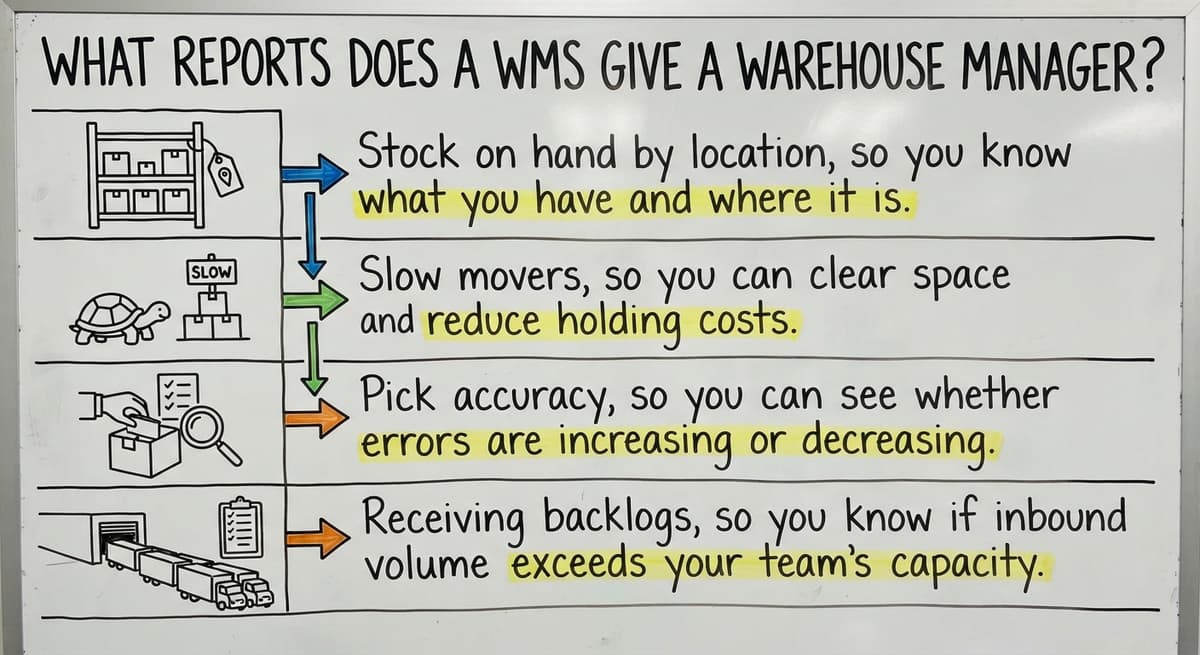
What Reports Does a WMS Give a Warehouse Manager?
The most useful reports are the ones that change a decision you make this week. A WMS produces many reports, but four matter most for a small operation:
- Stock on hand by location, so you know what you have before placing a reorder
- Slow movers, so you can clear space and reduce carrying costs
- Pick accuracy, so you can see whether errors are rising and where they originate
- Receiving backlogs, so you know if inbound volume is outpacing your team's capacity
Managers use these to make daily calls without digging through spreadsheets or asking staff to pull numbers manually. The report answers the question before the meeting starts.
What does it look like running on your own process?
The first thing you see is it running on your own process, at no build cost. The subscription starts once it is live and doing the job, not before.
Book a call
How Do Small Warehouses Use a WMS Differently Than Big Ones?
Most content about warehouse management software addresses enterprise logistics teams with IT departments and six-month implementation budgets. That is not most warehouses.
A small warehouse needs the same core functions: receiving, putaway, picking, packing, and cycle counting. What it does not need is a system that forces it to change every workflow to match the software's assumptions.
Custom warehouse software for small distributors starts with how the operation already works and builds from there.
Replacing spreadsheet and spreadsheets in a warehouse does not require a platform built for a 500-person DC. It requires a system scoped to the actual SKU count, the actual team size, and the actual workflows already in place.
The difference between a system that fits and one that forces change shows up in adoption: staff use a system that makes their job easier and ignore one that makes it harder.
Common Signs Your Operation Needs a WMS
The following are operational costs, not technology problems:
- Picking errors are rising and returns are eating into margin
- Staff spend several hours a week on manual inventory counts
- Inventory numbers in the accounting software never match what is actually on the shelf
- Orders ship late because no one knows where a specific SKU is located
- A single experienced employee holds all the location knowledge in their head
If two or more of these are true, the operation is already paying for a WMS through lost time, errors, and customer friction. The question is whether to keep paying that way.
What Should You Expect When Setting One Up?
For a small operation, setup is a matter of 4 to 8 weeks, not months. The process follows a clear sequence:
- Map the current workflow: receiving, storage zones, picking process, and shipping steps
- Configure locations in the system to match the physical warehouse
- Import existing SKUs and any opening inventory counts
- Train staff on scanning and the pick-list process
- Run parallel with the old system for a short period to confirm accuracy
A custom build starts with how the team already works. The goal is to replace specific manual tasks, one at a time, without disrupting the operation while it is running. Fulfillment center software for growing operations should feel like an upgrade, not a rebuild.
Why Does Ongoing Support Matter After Launch?
Ongoing support is as important as the launch. A system that goes live and then sits without adjustment will drift from the operation's needs within months. The right partner stays involved as the workflow evolves.
If your warehouse is running on printed sheets and memory, the next step is a conversation about what a scoped system would actually look like for your specific setup. No six-month implementation, no forced platform change, just a system built around how you already work.
Frequently asked questions
Frequently asked questions
What does a warehouse management system actually do day to day?
Day to day, a WMS records every item that arrives, assigns it a location, generates pick lists for outbound orders, confirms what was packed and shipped, and updates inventory counts in real time. Staff spend less time searching for stock and more time moving it.
What is the difference between a WMS and an ERP?
A WMS focuses on physical warehouse operations: receiving, location tracking, picking, packing, and inventory counts. An ERP covers the broader business including accounting, HR, and purchasing. Many small operations run a WMS alongside the accounting software without ever needing a full ERP.
How does cycle counting work inside a WMS?
Cycle counting divides the warehouse into zones or product groups and counts a small portion on a rolling schedule rather than shutting down for one large annual count.
The WMS compares the physical count to the system record and flags any gap automatically, so discrepancies are caught early and corrected before they compound.
How does a WMS reduce picking errors?
The WMS generates a pick list with exact bin locations for each item in an order. When the picker scans the item before placing it in the tote, the system confirms it is the correct SKU.
If it is wrong, the system flags it immediately. Errors are caught before packing, not after the customer receives the wrong product.
Can a small warehouse with fewer than 100 staff use a WMS effectively?
Yes. The core functions of a WMS, receiving, location tracking, pick lists, and cycle counting, are just as useful in a 10-person warehouse as in a large distribution center.
A system scoped to the actual operation works better than an enterprise platform with features the team will never use.
How long does it take to set up a warehouse management system?
For a small operation, a realistic timeline is two to six weeks. Setup involves mapping the current workflow, configuring locations, importing SKUs, and training staff.
A custom build scoped to an existing operation moves faster than a large platform implementation that requires changing workflows to match the software.
How do I know if my warehouse needs a WMS?
Clear signals include rising picking errors, inventory counts that do not match the accounting software, staff spending hours on manual counts, and orders shipping late because no one can locate a specific SKU quickly.
If two or more of these are true, the operation is already absorbing the cost of not having a system.
How does a WMS track inventory from receiving to shipping?
Each step creates a record. Receiving logs the item and assigns a bin location. Putaway confirms where it was placed. Picking records which units were pulled for an order.
Packing confirms what went into the shipment. At each handoff, the inventory count updates automatically so the system always reflects what is physically in the warehouse.
What are the main features of a warehouse management system?
Receiving against purchase orders, bin and location tracking, barcode scanning at pick and pack, real-time stock levels by location, routed pick lists, cycle counting, returns handling, and a sync to the accounting software so nothing is keyed twice.
Reporting on accuracy and throughput turns those records into decisions. Understanding how a warehouse management system works starts with those movements: every feature exists to record one of them.
How much does a warehouse management system cost?
The answer depends on the model. Subscription products charge by user, by order or by location, with setup, hardware and support tiers underneath the monthly fee. Enterprise platforms run far higher and take months to roll out.
A custom system for a small warehouse is a one-time build, comparable to a year of subscription fees for a large platform, with a smaller ongoing charge. Compare total cost over three years against the manual hours and stock errors removed.
What types of businesses need a WMS?
Any business whose stock moves through a building faster than a spreadsheet can follow: wholesale distributors, e-commerce sellers shipping daily, manufacturers holding parts and finished goods, third-party logistics providers holding other companies' stock, and retailers with a back room that has outgrown paper.
The signal is not company size; it is two people disagreeing about where something is or how many there are.
How can a WMS improve inventory accuracy?
By recording every movement at the moment it happens rather than at the end of the day: a receipt is scanned at the dock, a put-away scan records the location, a pick scan draws stock down, a shipment confirmation closes the order.
Cycle counts catch the rest in days instead of at year-end. Accuracy improves because the gap between the physical event and the record, where most errors live, closes.
What is in a free first look?
A 30 minute call, your operation mapped, and a clear picture of what we would build. No obligation and nothing to install.
Book a callRelated guides
The rest of this guide, for the parts of the job this page does not cover.
Guides
- Warehouse Inventory Management Systems
- Warehouse Management System Top 10
- Software for Warehouse Management System
- Small Business Warehouse Management System
- Warehouse Management System Types
- Warehouse Inventory Management System
- Warehouse Management System Examples
- Warehouse Management System Implementation
- Cloud Warehouse Management System
Common questions
- How to Choose a Warehouse Management System
- How to Create a Warehouse Management System
- How to Build a Warehouse Management System
- How to Design a Warehouse Management System
- How to Set up a Warehouse Management System
- How to Manage Inventory in a Warehouse
- What Are the Benefits of Warehouse Management System
- What is the Point of Warehouse Management System
- What is Asn in Warehouse Management System
- What is a Warehouse Management System
- Which Warehouse Management System Would a Jeweler Most Likely Use
- What is a Warehouse Management System Used For
- Warehouse Management System vs Warehouse Control System
- Meaning of Warehouse Management System
- Definition of Warehouse Management System