


Warehouse Organization Ideas
The best warehouse organization ideas are the ones that fix a daily frustration fast. Start by mapping your floor, naming every location, and putting fast-moving stock close to shipping. Then back that physical order with a record that updates on every scan, and the 15 ideas below show how, one at a time, for a warehouse of 5 to 100 people.
Published 12 August 2026. Reviewed and updated 15 September 2026.
Book a callWhy Warehouse Organization Ideas Fail Without a Foundation
A disorganized warehouse slows every pick. Staff double back. Errors climb. Morale drops. Small operations feel this faster than large ones because there is no spare capacity to absorb the waste.
Reviewed August 2026. Each figure comes from the assumptions stated beside it, so you can substitute your own and the arithmetic still holds.
Organization is not a one-time tidy. It is a set of rules the whole team follows every day. Without those rules, any improvement drifts back to chaos within weeks.
The sections below build those rules layer by layer, starting with the floor and finishing with the data behind it.
Would you rather have it built around your operation?
The first look is free. If you would rather not compare products, describe how your operation already works and we build the system around it.
No build cost. You see it running on your own process first, and the monthly subscription starts only once it is live.
Book a callStart With a Warehouse Map
The map is step 1: before moving a single shelf, sketch every aisle, rack, and zone on paper or a simple diagram tool. Walk the floor and mark where staff double back, where traffic jams form, and where space sits empty.
That map becomes the reference point for every change you make. It also matters for safety.
OSHA notes that "the warehousing and storage industry includes establishments operating facilities for general merchandise, refrigerated goods, and other products," and its warehousing guidance covers how people move on a floor as a core safety concern. A map lets you plan traffic flow before someone gets hurt.
Keep the map simple enough to print on one page. Update it every time the layout changes.
What Zones Should a Warehouse Have?
Every warehouse, even a small one, needs at least 5 defined zones: receiving, storage, picking, packing, and shipping. Clear zones reduce cross-traffic and the confusion that comes with it during busy periods.
- Receiving is where inbound goods land and get checked
- Storage is the main racking area, split further by velocity if space allows
- Picking is the path staff travel to pull orders
- Packing is where orders get boxed and labeled
- Shipping is where outbound orders wait for collection
Even a warehouse of 2,000 square feet benefits from marked boundaries between these areas. Tape on the floor costs almost nothing and cuts confusion immediately.
Keeping Receiving and Shipping Apart
Inbound and outbound traffic crossing the same area is the cause of delays and mislabeled shipments. Where possible, use separate dock doors.
If that is not an option, schedule inbound and outbound at different times of day. Clear floor markings show staff which direction each flow should move.
Use a Consistent Location Naming System
Assign every shelf, bin, and rack a short alphanumeric code. A common format is aisle, bay, and level: A-01-03 means aisle A, bay 1, level 3. Any staff member can find that location without asking.
The same codes must appear on physical labels and in your inventory records. When the label on the shelf matches the code in the system, picks are faster and errors drop. When they differ, staff guess, and guesses cost time.
This naming system is the backbone of warehouse inventory management: the software can only direct staff to the right slot if the slot has a name both humans and the system share.
How Should I Label Shelves and Bins in a Warehouse?
Labels should be readable from walking distance, survive humidity and forklift vibration, and never peel. Use large fonts, high-contrast colors, and printed vinyl or laminated card. Place labels at eye level on the front edge of each shelf.
Inconsistent labeling is one of the most common causes of picking errors. A label that fades, falls off, or sits on the wrong face of a rack undoes the whole naming system.
Check labels as part of your regular cycle count, covered below.
Is the comparison easier when one option is built for you?
Yes. Off-the-shelf means fitting your process to the software, and custom is the other way round. The first look costs nothing.
Book a call
Where Should Fast-Moving Items Be Stored in a Warehouse?
Fast-moving items belong in the slots closest to the packing and shipping area. This is the single change with the biggest daily payoff.
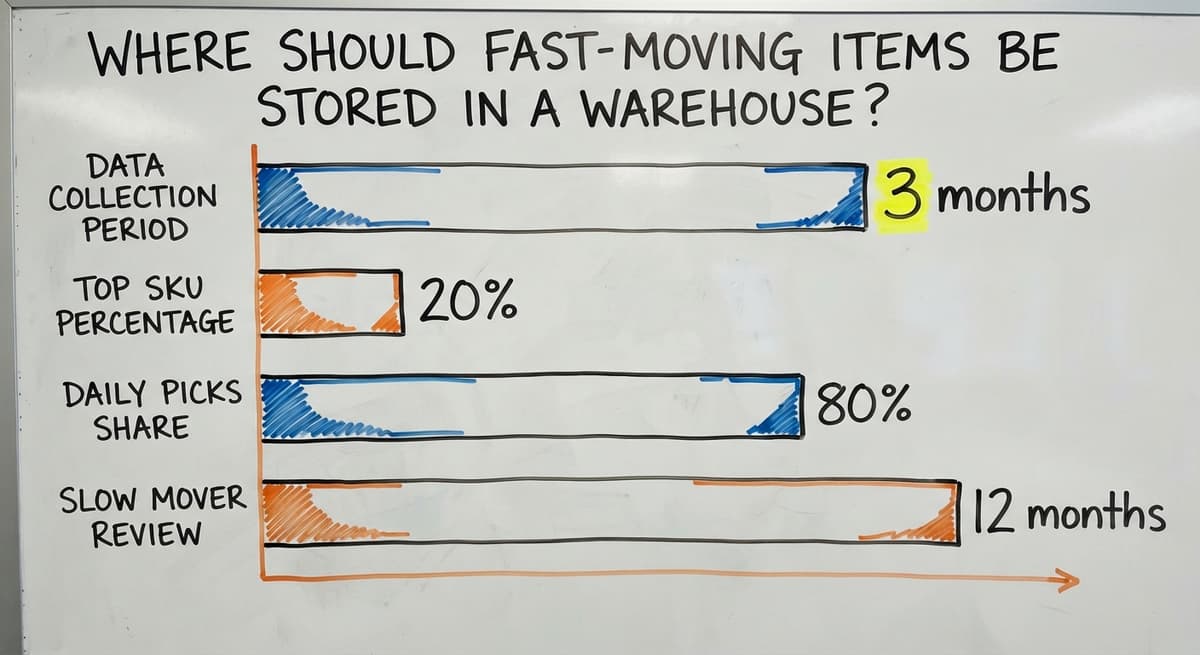
Start by pulling 3 months of order data and ranking every SKU by pick frequency. The top 20% of SKUs by order volume account for 80% of daily picks.
Move those items to your most accessible slots. Pickers travel less, orders ship faster, and fatigue drops.
Slow movers and seasonal stock go toward the back or on upper shelves. Mixing them with fast movers creates clutter and slows every pick. Review the slow-mover zone each quarter and clear out any stock that has not moved in 6 to 12 months.
Dead Stock Takes Up Real Space
Inventory that sits still for 6 to 12 months hides active stock and makes counts harder.
Set a written rule for when slow stock gets flagged: discount it, return it to the supplier, or remove it. A clear dead stock policy keeps shelves productive and your location names meaningful.
Set a Home for Every Tool and Supply
Tape guns, scanners, cutters, and packing supplies are the 4 things that most need a fixed spot. Staff waste real time hunting for shared tools that have drifted across the floor.
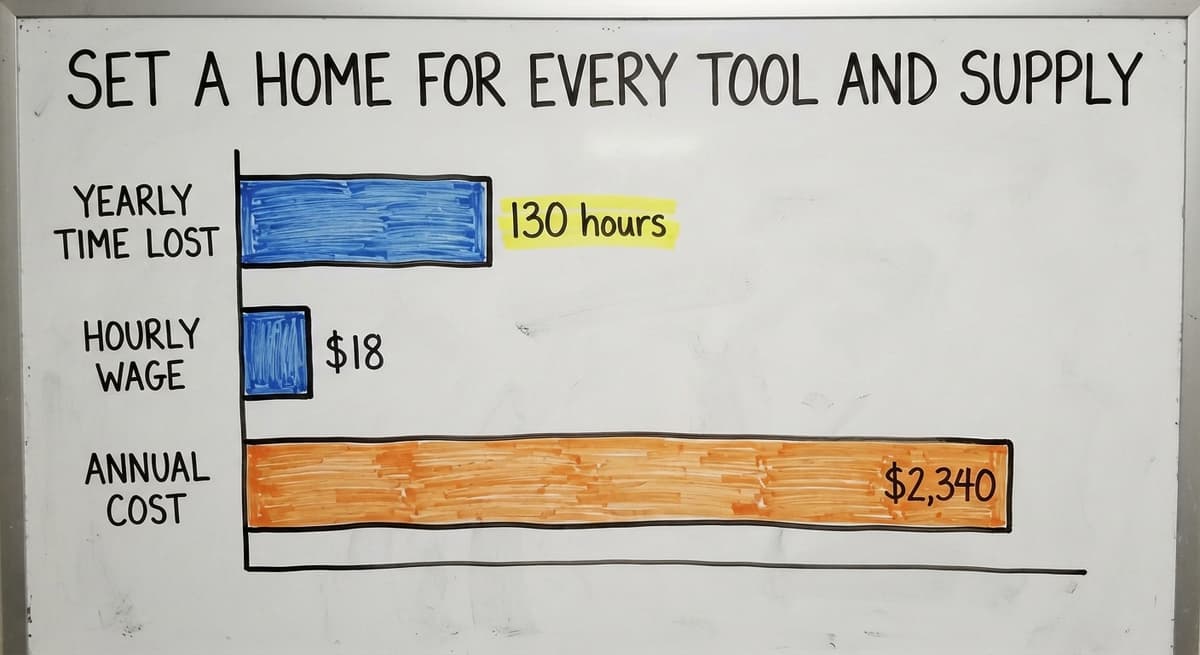
Consider 3 people spending 10 minutes each per shift looking for a tape gun. That is 30 minutes a day, 130 hours a year.
At the average wage for a stock clerk of around $18 an hour, that is roughly $2,340 a year in lost time from one missing tool.
Shadow boards or labeled hooks make it obvious when something is missing. The outline of the tool stays on the board. If the outline is empty, the tool is gone. No searching required.

Use Vertical Space You Are Probably Wasting
Most small warehouses use less than half of their available vertical height. Adding taller racking for slow movers and bulky items that do not need daily access can double usable storage without expanding the building.
Before adding any racking, check load ratings and follow safety rules. OSHA's warehousing guidance covers racking safety alongside floor traffic. A rack that fails is far more expensive than the space it saved.
Standardize How Stock Is Received and Put Away
A written put-away process is what prevents stock from landing in random spots. The best practices for a warehouse receiving process share one rule: every item gets checked, labeled, and assigned a location before it touches a shelf.
Skipping any part of that step is how inventory records drift from physical reality. A box that lands in the wrong aisle because someone was in a hurry can take hours to find later.
The IRS requires that businesses "value your inventory at the beginning and end of each tax year," which means your records need to reflect what is actually on the shelf. A sloppy put-away process makes that legal obligation harder to meet.
How Do I Keep Warehouse Inventory Records Accurate?
Accurate records start at the dock. Every item that comes in gets matched to a purchase order, labeled with the correct location code, and entered into the system before it moves. That discipline, applied consistently, keeps the digital record and the physical shelf in step.

What Is a Cycle Count and How Often Should I Do One?
A cycle count is a count of a small section of inventory on a regular schedule, rather than a full count of everything at once. Count a different zone each week. Over a month, you cover the whole warehouse without shutting down operations.
Focus first on high-value and fast-moving items. Errors in those locations cost the most and compound the fastest.
The Warehousing Education and Research Council tracks cycle count accuracy as one of its standard distribution centre benchmarks, which signals how central this practice is to well-run operations.
Cycle counts catch errors before they grow. A mislabeled pallet found in week 1 is a 10-minute fix. The same error found at year-end is a write-off and a frustrated customer.
What does it look like running on your own process?
The first thing you see is it running on your own process, at no build cost. The subscription starts once it is live and doing the job, not before.
Book a callDocument Your Layout So Anyone Can Follow It
A one-page floor map with zone descriptions is enough to get new staff up to speed in hours, not days. It also makes it easy to spot when something has drifted from the plan.
Keep the document somewhere everyone can reach it, printed near the dock or stored in a shared folder.
Update it every time a zone moves or a new rack goes in. A layout that exists only in one person's head is a single point of failure.

When Does a Warehouse Need Software Instead of Just Better Physical Organization?
Physical organization is limited when inventory records live in spreadsheets or printed sheets.
Errors multiply when someone has to type the same data in more than one place by hand. That is the point where many small operations start looking at purpose-built inventory software.
The signs are clear:
- Staff regularly find stock in the wrong location despite good labeling
- Order errors keep climbing even after physical fixes
- Cycle counts reveal gaps that no one can explain
- The same item is entered in 3 different places before a shipment leaves
Inventory tracking for small distributors does not require a large ERP system. A focused tool that ties your location codes to real-time stock levels can solve most of these problems without a painful rollout.
How Software Reinforces Physical Organization
Inventory software connects your physical location codes to live stock levels. When a picker scans a bin, the system confirms the right item is there. When a put-away goes wrong, the system flags it before the next pick fails.
The physical layout and the digital record stay in sync. Without that link, even a well-organized floor drifts because humans make small errors that paper systems never catch.
Barcode standards from GS1 make it possible for a label printed in your warehouse to scan correctly anywhere in the supply chain, which matters the moment you ship to a retailer or 3PL.
Can I Keep Using your accounting software and Still Improve My Warehouse Operations?
Yes. Many small distributors already use accounting software to manage their books and do not need to replace it.
Custom warehouse software can work alongside that system in a straightforward way: the warehouse system handles the operational side, location tracking, put-away, picks, and cycle counts, while the accounting side keeps doing the bookkeeping it already does well.
The goal is to remove manual overflow, not force a full platform switch. Custom operational software for wholesale and distribution can sit alongside the accounting platform you already use, pull the data it needs, and push updates back without requiring double entry. That is a realistic upgrade for a lean team, not a multi-year IT project.
What is in a free first look?
A 30 minute call, your operation mapped, and a clear picture of what we would build. No obligation and nothing to install.
Book a call
Small Warehouses Benefit From Custom-Fit Systems
Off-the-shelf warehouse software is built for enterprise scale. It forces small operations to adapt their workflows to the software rather than the other way around. That means retraining, workarounds, and features no one uses.
A system built around how your warehouse already works requires less retraining and less disruption. Local support matters too.
When a process needs to change fast, waiting 3 days for a ticket response is not an option for a team of 5 people shipping 200 orders a day.
NIST's Manufacturing Extension Partnership offers vendor-neutral guidance on supply chain process that applies directly here: match the tool to the operation, not the other way around.
What Is the Easiest First Step to Organizing a Messy Warehouse?
Pick one zone and fix it completely before moving to the next. Start with the area that causes the most daily frustration. For most operations, that is receiving or shipping, because errors there ripple through everything else.
A single zone done well does 2 things. It solves a real problem fast. It also shows the team that the changes are real and will last. That momentum matters.
Warehouse organization ideas fail most often not because the ideas are wrong but because the team stops believing the changes will stick.
Small visible wins build that belief. Fix one zone, document it, hold the standard for 2 weeks, then move to the next.
How Do I Organize a Small Warehouse From Scratch?
Start with these 6 steps in order:
- Map the floor and mark every zone before moving anything
- Name every location with a short alphanumeric code
- Label every shelf, bin, and rack with durable, readable labels
- Move fast-moving items to the spots nearest shipping
- Write a put-away process and train every person who touches inbound stock
- Run a count on your top 20% of SKUs in week 1
- Add software once the physical layer is stable and the team follows the rules
That order matters. Software added to a disorganized floor just automates the chaos. Physical order first, then the digital layer on top.
How Do I Stop My Warehouse From Getting Disorganized Again?
Organization stays only when rules are written down and someone is responsible for holding them. Three habits keep a warehouse from drifting:
- Daily returns: every tool and supply goes back to its labeled home before the shift ends
- Weekly cycle counts: a small section counted each week catches errors before they compound
- Quarterly reviews: the zone map and dead stock policy get reviewed every 3 months
The US Census Bureau's wholesale trade data shows that inventories-to-sales ratios shift across the year, which means what counts as slow-moving stock changes with the season. A quarterly review keeps your layout matched to current demand rather than last year's patterns.
No single fix holds forever. The warehouses that stay organized are the ones where the team treats the rules as permanent, not as a one-off project.
If your warehouse has outgrown spreadsheets and manual processes, a purpose-built system built around your existing workflows can close the gap without replacing what already works. Reach out to explore what a custom operational platform looks like for your operation.
Frequently asked questions
Frequently asked questions
What are the five S's of warehouse management?
The 5S method comes from lean manufacturing and stands for Sort, Set in order, Shine, Standardize, and Sustain. Sort means removing items that do not belong. Set in order means giving everything a fixed location. Shine means keeping the space clean and inspected.
Standardize means writing down the rules so anyone can follow them. Sustain means holding the standard over time through habits and accountability.
The 5S framework works well as a starting structure, but it needs to be backed by a location naming system and accurate inventory records to deliver lasting results.
What are the 5 main activities in a warehouse?
The 5 core activities are receiving, put-away, storage, picking, and shipping. Receiving covers checking inbound goods against a purchase order. Put-away moves those goods to their assigned location. Storage is the ongoing management of stock on the shelf.
Picking is pulling items to fulfill an order. Shipping is packing and dispatching that order. Every warehouse organization system is built around making these 5 activities faster and less error-prone.
What are the 7 storage techniques?
Common storage techniques include fixed location storage, where each SKU always lives in the same slot; random location storage, where any open slot is used and the system tracks where items land; zone storage, where items are grouped by type or velocity; bulk storage for large quantities in floor-level positions; vertical storage using tall racking for slow movers; cross-docking, where inbound goods go straight to outbound without being stored; and flow-through racking, where stock is loaded from the back and picked from the front.
The right mix depends on your SKU count, order volume, and available floor height.
What is the ideal warehouse layout?
There is no single ideal layout. The right design depends on your order volume, SKU count, building shape, and dock positions. That said, most well-run layouts share the same traits: clear separation between receiving and shipping, fast-moving stock placed closest to the packing area, defined travel paths that reduce backtracking, and vertical racking used for slow movers.
A U-shaped flow, where goods enter one side and exit the other, works well for many small and mid-size operations. An I-shaped flow suits buildings with docks on opposite ends.
How should I label shelves and bins in a warehouse?
Use large fonts and high-contrast colors on printed vinyl or laminated card. Place labels at eye level on the front edge of each shelf. Every label should match the alphanumeric code in your inventory system exactly.
Check labels during cycle counts and replace any that have faded, peeled, or shifted position. Readable, durable labels are the single most cost-effective investment in picking accuracy.
What is a cycle count and how often should I do one?
A cycle count is a count of a small section of inventory on a set schedule, rather than a full count of everything at once.
Most operations count a different zone each week so the entire warehouse is covered over a month without shutting down. Count your highest-value and fastest-moving items most often. Weekly cycle counts catch errors before they compound into write-offs or missed orders.
Can I keep using your accounting software and still improve my warehouse operations?
Yes. Bookkeeping software handles the books well and does not need to be replaced to improve warehouse operations.
A purpose-built warehouse system can sit alongside it, manage location tracking, put-away, picks, and cycle counts, and share data with that program without requiring double entry. The goal is to remove manual overflow from your operations team, not to force a full platform migration.
Where should fast-moving items be stored in a warehouse?
Fast-moving items belong in the slots closest to the packing and shipping area.
Pull 3 months of order data, rank every SKU by pick frequency, and move the top 20% to your most accessible locations. This reduces daily travel distance for pickers and speeds up order fulfillment.
Slow movers and seasonal stock go to the back or upper shelves where they are out of the daily path.
How do I create a warehouse layout?
Start by sketching every aisle, rack, and zone on paper or a simple diagram before moving anything. Walk the floor to spot where staff double back, where traffic jams form, and where space sits unused.
Divide the space into at least five zones: receiving, storage, picking, packing, and shipping. Keep the map simple enough to print on one page and update it whenever the layout changes.
What is the best warehouse labeling system?
The best system uses a consistent alphanumeric code for every shelf, bin, and rack, such as aisle, bay, and level combined into one code.
Labels should be readable from a distance, printed in large high-contrast fonts, and durable enough to survive humidity and forklift vibration. Placing labels at eye level on the shelf edge, and matching them exactly to inventory records, keeps picks fast and errors low.
How can I maximize warehouse storage space?
Maximize space by using vertical height that most small warehouses leave unused, adding taller racking for slow-moving or bulky items that do not need daily access.
Always check load ratings and follow safety guidelines before installing new racking, since a failed rack costs far more than the space it saves. Combining vertical storage with clear zoning and dead stock removal frees up additional usable room without expanding the building.
How should I organize inventory by product velocity?
Organize by velocity by placing fast-moving items in the spots nearest where orders are packed and sent out, since this reduces travel distance and speeds up every pick.
Rank items by recent order data to identify which small share of products accounts for most daily picks, then move those to the most accessible locations. Slower-moving and seasonal stock belong toward the back or on upper shelves, and should be reviewed regularly for removal.
Not sure this is the right shape for your operation?
The call is free. Describe how the work runs today. We map it on a call and show you what it would look like built around that, before you spend anything.
Book a callRelated guides
The rest of this guide, for the parts of the job this page does not cover.
Guides
- Warehouse Ideas Improvement
- Warehouse Organization
- Warehouse Inventory Management Software
- Warehouse Inventory Tracking Software
- Warehouse Inventory Management Systems
- Pick and Pack in Warehouse
- Warehouse Receiving Software
- Warehouse Inventory Systems
- Warehouse Stock Management Software
- Warehouse Management System Top 10
- Software for Warehouse Management System
- Warehouse Shipment
- Warehouse Tracking System
- Warehousing Operations
- Inventory and Warehouse Management Software
- Small Business Warehouse Management System
- Cloud Based Warehouse Management
- Warehouse Management System Types
- Warehouse Inventory Management System
- List of Warehouse Management Software
- Warehouse Management Costs