

Warehouse Organization
Good warehouse organization is a system your team follows without thinking. It is not a perfect facility. If your crew spends time searching for stock, the warehouse organization fix is a floor audit, 5 zones, consistent labels, and slotting by velocity, in that order. This guide, reviewed in September 2026, walks each step.
Published 21 July 2026. Reviewed and updated 15 September 2026.
Book a callWhy Does Warehouse Organization Break Down?
The Hidden Cost of a Disorganized Warehouse
Most warehouse teams work hard, and poor warehouse organization wastes it. The problem is that hard work gets eaten up by small inefficiencies that add up fast. Mispicks, delays, and overstock issues trace back to one root cause: nobody knows exactly where things are.
When products do not have a clear home, staff make their own decisions about where to put things. Over time, the same SKU ends up in three different spots. Pick and pack times stretch out. Customer orders go wrong. Trust erodes.
These are not staffing problems. They are systems problems.
Organization Is the Foundation Everything Else Builds On
Warehouse organization is the foundation: before you add software, before you hire more people, before you redesign your warehouse layout, you need a physical system that makes sense.
Software can reinforce good organization and scale it. But it cannot fix a warehouse that has no logical structure underneath.
The good news is that warehouse organization does not require a big budget or months of downtime. It requires a clear plan and the discipline to follow it.
Would you rather have it built around your operation?
The first look is free. If you would rather not compare products, describe how your operation already works and we build the system around it.
No build cost. You see it running on your own process first, and the monthly subscription starts only once it is live.
Book a callStart With a Warehouse Audit
Walk the Floor Before You Change Anything
The fastest way to start organizing a messy warehouse is to stop and look at what is actually happening before you move a single shelf.
Walk the floor and document where products actually live versus where they are supposed to live. Look for dead zones, which are areas staff avoid or rarely access, and high-traffic bottlenecks where people are constantly crossing paths.
Note where paper lists, printed pick sheets, or spreadsheet files are being used to fill gaps in the system. These workarounds are clues. They tell you exactly where the system is failing.
As OSHA states in its warehousing guidelines, "good housekeeping is the foundation of a safe and efficient warehouse," and that standard applies directly to how you organize product locations, traffic flow, and staging areas.
Turn Audit Findings Into Priorities
Count how many times per day staff ask each other where something is: that number is your warehouse organization score. This is a measurable inefficiency. Every question is time lost.
Use your audit findings to decide what to fix first. Do not try to reorganize everything at once. Pick the area causing the most daily friction and start there. A focused fix in one zone builds confidence and momentum for the rest.
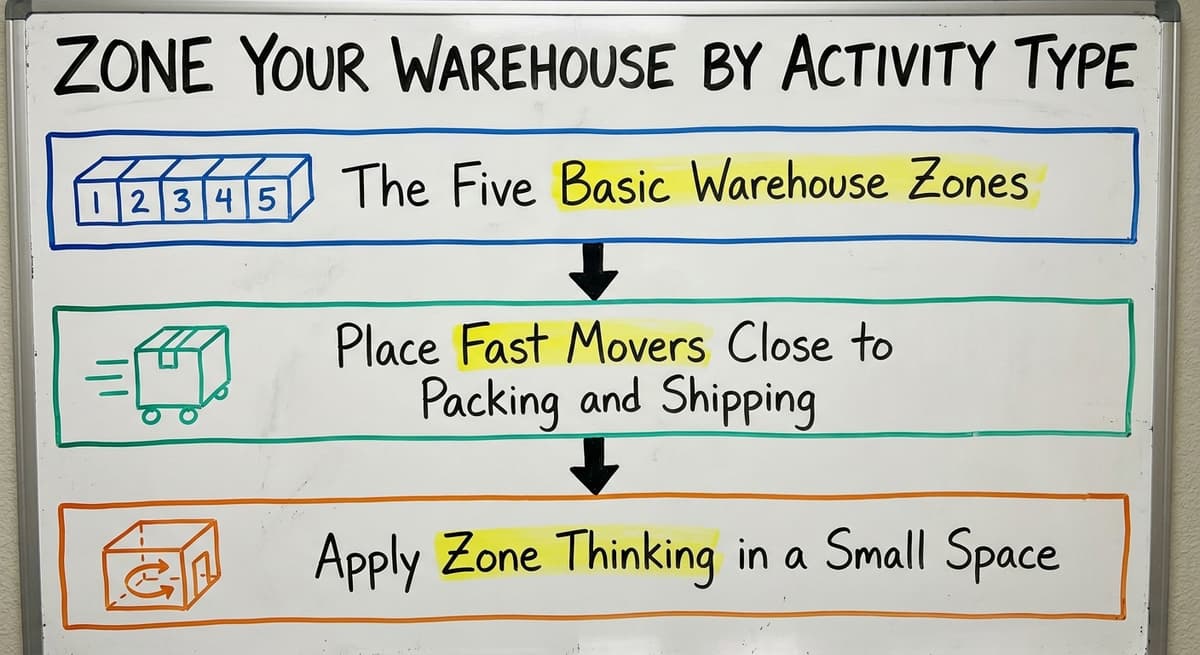
Zone Your Warehouse by Activity Type
The Five Basic Warehouse Zones
Every warehouse, no matter the size, benefits from warehouse organization into 5 distinct zones. The five basic zones are:
- Receiving: where inbound shipments arrive and get processed
- Storage: where inventory lives until it is needed
- Picking: where staff pull items for orders
- Packing: where orders are assembled and boxed
- Shipping: where finished orders wait for pickup or carrier collection
When these zones overlap, you get cross-traffic, confusion, and mistakes. Separating them physically reduces all three.
Place Fast Movers Close to Packing and Shipping
Warehouse layout decisions have a direct impact on picking speed. Items that move every day should be closest to the packing and shipping area. Items that move less often can live farther back.
A simple ABC method works well here:
- A items: move daily. Store closest to packing.
- B items: move weekly. Store in the middle of the warehouse.
- C items: move monthly or less. Store in the back or upper shelves.
Apply Zone Thinking in a Small Space
You do not need a 100,000 square foot facility to use warehouse zones. Even a small operation can apply this thinking with floor tape, signage, and shelf labels.
The goal is to make the zones visible so that every team member, including a new hire on day one, understands where things belong and why.

Label Everything Consistently
A Labeling System Is the Backbone of Warehouse Organization
If it is not labeled, it does not have a home. That is the rule. A labeling system is what turns a general idea about where things go into a system the whole team can follow without asking for help.
A simple location code uses four levels:
- Aisle
- Bay
- Shelf
- Bin
For example, A-03-B-02 means Aisle A, Bay 3, Shelf B, Bin 2. Any team member can learn this in a day. Any new hire can navigate the warehouse without a guide.
Make Labels Work With or Without a Scanner
Use both human-readable labels and barcodes on every location. This means the system works whether your team is using handheld scanners or reading labels by eye. When you add inventory tracking software later, the barcode infrastructure is already in place.
Consistency is everything. Every SKU, every shelf, and every bin needs a label in the same format. When physical SKU locations match item records in your bookkeeping platform, cycle counts become faster and your numbers stay accurate.
Inconsistent labeling is one of the most common reasons those records do not match what is on the shelf.
Not sure this is the right shape for your operation?
The call is free. Describe how you receive, pick and count today. We map it on a call and show you what the system would look like built around that, before you spend anything.
Book a callWhat Is Slotting and Why Does It Matter for Picking Speed?
Assign Every Product a Permanent Home
Slotting is the practice of giving each product a specific, permanent location on the shelf. It sounds simple, but most small warehouses skip this step and pay for it every day in extra pick time.
Reviewed August 2026. Figures below are worked from the assumptions stated beside them, so you can substitute your own times and rates and the arithmetic still holds.
Slotting is where the arithmetic is most obvious. If a picker walks 40 feet to a fast-moving item 60 times a shift, that is 4,800 feet a day, roughly 0.9 of a mile, per picker.
Moving that item to a bin 10 feet from the pack bench cuts the same 60 picks to 1,200 feet. Across 3 pickers and 250 working days that is about 510 miles a year of walking removed, and none of it required buying anything.
Velocity-based slotting means the items you pick most often are the easiest to reach. High-velocity products go at waist height in the primary pick zone.
Low-velocity products go on upper shelves or in back storage. This one change alone can cut pick list completion time significantly.
Handle Weight, Size, and Seasonal Changes
Slotting is also a matter of physical factors in warehouse organization. Heavy items belong at waist height to reduce injury risk.
Bulky items should be stored near the dock so they do not have to travel far. Oversized items need slots with enough clearance to pull safely.
Seasonal slotting adjustments are normal. When a product moves from slow to fast for a promotion or a new product launch, update the slot. Keep a simple log of slot changes so the pick list and bin locations stay accurate.
Connect Slotting to Your Pick List
A slotting plan connects directly to how your team picks orders. When pick lists are organized by bin location rather than by memory, pickers move through the warehouse in a logical path. This reduces backtracking and shortens order completion time.
When you add warehouse inventory management software capabilities later, the software can guide pickers by location automatically rather than relying on anyone to remember where things are.
Standardize Your Receiving Process
Most Disorganization Starts at the Dock
Poor receiving process is the most common cause of inventory inaccuracies in your accounting system.
When a shipment arrives and gets stacked in a staging area without being counted, labeled, and put away, it becomes invisible to the system. It is physically present but not recorded. The ledger shows one number. The shelf shows another.
A dedicated receiving zone with enough space to process a full delivery before the next one arrives is not a luxury. It is a basic requirement for inventory accuracy.
Use a Simple Receiving Checklist
Every inbound shipment should go through the same 4 steps before anyone moves on:
- Count the items and verify against the purchase order
- Inspect for damage
- Label each item or case with the correct SKU and location code
- Put away into the assigned bin location and record the movement
Leaving received goods in a staging area too long creates an invisible inventory black hole. Items sit in limbo, not counted, not located, not available for picking. This is where discrepancies in your inventory ledger start. A consistent receiving process closes that gap.

Keep Inventory Counts Manageable With Cycle Counting
What Is Cycle Counting and How Does It Work?
Cycle counting is the practice of counting a small section of inventory on a rotating schedule instead of shutting everything down for one big annual count. It is faster, less disruptive, and more accurate over time.
A well-organized warehouse makes cycle counting fast. When labels are clear and bin locations are consistent, a staff member can count a full zone in 20 minutes. Without that organization, the same count takes hours and produces unreliable results.
A simple monthly schedule works like this:
- Week 1: Count receiving and storage zones
- Week 2: Count primary pick zone (A items)
- Week 3: Count secondary pick zone (B and C items)
- Week 4: Count packing and shipping areas
Connect Cycle Counts to Your Accounting Software
Cycle count results are the link from warehouse organization back to your accounting platform: they feed in to keep records accurate without a full physical inventory shutdown.
When a count reveals a discrepancy, you can investigate and correct it immediately rather than discovering a months-old problem at year end.
Software built around your operation can automate count reminders and flag discrepancies automatically. This is one area where inventory tracking for wholesale distributors becomes a practical tool rather than an overhead cost. The physical organization makes the counting possible. The software makes the results actionable.
Is the comparison easier when one option is built for you?
Yes. Off-the-shelf means fitting your process to the software, and custom is the other way round. The first look costs nothing.
Book a callWhere Does Software Fit Into Warehouse Organization?
Software Reinforces Organization. It Does Not Replace It.
Software is not a fix for a disorganized warehouse. A warehouse management system installed on top of a broken physical system will just make the chaos faster and more expensive.
Get the physical layout, labeling, slotting, and receiving process right first. Then software becomes a multiplier.
Most small warehouses face a specific gap. Accounting software built for warehouse operations handles the bookkeeping side well.
But it does not manage pick paths, bin locations, or real-time stock movement. That operational layer is missing, and teams fill the gap with printed sheets, spreadsheets, and memory.
What Can Custom Software Do That Spreadsheets Cannot?
Custom warehouse software for small distributors is the layer that can connect to your bookkeeping software, keep it in place, and add the operational layer that printed sheets cannot provide. Specific capabilities include:
- Live location tracking so every item has a recorded home at all times
- Automatic reorder alerts when stock drops below a set threshold
- Digital pick lists tied directly to bin locations
- Cycle count scheduling and discrepancy flagging
- Receiving checklists that update inventory records in real time
These are not features that require a full ERP migration. A system built around your existing operation does not ask your team to change how they work. It supports how they already work and removes the manual steps that cause errors.
A Partner Who Understands Small Warehouse Operations
The fear of a big implementation is real and reasonable. Generic enterprise systems require months of downtime, expensive consultants, and a team willing to adapt to a system that was not built for them. That is not the only option.
Fulfillment center operations software built by a local partner who understands small and mid-size warehouse operations can fit the actual workflow. Custom workflow implementation means the system matches your operation, not the other way around.
If you are already running on your accounting system and want to add the operational layer without replacing anything, that kind of targeted build is worth exploring.
Simple Habits That Keep a Warehouse Organized Long Term
Organization is a daily habit, not a one-time project. The best initial cleanup in the world will unravel in 3 months if there are no habits to maintain it.
Practical habits that work in real warehouse environments:
- Run a 5-minute end-of-shift tidy routine in each zone. Every team member returns items to their labeled home before leaving.
- Do a monthly slotting review. Ask whether fast movers still live in the right spots. Product velocity changes over time.
- Assign zone ownership to specific team members. When someone is responsible for a zone, they notice when it starts to drift.
- Keep the system simple enough that any new hire can follow it on day one. If the system requires a long training period to understand, it is too complicated.
The goal is a warehouse where the system does the thinking, not the individual. When that is true, the organization holds even when key people are out sick, on vacation, or moving on to another job.

The Next Step
Warehouse organization is a physical and process problem first. Start with an audit, set up your zones, label everything consistently, and build a receiving process that keeps the numbers in your accounting platform clean. Then look at how software can reinforce what you have built.
If you are running a small or mid-size warehouse and want to talk through what a connected system would look like for your specific operation, reach out to The Software Society.
We build around your workflow, keep your accounting software in place, and deliver something your team can actually use from day one.
Frequently asked questions
Frequently asked questions
Why does warehouse organization break down even when staff work hard?
Disorganization is a systems problem, not a people problem. When products lack assigned locations, staff make their own decisions about where to put things.
Over time, the same SKU ends up in multiple spots, pick times grow, and errors increase. Hard-working teams get stuck compensating for a system that was never clearly defined.
What is the fastest way to start organizing a messy warehouse?
Start with a floor audit before moving anything. Walk the space and document where products actually live versus where they should live. Note the dead zones, the bottlenecks, and the paper workarounds.
Use those findings to pick one high-friction area and fix it first. A focused improvement in one zone builds momentum for the rest.
How do you create a labeling system that everyone on the team will actually use?
Keep it simple and consistent. A four-level location code using aisle, bay, shelf, and bin is easy to learn in a single shift.
Use both human-readable text and barcodes so the system works with or without a scanner. Apply the same format to every SKU, shelf, and bin without exceptions. Consistency is what makes a labeling system stick.
How does poor receiving process cause inventory inaccuracies in your accounting software?
When received goods sit in a staging area without being counted, labeled, and put away, they exist physically but not in the system. Your bookkeeping software shows one number and the shelf shows another.
A simple four-step receiving checklist, count, inspect, label, and put away, closes that gap and keeps inventory records accurate from the moment a shipment arrives.
What is cycle counting and how does it replace the annual physical inventory?
Cycle counting means counting a small section of inventory on a rotating schedule throughout the year instead of shutting down for one big annual count.
A well-labeled warehouse makes each zone count fast, 20 minutes or less. Results feed back into your accounting system continuously, so records stay accurate and year-end surprises become rare.
Can a small warehouse use the same organization methods as a large one?
Yes. The principles of zoning, labeling, slotting, and cycle counting apply at any scale. A small warehouse with limited square footage can use floor tape, signage, and shelf labels to create clear zones and location codes. The methods scale down without losing their effectiveness.
Do I need to replace your accounting software to get better warehouse organization?
No. Your accounting software handles the bookkeeping side well and most small warehouses should keep it. The gap is on the operational side, which means bin locations, pick paths, and real-time stock movement.
Custom warehouse software can connect to that system and add the operational layer without replacing anything or requiring a full ERP migration.
How do you keep a warehouse organized after the initial cleanup?
Build daily habits into the routine. A 5-minute end-of-shift tidy in each zone, a monthly slotting review, and assigned zone ownership for each team member are the three habits that matter most.
The system should also be simple enough that someone starting their first shift can follow it without a long training period.
How can I improve warehouse inventory accuracy?
Improve accuracy by starting with a full walk-through audit to see how actual product locations compare with where they should be, then apply consistent labels across every aisle, bay, shelf, and bin.
When physical locations match your inventory records exactly, cycle counts go faster and stay correct. Inconsistent labeling is one of the most common reasons recorded numbers stop matching what is actually on the shelf.
How do I design an efficient warehouse layout?
Design it around five basic zones, receiving, storage, picking, packing, and outbound shipping, keeping each separate so traffic does not cross and cause mistakes.
Place fast moving items closest to the shipping dock, mid movers in the middle, and slow movers toward the back or upper shelves using a simple ABC approach. Even a small space can apply this with painted floor markers, printed labels, and numbered shelf tags.
How do I design a warehouse layout?
Start by separating the floor into five zones, receiving, storage, picking, packing, and onward to shipping, since overlapping these causes confusion and errors.
Then position inventory by how often it moves, placing daily movers nearest the shipping area, weekly movers centrally, and rarely moved items farther back or on upper shelves. Clear signage and labeling make the layout understandable to any team member, including a brand new hire.
What is the best warehouse shelving system?
The best system uses velocity based slotting, giving every product a permanent, specific spot rather than letting staff choose on the fly.
High velocity items sit within easy arm's reach in the primary pick zone, while low velocity items move to upper shelves or back storage.
Heavy items stay at a comfortable lifting height to reduce injury risk, and bulky or oversized items get slots near the dock with enough clearance to handle safely.
What does it look like running on your own process?
The first thing you see is it running on your own process, at no build cost. The subscription starts once it is live and doing the job, not before.
Book a callRelated guides
The rest of this guide, for the parts of the job this page does not cover.
Guides
- Warehouse Organization Ideas
- Warehouse Inventory Management Software
- Warehouse Inventory Tracking Software
- Warehouse Inventory Management Systems
- Pick and Pack in Warehouse
- Warehouse Receiving Software
- Warehouse Inventory Systems
- Warehouse Stock Management Software
- Warehouse Management System Top 10
- Software for Warehouse Management System
- Warehouse Shipment
- Warehouse Tracking System
- Warehousing Operations
- Inventory and Warehouse Management Software
- Small Business Warehouse Management System
- Cloud Based Warehouse Management
- Warehouse Management System Types
- Warehouse Inventory Management System
- List of Warehouse Management Software
- Warehouse Management Costs
- Warehouse Management Cloud