


What Is Kanban System Of Inventory Management
Updated October 2026. This page reviews the kanban system of inventory management for small wholesale distributors and warehouse operators running on spreadsheets or an accounting package.
The kanban system of inventory management is a visual, signal-based method that tells your team when to reorder stock. A card, bin, or digital alert fires the reorder at the right moment: not too early, not too late. Inventory moves because real demand pulls it, not because a schedule pushes it.
Book a callWhat Is the Kanban System of Inventory Management?
Kanban is a pull system. Stock moves when a signal says it must. The word comes from Japanese and means "card" or "signal." In a warehouse, that signal is a physical card, an empty bin, or a software alert. The team sees the signal and places a replenishment order. No report. No memory. No guesswork. The trigger is built into the process, not stored in someone's head.
We build it for your operation, and the first look is free
If you would rather not compare products, describe how your operation already works and we build the system around it.
No build cost. You see it running on your own process first, and the monthly subscription starts only once it is live.
Book a callHow a Kanban System Works Step by Step
Stock is divided into containers, bins, or card-tagged quantities. Each quantity has a known reorder point built in from the start.
Here is how a basic cycle runs:
- The team picks from the active bin until it empties or hits its minimum level.
- The empty bin or the kanban card triggers a reorder signal.
- A replenishment order goes to the supplier or a reserve location fills the gap.
- The reserve stock covers demand while the new order arrives.
- The cycle resets when the new stock lands.
How Scan-Based Signals Replace Manual Kanban Cards
The reorder quantity is set in advance using lead time and average daily usage, not a guess. GS1, the global standards body behind supply chain barcodes, notes that scan-based tracking relies on "barcodes [that] enable the efficient and accurate exchange of information" (see GS1 barcode standards). A scan-triggered kanban signal uses that same logic: the barcode read replaces the manual card flip and fires the reorder automatically.
The system works because the signal is tied to physical reality, not a number in a spreadsheet.
What Is the Two-Bin Kanban Method?
The two-bin kanban method is the most common kanban setup in small warehouses, and it works without any software at all. Bin one is the active pick bin. Bin two is the safety reserve sitting behind it.
When bin one empties, the team moves to bin two and places a replenishment order. The physical act of switching bins is the signal. There is nothing to forget and nothing to check on a screen.
Two-bin kanban works because the signal is impossible to miss: an empty bin is its own alarm.
The comparison is easier when one option is built for you
Off-the-shelf means fitting your process to the software. We do it the other way round, and the first look costs nothing.
Book a callHow Software Strengthens the Two-Bin Signal
Software can automate the two-bin step. A digital trigger watches the inventory level and fires the reorder when the threshold is hit, removing the risk of a card being lost or a signal being missed on a busy shift. For operations already using an accounting package, a custom layer can watch stock levels and send the signal without replacing the system already in place.
Why Physical Kanban Still Holds Up
Physical kanban, using cards, colored tags, or labeled bins, costs almost nothing to start. No software license. No training beyond a 10-minute walkthrough. Any team member can see at a glance which bins need attention.
The tradeoff is human reliability. A card can fall behind a shelf. A busy team can skip the flip. Physical systems work best when the team is small and the SKU count is manageable, usually under 50 active items on a kanban cycle.
Kanban vs. Traditional Reorder-Point Inventory
A traditional reorder-point system stores a number in a spreadsheet or software record. Someone checks that number on a schedule and places an order when stock falls below it. The check depends on the schedule being kept and the data being current.
Kanban replaces the scheduled check with a standing signal. The signal fires the moment stock hits the trigger level, not the next time someone runs a report.
The real difference is timing: kanban signals are immediate, and scheduled reorder checks are not.

Choosing the Right Method for Each SKU
Neither approach is wrong for every situation. A practical split for most small distributors looks like this:
- Fast-moving SKUs: kanban, because the signal needs to be immediate and visible.
- Slow or irregular SKUs: reorder-point logic, because demand is too unpredictable for fixed bin sizes.
- Seasonal items: manual review, because the pattern changes too often for either system to hold without adjustment.
The US Census Bureau tracks the national inventories-to-sales ratio for wholesale firms at census.gov/wholesale, and that ratio tightens when distributors carry less excess stock. Kanban is one of the disciplines that keeps that ratio lean.
What Inventory Problems Kanban Solves
Small wholesale distributors and warehouse operators run into the same pain points again and again. Kanban addresses each one directly.
- Stockouts on fast-moving items happen when the reorder signal was missed or the check came too late. A kanban signal fires the moment the bin empties.
- Overstocking builds up when teams order "just in case" with no clear trigger. A fixed bin size sets a ceiling on how much stock sits idle.
- Memory-based reordering puts the entire system inside one person's head. When that person is out, orders get missed.
Kanban removes the dependency on memory and schedule by making the signal physical and unavoidable.
See it running on your own process first
No build cost. The subscription starts once it is live and doing the job, not before.
Book a callThe Labor Cost of Manual Reorder Checks
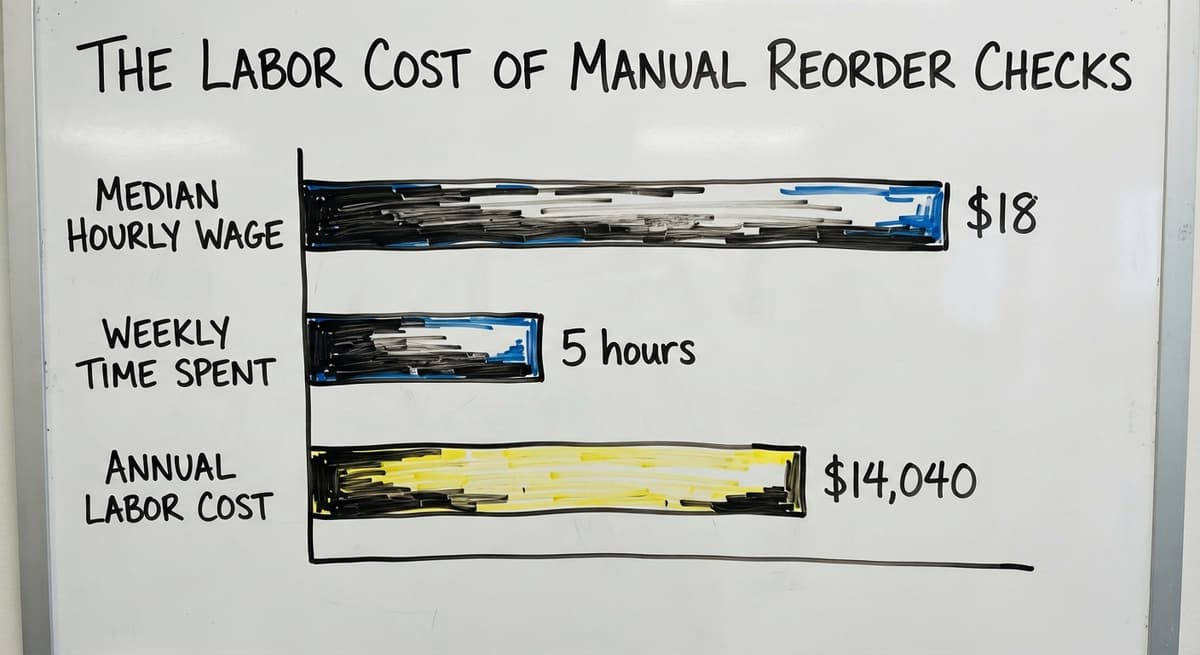
Manual count time drains staff hours that could go to picking and shipping. The Bureau of Labor Statistics reports that stock clerks and order fillers earn a median wage of around $18 per hour (BLS.gov). Three people spending 5 hours a week on manual reorder checks costs about $14,040 a year in labor alone.

Where Kanban Works Best in a Warehouse or Distribution Operation
Kanban fits best where demand is steady and lead times are short. The signal only works if the reserve bin can cover the gap between the reorder and the delivery.
Good fits for a kanban inventory system:
- High-velocity SKUs with consistent daily pull, such as standard packaging materials or core pick items.
- Consumable supplies like tape, labels, and stretch wrap, where usage is predictable and suppliers are local.
- Fulfillment center pick lines where stock accuracy and pick speed are both critical.
Where Kanban Falls Short
Honest limitations:
- Seasonal items with demand spikes need bin sizes adjusted before each season, which adds overhead.
- One-off or highly variable SKUs are poor candidates because the bin size is always wrong.
- Items with long or unreliable lead times need a larger safety buffer, which can offset the lean benefit.
The NIST Manufacturing Extension Partnership recommends matching inventory methods to the actual demand pattern of each SKU rather than applying one system across the board (NIST MEP). Start kanban where demand is predictable, and leave the irregular items on a different method.
Running Kanban With Software vs. Cards and Bins
Physical kanban is the right starting point for most small operations. Set up the bins, print the cards, and run the system for 30 days. The process reveals which SKUs need adjustment before any software investment is made.
Digital kanban adds automating at the signal layer. When stock hits the threshold, the system fires the reorder automatically. No card to flip. No human memory required. The reorder connects directly to purchasing, cutting the lag between signal and order.
For teams already running an accounting package, a custom inventory layer can watch stock levels and trigger the kanban signal without replacing the existing system. The accounting data stays where it is. The signal layer sits on top and handles the replenishment logic.
The right choice depends on SKU count, team size, and how often signals get missed under the current process.
Not sure this is the right shape for your operation
Describe how the work runs today. We map it on a call and show you what it would look like built around that, before you spend anything.
Book a call
Setting Your Kanban Quantities: A Simple Formula
The reorder quantity for a kanban bin follows a straightforward calculation:
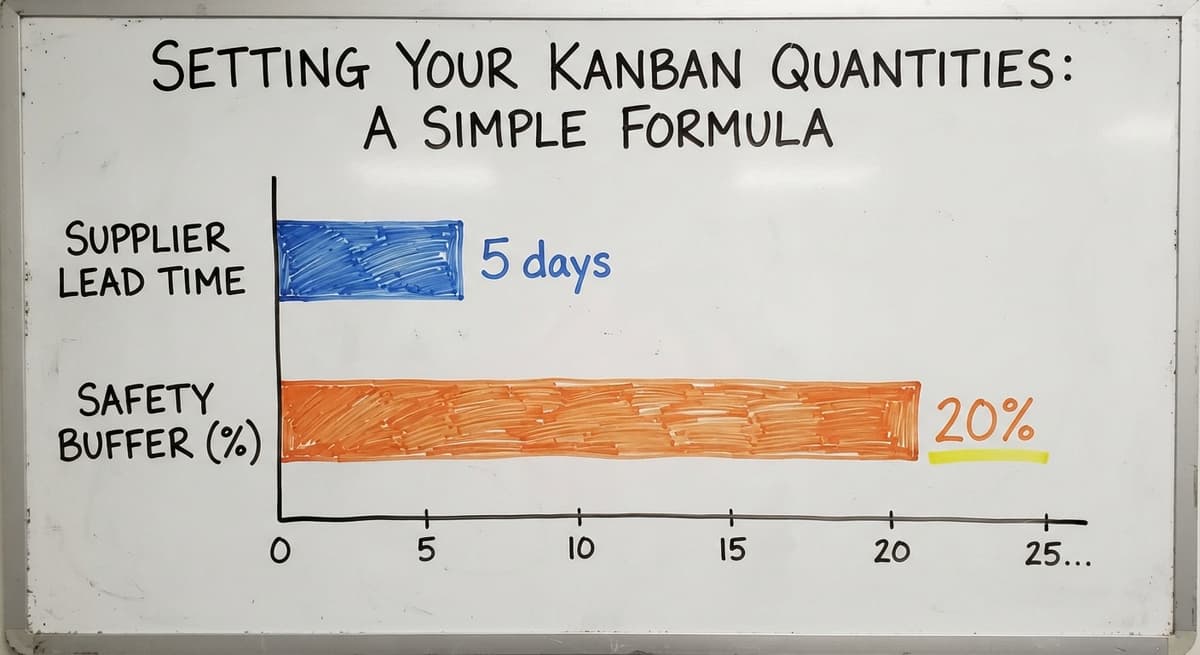
Reserve bin size = average daily usage × supplier lead time in days, plus a safety buffer.
A plain example: your team uses 20 units of a SKU each day. Your supplier takes 5 days to deliver. The minimum reserve bin size is 100 units. Add a 20% safety buffer and the bin holds 120 units. That buffer covers a demand spike or a short delay without a stockout.
A kanban quantity is only as reliable as the usage data behind it.
How Kanban Bin Sizes Affect Your Tax Records
The IRS requires that inventory be valued correctly for tax purposes. IRS Publication 538 states: "To figure taxable income, you must value your inventory at the beginning and end of each tax year" (IRS Publication 538). Accurate bin quantities feed that valuation directly, so sloppy kanban sizing creates a tax record problem as well as an operations problem. Manual systems break down when usage data is estimated rather than tracked. Software calculates and updates bin sizes automatically as demand shifts, keeping the formula current without a quarterly spreadsheet review.
How Do I Get Started With a Kanban System in My Operation?
Start with 5 to 10 of your fastest-moving SKUs rather than the whole catalog. Pick items with consistent daily pull and a reliable supplier lead time. Those are the ones where the signal will work cleanly from day one.
Here is a practical launch sequence:
- Pull 30 days of usage data for each chosen SKU and calculate the reserve bin size using the formula above.
- Set up physical bins or designate shelf zones for each SKU.
- Decide whether the signal will be a physical card, a colored tag, or a software threshold.
- Run the system for 30 days without changing anything.
- Review actual usage against your bin sizes and adjust where the reserve ran out or sat full.
The first 30 days will tell you more about your true usage patterns than any estimate, so start small and let the data set the quantities.
When to Add a Software Layer to Your Kanban System
If the manual tracking step is the bottleneck, that is the signal to add a software layer. A custom inventory system built around your existing operation can automate the reorder signal without a full ERP migration. The accounting package stays in place. The kanban logic runs on top of it, handling the triggers and the purchasing workflow your team currently does by hand.
Frequently asked questions
How does Kanban work in inventory management?
Kanban works by attaching a reorder signal to a physical quantity of stock. When that quantity is consumed, the signal fires and a replenishment order is placed. The team does not check a report or remember a schedule. The empty bin or the card is the instruction.
What are the six-six rules of Kanban?
The six rules come from the original Toyota production system. They cover: never pass defective items forward, take only what is needed, produce only what the downstream signal requests, level the load evenly, fine-tune the process through the signals themselves, and keep the system stable. In a warehouse context, the practical rules are simpler: set accurate bin sizes, act on every signal, and review quantities regularly.
Is Kanban better than Scrum?
These two methods solve different problems. Kanban is an inventory and workflow signal system used in warehouses and supply chains. Scrum is a project management framework used by software development teams. Comparing them directly is like comparing a shelf label to a meeting agenda. For inventory replenishment in a warehouse, kanban is the relevant tool.
What are the three types of Kanban?
The 3 main types used in warehouse and distribution settings are production kanban (signals to make or assemble), withdrawal kanban (signals to move stock from one location to another), and supplier kanban (signals sent directly to a vendor to trigger a delivery). Most small distributors use a simplified version that combines withdrawal and supplier signals into one step.
Can kanban work without specialized software?
Yes. Physical kanban using cards, bins, and colored tags needs no software at all. Many small operations run it successfully with nothing more than labeled shelves and a simple reorder card. Software adds reliability and speed but is not a requirement to start.
How does software improve a kanban inventory system?
Software removes the human steps that cause signals to be missed. It watches inventory levels in real time, fires the reorder the moment the threshold is hit, and can connect directly to a purchasing workflow. For teams already using an accounting package, a custom layer can add this signal logic without replacing the existing system.
Where should a small distributor start when implementing kanban?
Start with your 5 fastest-moving SKUs. Use 30 days of actual sales or pick data to set the bin sizes. Run physical bins for the first month before adding any software. The first cycle will surface the adjustments needed before the system scales.
How is kanban different from a traditional reorder-point system?
A traditional reorder-point system depends on someone checking a number in a spreadsheet on a schedule. Kanban fires automatically when the physical signal appears. The key difference is that kanban does not wait for the next review cycle.
Start with a free first look
A 30 minute call, your operation mapped, and a clear picture of what we would build. No obligation and nothing to install.
Book a callRelated guides
The rest of this guide, for the parts of the job this page does not cover.
Guides
Common questions
- What is Sales and Inventory Management System
- What is the Difference Between Aggregate and Item Inventory Management
- What is Jit Inventory Management
- What is the Definition of Inventory Management
- What is an Important Factor in Inventory Management
- What is Abc Classification in Inventory Management
- What is Inventory Management in Working Capital
- What is Inventory Management and Its Types
- What is the Main Purpose of Inventory Management
- What is Effective Inventory Management
- What is Information Technology Inventory Management
- What is Risk Pooling in Inventory Management
- What is Inventory Management Mary Kay
- What is Stock Taking in Inventory Management
- What is Bin Number in Inventory Management
- What is the Goal of Inventory Management Quizlet
- What is the Implication of Proper Inventory Management
- What is Omni-channel Inventory Management
- What is Inventory Management and Its Importance
- What is the Importance of Eoq in Inventory Management
- What is the Importance of Quality Inventory Management
- What is Inventory Management Explain Techniques of Inventory Management