

Best Inventory Tracking Systems
The best inventory tracking systems are the ones that match how your stock moves. For most wholesalers with 5 to 100 staff, that means barcode scanning tied to QuickBooks. Spreadsheets fit tiny lists. Warehouse software fits large floors. Custom builds fit odd workflows.
Book a callWhat Are the Best Inventory Tracking Systems?
The best inventory tracking systems fit your work, not a feature list. A tool with 200 features fails if your crew uses 10. Each type gets a fair look. No single type wins for every wholesaler or warehouse. A 6-person shop with one row of shelves needs less than a 90-person site with 4 buildings. We judge each type by one question: does it fit how you already work, or does it force a move?
We build it for your operation, and the first look is free
If you would rather not compare products, describe how your operation already works and we build the system around it.
Reviewed November 2026.
No build cost. You see it running on your own process first, and the monthly subscription starts only once it is live.
Book a callWhat an Inventory Tracking System Does
An inventory tracking system records what you have, where it sits, and when it moves. It replaces hand counts and guesses. It links receiving, storage, picking, and shipping into one record. Scan-based counts rest on shared codes, and GS1 calls its barcode standards part of "the global language of business" on its barcode standards page. Tax law adds a second reason to count well: IRS Publication 538 says, "To figure taxable income, you must value your inventory at the beginning and end of each tax year."
How Do You Know Your Current Tracking Method Is Failing?
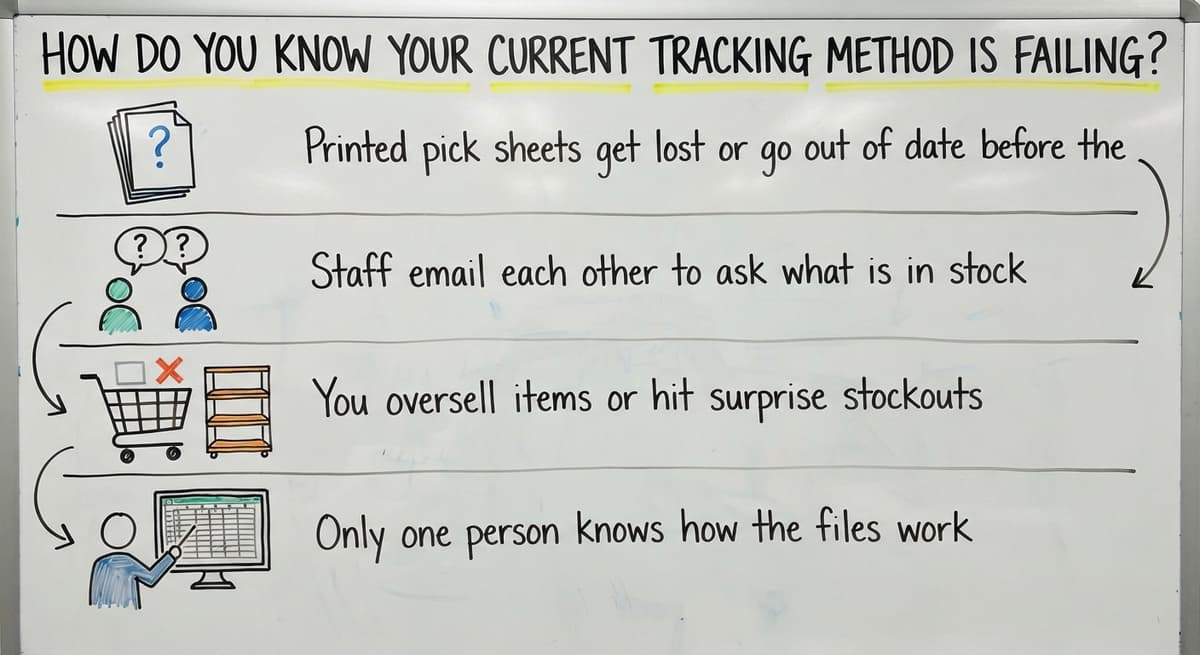
Your method is failing when the count in Excel does not match the shelf. Other signs show up on the floor and in the inbox:
- Printed pick sheets get lost or go out of date before the order ships.
- Staff email each other to ask what is in stock.
- You oversell items or hit surprise stockouts.
- Only one person knows how the files work.
Overselling also breaks a promise. The FTC's mail, internet, or telephone order rule expects you to ship when you said you would. Two or more of these signs mean the method has outgrown the business.
The Main Types of Inventory Tracking Systems
Five types of inventory tracking software cover the field. The table below compares them on cost, setup, fit, and limits. Costs are broad bands, not quotes. Read across a row to see where each type shines and where it stops.
| Type | Cost range | Setup effort | Best fit | Main limit |
|---|---|---|---|---|
| Spreadsheet or Access file | Lowest | Very light | 1 to 3 users, short item list | Errors and file versions |
| QuickBooks inventory | Low | Light | Basic counts tied to the books | No bin or lot detail |
| Barcode system | Low to mid | Moderate | Teams that move stock daily | Needs clean item data |
| Warehouse management system | Mid to high | Heavy | Large, complex sites | Long setup and training |
| Custom-built system | Mid to high, up front | Moderate | Odd workflows | Needs a clear scope |
The cheapest type is rarely the cheapest to run.
Not sure this is the right shape for your operation
Describe how the work runs today. We map it on a call and show you what it would look like built around that, before you spend anything.
Book a callSpreadsheets, Access, and QuickBooks
A spreadsheet is no longer enough when 2 or more people edit it at once. It also fails when orders ship the same day goods arrive. Spreadsheets and Access files cost little and everyone knows them. They suit a very short stock list. Copy and paste errors and rival file versions creep in as the team grows.
Can QuickBooks track inventory well enough? QuickBooks inventory tracking works for basic quantity and cost, and it ties stock to the books. It falls short on bin locations, lot tracking, and warehouse steps. Many teams keep QuickBooks for accounting and add a tool beside it.
Barcode Scanning and Warehouse Management Systems
A warehouse management system (WMS) goes further. Inventory tracking records counts. A WMS directs the work with bin locations, pick paths, and putaway rules. It also runs wave picking, which groups many orders into one batch. A WMS is strong for large sites but heavy for a team of 5 to 100. Watch for long setup and training time.
Do you need barcode scanning? Yes, once typing mistakes cost you money. With barcode inventory tracking, staff scan to receive, move, pick, and ship. Counts go faster and typos drop. You first need clean item and location data. You also buy scanners, labels, and mobile devices.
Features to Look for in an Inventory Tracking System
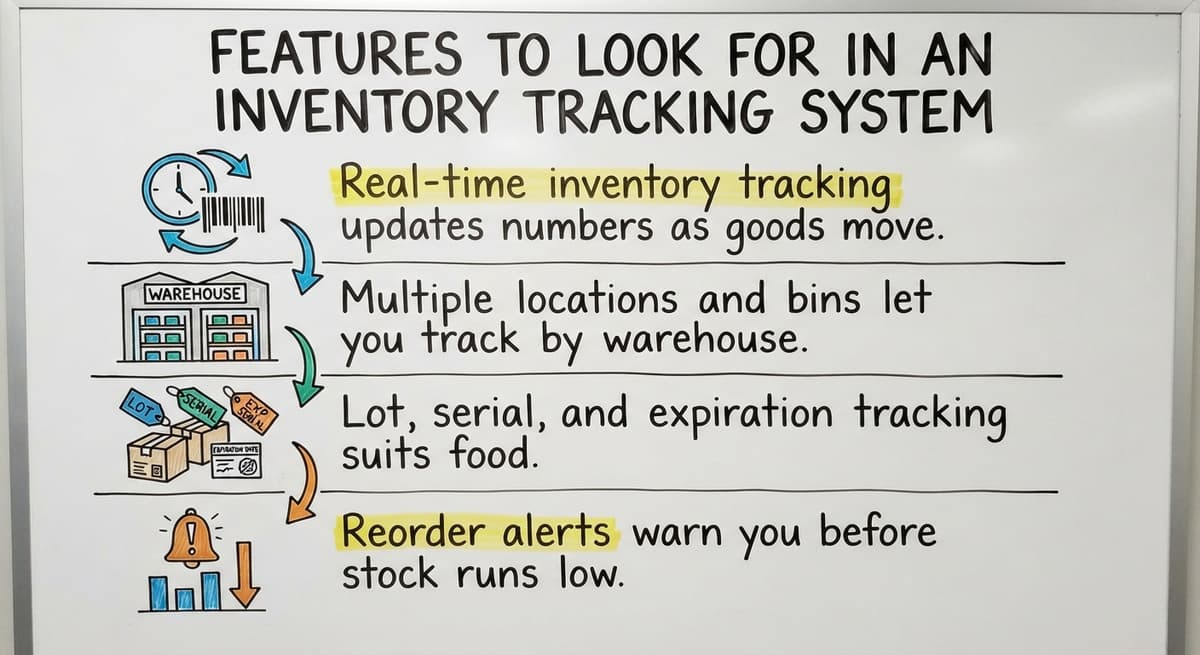
A short checklist beats a long demo. Match each feature to a problem your crew hits every day:

- Real-time inventory tracking updates numbers as goods move, so you stop overselling and stop surprise stockouts.
- Multiple locations and bins let you track by warehouse, shelf, and bin. Pickers find items faster and fewer items go missing.
- Lot, serial, and expiration tracking suits food, parts, and regulated goods. It speeds recalls and keeps first-in, first-out order.
- Reorder alerts warn you before stock runs low. Reports show slow movers, turns, and shrinkage, which is stock lost to theft or error.
If a feature solves no problem you have, skip it.
Does the System Connect to QuickBooks?
The best systems sync items, orders, and costs with QuickBooks, so nobody types the same data twice. Ask how the sync handles errors. Does it flag a failed order, retry it, or drop it without a word? A quiet failure leaves your books and your shelves out of step. Test the sync with 20 real orders before you sign.
How to Choose the Right System for Your Operation
Choosing takes 5 steps, and the warehouse floor should help with each one:
- Map how stock really moves, from dock to door.
- List your top 3 pain points.
- Set a budget that includes setup and training.
- Pick a type from the table above.
- Test with real data, not demo data.
Ask the pickers and receivers what slows them down. They know the gaps that managers miss. Then start with the smallest change that fixes the biggest problem. A team with lost pick sheets may need only scanning, not a full warehouse management system.

Questions to Ask Before You Buy or Build
Ask every vendor or builder the same 5 questions:
- Can it fit our current process, or do we change to fit it?
- What happens to our existing data?
- How long until staff use it daily?
- Who supports it after launch?
- What does it cost over 3 years?
Four mistakes cause most failed picks. Buyers pay for features they never use. They skip data cleanup. They ignore staff training. They also move everything at once instead of in phases. Clean data and trained staff matter more than any feature.
The comparison is easier when one option is built for you
Off-the-shelf means fitting your process to the software. We do it the other way round, and the first look costs nothing.
Book a callHow Much Do Inventory Tracking Systems Cost?
Five things drive cost: users, locations, hardware, setup, and custom work. A spreadsheet costs the least. QuickBooks sits in the low band. Barcode systems add scanner and label costs. Warehouse systems and custom builds sit highest, though a custom build is a one-time project and a warehouse system bills on a schedule.
Count hidden costs too. Take 3 people who spend 6 hours a week on manual entry at an assumed $22 an hour. That is $20,592 a year. The Bureau of Labor Statistics publishes real pay data for inventory clerks, so use your own wage. Stock also ties up cash, and the Census Bureau's Monthly Wholesale Trade report tracks the inventories-to-sales ratio for wholesale firms.

How to Roll Out a New System Without Disruption
A one-zone pilot takes weeks. A full warehouse management rollout takes months. You avoid a long, costly rollout by going small first:
- Pilot with one product group or one shelf zone.
- Run the old and new methods side by side for a short time.
- Do a full count before you go live.
- Phase in the rest, zone by zone.
The NIST Manufacturing Extension Partnership offers vendor-neutral guidance on supply chain and inventory process. A phased start keeps orders moving while staff learn.
When Does a Custom Inventory System Make More Sense Than Off-the-Shelf?
A custom system makes more sense when off-the-shelf tools force daily workarounds. Custom inventory software is built around how your operation already works. It works at small scale, not only at large firms. Signs that point to a custom build:
- You run kitting, special pricing, or mixed units of measure.
- Staff already use workarounds every day.
- You want to keep QuickBooks and replace only the manual parts.
There is a tradeoff. A custom build needs a clear scope and a builder who listens. If a standard tool fits, buy it. A local Columbus, Ohio team, such as The Software Society with its Custom Workflow Rollout service, can meet on site and see your floor before it proposes anything.
Next Steps
Match the system to your process and your size. Start small, use clean data, and train the crew. If you want to talk through how stock moves in your operation, The Software Society offers a short conversation. Bring your pain points. We will help you see whether a custom fix or an off-the-shelf tool fits better.
Frequently asked questions
What is the difference between inventory tracking and a warehouse management system?
Inventory tracking records what you have, where it is, and when it moves. A warehouse management system also directs the work, with bin locations, pick paths, putaway rules, and wave picking. Small teams often need only tracking. Large, complex sites need the full system.
Can QuickBooks track inventory well enough?
QuickBooks inventory tracking handles basic quantity and cost and ties stock to your books. It falls short on bin locations, lot tracking, and warehouse workflows. Many teams keep it for accounting and add a tool beside it for the floor.
Do I need barcode scanning?
You need barcode scanning when typing mistakes cost you money or counts take too long. Staff scan to receive, move, pick, and ship. You first need clean item and location data, plus scanners, labels, and mobile devices.
How much does an inventory tracking system cost?
Cost depends on users, locations, hardware, setup, and custom work. Spreadsheets cost the least and warehouse systems cost the most. Add training and staff time to the price. Compare 3-year totals, not the first month.
How long does it take to set up a new inventory tracking system?
A one-zone pilot takes weeks. A full warehouse management rollout takes months. Clean data, trained staff, and a phased start shorten the time. Run the old and new methods side by side briefly, and do a full count before you go live.
Can I keep QuickBooks and still add better inventory tracking?
Yes. Many teams keep QuickBooks for accounting and add a barcode or custom tool for stock. The tool syncs items, orders, and costs, so nobody types data twice. Ask how the sync handles errors before you buy.
When should I build a custom system instead of buying one?
Build when you run kitting, special pricing, or mixed units of measure, or when staff use workarounds daily. Buy when a standard tool fits. A custom build needs a clear scope and a builder who listens to how your floor works.
Start with a free first look
A 30 minute call, your operation mapped, and a clear picture of what we would build. No obligation and nothing to install.
Book a callRelated guides
More on the same work.
- How to Keep Track of Inventory
- How to Create an Inventory Tracking System?
- How to Keep Track of Inventory on Clover
- How to Keep Track of Computer Inventory
- How to Keep Track of Consignment Inventory
- How to Keep Track of Alcohol Inventory
- How to Keep Track of Product Inventory
- How to Keep Track of Ebay Inventory
- How to Keep Track of Poshmark Inventory
- How to Track Inventory for Home Staging
- How to Keep Track of Dental Inventory
- How to Keep Track of Boutique Inventory
- How to Keep Track of Vaccine Inventory
- How to Keep Track of Liquor Inventory
- How to Track Inventory Qbo
- How to Track Non Inventory Items
- How to Keep Track of Grocery Inventory
- How to Track Inventory in Salesforce
- How to Keep Track of Lularoe Inventory
- How to Keep Track of Freezer Inventory
- How to Track Ps5 Inventory
- How to Keep Track of Cigarette Inventory
- How to Keep Track of Inventory on Etsy
- How to Keep Track of Inventory Electronically