


How To Design A Warehouse Management System
Designing a warehouse management system is a 10-step sequence that starts on the floor, not on a screen. Running a warehouse on spreadsheets and sticky notes works until it stops working: orders get mixed up, stock counts drift, and staff spend time hunting for product instead of moving it. This guide, reviewed in September 2026, takes the design from workflow map to rollout plan for a warehouse of 5 to 100 people.
Published 14 August 2026. Reviewed and updated 15 September 2026.
Reviewed August 2026. Each figure comes from the assumptions stated beside it, so you can substitute your own and the arithmetic still holds.
Book a callWhat Does a Warehouse Management System Actually Do?
A warehouse management system, or WMS, is software that tracks inventory, orders, locations, and movement inside a warehouse. That is the whole job. It knows where product is, where it came from, where it is going, and who touched it.
A WMS is not an ERP. An ERP manages the whole business: accounting, HR, purchasing, and more. A WMS focuses on what happens between your receiving dock and your shipping door. The two can work together, but they are not the same thing.
For a 10-to-50-person operation, a WMS does not have to be a massive platform. It can be a focused set of tools that covers your specific pain points. The design decisions ahead will help you figure out exactly what yours needs to do.
Would you rather have it built around your operation?
The first look is free. If you would rather not compare products, describe how your operation already works and we build the system around it.
No build cost. You see it running on your own process first, and the monthly subscription starts only once it is live.
Book a callMap Your Current Workflow Before You Design Anything
Design is observation first, software selection second. Before you look at a single vendor or write a single requirement, walk your floor.
Follow a product from the moment it arrives to the moment it ships. Write down every step. Note every place where paper, a spreadsheet, or email fills in for a missing system. Those gaps are your real requirements.
Then identify the three or four steps that cause the most errors or delays. Ask your team. They know exactly where things go wrong.
OSHA notes that warehousing involves "a wide variety of hazards" that proper process design can reduce, and their guidance at osha.gov/warehousing is worth reviewing as you document your floor operations.
The map you build becomes the blueprint your system must match. Any WMS that does not fit that map will be fought by your team from day one.
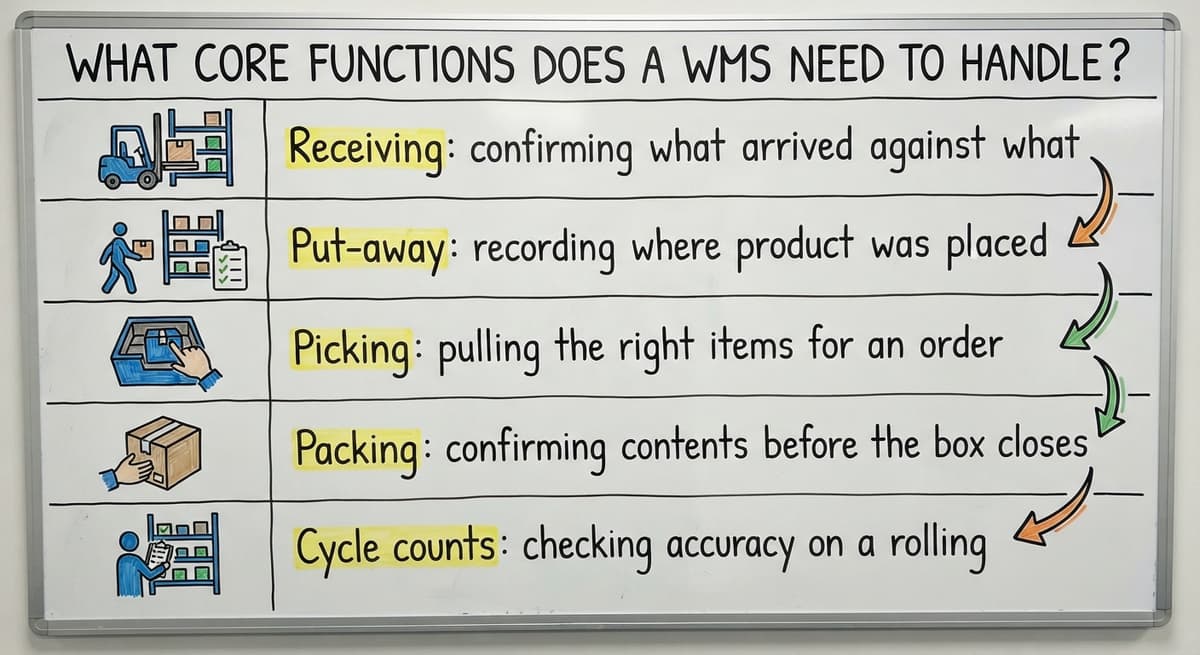
What Core Functions Does a WMS Need to Handle?
A WMS must handle the functions that are currently broken or manual in your operation. The standard list includes receiving, put-away, picking, packing, shipping, and cycle counts. Your job is to decide which of those actually matter right now.
Do not prioritize by what a vendor brochure lists. Prioritize by pain. If receiving is where errors start, that is your first function to design. If picking is slow and inaccurate, that comes next.
A small warehouse may only need four or five functions to start. Each function should tie back to a real daily task your team performs:
- Receiving: confirming what arrived against what was ordered
- Put-away: recording where product was placed
- Picking: pulling the right items for an order
- Packing: confirming contents before the box closes
- Cycle counts: checking accuracy on a rolling schedule
Start there. Add functions as the team gets comfortable.

Decide How the System Will Connect to Your Accounting Software
Most small distributors and warehouses already run their financials in a standard accounting package. A well-designed WMS does not replace it. It feeds the accounting software accurate data so your books reflect what is actually in the building.
Decide early which data flows from the WMS into the accounting software:
- Receipts posted when product arrives
- Inventory adjustments approved by a supervisor
- Fulfilled orders that trigger invoicing
Avoiding double entry is a design goal from day one, not an afterthought. If your team has to update both the WMS and the accounting system manually, one of them will always be wrong.
A custom-built system can be designed around your existing accounting setup, preserving the workflows your bookkeeper already knows. Accounting integration is one of the most common starting points for teams replacing spreadsheet and paper processes in a warehouse.
Choose a Location and Bin Structure
Every WMS is built on a way to address physical space. Zones, aisles, shelves, and bins give every product a home the system can find.
Keep naming simple enough that a new hire can learn it in one shift. A structure like A-01-03-B (zone, aisle, shelf, bin) is readable and logical. Avoid codes that only make sense to the person who invented them.
Match the location structure to how product actually moves. Fast-moving items belong close to the shipping dock. Slow movers can sit deeper in the building. If your location addresses fight your picking path, staff will ignore them.
The system is only as accurate as the location data behind it. Build the address structure before you enter a single SKU.
Is the comparison easier when one option is built for you?
Yes. Off-the-shelf means fitting your process to the software, and custom is the other way round. The first look costs nothing.
Book a callWhat Is the Best Way to Track Inventory in a Small Warehouse?
The best tracking method is the one your team will actually use every day. For most small warehouses, that means barcode scanning. It is fast, affordable, and accurate enough for the volume you are running.
Manual entry works for very low-volume operations but introduces errors at scale. RFID is worth considering if you move high-value items or need hands-free tracking, but the cost is harder to justify under a certain volume.
Design for cycle counts rather than annual physical counts. Counting a section of the warehouse each week keeps accuracy high without shutting down operations. Set an accuracy target from day one and measure against it.
Define who can approve inventory adjustments. Limit that access. Every adjustment should have a record of who made it and why.

Design the Receiving Process
Receiving is where most inventory errors are introduced. A product received with the wrong quantity or wrong SKU creates problems that travel through every step downstream.
Your system should prompt staff to confirm three things on every receipt:
- Quantity received
- SKU or item number
- Condition of the goods
Where possible, match incoming shipments against purchase orders automatically. Flag any discrepancy before product is put away. Catching a receiving error at the dock costs almost nothing. Catching it after the product is shelved, picked, and shipped to a customer costs much more.
A clean receiving process protects picking, packing, and shipping. It is worth spending extra design time here.
Design the Picking and Packing Process
A good pick list is one that routes staff through the warehouse in a logical path. A system that sends a picker back and forth across the building wastes time and creates errors.
For high-volume operations, consider batch picking: pulling items for multiple orders in one pass, then sorting at a packing station. For lower volumes, single-order picking is simpler and easier to verify.
At packing, the system should confirm the right item and quantity before the box closes. Packing confirmation creates the record that triggers shipping and billing. Errors caught here cost far less than errors caught by the customer.
This is also where custom operational software for wholesale and distribution tends to deliver the clearest return: a packing step designed around your specific SKU mix and order patterns.
What does it look like running on your own process?
The first thing you see is it running on your own process, at no build cost. The subscription starts once it is live and doing the job, not before.
Book a callWho Should Have Access to What in the System?
Not every staff member needs access to every function. Define roles before you build anything, because access controls are much harder to retrofit.
A simple role structure for a small warehouse:
| Role | Core Access |
|---|---|
| Receiver | Receiving, put-away |
| Picker | Pick lists, location lookup |
| Packer | Packing confirmation |
| Supervisor | Adjustments, cycle counts, reports |
| Manager | Full access including user management |
Limiting who can edit inventory records protects data integrity and creates an audit trail when something goes wrong. Keep role setup simple enough to manage without an IT department. If you need a developer to add a new employee, the system is too complicated.

Build In Reporting From the Start
Reporting design is deciding what you and your operations manager need to see every day before you build a single screen. Reports designed after the fact almost always miss a data point that matters.
Useful daily reports for warehouse inventory management:
- Inventory on hand by location
- Orders in progress and their status
- Receiving backlog
- Error rate by process step
Reports should answer real operational questions. A dashboard that shows inventory value but not where errors are occurring is not useful for running a warehouse. Design each report around a decision someone actually makes.
A visible dashboard reduces the need for status meetings. When the numbers are current and accurate, the conversation shifts from "what is going on" to "what do we do about it."
Plan the Rollout So the Team Actually Uses It
A system no one uses solves nothing. Adoption is a design problem, not a training problem.
Start with one process. Get it working. Then add the next. Running the old process and the new system in parallel for a short period reduces risk and gives staff time to build confidence.
Train each person on their specific role, not on the whole system. A picker does not need to know how receiving works. Focused training is faster and sticks better.
Collect feedback in the first two weeks and fix friction points fast. Early wins build the trust that carries the team through harder changes later. If staff see that their input changes the system, they invest in making it work.
How to automate order fulfillment for small distributors is a natural next step once the core system is stable and adopted.
Custom Built vs. Off-the-Shelf: Which Fits a Small Operation?
Off-the-shelf WMS platforms target average warehouses. Yours is not average. It has specific products, specific customers, and specific workflows that a packaged system will not match without customization.
Customization of a packaged system costs more than building from scratch, and you still end up with someone else's architecture underneath. A custom system scopes down to only what your operation actually needs.
Smaller teams benefit from software that uses their language and matches their process. When the system reflects how your team already works, adoption is faster and training is simpler.
A local builder can adjust the system as your operation grows or changes, without waiting on a vendor's release schedule.
Warehouse inventory management software built around your existing workflow, rather than a generic template, is the approach that tends to hold up as volume increases.
Designing a WMS is a series of practical decisions, not a technology project. Start with your workflow. Define the functions that matter. Keep the accounting software where it works. Build location structure before you enter data. Plan the rollout before you launch.
If you are ready to move off spreadsheets and build something that fits how your warehouse actually runs, The Software Society builds custom operational software aligned to real operations. Reach out to start with a straightforward review of what you need.
Frequently asked questions
What the manual process costs, in numbers
Walking is the hidden cost. A picker covering 40 feet to a fast mover 60 times a shift walks 2,400 feet a day, and across 250 days that is 600,000 feet a year per picker.
The sources behind this guide
The public record on this is worth reading directly: GS1 covers why a barcode printed by one company scans at another.
Frequently asked questions
What are the four types of WMS?
The four common types are standalone WMS (software focused only on warehouse operations), ERP-integrated WMS (a warehouse module built into a broader business system), cloud-based WMS (hosted software accessed via browser with subscription pricing), and custom-built WMS (software designed specifically for one operation).
No single type is best for every warehouse. Standalone and cloud-based systems suit smaller operations that need fast deployment. Custom-built systems suit operations with workflows that packaged software cannot match.
What are the five S's of warehouse management?
The five S's come from the Japanese lean manufacturing framework: Sort (remove items that do not belong in a work area), Set in order (organize what remains so it is easy to find and use), Shine (keep the space clean and inspect as you clean), Standardize (create consistent procedures so the first three steps hold), and Sustain (build habits and accountability so the system does not slide back).
Applied to warehouse design, the five S's support accurate bin locations, clean receiving areas, and consistent picking paths.
What does the 80/20 rule mean in inventory management?
In inventory management, the 80/20 rule means roughly 80 percent of your order volume comes from 20 percent of your SKUs. That 20 percent of items should have the most accessible bin locations, the tightest cycle count schedules, and the clearest receiving procedures.
Applying this principle when designing a WMS helps you prioritize where to spend accuracy effort and where to place fast-moving product in the building.
What are the 5 KPIs for a warehouse?
Five KPIs that most warehouse operations track are: inventory accuracy (percentage of records that match physical counts), order fulfillment rate (percentage of orders shipped complete and on time), receiving accuracy (percentage of receipts processed without errors), pick accuracy (percentage of picks pulled correctly on the first attempt), and dock-to-stock time (how long it takes from a truck arriving to product being available in the system).
Set targets for each from the first week the system is live and review them weekly.
Do I need to replace my accounting software to use a WMS?
No. A well-designed WMS works alongside your accounting software, not instead of it. The WMS tracks what happens on the warehouse floor and sends accurate data to the accounting software for invoicing, purchasing, and financials.
The goal is to eliminate double entry, not to move your accounting into a new platform. A custom-built system can be designed specifically around your existing accounting setup.
Where do I start when designing a WMS for my warehouse?
Start by mapping your current workflow on paper before selecting any software. Walk the floor and write down every step from receiving to shipping.
Note where spreadsheets or email fills in for a missing system. Identify the three or four steps that cause the most errors. That map becomes the requirement list your system must satisfy.
How should I structure bin and location addresses in a WMS?
Use a simple, consistent naming convention that staff can learn in one shift. A format like zone, aisle, shelf, and bin works well for most small warehouses.
Place fast-moving items closest to the shipping dock. The structure should reflect how product actually moves through the building, not how the software vendor organized their demo warehouse.
Should I buy an off-the-shelf WMS or have one built for my operation?
For most small warehouses with specific workflows, a custom-built WMS is worth considering. Off-the-shelf platforms target average operations and often require costly customization to fit non-standard processes.
A custom system scopes down to only the functions you need, built around your existing accounting setup, and adjusted as your operation changes. The right choice depends on how closely a packaged system matches your actual workflow before any customization.
What modules should a warehouse management system include?
Receiving with purchase order matching, put-away and location management, inventory with real-time quantities by bin, order picking with routed pick lists, packing and shipping with carrier confirmation, cycle counting, returns, and reporting.
When you design a warehouse management system for a small operation, build the modules the current process actually uses first and leave room for the rest; a system that covers every module badly loses to one that covers five well.
How should inventory be modeled in a WMS database?
Separate the item from the stock. An item record holds the SKU, description, units and barcode once. A stock record holds quantity by item, by location, and where it matters by lot or serial, so the same SKU can sit in several bins.
Every change to a stock record comes from a movement record: receipt, put-away, pick, transfer, adjustment or count, with a user and a timestamp. If you can rebuild any quantity by replaying its movements, the model is right.
Which picking strategy is best for a warehouse?
The answer depends on order shape. Discrete picking, one order at a time, suits low volume and large orders. Batch picking, several small orders on one walk, suits e-commerce volumes of single-line orders.
Zone picking, each picker owning an area, suits large buildings with many lines per order. Most small warehouses start discrete, add batch picking once daily orders climb past a few dozen, and only zone when the building demands it.
How much does it cost to build a warehouse management system?
The answer scales with scope. A custom system covering the five core functions for a small warehouse is a one-time build that is comparable to a year of subscription fees for a large platform, with a smaller ongoing fee for hosting and support.
The variables are how many integrations it needs, whether it runs on the scanners the team already has, and how clean the data is at the start. Compare against total cost over three years, not against a monthly figure.
What is in a free first look?
A 30 minute call, your operation mapped, and a clear picture of what we would build. No obligation and nothing to install.
Book a callRelated guides
The rest of this guide, for the parts of the job this page does not cover.
Guides
- Warehouse Inventory Management Systems
- Warehouse Management System Top 10
- Software for Warehouse Management System
- Small Business Warehouse Management System
- Warehouse Management System Types
- Warehouse Inventory Management System
- Warehouse Management System Examples
- Warehouse Management System Implementation
- Cloud Warehouse Management System
Common questions
- How to Choose a Warehouse Management System
- How to Create a Warehouse Management System
- How to Build a Warehouse Management System
- How to Set up a Warehouse Management System
- How Warehouse Management System Works
- How to Manage Inventory in a Warehouse
- What Are the Benefits of Warehouse Management System
- What is the Point of Warehouse Management System
- What is Asn in Warehouse Management System
- What is a Warehouse Management System
- Which Warehouse Management System Would a Jeweler Most Likely Use
- What is a Warehouse Management System Used For
- Warehouse Management System vs Warehouse Control System
- Meaning of Warehouse Management System
- Definition of Warehouse Management System