


How To Set Up A Warehouse Management System
Setting up a warehouse management system is a 9-step job, and the order matters more than the software. Running a warehouse on spreadsheets and paper pick lists works until it stops working: orders go out wrong, counts drift, and your best people spend hours fixing data instead of moving product. This guide, reviewed in September 2026, walks the setup from the floor map to go-live.
Published 19 August 2026. Reviewed and updated 15 September 2026.
Book a callWhat Does a Warehouse Management System Actually Do?
A warehouse management system (WMS) is software that tracks where every item is, where it moves, and what happens to it from the moment it arrives to the moment it ships. It handles receiving, putaway, pick and pack, shipping, and cycle counts in real time.
The public record on this is worth reading directly: GS1 covers why a barcode printed by one company scans at another.
The public record on this is worth reading directly: Auburn University RFID Lab covers independent research on RFID in retail and supply chain.
The public record on this is worth reading directly: Warehousing Education and Research Council covers the standard benchmark set for distribution centre performance.
The public record on this is worth reading directly: IRS Publication 538 covers why inventory has to be counted and valued at all, as a legal obligation rather than a preference.
The arithmetic is worth doing before the software conversation. 3 people spending 6 hours a week between them chasing the same questions, at 22 dollars an hour, is 936 hours a year of paid time spent confirming what a system would already know. Over 3 years that is 2,808 hours.
Reviewed August 2026. Each figure comes from the assumptions stated beside it, so you can substitute your own and the arithmetic still holds.
Walking is the hidden cost. A picker covering 40 feet to a fast mover 60 times a shift walks 2,400 feet a day, and across 250 days that is 600,000 feet a year per picker.
Moving 20 fast movers nearer the pack bench removes most of it.
Most small warehouses still run on spreadsheets, paper logs, and email chains. Those tools are not bad; they just do not scale. When one person holds all the knowledge in their head, and that person calls in sick, the whole operation slows down.
A WMS does not have to replace your accounting software. It does not require a full ERP migration. Think of it as a layer that manages physical inventory movement; the accounting software keeps doing what it does well, the financials.
Would you rather have it built around your operation?
The first look is free. If you would rather not compare products, describe how your operation already works and we build the system around it.
No build cost. You see it running on your own process first, and the monthly subscription starts only once it is live.
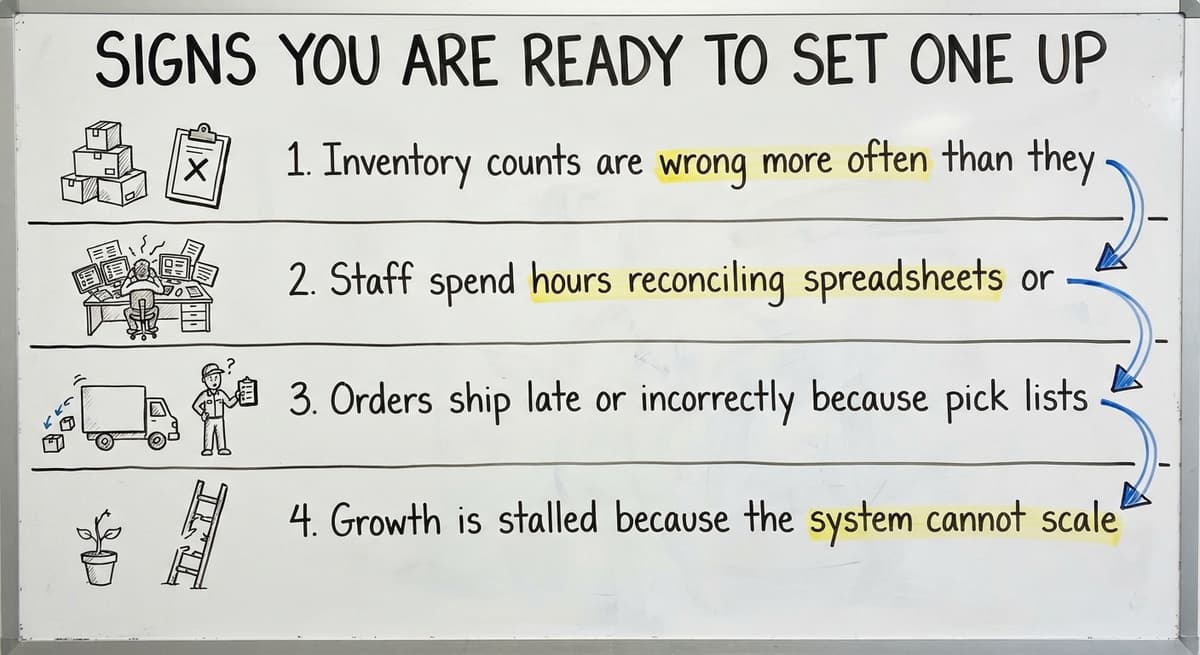
Book a callSigns You Are Ready to Set One Up
You do not need a perfect operation to start. You need a clear signal that the current approach is costing you real money or real growth.
Watch for these:
- Inventory counts are wrong more often than they are right
- Staff spend hours reconciling spreadsheets or re-entering data already in the accounting system
- Orders ship late or incorrectly because pick lists live on paper
- Growth is stalled because the system cannot scale past your current headcount
Workplace safety is also a factor. OSHA states directly that "employers must keep all places of employment clean and orderly and in sanitary condition," and its warehousing guidelines at https://www.osha.gov/warehousing make clear that disorganized inventory and unclear location systems contribute to preventable incidents on the floor.
If two or more of those signals are present, you are ready.
How Do You Map Your Current Warehouse Workflow Before Building Anything?
Walk the floor and write down every step from the moment a truck backs into your dock to the moment a box leaves for the carrier. That floor walk is the foundation of a good WMS setup.
Note every place where data gets written on paper, sent by email, or typed into a second system. Each of those handoffs is a potential error.
Then identify the three or four bottlenecks that eat the most time or cause the most mistakes. Common ones:
- Receiving staff write counts on paper and someone else enters them later
- Pickers cannot find items because bin locations are not labeled consistently
- Shipping holds up because no one knows if an order is fully picked
This map becomes your blueprint. Build the system around what you find, not around a vendor's default workflow.

Decide What the System Needs to Handle on Day One
Scope is where most WMS projects get into trouble. Teams try to solve every problem at once and end up solving none of them well.
Start with the must-haves only:
- Receiving and putaway
- Pick and pack
- Ship confirmation
- Basic cycle counts
Separate those from the nice-to-haves: demand forecasting, vendor portals, advanced reporting. Those can come later.
Confirm early if accounting integration is a day-one requirement. For most small operations, it is. Replacing spreadsheets in warehouse operations without connecting to your financial system just creates a new silo.
A smaller scope on day one means a faster go-live and less disruption to daily operations.
Should I Buy Off-the-Shelf WMS Software or Get a Custom Build?
Off-the-shelf platforms target the average warehouse, which means they fit some operations well and others poorly. When the software does not match your workflow, staff work around it, and workarounds quietly become the real system.
Custom warehouse software for small operations is built around how you already work. Staff do not have to unlearn habits or adapt to a foreign screen layout.
Here is a practical comparison:
| Factor | Off-the-Shelf | Custom Build |
|---|---|---|
| Upfront cost | Lower license fee | Higher build cost |
| Time to adopt | Longer (new workflows) | Shorter (familiar logic) |
| Fit to your process | Partial | High |
| Workarounds needed | Common | Rare |
| Long-term flexibility | Limited | Built in |
For teams between 5 and 100 people, the total cost of a poor fit, including training time, workarounds, and staff frustration, exceeds the cost of building something right.
Is the comparison easier when one option is built for you?
Yes. Off-the-shelf means fitting your process to the software, and custom is the other way round. The first look costs nothing.
Book a callSet Up Your Location and SKU Structure First
Before you load a single item into the system, assign a unique label to every bin, shelf, row, and zone in the building. This is not optional. It is the foundation everything else builds on.
Good bin location labels are short, logical, and readable by anyone without training. A label like A-01-03 (aisle A, rack 01, shelf 03) works. A label like "Bob's corner" does not.
Do the same for SKUs. Every item needs one consistent identifier across all systems. Duplicate SKUs, alternate part numbers, and informal nicknames cause inventory tracking errors that compound fast.
Errors in this structure cause problems everywhere else in the system. Get it right before go-live.

Connect the System to Your Accounting Software Without Replacing It
Your accounting software handles financials well. Your WMS should handle physical inventory movement. Those are two different jobs, and both systems do their job better when they are not trying to do the other one.
The key is defining the system that owns each data type:
- Items and pricing: the accounting software
- Bin locations and quantities: WMS
- Purchase orders: the accounting software creates them, WMS receives against them
- Invoices: the accounting software generates them after the WMS confirms shipment
A clean accounting integration pushes inventory adjustments automatically so staff stop entering the same number twice. Avoid any setup that requires manual exports or CSV imports between the two systems. That is just a slower version of the spreadsheet problem you are trying to solve.
Load Your Starting Inventory Data Accurately
Run a full physical count before go-live, not after. This is the step teams most often skip, and it is the one that causes the most early failures.
Before you load anything:
- Remove discontinued SKUs from the item list
- Fix duplicate entries and merge them into one record
- Correct any unit-of-measure errors (each vs. case vs. pallet)
- Assign every item to its correct bin location
A dirty starting count will undermine trust in the system within the first week. Staff will stop believing the numbers, and they will go back to counting by hand. That defeats the purpose.
Inventory tracking for wholesale distributors depends on a clean baseline. Take the time to build one.
What does it look like running on your own process?
The first thing you see is it running on your own process, at no build cost. The subscription starts once it is live and doing the job, not before.
Book a callHow Do You Train Your Team on a New Warehouse System Without Disrupting Operations?
Show staff why the new process is easier before you show them how to use the software. People adopt new tools faster when they understand the problem being solved, not just the steps to follow.
Train on real scenarios from your own warehouse. Use your actual SKUs, your actual bin locations, your actual order types. Generic demo data creates confusion when staff try to apply what they learned to real work.
A few practices that help:
- Identify one or two floor leads who become the go-to people for questions
- Run a short parallel period where both old and new methods run together to catch gaps
- Create a simple way for staff to flag problems without fear of blame
Most early issues are process gaps, not software bugs. Stay curious rather than reactive when something goes wrong.

Go Live in Phases, Not All at Once
Start with receiving and putaway. Once those are stable and staff are confident, add picking and shipping. Phased rollout limits the blast radius if something needs adjustment.
Set a clear date for when the old paper or spreadsheet process officially stops. Without a hard cutoff, teams run both systems indefinitely and the old one never really goes away.
Celebrate small wins. When the first week of receiving runs clean, say so. Confidence in the new system builds through small, visible successes.
Monitor the System and Fix Problems Early
The first month after go-live is the most important. Run cycle counts weekly to catch discrepancies before they compound.
Track a few simple metrics:
- Pick accuracy rate
- Receiving time per order
- Inventory variance between WMS and the books
Those three numbers will tell you quickly whether the system is working or whether something needs adjustment. You do not need a dashboard full of charts. You need a few honest numbers reviewed consistently.
When Should You Ask for Outside Help?
If your internal team does not have time to map the workflow, build the system, and train staff simultaneously, the project will stall. That is not a failure of will; it is a capacity problem.
A partner who understands small-to-mid warehouse operations can cut setup time significantly and prevent the most common mistakes: poor location structure, incomplete accounting integration, and training that covers software clicks but not real process.
Look for a team that builds around your workflow rather than selling a standard template. The best setups involve the people who will use the system from the very first conversation.
Warehouse inventory management software overview is a useful starting point if you are still comparing options. When you are ready to move from comparison to implementation, the right partner will help you build something that fits, not something you have to adapt to.
If your warehouse is outgrowing manual processes and you want a system built around how you actually work, connect with The Software Society. The first conversation is about your operation, not a product pitch.
Frequently asked questions
Frequently asked questions
What are the four types of WMS?
The four common types are: standalone WMS (dedicated warehouse software with no built-in ERP connection), ERP-integrated WMS (a module inside a larger enterprise system), cloud-based WMS (hosted software accessed by subscription, no local installation required), and custom-built WMS (software designed specifically around one operation's workflow).
The right type depends on your team size, existing software, and how closely the system needs to match your current process.
How much does a WMS system cost?
There is no single answer. Off-the-shelf cloud WMS platforms run between $300 and $3,000 per month depending on users and features. Custom-built systems have a higher upfront build cost but lower ongoing fees and fewer workarounds.
The number that matters most is total cost of ownership: license or build fee plus implementation time, training, and the cost of any manual workarounds the software requires. A cheaper license that forces expensive workarounds is not actually cheaper.
What are the five S's of warehouse management?
The five S's come from a Japanese lean manufacturing framework: Sort (remove items that do not belong in the space), Set in order (organize what remains so everything has a clear place), Shine (keep the space clean and inspect as you clean), Standardize (create consistent rules so the first three steps stay in place), and Sustain (build habits and accountability so the system holds over time).
A WMS supports all five by enforcing location structure and consistent process, but the five S's are a physical and cultural practice, not a software feature.
Can you give me some examples of WMS systems?
They fall into a few families: small-business platforms that pair with a standard accounting package and suit small manufacturers and distributors; third-party logistics systems built for multi-client billing and portals; cloud mid-market systems sold by subscription; fulfillment-focused systems built around e-commerce order flow; and the enterprise suites sized for large distribution centers.
None of these is the right answer for every warehouse. The best fit depends on your team size, order volume, integration needs, and how willing your staff are to adapt to a new workflow.
Do I have to replace my accounting software to set up a WMS?
No. Your accounting software handles financials well and should stay in place. A WMS handles physical inventory movement: receiving, putaway, pick, pack, and ship.
A clean integration between the two systems means inventory adjustments flow to the accounting software automatically without anyone re-entering data. The key is defining which system owns each data type so there is no conflict between the two.
What should I set up first when implementing a WMS?
Set up the warehouse management system's location structure and SKU list before anything else. Every bin, shelf, row, and zone needs a unique label. Every item needs one consistent identifier. That structure is the foundation the WMS builds on.
After that, run a full physical count and load clean data before go-live. Starting with accurate location and inventory data prevents most of the trust problems that derail early adoption.
How long does it take to set up a warehouse management system?
For a small to mid-size operation setting up a warehouse management system in phases, a realistic timeline is four to twelve weeks from floor mapping to go-live.
The biggest variables are how clean your existing data is, whether accounting integration is required from day one, and how much internal time the team can dedicate alongside daily operations.
Custom builds scoped tightly to day-one needs go live faster than off-the-shelf platforms that require staff to learn an unfamiliar workflow.
How do I know if the system is working after go-live?
Track three numbers in the first month: pick accuracy rate, receiving time per order, and inventory variance between your WMS and the books. Run cycle counts weekly to catch discrepancies early.
If those numbers are improving or holding steady, the system is working. If variance is growing or staff are reverting to paper, there is a process gap to investigate. Most early problems are workflow issues, not software failures.
How long does WMS implementation take?
For a small warehouse, six to sixteen weeks from mapping the process to running fully on the new system, with the first phase, receiving or one product line, live within the first few weeks.
Enterprise platforms take six to twelve months. The variables are how clean the data is at the start, whether the accounting integration is needed on day one, and how much time the team can give alongside daily work.
What hardware is needed for a warehouse management system?
A warehouse management system needs less hardware than most people expect: barcode scanners or phones with a scanning app for receiving and picking, a label printer for locations and items, a tablet or terminal at receiving and at packing, and a reliable wireless connection across the floor.
Racking labels and bin labels are the cheapest and most important part. Buy the hardware the team will actually carry, and test scanning in the darkest corner of the building before go-live.
How do you migrate inventory data into a WMS?
Clean before you load. Export the item list from the accounting software, fix duplicate and inconsistent SKUs, add units and barcodes, and build the location list from the labelled shelves rather than from memory.
Do a fresh physical count and load quantities by location, then open the live purchase and sales orders so the system starts with the real backlog. Reconcile the loaded totals against the books before the first shift uses it.
Which WMS features does a small business need?
Receiving against purchase orders, bin locations, scanning at pick and pack, real-time quantities, a routed pick list, cycle counting, and a live link to the accounting software. That set removes most of the manual work a small warehouse does.
Wave planning, labor management, slotting optimisation and yard management are enterprise features; a small business pays for them and rarely uses them.
What is in a free first look?
A 30 minute call, your operation mapped, and a clear picture of what we would build. No obligation and nothing to install.
Book a callRelated guides
The rest of this guide, for the parts of the job this page does not cover.
Guides
- Warehouse Inventory Management Systems
- Warehouse Management System Top 10
- Software for Warehouse Management System
- Small Business Warehouse Management System
- Warehouse Management System Types
- Warehouse Inventory Management System
- Warehouse Management System Examples
- Warehouse Management System Implementation
- Cloud Warehouse Management System
Common questions
- How to Choose a Warehouse Management System
- How to Create a Warehouse Management System
- How to Build a Warehouse Management System
- How to Design a Warehouse Management System
- How Warehouse Management System Works
- How to Manage Inventory in a Warehouse
- What Are the Benefits of Warehouse Management System
- What is the Point of Warehouse Management System
- What is Asn in Warehouse Management System
- What is a Warehouse Management System
- Which Warehouse Management System Would a Jeweler Most Likely Use
- What is a Warehouse Management System Used For
- Warehouse Management System vs Warehouse Control System
- Meaning of Warehouse Management System
- Definition of Warehouse Management System