


Medical Inventory Management
If you distribute medical supplies and your current system is a mix of spreadsheets, printed pick sheets, and memory, you are not alone. Most small and mid-size medical distributors start that way. The problem is that medical inventory management has specific demands that general warehouse tools were never designed to handle. This guide explains what breaks, why it breaks, and what a practical solution looks like for an operation your size.
Book a callWhat Medical Inventory Management Means
Medical inventory management is the process of tracking, ordering, storing, and distributing medical supplies and equipment across a facility or distribution operation. For a wholesale distributor, that means knowing exactly what stock you have, where it is, which lot it belongs to, when it expires, and when to reorder. It covers the full movement of product from receiving dock to customer delivery. The goal is simple: the right product reaches the right customer at the right time, with the records to prove it.
We build it for your operation, and the first look is free
If you would rather not compare products, describe how your operation already works and we build the system around it.
Reviewed October 2026. Figures are worked from the assumptions stated beside them, so you can substitute your own and the arithmetic still holds.
The holding cost is the part nobody prices. 500 units sitting for 90 days, at 3 dollars a unit a month, is 4,500 dollars of shelf time on stock that has not sold. Turning that stock 4 times a year instead of 2 halves it.
No build cost. You see it running on your own process first, and the monthly subscription starts only once it is live.
Book a callWhy Medical Inventory Is Harder to Manage Than General Inventory
Medical products carry requirements that standard warehouse processes were not built for. Expiration dates, lot numbers, and cold-chain or handling rules add layers that a general inventory setup ignores. As GS1 notes, "barcodes are the foundation of supply chain efficiency", and in medical distribution, that foundation has to support traceability all the way to the end customer.
The stakes of a stockout are also higher here than in most wholesale categories. A hospital or clinic running out of a critical supply cannot simply wait a few extra days. Healthcare customers expect accurate, on-time fulfillment every time, and a single missed shipment can cost you the account. Inventory accuracy in medical supply distribution is not a nice-to-have; it is a customer retention issue.
What Medical Distributors Actually Track
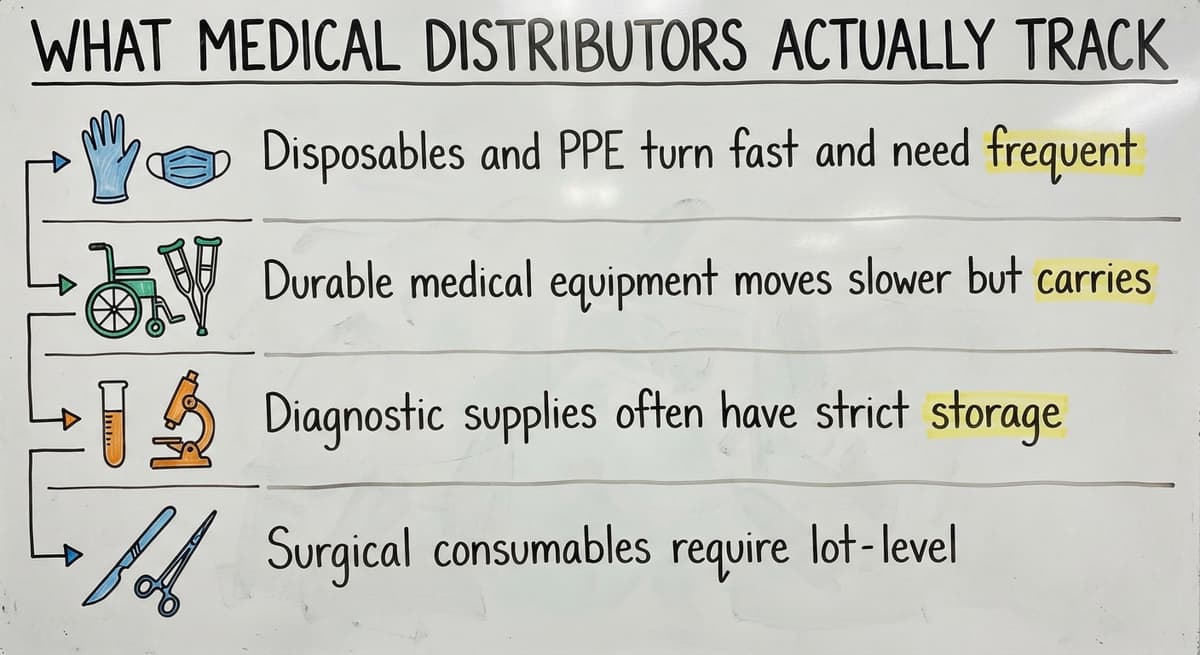
What are the most common inventory categories in medical supply distribution? Disposables, durable medical equipment, diagnostic supplies, personal protective equipment, and surgical consumables cover the bulk of what most distributors move. Each category behaves differently:
- Disposables and PPE turn fast and need frequent reorder cycles with tight expiration monitoring.
- Durable medical equipment moves slower but carries serial number records requirements.
- Diagnostic supplies often have strict storage temperature rules and short shelf lives.
- Surgical consumables need lot-level traceability for recall readiness.
A single warehouse may manage all five categories under one roof, each with its own records rules and reorder rhythm. A system that treats them all the same will fail at least some of them.
Where Manual Systems Break Down in Medical Distribution
Most small distributors start with an accounting package for financials, a spreadsheet for stock counts, printed pick sheets on the floor, and email chains for reorder requests. Each tool works on its own. The breakdown happens when information needs to move between them.
A receiving clerk logs a new lot number in the spreadsheet. A picker pulls from a printed sheet that does not reflect that update. An invoice goes out with the wrong lot recorded. By the time the discrepancy surfaces, three more orders have shipped. Errors do not stay isolated; they compound with every transaction.
Why Expiration and Lot Tracking Fail First in Manual Systems
Expiration date tracking is where manual systems break down fastest. At low volume, a person can watch the dates manually. As SKU count grows, the spreadsheet becomes a liability rather than a safety net. Lot tracking in Excel is especially fragile because there is no system enforcing consistency, only the discipline of whoever entered the data last.
The comparison is easier when one option is built for you
Off-the-shelf means fitting your process to the software. We do it the other way round, and the first look costs nothing.
Book a callThe Real Cost of Inventory Errors
The visible costs are emergency reorders, expedited shipping charges, and expired product written off as a direct loss. The less visible cost is time. When a customer calls asking which lot number shipped on their last order, someone has to dig through emails and spreadsheets to find the answer. That same manager is not reviewing vendor pricing, training staff, or planning for next quarter.
Misplaced or expired stock is not just a write-off; it is a signal that the system cannot see what it holds. Overstock ties up cash. Stockouts trigger complaints. Matching pulls your best people away from work that actually grows the business. None of these costs show up as a single line item, which is exactly why they persist longer than they should.

Key Features a Medical Inventory System Should Have
Before evaluating any platform, use this checklist. A system built for medical supply distribution should handle all of the following without requiring workarounds: lot and expiration date tracking enforced at the data level, automated reorder triggers based on defined thresholds, real-time stock visibility across locations, audit-ready documentation that can be pulled in minutes, and integration with existing accounting or order management tools. Any platform that needs manual steps to cover these areas will reproduce the same failure points as the spreadsheet setup it replaces.
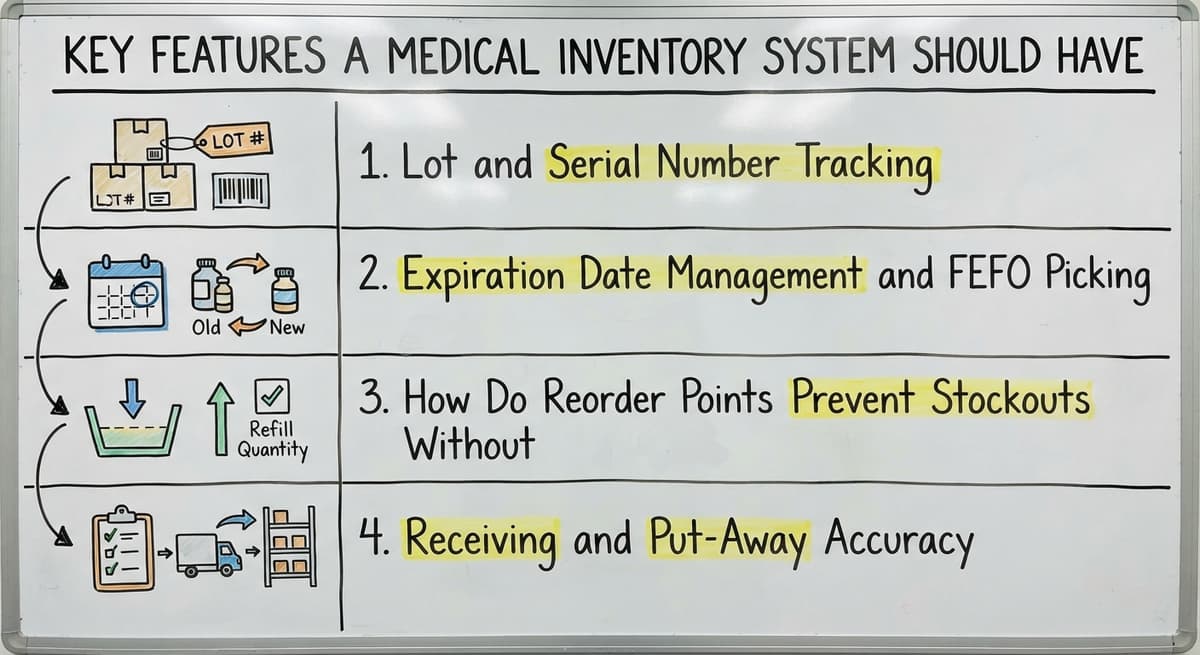
Lot and Serial Number Tracking
Lot tracking matters because recalls happen, and when they do, you need to know exactly which customers received which lot within minutes, not days. A capable system assigns lot numbers at receiving, follows them through every pick and ship transaction, and makes them searchable by order, customer, or date range.
The test is simple: can you answer a lot-number question from a customer in under two minutes? If the answer needs opening multiple spreadsheets or calling the warehouse floor, lot tracking is a gap in your current setup. Good medical distributor software closes that gap at the point of receiving, not after a problem surfaces.
Expiration Date Management and FEFO Picking
FEFO stands for first expired, first out. It means the system directs pickers to the product expiring soonest, not the product closest to the dock or easiest to reach. Without this logic built into the pick process, staff default to convenience, and product expires on the shelf while newer stock ships.
A well-designed system alerts staff before product expires, not after. Proactive expiration alerts turn a write-off risk into a manageable task, such as a targeted promotion or a priority reorder. Manual expiration tracking in a spreadsheet fails at any meaningful SKU count because there is no automatic trigger, only a column someone has to remember to check.
See it running on your own process first
No build cost. The subscription starts once it is live and doing the job, not before.
Book a callHow Do Reorder Points Prevent Stockouts Without Overstocking?
A reorder point is the stock level at which a new buy order should be triggered. Set it correctly and you reorder before you run out, without carrying excess inventory that ties up cash. The system should generate a reorder alert or draft a buy order automatically when stock hits that minimum, removing the dependency on someone remembering to check.
Reorder points should be adjustable by SKU. A fast-moving disposable needs a different trigger than a slow-moving durable. Buy order automating works best when the thresholds reflect actual demand patterns, which means reviewing and updating them as your product mix changes rather than setting them once at go-live.
Receiving and Put-Away Accuracy
Errors at receiving flow downstream into every pick, ship, and invoice that follows. A structured receiving process matches the incoming shipment to the open buy order, logs lot numbers and expiration dates at that moment, and assigns a bin location before the product moves to the shelf.
This step is often the weakest link in small warehouse operations because it feels administrative rather than urgent. Bin location tracking established at receiving is what makes every downstream search fast and accurate. When receiving is done correctly, the rest of the system can trust the data it holds.
How Medical Inventory Management Connects to Your Accounting Software
Most small distributors run their financials in an accounting package and have no intention of replacing it. A well-designed inventory system does not ask you to. Accounting software integration for warehouse operations works best when the two systems handle separate jobs and share data cleanly.
The inventory system owns stock movement: receiving, put-away, picking, shipping, and lot records. Your accounting software owns billing, accounts payable, and financial reporting. When an order ships, the inventory system passes the transaction to your accounting software so the invoice generates without manual entry. When a buy order closes, the cost flows to the books automatically.
The result is one source of truth for stock and one for financials, connected rather than duplicated. You keep the accounting tool your team already knows, and you stop re-entering data between systems.

Why Off-the-Shelf Platforms Often Fall Short
Generic inventory platforms are built for the average warehouse. They handle standard SKUs, standard pick-and-ship workflows, and standard reorder logic. Medical supply distribution is not average. Lot tracking, expiration management, FEFO picking, and healthcare customer records are not add-ons in this industry; they are core requirements.
Forcing your operation to fit a rigid platform means building workarounds for the gaps. Those workarounds are usually spreadsheets, which is where you started. The platform solves some problems and creates new ones, and your staff spends time managing the system rather than running the warehouse. Generic warehouse inventory system tools also tend to price for features you will never use while leaving out the ones specific to medical distribution.
What a Custom Approach Looks Like
Custom inventory software built for a small distributor does not mean a multi-year project or a blank-check budget. A focused build replaces only the manual steps causing the most pain: lot tracking at receiving, expiration alerts, reorder triggers, and the data handoff to your accounting package.
The difference from a packaged platform is that the system is built around how your operation already works. Staff do not learn a new process; they get tools that support the process they already follow. Custom warehouse management software developed by a local builder who understands small-to-mid-size distribution moves faster and stays more accountable than a large vendor with a standard rollout playbook.
Replacing Excel in warehouse operations does not need rebuilding everything at once. Start with the highest-pain process, get it working, then expand. That approach keeps cost and risk contained while delivering measurable improvement quickly.
Not sure this is the right shape for your operation
Describe how the work runs today. We map it on a call and show you what it would look like built around that, before you spend anything.
Book a call
Signs Your Current System Is Holding You Back
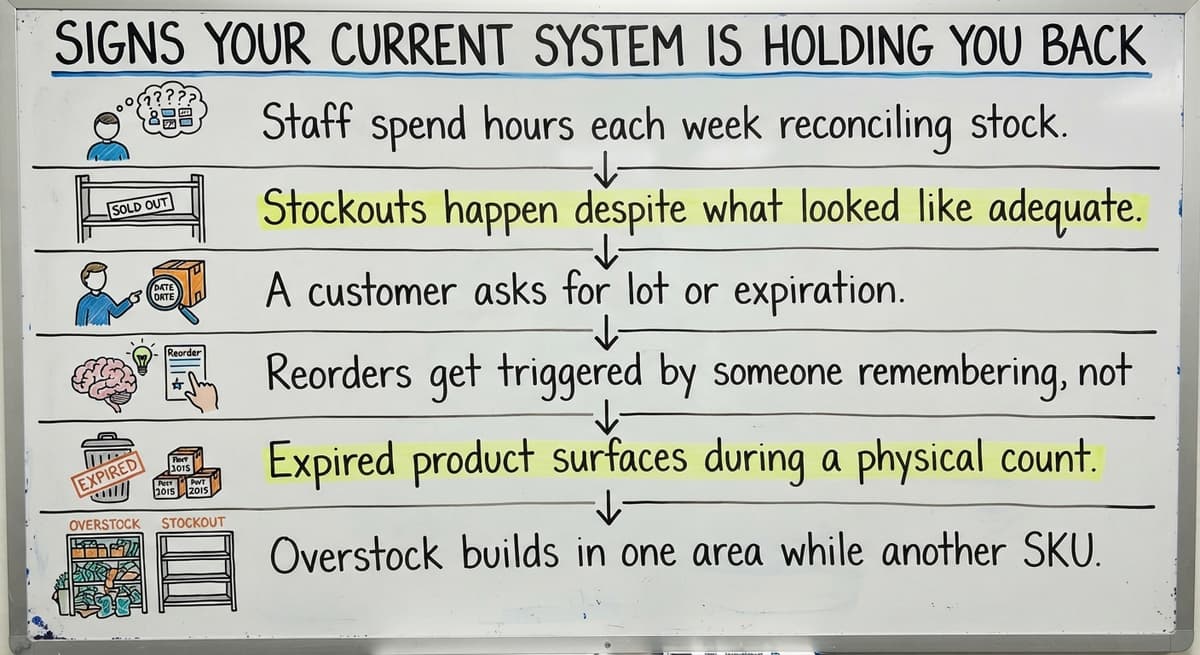
Growing distribution operations share a recognizable set of warning signs, and each one is fixable:
- Staff spend hours each week reconciling stock counts against what the system shows.
- Stockouts happen despite what looked like adequate inventory on hand.
- A customer asks for lot or expiration records and the answer takes more than a few minutes to produce.
- Reorders get triggered by someone remembering, not by a data threshold.
- Expired product surfaces during a physical count rather than before it ships.
- Overstock builds in one area while another SKU runs short.
If more than two of these sound familiar, your current setup is costing you more than a new system would. The issue is not effort or discipline; it is that the tools were not designed for this level of complexity.
How Should You Evaluate a Medical Inventory Management Solution?
Evaluating options gets easier when you focus on a short list of questions rather than a feature matrix. Start with the ones that matter most to your operation. Does the system handle lot and expiration tracking natively, or does it need a third-party add-on? Can it connect to your accounting package without a full data migration? Does it work at your current scale without requiring an enterprise contract?
Also ask: who supports it after go-live? A large platform vendor routes you to a support queue. Distribution operations software built for small teams usually means a direct relationship with the people who built it. The support model matters as much as the feature list, because the questions you have six months after launch are more specific than the ones you have during a sales demo.
Implementation and Measuring Success
A focused implementation that replaces specific manual steps can be completed quickly. A full system overhaul takes longer, costs more, and carries more risk. The practical approach is to start with the process causing the most disruption, such as lot tracking at receiving or expiration management, get it running correctly, then build from there.
Before you go live, set a baseline. Count how many hours per week go to stock matching. Record how many stockouts occurred last quarter. Note how many expired-product write-offs appeared in the last physical count. Without a baseline, improvement is anecdotal rather than measurable.
After rollout, track the same numbers. Order accuracy rate, stockout frequency, expired product write-offs, and time spent on matching should all move in the right direction within the first few months. If they do not, the system or the setup needs adjustment. Metrics make that conversation specific rather than subjective.
Medical Inventory Management Is Not Only for Large Operations
Enterprise supply chain software gets most of the attention in this category, but a 10- to 80-person distribution operation has the same core needs as a large one. You still need lot tracking. You still need expiration management. Your customers still expect accurate records. The difference is scale and budget, not complexity.
Inventory management software for wholesale distributors at your size should fit your operation, not the other way around. A solution built for a 500-person warehouse will overwhelm a lean team and price out a small distributor before the first order ships. The right answer is a system sized to your actual operation, with room to grow as volume increases rather than a platform you have to grow into before it becomes useful.

Next Steps for Your Operation
Good medical inventory management comes down to three things: knowing exactly what you have, tracking it through every transaction, and connecting that data to your financials without manual re-entry. Those are solvable problems at any distribution scale.
If your current setup is creating more work than it prevents, the right next step is a conversation about your specific operation, not a generic software demo. Describe what is breaking and what you need it to do instead. That is where a practical fix starts.
Frequently asked questions
What is medical inventory management and how is it different from general inventory management?
Medical inventory management covers the tracking, ordering, storing, and distributing of medical supplies across a distribution operation. It differs from general inventory management because medical products carry expiration dates, lot numbers, and strict handling requirements that standard warehouse tools do not address. Healthcare customers also expect a higher level of records and fulfillment accuracy than most other wholesale categories.
What features does a medical inventory system need that a standard warehouse system does not?
A medical inventory system needs lot and serial number tracking at receiving, FEFO picking logic for expiration-date management, proactive expiration alerts before product reaches its date, and the ability to produce lot records quickly for customer or regulatory requests. Standard warehouse systems handle basic stock counts and reorder triggers but usually lack these medical-specific workflows.
How do I track lot numbers and expiration dates without a dedicated system?
Most distributors use spreadsheets for this, which works at very low volume. As SKU count and order frequency grow, spreadsheet tracking becomes unreliable because there is no automatic enforcement of data entry, no FEFO picking logic, and no alert when a date approaches. A dedicated system captures lot and expiration data at receiving and carries it through every transaction automatically.
Can I keep using my accounting software and still improve my inventory management?
Yes. A well-designed inventory system connects to your accounting software rather than replacing it. The inventory system handles stock movement, lot tracking, and order fulfillment. Your accounting software handles billing and accounting. When the two systems share data cleanly, you remove manual re-entry without changing the financial tools your team already knows.
Why do off-the-shelf inventory platforms often not work well for medical distributors?
Generic platforms are built for standard warehouse workflows. Lot tracking, expiration management, FEFO picking, and healthcare records are not standard features in most packaged systems. Distributors end up building workarounds, usually spreadsheets, which recreates the original problem. A platform designed for medical supply distribution handles these requirements as core functions rather than add-ons.
What does a custom-built inventory system actually look like for a small distributor?
A focused custom build replaces the specific manual steps causing the most pain: lot capture at receiving, expiration alerts, reorder triggers, and the data handoff to your accounting package. It is built around your existing process rather than requiring staff to learn a new one. The scope stays narrow enough to deliver working software quickly without a months-long rollout.
How do I know when my current system is no longer good enough?
Common indicators include staff spending large time each week reconciling stock counts, stockouts that occur despite what the system shows, inability to answer a customer's lot or expiration question quickly, and reorders triggered by memory rather than data. If expired product surfaces during a physical count rather than before it ships, that is a direct signal the current setup cannot see what it holds.
What should I look for when evaluating a medical inventory management solution?
Focus on whether the system handles lot and expiration tracking natively, whether it connects to your accounting package without a full migration, and whether it is priced and sized for your current operation. Also ask who provides support after go-live. A direct relationship with the people who built the system is more useful than a vendor support queue when specific working questions arise.
How long does it take to implement a new inventory system?
A focused implementation that targets specific manual steps, such as lot tracking at receiving or expiration management, can be completed in weeks rather than months. A full system overhaul takes longer. The practical approach is to start with the process causing the most disruption, get it working correctly, and expand from there. Avoid implementations that need months of staff training before anything is functional.
How do I measure whether a new system is actually working?
Set a baseline before go-live: record hours spent on stock matching, number of stockouts per quarter, and expired product write-offs from the last physical count. After rollout, track the same numbers. Order accuracy rate, stockout frequency, and matching time should all improve within the first few months. If they do not, the setup needs adjustment, and specific numbers make that conversation productive.
Start with a free first look
A 30 minute call, your operation mapped, and a clear picture of what we would build. No obligation and nothing to install.
Book a callRelated guides
The rest of this guide, for the parts of the job this page does not cover.
Guides
- Multi Location Inventory Management Software
- Inventory Management for Multiple Locations
- Inventory Management System for Manufacturing
- Inventory Management Pics
- B2b Inventory Management
- Jewelry Inventory Management
- Dental Inventory Management
- The Objective of Inventory Management is To
- Qr Code for Inventory Management
- Hvac Inventory Management Software
- Inventory Management Software for Schools
- Nonprofit Inventory Management
- Manual Inventory Management
- Inventory Management Photos
- Inventory Management Software Costs
- Hvac Inventory Management
- Automated Inventory Management System
- Multi Location Inventory Management
- Drop Ship Inventory Management
- Warehouse Inventory Management Software
- Warehouse Inventory Management Systems
- Quickbooks Inventory Management Software
- Inventory and Warehouse Management Software