


Multi Location Inventory Management
Multi location inventory management means tracking stock across 2 or more physical sites from a single system. If you run warehouses, fulfillment centers, or off-site storage, you need to know what is where at any moment. This article was reviewed in October 2026 and covers what the problem actually is, where common tools fall short, and what a working solution looks like.
Book a callWhat Multi Location Inventory Management Actually Means
Single-site tracking is simple: one place, one count, one record. Multi location inventory management adds a second hard problem on top of the counting problem: location. Stock at a fulfillment center is not the same as stock at a wholesale distribution hub, even if both show the same SKU. A system that cannot tell the difference will cost you sales, time, and credibility with customers.
Sites can include warehouses, fulfillment centers, wholesale distribution hubs, or off-site storage units. The challenge is not the counting. The challenge is knowing which site holds which units right now, and keeping that picture current as stock moves.
We build it for your operation, and the first look is free
If you would rather not compare products, describe how your operation already works and we build the system around it.
No build cost. You see it running on your own process first, and the monthly subscription starts only once it is live.
Book a callWhy Two Locations Get Hard Fast
One site can run on a clipboard. A second site doubles the data and doubles the chance for error. The real trap is what happens between sites.
When stock moves from warehouse A to warehouse B, there is a gap. The item has left one location but has not arrived at the other. During that gap, it is invisible. A rep can sell it from either site and neither system will flag the conflict.
Staff at different sites also update records in different ways. One site logs a receipt the morning it arrives. Another logs it at end of day. Those timing gaps create mismatches that take hours to untangle. As GS1 notes when describing the barcode standards that underpin any scan-based count, consistent spotting at every point in the supply chain is what makes a shared record possible: GS1 barcode standards. Without that consistency, each site is well running its own system.
What Pain Points Distributors Report Most
What problems does poor multi-site stock control actually cause in practice? The most common ones share a pattern: the system shows one thing and reality is another.
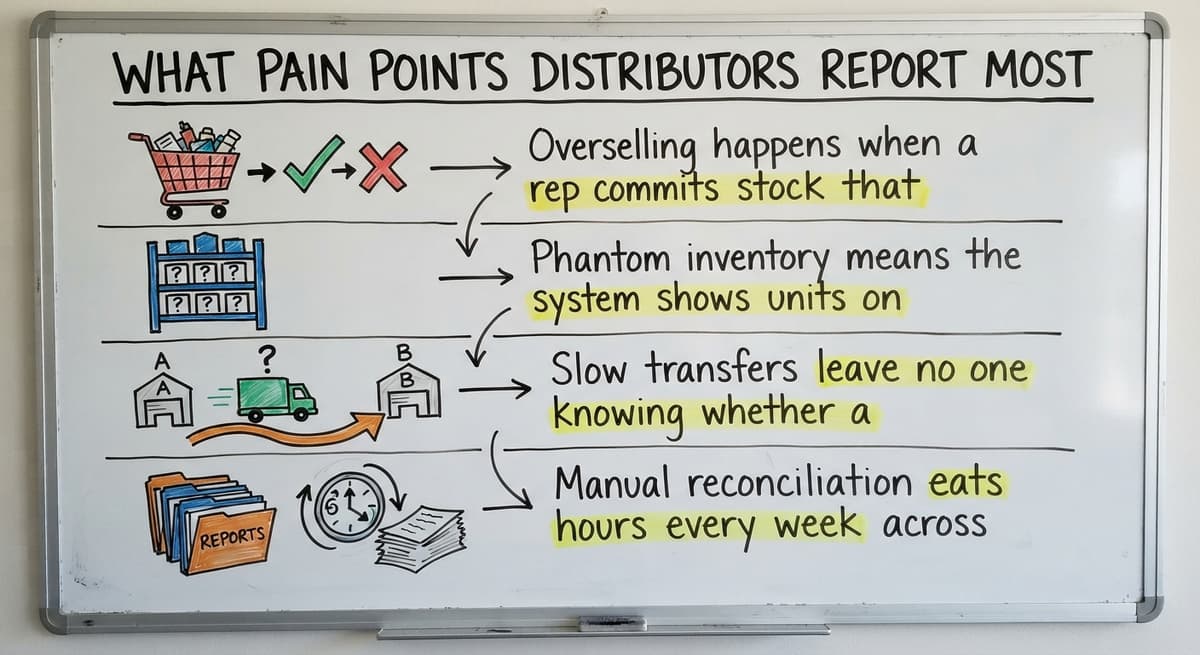
- Overselling happens when a rep commits stock that is already reserved at a different site.
- Phantom inventory means the system shows units on hand that were already shipped or damaged.
- Slow transfers leave no one knowing whether a request was sent, picked, or received.
- Manual matching eats hours every week across printed sheets, email threads, and spreadsheets.
The US Federal Trade Commission needs sellers to ship when they said they would, or notify the customer and offer a cancellation. FTC Mail and Telephone Order Rule. An inaccurate count is not just an operations problem. It is a compliance risk.
Why Spreadsheets and Email Break Down Across Sites
Spreadsheets fail at multi-site inventory tracking not because staff use them wrong, but because the tool is wrong for the job. Each site keeps its own file. No one holds a single current version. Email threads for stock requests get buried or missed entirely.
Version control is impossible when 2 people update the same file and one overwrites the other. That is not a discipline problem. It is a structural one. A spreadsheet has no concept of location, no transfer status, and no receiving confirmation. It records a number, not a process.
The same applies to email. A request sent at 9 a.m. on a Tuesday may sit unread until Thursday. By then the stock has moved, or been sold, or been counted twice.

Where an Accounting Package Fits and Where It Stops
Many small distributors already rely on an accounting package like a popular small-business accounting platform for invoicing, vendor bills, and financial reporting. That is the right tool for those jobs. Its inventory features are designed for simple, single-location use and do not handle multi-site stock visibility natively.
The IRS is clear that inventory tracking is a legal obligation, not a preference. IRS Publication 538 states: "To figure taxable income, you must value your inventory at the beginning and end of each tax year." IRS Publication 538. That valuation has to be accurate across every site.
The goal is not to replace the accounting package. The goal is to add a layer that manages location-level inventory and feeds clean data back to it. Accounting software integration for warehouse operations keeps financials intact while closing the multi-site gap.
The comparison is easier when one option is built for you
Off-the-shelf means fitting your process to the software. We do it the other way round, and the first look costs nothing.
Book a callCore Features a Multi Location Inventory System Must Have
Not every platform handles multi-site stock control the same way. Before choosing a solution, check for these specific capabilities.
- Real-time stock levels per location, visible from one screen, so any staff member can answer a stock question without calling another site.
- Transfer orders with an in-transit status so an item leaving warehouse A is not counted as available at either site until warehouse B confirms receipt.
- Receiving logs that record every inbound shipment at the correct location, not just at the company level.
- Location-level reorder points that trigger restocking at the specific site running low, not just when the company-wide total dips.
How Stock Transfers Should Actually Work
A transfer order should move through 3 clear steps. Warehouse A creates a transfer and picks 50 units. Those units move to an in-transit status: neither site counts them as available. Warehouse B scans or logs the arrival and confirms the quantity received. Only then does the system update on-hand quantities at both locations.
Without that two-step handshake, items get double-counted or disappear from the books entirely. Most off-the-shelf tools skip the in-transit step and simply move a number from one column to another. That is not a transfer. That is a math problem waiting to happen.
How Reorder Points Work Differently Across Sites
A company-wide reorder point hides location-level shortages. One site may be out of stock while another holds 200 units of the same SKU. The company-wide total looks fine. The customer at the first site cannot get their order filled.
Location-level reorder points trigger restocking at the site that needs it, based on that site's own sales velocity. A busy fulfillment center may need a threshold of 50 units. A slow secondary warehouse may need 10. Custom inventory software can set different thresholds per location and alert the right person when a specific site dips below its limit.

How Do You Count Inventory Across Multiple Warehouse Locations Without Shutting Down?
Cycle counting is the answer. A full physical count across multiple sites is disruptive and rarely done often enough to keep records clean. Cycle counting lets each site count a portion of inventory on a rolling schedule, so operations never stop.
A good warehouse inventory system assigns count tasks by location, records variances against the system count, and flags SKUs that are consistently off. That pattern of consistent variance usually points to a receiving error, a labeling problem, or a theft issue. Catching it on a rolling basis costs far less than discovering it at year-end.
The NIST Manufacturing Extension Partnership identifies consistent cycle counting as a core practice for maintaining supply chain accuracy without working disruption. NIST MEP Supply Chain.
See it running on your own process first
No build cost. The subscription starts once it is live and doing the job, not before.
Book a callReporting That Shows the Whole Picture
Operations managers need 2 views at once: the company-wide total and the per-location breakdown. Generic tools often force a choice between them. Custom software can display both in the same report, so a manager can see that the company holds 400 units of SKU-1001 and at once see that 300 are at site A and 100 are at site B.
Key reports for multi-site stock control include:
- Total on-hand by SKU across all sites, for purchasing decisions
- Stock aging per location, to catch slow-moving inventory before it becomes a write-off
- Transfer history, to audit what moved, when, and whether it was confirmed
- Fill rate by site, to spot which location is struggling to fulfill orders on time
The US Census Bureau tracks the national inventories-to-sales ratio for wholesale firms monthly. US Census Bureau Wholesale Trade. Distributors who cannot produce location-level data cannot benchmark their own performance against that ratio.
Custom Software vs. Off-the-Shelf: What the Difference Means in Practice
Off-the-shelf platforms are built for a broad market. They need the business to adapt its process to the software. Staff learn new terminology, new screens, and new workflows that may not match how any of their sites actually operate.

Custom warehouse management software is built around the workflows already in place. If one site uses different naming conventions or a different receiving process, the system accommodates that. Adoption is faster when staff recognize their own process in the tool rather than someone else's.
This is the opposite of a long ERP rollout that rewrites how the business works. Wholesale distribution software built around your workflow does not need a migration. It fits the operation as it exists today and grows with it.
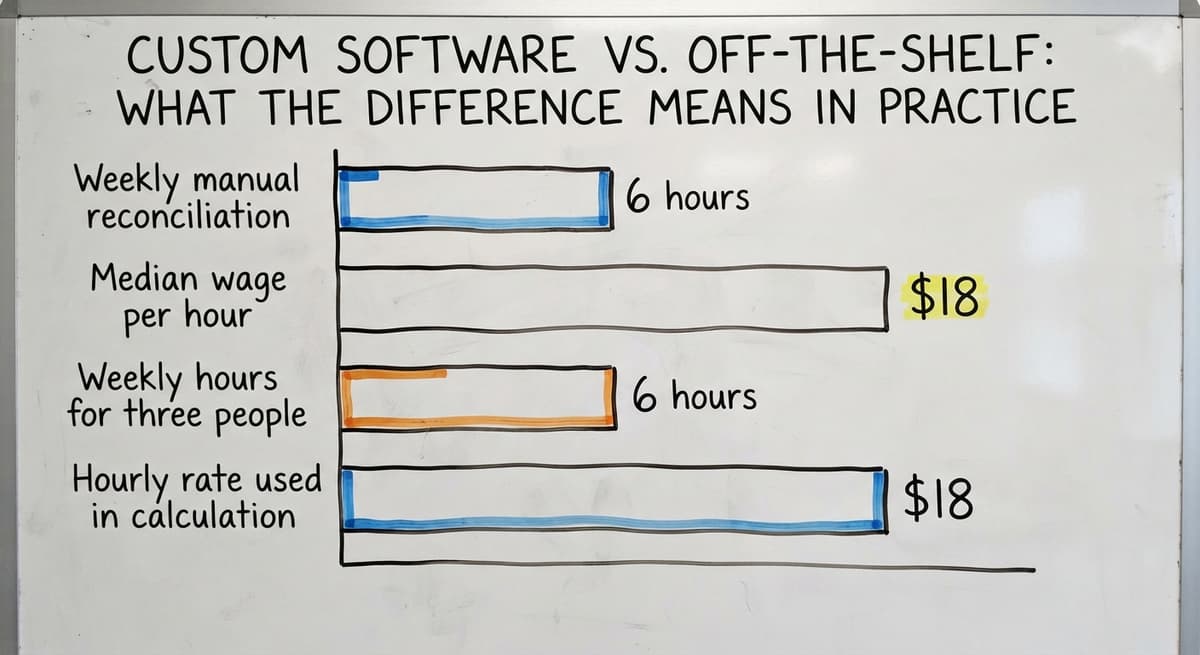
For a small distributor with 3 staff spending 6 hours a week on manual matching, the math is direct. The US Bureau of Labor Statistics puts the median wage for stock clerks and order fillers at around $18 an hour. BLS Occupational Employment. Three people at 6 hours a week at $18 an hour is roughly $16,848 a year in labor spent on a problem a system could handle automatically.
Is Your Current Setup Costing You Money?
A manual setup is costing the business money when the symptoms become routine rather than rare. Check whether any of these apply to your operation right now.
- Staff spend more than a few hours a week reconciling stock counts by hand.
- Customer orders are delayed because no one knows which site holds the stock.
- Oversells or phantom inventory have appeared more than once in the past quarter.
- Managers cannot answer "what do we have on hand right now at each location" without making phone calls.
If 2 or more of those are true, replacing spreadsheets with custom operations software is not a luxury. It is the fix that stops a recurring loss.
Questions to Ask Before Choosing a Solution
Not every system that claims multi location inventory management actually delivers it. These questions cut through the marketing.

- Does it track transfers as a two-step event, or just move a number from one column to another?
- Can reorder points be set per location, not just company-wide?
- Will it connect to your accounting software without replacing it?
- How long does rollout take, and who does the work?
- Is it built for an operation our size, or will we pay for features we will never use?
A focused custom build for a small distributor can go live in weeks when the scope is kept tight. The process starts with a review of current workflows at each location before writing a line of code. The gaps are mapped, the build is tested with real staff at real locations, and the rollout is staged so operations keep running.
Custom makes sense when off-the-shelf tools need large workarounds. If the business has already outgrown spreadsheets but is not ready for a full ERP, inventory management software for small distributors fills that gap precisely, without the cost or disruption of replacing accounting software that already works.

A Practical Starting Point
Document the current process at each location before looking at software. Identify the single biggest source of errors or delays. That is where to start, not with a feature list.
Pick a solution that can grow with the operation without requiring a full re-rollout every time a site is added. Work with a team that understands distribution and warehousing, not just software development.
The right system fixes the specific gap without blowing up what already works. That is the standard worth holding any solution to.
If your operation is ready to move past spreadsheets and email, reach out to discuss what a focused build would look like for your sites, your workflows, and your team.
Frequently asked questions
Can I keep using my accounting software if I add multi-location inventory software?
Yes. The right solution integrates with your accounting software rather than replacing it. The inventory layer handles location-level tracking, transfers, and receiving. Your accounting software continues to manage invoicing, vendor bills, and financial reporting. The two systems sync so records stay accurate without double entry.
How many locations does a business need before multi location inventory management makes sense?
Two sites with active stock movement is usually enough to justify a dedicated system. Once stock is moving between 2 locations regularly, spreadsheets and email create gaps that cost real money in staff time, oversells, and delayed orders.
How should a stock transfer be tracked so items are never double-counted?
A transfer should move through 3 steps: the sending site creates a transfer order and marks units as in transit, the receiving site confirms arrival, and only then does the system update on-hand quantities at both locations. Skipping the in-transit step is the most common cause of double-counting.
What does cycle counting look like across multiple warehouse locations?
Each site counts a portion of its inventory on a rolling schedule rather than stopping operations for a full count. The system assigns count tasks by location, records any variance, and flags SKUs that are consistently off so the root cause can be found and fixed.
How long does it take to implement a custom multi location inventory system?
A focused custom build for a small distributor usually takes weeks, not months, when the scope is kept tight. The process starts with a workflow review, maps the gaps, and tests with real staff before going live. A narrow scope is the key to a fast rollout.
Do staff need technical skills to use a custom inventory system?
No. A system built around existing workflows uses the terminology and screens staff already recognize. The learning curve is minimal because the software matches the process rather than requiring staff to learn someone else's logic.
What is the difference between a company-wide reorder point and a location-level reorder point?
A company-wide reorder point triggers when the total across all sites falls below a threshold. A location-level reorder point triggers when a specific site runs low, even if other sites hold plenty. Without location-level points, busy sites run out while slow sites hold excess stock.
Start with a free first look
A 30 minute call, your operation mapped, and a clear picture of what we would build. No obligation and nothing to install.
Book a callRelated guides
The rest of this guide, for the parts of the job this page does not cover.
Guides
- Multi Location Inventory Management Software
- Inventory Management for Multiple Locations
- Inventory Management System for Manufacturing
- Inventory Management Pics
- B2b Inventory Management
- Jewelry Inventory Management
- Dental Inventory Management
- The Objective of Inventory Management is To
- Qr Code for Inventory Management
- Hvac Inventory Management Software
- Inventory Management Software for Schools
- Nonprofit Inventory Management
- Manual Inventory Management
- Inventory Management Photos
- Inventory Management Software Costs
- Hvac Inventory Management
- Automated Inventory Management System
- Medical Inventory Management
- Drop Ship Inventory Management
- Warehouse Inventory Management Software
- Warehouse Inventory Management Systems
- Quickbooks Inventory Management Software
- Inventory and Warehouse Management Software