


Warehouse Execution System Vs Warehouse Management System
Warehouse execution system vs warehouse management system is a question of timing. A warehouse execution system (WES) handles floor tasks in real time; a warehouse management system (WMS) handles planning and inventory. Most warehouses of 5 to 100 people need a WMS and not a WES, and this guide, reviewed in September 2026, explains the split, when both make sense, where a warehouse control system fits, and the questions to ask a vendor who blurs the three.
Reviewed August 2026. Each figure comes from the assumptions stated beside it, so you can substitute your own and the arithmetic still holds.
Published 13 August 2026. Reviewed and updated 15 September 2026.
Book a callWhat Is a Warehouse Management System?
A warehouse management system, or WMS, is the planning side of your operation. It tracks stock, sets putaway rules, allocates orders, and produces reports. Think of it as the central record of what you have and what needs to ship.
Large automated distribution centres with conveyors, sorters, and robotics run a WMS alongside a warehouse execution system. For most operations with 5 to 100 staff, the WMS alone is sufficient.
Run both only when your facility has automated sortation or conveyor lines, order volume is high enough that task sequencing changes minute by minute, or delays at one station create measurable downstream cost.
A warehouse control system, or WCS, is narrower than either. It talks directly to physical equipment: conveyor belts, label printers, sorter gates. It sends machine signals rather than worker instructions, and is only relevant when that physical sortation equipment is present.
Most commercial WMS products target large enterprises. They come with long setup times, high licence fees, and rigid workflows designed for operations far bigger than yours.
The right system is the one that closes the gap between where your operation breaks down and where it needs to perform. For most small distributors, that gap is in WMS-level functions, not real-time execution.
What Does a WMS Actually Control?
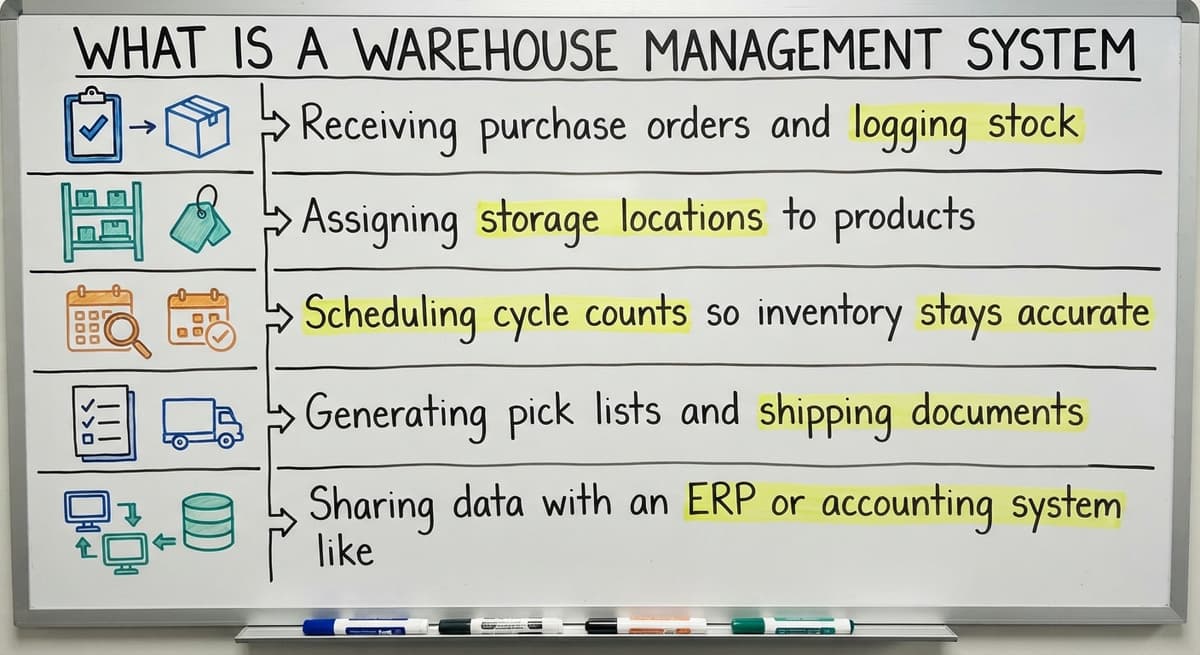
A WMS is the owner of the 4 decisions made before work hits the floor:
- Receiving purchase orders and logging stock
- Assigning storage locations to products
- Scheduling cycle counts so inventory stays accurate
- Generating pick lists and shipping documents
- Sharing data with an ERP or accounting system like QuickBooks
The IRS makes inventory accuracy a legal matter, not just a preference. As IRS Publication 538 states, "To figure taxable income, you must value your inventory at the beginning and end of each tax year." A WMS is the tool that makes that count reliable.
Most commercial WMS platforms connect to an ERP or to QuickBooks integration for distributors, so your accounting stays in sync without manual entry. That connection alone removes a significant source of error for small teams.
Would you rather have it built around your operation?
The first look is free. If you would rather not compare products, describe how your operation already works and we build the system around it.
No build cost. You see it running on your own process first, and the monthly subscription starts only once it is live.
Book a callWhat Is a Warehouse Execution System?
A warehouse execution system, or WES, is the floor side, working in real time. It takes work orders from a WMS or ERP and breaks them into moment-by-moment instructions for workers and machines. It sequences picks, balances tasks across staff, and coordinates equipment like conveyors and sorters.
The WES is not concerned with what needs to ship tomorrow. It is focused on who picks bin 14B in the next 90 seconds.
Where Does a WES Fit on the Floor?
A WES is most common in high-volume automated facilities. It earns its cost when:
- Conveyor belts and sorters need real-time job feeds
- Dozens of workers must be balanced against live order flow
- A delay at one station backs up the whole line
OSHA describes the environment directly: "The warehousing and storage industry includes establishments operating facilities for general merchandise, refrigerated goods, and other products," and notes that coordinating people and moving equipment safely is a core operational challenge. A WES addresses exactly that coordination at scale.
For operations without significant automation, a supervisor and a simple pick list do the same job at no software cost.

What Is the Core Difference Between a WES and a WMS?
A WMS is the system that decides what work needs to happen. A WES decides who does it, in what order, right now. That one sentence covers most of what you need to know.
The WMS is the manager writing next week's schedule. The WES is the floor supervisor calling out assignments every few minutes as conditions change. Both roles matter in a large automated facility.
In a smaller operation, one person fills both roles, and software that tries to separate them adds friction rather than removing it.
The Practical Split
| System | Primary Job | Typical User |
|---|---|---|
| WMS | Inventory, orders, planning | All warehouse sizes |
| WES | Real-time task sequencing | High-volume automated facilities |
| WCS | Machine signals and equipment control | Facilities with conveyors or sorters |
Many small and mid-sized warehouses only need one of these systems. Buying all 3 without the volume or automation to justify them is a fast way to overspend and underuse.
Is the comparison easier when one option is built for you?
Yes. Off-the-shelf means fitting your process to the software, and custom is the other way round. The first look costs nothing.
Book a call
Do You Need Both a WES and a WMS?
Large automated distribution centres with conveyors, sorters, and robotics run both systems together. For most operations with 5 to 100 staff, the answer is no.
When Do Both Systems Make Sense?
Both systems are worth running in 3 cases:
- Your facility has automated sortation or conveyor lines
- Order volume is high enough that task sequencing changes minute by minute
- Delays at a single station create measurable downstream cost
When Is One System Enough?
If your operation is mostly manual, a WMS or a purpose-built custom warehouse software tool will cover nearly everything you need. Supervisors handle real-time task sequencing naturally. Simple pick lists direct workers without a WES layer.
Buying a WES without significant automation is over-engineering the problem. The Warehousing Education and Research Council publishes benchmark data for distribution centre performance at werc.org, and the gap between a well-run manual operation and an automated one is rarely closed by software alone. It requires the physical equipment first.
The Cost of Over-Engineering Your Warehouse Software
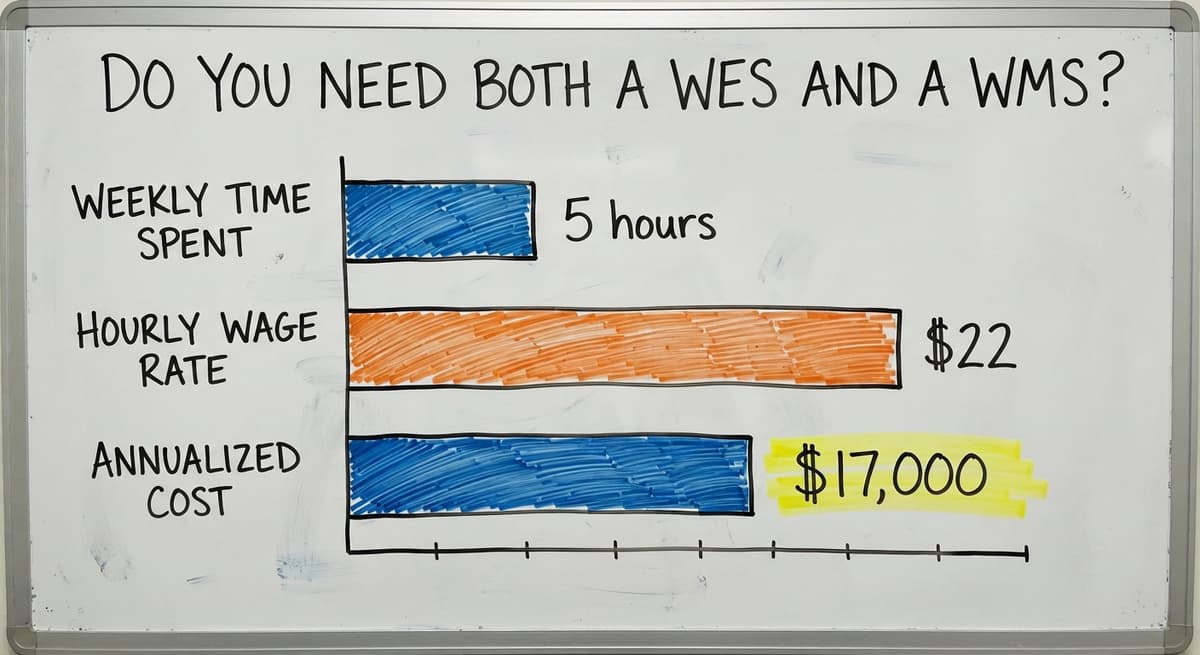
Consider the cost of getting this wrong. 3 operations staff spending 5 hours a week managing a system they do not need, at the US Bureau of Labor Statistics median wage for warehouse workers of around $22 an hour, is over $17,000 a year in lost productive time. That wage figure is drawn from BLS occupational data.

Where Does a Warehouse Control System Fit In?
A warehouse control system, or WCS, is narrower than either a WES or a WMS. It talks directly to physical equipment: conveyor belts, label printers, sorter gates. It sends machine signals rather than worker instructions.
WCS vs WES vs WMS in Plain Terms
- A WCS is the layer that tells a conveyor belt to speed up or a gate to open
- WES tells a worker to pick item A before item B, and tells the conveyor when to expect it
- WMS tells the system that order 4821 needs to ship by 3pm
For most small distributors, a WCS is irrelevant unless you have automated conveyors or sortation equipment already in place. Knowing the difference keeps you from buying software that solves a problem you do not have.

Which System Fits a Small Distributor or Fulfilment Centre?
If you run QuickBooks and manage orders in spreadsheets or email, you are missing a WMS layer, not a WES. The gap is in planning, inventory accuracy, and order visibility, not real-time machine task sequencing.
Small operations need:
- Accurate inventory counts that satisfy IRS requirements
- Clear order visibility from receipt to ship
- Simple pick and pack direction for staff
- A connection between warehouse data and QuickBooks
All of those are WMS functions. A WES adds value only after you have automated equipment and enough volume to need real-time machine-level task balancing. Pick and pack software for fulfilment centres at this size does not need a WES layer to work well.
Inventory tracking software for wholesale distributors at the 5 to 100 staff level is a solved problem. The challenge is finding something that fits your workflow rather than forcing your team into someone else's.
The Problem With Off-the-Shelf WMS Platforms for Small Operations
Most commercial WMS products target large enterprises. They come with long setup times, high licence fees, and rigid workflows designed for operations far bigger than yours.
What Do Small Warehouses Actually Experience?
Small warehouses use only 20 percent of the features while paying for all of them. The remaining 80 percent sits idle and adds complexity.
Training takes longer. Staff resist the change. And the system still does not quite match how your team actually works.
There is also the migration problem. Many enterprise WMS platforms want to replace QuickBooks rather than connect to it. That means a painful financial system change on top of an operational one, with all the risk that brings.
NIST's Manufacturing Extension Partnership offers vendor-neutral guidance on supply chain process improvement at nist.gov/mep, and a consistent theme is that software should fit the process, not the other way around. For small operations, that principle rules out most off-the-shelf enterprise platforms.
What does it look like running on your own process?
The first thing you see is it running on your own process, at no build cost. The subscription starts once it is live and doing the job, not before.
Book a callCustom Warehouse Software as an Alternative
A custom system takes shape to handle receiving, inventory tracking, pick lists, and order fulfilment without forcing your team into a new process. It connects to QuickBooks so your accounting stays intact. Your team does not have to learn a new financial system.
Custom operational software for small warehouses covers the same WMS functions at a fraction of the cost of an enterprise platform. It follows your actual workflow, not a generic one.
Why Does Custom Software Often Outperform a Generic WMS for Smaller Operations?
For operations in the 5 to 100 staff range, a purpose-built tool outperforms a generic WMS because it matches what your team already does.
Support is faster. Changes are possible. And the system grows with you rather than locking you into a vendor's roadmap.
Warehousing inventory management software built this way also removes the pressure to replace QuickBooks. The two systems share data through a clean connection, and your finance team keeps working the way they always have.
What Is the Right System: WES, WMS, or Custom Software?
The right system closes the gap between where your operation breaks down and where it must perform. Small distributors find that gap sits in WMS-level functions, not real-time execution.
Quick Reference: WES vs WMS vs Custom Operational Software
| System | Best For | Typical Cost Signal |
|---|---|---|
| WMS (enterprise) | Large operations, complex multi-site inventory | High licence and setup cost |
| WES | Automated facilities with conveyors and robotics | Justified only with automation |
| WCS | Machine-level equipment control | Only with physical sortation equipment |
| Custom operational software | Small to mid-size operations on QuickBooks | Fits your workflow and budget |
Choosing the Right System: Three Questions to Ask First
Before choosing any system, answer 3 questions:
- What is your current daily order volume?
- How much of your operation is automated versus manual?
- Where does work actually break down today?
If the answers point to inventory errors, missed orders, or poor visibility, that is a WMS problem. If they point to conveyors running out of sync with pick stations, that is a WES problem. Most small operations land firmly in the first category.
Distribution centre software does not need to be expensive or complex to work. It needs to fit the way your team operates and keep your data clean.
If you are not sure which gap you are trying to close, that is a good place to start a conversation. The Software Society builds custom operational systems that connect to QuickBooks, match your real workflow, and grow with your operation.
Reach out and describe what is breaking down. We will tell you honestly whether a custom build, a WMS, or something simpler is the right answer for your size and volume.
Frequently asked questions
Frequently asked questions
What is a warehouse execution system?
A warehouse execution system (WES) manages real-time task sequencing on the warehouse floor. It receives work orders from a WMS or ERP and breaks them into moment-by-moment instructions for workers and automated equipment like conveyors and sorters.
A WES is most valuable in high-volume facilities with significant automation. In smaller manual operations, a supervisor and pick list do the same job without the added software cost.
What are the differences between WES and WMS?
A WMS handles planning and inventory control: receiving, putaway, order allocation, and reporting. A WES handles real-time floor execution: sequencing tasks, directing workers, and coordinating automated equipment in the moment.
The WMS decides what work needs to happen. The WES decides who does it and in what order, right now. Most small warehouses need a WMS. A WES only adds value once significant automation is in place.
What are the four types of WMS?
WMS platforms are grouped into four types: standalone systems built solely for warehouse operations; ERP-integrated modules that sit inside a broader business system like SAP or Oracle; cloud-based SaaS platforms accessed by subscription; and custom-built systems designed for a specific operation.
Each suits a different size and budget. Standalone and ERP-integrated systems tend to suit large enterprises. Cloud SaaS and custom builds are more accessible for small to mid-sized operations.
Is SAP a WMS or ERP?
SAP is primarily an ERP, which stands for enterprise resource planning. It manages finance, procurement, HR, and operations across a whole business.
SAP does include a WMS module called SAP Extended Warehouse Management (SAP EWM), so it can function as a WMS within its broader platform.
For a small distributor, SAP is far more than needed and significantly more expensive than alternatives that cover the same warehouse functions.
Can I keep QuickBooks and still add warehouse management software?
Yes. A well-built warehouse management system or custom operational tool can connect directly to QuickBooks, sharing inventory and order data without replacing your accounting system. This is one of the key advantages of a custom-built approach over most enterprise WMS platforms, which require replacing QuickBooks entirely.
Keeping QuickBooks in place avoids a painful financial migration and lets your team keep working the way they already do.
Why do most off-the-shelf WMS platforms not work well for small operations?
Commercial WMS platforms target large, complex, multi-site operations. They carry steep licence costs, lengthy rollouts, and workflows that rarely bend. Small warehouses use only a fraction of the features while paying for all of them.
The remaining features add complexity and slow down training. A custom-built system covers the same core functions at lower cost and fits the way your team already works, without forcing a process change.
Where does a warehouse control system fit compared to a WES and WMS?
A warehouse control system (WCS) is narrower than both. It sends signals directly to physical equipment: conveyor belts, sorter gates, label printers. A WES sequences tasks for workers and machines. A WMS handles inventory and order planning.
Without automated conveyors or sortation equipment, a WCS is not relevant for a small distributor. Knowing the difference helps you avoid buying software that solves a problem you do not have.
Is a custom-built system a realistic alternative to a WMS for a small warehouse?
Yes, for operations in the 5 to 100 staff range, a custom-built operational system is a better fit than an enterprise WMS. It can handle receiving, inventory tracking, pick lists, and order fulfilment while connecting to QuickBooks rather than replacing it.
Support is faster, changes are possible, and the system matches your actual workflow. The cost is lower than a commercial WMS licence, and you are not paying for features you will never use.
Do I need both a WMS and a WES?
Most operations do not need both. Run both only if your facility has automated sortation or conveyor lines, order volume is high enough that task sequencing changes minute by minute, or a bottleneck at a single station creates measurable downstream cost.
For most operations with 5 to 100 staff, a WMS alone is sufficient, and adding a WES without that automation is over-engineering the problem.
When should a warehouse implement a WES?
A warehouse should implement a WES only when it has significant automation, such as conveyor belts and sorters needing real-time job feeds, dozens of workers who must be balanced against live order flow, or a delay at a single workstation that backs up the whole line.
Without that automation, a supervisor and a simple pick list do the same job at no software cost.
What are the best WMS and WES vendors?
The page does not recommend specific WMS or WES vendors. Instead, it notes that commercial WMS platforms tend to serve large enterprises, carrying lengthy rollouts, steep licence costs, and workflows built for operations far bigger than a small distributor.
The right system is whichever one closes the actual gap between where your operation breaks down and where it must perform.
What is the difference between WES, WMS, and WCS?
A WMS handles planning: inventory, orders, and putaway rules, and is used across all warehouse sizes. A WES coordinates workers and equipment moment by moment, sequencing tasks in real time, and suits high-volume automated facilities.
A WCS is the narrowest, sending direct machine signals to equipment like conveyor belts, label printers, and sorter gates, relevant only where that physical sortation equipment exists.
What is in a free first look?
A 30 minute call, your operation mapped, and a clear picture of what we would build. No obligation and nothing to install.
Book a callRelated guides
The rest of this guide, for the parts of the job this page does not cover.
Guides
- Warehouse Inventory Management Systems
- Warehouse Management System Top 10
- Software for Warehouse Management System
- Small Business Warehouse Management System
- Warehouse Management System Types
- Warehouse Inventory Management System
- Warehouse Management System Examples
- Warehouse Management System Implementation
- Cloud Warehouse Management System
- Warehouse Stock Management System
Common questions
- What Are the Benefits of Warehouse Management System
- What is the Point of Warehouse Management System
- How to Choose a Warehouse Management System
- What is Asn in Warehouse Management System
- How to Create a Warehouse Management System
- What is a Warehouse Management System
- Which Warehouse Management System Would a Jeweler Most Likely Use
- How to Build a Warehouse Management System
- What is a Warehouse Management System Used For
- Warehouse Management System vs Warehouse Control System
- Meaning of Warehouse Management System
- Definition of Warehouse Management System
- Warehouse Management System Comparison
- What is the Purpose of a Warehouse Management System