

What Are The 5 Main Activities In A Warehouse?
Running a warehouse means managing five core activities every single day. Get them right and orders ship on time. Let one slip and the problems stack up fast. This guide breaks down each activity in plain language so you can spot where your operation is losing time or accuracy.
Published 11 August 2026. Reviewed and updated 15 September 2026.
Book a callWhy Do Warehouse Activities Matter for Small Operations?
Every warehouse runs on the same five activities, regardless of whether it holds fifty pallets or five thousand.
The difference at smaller operations is that there is less buffer. One missed receipt or one mislabeled bin causes a customer complaint before anyone notices the root cause.
The public record on this is worth reading directly: GS1 covers why a barcode printed by one company scans at another.
The public record on this is worth reading directly: Auburn University RFID Lab covers independent research on RFID in retail and supply chain.
Reviewed August 2026. Each figure comes from the assumptions stated beside it, so you can substitute your own and the arithmetic still holds.
Put numbers on the errors and it gets clearer. 200 orders a day at a 2 percent mispick rate is 4 wrong shipments a day and roughly 1,000 orders a year going out wrong.
Cutting that to 0.5 percent leaves 250 orders a year, which is 750 fewer apologies.
The obligation behind all of this is not optional. OSHA states: “The warehousing and storage industry includes establishments operating facilities for general merchandise, refrigerated goods, and other products.” A figure nobody trusts makes that number a guess.
Most content on this topic addresses large distribution centres with dedicated teams for each function. This guide addresses operations managers and owners running on an accounting package and spreadsheets who need to understand the five activities before they can fix what is broken.
Understanding the sequence is the starting point. Each activity hands off to the next, and a mistake made early shows up late, at the worst possible moment.
Would you rather have it built around your operation?
The first look is free. If you would rather not compare products, describe how your operation already works and we build the system around it.
No build cost. You see it running on your own process first, and the monthly subscription starts only once it is live.
Book a callActivity 1: Warehouse Receiving
Receiving is where goods enter the warehouse. It covers unloading, counting, inspecting, and recording every incoming shipment. Errors at receiving ripple through every activity that follows, because every downstream process trusts that the opening count is correct.
As OSHA notes, warehousing involves significant physical hazards during unloading and material handling, which means a safe, structured receiving process protects both people and inventory accuracy.
Many small warehouses still log receipts on paper or in a spreadsheet, then enter the numbers into the accounting system after the fact. That gap between physical receipt and recorded receipt is where mismatches are born.
What Can Go Wrong at Receiving?
Short shipments that go unrecorded are the most common problem. The warehouse believes it received one hundred units. The supplier shipped eighty. Nobody catches it until a pick comes up short three weeks later.
Other common failure points:
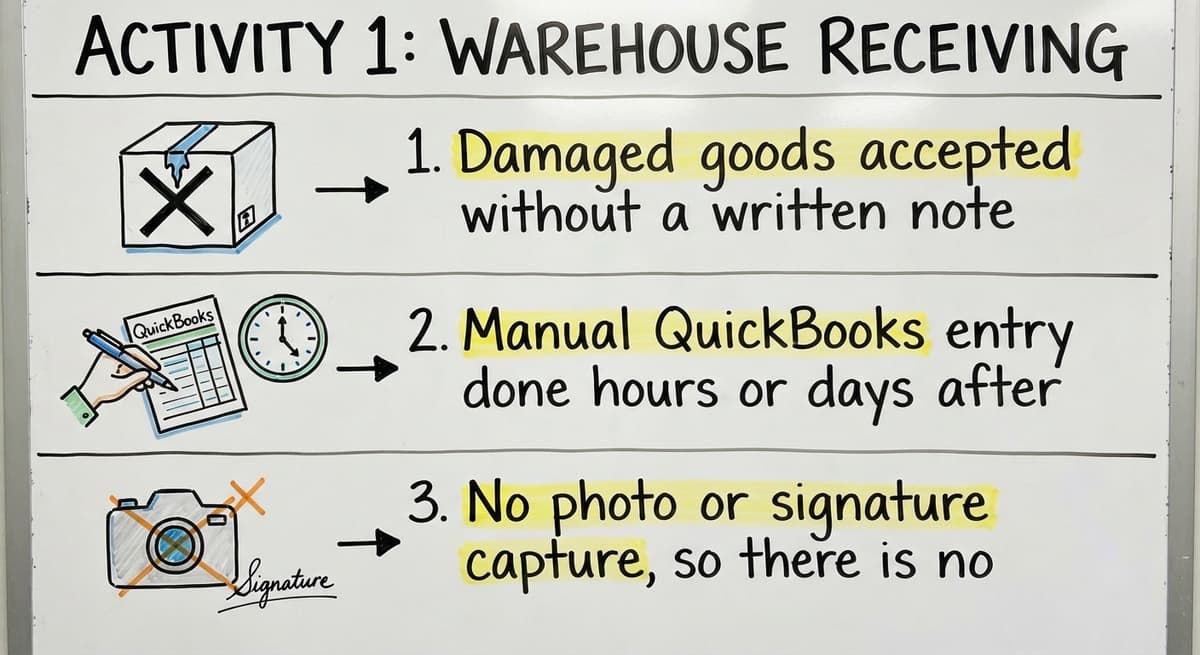
- Damaged goods accepted without a written note, creating disputes with suppliers
- Manual accounting entry done hours or days after unloading, leaving timing gaps
- No photo or signature capture, so there is no proof of condition at arrival
A simple scan-in process or a structured receiving log closes most of these gaps without requiring new software. The goal is one record created at the dock, not reconstructed later from memory.

Activity 2: Putaway
Putaway is moving received goods from the dock to their storage location. It sounds straightforward, but a warehouse without a location system turns every pick into a search.
A good putaway process assigns a specific bin, shelf, or zone to every SKU before the stock is moved. Staff scan or record the location at the time of putaway, not after. That single step means anyone can find any item without asking around.
Even a basic location code system, something as simple as Row A, Shelf 3, Bin 2, cuts pick time significantly. The benefit compounds over time as the product mix grows and new staff join without institutional memory of where things live.
Activity 3: Storage and Inventory Management
Storage is the ongoing work of keeping inventory accurate and organized while it sits in the warehouse. Inventory management is where most small operations struggle most, because stock moves faster than records get updated.
This activity includes:
- Cycle counts on rotating sections of the warehouse
- Stock checks before committing to large orders
- Maintaining location integrity when items are moved or consolidated
- Logging returns, adjustments, and internal transfers
Accounting software tracks purchases and sales well. It does not track bin locations or real-time stock movement. That gap is why a warehouse can show positive inventory in the accounting system while a picker stands in front of an empty shelf.
Is the comparison easier when one option is built for you?
Yes. Off-the-shelf means fitting your process to the software, and custom is the other way round. The first look costs nothing.
Book a callWhy Is Inventory Accuracy Hard to Maintain?
Returns and adjustments go unlogged because the process for recording them is slower than the physical act of putting the item back on the shelf. Spreadsheets and email threads create competing versions of the truth, with each department trusting a different number.
Warehouse inventory management software for small operations solves this by keeping one live record that updates when stock moves, not when someone remembers to enter it. The record does not need to be complex. It needs to be current and shared.
Activity 4: Picking and Packing
Picking is selecting items from storage to fill an order. Packing is preparing those items for shipment with the right packaging and documentation. Together, these two steps are where most customer-facing errors occur.
Picking errors are the most common source of customer complaints in small warehouses, and most of them are preventable.
Common picking methods:
| Method | Best For | Risk |
|---|---|---|
| Single order pick | Low volume, varied SKUs | Slow at scale |
| Batch picking | Multiple orders with shared SKUs | Requires sorting step |
| Zone picking | Large warehouses with defined areas | Needs coordination between zones |
How Do Pick Errors Happen and How Can They Be Reduced?
Picking from memory or handwritten lists is the leading cause of wrong items and wrong quantities. Similar SKUs stored near each other increase the risk of mix-ups, especially for new staff.
A digital pick list tied to live inventory reduces errors without requiring a full warehouse management system. Displaying the correct bin location on a screen or a printed sheet removes the guesswork.
Replacing spreadsheets and manual processes in a warehouse at the picking stage alone can cut error rates noticeably.
What does it look like running on your own process?
The first thing you see is it running on your own process, at no build cost. The subscription starts once it is live and doing the job, not before.
Book a callHow Does Shipping Connect Back to Inventory Management?
Shipping is the final step where orders leave the warehouse. It covers carrier selection, label generation, documentation, and recording the outbound movement. Confirming shipment in the inventory system is what closes the loop and keeps stock counts accurate.
A shipment that leaves without being recorded in the system creates a ghost unit. The inventory count stays high, someone commits that stock to another order, and the problem surfaces when the second order cannot be filled.
Shipping errors not caught before the truck leaves are expensive. Reprinting labels, arranging returns, and issuing credits all cost more than a thirty-second confirmation step at dispatch.
Custom software that works alongside the accounting system can handle this confirmation automatically, updating inventory the moment a shipment is recorded rather than waiting for an end-of-day reconciliation.

How Do the 5 Activities Connect to Each Other?
The five main activities in a warehouse are a sequence, not a set of independent tasks. Receiving feeds putaway. Putaway feeds storage. Storage feeds picking. Picking feeds shipping. A mistake at any point becomes someone else's problem downstream.
Most warehouse problems are not isolated events. They are upstream errors caught late. A short shipment missed at receiving shows up as a stockout at picking.
A putaway logged to the wrong bin causes a search at pick time. A shipment not confirmed leaves inventory inflated.
Fixing the handoff between activities is more valuable than optimizing any single step. That means the receiving record flows into storage, the storage record drives the pick list, and the pick list connects to the shipping confirmation.
Managing All Five Activities Without a Big ERP
Small and mid-size warehouses do not need a full enterprise resource planning system to manage these five activities well. The goal is replacing the manual parts without disrupting what already works in the accounting software.
Inventory accuracy for wholesale distributors and fulfilment centres comes from one accurate record shared across receiving, storage, picking, and shipping, not from the most expensive software on the market.
Custom workflow implementation built around existing operations handles all five activities at small scale. The system fits the warehouse rather than forcing the warehouse to fit the system. Local implementation support means the setup reflects real workflows, not a generic template.
Next Steps for Your Warehouse Operation
Start by identifying which of the five activities causes the most errors or delays right now. That is the one to fix first, because it is costing the most in time or customer complaints.
A short operational review can show exactly where a connected system would help most. Custom warehouse software built for your size and your workflow is available without a long or expensive rollout. Reach out to discuss what your operation needs before committing to anything.
Frequently asked questions
Frequently asked questions
What are the 5 functions of a warehouse?
The five functions of a warehouse are receiving, putaway, storage and inventory management, picking and packing, and shipping. Each function feeds the next in sequence.
A breakdown in any one of them creates problems that show up later in the process, at the worst possible time.
What are the 5 warehouse processes?
The five warehouse processes are: (1) receiving incoming goods, (2) putaway to assigned storage locations, (3) storage and ongoing inventory management, (4) picking and packing orders, and (5) shipping and dispatch. These processes apply to warehouses of every size, from a single-room operation to a large fulfilment centre.
What are the 5 key skills of a warehouse worker?
The five key skills for warehouse workers are attention to detail during receiving and picking, physical stamina for repetitive tasks, familiarity with inventory systems and scan tools, ability to follow location and labelling procedures accurately, and clear communication when stock discrepancies or damage are found. No single skill matters more than consistency across all five.
What are the five S's in a warehouse?
The five S's are Sort, Set in order, Shine, Standardize, and Sustain. They come from a Japanese workplace organization method and are used in warehouses to reduce clutter, improve location discipline, and maintain clean working areas.
The five S's support the five main warehouse activities but are a separate framework focused on physical organization rather than process flow.
What happens during the receiving process in a warehouse?
Receiving covers unloading the delivery, counting units against the purchase order, inspecting for damage, and recording the receipt in the inventory system.
The record created at receiving is what every downstream activity relies on. Errors here, such as unrecorded short shipments or accepted damaged goods, create disputes and stockouts that surface weeks later.
Can a small warehouse manage all five activities without a big ERP system?
Yes. Small warehouses do not need a full ERP to manage receiving, putaway, storage, picking, and shipping accurately. What they need is one connected record that updates in real time and works alongside the accounting tools already in place.
Custom workflow software built for small operations handles all five activities without the cost or complexity of an enterprise system.
What causes picking errors and how can they be reduced?
Picking errors most often come from handwritten pick lists, picking from memory, and similar SKUs stored close together.
A digital pick list tied to live inventory and displaying the correct bin location removes most of the guesswork. Separating similar SKUs and using clear bin labelling also reduces mix-ups without requiring a full warehouse management system.
How do warehouses keep inventory accurate between receipts and shipments?
Accurate inventory between receipts and shipments depends on logging every movement, not just purchases and sales. That means recording putaway locations, cycle counting regularly, logging returns and adjustments as they happen, and confirming shipments in the system before the truck leaves.
A single live record shared across all five activities is more reliable than separate spreadsheets updated after the fact.
What is the difference between put-away and storage?
Put-away is the movement: taking received goods from the dock to an assigned location and recording where they went. Storage is the state that follows: keeping stock findable, counted and in the right conditions until it is picked.
A warehouse can do put-away well and storage badly if locations drift, so both need their own rules and their own counts.
How can warehouse picking be made more efficient?
Give pickers a digital pick list that sorts the route through the building, keep the fastest-moving items nearest the packing area, use scanning to confirm each pick instead of a visual check, batch small orders so one walk serves several, and keep bin locations accurate so nobody searches.
Most picking time is walking and searching, not lifting; cutting those is where the gains are.
What is the warehouse process flow?
Goods arrive and are received against the purchase order; they are put away to an assigned location and recorded; they sit in storage and are cycle counted; an order triggers a pick, the picked items are packed and labelled, and the shipment is confirmed so inventory drops and the customer is notified.
Returns re-enter the flow at receiving. Every step should update one shared record.
What equipment is commonly used in warehouses?
Pallet jacks and forklifts for moving freight, racking and shelving for storage, barcode scanners or phones with a scanning app, label printers, packing stations with scales, and a computer or tablet at receiving and shipping.
For a small warehouse the equipment that changes accuracy most is the scanner, because it turns each movement into a recorded event instead of a memory.
What is in a free first look?
A 30 minute call, your operation mapped, and a clear picture of what we would build. No obligation and nothing to install.
Book a callRelated guides
The rest of this guide, for the parts of the job this page does not cover.
- What Are the Top 5 Warehouse Management Systems?
- What Are the 7s Rules in a Warehouse?
- What is Picking and Packing in a Warehouse?
- What Does Receiving Mean in a Warehouse?
- What is the Main Purpose of Inventory Management
- What is the Most Important Part of Warehouse Organization
- What Are the Benefits of Warehouse Management System
- What is the Point of Warehouse Management System
- What is Asn in Warehouse Management System
- What is a Warehouse Management System
- What is the Best Warehouse Inventory Management System?
- What is a Warehouse Management System Used For
- What is the Difference Between Warehousing and Inventory Management
- What is the Most Popular Warehouse Management System?
- What Are the 7 Types of Warehouses?
- What is Warehousing Operations
- What is the Purpose of a Warehouse Management System
- What is a Warehouse Management System Pdf
- What is Warehouse Operation
- What is B Type of Inventory in Warehouse Management
- What Does Lpn Stand for in Warehousing
- What is a Simple Warehouse Management System?
- What is Warehousing and Inventory Management
- What is a Warehouse Management System Example