


What Are The Most Popular Wms?
The most popular WMS platforms are cloud-based subscription tools, ERP-embedded warehouse modules, and custom-built systems. The right one depends on your operation size, your existing software, and how standard your workflow is. A warehouse management system (WMS) that fits how you already work will outperform a feature-rich platform that forces you to change everything.
Reviewed: October 2026
Book a callWhat Is a WMS and What Does It Do?
A warehouse management system (WMS) is software that tracks inventory, orders, and movement inside a warehouse. It tells you what you have, where it sits, and where it needs to go next. A good WMS replaces the guesswork that comes with paper pick sheets and manual counts. It connects receiving, storage, picking, packing, and shipping into one visible flow. That visibility is what makes a warehouse run faster and with fewer errors.
We build it for your operation, and the first look is free
If you would rather not compare products, describe how your operation already works and we build the system around it.
No build cost. You see it running on your own process first, and the monthly subscription starts only once it is live.
Book a callWhy So Many Warehouses Still Run on Spreadsheets
Spreadsheets, printed pick sheets, and email chains are a natural starting point. They cost nothing and your team already knows how to use them. The problem shows up when volume grows. One person enters a receipt. Another pulls from the same stock without seeing it. A third emails a correction. By end of day, the count is wrong and no one is sure whose number is right.
The IRS makes the stakes clear. According to IRS Publication 538, "To figure taxable income, you must value your inventory at the beginning and end of each tax year." That is a legal obligation, not a preference. When your records are split across 3 spreadsheets and a shared inbox, meeting that obligation costs real time. That is the moment most operations start looking for inventory management software built for a warehouse.
What Types of WMS Are Most Commonly Used?
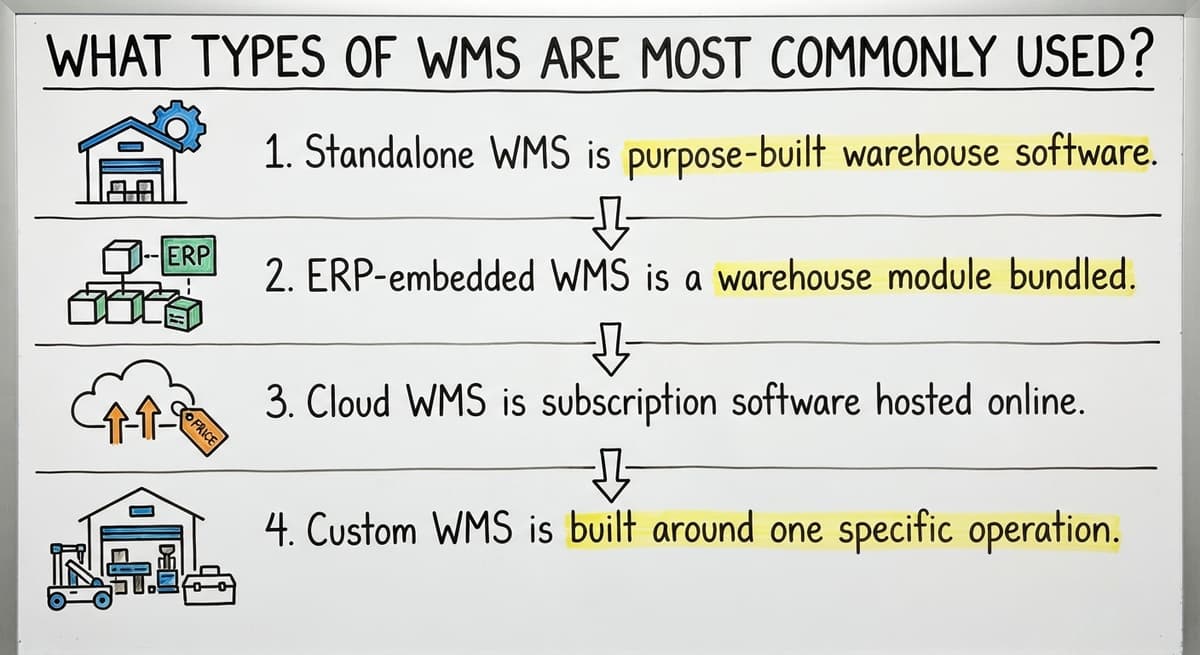
Four types of WMS cover most of the market, and choosing between them comes down to how your operation is structured.
- Standalone WMS is purpose-built warehouse software used on its own. It handles inventory tracking, pick pack ship, and fulfillment without touching your accounting system.
- ERP-embedded WMS is a warehouse module bundled inside a large enterprise platform. It works well when the whole business runs inside that same system.
- Cloud WMS is subscription software hosted online. It has a low upfront cost and deploys fast, which makes it popular with small warehouse software buyers.
- Custom WMS is built around one specific operation. It takes longer to build but fits unusual workflows that off-the-shelf tools cannot handle.
None of these is the best type in every case. The right type is the one that matches your current size, your existing tools, and the complexity of your workflow.
What Makes a WMS Popular With Small and Mid-Sized Operations
Small and mid-sized warehouses do not need the most powerful system. They need the most usable one. Ease of adoption is the first filter. If staff need weeks of classroom training, the system will be resisted from day one.
Fit matters more than feature count. A system that works alongside your accounting software without replacing it keeps your accounting stable while improving the warehouse side. Pricing built for 5 to 100 staff rather than enterprise contracts makes the decision easier to justify. Accessible support, meaning a real person to call rather than a ticket queue, keeps the system running when something goes wrong. Operations that check all four of those boxes tend to stick with the tool they chose.
The comparison is easier when one option is built for you
Off-the-shelf means fitting your process to the software. We do it the other way round, and the first look costs nothing.
Book a callCore Features Found in Popular WMS Platforms
Popular WMS tools share a common feature set, though the depth of each feature varies widely. Before comparing platforms, know which features your operation actually uses every day.
The features that appear in nearly every well-regarded system include:
- Real-time inventory tracking across multiple locations and bin levels, so stock counts are accurate without a manual cycle count
- Receiving and put-away workflows that log every inbound shipment and direct it to the right location
- Pick, pack, and ship management that guides staff through each order without paper lists
- Order fulfillment and backorder visibility so your team knows what is promised and what is delayed
- Reporting and stock-level alerts that flag low inventory before it causes a missed shipment
Why Feature Count Is the Wrong Way to Compare WMS Tools
A platform with all five of these working reliably will outperform one with twenty features that are hard to use. Fit matters more than feature count, and that principle separates the WMS tools that get adopted from the ones that get abandoned.

How Does a WMS Work With Your Accounting Software?
Many small distributors and warehouses rely on small-business accounting software for accounting, and they should keep doing so. A good WMS syncs inventory and order data to your accounting software without requiring double-entry. The warehouse system handles receiving, picking, and fulfillment. Your accounting software handles invoicing, payments, and reporting. Each tool does what it does well.
The goal of accounting software integration is a clean handoff. When an order ships, the WMS updates inventory and passes the transaction to your accounting software automatically. No one re-keys the numbers. For more on setting this up cleanly, see [how to connect warehouse software to your accounting platform](/how-to-connect-warehouse-software-to-your accounting software).
Red Flags When Evaluating WMS and Accounting Software Compatibility
Avoid any system that needs a full accounting migration just to unlock warehouse features. That is a sign the tool was built for a different kind of buyer. If a vendor cannot explain how their system works alongside your accounting software in plain language, that is a red flag worth taking seriously.
Cloud WMS vs. Custom WMS: What Is the Difference?
Cloud WMS and custom WMS serve different kinds of operations, and picking the wrong one creates problems that compound over time.
Cloud WMS deploys fast, often in days rather than months. It runs on a monthly subscription with no large upfront cost. The tradeoff is that workflows are largely fixed. You adapt your process to the software, not the other way around.
Custom WMS is built around your exact process. It takes longer to build and costs more to start. The payoff is that it handles non-standard receiving rules, special lot tracking, and customer-specific fulfillment requirements that cloud tools cannot accommodate.
See it running on your own process first
No build cost. The subscription starts once it is live and doing the job, not before.
Book a call
Which WMS Type Fits Your Operation?
Operations with straightforward, standard workflows often do well with a cloud tool. Operations with unusual rules or multiple exceptions tend to hit the ceiling of cloud tools quickly and spend more time on workarounds than on actual work. For a deeper look at this decision, see custom warehouse software for small operations. The right choice is the one that matches how your operation actually runs, not the one with the fastest demo.
Red Flags to Watch for When Evaluating a WMS
Not every WMS that markets itself to small warehouses is actually built for them. Watch for these warning signs during any evaluation:
- Long rollout timelines measured in months rather than weeks suggest the system was not designed for your scale
- Enterprise pricing that does not shrink for 5 to 100 staff operations means you will pay for capacity you never use
- Mandatory accounting migration is a sign the vendor wants to own your whole stack, not just the warehouse side
- No dedicated contact means support is a ticket queue, and when something breaks on a busy ship day, a queue is not good enough
- Forced process changes where the software's assumptions override your actual workflow signal a poor fit from the start
A WMS that raises 2 or more of these flags during a demo is worth walking away from, regardless of the feature list.
What Questions Should You Ask Before Choosing a WMS?
The right questions surface problems before you sign a contract, not after. Start with the ones that matter most to your specific operation.
- Will this work with our current accounting software setup, or does it need changes to how we handle accounting?
- How long before our team is actually using it day to day, not just trained on it?
- Can it handle our specific product types, lot sizes, or customer fulfillment rules?
- Who do we call when something breaks, and is that person available during our operating hours?
- Does the price make sense for an operation our size, both now and if we grow by 30%?
These questions do not have universal answers. They have answers that are right for your operation. A vendor who deflects or gives vague responses to any of them is telling you something important about what working with them will feel like.
What Wholesale Distributors Need That Generic WMS Tools Often Miss
Wholesale distributors have needs that a standard warehouse tool was not built to handle. Generic small warehouse software assumes a single price per SKU, one ship-from location, and a predictable inbound schedule. Distributors rarely work that way.

The gaps that show up most often include:
- Customer-specific pricing that varies by account, volume tier, or contract terms
- Multi-location inventory where the same SKU lives in 2 or more warehouses and orders can pull from either
- Vendor lead times that affect what can be promised and when
- Fast pick-and-pack workflows built for fulfillment center volume, not just inventory counts
Off-the-shelf tools are built for the average warehouse. When your operation is not average, the workarounds pile up fast. A system built around how you actually distribute avoids that accumulation entirely. For more on this, see inventory management software for wholesale distributors and order fulfillment software for distributors.
Not sure this is the right shape for your operation
Describe how the work runs today. We map it on a call and show you what it would look like built around that, before you spend anything.
Book a callWhen a Custom WMS Makes More Sense Than an Off-the-Shelf Platform
Custom warehouse software is not the right answer for every operation. But for some, it is the only answer that actually works.
Consider a custom WMS when:
- Every platform you evaluate needs major compromises to your core process, not minor ones
- You have already tried 1 or 2 WMS tools and outgrown or rejected them within a year
- The manual workarounds your team runs today cost more in staff time than a build would cost to complete
How to Calculate Whether Custom WMS Pays for Itself
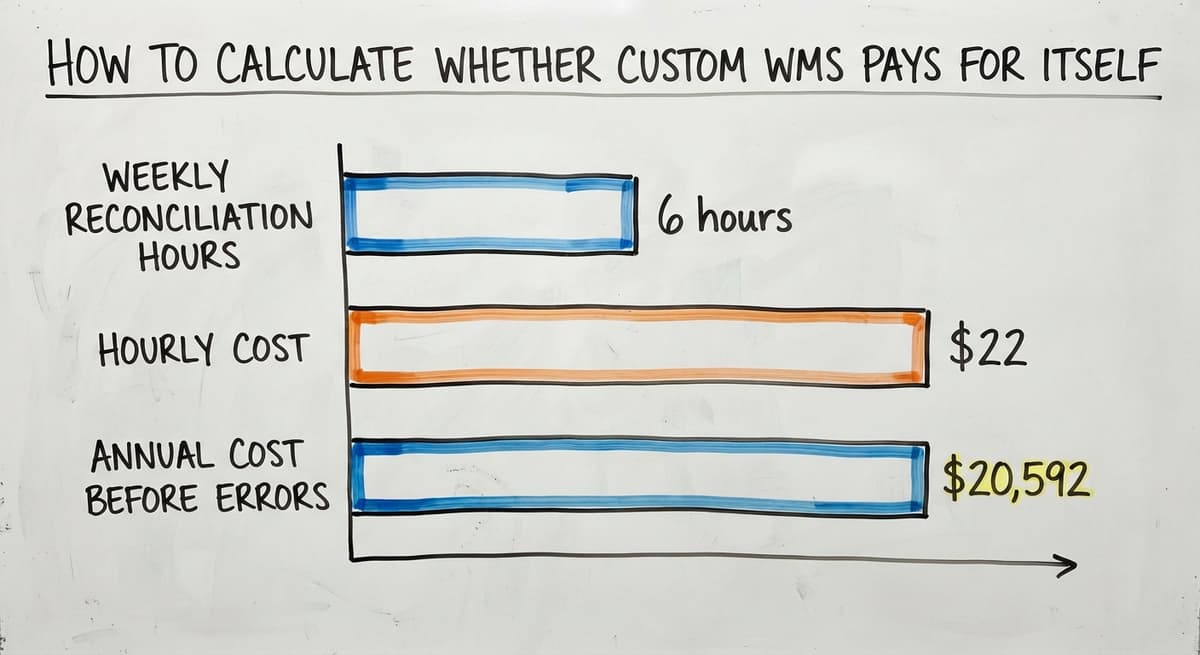
Three people spending 6 hours a week on manual matching at $22 an hour adds up to $20,592 a year before you count the errors those hours produce. If you want the software to match the business rather than the reverse, that math matters. The NIST Manufacturing Extension Partnership recommends aligning systems to actual supply chain processes rather than forcing process change to fit a tool. That guidance applies directly here. If the tool does not fit, the tool is the problem.
How to Get Started With the Right WMS for Your Operation
Before you look at a single demo, map the biggest pain points in your current warehouse workflow. Write them down. Where do errors happen? Where does your team lose the most time? Where does the customer feel the friction?
Next, decide which parts of your accounting software you want to keep and which parts you want to replace. Most operations want to keep all of it and just add warehouse ability on top. That decision shapes every conversation with a vendor.
How to Find a WMS Partner Who Works at Your Scale
Talk to a team that works at your scale. A partner who has built systems for operations like yours will ask different questions than a vendor running enterprise demos. They will understand replacing Excel and spreadsheets in warehouse operations without treating it as a simple migration. If you are ready to talk through what your operation actually needs, start a conversation with our team. We build around your workflow, not the other way around.
Frequently asked questions
Which WMS does a major global parcel and freight carrier use?
A major global parcel and freight carrier operates at a scale that needs a custom or enterprise-grade warehouse management system built specifically for their network. The name of their internal platform is not publicly disclosed in a way that would be useful for a small or mid-sized operation to reference. What matters for your decision is not what a global logistics company uses. It is what fits your volume, your team size, and your existing tools.
Which inventory management system is best?
There is no single best inventory management system. The right system depends on your order volume, how many locations you manage, whether you need accounting software integration, and how standard your fulfillment process is. A small distributor with simple workflows may do well with a cloud tool. An operation with non-standard rules or multiple customer pricing tiers will likely need something built closer to their actual process.
What are the 7 types of warehouses?
Warehouses are generally grouped by function: private warehouses owned by a single company, public warehouses that rent space to multiple users, bonded warehouses that hold imported goods under customs control, climate-controlled warehouses for temperature-sensitive goods, distribution centers focused on fast throughput rather than long-term storage, fulfillment centers that pick and ship individual orders, and automated warehouses that use robotics and conveyor systems. The WMS you need depends heavily on which type you operate.
Is a large enterprise resource planning platform also a WMS?
A large enterprise resource planning platform is an ERP, which stands for enterprise resource planning. It is a large business management platform that covers finance, HR, procurement, and operations. Some ERPs include a warehouse management module inside their broader system. That makes them an ERP with WMS ability, not a standalone WMS. For most small and mid-sized warehouses, a full ERP is far more than is needed and comes with a cost and complexity that does not match the scale of the operation.
How does a WMS connect to small-business accounting software?
A WMS connects to your accounting software by syncing inventory levels and order transactions automatically after each shipment or receipt. The warehouse system handles the physical side. Your accounting software handles invoicing and financial reporting. A clean integration means no one re-keys data between the two systems. Look for a WMS that treats your accounting software as a partner tool, not something to replace.
What is the difference between a cloud WMS and a custom WMS?
A cloud WMS is subscription software that deploys quickly and works well for standard warehouse workflows. A custom WMS is built around your specific process and handles rules that off-the-shelf tools cannot. Cloud tools cost less to start but may need you to adapt your workflow. Custom tools take longer to build but fit operations with non-standard fulfillment rules, special lot tracking, or customer-specific pricing.
When does a small warehouse need a WMS instead of spreadsheets?
A small warehouse needs a WMS when spreadsheet errors start causing missed shipments, when more than 1 person is updating the same inventory records, or when manual matching is taking more than a few hours a week. The IRS also needs accurate inventory valuation at the start and end of each tax year, which is difficult to guarantee with shared spreadsheets. If your team is working around the tools rather than with them, it is time to look at dedicated warehouse software.
What should a wholesale distributor look for in a WMS?
A wholesale distributor should look for a WMS that handles customer-specific pricing, multi-location inventory, and vendor lead time visibility. It should integrate with your accounting software without forcing an accounting migration. It should support fast pick-and-pack workflows rather than just inventory counts. And it should be priced and supported at a scale that matches a lean internal team, not an enterprise operation with a dedicated IT department.
Start with a free first look
A 30 minute call, your operation mapped, and a clear picture of what we would build. No obligation and nothing to install.
Book a callRelated guides
The rest of this guide, for the parts of the job this page does not cover.
- What is the Most Important Part of Warehouse Organization
- What is the Most Popular Warehouse Management System?
- Which Warehouse Management System Would a Jeweler Most Likely Use
- What is the Difference Between Aggregate and Item Inventory Management
- What is an Important Factor in Inventory Management
- What is Abc Classification in Inventory Management
- What is Inventory Management in Working Capital
- What is Inventory Management and Its Types
- What is the Main Purpose of Inventory Management
- What is Information Technology Inventory Management
- What is Risk Pooling in Inventory Management
- What is Inventory Listing
- What is Inventory Management Mary Kay
- What is Stock Taking in Inventory Management
- What is Bin Number in Inventory Management
- What is Inventory
- What is the Goal of Inventory Management Quizlet
- What is the Implication of Proper Inventory Management
- What is Omni-channel Inventory Management
- What is Inventory Management and Its Importance
- What is the Importance of Eoq in Inventory Management
- What Are the 5 Benefits of Inventory Management?
- What is the Importance of Quality Inventory Management
- What is Inventory Management Explain Techniques of Inventory Management