


What Is The Use Of Inventory Management System
An inventory management system is software that tracks what stock you have, where it sits, and how it moves. It gives your operation one accurate count at any moment. It replaces spreadsheets, printed pick sheets, and email chains. If your team is losing time reconciling stock or shipping orders from inventory that is already gone, this page explains what the system does and whether you need one.
Reviewed and updated: October 2026
Book a callWhat an Inventory Management System Actually Does
At its core, an inventory management system gives your business a single picture of stock across every location. When goods arrive, the system records them. When orders ship, it subtracts them. Nothing falls through because someone forgot to update a spreadsheet.
Manual methods like spreadsheets and printed pick sheets break down fast. A cell gets overwritten. A sheet is not saved. Two people edit different files. The system removes those failure points by keeping one record that everyone reads from.
The IRS is direct about why accurate counts matter beyond operations. IRS Publication 538 states: "To figure taxable income, you must value your inventory at the beginning and end of each tax year." Accurate stock data is a legal need, not just a convenience.
We build it for your operation, and the first look is free
If you would rather not compare products, describe how your operation already works and we build the system around it.
No build cost. You see it running on your own process first, and the monthly subscription starts only once it is live.
Book a callTracking Stock Levels and Reorder Points in Real Time
Real-time inventory means the system updates quantities the moment goods arrive, move, or ship. Your team does not wait for an end-of-day count to know what is available.
This matters most in a warehouse or fulfillment center where orders move fast. Without live counts, your staff oversells stock that is already gone. They discover a stockout only when a customer orders. Emergency reorders cost more and arrive late.
Reorder points set a floor for each SKU. When stock drops below that floor, the system fires a low-stock alert. Reorder quantities can be set per SKU based on lead times and how fast each item sells. You stop guessing and start restocking on schedule.
Barcode scanning is the engine behind accurate counts. As GS1 explains, "GS1 barcodes are the most widely used supply chain standards system in the world," and every scan-based count relies on those standards to tie a physical item to a digital record.
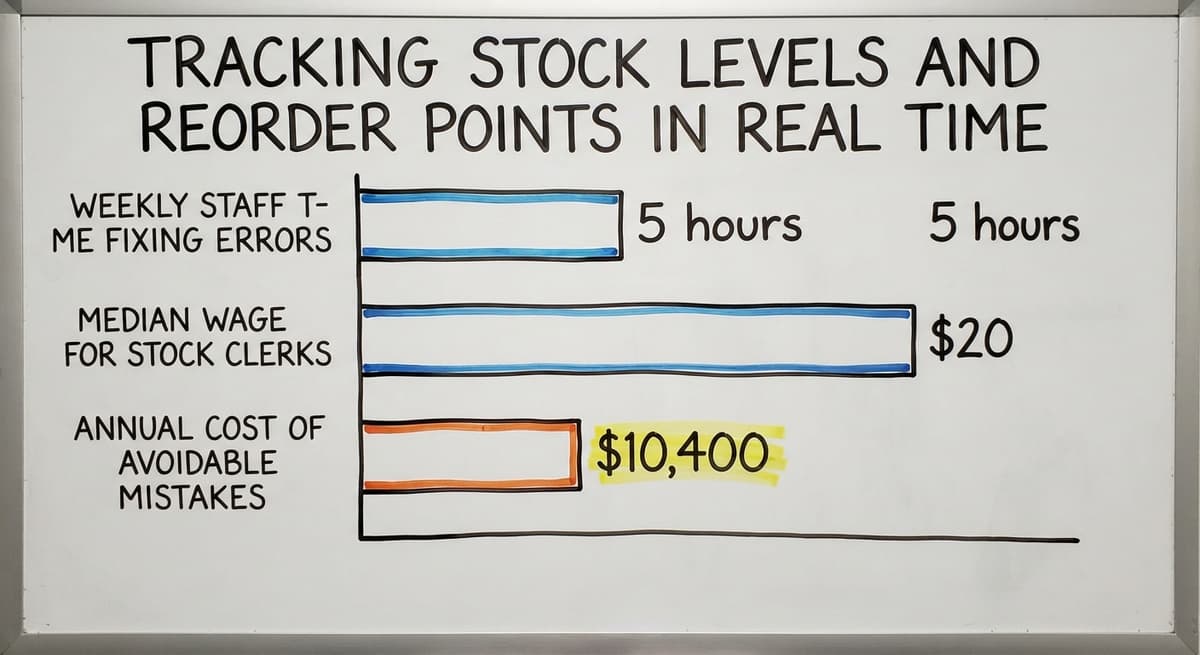
The cost of not having this is real. Take 2 warehouse staff spending 5 hours a week each fixing stock errors. At the current median wage for stock clerks of around $20 an hour, per BLS data, that is $10,400 a year spent on correcting avoidable mistakes.

How Does an Inventory Management System Handle Purchase Orders and Receiving?
Yes, and this is one of the places it saves the most time. The system records each buy order when it is created. When goods arrive, the receiving team scans or enters what came in. The system matches that count to the original order automatically.
Discrepancies between what was ordered and what arrived get flagged right away. No one has to cross-reference a paper receiving log against an entry made in their accounting software three days later.
This matters beyond your warehouse. The FTC's Mail, Internet, or Telephone Order Rule needs sellers to ship when promised or notify the customer. Accurate receiving data is what lets you make that promise with confidence.
Picking, Packing, and Fulfillment
Once stock is received, the system generates pick lists tied to real stock locations. A picker goes to the right bin, pulls the right quantity, and the system marks it moved.
Printed pick sheets go stale the moment they leave the printer. If another order ships the same item in the meantime, the picker finds an empty bin. Fulfillment accuracy drops, returns go up, and customers notice.
A live pick list pulls from current data every time. Fewer wrong picks mean fewer return labels and fewer calls to customer service.
The comparison is easier when one option is built for you
Off-the-shelf means fitting your process to the software. We do it the other way round, and the first look costs nothing.
Book a callInventory Visibility and Reporting Across Locations
Reporting shows which SKUs move fast, which sit, and which locations hold what. For a wholesale distributor running more than 1 warehouse or staging area, this is the difference between knowing your business and guessing at it.

In Excel, this data lives in separate files. Someone has to pull them together, reconcile the differences, and hope nothing changed while they were doing it. The result is always a little out of date.
An inventory management system holds all location data in one place. A manager can see, right now, that warehouse A has 40 units of a SKU and warehouse B has 3. They can move stock before a stockout happens rather than after.
The US Census Bureau's Monthly Wholesale Trade data tracks the inventories-to-sales ratio for wholesale firms nationally. Operations that keep that ratio tight tend to carry less dead stock and free up cash. Visibility is what makes that possible.

Can I Keep Using My Accounting Software If I Add an Inventory Management System?
Yes. An inventory management system does not replace your accounting software. It handles the working detail that accounting software was never built for: bin locations, pick lists, receiving discrepancies, and live stock counts. When a transaction is complete, the financial data passes across to your accounting software.
For small to mid-size operations, integrating accounting software with a warehouse management system is a practical path. You keep the accounting tool your team already knows. You add a layer that handles the warehouse work your accounting software cannot do well.
This is not a big ERP project. It does not need months of setup or a team of consultants. The right system fits the way your operation already runs and replaces only the manual parts that are causing pain.

Signs Your Operation Has Outgrown Manual Inventory Tracking
Some pain points show up before the problem becomes obvious. Watch for these:
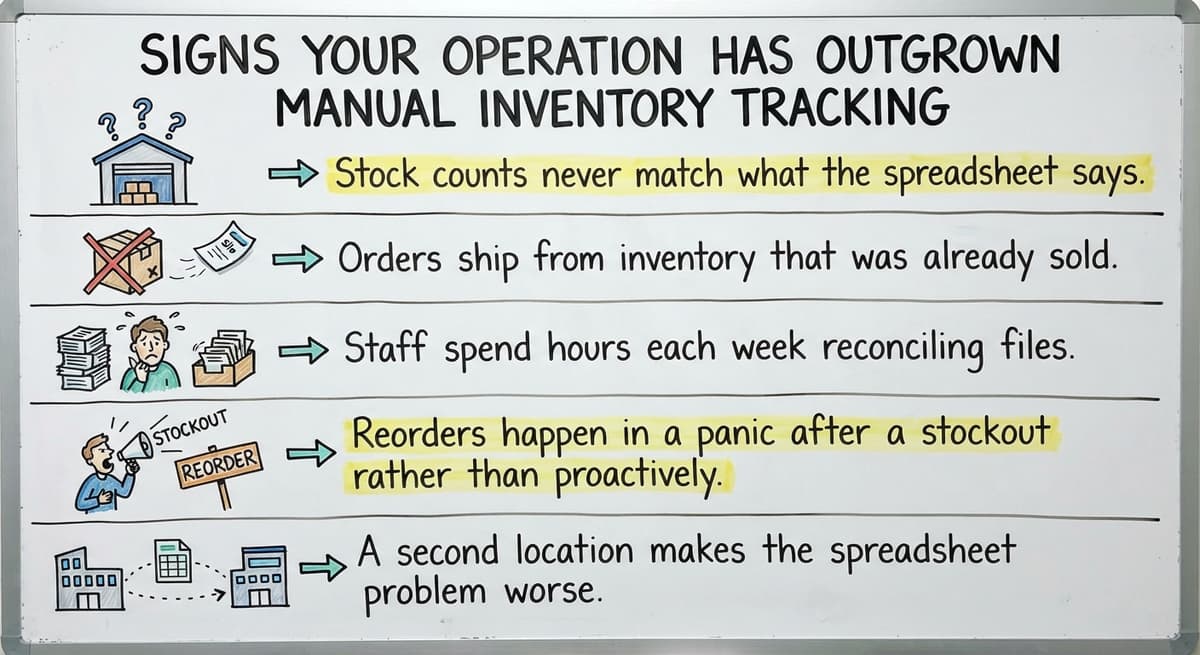
- Stock counts never match what the spreadsheet says, no matter how carefully the team updates it
- Orders ship from inventory that was already sold to another customer
- Staff spend hours each week reconciling files instead of moving product
- Reorders happen in a panic after a stockout rather than on a planned schedule
- A second location makes the spreadsheet problem twice as bad
Growth makes manual methods worse, not better. More SKUs, more orders, and more locations mean more chances for the spreadsheet to be wrong. The NIST Manufacturing Extension Partnership notes that supply chain visibility is a core need for growing operations, not a luxury reserved for large firms.
If any of these points sound familiar, the problem will not fix itself as volume increases.
What Should I Look for When Choosing an Inventory Management System?
Fit with your existing workflow matters more than feature count. The right system works the way your operation already runs. The wrong one makes you change how you work just to match the software.
Here is what to weigh:
- Workflow fit: Does the system match how your team receives, picks, and ships today, or does it demand a full process rebuild?
- Scale: A system built for a team of 5 to 100 people behaves differently from an enterprise platform. Make sure the complexity matches your size
- Accounting software compatibility: If you already use an accounting package, confirm the connection is clean and does not need manual exports
- Reporting: Can you see stock by location, by SKU, and by movement speed without building a custom report every time?
- Custom inventory software for wholesale distributors is worth considering when off-the-shelf tools force too many compromises on how your operation works
The goal is custom working software built around your workflow, not a system you have to bend yourself to fit. If a vendor cannot explain how their system handles your specific receiving or picking process, that is a signal worth taking seriously.
Frequently asked questions
What is the purpose of an inventory management system?
An inventory management system tracks what stock you have, where it is, and how it moves. Its purpose is to give your operation one accurate count at all times so you can fulfill orders correctly, avoid stockouts, and meet the legal requirement to value inventory at tax time.
What are the top 5 inventory management software?
There is no single right answer. The best fit depends on your operation size, existing tools, and how your team works. Options range from spreadsheets and basic inventory apps to cloud platforms and custom-built systems. A small distributor running basic accounting software needs different features than a large retailer. Evaluate on workflow fit, compatibility with your accounting package, and whether the system scales to your team size before comparing feature lists.
What are the four main types of inventory systems?
The four main types are: periodic systems, where counts happen on a set schedule; perpetual systems, where every transaction updates the count in real time; barcode-based systems, which use scanning to drive perpetual counts; and batch or lot tracking systems, which follow groups of goods through the supply chain. Most small to mid-size warehouses benefit most from a perpetual, scan-based system.
What are the 5 steps to effective inventory systems?
Five steps that apply to most operations: 1. Audit your current stock and assign each SKU a clear location. 2. Set reorder points for each item based on lead time and sales pace. 3. Connect receiving to the system so every arrival is recorded on arrival. 4. Generate pick lists from live data, not printed sheets. 5. Review reports regularly to spot slow-moving stock and adjust reorder quantities before cash is tied up.
How does a system know when to reorder stock?
You set a reorder point for each SKU. That is the quantity at which the system fires a low-stock alert. When stock drops to or below that number, the alert goes out. Reorder quantities can be set per SKU based on how long your supplier takes to deliver and how fast that item sells.
Can I keep using my accounting software if I add an inventory management system?
Yes. An inventory management system handles the working work: bin locations, pick lists, receiving, and live counts. When a transaction closes, the financial data passes to your accounting software. You keep the accounting tool your team already knows and add warehouse ability without replacing anything that is working.
How do I know if my operation needs an inventory management system?
Clear signals include stock counts that never match your records, orders shipped from inventory already sold to another customer, and staff spending hours each week reconciling spreadsheets. If any of those sound familiar, and your volume is growing, manual methods will get harder before they get easier.
Does an inventory management system work for a small warehouse or distributor, not just a large enterprise?
Yes. A system built for a team of 5 to 100 people is a different product from an enterprise platform. It does not need months of setup or a consultant team. The right system fits your current workflow, connects to your accounting software, and replaces only the manual steps that are causing the most pain.
Start with a free first look
A 30 minute call, your operation mapped, and a clear picture of what we would build. No obligation and nothing to install.
Book a callRelated guides
The rest of this guide, for the parts of the job this page does not cover.
Guides
Common questions
- What is Kanban System of Inventory Management
- What is Online Inventory Management System
- What is Sales and Inventory Management System
- What is Rol in Inventory Management System
- What is Inventory Management System Project
- What Warehouse Management System Does Amazon Use
- Which Warehouse Management System Would a Jeweler Most Likely Use
- What is the Difference Between Aggregate and Item Inventory Management
- What is Jit Inventory Management
- What is the Definition of Inventory Management
- What is an Important Factor in Inventory Management
- What is Abc Classification in Inventory Management
- What is Inventory Management in Working Capital
- What is Poor Inventory Management
- What is Inventory Management and Its Types
- What is the Main Purpose of Inventory Management
- What is Inventory Management in Pharmacy
- What is Effective Inventory Management
- What is Information Technology Inventory Management
- What is Inventory Management in Tally
- What is Risk Pooling in Inventory Management
- What is Inventory Management Mary Kay