


What Is Online Inventory Management System
An online inventory management system is software that tracks your stock in real time, from any device with internet access. It records every item that arrives, moves, or ships. Staff see the same live counts at the same moment. It replaces spreadsheets, printed pick lists, and emailed updates with 1 shared source of truth. Reviewed and updated: October 2026.
Book a callWhat Is an Online Inventory Management System?
An online inventory management system is software that shows you exactly what you have in stock, where it sits, and how it moves, updated live as each transaction happens. You do not need to walk the floor or call a coworker to get a current count. Any staff member with internet access sees the same numbers at the same time. It is the working backbone for any warehouse or distribution business that has outgrown paper and spreadsheets.
Why "Online" Matters
The word "online" means the data lives in the cloud, not on a single desktop. A manager in the office, a picker on the floor with a tablet, and a buyer placing a replenishment order all work from the same live record. No one overwrites anyone else. No version sits on a USB drive that nobody updated.
We build it for your operation, and the first look is free
If you would rather not compare products, describe how your operation already works and we build the system around it.
No build cost. You see it running on your own process first, and the monthly subscription starts only once it is live.
Book a callHow an Online Inventory System Works Day to Day
Inventory tracking is not abstract. Here is what the system actually does during a normal shift.
When a shipment arrives, staff scan each item. The system adds those units to the count at once, logs the time, and records the user who received them. When a picker pulls an item for an order, the count drops by that quantity in the same instant. Every move, receiving, picking, transferring between bin locations, adjusting for damage, processing a return, gets a time stamp and a user ID attached to it.
GS1, the global standards body behind barcode numbering, notes that barcodes "enable the capture of data at the point of transaction," which is exactly what makes scan-based receiving accurate rather than estimated.
What the System Does When Stock Gets Low
When a SKU falls below its reorder point, the system alerts the right person without anyone checking a spreadsheet first. Packing lists, receiving logs, and stock reports generate from the transaction record, no manual entry required.
Is an Inventory System Really Different from a Spreadsheet?
Yes, and the gap is wider than most people expect. A spreadsheet is a snapshot of what someone typed at a specific moment. An online inventory management system updates the moment a transaction happens.
With a spreadsheet, 2 staff members editing the same file at the same time will overwrite each other's work. That does not happen in a live system. Every user works on the same record simultaneously, and the system sorts out the order of events automatically.
Why the Audit Trail Is the Biggest Practical Difference
The audit trail is the biggest practical difference. Every change in a live system carries the name of who made it and the exact time. A spreadsheet has none of that. When a count is wrong, there is no way to trace it back. That missing trail is where most receiving errors and fulfillment mistakes hide.
The IRS is direct on why counts matter: IRS Publication 538 states, "To figure taxable income, you must value your inventory at the beginning and end of each tax year." A spreadsheet that drifts between manual updates is not a reliable basis for that valuation. A live system is.
The comparison is easier when one option is built for you
Off-the-shelf means fitting your process to the software. We do it the other way round, and the first look costs nothing.
Book a callThe Core Parts of an Online Inventory System
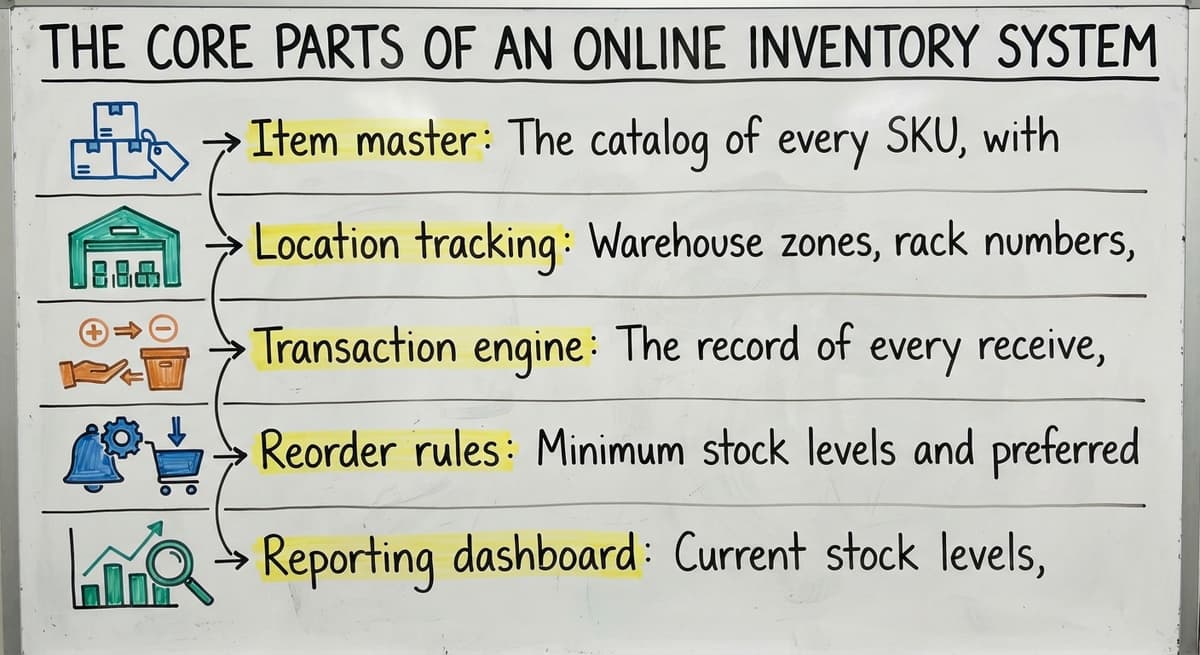
Most online inventory management systems share the same building blocks. The names vary by vendor, but the functions do not.
- Item master: The catalog of every SKU, with descriptions, units of measure, costs, and supplier details. This is the foundation everything else runs on.
- Location tracking: Warehouse zones, rack numbers, bin positions, or multiple sites. The system knows not just how many units exist but exactly where they are.
- Transaction engine: The record of every receive, pick, transfer, adjustment, and return. This is what makes the audit trail possible.
- Reorder rules: Minimum stock levels and preferred suppliers set per SKU. When a count hits the floor, the alert fires automatically.
- Reporting dashboard: Current stock levels, movement history, and variance reports, available without pulling data into a separate tool.
These 5 parts work together. Remove one and the others lose accuracy.

Who Uses Online Inventory Management Systems?
Inventory management for distributors is the most common use case, but the range of businesses that benefit is broader than that.
- Wholesale distributors managing hundreds or thousands of SKUs across customer orders need real-time stock visibility to promise accurate ship dates.
- Fulfillment centers processing inbound and outbound shipments daily cannot afford a count that is 4 hours old.
- Warehouses with picking and packing teams use the system to route work and confirm each pick before a box closes.
- Small and mid-size operations benefit as much as large ones. The system scales to the size of the business. A 5-person warehouse gains the same accuracy advantage as a 200-person distribution center.
The common thread is not company size. It is the need to know what is in stock right now, without asking someone to go look.
How It Connects to Your Accounting Software and Other Tools
Many small distributors and warehouses already run their books in a popular small-business accounting application. That is not a reason to delay moving to a real stock management system.
An online inventory management system does not have to replace your existing accounting software. The 2 tools handle different layers of the business. The inventory layer manages the warehouse floor: counts, locations, picks, and shipments. Your accounting software handles the financials: invoices, payments, and reporting.
How Accounting Software Inventory Integration Works in Practice
Accounting software inventory integration means data flows between the 2 systems automatically. When a shipment is received in the inventory system, the cost hits the books. When an order ships, the invoice generates. No one keys the same number twice.
This matters because the fear most operations managers have is a full platform migration that disrupts everything at once. A well-built integration avoids that. The accounting workflow stays exactly as it is. The warehouse floor gets the accuracy tools it needs. Both improve without either being replaced.

Signs Your Operation Is Ready for One
The following diagnostic questions are not a sales pitch. Answer them honestly about your own operation.
- Are your stock counts wrong more often than they are right?
- Do staff spend hours each week reconciling spreadsheets or emailing updates to each other?
- Have orders shipped with the wrong items or quantities because a pick list was out of date?
- Can you see current stock levels right now, without walking the floor or calling someone?
- Is growth limited because the manual process cannot keep pace with order volume?
See it running on your own process first
No build cost. The subscription starts once it is live and doing the job, not before.
Book a callThe Cost of Staying on a Manual Process
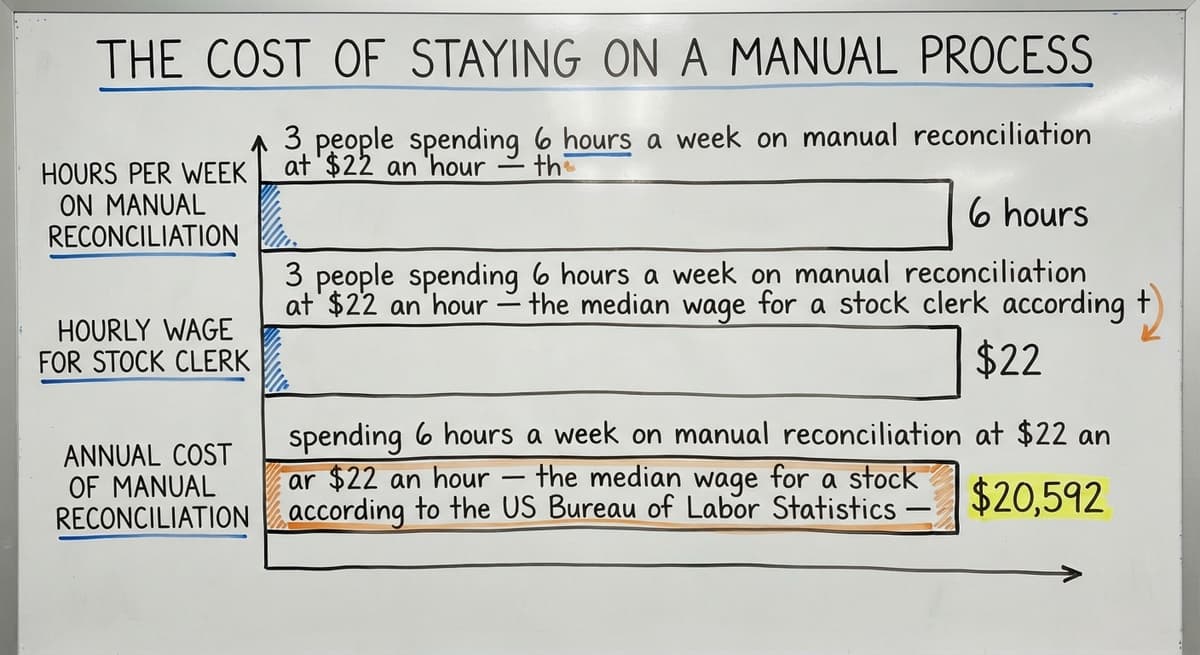
Consider the labor cost alone. 3 people spending 6 hours a week on manual matching at $22 an hour, the median wage for a stock clerk according to the US Bureau of Labor Statistics, adds up to $20,592 a year. That is before counting the cost of a mis-shipped order or a stockout that loses a customer.
The US Federal Trade Commission's Mail, Internet, or Telephone Order Merchandise Rule needs sellers to ship by the date they promise or notify the customer and offer a refund. Inaccurate stock counts make that promise hard to keep. Order fulfillment accuracy is not just an working goal, it is a legal baseline.
What to Look for When Choosing a System
Choosing warehouse inventory software is not about finding the most features. It is about finding the right fit for how your operation already runs.
Start with these criteria.
- The system should fit your existing workflow, not force you to redesign the operation to match the software.
- It should scale to your size. Warehouse management software for small and mid-size operations is a different build than an enterprise platform with hundreds of licensed users.
- It should connect cleanly to the accounting and ordering tools you already use, without a custom integration project every time something changes.
- Rollout should be short and scoped. A year-long rollout is not appropriate for a warehouse that needs to keep shipping while the system goes live.
- The team behind it should understand distribution and warehouse operations, not just software architecture.

Match the System to Your Specific Bottleneck
The NIST Manufacturing Extension Partnership recommends that businesses evaluate supply chain tools against their actual process requirements before selecting a platform. That principle applies directly here: the right system is the one that solves your specific bottleneck, not the one with the longest feature list.
How Disruptive Is It to Implement an Online Inventory Management System?
A well-scoped rollout does not shut down your operation. It is built around the workflow you already run.
The practical path is to start with the biggest pain point. For most warehouses, that is stock accuracy or order fulfillment errors. Solve that first. Expand to other functions once the team is confident in the core record.
Custom working software rollout process matters here. A generic platform asks your operation to bend to its logic. A custom-built system matches your exact process: your bin numbering, your receiving steps, your pick sequence. Staff do not have to relearn how the warehouse runs. They learn 1 new tool that handles the part that was breaking.
Moving Off Spreadsheets and Legacy Databases
Replacing Excel and Access databases with working software is a common starting point for businesses at this stage. The data already exists. The process already exists. The goal is to move that process into a system that updates live, logs every action, and does not break when 2 people use it at the same time.
Local rollout support means someone who understands your business can be on-site or on-call from day one, not a ticket queue in another time zone. If you are weighing whether this kind of system fits your operation, that conversation is the right place to start.
Frequently asked questions
What is the purpose of inventory management software?
Inventory management software exists to keep stock counts accurate in real time and to record every movement of goods through a warehouse or distribution operation. The practical purpose is fewer mis-ships, fewer stockouts, and a record the business can rely on for purchasing decisions and tax reporting.
Does cloud-based small-business accounting software offer inventory management?
Many small-business accounting applications include basic item tracking for businesses that sell products. They are not designed to manage warehouse locations, bin-level tracking, or high-volume receiving and picking workflows. Most warehouse and distribution operations find they need a dedicated inventory layer that connects to their accounting software rather than relying on the accounting application alone to run the floor.
Can an online inventory system work alongside your accounting software instead of replacing it?
Yes. The inventory system handles the warehouse floor: counts, locations, picks, and shipments. Your accounting software handles the financials. Data flows between the two so there is no double entry. This is the most common setup for small and mid-size distributors who do not want to migrate their accounting workflow.
What is the difference between an inventory system and a spreadsheet?
A spreadsheet is a static file that someone updates manually. An online inventory management system updates the moment a transaction happens. Multiple staff can work in it at the same time without overwriting each other. Every change carries a time stamp and a user ID. A spreadsheet has none of that, which means errors are hard to find and impossible to trace.
What is the best inventory management software for small businesses?
There is no single best option. The right choice depends on how your operation works, what tools you already use, and how much you need to customize the workflow. A small business with simple needs may start with a basic cloud app. One with a more complex pick-and-ship process, multiple locations, or specific integration requirements will get more value from a system built around its actual workflow. Evaluate on fit, not feature count.
What is a cloud-based inventory management application?
A cloud-based inventory application is a web-hosted tool for tracking stock, orders, and warehouse activity. This article does not review or compare specific products. If you are evaluating any inventory platform, the criteria that matter most are whether it fits your existing workflow, connects to your accounting tools, and can be implemented without a long disruption to your operation.
How do I know if my operation needs an inventory management system?
If your counts are wrong more often than they are right, if staff spend meaningful time reconciling records, or if orders ship with errors because pick lists are outdated, the manual process is already costing more than a system would. The labor cost alone is usually the clearest number to run: take the hours spent on manual matching each week, multiply by the hourly wage, and multiply by 52.
What are the core components of an online inventory management system?
Most systems are built from 5 parts: an item master that catalogs every SKU, location tracking that records where each unit sits, a transaction engine that logs every move, reorder rules that trigger alerts automatically, and a reporting dashboard that shows current stock without manual pulls.
Start with a free first look
A 30 minute call, your operation mapped, and a clear picture of what we would build. No obligation and nothing to install.
Book a callRelated guides
The rest of this guide, for the parts of the job this page does not cover.
Guides
Common questions
- What is Kanban System of Inventory Management
- What is Sales and Inventory Management System
- What is Inventory Management System Project
- What is the Difference Between Aggregate and Item Inventory Management
- What is Jit Inventory Management
- What is the Definition of Inventory Management
- What is an Important Factor in Inventory Management
- What is Abc Classification in Inventory Management
- What is Inventory Management in Working Capital
- What is Poor Inventory Management
- What is Inventory Management and Its Types
- What is the Main Purpose of Inventory Management
- What is Inventory Management in Pharmacy
- What is Effective Inventory Management
- What is Information Technology Inventory Management
- What is Risk Pooling in Inventory Management
- What is Inventory Management Mary Kay
- What is Stock Taking in Inventory Management
- What is Hospital Inventory Management
- What is Bin Number in Inventory Management
- What is the Scope of Inventory Management
- What is the Goal of Inventory Management Quizlet