


What Is Inventory Management System Project
An inventory management system project is a planned effort to build or configure software that tracks stock levels, orders, and product movement across an operation. It has a defined start, a set of phases, and a clear end point: the team is using the new system and the old manual process is gone. This page was last reviewed October 2026.
Book a callWhat Is an Inventory Management System Project?
An inventory management system project is not just buying software. It is a structured effort that moves a business from manual inventory tracking to a single reliable system. The project covers four things: defining what the operation needs, building or configuring the software to match, testing it with real data, and rolling it out to the team.
The goal is simple. Replace spreadsheets, printed sheets, and email threads with one place where stock levels are always current. Most operations that start this project have already hit a wall where their current tools cannot keep up with daily volume.
We build it for your operation, and the first look is free
If you would rather not compare products, describe how your operation already works and we build the system around it.
No build cost. You see it running on your own process first, and the monthly subscription starts only once it is live.
Book a callWhy Accurate Inventory Is a Legal Requirement
The IRS makes the stakes plain: "To figure taxable income, you must value your inventory at the beginning and end of each tax year," according to IRS Publication 538. That is not a preference. It is a legal requirement, and a manual process makes it harder to meet.
Why Businesses Start This Kind of Project
Most operations do not start an inventory management system project because they read an article about it. They start because something broke.
Common triggers include stock errors, overselling, slow fulfillment, and staff spending hours each week reconciling numbers across tools that do not talk to each other. Wholesale distributors and warehouse operations often hit a wall where an accounting package and a spreadsheet can no longer keep up with daily volume.
A formal project gives the effort structure so it gets finished instead of stalling after the first planning meeting. Without defined phases and a clear scope, these efforts tend to drift.
Industry Standards and Legal Obligations Behind the Decision
GS1, the global standards body behind barcode systems, notes that "barcodes are the most widely used automatic spotting technology in the world," which tells you how common scan-based counting has become even at small operations. If your team is still counting by hand, you are behind the standard practice in your industry.
The US Federal Trade Commission's Mail, Internet, or Telephone Order Merchandise Rule needs sellers to ship when they say they will. An inaccurate count is the fastest way to break that obligation.
What Phases Does an Inventory Management System Project Include?
An inventory management system project runs through 5 clear phases, and skipping any one of them is the most common reason projects fail.
Phase 1 is discovery. The team maps how inventory actually moves through the operation today. This means walking the warehouse floor, not guessing from a conference room.
Phase 2 is design. The team decides what the system needs to track, flag, and automate. This is where requirements get written down before any software is chosen.
Phase 3 is build or setup. The software is created or set up to match those requirements.
Why the Phase Sequence Cannot Be Skipped
Phase 4 is testing. The system runs against real data before anyone goes live. Errors found here cost an hour to fix. Errors found after go-live cost days.
Phase 5 is rollout. The team is trained, the old process is shut down, and the new system becomes the single source of truth for stock levels.
Each phase produces something the next phase depends on. That sequence is what separates a project from a buy.
What Does an Inventory Management System Actually Track?
Inventory tracking covers more ground than most people expect before they start a project. A well-built system handles all of the following.
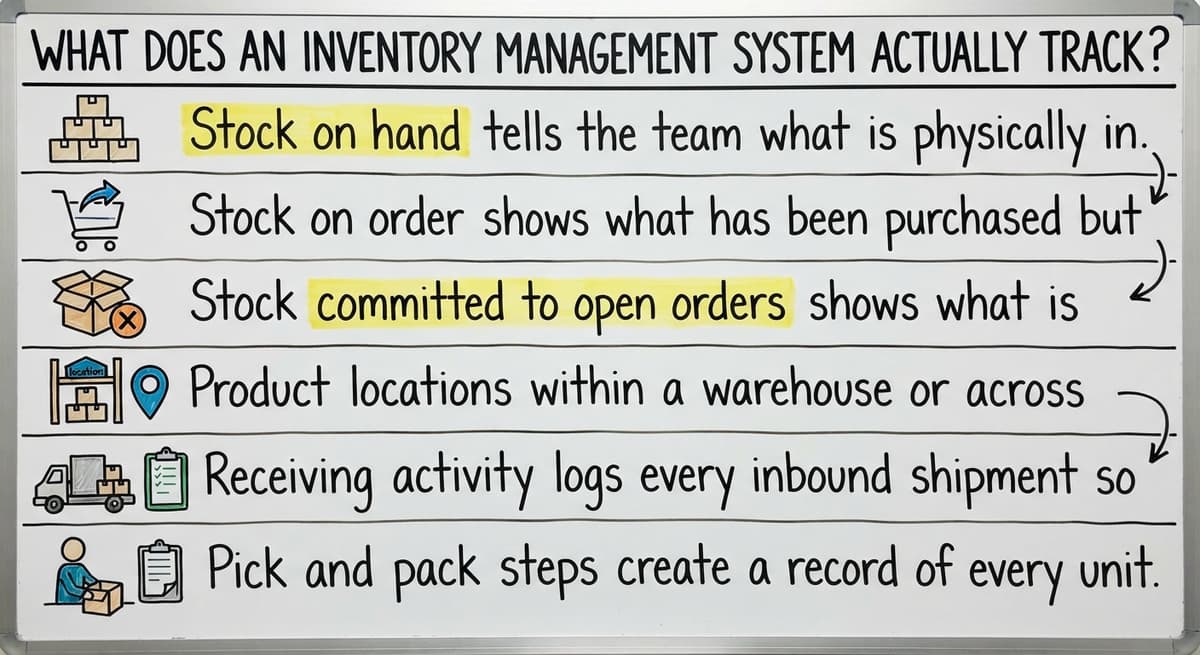
- Stock on hand tells the team what is physically in the building right now.
- Stock on order shows what has been purchased but not yet received, so buyers do not double-order.
- Stock committed to open orders shows what is already spoken for, preventing the same unit from being sold twice.
- Product locations within a warehouse or across multiple storage sites let staff find items without walking every aisle.
- Receiving activity logs every inbound shipment so discrepancies with the buy order are caught at the dock.
- Pick and pack steps create a record of every unit that leaves a bin, reducing fulfillment errors.
- Outbound shipment records tie each order to a carrier and a tracking number.
- Reorder points trigger a low-stock alert before a stockout happens, giving purchasing time to act.
The comparison is easier when one option is built for you
Off-the-shelf means fitting your process to the software. We do it the other way round, and the first look costs nothing.
Book a callWhy Tracking All of This Affects the Bottom Line
The US Census Bureau's Monthly Wholesale Trade data tracks inventories-to-sales ratios across wholesale firms nationally. Operations that carry too much stock tie up cash. Operations that carry too little lose sales. A system that tracks all of the above gives managers the visibility to stay between those two problems.
How Does an Inventory System Work Alongside Your Accounting Software?
A well-scoped project does not force the business to abandon accounting software that already works. Accounting software integration for warehouse operations is one of the most practical ways to connect working detail with financial reporting without rebuilding everything.
The inventory system handles the working side: receiving, picking, shipping, and stock counts. Your accounting software stays in place for invoicing, accounts payable, and reporting. Data flows between the two so numbers stay consistent without anyone entering the same figure twice.
This approach fits operations with 5 to 100 staff who are not ready for a full ERP replacement. An ERP (enterprise resource planning system) combines every business function in one platform, which is powerful but expensive and slow to implement. Most small distributors do not need that.

What Double Entry Actually Costs and Why Integration Closes the Gap
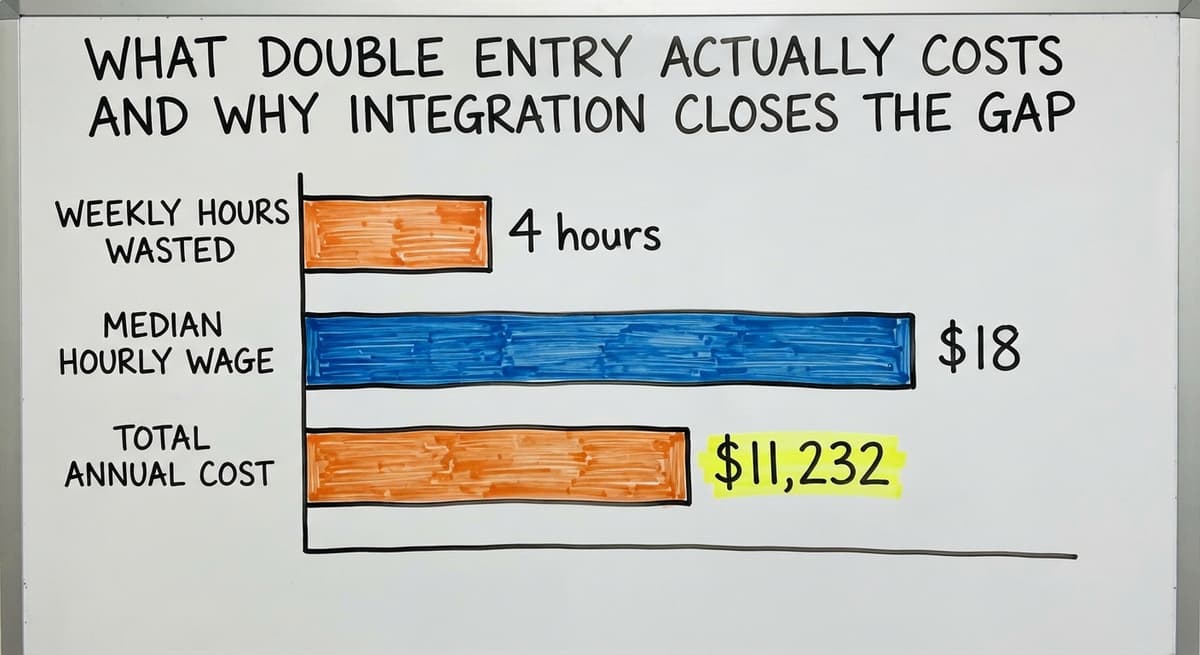
Consider the cost of double entry alone. If 3 staff members each spend 4 hours a week re-entering data between tools, at the Bureau of Labor Statistics median wage for stock clerks and order fillers of around $18 an hour, that is roughly $11,232 a year in labor doing nothing but copying numbers from one place to another. A connected system eliminates that entirely.
The NIST Manufacturing Extension Partnership offers vendor-neutral guidance on supply chain integration, and its consistent finding is that data handoffs between disconnected tools are where errors enter the process. Closing that gap is the primary reason to connect your inventory system to your accounting package.
Should a Small Distributor Build a Custom System or Buy Off-the-Shelf Software?
The answer depends on how unique the workflow is and how much process change the team can absorb.
Off-the-shelf inventory software is built for an average operation. It works well when the business's process is close to that average. The tradeoff is that the business adapts its workflow to fit the software, not the other way around. That adaptation takes time and sometimes creates new friction.
Custom inventory software for wholesale distributors starts from how the operation already works. The system is built around the actual process rather than a generic template. Custom does not always mean expensive or slow. A focused scope that targets only the manual pain points can be delivered at a scale that fits smaller operations.
How to Choose Between the Two Options
Here is a practical way to decide:
| Situation | Off-the-shelf | Custom build |
|---|---|---|
| Workflow matches standard practice | Strong fit | Unnecessary |
| Unique receiving or fulfillment steps | Needs workarounds | Built to match |
| Team has low tolerance for process change | May cause friction | Lower friction |
| Budget is fixed and tight | Lower upfront cost | Depends on scope |
The mistake most operations make is choosing the software before writing down the requirements. That sequence almost always leads to a system that does 80% of the job and needs manual workarounds for the rest.
Common Mistakes That Stall the Project
Inventory management system projects fail in predictable ways. Knowing the patterns in advance is the fastest way to avoid them.

- Scoping too broadly at the start turns a manageable project into one that never ships. Pick the 3 biggest pain points and solve those first.
- Skipping the warehouse staff who actually use the system daily means the finished product does not match real-world use. The people on the floor know things the manager does not.
- Choosing software first and writing requirements second forces the business to fit the tool instead of the other way around.
- Skipping a testing phase and going live with untested data flows guarantees errors that erode trust in the new system within the first week.
- Planning the build but not planning the team training leaves staff reverting to spreadsheets because no one showed them how to use the new tool.
See it running on your own process first
No build cost. The subscription starts once it is live and doing the job, not before.
Book a callWhy the Spreadsheet Is the Hardest Habit to Break
Replacing Excel-based inventory tracking is one of the most common triggers for this kind of project, and it is also one of the most commonly stalled. The spreadsheet feels safe because everyone knows how to use it. The project stalls when no one plans the changeover as carefully as the build.
How Do You Know When an Inventory Management Project Was Successful?
Success shows up in daily behavior, not in the software itself. The clearest signs appear within the first 3 months after go-live.
Staff spend less time searching for stock information and more time on work that moves orders forward. That shift is visible without measuring it.
Order errors and stockouts drop. Not to zero, but noticeably. If the operation was losing 2 to 3 orders a week to picking errors or oversells, that number falls.
Managers can see inventory status in real time without asking someone to check. That single change removes a category of interruption that slows every shift.

Adoption Is the Final Measure of a Successful Rollout
The team adopted the system and stopped reverting to printed sheets or side spreadsheets. Reversion is the clearest sign a rollout failed. Adoption is the clearest sign it worked.
Warehouse management software for small operations earns its place when the team chooses to use it over the old method, not because they were told to.
What the System Needs to Handle Beyond Basic Counting
Stock counts are the obvious starting point, but a complete inventory management system project also covers the surrounding steps that cause errors when they are manual.
Receiving accuracy is where most inventory errors start. A unit received but not logged creates a phantom gap in the count. A unit logged at the wrong quantity creates an overcount that leads to overselling later.
Location tracking matters in any warehouse with more than 1 aisle. Knowing a product is in stock is only useful if the picker can find it without searching.
Return handling is often left out of the initial scope and becomes a manual workaround the day after go-live. Plan for it in the design phase.
How Reorder Points Prevent Stockouts and Excess Stock
Reorder points need to be set and reviewed regularly. A reorder point is the stock level at which a buy order should be triggered automatically or flagged for review. Setting it too high ties up cash. Setting it too low causes stockouts. The system should make it easy to adjust these as demand changes.

How Barcode Scanning Connects to the Project
Barcode scanning removes the manual entry step that causes most receiving and picking errors. When a staff member scans a barcode instead of typing a product code, the chance of a keystroke error drops to near zero.
GS1 keeps the barcode standards that make this work across supply chains. Their barcode standards page explains the formats used across retail and wholesale. Any inventory system project that includes scanning should be built around those standards so barcodes from suppliers scan correctly without manual mapping.
A scanning setup does not need a large investment. A basic handheld scanner and a system that reads GS1 barcodes can handle receiving, picking, and cycle counts at a fraction of the cost of a full warehouse management suite.
Which Steps to Scan and Which to Skip
The design phase of the project is the right time to decide which steps will use scanning and which will not. Scanning everything sounds thorough. Scanning the 3 steps where errors actually happen is faster to implement and produces the same error reduction.
Not sure this is the right shape for your operation
Describe how the work runs today. We map it on a call and show you what it would look like built around that, before you spend anything.
Book a callPlanning the Data Before the Build Starts
One of the most skipped steps in an inventory management system project is cleaning the data before the build begins. A new system loaded with bad data produces bad results at once, which destroys trust in the tool before the team has had a chance to use it.
Start by auditing the current product list. Remove duplicates, fix naming inconsistencies, and confirm that every SKU (stock keeping unit, a unique code for each product variant) has a correct unit of measure.
Bad data is the fastest way to make a good system look broken. The team will blame the software when the real problem is the records it was given.

Why Data Cleanup Is Not a Delay
The IRS needs accurate inventory valuation at the start and end of each tax year. A clean product list and consistent costing method make that valuation straightforward. A messy one makes it a project of its own every year.
Plan at least 2 to 3 weeks for data cleanup before the build phase starts. That timeline is not a delay. It is what makes the go-live clean.
How to Measure the Cost of the Current Manual Process
Before committing to a project, it helps to put a number on what the current process actually costs. That number is usually larger than expected.
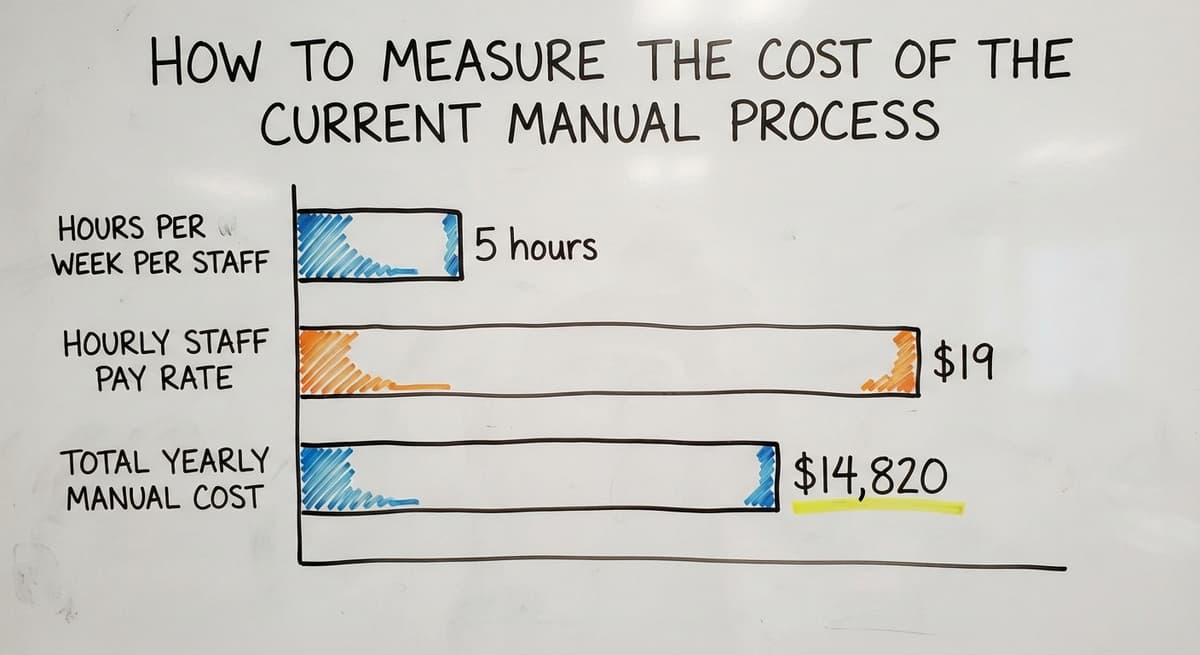
Count the staff hours spent each week on manual inventory tasks: counting, reconciling, re-entering data, and searching for stock information. Multiply by the hourly wage. The Bureau of Labor Statistics reports median wages for stock clerks and order fillers, which gives a real baseline for this math.
For example: 3 staff members each spending 5 hours a week on manual inventory tasks at $19 an hour adds up to $14,820 a year. That figure does not include the cost of errors, stockouts, or the manager time spent investigating discrepancies.
The Project Does Not Need to Be Free, It Needs to Cost Less Than the Problem
That annual cost is the budget the project has to beat. A system that removes most of that manual work pays for itself in the first year for most small operations.
Add the cost of 1 oversell per week at your average margin, and the number grows further. The project does not need to be free. It needs to cost less than the problem it solves.

How Do You Get Started Planning an Inventory Management System Project?
Start by writing down the 3 to 5 biggest inventory pain points the operation faces right now. That list is the first draft of your project scope.
Next, identify which parts of the current process are manual and which tools those tasks currently live in. A simple table with three columns works: the task, the tool it lives in today, and the problem it causes. That document becomes the starting point for any conversation with a builder.
Talk to a partner who works at small-to-mid scale and can scope a project around your actual workflow rather than a generic template. A partner who has built systems for wholesale distributors and warehouse operations will ask different questions than one who sells enterprise software.
What to Confirm Before You Buy or Build Anything
Avoid starting with a demo. A demo shows what the software does. A discovery conversation surfaces what your operation actually needs. Those two things are often different.
If the operation uses dedicated accounting software, confirm early that any system under consideration can connect to it cleanly. That integration is not a feature to add later. It is a requirement to scope from the start.
A local or specialized partner who understands your vertical can move faster and ask better questions from day one. The Software Society works with growing operations to scope and build custom workflow systems aligned to real processes, not generic templates. If your inventory process is a pain point, that is a conversation worth having before you buy anything.
Conclusion
An inventory management system project is a structured effort with a beginning, a set of phases, and a clear outcome: the team uses one system instead of several disconnected tools. The project works when it starts with the real pain points, involves the staff who do the work, and connects to the accounting tools already in place.
The cost of staying manual is measurable. The path to fixing it is clear. The only question is whether the project gets the structure it needs to finish.
Frequently asked questions
What is a good inventory management system?
There is no single answer that fits every operation. The right system depends on the size of the operation, how unique the workflow is, and which tools are already in place. A small operation with a standard process may do well with a basic cloud inventory platform. A wholesale distributor with custom receiving or fulfillment steps will likely need a system configured or built around those specifics. The criteria that matter most are: does it track what your operation actually needs to track, does it connect to your accounting package without double entry, and can your team learn it without months of training.
How to project inventories?
Projecting inventory means estimating how much stock you will need over a future period based on past sales, current orders, and expected demand. Start with your sales history for the same period last year. Adjust for any known changes, such as a new product line or a seasonal shift. Set reorder points at the level where a buy order needs to trigger before you run out, accounting for your supplier's lead time. A well-configured inventory system automates this calculation and flags items that are trending toward a stockout before it happens.
What is a kanban system for inventory?
A kanban system is a visual method for triggering replenishment. In its simplest form, a bin or card signals that stock has reached its reorder point and a new order should be placed. The signal is physical and immediate, which makes it easy for warehouse staff to use without software. Many inventory management systems incorporate kanban logic digitally, where a low-stock alert plays the same role as the physical card. Kanban works best for items with predictable demand and a consistent lead time from the supplier.
Is inventory management a good career?
Inventory management is a stable and in-demand field. The Bureau of Labor Statistics tracks wages and employment for stock clerks, logistics coordinators, and warehouse managers, all of which fall under the inventory management umbrella. As more operations move from manual tracking to software-driven systems, the demand for people who understand both the process and the tools has grown. Someone who can manage an inventory system project from discovery through rollout is valuable to any wholesale, distribution, or manufacturing operation.
What does an inventory management system project actually include?
The project includes five phases: discovery, where the team maps the current process; design, where requirements are written down; build or setup, where the software is created or set up; testing, where the system runs against real data before go-live; and rollout, where the team is trained and the old process is shut down. Each phase produces something the next phase depends on. Skipping any phase is the most common reason these projects stall or produce a system the team does not use.
How does an inventory system connect to accounting software?
A well-scoped inventory system sends data to the accounting package automatically rather than requiring staff to enter the same figures in two places. The inventory system handles working detail: receiving, picking, shipping, and stock counts. The accounting package handles invoicing, accounts payable, and financial reporting. Data flows between the two on a schedule or in real time, depending on the integration. This approach lets the business keep accounting software that already works while adding the working tracking it has been missing.
How long does an inventory management system project take?
A focused project scoped around the 3 to 5 biggest pain points can be completed in 8 to 16 weeks for most small operations. Projects that try to solve every problem at once, or that skip the discovery and data cleanup phases, take significantly longer and often stall. The timeline depends on the complexity of the workflow, the quality of the existing data, and how quickly the team can take part in testing and training.
What data needs to be ready before an inventory system project starts?
The most important data to prepare is the product list. Every item the operation stocks should have a unique identifier, a consistent name, a unit of measure, and a cost. Duplicates and naming inconsistencies in this list will cause errors in the new system from day one. Most operations also need to reconcile their current stock counts against what is actually on the shelf before loading data into a new system. Plan 2 to 3 weeks for this cleanup before the build phase begins.
Start with a free first look
A 30 minute call, your operation mapped, and a clear picture of what we would build. No obligation and nothing to install.
Book a callRelated guides
The rest of this guide, for the parts of the job this page does not cover.
Guides
Common questions
- What is Kanban System of Inventory Management
- What is Sales and Inventory Management System
- What is the Difference Between Aggregate and Item Inventory Management
- What is Jit Inventory Management
- What is the Definition of Inventory Management
- What is an Important Factor in Inventory Management
- What is Abc Classification in Inventory Management
- What is Inventory Management in Working Capital
- What is Poor Inventory Management
- What is Inventory Management and Its Types
- What is the Main Purpose of Inventory Management
- What is Inventory Management in Pharmacy
- What is Effective Inventory Management
- What is Information Technology Inventory Management
- What is Risk Pooling in Inventory Management
- What is Inventory Management Mary Kay
- What is Stock Taking in Inventory Management
- What is Bin Number in Inventory Management
- What is the Goal of Inventory Management Quizlet
- What is the Implication of Proper Inventory Management
- What is Omni-channel Inventory Management
- What is Inventory Management and Its Importance