


Good Inventory Apps
Good inventory apps show true stock counts, are easy for staff to use, and fit the way your team already works. Test three things before you buy: count accuracy, speed on the floor, and QuickBooks fit.
Reviewed November 2026.
It is written for small wholesale and warehouse teams that run on QuickBooks, Excel and paper.
Book a callWhat Makes Good Inventory Apps?
A good inventory app shows accurate stock counts, is easy for staff to learn, and fits how work already happens. Judge it by results. You want fewer stockouts, fewer wrong shipments, and less retyping.
Many owners run on QuickBooks, Excel and paper. That mix works until orders grow. Then counts drift, and people fix errors by hand. A good app stops the drift without forcing a new way of working.
What an Inventory App Actually Does
An inventory app tracks what you have, where it is, and what moves in and out. It replaces count sheets, spreadsheets and memory. A spreadsheet stores numbers but does not update itself. An app updates counts as people scan and ship.
A full ERP (enterprise resource planning) runs money, people and stock in one large system. An app covers stock only. For scan-based counts, GS1 sets the public rules for "barcodes" on its barcode standards page. Labels that follow those rules work with almost any scanner.
We build it for your operation, and the first look is free
If you would rather not compare products, describe how your operation already works and we build the system around it.
No build cost. You see it running on your own process first, and the monthly subscription starts only once it is live.
Book a call
Is a Spreadsheet Good Enough for Inventory?
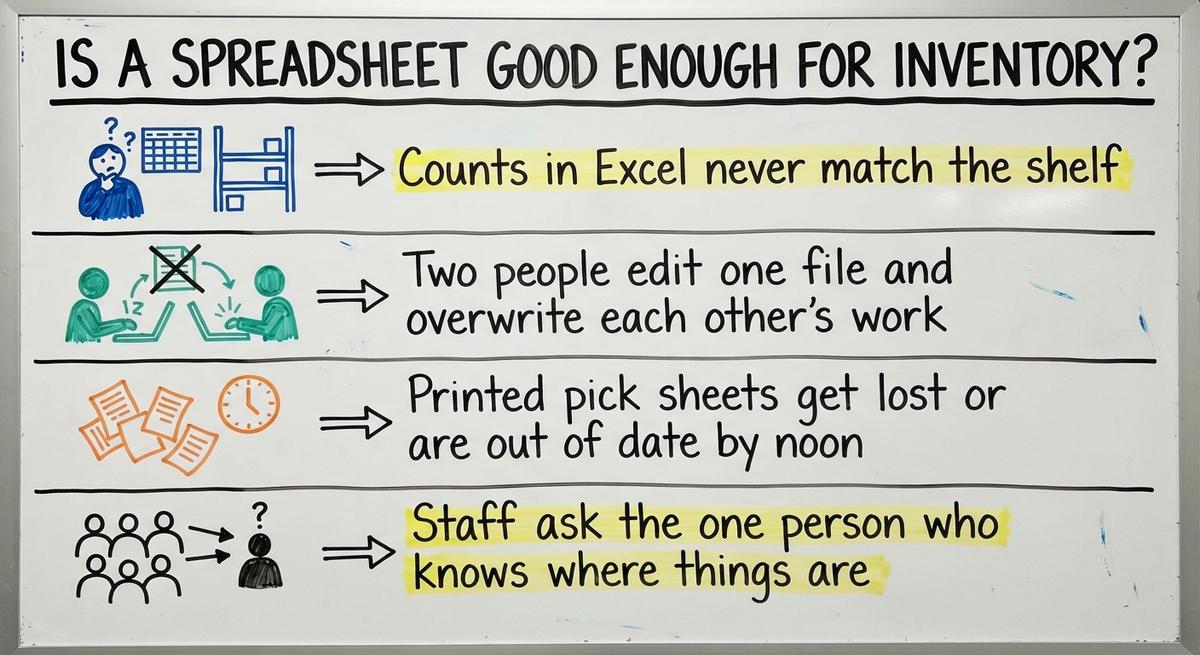
A spreadsheet is good enough for a small, slow shelf. Watch for these 4 signs that you have outgrown it:
- Counts in Excel never match the shelf, so staff stop trusting the file.
- Two people edit one file and overwrite each other's work.
- Printed pick sheets get lost or are out of date by noon.
- Staff ask the one person who knows where things are.
The cost adds up. Say 3 people spend 6 hours a week fixing counts at $22 an hour. That is $20,592 a year. The US Bureau of Labor Statistics publishes pay for stock clerks if you want to use your own rate. When people spend more time fixing the file than using it, the file has to go.
Core Features Good Inventory Apps Should Have
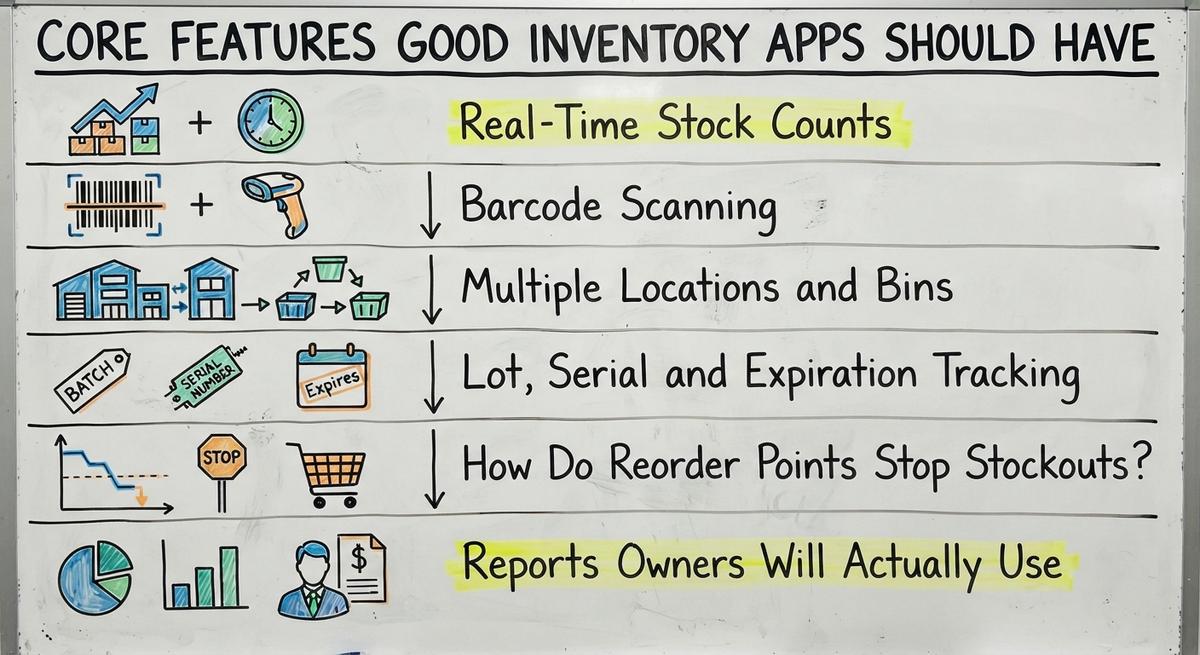
Good inventory apps share 5 must-have features: live counts, scanning, locations, reorder alerts and plain reports. Lot tracking is a nice-to-have unless you sell food or regulated goods. Each feature below fixes one daily problem. Skip any feature that does not fix a problem you have.
Real-Time Stock Counts
Real-time stock counts mean quantities change the moment someone receives, picks or adjusts an item. Late counts cause overselling. A customer orders what is not on the shelf. Then you rush a buy or send an apology.
The US Federal Trade Commission expects sellers to ship when they said they would under its mail, internet and telephone order rule. An accurate count is how you keep that promise. Ask how fast the app updates after a scan. Seconds is the right answer.
Barcode Scanning
Barcode scanning cuts typing mistakes at the source. A worker scans a label instead of keying a number. Phones work as scanners. Handheld scanners cost more but are faster in a big room.
Scanning helps in 3 places: receiving, picking and cycle counts. A cycle count is a small, regular count of one shelf area, in place of one big count a year. Ask whether the app scans with the hardware you own today. A scan that takes 1 second beats a number typed in 10.
Multiple Locations and Bins
Good apps track stock by warehouse, shelf and bin. A bin is one labeled spot on a shelf. Without bins, workers hunt. With them, a pick sheet says Aisle 4, Bin B2.
Transfers between locations stay on record. Stock leaves one site and shows as in transit until the other site scans it in. That trail ends the argument over where 40 cases went. Wholesale inventory spread over 2 or 3 sites needs this from day one.
Lot, Serial and Expiration Tracking
Lot, serial and expiration tracking matters for food, medical supplies and regulated goods. A lot is a batch made together. A serial number marks one unit. With both, you can trace a recall to each buyer in minutes.
Expiration dates let the app pick first-expired-first-out. That means the oldest dated stock ships first. Not every business needs this. A shop that sells screws and shelving can skip it. Pay for it only if a recall or an expiry date can hurt you.
How Do Reorder Points Stop Stockouts?
Reorder points stop stockouts by warning you before an item runs out. A reorder point is the minimum count you set for each item. When stock drops to it, the app sends an alert or drafts a buy order.
You avoid empty shelves. You also avoid overbuying, since you buy when the count says so, not on a hunch. Set the point from lead time. If a supplier takes 10 days and you sell 5 a day, set the point above 50.
Reports Owners Will Actually Use
Useful reports show stock value, fast and slow movers, and shrinkage. Shrinkage is stock lost to theft, damage or error. Value matters for tax too. IRS Publication 538 says: "To figure taxable income, you must value your inventory at the beginning and end of each tax year."
A report that needs an analyst will not get read. Look for one screen per question. Which items sit still? Which ones sell out? Where do counts go wrong? If an owner cannot read the report in a minute, the report has failed.
Not sure this is the right shape for your operation
Describe how the work runs today. We map it on a call and show you what it would look like built around that, before you spend anything.
Book a callDoes the App Work with QuickBooks?
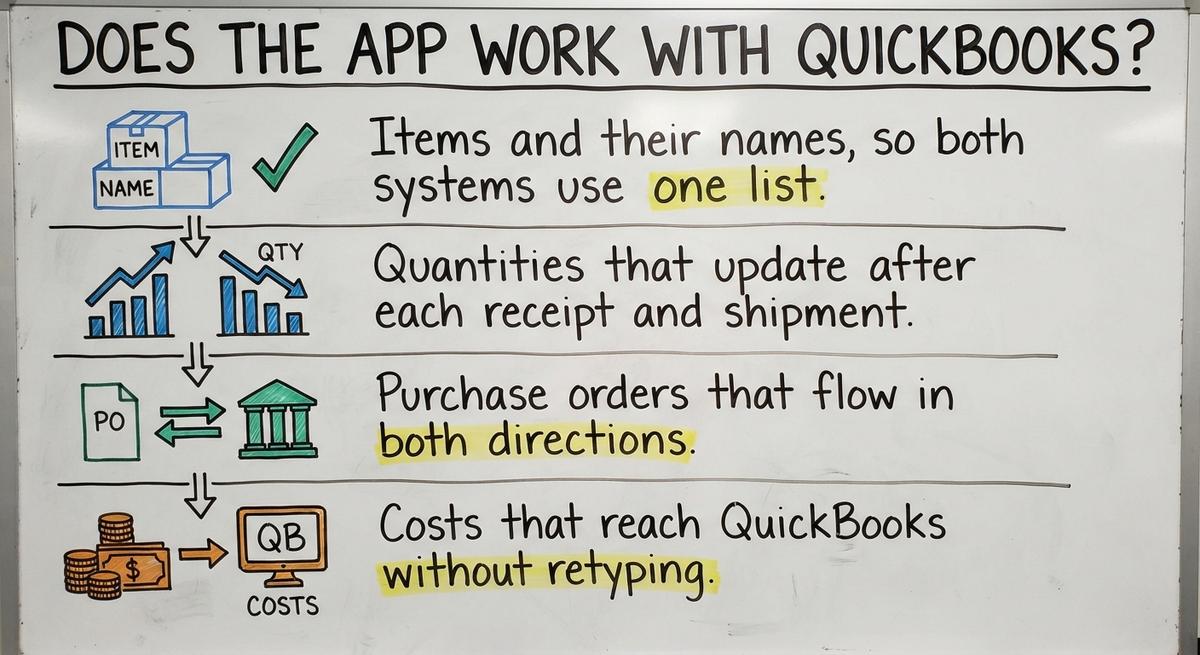
Many inventory apps work with QuickBooks, and for most owners this is the deciding question. You keep QuickBooks for accounting. The app handles stock. Good QuickBooks inventory sync covers four things:
- Items and their names, so both systems use one list.
- Quantities that update after each receipt and shipment.
- Buy orders that flow in both directions.
- Costs that reach QuickBooks without retyping.
Watch for one-way syncs. They push data out but not back, so staff enter the same order twice. Double entry brings back the errors you wanted to leave. Compare any app with quickbooks inventory management software, then ask for a demo with your own items. Run one buy order from start to finish.
Can Staff Learn It Quickly?
Staff can learn a good inventory app in one short session when the screens are simple. Floor workers need big buttons, few fields and clear scan prompts.
Test with your newest hire, not the manager. If that person needs help on every step, the app is too hard. Long training means the app will not get used. People drift back to paper. Ask the vendor how long training takes for a receiving clerk. Then time it yourself.
Off-the-Shelf Apps and Custom Software: Where Each Fits
The best inventory software is the one that fits your flow. Ready-made apps fit standard flows. Custom inventory software fits flows that do not follow a template. The table compares the four common paths.
| Option | Best for | Weak spot |
|---|---|---|
| Spreadsheet | One person and a short list of items | Overwrites and stale counts |
| Ready-made inventory app | Standard receive, pick and ship flows | Odd pricing or pick rules |
| Full ERP | Large firms that run every function in one system | Long, costly rollout |
| Custom build, such as The Software Society | Unique process and many side sheets | Needs a clear brief and an owner who joins reviews |
The comparison is easier when one option is built for you
Off-the-shelf means fitting your process to the software. We do it the other way round, and the first look costs nothing.
Book a callWhere Ready-Made Apps Fit and Fall Short
Ready-made apps work well when you receive, store, pick and ship in standard ways. They start fast and cost little to try. Many warehouse inventory management systems of this type serve simple shops well.
They fall short with odd pricing, special packaging or custom pick rules. Say you buy by the pallet, sell by the case and ship by the each, with price tiers by customer. Many apps cannot model that. Staff then build workarounds in side sheets. Forcing your process to match the app is the root of most workarounds.
When Custom Inventory Software Makes Sense
Custom inventory software makes sense when your process is your edge and does not fit a template. Another sign is a pile of side spreadsheets that you still need after adopting an app.
Custom can be small. Replace only the manual parts, such as the pick sheet or the receiving log. The build follows how your operation works now, with no forced move of all your data. It works at small scale, not just for large firms. The Software Society builds custom workflows for small and mid-sized teams. Ask any builder, us included, to show a small first piece.

Can a Small Warehouse Use an Inventory App Without an ERP?
Yes, a small warehouse can run well on an inventory app with no ERP. Owners with 5 to 100 staff fear long, costly rollouts. A focused tool fixes the biggest pain first, such as counts or pick sheets.
Add pieces over time as needs grow. Today it is scanning. Next year it is reorder alerts or a second site. The US Census Bureau tracks wholesale inventories against sales each month. That is a reminder of how much money sits on shelves. Small business inventory deserves a tool sized to the job.
Questions to Ask Before You Pick an App
Five questions separate a good fit from a costly mistake. Put them to every vendor in writing.
- Does it match how we receive, store, pick and ship?
- Can it group items the way we do, such as raw goods and finished goods?
- What happens to our existing data on day one?
- Who answers the phone when something breaks?
- What does it cost as we add users or locations?
- Can we export all our data if we leave?
A vendor who answers all six plainly has earned a pilot.

How to Test an Inventory App Before You Commit
You can test an inventory app in one week with a small pilot. Follow these steps:
- Pick one product group or one shelf area.
- Load those items and run receiving, picking and shipping in the app.
- Do a physical count at the end of the week.
- Compare the app counts to the shelf.
- Record time saved and errors avoided.
The NIST Manufacturing Extension Partnership offers vendor-neutral guidance on supply chain process if you want a second view. A pilot that matches the shelf within a few units has passed.
See it running on your own process first
No build cost. The subscription starts once it is live and doing the job, not before.
Book a callCommon Mistakes When Choosing Inventory Apps
Four mistakes cause most failed inventory app projects:
- Buying for features you will never use, then paying for them each month.
- Skipping staff input, so the people on the floor fight the tool.
- Ignoring how data gets in from receiving, where most errors start.
- Moving everything at once instead of in phases.
Good inventory apps get chosen with the floor team in the room. The cheapest fix is a short meeting before you sign.

How to Roll Out a New Inventory App Without Disruption
A smooth rollout takes 4 steps in order:
- Start with a clean count of every shelf.
- Clean up item names and SKUs (stock keeping units, the codes for each item) before you load them.
- Run old and new side by side for a short time.
- Train in short sessions on the floor, not in a meeting room.
Accuracy needs care after setup too. Count one shelf area each week and fix gaps the same day. Weekly counts keep data true long after the launch.
A Simple Checklist for Good Inventory Apps
Good inventory apps pass 7 checks. Use this list on any vendor:
- Counts match the shelf after a pilot.
- Staff learn it in one short session.
- Barcode scanning works with your hardware.
- QuickBooks sync runs both ways.
- Reports answer your questions in a minute.
- Cost stays fair as users and sites grow.
- You can export your data at any time.
An app that fails any one of these will cost you later.

Who Can Help With Inventory Software in Columbus, Ohio?
The Software Society is local to Columbus, Ohio, and helps operations that need inventory software. One team builds the software, the website and the search presence. You do not manage a pile of vendors.
We can walk your warehouse floor and watch the real workflow. Then we tell you whether a ready-made app or a custom build fits. Some teams need warehouse inventory management software built around odd rules. Others need only a better app. We say which.

What Should You Do Next?
List the top 3 problems in your stock process. Maybe counts drift, pick sheets go stale, or QuickBooks needs retyping. Then check how each problem fits a ready-made app or a custom build.
If a ready-made app fixes all three, buy it and run the pilot. If you still need side sheets, talk to us. The Software Society offers a simple conversation about your current workflow, with no pressure.
Frequently asked questions
What makes an inventory app good?
A good inventory app shows accurate stock counts, is easy for staff to learn, and fits how your work already runs. Judge it by results: fewer stockouts, fewer wrong shipments and less retyping. Test it with a one-week pilot on one shelf area.
What features should an inventory app have?
Look for live stock counts, barcode scanning, bin and location tracking, reorder alerts and plain reports. Add lot, serial and expiration tracking only if you sell food, medical supplies or regulated goods. Skip any feature that does not fix a problem you have.
Do inventory apps work with QuickBooks?
Many do. A good sync covers items, quantities, buy orders and costs, and runs both ways. Avoid one-way syncs, since staff must enter the same order twice. Keep QuickBooks for accounting and let the app handle stock. Test one buy order from start to finish.
Can a small warehouse use an inventory app without an ERP?
Yes. A focused app can fix the biggest pain first, such as counts or pick sheets. Add pieces over time as needs grow. Owners with 5 to 100 staff can skip the long, costly rollout that a full ERP brings.
Is a spreadsheet good enough for inventory?
A spreadsheet works for a small, slow shelf. It fails when counts never match the shelf, two people overwrite one file, pick sheets go stale, or only one person knows where things are. Those signs mean you have outgrown it.
When is custom inventory software better than a ready-made app?
Custom software is better when your process is your edge and does not fit a template. Another sign is many side spreadsheets after adopting an app. Custom can be small and replace only the manual parts, without a forced move of all your data.
How do I test an inventory app before buying?
Run a one-week pilot with one product group or shelf area. Compare the app counts to a physical count at the end. Track time saved and errors avoided. Have your newest hire try it, not the manager.
How long does it take to start using an inventory app?
A small pilot on one shelf area can run in a week. A full move takes longer and depends on item count and data quality. Clean item names first, then phase the rollout by product group.
Start with a free first look
A 30 minute call, your operation mapped, and a clear picture of what we would build. No obligation and nothing to install.
Book a callRelated guides
More on the same work.
Guides
- Best Inventory Software
- Classification of Inventory
- Excess Inventory
- Closed for Inventory
- Multi Location Inventory Management Software
- Ms Excel Inventory Template
- Inventory Management for Multiple Locations
- Costing Inventory
- Is Inventory a Long-term Asset
- Inventory Management System for Manufacturing
- Inventory Fixed Assets
- Inventory Management Pics
- Inventory Monitoring
- Excel Inventory Template
- Push and Pull Inventory
- Types of Inventory Control
- Consumable Inventory