


Warehouse Systems
Warehouse systems are the software and scanning hardware that record every receipt, put-away, pick, pack, and shipment, so the stock count is right without a physical count. For an operation of 5 to 100 people the choice is between a WMS, an inventory management system, and a custom build, at $50 to $500 a month packaged or $10,000 to $40,000 once for a build. This guide compares the 3 types.
Published 20 July 2026. Reviewed and updated 15 September 2026.
Reviewed August 2026. Each figure comes from the assumptions stated beside it, so you can substitute your own and the arithmetic still holds.
Book a callWhat Are Warehouse Systems, Actually?
A warehouse system is software and a set of processes that track the physical movement of goods through your facility. It records what comes in, where it is stored, what gets picked for each order, how it is packed and shipped, and what comes back as a return.
That is different from general business software. QuickBooks tracks money. Excel tracks whatever you tell it to.
A warehouse system tracks the physical flow of stock, from the moment a delivery arrives at your dock to the moment a parcel leaves for a customer.
Why the distinction matters
The distinction matters because money problems and stock problems have different causes. A warehouse system solves the stock problems: wrong locations, missed picks, phantom inventory, slow receiving.
Accounting software solves the money problems. The two tools work best when they talk to each other, not when one tries to do the other's job.
Would you rather have it built around your operation?
The first look is free. If you would rather not compare products, describe how your operation already works and we build the system around it.
No build cost. You see it running on your own process first, and the monthly subscription starts only once it is live.
Book a callWhy Do Warehouse Systems Matter for Small and Mid-Size Operations?
There is a persistent myth that warehouse systems are only for large enterprises with dedicated IT teams and six-figure implementation budgets. That is not true, and it costs small operations real money every year.
Operations with five to 100 staff are the ones that lose the most to manual tracking.
A single picking error costs time to investigate, a replacement to ship, and a customer relationship to repair. Multiply that across hundreds of orders a week and the numbers add up fast.
Warehouse Safety Is an Operational Problem, Not a Separate One
As OSHA notes, "warehousing is one of the more hazardous industries," and disorganised stock movement, unclear put-away locations, and rushed manual processes all contribute to that risk.
A warehouse system does not just save time. It creates the kind of order and visibility that makes a warehouse safer and easier to manage, regardless of team size.
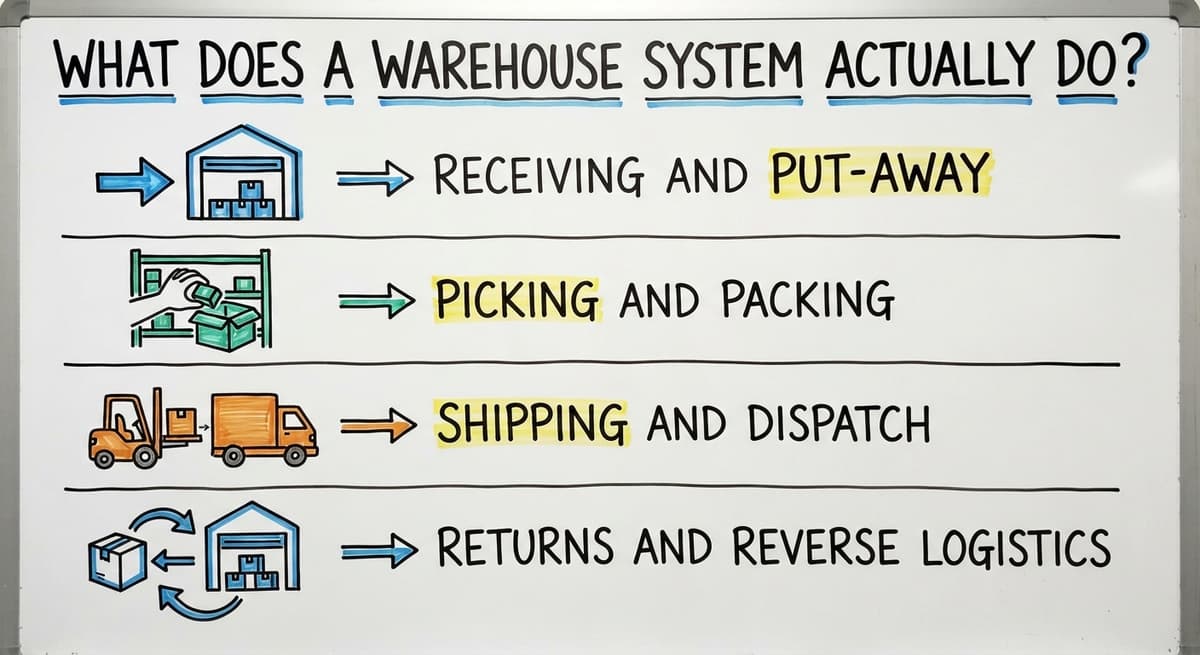
What Does a Warehouse System Actually Do?
A warehouse system handles six core functions: receiving, put-away, picking, packing, shipping, and returns. Each function feeds directly into the next, so a mistake at any stage creates problems downstream. Understanding the chain helps you see where your current process is breaking.
At the shipping and dispatch stage, for example, the system generates a shipping label and updates the order record with tracking information. Carrier integrations pull live rates and push tracking numbers back to the customer automatically, removing the manual step of copying data between systems.
Receiving and Put-Away
Receiving is the process of checking in stock when it arrives. A warehouse system records what was expected, what actually arrived, and any discrepancies.
Put-away assigns each incoming item a specific location in the warehouse, whether that is a bin, shelf, or zone.
Errors at this stage are the most expensive kind because they are invisible.
If stock is put in the wrong location and the system records it as somewhere else, every pick that touches that SKU will be wrong until someone physically finds it.
Picking and Packing
Picking means pulling the right items for an order. Packing means preparing those items for shipment.
A warehouse system generates a pick list automatically when an order is confirmed, telling the picker exactly where to go and what to take.
Barcode scanning at the pick stage confirms the right item was pulled before it reaches the packing bench. That single check eliminates most of the customer complaints that come from wrong-item shipments.
Shipping and Dispatch
Once an order is packed, the warehouse system generates a shipping label and updates the order record with tracking information.
Carrier integrations pull live rates and push tracking numbers back to the customer automatically, removing the manual step of copying data between systems.
Returns and Reverse Logistics
Returns need their own process inside a warehouse system because a returned item is not the same as new stock. It needs to be inspected, then either restocked, quarantined, or written off.
Poor returns handling is the primary cause of phantom inventory, where the system shows stock that is physically damaged, missing, or unsellable.
The Main Types of Warehouse Systems
Not every warehouse needs the same kind of system. The four main categories are warehouse management systems, inventory management systems, ERP warehouse modules, and custom-built software. The right choice depends on the size and complexity of your operation, not on what a vendor's sales team recommends.
A warehouse management system handles the full operational chain from receiving to dispatch. An inventory management system focuses on stock levels and locations. An ERP warehouse module sits inside a broader business platform. Custom-built software follows workflows that no standard product fits well.
What Is a Warehouse Management System?
A warehouse management system (WMS) is purpose-built software that manages the full physical flow of goods through a warehouse, from receiving to dispatch. It includes barcode scanning, bin and location management, pick list generation, carrier integration, and reporting.
A WMS targets mid-to-large operations that process high order volumes across multiple locations. Common platforms in this space include Manhattan Associates, Fishbowl, and Deposco, among others.
None of these is the right answer for every operation, and choosing based on brand recognition alone is a reliable way to overspend.
Inventory Management Systems
An inventory management system (IMS) focuses on stock counts, reorder points, and purchase order tracking. It does not typically manage the physical movement of goods through the warehouse in the same granular way a WMS does.
For a small operation that mainly needs to know what it has and when to reorder, an IMS is often enough.
The upgrade to a full WMS makes sense when order volume grows, when picking accuracy becomes a daily problem, or when the team is managing multiple storage locations.
ERP Warehouse Modules
An ERP (enterprise resource planning) system is a large platform that connects finance, HR, procurement, manufacturing, and warehouse operations in one database.
The warehouse module inside an ERP can be powerful, but the surrounding system comes with significant cost and implementation complexity.
For most operations under 100 staff, an ERP is overkill. The implementation alone can take six to eighteen months and require dedicated project management.
The warehouse module ends up being less capable than a standalone WMS while costing considerably more to run.
Custom Warehouse Systems
A custom warehouse system is software built around the specific workflows of one operation rather than a generic template. This does not mean building something from scratch at enormous cost. It means designing a system around how your team actually works, including the quirks, exceptions, and existing tools that a standard product would force you to abandon.
Custom makes the most sense when your workflows are genuinely different from the standard model, when you have existing systems that must be preserved, or when off-the-shelf products keep requiring workarounds that slow the team down.
Custom operational software for wholesale distributors is one area where a purpose-built approach outperforms a generic WMS on both cost and fit.

How Do Warehouse Systems Connect to QuickBooks?
Most small operations run their books in QuickBooks and have no interest in replacing it. The good news is that a warehouse system does not need to replace QuickBooks.
The two systems are designed to do different things, and a clean integration between them removes the need to choose.
The data that flows between a warehouse system and QuickBooks includes completed order invoices, purchase order receipts, stock adjustments, and inventory valuations.
The warehouse system handles the physical side. QuickBooks handles the financial side. A good integration means that data moves automatically between them without anyone re-entering it.
What Does QuickBooks Do Well in a Warehouse Setting?
QuickBooks is genuinely strong at the things it was built for:
- Accounting and financial reporting
- Invoicing customers and recording payments
- Managing vendor bills and purchase payments
- Basic profit and loss reporting
- Payroll and tax preparation
These are worth keeping. There is no reason to rebuild your accounting workflow inside a warehouse system when QuickBooks already handles it reliably.
Is the comparison easier when one option is built for you?
Yes. Off-the-shelf means fitting your process to the software, and custom is the other way round. The first look costs nothing.
Book a callWhere Does QuickBooks Fall Short in the Warehouse?
QuickBooks was not designed to manage physical stock movement, and the gaps become obvious as order volume grows.
The most common missing capabilities are real-time stock locations, pick list generation, barcode scanning, and multi-location inventory tracking.
Teams fill these gaps with Excel files, printed sheets, and email threads. That works at low volume.
As orders increase, version conflicts in spreadsheets, lost pick sheets, and manual data entry errors accumulate until someone ships the wrong thing to the wrong customer on the wrong day.
Replacing Excel and Access databases with custom software is a step many operations delay too long, because the pain feels manageable until it suddenly is not.
The QuickBooks and Warehouse System Integration
A warehouse system that integrates with QuickBooks pushes data automatically at defined sync points. When an order is completed in the warehouse system, the invoice appears in QuickBooks.
When a purchase receipt is confirmed, the stock value updates. When a stock adjustment is made, the inventory asset account reflects it.
The result is that your finance team works in QuickBooks as they always have, while your warehouse team works in a system built for their actual tasks. No double entry. No end-of-day reconciliation ritual.
QuickBooks integration for warehouse operations is one of the most common requirements for small and mid-size distributors, and it is worth confirming early in any vendor conversation that the integration is native and reliable, not a third-party connector that breaks on updates.
Key Features to Look for in a Warehouse System
Not every operation needs every feature. A 12-person wholesale distributor has different needs from a 75-person fulfilment centre. The goal is to match features to your actual workflow before evaluating any software, not after.
Core features to assess include barcode scanning, real-time inventory visibility, carrier integration, returns handling, and reporting. Secondary features such as wave picking, lot tracking, or multi-location support matter only if your operation actually uses those processes. Starting with your workflow rather than a vendor's feature list keeps the evaluation grounded.
How Do You Know If Your Operation Needs a Warehouse System?
The right time to act is before problems become expensive, not after a major shipping error or an inventory write-off. Most operations show the warning signs long before anyone decides to change.
Common indicators include frequent picking errors, stock discrepancies that only surface at stocktake, staff spending significant time on manual data entry, difficulty tracking orders across multiple channels, and an inability to answer basic questions about stock levels without physically checking. If more than two of these are present, the operation is already absorbing the cost of not having a system.
You Are Running the Warehouse on Spreadsheets
The spreadsheet warehouse is a specific pattern: multiple files managed by different people, updated manually, prone to version conflicts, and always slightly out of date.
Decisions get made on stale data because nobody is sure which version of the stock file is current.
The hidden cost is not just the errors. It is the staff time spent maintaining the files, reconciling the discrepancies, and answering questions that a live system would answer automatically.
Inventory management for small and mid-size operations almost always starts here, and the upgrade path is shorter than most owners expect.
Inventory Counts Are Always Off
Inventory discrepancies without a system are not a mystery. Stock moves, records do not update, and the gap grows.
The downstream effects include picking from empty locations, ordering stock that is already in the warehouse, and writing off inventory that was never properly tracked.
Cycle counting inside a warehouse system solves this systematically. Instead of a painful annual count, small sections of the warehouse are counted on a rolling schedule, keeping records accurate without shutting down operations.
Are Slow Shipments Costing You Customers?
Slow fulfilment is almost always a process problem, not a people problem. Without a system, pickers search for items, packers wait for information, and dispatch queues build up because someone is typing labels by hand.
A warehouse system compresses the pick-pack-ship cycle by giving each person exactly the information they need at exactly the right moment.
Faster fulfilment directly affects customer satisfaction and repeat purchase rates, which are the metrics that matter most for a growing distributor.
You Cannot See What Is Happening in Real Time
Managing by memory or end-of-day reports means reacting to problems that have already happened.
A live dashboard shows order status, stock levels, and fulfilment progress as they change, so decisions can be made before a situation becomes a crisis.
During peak periods, this visibility is especially valuable. Knowing that a picking area is falling behind at 10am gives a manager time to reallocate staff. Finding out at 4pm does not.
Staff Are Spending Hours on Manual Data Entry
Manual data entry is slow, error-prone, and frustrating for the people doing it.
When a warehouse runs on manual processes, a significant portion of every shift goes to recording information that a system would capture automatically.
The real cost is not just the time. It is the errors that manual entry introduces, the staff frustration that leads to turnover, and the growth ceiling that manual processes create.
Automation inside a warehouse system eliminates most of these steps, freeing the team for work that actually requires human judgment.
Off-the-Shelf vs Custom Warehouse Systems
Off-the-shelf and custom warehouse systems both have a place. The decision comes down to how closely a standard product fits your workflow, what existing systems need to be preserved, and what the real cost of adapting to a poor fit would be over time.
When Does Off-the-Shelf Work Well?
A standard WMS or IMS is a good fit when:
- Your workflows match the standard model closely
- The integrations you need are already built into the product
- Your team can adapt to the software without losing efficiency
- You need to be live quickly and the vendor has a proven deployment track record
Off-the-shelf products can be deployed faster when the operation fits the software. The key word is "fits." If the fit requires significant compromise, the speed advantage disappears.
What does it look like running on your own process?
The first thing you see is it running on your own process, at no build cost. The subscription starts once it is live and doing the job, not before.
Book a callWhen Does Off-the-Shelf Fall Short?
Standard software is a problem the day it forces workflow changes that hurt the operation.
Common complaints include workarounds that the team develops to get around missing features, integrations that do not exist or require expensive middleware, and a feature set that is either too thin or too complex for the actual operation.
The cost of adapting to bad software is invisible in the early months and very visible by month six, when the workarounds have multiplied and the original problems have not been solved.
When Does Custom Warehouse Software Make Sense?
Custom makes sense when the operation's workflows are genuinely different from the standard model and when the cost of adapting to off-the-shelf software exceeds the cost of building something purpose-built. That is a more common situation than vendors of standard products would like buyers to believe.
Operations with unique receiving workflows, customer-specific pricing rules, existing systems that cannot be replaced, or specific integration requirements are strong candidates for a custom approach.
A good custom build follows how the team already works, not around how a software company thinks warehouses should work. Order management and fulfillment software built to your exact workflow outperforms a generic product that the team has to work around every day.
The Real Cost of a Warehouse System
The sticker price is rarely the full picture. A balanced view of cost includes software licensing, implementation, training, and ongoing support. It also includes the cost of doing nothing, which is the baseline any investment should be compared against.
Operations that delay a system decision absorb that cost invisibly through picking errors, inventory write-offs, staff time spent on manual reconciliation, and customer relationships damaged by fulfilment mistakes. Putting a number on those losses before evaluating software gives the comparison an honest foundation.
Software Licensing and Subscription Fees
Most modern warehouse systems are sold as SaaS subscriptions, meaning a monthly or annual fee per user or per facility. These fees add up over time, so weigh them against the value delivered, not just the initial quote.
Custom systems have a different cost structure: a higher upfront build cost and lower ongoing fees, with no per-user pricing that scales against you as the team grows.
Neither model is inherently better. The right comparison is total cost over three to five years, not the first invoice.
Implementation and Training Time
Implementation is where most warehouse system projects succeed or fail. A realistic implementation for a small operation includes data migration, workflow configuration, hardware setup, and staff training.
Vendor proposals underestimate the training component, which is where adoption actually happens.
Plan for the implementation to take longer than the vendor suggests, and build in time for the team to practice in the new system before going live on real orders.
The Cost of Doing Nothing
Staying on spreadsheets and manual processes has a real cost that rarely appears on a budget line. It includes staff hours spent on data entry that could be automated, order errors that require reshipping, inventory write-offs from stock that was never properly tracked, and the growth ceiling that manual processes create.
Add those up across a year and the number is larger than the cost of a warehouse system. That comparison is the honest starting point for any investment decision.

How Do You Choose the Right Warehouse System for Your Operation?
The right system is the one that fits the operation, not the one with the most features or the biggest marketing budget.
A practical decision framework has five steps: map your current workflow, identify the specific problems you need to solve, shortlist systems that address those problems without requiring you to rebuild your process around theirs, evaluate integration with the tools you already use, and pressure-test the vendor relationship before signing anything.
Why Should Mapping Your Current Workflow Come First?
Documenting the current process before evaluating any software is the step that separates good implementations from expensive ones. The map should capture every step in the operation: how stock arrives, how it is checked in, where it is stored, how orders are picked, how they are packed, and how they are dispatched.
Include the handoffs between people, the pain points that slow things down, and the workarounds the team has built.
This map becomes the requirements document for every vendor conversation. Without it, vendors will show you what their software does. With it, you can ask whether their software does what your operation needs.
List the Systems You Already Use
Existing systems shape the field of viable options significantly. QuickBooks, shipping carriers, e-commerce platforms, and any industry-specific software all need to be considered before a warehouse system is chosen.
Integration requirements eliminate many products early and should be treated as hard requirements, not nice-to-haves.
A warehouse system that does not connect cleanly to the tools your team already relies on will create new problems while solving old ones.
Define the Problem You Are Solving
Buying a warehouse system without a clear problem statement is a reliable way to end up with expensive software that nobody uses. Write down the top three operational problems you want solved.
Make them specific: "we ship wrong items three or four times a week" is useful. "We want to improve our warehouse operations" is not.
That list should drive every vendor conversation. If a vendor cannot explain how their product solves those three problems, the conversation can end there.
Evaluate Vendors Against Your Workflow, Not Their Demo
A polished demo in a vendor's controlled environment is not evidence that the software will work in your warehouse.
Ask vendors to walk through your specific workflow, using your SKU structure, your carrier accounts, and your QuickBooks setup.
Implementation track record matters more than feature lists. Ask for references from operations of similar size and complexity, and ask those references specifically about the implementation experience, not just the software itself.
Plan for Adoption, Not Just Installation
A system nobody uses is worse than no system at all, because it creates the illusion of having solved the problem while the real problems continue.
Good adoption means involving warehouse staff early in the process, building training into the project timeline, and identifying a team champion who can support colleagues after go-live.
The best warehouse systems are the ones the team actually uses every day, and that outcome is determined more by the implementation approach than by the software itself.
Common Mistakes When Implementing a Warehouse System
Implementation mistakes follow recognisable patterns across many projects. Avoiding them is as important as choosing the right software.
The most common are: selecting a system before mapping the existing workflow, underestimating training time for staff who will use the system daily, treating go-live as the finish line rather than the starting point, failing to assign a single internal owner for the project, and not testing integrations with existing tools before launch.
What is in a free first look?
A 30 minute call, your operation mapped, and a clear picture of what we would build. No obligation and nothing to install.
Book a callWarehouse Systems for Wholesale Distributors
Wholesale distribution has 4 warehouse needs that standard products handle poorly: pallets, lots, customer pricing, and split shipments.
High SKU counts, bulk receiving in mixed pallets, customer-specific pricing, and complex reorder patterns all require a system that can handle nuance.
The QuickBooks integration requirement is tighter for distributors than for pure fulfilment operations, because distributor invoicing involves volume discounts, tiered pricing, and payment terms that need to be reflected accurately in the accounting system.
A warehouse system that pushes clean, complete data to QuickBooks is not optional for this audience; it is a baseline requirement.
Distributors also tend to have longer supplier relationships with more complex purchase order workflows, including partial receipts, backorders, and landed cost calculations. These are worth testing specifically during any vendor evaluation.
Warehouse Systems for Fulfilment Centres
Fulfilment centres operate at high order volume with speed as the primary metric.
The warehouse system features that matter most here are pick efficiency, carrier integration, and returns processing, because those three areas determine throughput and customer satisfaction.
Multi-client fulfilment adds another layer of complexity: the system needs to keep inventory, orders, and billing separate by client while giving the operations team a single view of the facility. This is one area where off-the-shelf products fall short, and where a custom approach or a specialist WMS earns its cost.
Fulfilment centres also tend to have the most to gain from automation.
Automated pick list generation, carrier rate shopping, and returns processing can each save hours of manual work per day across a busy facility.
What Questions Should I Ask a Warehouse System Vendor?
The questions that reveal whether a vendor truly fits the operation are the ones that go beyond the standard demo. Use this list before committing to any platform:
- Can you walk through our specific receiving and put-away workflow, not a generic example?
- How does your system integrate with QuickBooks, and is that integration native or third-party?
- What does the implementation timeline look like for an operation our size, and who manages it?
- What happens when we find a problem after go-live, and who do we call?
- Can you show us references from operations with similar SKU counts and order volumes?
- How are updates and new features rolled out, and do they require re-training?

What Should You Ask a Vendor About Pricing, Data, and Growth?
Before signing any contract, get clear answers to these questions:
- What does the per-user or per-location pricing look like as we grow?
- How does the system handle our specific carrier accounts and shipping rules?
- What data do we own, and how do we export it if we ever need to change systems?
- How long does the average implementation take for a business like ours?
A vendor who cannot answer these questions clearly is telling you something important about what the relationship will look like after the contract is signed.
What Does Good Support Look Like After Go-Live?
The relationship with a warehouse system vendor is a 3-year one, and it does not end at launch.
Good post-go-live support includes timely bug fixes, workflow adjustments as the operation changes, and training for new staff who join after the initial implementation.
A generic help desk with a ticketing system and a 48-hour response window is not adequate support for a warehouse operation where a system failure stops orders from shipping.
Local or dedicated support, where the person who answers the phone knows your setup, is worth paying for.
Ask vendors specifically what support looks like in the first 90 days after go-live, and what it looks like in month 12. The answers will differ, and both matter.
How Do You Get Started with a Warehouse System?
The practical first steps are straightforward. Map your current workflow. List every system the operation currently uses.
Write down the three problems you most need to solve. Then start talking to vendors, using your workflow map and problem list to drive every conversation.
Do Not Wait for the Perfect Moment to Act
The perfect moment is always six months ago, when the problems were smaller. The second-best time is now, before the next inventory write-off or shipping error makes the decision for you. If your operation is currently running on QuickBooks, Excel, and printed pick sheets, the gap between where you are and where a well-chosen warehouse system can take you is smaller than it looks.
The first step is a conversation about what your operation actually needs, not a demo of what a vendor wants to sell. The Software Society works with growing wholesale distributors and fulfilment operations to build and implement systems that fit the way the team already works. If you want to talk through what that looks like for your operation, that conversation costs nothing and commits you to nothing.
Frequently asked questions
What the manual process costs, in numbers
The guide is not written for a Fortune 500 logistics team. It addresses the owner or operations manager of a 10-to-80-person wholesale distributor or fulfilment centre who needs practical answers, not a vendor pitch.
Frequently asked questions
What is the difference between a warehouse management system and an inventory management system?
A warehouse management system (WMS) manages the full physical flow of goods through a facility, including receiving, put-away, picking, packing, shipping, and returns.
An inventory management system (IMS) focuses on stock counts, reorder points, and purchase order tracking without the same granular control over physical movement. Small operations start with an IMS and upgrade to a WMS as order volume and complexity grow.
Can a warehouse system work alongside QuickBooks without replacing it?
Yes. A warehouse system and QuickBooks are designed to do different things. The warehouse system handles the physical movement of stock. QuickBooks handles accounting, invoicing, and payments.
A clean integration between the two pushes data automatically at key sync points, such as completed orders and purchase receipts, so there is no double entry and no need to abandon your existing accounting setup.
How do I know if my operation is ready for a warehouse system?
The clearest signs are inventory counts that are regularly wrong, orders that take too long to ship, staff spending significant time on manual data entry, and no real-time visibility into what is happening in the warehouse.
If your team is managing stock on spreadsheets and printed pick sheets, the operation is ready. The right time to act is before a major error makes the decision urgent.
When should a business choose a custom warehouse system over an off-the-shelf product?
Custom makes sense when your workflows differ significantly from the standard model, when you have existing systems that cannot be replaced, or when off-the-shelf products consistently require workarounds that slow the team down.
Custom does not mean expensive or slow to build. A purpose-built system designed around your actual workflow costs less over three to five years than a standard product the team has to fight every day.
How much does a warehouse system cost?
The full cost includes software licensing or subscription fees, implementation, hardware such as scanners, and ongoing support. SaaS products charge a monthly fee per user or per facility, which adds up over time.
Custom systems have a higher upfront cost and lower ongoing fees. The honest comparison is total cost over three to five years, including the cost of the problems you are currently living with on manual processes.
How long does it take to implement a warehouse system?
For a small operation, a realistic implementation runs from four to twelve weeks depending on the complexity of the workflow, the quality of existing data, and the number of integrations required.
Vendor proposals underestimate training time. A phased rollout, starting with one function before expanding, reduces risk and builds staff confidence faster than a single go-live date.
Do small warehouses with fewer than 100 staff need a warehouse system?
Yes, more urgently than larger operations. Small teams lose a disproportionate amount of time to manual tracking, picking errors, and inventory discrepancies because there is less redundancy to absorb the mistakes.
A warehouse system sized appropriately for a small operation delivers a fast return through reduced errors, faster fulfilment, and staff time recovered from manual data entry.
What are the most common mistakes when implementing a warehouse system?
The most common mistakes are buying more system than the operation needs, skipping data cleanup before go-live, switching everything over at once rather than using a phased approach, and failing to involve warehouse staff early in the process.
Staff who helped design the workflow and had time to practice before go-live adopt the system far more reliably than those who were told about it on day one.
What are the best warehouse management systems for small businesses?
For under 5,000 orders a month and one building, an entry-level cloud WMS at $100 to $500 a month covers receiving, bin locations, picking, and shipping.
Past 2 buildings, or with customer-specific rules, a build around the operation costs less over 3 years than the mid-market platforms.
How much does warehouse management software cost?
Entry-level cloud WMS runs $100 to $500 a month; mid-market platforms $1,000 to $5,000 a month plus $10,000 to $50,000 implementation.
A custom build scoped to one warehouse runs $10,000 to $40,000 once with a smaller monthly fee. Scanners add $150 to $400 per station.
What warehouse automation equipment integrates with a WMS?
Barcode scanners and label printers on day one; conveyor scanners, pick-to-light, and scales through the WMS's device interfaces; robots and automated storage through the vendor's own integration.
A small warehouse gets most of the gain from scanners and labels alone.
What is in a free first look?
A 30 minute call, your operation mapped, and a clear picture of what we would build. No obligation and nothing to install.
Book a callRelated guides
The rest of this guide, for the parts of the job this page does not cover.
Guides
- Warehouse Inventory Management Systems
- Warehouse Inventory Systems
- Warehouse Management System Top 10
- Software for Warehouse Management System
- Warehouse Tracking System
- Small Business Warehouse Management System
- Warehouse Management System Types
- Warehouse Inventory Management System
- Warehouse Management System Examples
- Warehouse Management System Implementation
- Cloud Warehouse Management System
- 3pl Warehouse Management System
Common questions
- What Are the Benefits of Warehouse Management System
- What is the Point of Warehouse Management System
- How to Choose a Warehouse Management System
- What is Asn in Warehouse Management System
- How to Create a Warehouse Management System
- What is a Warehouse Management System
- Which Warehouse Management System Would a Jeweler Most Likely Use
- How to Build a Warehouse Management System
- What is a Warehouse Management System Used For
- Warehouse Management System vs Warehouse Control System
- Meaning of Warehouse Management System
- Definition of Warehouse Management System