

Warehousing Tasks
Warehousing tasks are the repeating daily jobs of a warehouse: receiving, putaway, picking, packing, shipping, counting, and returns. Each task feeds the next, so a mistake in one becomes a problem in the rest. This guide, reviewed in September 2026, takes the 7 tasks one at a time, with the numbers a small warehouse should expect from each.
Reviewed August 2026. Each figure comes from the assumptions stated beside it, so you can substitute your own and the arithmetic still holds.
Published 15 August 2026. Reviewed and updated 15 September 2026.
Book a callWhat Are Warehousing Tasks?
Warehousing tasks are the jobs your team does every day to move goods in, store them, and send them out. They are not one-off projects. They repeat every shift.
The main tasks are:
- Receiving inventory: counting and recording what arrives
- Putaway: moving goods to the right storage spot
- Order picking: pulling items for each order
- Packing: boxing and labeling for shipment
- Shipping: handing off to the carrier
- Cycle counts: checking that stock levels are accurate
- Returns: processing goods that come back
These tasks connect. A short shipment recorded as full in receiving will show as available stock. A picker will pull for an order that cannot be filled.
The customer gets a late or wrong shipment. One missed step at the start causes a real problem three days later.
Would you rather have it built around your operation?
The first look is free. If you would rather not compare products, describe how your operation already works and we build the system around it.
No build cost. You see it running on your own process first, and the monthly subscription starts only once it is live.
Book a callWhy Do Warehousing Tasks Matter for Small and Mid-Size Operations?
Small warehouses feel errors harder. A large operation has buffer: extra staff, extra stock, extra time. A 10-person team does not.
Owners and managers in small operations are on the floor. You are not reviewing reports from an office. You are watching the problem happen in real time.
Getting tasks right is how a small operation competes with a bigger one. Speed and accuracy at each step add up. They build a reputation for reliable shipments that larger, slower competitors cannot always match.
Accurate inventory also has a legal side. As IRS Publication 538 states, "To figure taxable income, you must value your inventory at the beginning and end of each tax year." That valuation depends on counts you can trust.
Sloppy warehousing tasks make that number unreliable, which creates a tax problem on top of an operations problem.
Receiving Inventory
How does receiving inventory affect everything else in the warehouse? Receiving is the first warehousing task, and it sets the condition of every item that follows it through your system.
When a shipment arrives, your team needs to count it, inspect it, and record it. That sounds simple. In practice, two common problems show up constantly:
- A short shipment gets recorded as a full one because the team is busy and assumes the count is right.
- Damaged goods are accepted without a note, so there is no record to support a claim later.
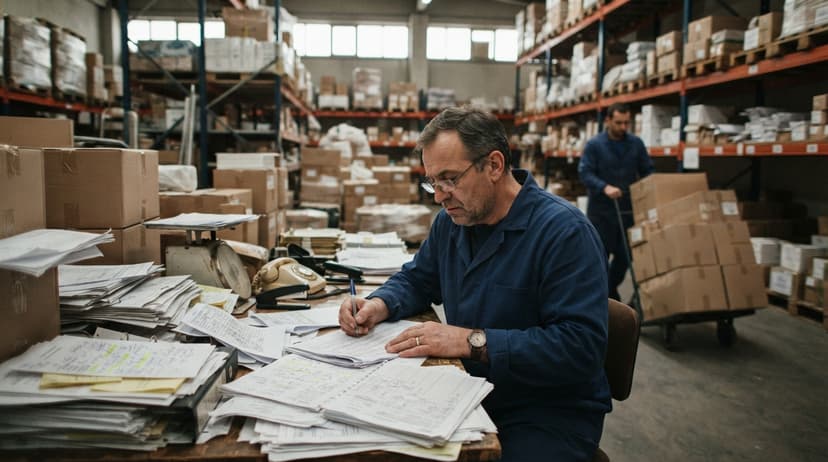
A paper clipboard does not help here. Someone writes a number, the clipboard goes in a drawer, and no one checks it against the purchase order until there is a problem.
A digital receiving log solves this. Your team scans each item as it arrives. The system checks the count against the open purchase order. Any gap shows up immediately. The Warehouse Receiving Process becomes a checkpoint, not a formality.
Putaway
Putaway is the warehousing task of moving received goods from the dock to their correct bin location in storage. It sounds like a simple carry job. The cost of doing it badly shows up later.
When a picker cannot find an item, they walk the whole aisle. Sometimes they give up and mark it as out of stock.
The item is there, just in the wrong spot. That is a lost sale caused by a putaway error from two days ago.
A clear bin location system prevents this. Each storage spot gets a short, readable name: A-01-03 for aisle A, rack 1, shelf 3. Staff learn the naming fast. Labels on the bins confirm the right spot.
You do not need a full warehouse management system to do this.
Warehouse Inventory Management Software built for small teams can suggest the right bin during putaway and confirm the scan before the item is set down. That one step stops most putaway errors before they start.
Order Picking
Picking is pulling the right items in the right quantities for a customer order. It is the warehousing task most directly tied to whether your customer is happy.
A wrong pick means a wrong shipment. A wrong shipment means a return, a credit, and a phone call. It also means your team does the work twice.
Walk-path efficiency matters here. If your pick list sends a picker to aisle A, then aisle F, then back to aisle A, you are wasting floor time.
A digital pick list can sort picks by location so the walk is one direction, not back and forth.
Batch Picking vs Single-Order Picking
Single-order picking is the warehousing task done one order at a time by one picker. It is simple and easy to track. At low volume, it works fine.
Batch picking means one picker pulls items for several orders in a single walk. It is faster when volume grows. The risk is mixing items between orders if the process is not clear.
For a small warehouse with a lean team, batch picking makes sense once you are processing more than 20 to 30 orders a day.
Software can group orders automatically by pick zone so your team walks less and picks more. A clear pick list on a screen or handheld device keeps orders from getting mixed.
Is the comparison easier when one option is built for you?
Yes. Off-the-shelf means fitting your process to the software, and custom is the other way round. The first look costs nothing.
Book a callPacking
Packing is the warehousing task of placing picked items into the right box or bag for shipment. The decisions made at the pack station affect both cost and damage rates.
A box that is too large for the items inside costs more in dimensional weight charges. A box with no void fill leads to damaged goods and a return. Both are avoidable.
The pack station is also where verification happens. A pack slip confirms what should be in the box. A label confirms where it is going. A scan step confirms the right items are inside before the box is sealed.
A packing checklist built into software prevents the most common error: a missing item that was picked but set aside and never packed. The system will not let the box close until every item on the order is scanned in.
Shipping and Dispatch
Shipping is the warehousing task that closes the order loop. The right package goes to the right carrier at the right time. When this step goes wrong, the customer sees it first.
Common manual problems include printing the wrong label, missing a carrier cutoff, and forgetting to log the tracking number. Each one is fixable with a guided digital step.
Shipping data should also feed back into your records without double entry.
When a shipment goes out, the order status updates, inventory adjusts, and the transaction posts to the accounting software. That is what Accounting Integration for Warehouse Operations looks like in practice: one action, one update, no spreadsheet in between.
A manual shipping log requires someone to copy tracking numbers by hand. That person makes errors. Those errors cause customer service calls. Eliminating the manual log is one of the fastest wins a small warehouse can get from software.
How Often Should a Small Warehouse Do Cycle Counts?
Cycle counts are small, frequent counts of a portion of your inventory, done on a rolling schedule rather than a full annual shutdown. For most small warehouses, counting a section each week is more practical and more accurate than one big annual count.
A full physical count shuts down operations. It is stressful, it takes all day, and it only gives you a snapshot once a year. A lot can go wrong in the months between counts.
Cycle counts catch shrinkage and errors early. If bin A-02-05 shows 40 units on hand but the count finds 34, you know now, not at year-end. You can investigate before the trail goes cold.
Count results should feed directly back to your system and to the accounting software without a separate spreadsheet step. Inventory Tracking for Small Warehouses works best when the count, the system record, and the accounting record stay in sync automatically.
Returns and Reverse Logistics
Returns are a warehousing task that many small operations handle poorly, not because the team is careless, but because no one built a clear process for it.
When a return arrives, 4 things need to happen in order:
- Receive the return and match it to the original order
- Inspect the condition of the item
- Decide the disposition: restock, quarantine, or discard
- Update inventory and issue any credit memo in the accounting software
When this process is unclear, phantom stock builds up. An item gets restocked without an inspection. A damaged unit goes back to a pick bin. The next customer gets a bad product. Meanwhile, the credit memo never gets issued, and your books are wrong.
A simple returns workflow in software walks your team through each step in order. Nothing moves to the next step until the prior one is confirmed. Reverse logistics does not have to be complicated. It just needs a defined path.
Replenishment and Stock Transfers
Replenishment is the warehousing task of moving stock from bulk storage to the active pick face before the pick face runs dry. It is a background task that most small teams skip until a picker hits an empty bin mid-order.
When that happens, the picker stops, finds a manager, someone goes to bulk storage, and the order sits. That delay is avoidable.
A replenishment trigger in software solves this. When a bin location drops below a set quantity, the system flags it for a stock transfer before the next pick wave starts. Your team handles it between waves, not during one.
Stock transfers between zones in the same warehouse follow the same logic: scan out of the source location, scan into the destination. The system knows where everything is at all times, which means no one has to guess.
What does it look like running on your own process?
The first thing you see is it running on your own process, at no build cost. The subscription starts once it is live and doing the job, not before.
Book a call
Slotting and Location Management
Slotting is the warehousing task of deciding where each SKU lives in your warehouse. It sounds like a one-time setup task. In practice, it needs regular review.
Fast-moving items should sit close to the pack station. Slow movers go in deep storage. If your top 20 sellers are in the back corner because that is where they landed when you first set up, your team walks extra distance on every single pick.
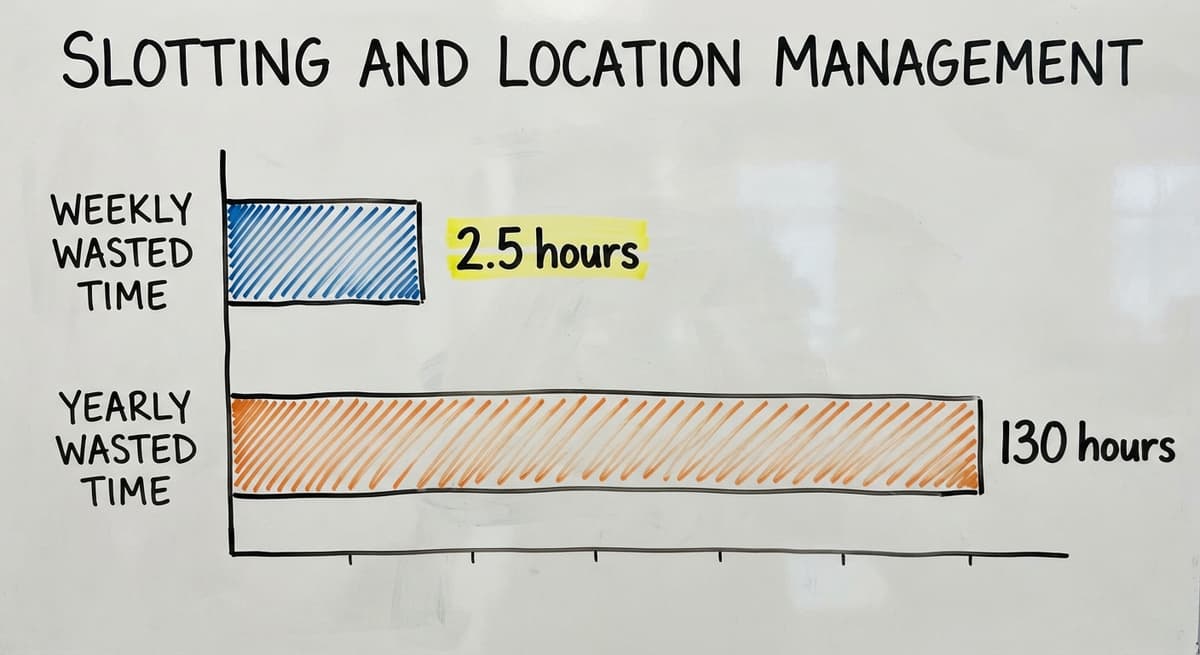
Consider a team of 3 pickers each walking an extra 10 minutes per shift due to poor slotting. That is 30 minutes a day, 2.5 hours a week, roughly 130 hours a year of wasted floor time.
At the median wage for warehouse workers, that adds up to real money that does not need to be spent.
Review slot assignments when your product mix changes. A new fast-moving SKU should not sit in the same spot as the slow mover it replaced.
Labeling and Barcoding
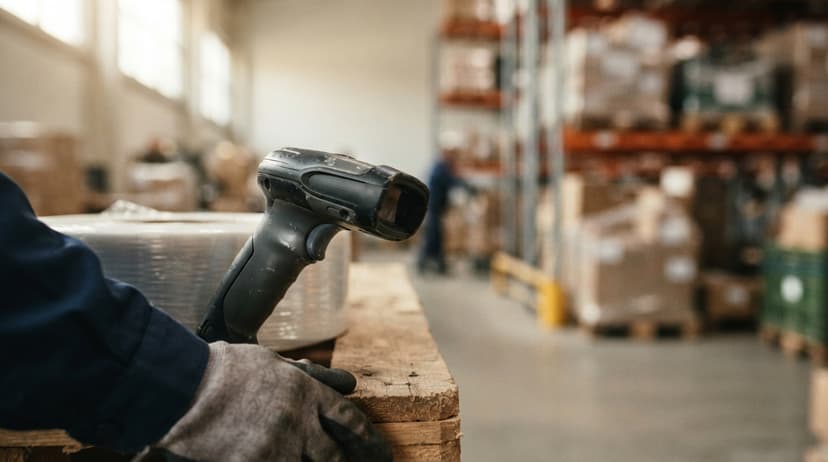
Labels on bins, pallets, and products make every other warehousing task faster. Barcode scanning lets your team confirm an action instead of typing it, which cuts errors dramatically.
You do not need an enterprise system to use barcode scanning. A small warehouse can add scan-and-confirm steps to receiving, putaway, picking, and packing with software built for that scale.
Custom Warehouse Software for Distributors can add scanning to the exact steps where your team currently makes the most errors. You do not have to scan everything on day one. Start with the task causing the most mistakes and add steps from there.
Reporting and Task Tracking
Knowing which tasks were done, by whom, and when is how you spot problems before they become patterns.
Basic metrics worth tracking:
- Orders picked per hour, per picker
- Receiving accuracy: units logged vs units actually received
- Cycle count variance: system quantity vs physical count
- Pack error rate: returns caused by wrong items
A dashboard built into your warehouse software replaces the end-of-day spreadsheet summary that someone has to build and someone else has to read. Reports should be readable by the person running the warehouse, not just by someone with a spreadsheet background.
How Do Warehousing Tasks Connect to Each Other and Cause Downstream Errors?
Each warehousing task feeds the next, so an error at step one does not stay at step one. A receiving error becomes a wrong inventory count.
A wrong count leads to a pick that cannot be filled. A failed pick causes a late shipment. The customer calls. Your team spends an hour fixing something that started with one unchecked box at the dock.
Fixing tasks in isolation rarely solves the real problem. If you improve picking but receiving is still inaccurate, pickers will still hit dead ends. The whole chain needs to work together.
A connected system shows you where the chain broke. When a shipment goes wrong, you can trace it back: which order, which pick, which receiving record. That audit trail is what makes accountability possible and what makes the same mistake less likely to repeat.
Common Warehousing Task Problems in Small Operations
Most small warehouses share the same 5 warehousing task problems. They grow quietly until a bad week makes them visible.
- Memory and paper replace a system. Staff remember where things go. When that person is out, no one else knows.
- Tasks get done differently every time. No standard process means no consistent result.
- Data lives in 3 places: the accounting software, a spreadsheet, and someone's head. None of them match.
- Problems hide until volume spikes. A process that works for 20 orders a day breaks at 60.
The NIST Manufacturing Extension Partnership notes that small and mid-size manufacturers and distributors consistently benefit from process standardization before technology investment. Map the task first. Then pick the tool.
Why Do Spreadsheets and Printed Sheets Stop Working at Scale?
Spreadsheets work for 10 SKUs and a handful of warehousing tasks. They start to break around a few hundred. At a thousand, they are a liability.
A printed pick list is accurate the moment it prints. If an order changes 10 minutes later, the list is wrong and the picker does not know it. A digital pick list updates in real time.
No paper system creates an audit trail. When something goes wrong, there is no record of who did what and when. Without accountability, the same mistake repeats.
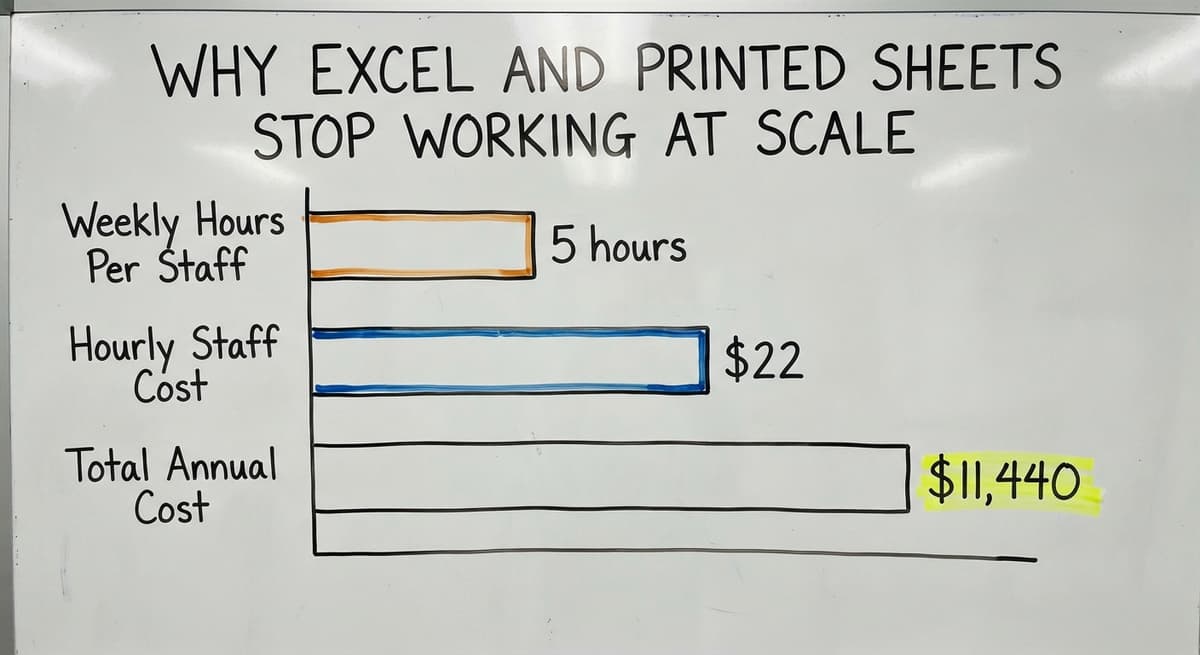
The hidden labor cost of manual systems is also real. Consider 2 staff members spending 5 hours a week each on data entry and reconciliation at $22 an hour. That is $11,440 a year spent on work that software handles automatically.
What is in a free first look?
A 30 minute call, your operation mapped, and a clear picture of what we would build. No obligation and nothing to install.
Book a call
How Does Warehouse Inventory Management Software Handle Warehousing Tasks?
Warehouse inventory management software is a guided digital process that replaces the manual steps in each warehousing task. Your team follows prompts instead of relying on memory.
Receiving gets a scan-and-confirm step. Putaway gets a bin suggestion. Picking gets a sorted digital list. Packing gets a verification scan. Shipping triggers an automatic inventory update. Counts post directly to the system.
Real-time inventory updates replace end-of-day reconciliation. When a pick happens, the system knows immediately. There is no lag, no batch update, no spreadsheet to run at 5pm.
The right software fits around your existing operation. It does not ask you to change how you work before it will help you. It starts with the tasks causing the most pain and adds structure from there.
Keeping Your Accounting Software and Adding Warehouse Software
Most small warehouses are already on an accounting package, and warehousing tasks live outside it. They do not want to leave it, and they should not have to.
Warehouse software does not replace the accounting software. It sits alongside it. When a shipment goes out, the inventory update and the revenue entry post to the accounting software automatically.
When a purchase order is received, the cost posts. No double entry. No end-of-day sync file.
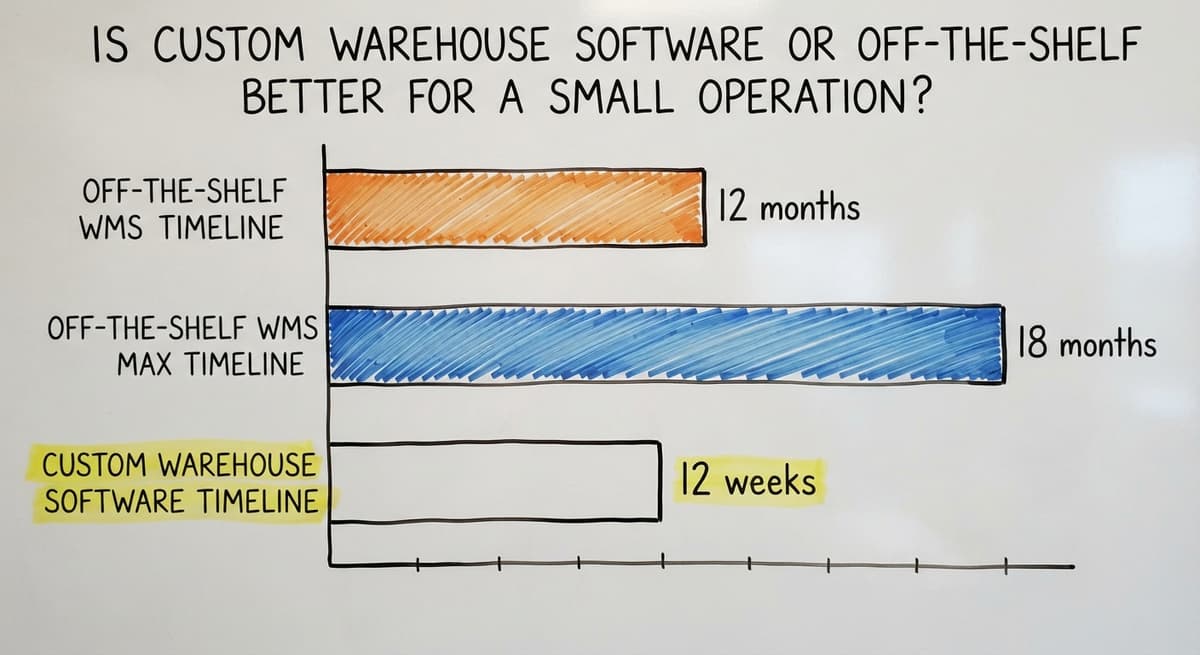
Accounting Integration for Warehouse Operations is faster and cheaper than moving to a full ERP. An ERP implementation can take 6 to 18 months and cost more than most small warehouses spend on software in a decade.
Adding a warehouse layer to the accounting software takes weeks, not months, and your accounting team does not have to learn a new system.
Is Custom Warehouse Software or Off-the-Shelf Better for a Small Operation?
For a small warehouse with a specific process, custom software is the better fit because it is built around how you already work, not the other way around.
Off-the-shelf warehouse management systems target a broad market. They include features you will never use and require you to adapt your process to their design. Implementation takes months and requires a consultant.
Custom software starts with your current tasks. A developer maps what you do, then builds tools that match it. You do not train your team on a new way of working. You give them a better tool for the way they already work.
Cost comparison:
| Option | Typical timeline | Ongoing cost | Fits your process |
|---|---|---|---|
| Off-the-shelf WMS | 3 to 12 months | High monthly license | Partial, requires adaptation |
| Full ERP | 6 to 18 months | Very high | Low without heavy config |
| Custom warehouse software | 4 to 12 weeks | Lower, no per-seat bloat | High, built to match |
Custom Warehouse Software for Distributors makes the most sense when your process is specific, your team is lean, and you want a local partner who can see the operation in person rather than a remote vendor selling a packaged product.
Getting Started Without a Long Implementation
Before you choose any software, map your current warehousing tasks on paper. Write down each step your team takes from receiving to shipping. Note where errors happen most often.
Then start with the 1 or 2 tasks causing the most pain. Do not try to fix everything at once. A focused first step gets results faster and builds team confidence.
A local partner who can visit your floor is worth more than a remote vendor who has never seen your racking. They can spot problems in your layout that no demo will reveal.
A realistic first 90 days for a small warehouse adding software looks like this:
- Weeks 1 to 2: map current tasks and identify the top pain points
- Weeks 3 to 6: configure and test the software for those specific tasks
- Weeks 7 to 10: train the team and run the new process alongside the old one
- Weeks 11 to 12: go live and monitor for gaps
The goal is a working system in 90 days, not a perfect one. Improve from there.
Frequently Asked Questions About Warehousing Tasks
What are the 5 main activities in a warehouse? The 5 main activities are receiving, putaway, picking, packing, and shipping. Most warehouses also add cycle counting and returns as regular tasks, but those 5 form the core flow that every order moves through.
What are the typical tasks of a warehouse worker? A warehouse worker receives and checks incoming shipments, moves goods to storage locations, picks items for orders, packs boxes, applies shipping labels, and counts stock during cycle counts.
In smaller operations, one person handles several of these tasks in a single shift.
What are the 7S of warehousing? The 7S framework in warehousing refers to: Sort, Set in order, Shine, Standardize, Sustain, Safety, and Spirit. It comes from lean manufacturing and is used to organize the physical workspace and build repeatable habits.
Not every small warehouse uses this framework by name, but the ideas behind it apply to any operation trying to reduce waste and errors.
What are the 5 warehouse processes? The 5 warehouse processes, the warehousing tasks grouped, are receiving, storage, order fulfillment, shipping, and returns. These map closely to the 5 main activities but frame each one as a process with defined steps rather than a single action.
Software handles each process by guiding your team through those steps in order.
Can a small warehouse use barcode scanning without a big system? Yes. Barcode scanning does not require an enterprise warehouse management system.
A focused software tool built for small operations can add scan-and-confirm steps to receiving, picking, and packing without a long implementation or a high monthly cost. Start with the task where errors are most frequent.
Do I need to replace my accounting software to manage warehousing tasks in software? No. Warehouse software and the accounting software work alongside each other.
The warehouse layer handles task guidance, inventory tracking, and pick and pack steps. The accounting software handles accounting. A sync between the two keeps inventory values, purchase orders, and shipment records accurate in both systems without manual entry.
How do warehousing tasks change as order volume grows? At low volume, simple processes work fine. As volume grows, the gaps in those processes become costly. Batch picking replaces single-order picking.
Cycle counts replace annual shutdowns. Digital pick lists replace printed sheets. The tasks stay the same; the tools and structure around them need to grow with the volume.
What is the most important warehousing task to get right first? Receiving. Every other warehousing task depends on the accuracy of what was recorded when goods arrived.
A receiving error creates problems in putaway, picking, packing, and shipping. Fixing receiving first has the broadest positive effect on the rest of the operation.
Frequently asked questions
The sources behind this guide
The public record on this is worth reading directly: US Census Bureau, Monthly Wholesale Trade covers national inventories, sales and the inventories-to-sales ratio for wholesale firms.
Frequently asked questions
What are the 5 main activities in a warehouse?
The 5 main activities are receiving, putaway, picking, packing, and shipping. Most warehouses also add cycle counting and returns as regular tasks, but those 5 form the core flow that every order moves through.
What are the typical tasks of a warehouse worker?
A warehouse worker receives and checks incoming shipments, moves goods to storage locations, picks items for orders, packs boxes, applies shipping labels, and counts stock during cycle counts. In smaller operations, one person handles several of these tasks in a single shift.
What are the 7S of warehousing?
The 7S framework in warehousing refers to: Sort, Set in order, Shine, Standardize, Sustain, Safety, and Spirit. It comes from lean manufacturing and is used to organize the physical workspace and build repeatable habits.
Not every small warehouse uses this framework by name, but the ideas behind it apply to any operation trying to reduce waste and errors.
What are the 5 warehouse processes?
The 5 warehouse processes, the warehousing tasks grouped, are receiving, storage, order fulfillment, shipping, and returns. These map closely to the 5 main activities but frame each one as a process with defined steps rather than a single action.
Software handles each process by guiding your team through those steps in order.
Can a small warehouse use barcode scanning without a big system?
Yes. Barcode scanning does not require an enterprise warehouse management system. A focused software tool built for small operations can add scan-and-confirm steps to receiving, picking, and packing without a long implementation or a high monthly cost. Start with the task where errors are most frequent.
Do I need to replace my accounting software to manage warehousing tasks in software?
No. Warehouse software and the accounting software work alongside each other. The warehouse layer handles task guidance, inventory tracking, and pick and pack steps.
The accounting software handles accounting. A sync between the two keeps inventory values, purchase orders, and shipment records accurate in both systems without manual entry.
How do warehousing tasks change as order volume grows?
At low volume, simple processes work fine. As volume grows, the gaps in those processes become costly. Batch picking replaces single-order picking. Cycle counts replace annual shutdowns.
Digital pick lists replace printed sheets. The tasks stay the same; the tools and structure around them need to grow with the volume.
What is the most important warehousing task to get right first?
Receiving. Every other warehousing task depends on the accuracy of what was recorded when goods arrived. A receiving error creates problems in putaway, picking, packing, and shipping. Fixing receiving first has the broadest positive effect on the rest of the operation.
What does a warehouse worker do daily?
A typical day runs through the same warehousing tasks in order: receiving deliveries and checking them against purchase orders, putting stock away to its location, picking orders from a pick list, packing and labelling them, loading shipments, and counting a slice of the warehouse.
In a small operation one person covers several of those; in a larger one each is a role. Scanning at each step is what keeps the record honest.
What skills are needed for warehouse jobs?
Accuracy first: reading a purchase order or pick list correctly and counting carefully. Then physical fitness and safe handling, basic comfort with a scanner and a tablet, attention to labels and locations, and the habit of recording a movement when it happens rather than later.
Forklift or pallet-jack certification opens up receiving and loading work. Most warehousing tasks are learned in weeks; the accuracy habit is what makes someone good at them.
What safety rules should warehouse workers follow?
Keep aisles and dock areas clear, lift with the legs and use equipment for anything heavy, wear the footwear and high-visibility gear the site requires, never walk under a raised load, stack pallets stably and within rack limits, report damaged racking or spills immediately, and follow the traffic rules for forklifts and people.
The regulator's warehousing guidance is the reference; a site's own rules should be posted where the work happens.
What is the difference between picking and packing?
Picking is the warehousing task of collecting the items for an order from their locations, guided by a pick list and confirmed by scanning each item.
Packing is what happens next at the packing station: checking the picked items against the order, boxing them with the right protection, printing the label and confirming the shipment so inventory drops and the customer is notified.
Errors caught at packing are cheap; errors that leave the building are not.
Not sure this is the right shape for your operation?
The call is free. Describe how the work runs today. We map it on a call and show you what it would look like built around that, before you spend anything.
Book a callRelated guides
The rest of this guide, for the parts of the job this page does not cover.
Guides
- Warehouse Inventory Management Software
- Warehouse Inventory Tracking Software
- Warehouse Inventory Management Systems
- Pick and Pack in Warehouse
- Warehouse Receiving Software
- Warehouse Inventory Systems
- Warehouse Stock Management Software
- Warehouse Management System Top 10
- Software for Warehouse Management System
- Warehouse Shipment
- Warehouse Tracking System
- Warehousing Operations
- Inventory and Warehouse Management Software
- Small Business Warehouse Management System
- Cloud Based Warehouse Management
- Warehouse Management System Types
- Warehouse Inventory Management System
- List of Warehouse Management Software
- Warehouse Management Costs
- Warehouse Management Cloud
- Warehouse Management System Examples