


What Are The Four Types Of Wms?
Reviewed and updated: October 2026
The 4 types of WMS are: standalone WMS, supply chain module WMS, ERP-integrated WMS, and custom-built WMS. Each one is built differently, connects to other tools differently, and fits a different size of operation. Knowing which type matches your setup saves time, money, and a painful rollout.
Book a callWhy the Type of WMS You Choose Matters
Not every warehouse management system is built for the same operation. A WMS built for a 500-person distribution center will overwhelm a 12-person fulfillment team. Choosing the wrong type forces you to change workflows that already work, pay for features you will never use, and survive an implementation that drags on for months.
Small and mid-sized distributors have different needs than enterprise operations. They need fast go-live, accounting software integration, and a system that fits their current process, not one that demands they rebuild around it. Understanding the four types helps you ask the right questions before any vendor gets in the room.
We build it for your operation, and the first look is free
If you would rather not compare products, describe how your operation already works and we build the system around it.
No build cost. You see it running on your own process first, and the monthly subscription starts only once it is live.
Book a callThe Four Types of WMS at a Glance
The four types are standalone WMS, supply chain module WMS, ERP-integrated WMS, and custom-built WMS. They differ in how they are built, how they connect to other tools, and who they are designed for. The IRS makes clear why inventory tracking is not optional: as stated in IRS Publication 538, "To figure taxable income, you must value your inventory at the beginning and end of each tax year." That legal obligation is the baseline. The type of WMS you pick work out how well you meet it without burying your team in manual work.
What Is a Standalone WMS and Who Is It For?
A standalone WMS is a dedicated warehouse application that runs on its own, separate from your accounting or order management tools. It covers the core functions: receiving, put-away, picking, packing, and shipping. It does not touch your financials directly.
This type is a good fit for operations that want focused warehouse control without replacing their accounting package. The tradeoff is integration work. Connecting a standalone WMS to your accounting software or an order platform needs a separate integration layer. If that layer is thin or unreliable, data gaps appear fast. Stock levels in the WMS drift from what your accounting package shows, and the team ends up reconciling records by hand.
Standalone WMS works best when the warehouse problem is isolated and the rest of the business runs fine on existing tools.
Key strengths of a standalone WMS
A standalone WMS earns its place by doing warehouse work well without requiring a full platform overhaul. Understanding what it does well, and where it falls short, helps set realistic expectations before rollout begins.
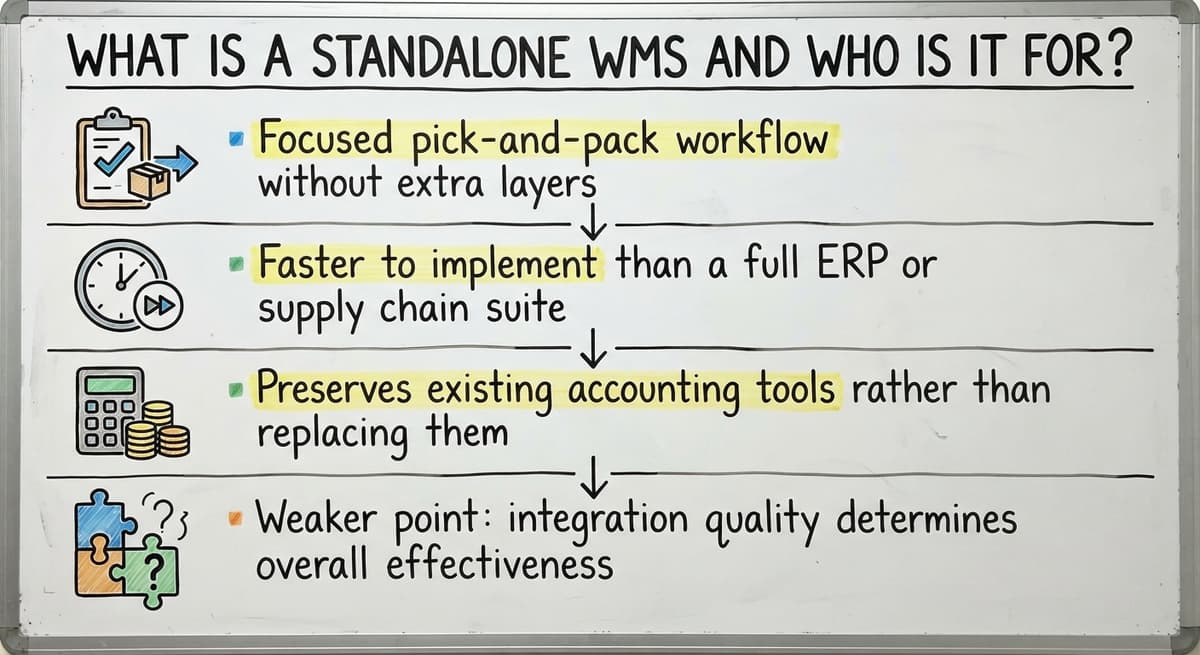
- Focused pick-and-pack workflow without extra modules the team will not use
- Faster to implement than a full ERP or supply chain platform
- Preserves existing accounting tools rather than forcing a replacement
- Weaker point: integration quality work out whether it creates new data problems
What Is a Supply Chain Module WMS?
A supply chain module WMS lives inside a larger supply chain management platform. It is not a standalone product. The warehouse functions are one piece of a system that also manages suppliers, freight, and logistics across a wider network.
This type works well for large distribution networks that need to coordinate many moving parts in one place. For a smaller warehouse, it is usually more than necessary. Licensing costs are tied to the full platform, so you pay for supplier management tools, logistics dashboards, and reporting modules even if your operation does not need them.
Flexibility is also limited. The WMS module is built to work inside the platform's rules, not around your specific process. Customizing one piece often means touching the whole system. For an operation that only needs warehouse-level control, a supply chain module WMS adds cost and complexity without adding proportional value.
The comparison is easier when one option is built for you
Off-the-shelf means fitting your process to the software. We do it the other way round, and the first look costs nothing.
Book a callWhat Is an ERP-Integrated WMS and What Does It Cost?
An ERP-integrated WMS is a warehouse module built into or tightly connected to an enterprise resource planning system. ERP means one platform that handles accounting, purchasing, sales, and warehouse operations together. Data moves across all of those functions automatically, with no manual re-entry. The appeal is a single system of record for the whole company.
Why ERP Integration Is Often the Wrong Fit for Small Operations
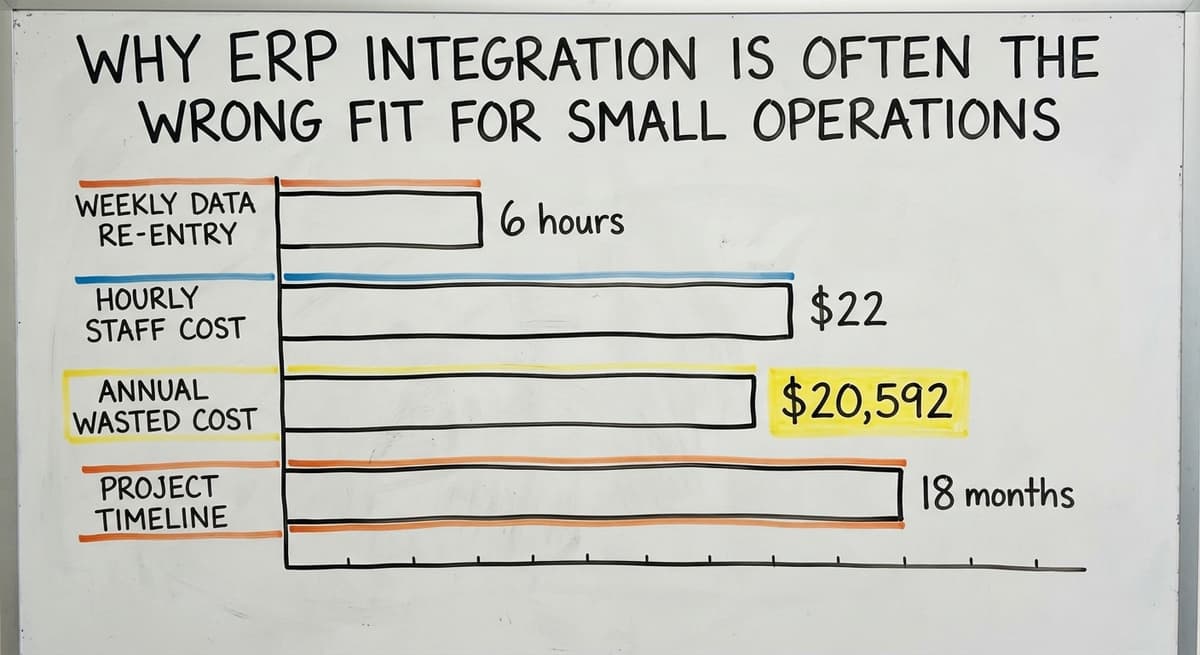
The tradeoff is large. Rollout runs long and expensive. The business must often change how it works to match the ERP's logic, not the other way around. For an operation running 5 to 100 staff, this type is frequently oversized. Consider the staff cost alone: if 3 people spend 6 hours a week re-entering data between systems at $22 an hour, that is $20,592 a year in wasted labor. An ERP solves that problem, but the rollout investment often exceeds what a small operation can absorb. ERP-integrated WMS is the right answer for a business ready to replace every existing tool at once. It is the wrong answer for one that is not.
What ERP implementation actually demands
An ERP rollout is not a software install, it is an company project that touches every department at once. The demands below are consistent across rollouts and should be weighed before any commitment is made.
- A long project timeline, often 6 to 18 months before the team is fully live
- Process changes across accounting, purchasing, and warehouse at the same time
- Staff training on an entirely new system rather than an improvement to the current one
- Budget for licenses, rollout fees, and the productivity dip during the switch

Type 4: What Makes a Custom-Built WMS Different?
A custom-built WMS is designed around how your operation already works. It does not ask you to change your process to match pre-built software. It fills the gaps in your existing tools rather than replacing everything at once. For distributors running on accounting software and spreadsheets, this matters.
What a Custom WMS Replaces and What It Leaves Alone
A custom WMS can connect directly to your accounting software, keep it in place, and automate the manual steps that slow the team down: printing pick sheets, counting inventory by hand, re-entering shipping data. The accounting package stays where it is and keeps doing what it does well. This type scales to the size of the business, not the size of an enterprise budget. It is built for operations that have outgrown spreadsheets and printed pick sheets but are not ready for a full ERP overhaul. Custom-built warehouse software gives a small or mid-sized distributor the control of a larger system without the overhead that comes with it.
How the Four Types Compare Side by Side
Cost and time to go live separate these types quickly. Standalone and custom-built options tend to be faster and more affordable for smaller teams. A standalone WMS can often go live in weeks if the integration work is straightforward. A custom build takes longer upfront but matches the existing process, so staff adoption is faster once it is live.
See it running on your own process first
No build cost. The subscription starts once it is live and doing the job, not before.
Book a call
Which WMS Types Fit Lean Teams and Which Do Not
ERP-integrated and supply chain module systems carry more overhead than most 5-to-100-staff operations need. They are built for complexity at scale. The flexibility trade-off is real: both types are harder to adjust once live, and changes often need vendor involvement rather than a quick setup update. For small warehouse operations, the decision usually comes down to 2 questions: how much process change is the team willing to absorb, and how long can the operation run without a fully working system during the switch? Standalone and custom-built WMS types answer both questions more favorably for lean teams.
Signs You Have Outgrown Your Current Setup
Some signals show up before the pain becomes obvious. These are the ones worth watching.
- Orders are tracked in spreadsheets or printed pick sheets that get lost or overwritten
- Inventory counts do not match what your accounting package shows, and no one knows why
- Staff spend part of every shift re-entering data from one system into another
- Mis-picks and shipping errors are climbing as order volume grows
- The operation runs on tribal knowledge: one person knows where things are and what the process is, and that knowledge lives in their head
Why Inventory Errors Compound as Volume Grows
Any one of these signals means a WMS of some type is overdue. The US Census Bureau's Monthly Wholesale Trade data shows that wholesale inventories are large and closely watched at the national level. At the business level, inventory errors compound fast when volume grows. A system that worked at 50 orders a day breaks down at 150, and the signs appear well before the breaking point.

What Should I Ask Before Choosing a WMS Type?
The right questions narrow the field before any vendor conversation starts. Here are the ones that matter most.
- Do you want to keep your accounting software, or are you ready to replace your accounting system entirely?
- How many staff will use the system every day, and what is their comfort level with new software?
- How long can the operation run through an rollout project before it affects customers?
- Does the WMS need to match your current workflow, or is the team willing to change how it works?
- Is the goal to fix one broken area, like receiving or pick-and-pack, or to connect the whole operation?
Where to Get Vendor-Neutral Guidance Before You Start
Answering these questions honestly before talking to a vendor protects you from buying a system sized for someone else's operation. The NIST Manufacturing Extension Partnership offers vendor-neutral guidance on supply chain process decisions that can help frame these questions at the working level.
Not sure this is the right shape for your operation
Describe how the work runs today. We map it on a call and show you what it would look like built around that, before you spend anything.
Book a callWhy Small Distributors Often Choose Custom Over Off-the-Shelf
Off-the-shelf WMS products are built for a generic warehouse. They assume a standard receiving process, a standard picking method, and a standard way of counting inventory. Most small distributors do not run a standard operation.
How a Custom Build Fits the Team Already in Place
Custom warehouse software is built around the workflows already in place. Staff recognize the screens because the screens reflect how the job actually gets done. That familiarity cuts training time and speeds adoption. Your accounting software stays in place and handles what it handles well. The custom layer handles warehouse workflow automating: scanning, tracking, pick-and-pack, and shipping confirmation. No forced migration to a new accounting system. No paying for enterprise features the team will never open. Local builders who understand the operation can adjust the system as the business grows. A new product line, a second location, or a change in how orders come in does not need a platform upgrade or a new license tier. For a distributor that has outgrown spreadsheets but is not ready for an ERP, custom-built warehouse software closes the gap without creating a new one.

What a Custom WMS Implementation Actually Looks Like
A custom build starts with a review of how the operation currently runs. No demo of pre-built features, no slide deck of capabilities. The first conversation is about the current process: where orders come in, how the floor is organized, where errors happen, and what the team wishes worked differently.
How Go-Live Is Phased to Keep the Operation Running
The system is built to match that process. Accounting software integration is set up so financial data stays accurate without double entry. Inventory counts in the WMS match what the accounting package shows because they pull from the same source. Go-live is phased. The team is never left without a working system while the new one is being tested. One function goes live at a time, usually starting with receiving or pick-and-pack, where the pain is sharpest. The builders stay involved after launch. As the business changes, the system changes with it. That ongoing relationship is what separates a custom build from a software buy: the system grows with the operation rather than the operation growing around the system.
Choosing the Right WMS Type for Your Operation
Standalone WMS fits operations that want focused warehouse control and already have a working accounting setup. Supply chain module WMS fits larger networks managing suppliers and logistics together. ERP-integrated WMS fits businesses ready to replace every tool at once and absorb a long rollout. Custom-built WMS fits distributors and warehouses that need a system shaped around their current process, not a generic one.
Start with your current pain points, not a feature checklist. The right WMS type is the one that solves the real problem at your current scale. If your operation runs on accounting software and the biggest issues are inventory accuracy and pick-and-pack errors, a custom build with accounting software integration for warehouse operations is likely the shortest path to a fix.
If you are ready to talk through what your operation actually needs, that conversation starts with your process, not a product pitch.
Frequently asked questions
What are the types of WMS?
There are 4 main types of warehouse management systems: standalone WMS, supply chain module WMS, ERP-integrated WMS, and custom-built WMS. Each is built differently and fits a different size and type of operation. Standalone systems focus on warehouse functions alone. Supply chain modules sit inside a larger platform. ERP-integrated systems share data across the whole business. Custom-built systems are designed around how a specific operation already works.
What are the four types of warehouse management systems?
The 4 types of warehouse management systems are: (1) standalone WMS, a dedicated warehouse app that runs independently; (2) supply chain module WMS, a warehouse function inside a larger supply chain platform; (3) ERP-integrated WMS, a warehouse module built into or tightly connected to an enterprise resource planning system; and (4) custom-built WMS, a system designed around a specific operation's existing workflow. The right type depends on the size of the operation, the tools already in use, and how much process change the team can absorb.
What is the most common WMS?
There is no single most common WMS. The most widely used type depends on the size of the operation. Large enterprises tend to use ERP-integrated or supply chain module systems. Small and mid-sized distributors more often use standalone or custom-built systems because those fit lean teams and existing tools like small-business accounting software without requiring a full platform replacement. The right choice is the one that matches your current scale, not the one with the most name recognition.
What are the top 20 WMS systems?
This article does not rank or name specific WMS products because the right system depends on the operation, not a popularity list. A system that ranks highly for a 300-person distribution center may be completely wrong for a 15-person warehouse. Instead of looking for a top-20 list, focus on the 4 types of WMS and which type fits your size, your existing tools, and how much rollout time you can absorb. That question narrows the field faster than any ranking.
Can a WMS work alongside your accounting software without replacing it?
Yes. A standalone WMS or a custom-built WMS can integrate with your accounting software and leave it in place. The WMS handles warehouse functions like receiving, picking, and shipping. Your accounting software continues to handle accounting. A well-built integration keeps inventory counts and financial data in sync without requiring manual re-entry. ERP-integrated systems, by contrast, usually replace your accounting software rather than work alongside it.
How long does a WMS rollout take?
Rollout time varies by type. A standalone WMS with a clean integration can go live in a few weeks. A custom-built WMS usually takes longer upfront because it is built around your specific process, but a phased go-live keeps the operation running throughout. An ERP-integrated WMS is the longest, often 6 to 18 months, because it needs changing processes across accounting, purchasing, and warehouse operations at the same time. The right timeline depends on how complex the operation is and how much the team can change at once.
How do I know if my operation needs a WMS?
Clear signals include: inventory counts that do not match your accounting records, staff spending time re-entering data between systems, mis-picks or shipping errors increasing as order volume grows, and a process that depends on one person's memory rather than a documented system. If orders are still tracked on printed sheets or spreadsheets, a WMS of some type is overdue. The question is not whether you need one but which of the 4 types fits your current scale.
Start with a free first look
A 30 minute call, your operation mapped, and a clear picture of what we would build. No obligation and nothing to install.
Book a callRelated guides
The rest of this guide, for the parts of the job this page does not cover.
Guides
- Types of Inventory Control
- Types of Stock Control Systems
- 7 Types of Inventory
- Warehouse Management System Types
Common questions
- What Are the Most Popular Wms?
- What is Inventory Management and Its Types
- What Are the 7 Types of Warehouses?
- What is B Type of Inventory in Warehouse Management
- What is the Difference Between Aggregate and Item Inventory Management
- What is Jit Inventory Management
- What is an Important Factor in Inventory Management
- What is Abc Classification in Inventory Management
- What is Inventory Management in Working Capital
- What is the Main Purpose of Inventory Management
- What is Effective Inventory Management
- What is Information Technology Inventory Management
- What is Risk Pooling in Inventory Management
- What is Inventory Listing
- What is Inventory Management Mary Kay
- What is Stock Taking in Inventory Management
- What is Bin Number in Inventory Management
- What is Inventory
- What is the Goal of Inventory Management Quizlet
- What is the Implication of Proper Inventory Management