


What Is Barcoding In Inventory Management
Reviewed October 2026
Barcoding in inventory management means giving each product a unique barcode label so a scanner can read it and record the movement automatically. A scan replaces a typed entry. That single change removes most of the human error that creeps into receiving, picking, and shipping when staff rely on printed sheets and memory.
Book a callHow Barcoding in Inventory Management Works
Every barcode system runs a 3-part loop: create a label, scan it at a touchpoint, and write the result to an inventory record.
A touchpoint is any place a product changes hands or location. The common ones are the receiving dock, a storage shelf, the pick station, the packing table, and the outbound shipment. At each stop, a scan takes under a second and logs exactly what moved, when, and where.
A SKU (stock keeping unit) is the internal code that ties the barcode to a specific product in your system. GS1, the global standards body, describes barcodes as "a series of parallel bars and spaces that can be scanned electronically," and its full standards library is at gs1.org/standards/barcodes. Without a software layer to receive each scan, the loop is broken. The label and the scanner are only inputs. The record is the result.
Which Barcode Type Should I Use?
The choice between 1D and 2D barcodes usually comes down to what your suppliers already print. 1D barcodes like UPC and Code 128 carry a short string of numbers. They work well for standard retail items that arrive pre-labeled. 2D barcodes like QR codes and Data Matrix pack more data into a smaller space, which matters when a label must carry lot numbers, expiration dates, or serial numbers. Most warehouse scanners read both formats, so the practical answer is: use what your suppliers provide, and print 2D labels only for items that arrive unlabeled or need extra data.
We build it for your operation, and the first look is free
If you would rather not compare products, describe how your operation already works and we build the system around it.
No build cost. You see it running on your own process first, and the monthly subscription starts only once it is live.
Book a callWhat Equipment Do You Need?
The basic hardware list is short:
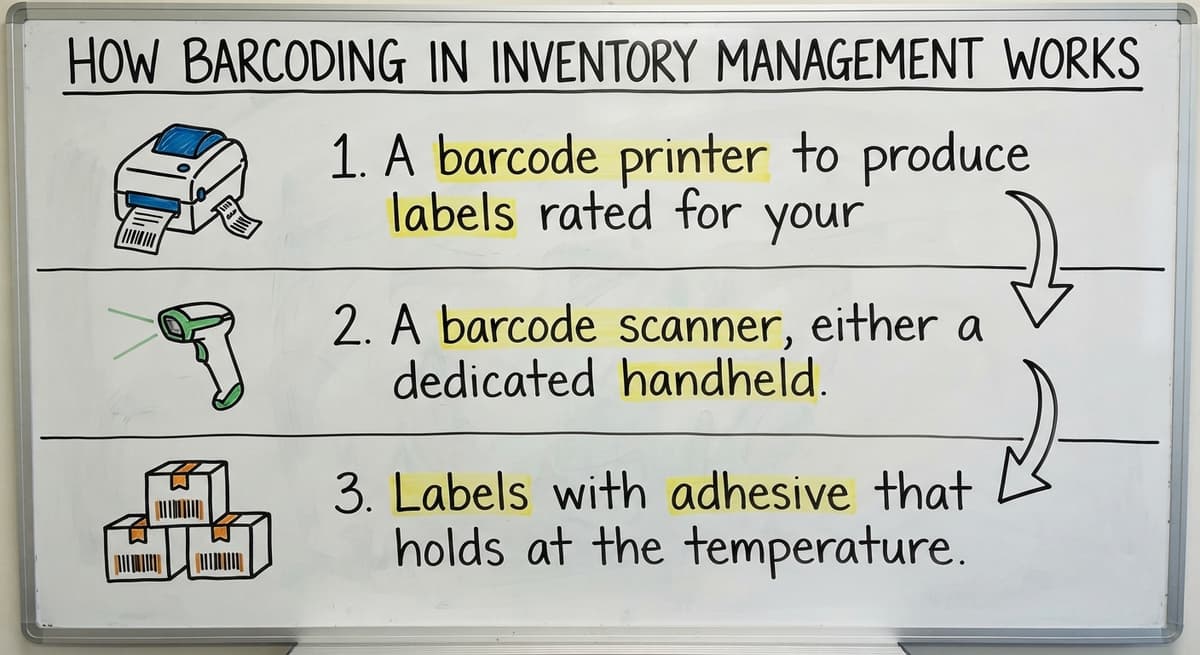
- A barcode printer to produce labels rated for your storage environment (cold storage and humid dock areas destroy standard paper labels fast)
- A barcode scanner, either a dedicated handheld device or a mobile phone running a scanning app
- Labels with adhesive that holds at the temperature and humidity of your facility
Scanners range from a $200 handheld gun to a phone with a free app. The price gap is real, but it is not the decision that matters most. Hardware is only useful when it connects to software that records and acts on the scan. A scanner that feeds data nowhere is a flashlight in a dark room.
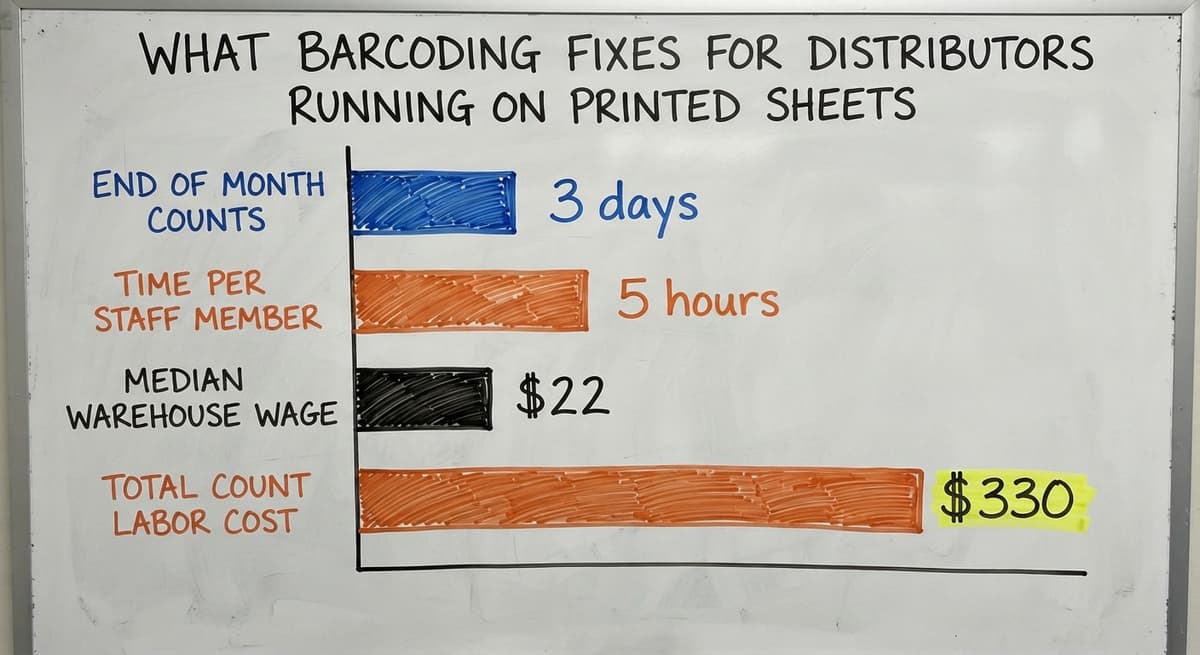
What Barcoding Fixes for Distributors Running on Printed Sheets
If your operation runs on an accounting package plus printed pick sheets and a monthly Excel count, these are the specific problems barcode scanning addresses.
| Before | After |
|---|---|
| Receiving staff hand-count and write quantities on a sheet, then someone keys the numbers in later | A scan at the receiving dock writes the quantity directly to the inventory record, no second entry needed |
| A picker reads a SKU off a sheet and grabs the nearest item that looks right | A scanner confirms the picked item matches the order before it leaves the shelf |
| End-of-month counts take 2 to 3 days and still produce discrepancies | Cycle counts done with a scanner take minutes per aisle and match the system record in real time |
| A wrong shipment gets caught by the customer, not by your team | A scan at the packing table flags a mismatch before the box closes |
The IRS is clear on why accurate counts are not optional. IRS Publication 538 states: "To figure taxable income, you must value your inventory at the beginning and end of each tax year." A count that is off by even a small margin produces a wrong tax figure, not just an working headache.
Consider the labor cost of doing this manually. 3 staff members spending 5 hours each on a monthly count, at the median warehouse worker wage of around $22 an hour per Bureau of Labor Statistics data, adds up to $330 per count or nearly $4,000 a year, before accounting for the errors those counts still contain.
The comparison is easier when one option is built for you
Off-the-shelf means fitting your process to the software. We do it the other way round, and the first look costs nothing.
Book a callHow Barcode Scanning Connects to Inventory Software
A scan is just an input. The software decides what happens next: subtract a quantity from a bin, flag a count that does not match the buy order, or mark an order as shipped.
This is where most small operations stumble. They buy scanners, point them at labels, and then discover the data has nowhere useful to go because the accounting package was never built to handle floor-level warehouse activity.
The right approach is software built around the operation's actual workflow, not a generic screen that forces staff to adapt. A well-integrated custom layer can keep your accounting package as the financial record while the warehouse side handles receiving, picking, and shipping in real time. Inventory management software for wholesale distributors built this way does not need replacing what already works financially. It fills the gap between the scan and the ledger.
The NIST Manufacturing Extension Partnership offers vendor-neutral guidance on supply chain process design, and its core point holds: the process should drive the system, not the other way around.
Common Mistakes When Setting Up Warehouse Barcoding
Most setup problems fall into 4 categories. Knowing them ahead of time saves weeks of rework.

- Buying scanners before the software is ready means staff scan labels that write data nowhere, which builds bad habits fast.
- Relying entirely on supplier barcodes leaves you with no plan for items that arrive unlabeled, which happens more often than expected.
- Printing standard paper labels for cold or humid environments produces labels that fade or peel within days, breaking the scan loop at the worst moments.
- Skipping training on scan failures is the most overlooked gap. When a label is missing or a scan does not register, staff need a clear path to follow. The exception path matters as much as the normal one.
Replacing Excel and printed pick sheets with a connected system only works if every person on the floor knows what to do when the system does not behave as expected.
How Do You Start Barcoding Without Disrupting Current Operations?
Start with 1 high-traffic touchpoint, and receiving is almost always the right one. Every item that enters the building passes through it. Fixing the count at entry means every downstream step starts with accurate data.

Before choosing any software, map the current manual steps on paper. Write down who does what, in what order, and where the data goes. That map tells you what the system needs to do. Custom warehouse software built around your workflow will fit that map. A generic platform will ask you to change the map to fit it.
The FTC's guidance on order fulfillment is a useful reminder that shipping accuracy is not just an working goal. Businesses have a legal obligation to ship what was ordered, when it was promised. Accurate inventory is what makes that possible.
Operations teams in wholesale distribution and warehousing can walk through their current workflow with a local software partner to find where barcode scanning would cut the most waste. How custom software works alongside your existing accounting software is a practical starting point for that conversation, not a full system replacement.
Frequently asked questions
How do I create a barcode for my inventory?
You need 3 things: a unique code for each product (your SKU), a barcode printer, and software that ties the code to the product record. Most inventory platforms let you generate and print barcode labels directly. For items you sell to other businesses, GS1 at gs1.org/standards/barcodes is the standard source for globally recognized barcodes. For internal warehouse use only, you can generate codes without registering them externally.
What is barcode scanning used for?
In a warehouse, barcode scanning is used to record product movement without manual data entry. A scan at the receiving dock logs what arrived. A scan at the pick station confirms the right item was pulled. A scan at packing checks the order before the box closes. Each scan writes a record automatically, which removes the typing errors that cause most inventory discrepancies.
Which barcode type should I use?
There is no single right answer. Use what your suppliers already print when possible, because most warehouse scanners read both 1D and 2D formats. Choose 1D barcodes like UPC or Code 128 for standard retail items. Choose 2D formats like Data Matrix when a label must carry extra data such as lot numbers or expiration dates in a small space.
How much does a barcode inventory system cost?
The range is wide. A basic setup with a mobile phone scanner app and a low-cost label printer can run under $500. A dedicated handheld scanner costs $200 to $800. The software layer varies most: a simple inventory app may cost $50 a month, while a custom system built around your specific workflow is priced by scope. The right question is not the lowest cost but which option connects the scan to a useful record without creating workarounds.
Can a small warehouse use barcoding without a full ERP system?
Yes. A 10-person warehouse can implement barcode scanning without an ERP or a long rollout. The goal is to replace the manual parts of the workflow, not the entire business system. An accounting package can stay as the financial record while a lighter inventory layer handles the floor activity. Start with one touchpoint, usually receiving, and expand from there.
What problems does barcoding solve for small and mid-size distributors?
The biggest gains show up in 4 areas: miscounts during receiving, wrong items shipped, time lost hunting for stock, and end-of-month reconciliation that takes days instead of hours. Each problem traces back to manual data entry. A scan removes the entry step, so the error rate drops with it.
How does barcode scanning connect to inventory management software?
The scan is the input. The software decides what happens next: adjust a quantity, flag a discrepancy, update an order status. Without software built to receive and act on the scan, the hardware does nothing useful. The connection between the scanner and the record is where most small operations need the most help.
Start with a free first look
A 30 minute call, your operation mapped, and a clear picture of what we would build. No obligation and nothing to install.
Book a callRelated guides
The rest of this guide, for the parts of the job this page does not cover.
- What is the Difference Between Aggregate and Item Inventory Management
- What is Jit Inventory Management
- What is Kanban System of Inventory Management
- What is the Definition of Inventory Management
- What is an Important Factor in Inventory Management
- What is Abc Classification in Inventory Management
- What is Inventory Management in Working Capital
- What is Poor Inventory Management
- What is Inventory Management and Its Types
- What is the Main Purpose of Inventory Management
- What is Inventory Management in Pharmacy
- What is Effective Inventory Management
- What is Information Technology Inventory Management
- What is Inventory Management in Tally
- What is Risk Pooling in Inventory Management
- What is Inventory Management Mary Kay
- What is Stock Taking in Inventory Management
- What is Hospital Inventory Management
- What is Bin Number in Inventory Management
- What is the Scope of Inventory Management
- What is the Goal of Inventory Management Quizlet
- What is the Implication of Proper Inventory Management
- What is Omni-channel Inventory Management
- What is Inventory Management and Its Importance