


What Is Inventory Management Ppt
An inventory management PPT is a slide deck that explains how a business tracks, stores, and moves stock. It defines key terms, maps core processes, and sets shared expectations for a team. It is a teaching tool, not a tracking tool. It cannot count items, trigger reorders, or connect to an accounting package.
Reviewed October 2026
Book a callWhat an Inventory Management PPT Actually Is
An inventory management presentation gives a team a shared starting point. Managers use it to train new staff, walk ownership through a process change, or introduce a new workflow before it goes live. The slide deck covers what inventory management means, why it matters to the business, and how the process flows from receiving to shipping.
The IRS makes the stakes plain. IRS Publication 538 states: "To figure taxable income, you must value your inventory at the beginning and end of each tax year." Counting stock is a legal obligation, not a preference. A PPT helps the team understand that obligation before they touch a single item.
That shared understanding is the whole value of the format. A slide deck explains; it does not execute.
We build it for your operation, and the first look is free
If you would rather not compare products, describe how your operation already works and we build the system around it.
No build cost. You see it running on your own process first, and the monthly subscription starts only once it is live.
Book a callWhat Slides Typically Appear in an Inventory Management Presentation
A well-built inventory management PPT follows a logical order. Each slide answers one question before the next one opens.
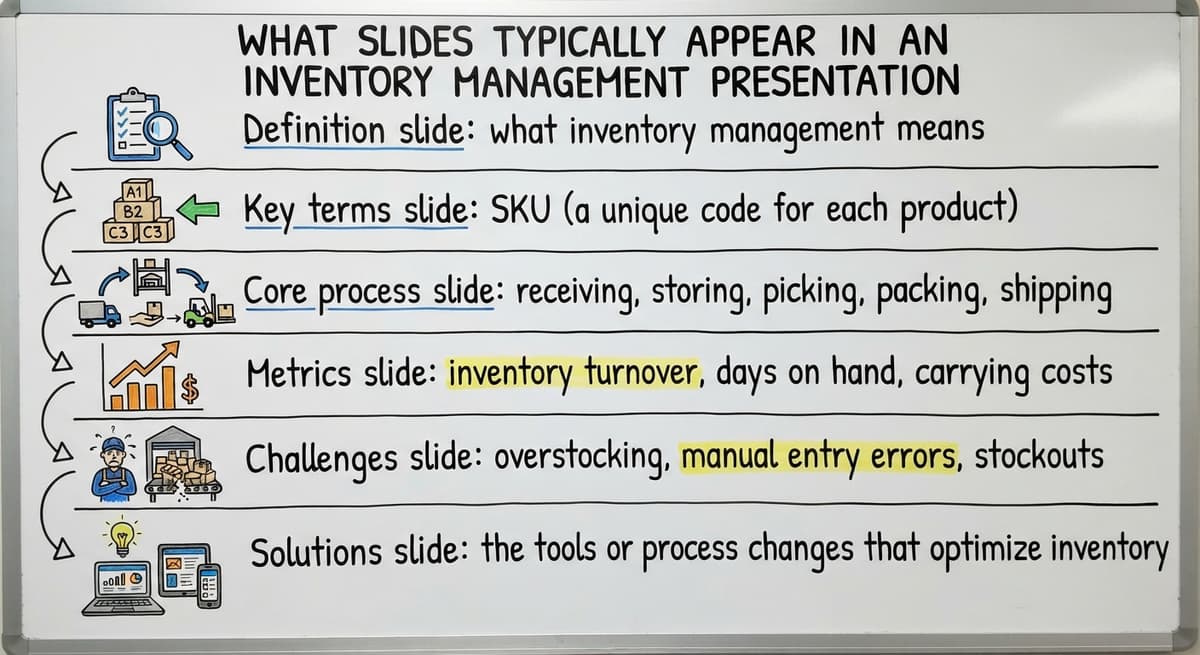
- Definition slide: what inventory management means and why it protects revenue and compliance
- Key terms slide: SKU (a unique code for each product), reorder point (the stock level that triggers a new order), lead time, carrying cost, and stockout
- Core process slide: receiving, storing, picking, shipping, and counting, in that sequence
- Metrics slide: inventory turnover, days on hand, fill rate, and shrinkage
- Challenges slide: overstocking, manual entry errors, and poor visibility into live stock levels
- Solutions slide: the tools or process changes that fix each problem
Why the Metrics Slide Cannot Be Skipped
A deck that skips the metrics slide leaves the team with no way to measure whether the process is working. The barcode standards that make scan-based counts reliable come from GS1. As GS1 explains, its barcode standards are "the most widely used supply chain standards system in the world," which is why any slide covering warehouse operations should reference them when discussing scan-based receiving or cycle counting.
What Key Concepts Does an Inventory Management PPT Cover?
A strong inventory management PPT connects every concept to an working outcome, not just a dictionary definition. Reorder point and safety stock tell the team when to order and how much buffer to keep. A reorder point set too low causes stockouts. Safety stock is the cushion that covers late supplier deliveries. FIFO and LIFO are valuation methods. FIFO (first in, first out) assumes the oldest stock sells first. LIFO (last in, first out) assumes the newest sells first. The choice affects tax liability, which is why the IRS tracks it.
The comparison is easier when one option is built for you
Off-the-shelf means fitting your process to the software. We do it the other way round, and the first look costs nothing.
Book a callHow Each Concept Should Land on the Slide
Every concept in the deck should end with a sentence that names the real-world result. Cycle counting versus full physical counts is a practical distinction. A full count shuts down the warehouse. Cycle counting checks a rotating subset of items each week so errors surface without stopping operations. The framing matters: not "reorder points prevent stockouts" but "a reorder point set at 50 units means staff place the next order before the shelf hits zero."

Who Uses an Inventory Management PPT
The audience is almost always internal. Operations managers use the deck to train new warehouse staff. Owners use it to align their team before rolling out a process change. Vendors or consultants use it to walk a distributor through a proposed system before any software is installed.
The typical reader of this article runs a wholesale distribution or warehouse operation with 5 to 100 staff. That team likely does not have a dedicated trainer. A clear slide deck is the fastest way to get everyone looking at the same process before the first box moves.
What a PPT Cannot Do, and When That Becomes a Problem
An inventory management presentation is a communication tool. It is not an working one. It does not track live stock levels, connect to buy orders, or flag a low-stock alert at 2 a.m.
The US Federal Trade Commission needs businesses to ship orders when promised. An inaccurate count breaks that promise. A slide deck cannot prevent that. Only a live system can.
A PPT also does not replace spreadsheets or an accounting package. It explains what those tools should do. The moment a team finishes the training deck and goes back to a shared Excel file, the gap between knowing and doing opens again.
A slide deck is the right tool when a team needs to learn. It is the wrong tool when a team needs to act.
When Is a Slide Deck the Right Tool?
A PPT earns its place in 3 specific situations. First, when introducing inventory concepts to staff who have never worked in a formal warehouse. Second, when aligning ownership and floor staff on a new process before it goes live. Third, when documenting a current-state workflow so every person on the team sees the same picture.
It is not the right tool for daily operations, live stock visibility, or reorder decisions. Those tasks need data, not slides.

When Your Operation Needs More Than a Presentation
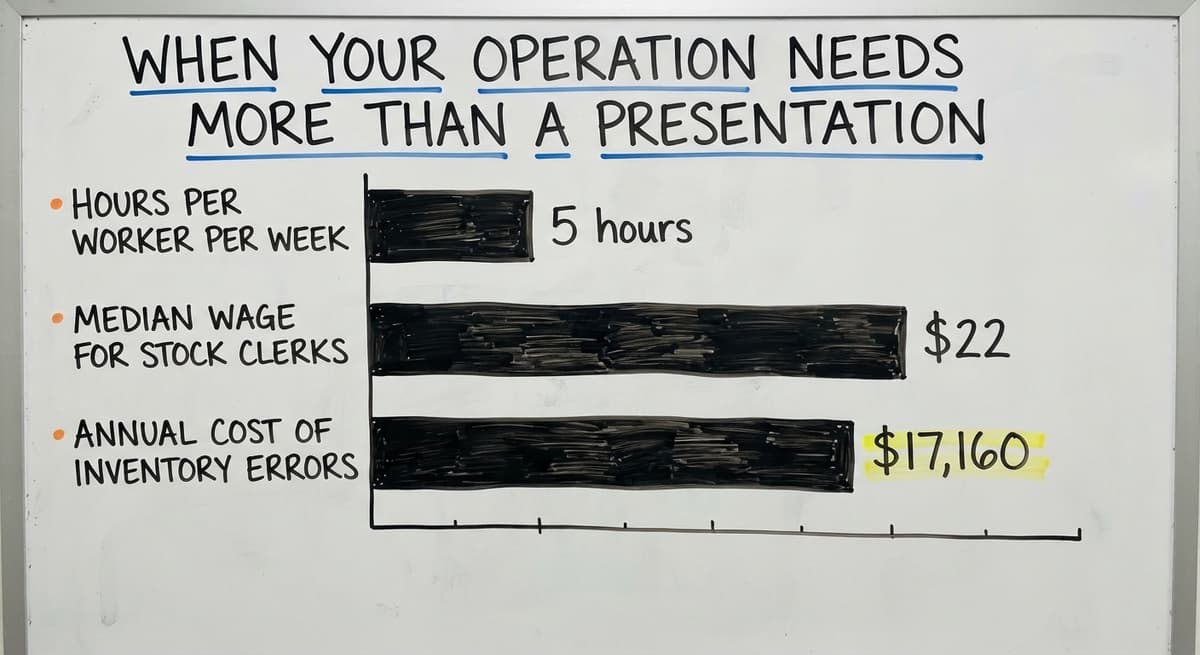
Certain signs mean the team has outgrown manual processes. Stock discrepancies appear after every receiving day. Reorders get missed because no one checked the sheet. Fulfillment errors climb as order volume grows. Staff spend more time correcting records than picking orders. Consider the math: 3 warehouse workers each spending 5 hours a week correcting inventory records, at the median wage for stock clerks of about $22 an hour, costs roughly $17,160 a year. That number does not count the orders that ship wrong or the customers who do not reorder.
See it running on your own process first
No build cost. The subscription starts once it is live and doing the job, not before.
Book a callWhat the Right System Actually Handles
When your accounting software's built-in inventory tools plus a spreadsheet can no longer keep up with order volume, the answer is not a better slide deck. The answer is a system built around how the operation already works. Inventory management software for small distributors handles what the PPT only describes: live stock levels, automated reorder alerts, receiving records tied to buy orders, and pick lists generated from real data.

How Purpose-Built Software Differs From a Slide Deck
Software tracks stock in real time. A presentation explains what stock levels are. That is the whole difference, and it matters every hour the warehouse is open. A purpose-built system automates the tasks the PPT only names. Reorder alerts fire when a SKU hits its reorder point. Receiving records update the moment a shipment is logged. Pick lists generate from live data, not from a count done last Tuesday.
Why Integration and Fit Matter for Small Operations
How inventory management software works with your accounting software matters here. A connected system writes financial data directly to the accounting package. Staff stop re-entering the same numbers in 2 places, and the books stay accurate without a matching step at month end. Custom warehouse management systems for small operations are built around an existing workflow rather than forcing a process change. That distinction matters for a team of 10 to 50 people who cannot afford a six-month rollout or a system built for a 500-person distribution center. Replacing Excel-based inventory tracking with a live system removes the single biggest source of count errors: the manual entry step between the warehouse floor and the spreadsheet.

Are You Ready to Move Beyond the Basics?
A PPT is a legitimate and useful starting point. It builds shared vocabulary, maps the process, and gets a team aligned before any system goes live. That work has real value.
The working gains, though, come from a system that handles the work automatically. Inventory management for wholesale distributors needs live data, connected records, and alerts that fire without anyone checking a sheet.
If your team has finished the training deck and is still correcting stock counts by hand, the next step is a conversation about what a custom-built solution would look like for your specific operation. No pressure, no demo script: just a practical look at where the gaps are and what closing them would mean for your team.
Frequently asked questions
What is an inventory management PPT used for?
An inventory management PPT is a slide deck used to explain inventory concepts, define key terms, and map core processes for a team. It is most useful for training new staff, aligning a team before a process change, or documenting a current-state workflow. It is a teaching tool, not a tracking tool.
What slides should be included in an inventory management presentation?
A complete inventory management presentation usually includes a definition slide, a key terms slide covering SKUs and reorder points, a core process slide covering receiving through shipping, a metrics slide with inventory turnover and fill rate, a challenges slide, and a solutions or next steps slide.
What is the difference between cycle counting and a full physical count?
A full physical count stops warehouse operations while staff count every item. Cycle counting checks a rotating subset of SKUs each week, so errors surface without shutting down the floor. Most operations prefer cycle counting because it catches discrepancies faster and with less disruption.
Can an inventory management PPT replace inventory software?
No. A slide deck explains concepts but does not track live stock levels, trigger reorder alerts, or connect to buy orders. It is a communication tool. An inventory management system is the working tool that does the actual work the PPT describes.
What are the signs a warehouse has outgrown manual inventory tracking?
Common signs include recurring stock discrepancies after receiving, missed reorders, rising fulfillment errors, and staff spending large time correcting records rather than picking orders. When an accounting package plus spreadsheets can no longer keep up with order volume, a purpose-built system is the practical next step.
What key terms does an inventory management PPT usually define?
Most inventory management presentations define SKU (a unique product code), reorder point (the stock level that triggers a new order), lead time (how long a supplier takes to deliver), carrying cost (the cost of holding stock), and stockout (running out of an item before the next order arrives).
How does inventory management software connect to your accounting software?
A connected inventory system writes receiving records, stock adjustments, and order data directly to your accounting software. That removes the manual step of re-entering the same figures in 2 places and keeps financial records accurate without a separate matching process at month end.
Start with a free first look
A 30 minute call, your operation mapped, and a clear picture of what we would build. No obligation and nothing to install.
Book a callRelated guides
The rest of this guide, for the parts of the job this page does not cover.
- What is the Difference Between Aggregate and Item Inventory Management
- What is Jit Inventory Management
- What is Kanban System of Inventory Management
- What is the Definition of Inventory Management
- What is an Important Factor in Inventory Management
- What is Abc Classification in Inventory Management
- What is Inventory Management in Working Capital
- What is Poor Inventory Management
- What is Inventory Management and Its Types
- What is the Main Purpose of Inventory Management
- What is Inventory Management in Pharmacy
- What is Effective Inventory Management
- What is Information Technology Inventory Management
- What is Inventory Management in Tally
- What is Risk Pooling in Inventory Management
- What is Inventory Management Mary Kay
- What is Stock Taking in Inventory Management
- What is Hospital Inventory Management
- What is Bin Number in Inventory Management
- What is the Scope of Inventory Management
- What is the Goal of Inventory Management Quizlet
- What is the Implication of Proper Inventory Management
- What is Omni-channel Inventory Management
- What is Inventory Management and Its Importance