


What Is Mobile Inventory Management
Reviewed and updated: October 2026
Mobile inventory management means using a phone, tablet, or handheld scanner to track stock in real time. Workers scan items and enter data right at the shelf, dock, or truck. The count updates instantly in a central system. No paper. No walking back to a desk. Anyone on the team can see what is actually on the shelf, right now.
Book a callHow Mobile Inventory Management Works on the Warehouse Floor
The basic flow is simple. A pallet arrives at the dock. A worker scans the barcode on each box with a handheld device. That scan travels to a central system and the stock count goes up at once. When a picker pulls an item, they scan it again. The count drops. Every step, from receiving to shipping, happens at the point of action.
Barcodes are the language that makes this possible. As GS1, the global standards body, explains, barcodes are "the foundation of supply chain efficiency", enabling any scan to be read and matched across systems without manual re-entry.
The result is that managers see live stock counts without chasing anyone for a clipboard. Warehouse mobile scanning closes the gap between what is physically on the shelf and what the records say.
We build it for your operation, and the first look is free
If you would rather not compare products, describe how your operation already works and we build the system around it.
No build cost. You see it running on your own process first, and the monthly subscription starts only once it is live.
Book a callWhat Problems Does Manual Inventory Tracking Cause?
Manual tracking causes errors the moment something moves. A clipboard updated at 9 a.m. is wrong by 10 a.m. A spreadsheet needs someone to re-enter data from a paper sheet, and every keystroke is a chance to make a mistake.
The pain points most warehouse operators know well:
- Overselling items that are already gone from the shelf
- Lost picks because the location recorded does not match where the item actually sits
- Slow receiving because workers write things down and enter them later
- Stock counts that are never quite right, no matter how often the team checks
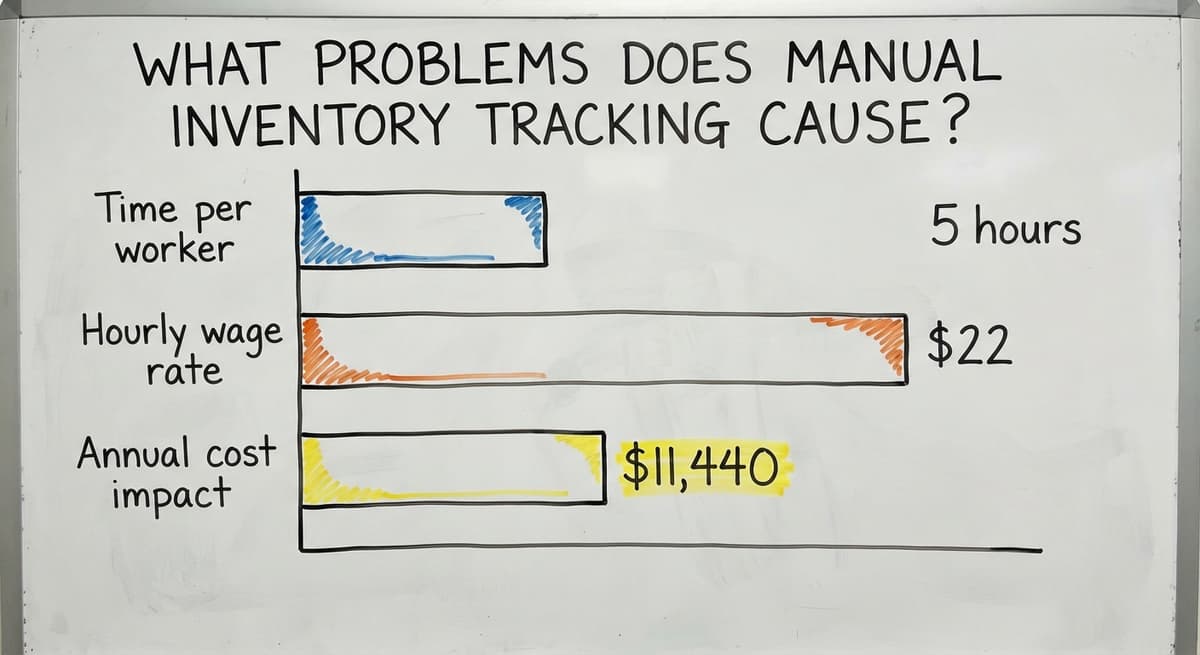
Think about the labor cost alone. If 2 workers each spend 5 hours a week on manual data entry at $22 an hour (near the median for stock and order clerks, per the US Bureau of Labor Statistics), that is $11,440 a year in time spent moving data from paper to screen, with errors included at no extra charge.
The IRS adds another reason to get counts right. IRS Publication 538 states: "To figure taxable income, you must value your inventory at the beginning and end of each tax year." A bad count is not just an operations problem. It is a tax problem.
Accurate, real-time inventory tracking turns a chronic source of loss into a solved problem.
Key Features to Expect From a Mobile System
A solid mobile inventory system gives your team tools that match how they actually work. Here is what practical warehouse floor tracking looks like in practice:
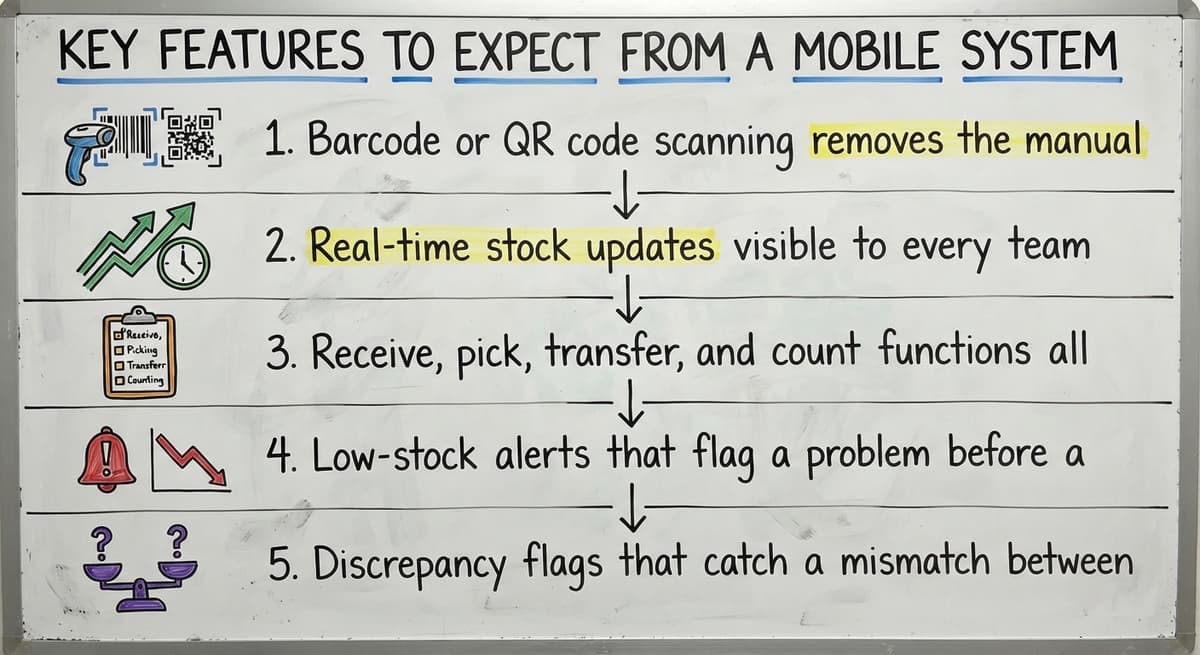
- Barcode or QR code scanning removes the manual entry step that causes most receiving errors
- Real-time stock updates visible to every team member the moment a scan happens
- Receive, pick, transfer, and count functions all accessible from the floor without walking to a terminal
- Low-stock alerts that flag a problem before a picker finds an empty shelf
- Discrepancy flags that catch a mismatch between the scan and the expected count on the spot
These are not luxury features. They are the minimum a team needs to stop relying on memory and paper. Pick accuracy rises when workers confirm each step with a scan rather than a guess.
How It Fits With Your Accounting Software
Many small distributors already run their financials in an accounting platform and have no reason to change that. Your accounting software handles invoices, payments, and books well. It was not built to manage warehouse floor tracking, barcode scanning inventory, or live bin locations.
Mobile inventory management sits on top of your accounting software and handles the parts it was never designed for. A worker scans a received shipment on the floor. That count flows into the system. Your accounting software sees the updated inventory value without anyone re-entering a number.
This is the accounting software integration for wholesale and distribution model that growing operations need: keep what works, fix what does not. No ripping out the accounting system. No retraining the bookkeeper. The warehouse team gets mobile tools. The finance team keeps their familiar screens.
The goal is to stop double entry, not to start over.
The comparison is easier when one option is built for you
Off-the-shelf means fitting your process to the software. We do it the other way round, and the first look costs nothing.
Book a call
Who Uses Mobile Inventory Management
Mobile inventory management fits any operation where workers move around rather than sit at a desk. In practice, that means:
- Wholesale distributors managing hundreds of SKUs across a large warehouse floor
- Fulfillment centers where pick accuracy directly affects whether a customer gets the right item
- Small to mid-size teams of 5 to 100 staff who need real results without an enterprise software budget
- Any operation where the person doing the work is not the same person sitting at the computer
The US Census Bureau's Monthly Wholesale Trade data shows that wholesale inventories run into the trillions of dollars nationally. Even a small distributor holding $500,000 in stock has real exposure when counts are wrong. The smaller the team, the more each error costs as a share of the whole.
Mobile vs. Desktop Inventory Management
Desktop systems need a worker to walk to a terminal, find the right screen, and enter data from memory or a handwritten note. By then, 3 other things may have moved.
Mobile systems let the update happen where the work happens. The scan is the entry. There is no second step.
The table below shows where the two approaches differ in daily practice:
| Factor | Desktop System | Mobile System |
|---|---|---|
| Where data is entered | At a fixed terminal | At the shelf, dock, or truck |
| Lag between action and record | Minutes to hours | Seconds |
| Error source | Manual re-entry | Misread scan (rare) |
| Staff movement required | Walk to terminal | None |
Mobile does not mean replacing your existing software. It means extending inventory management software to the floor where the work actually happens. The terminal stays useful for reporting; the floor gets real-time tools.
What a Custom Mobile Inventory System Looks Like
Off-the-shelf tools are built for a generic warehouse. Your warehouse is not generic. Replacing spreadsheets with custom operations software means building screens and workflows around how your team already moves, not asking your team to learn a foreign process.
A custom build for a small distributor might look like this: the receiving screen shows only the fields that matter for that dock. The pick screen lists bin locations in the order a worker actually walks the aisle. Alerts go to the right person, not everyone.
The NIST Manufacturing Extension Partnership notes that supply chain improvements work best when they match the actual process rather than a theoretical one. That principle applies directly to small warehouse software: a system your team uses is better than a system your team avoids.
A local builder who understands small-scale operations will ask how your team works before writing a line of code. An enterprise vendor will hand you a manual. Custom warehouse software built around your workflow means no long migration and no retraining staff on a process that does not fit.
Is Mobile Inventory Management Right for Your Operation?
Mobile inventory management is worth exploring if your team is still writing things down and entering them later. Ask these questions about your current process:

- Are workers recording counts on paper and entering them into a screen at the end of a shift?
- Do stock counts frequently disagree with what is actually on the shelf?
- Are picks slow because locating an item takes guesswork?
- Has your team oversold an item that was already gone?
If any of these sound familiar, the manual process is already costing you money and customer trust. The fix does not need replacing everything you have. It needs adding mobile tools to the parts that are still running on paper.
Inventory management software for small distributors does not have to be complex or expensive to be effective. Start with the biggest pain point, whether that is receiving, picking, or counting, and build from there. The right first step is a conversation about what your team actually does, not a demo of features you may never use.
Frequently asked questions
What is inventory management in easy language?
Inventory management means knowing what stock you have, where it is, and how much of it is left. A good system updates those counts every time something moves, so your records match what is actually on the shelf. Mobile inventory management does this using a phone or scanner on the warehouse floor instead of paper or a desktop computer.
Is there an app for inventory management?
Yes, several types exist. A basic spreadsheet app works for very small operations. A cloud inventory app adds barcode scanning and real-time updates. A custom-built mobile system goes further by matching your exact workflow, locations, and data fields. The right choice depends on how many SKUs you manage, how many staff move stock each day, and whether you need the system to connect to your existing accounting software.
Does mobile inventory management replace your accounting software or work alongside it?
It works alongside your accounting software, not instead of it. Your accounting software handles invoices, payments, and financial records well. Mobile inventory management handles the warehouse floor work: scanning received goods, tracking picks, and keeping live stock counts. The two systems share data so counts stay current in both places without anyone re-entering numbers by hand.
What is the difference between mobile and desktop inventory management?
Desktop inventory management needs a worker to walk to a fixed terminal and enter data after the fact. Mobile inventory management lets the worker scan or enter data at the exact moment and place the work happens. The practical difference is lag and errors: desktop creates both, mobile reduces both. Mobile does not replace the desktop system; it extends it to the floor.
What is medical inventory management?
Medical inventory management applies the same core idea to healthcare settings: tracking supplies, medications, and equipment so the right item is available when needed. The stakes are higher because a missing item can affect patient care. The tools are similar, including barcode scanning and real-time counts, but the rules around expiration dates, lot tracking, and regulatory compliance are stricter than in a standard warehouse.
What skills are needed for inventory management?
The practical skills are attention to detail, comfort with scanning tools and basic software, and the habit of recording every movement at the time it happens rather than later. Company thinking helps when managing many SKUs across multiple locations. For managers, reading stock reports and spotting discrepancies early matters most. A good mobile system reduces the skill burden by making the right action the easy action at each step.
How do I know if my operation needs mobile inventory management?
If your team writes counts on paper and enters them into a screen later, if stock counts frequently disagree with physical stock, or if picks are slow because locations are uncertain, your operation would benefit from mobile tools. The cost of staying manual adds up fast: 2 workers spending 5 hours a week on data entry at $22 an hour is over $11,000 a year, before counting the cost of errors.
What does a custom mobile inventory system look like compared to off-the-shelf software?
Off-the-shelf software gives every user the same screens and workflows, built for a generic operation. A custom system is built around how your team actually works: the fields your dock workers need, the bin order your pickers walk, the alerts your manager wants. There is no long migration and no retraining staff on a foreign process. The system fits the work rather than the other way around.
Start with a free first look
A 30 minute call, your operation mapped, and a clear picture of what we would build. No obligation and nothing to install.
Book a callRelated guides
The rest of this guide, for the parts of the job this page does not cover.
- What is the Difference Between Aggregate and Item Inventory Management
- What is Jit Inventory Management
- What is Kanban System of Inventory Management
- What is the Definition of Inventory Management
- What is an Important Factor in Inventory Management
- What is Abc Classification in Inventory Management
- What is Inventory Management in Working Capital
- What is Inventory Management and Its Types
- What is the Main Purpose of Inventory Management
- What is Effective Inventory Management
- What is Information Technology Inventory Management
- What is Risk Pooling in Inventory Management
- What is Inventory Management Mary Kay
- What is Stock Taking in Inventory Management
- What is Bin Number in Inventory Management
- What is the Goal of Inventory Management Quizlet
- What is the Implication of Proper Inventory Management
- What is Omni-channel Inventory Management
- What is Inventory Management and Its Importance
- What is the Importance of Eoq in Inventory Management
- What is the Importance of Quality Inventory Management
- What is Inventory Management Explain Techniques of Inventory Management
- What is Mean by Inventory Management
- What is Inventory Management Meaning in Hindi